Logos representative only and should not be seen as an endorsement / preference / recommendation
Updates from the week ending Sunday, February 6th, 2022
This summary is generally published every Monday, and is a list of SL viewer / client releases (official and TPV) made during the previous week. When reading it, please note:
It is based on my Current Viewer Releases Page, a list of all Second Life viewers and clients that are in popular use (and of which I am aware), and which are recognised as adhering to the TPV Policy. This page includes comprehensive links to download pages, blog notes, release notes, etc., as well as links to any / all reviews of specific viewers / clients made within this blog.
By its nature, this summary presented here will always be in arrears, please refer to the Current Viewer Release Page for more up-to-date information.
Note that for purposes of length, TPV test viewers, preview / beta viewers / nightly builds are generally not recorded in these summaries.
Official LL Viewers
Release viewer: Mac Voice hotfix viewer 6.5.2.567427, dated January 13 – no change.
Logos representative only and should not be seen as an endorsement / preference / recommendation
Updates from the week ending Sunday, January 30th, 2022
This summary is generally published every Monday, and is a list of SL viewer / client releases (official and TPV) made during the previous week. When reading it, please note:
It is based on my Current Viewer Releases Page, a list of all Second Life viewers and clients that are in popular use (and of which I am aware), and which are recognised as adhering to the TPV Policy. This page includes comprehensive links to download pages, blog notes, release notes, etc., as well as links to any / all reviews of specific viewers / clients made within this blog.
By its nature, this summary presented here will always be in arrears, please refer to the Current Viewer Release Page for more up-to-date information.
Note that for purposes of length, TPV test viewers, preview / beta viewers / nightly builds are generally not recorded in these summaries.
Official LL Viewers
Release viewer: Mac Voice hotfix viewer 6.5.2.567427, dated January 13 – no change.
Release channel cohorts:
No updates.
Project viewers:
Performance Improvements project viewer updated to version 6.6.0.567604, on January 24.
Logos representative only and should not be seen as an endorsement / preference / recommendation
Updates from the week ending Sunday, January 23rd, 2022
This summary is generally published every Monday, and is a list of SL viewer / client releases (official and TPV) made during the previous week. When reading it, please note:
It is based on my Current Viewer Releases Page, a list of all Second Life viewers and clients that are in popular use (and of which I am aware), and which are recognised as adhering to the TPV Policy. This page includes comprehensive links to download pages, blog notes, release notes, etc., as well as links to any / all reviews of specific viewers / clients made within this blog.
By its nature, this summary presented here will always be in arrears, please refer to the Current Viewer Release Page for more up-to-date information.
Note that for purposes of length, TPV test viewers, preview / beta viewers / nightly builds are generally not recorded in these summaries.
Official LL Viewers
Release viewer: Mac Voice hotfix viewer 6.5.2.567427, dated January 13 – no change.
Release channel cohorts:
Maintenance RC viewer, version 6.5.3.567451, issued on January 20th, combining the Jenever and Koaliang Maintenance viewers.
Logos representative only and should not be seen as an endorsement / preference / recommendation
Updates from the week ending Sunday, January 16th, 2022
This summary is generally published every Monday, and is a list of SL viewer / client releases (official and TPV) made during the previous week. When reading it, please note:
It is based on my Current Viewer Releases Page, a list of all Second Life viewers and clients that are in popular use (and of which I am aware), and which are recognised as adhering to the TPV Policy. This page includes comprehensive links to download pages, blog notes, release notes, etc., as well as links to any / all reviews of specific viewers / clients made within this blog.
By its nature, this summary presented here will always be in arrears, please refer to the Current Viewer Release Page for more up-to-date information.
Note that for purposes of length, TPV test viewers, preview / beta viewers / nightly builds are generally not recorded in these summaries.
Official LL Viewers
Release viewer: Mac Voice hotfix viewer 6.5.2.567427, dated January 13 – NEW.
Release channel cohorts:
No updates.
Project viewers:
Mesh Optimizer updated to version 6.5.2.566858, dated January 5 (issued some time after January 10).
Catznip version R13 surfaced on Sunday, January 2nd, 2022 as the current release version of the viewer. It comes some two years after the last full public release of the viewer – although there have been interim releases of “alpha / beta” versions during that time. As such, it is a significant release in terms of Catznip moving back towards a good degree of parity with the official SL viewer.
In reference to the official viewer, this release see Catznip:
Reach full parity with SLV release 6.4.12.555248 (Dawa maintenance viewer, promoted to de facto release status, February 1st, 2021)
Incorporate:
The Environment Enhancement Project (with Catznip improvements).
The Camera Presets capability (again, with Catznip improvements).
As always, full details of the changes and updates in this Catznip release are available through the official release notes; what follows is a general summary of the more interesting updates.
Linden Lab Derived Updates
Environment Enhancement Project (EEP)
The Environment Enhancement Project (EEP) was officially released on April 20th, 2020, and incorporated into numerous Catznip “alpha/beta” builds, but R13 marks the first “full” release of the viewer to incorporate EEP functionality.
A complete overhaul and replacement of the Windlight system, EEP is a complex capability which has been covered expensively in blog posts and tutorials including within this blog. As such, I will just drop a couple of links in here for those who may need a further introduction to / understanding of EEP and its capabilities:
However, Catznip R13 incorporates a number of refinements over the original EEP implementation, as outlined below.
EEP Quick Preferences: The Catznip Quick Preferences panel has been updated to provide a set of EEP options. This includes:
Buttons to apply a region’s or parcel’s Shared Environment and to access the Personal Lighting floater.
Individual sections for selecting / editing Fixed Sky, Day Cycle and Water settings, each with:
A drop-down list of available settings, defined by those in your inventory → Settings folder and those in the Library → Environments folder.
The ❮ [left] and ❯ [right] buttons to cycle you through each type of setting.
A wrench button to open the Edit floater for each class of setting.
Day Cycles only:
Radio buttons for selecting the Sun or Moon
Azimuth and Elevation sliders tied to the radio buttons to adjust the position of the Sun or Moon.
A Reapply Current Windlight at logon check box, which does precisely what it says when checked.
An Interpolate Preset Changes checkbox. When checked, this will transition you from one setting to the next over 5 seconds; if unchecked, transitions between EEPs will occur fairly instantly.
The EEP options available through the Catznip Quick Preferences
Edit Library EEP Assets: Under most EEP implementations, those contained within the Library → Environments folder must first be copied to a user’s inventory (e..g to the Settings folder).
Catznip R13 allows users to open EEP assets within Library → Environments directly into the appropriate edit panel (highlight the asset, then right-click on it and select Open) the Windlight settings straight from the library (right-click inventory / Open). This allows changes to be made to the settings, which can be saved to inventory (e.g. within the Settings folder) using the edit panel’s Save As option (or, if the changes are to be temporary, Apply Only To Myself can be used without creating a new inventory asset).
Active EEP Asset indicator: Catznip R13 will display “(active)” alongside the currently active EEP asset / settings in both inventory and the My Environments floater.
General panel / floater clean-up: the majority of the EEP panels and floaters have been cleaned up to reduce their footprint without feeling too cramped.
Camera Presets
The ability to create and save custom Camera Presets (how the viewer camera is positioned) became part of the official release viewer release viewer in the first half of 2020, and which finds its way into the Catznip release viewer with R13.
Again, I’ve covered the capability in depth within: Tutorial: Viewer Camera Presets, so those unfamiliar with the capability should refer to that document – keeping in mind it directly reference the official viewer. However, Catznip have implemented the capability with their own updated Camera floater, which also includes a couple of options specific to the viewer, and this panel and its options is outlined below.
Catznip’s Camera Presets implementation
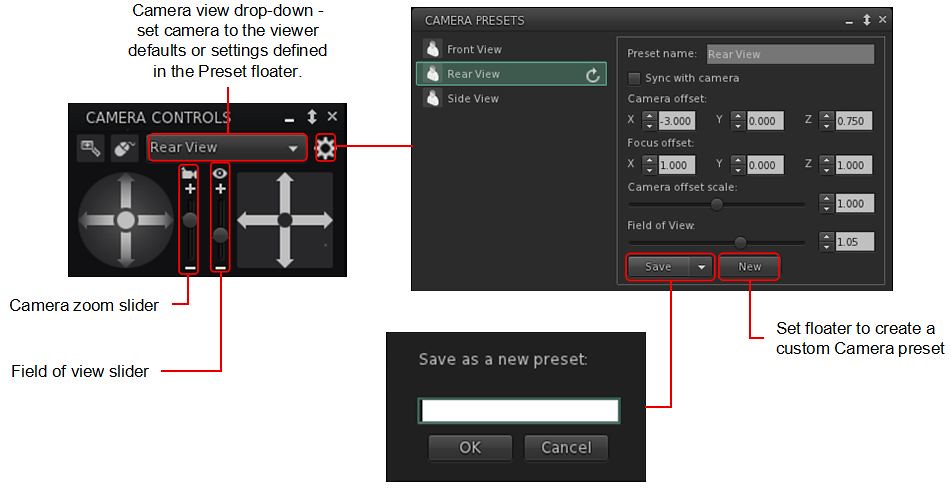
A gear icon opens the Presets panel, where the default set of Camera positions (e.g. Front, Rear, Side), can be amended to suit personal needs, and where additional custom presets can be created (via the New button within the panel).
Note the Catznip Camera Prresets panel also allows the setting of the viewer’s field of view, an option not included in the official implementation of Camera Presets.
All presets (default and custom) can be accessed via a drop-down list at the top of the camera floater – click the arrow to the right of the button to open the drop-down and then click on the required preset.
The Zoom and Field of View sliders:
Using the Camera icon, the Zoom camera slider does what its name states: zooms the camera in and out.
Using the Eye icon, the Field of View slider controls the field of view (Ctrl-8 / Ctrl-0) which is more commonly used to ‘zoom’ in tight to an attachment for editing.
Note that both of these sliders will refer to their defaults on tapping Esc. If you wish to set a new Field of of View, this should be done by creating a new preset.
Catznip have also included Penny Patton’s popular over-the-shoulder presets within R13.
Catznip Updates
Resolution Scale
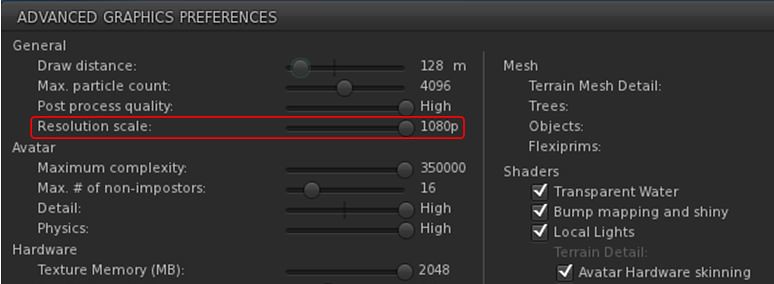
Viewer frame rates (FPS) can be a problem for some, and while Linden Lab is attempting improvements to address this, Catznip R13 includes one of the Catznip team’s approaches to boosting FPS – altering the screen resolution scale in the viewer.
A new slider, Resolution Scale, has been added to the Advanced Graphics Presets panel (Preferences → Graphics click Advanced Settings … button). By default, this is set to the highest resolution of your monitor, and but can be reduced by up to half of that resolution by moving the slider to the left. Doing so should improve viewer FPS – but will make the scene resolution displayed on your screen look increasingly blocky.
The Catznip R13 (screen) Resolution Slider
Other Updates of Note:
Places Search tab: Catznip R13 adds the following capabilities to the Legacy Places search tab:
Pressing Enter within the text input field will search on the text in the field (as will click the Search button).
Pressing Enter or double-clicking on a specific search result will teleport yo to that location.
CATZ-530 – Group Notice Creation: when writing a Group notice, the number of remaining characters is displayed under the text entry field.
CATZ-547 – Option to turn off extra lighting that is applied when editing appearance.
CATZ-557 – Improve initial opening time for the landmarks floater (+ improved filtering performance).
CATZ-584 – Give visual feedback when using an invalid regex for an inventory search.
CATZ-593 – Add option to sort Nearby and Friends list by username.
CATZ-594 – Opening the feedback floater should give focus to the feedback form.
CATZ-601 – Increase default and minimal texture cache size.
Again, please refer to the official blog post from the Catznip team for a complete list of updates and fixes.
Feedback
Catznip still lags somewhat behind the official viewer in terms of more recent releases from the latter, but this release gives a good base on which to build and catch up. Points worthy of note for me are:
EEP Quick Preference Tab – well considered, and with more-or-less the right options.
Camera Presets – good to see them “officially arrive” in Catznip, and the reworking of the Camera floater and the Camera Presets floaters / panels is very well done.
Even so, and again from a personal perspective, Catznip still isn’t quite there in terms of becoming my viewer of choice – in that regard Kokua has currently overtaken it in terms of an alternative to Firestorm, but I remain swayed towards the latter purely because of the Phototools floater and its tabs – it simply offers everything I need in a nice, convenient package that Catznip R13’s EEP Quick Preference tab doesn’t fully match and Kokua really lacks – although it does offer more that is up-to-date with the official viewer than either Firestorm or Catznip.
That said, for Catznip users, there should be little, if anything, in R13 to complain about.
Logos representative only and should not be seen as an endorsement / preference / recommendation
Updates from the week ending Sunday, January 9th, 2022
This summary is generally published every Monday, and is a list of SL viewer / client releases (official and TPV) made during the previous week. When reading it, please note:
It is based on my Current Viewer Releases Page, a list of all Second Life viewers and clients that are in popular use (and of which I am aware), and which are recognised as adhering to the TPV Policy. This page includes comprehensive links to download pages, blog notes, release notes, etc., as well as links to any / all reviews of specific viewers / clients made within this blog.
By its nature, this summary presented here will always be in arrears, please refer to the Current Viewer Release Page for more up-to-date information.
Note that for purposes of length, TPV test viewers, preview / beta viewers / nightly builds are generally not recorded in these summaries.
Official LL Viewers
Release viewer: version version 6.5.1.566335, formerly the Cache+ 360 Capture viewer, dated December 7, promoted December 15 – No change.



 Inara Pey: Living in a Modemworld