Viewer 2’s Basic Mode gains a new feature today – that of Voice.
While I don’t use Voice myself – I have nothing against it, I just move largely in the world of role -play in SL, and Voice can be illusion-shattering in that regard – I think it’s a pretty good option to have within Second Life, and adding it to the Basic Mode makes sense. To a point.
The problem is, a lot of things are “coming” to the Basic Mode (or have been indicated at coming) – currency, for example. To be fair, I’ve suggested some additions myself, although they appear to be fewer than those LL are contemplating. Which leads to a problem I’ve touched on before.
If LL keep adding to the Basic Mode, how long until it ceases being the “Basic Mode” and becomes “The Viewer”? The function of a Basic Mode, I thought, was to ease new users into the Second Life / Viewer experience. Ergo, it makes sense to keep the Basic Mode relatively simple and clean. While things like Voice are very useful to have, the fact remains that if things keep getting added to the Basic Mode, then it won’t be long before any advantages gained in introducing it are going to be washed away.
In discussing this with Rodvik a while ago, I pointed out the need to provide a better transitional experience between the Basic and Advanced modes of the Viewer. It’s something he apparently generally agreed with, although he also appeared to imply that Basic might be more to do with making Viewer development more iterative, and that at some point in the future, Basic may merge with Advanced – presumably because the code base has been overhauled and made somewhat more modular, making future Viewer maintenance a lot easier. If so, this throws the purpose of the Basic Mode into a whole different category than “simply” being a tool to help new users – and it’s future becomes somewhat more intriguing.
Personally, while I’m all in favour of making the Viewer a lot more modular (something I understand Bagman Linden (Jeff Petersen) is quite keen on) to the point of potentially making elements of the Viewer “optional” / “installable as required” where users are concerned, I still think that the Basic Mode holds a lot of potential where new users are concerned, providing LL address its current shortfalls without overloading it with features and providing they add the means to bridge the gap between it and the Advance Mode smoothly.
It’ll be interesting to see which direction they do opt to take.
In something of a surprise move, Phoenix have released version 1102 of the Viewer. While an update was anticipated following the Ogg Vorbis Library files issue, the extent of this update took many by surprise, including as it does the Viewer 2 Avatar Physics code.
Yes, bouncing bewbs (and bums and bellies) using the official Linden code within Phoenix.
However, this isn’t a fad release: there have been reports that Viewers not using the LL Avatar Physics code are failing to render avatars that are using the Physics Layer correct (remember, Avatar Physics is a worn layer, like clothing, Alpha and Tattoo layers). So this inclusion of the code is as much about fixing this issue within Phoenix as it is about giving people bouncy bits.
To further encourage people to upgrade to 1102, the Phoenix team are including a set of pre-defined Physics Layers, each created by a different member of the team, which are ready-to-wear for both male and female avatars (yes, men can have wobbly bits as well!). For that want to make their own, there is an easy-to-follow tutorial from Phoenix.
Other fixes with the release include:
Removal of old Breast physics code as it is now obsolete and no longer compatible
Addition of further user-created WL Presets
Set “Let Scripts Control My Play Button” to OFF by default. Prefs> Audio & Video>
Fixed local lights issue for Mac users (could only see 2 local lights rather than the default 6)
Security fix with OGG Vorbis Library (see above)
Addition of Linden chat color options in Prefs>Text Chat>“Color text for linden text chat”
Open buttons for logfiles, Chat logs etc on Linux and Mac fixed. Prefs> Network & Folder>
Further sculpt fixes
TP Failure crash fix
Blank media texture crash fix.
Performance on this release (for me) appears somewhat better than 1050, and on a par with 977 Beta (which I had to roll back to following the 1050 release). However, given the Ogg and Avatar Physics “fixes” this is really a necessary upgrade than an optional one.
Nalates Urriah reports that Linden Lab have confirmed there is a security exploit involving a flaw in the Ogg Vorbis library could lead to Viewer crash issues. It’s not thought that the exploit can either perform privilege-escalation or arbitrary code-execution on users’ systems.
The flaw has been known about since 2009, but the exploit is fairly recent. Ogg files are in widespread use, so this is not an issue specific to the Viewer code. Linden lab has responded to the situation by issuing a patch and an advisory for all TPVs to recompile their binaries for all TPV viewers.
At the time from writing, updating executables for Kirstenlee’s Viewer (S21 7a) and the Firestorm Previews have been released. Links for the Firestorm downloads (which do not appear to be available on the Phoenix website) are available as follows:
Note that all of the above three releases of Firestorm should be clean installations, not installed over any previous release (which should be removed first).
Other TPVs will doubtless follow, and users are advised to keep an eye on the various Viewer-related blogs and update as required.
Addendum May 16th
Phoenix have released an update that fixes this issue (and others). Find it here.
Kokua is the name of the new Viewer from the Imprudence team. It’s been in development for several months, and a “test release” or “Work-in-Progress release” has now been made available. Based on Snowstorm 2.4, Kokua represents the forth major TPV to be based on the Viewer 2, following Kirstenlee’s S20/S21 series, Dolphin 2 and Firestorm itself.
Given the version (0.1.0) on offer isn’t even an Alpha, it would be unfair to subject it to a full review; rather, here are some impressions after having taken it for a spin over a couple of hours.
Installation and Start-up
Installation was pretty much the norm for an SL Viewer, although running it might cause some surprises, at least on the Windows version, where it opens up a couple of unexpected terminal windows; one apparently monitoring the Viewer’s system calls, etc., and the other blank. Closing the latter will remove the blog display panel from the splash screen, but otherwise not impact the Viewer. Closing the other window – identifiable from the commands displayed – will also close the Viewer – it must remain open until you actively quit the Viewer (at which point it will close). Doubtless future releases will see these additional windows removed.
Hybrid Interface
Once logged-in it becomes evident that Kokua is something of a hybrid Viewer; while the layout of the UI is broadly Viewer 2, there are subtle differences. The most obvious of these at first glance is the menu bar, which is more Viewer 1.x in appearance than Viewer 2.x. Rather than the increasingly-familiar Me, Communicate, World, Build and Help options, Kokua presents us with File, Edit, View, World, Build and Help, together (as with Viewer 2) the optional Advanced and Develop menus.
Similarly, the toolbar at the bottom of the Viewer window presents additional buttons over Viewer 2’s default set (see below). Of particular note is the Sidebar button, which brings up a floating palette from which the various Sidebar tabs can be accessed. Anyone having used Kirstenlee’s S20 Viewer, will find this instantly familiar. However, there is a slight annoyance – close the Sidebar palette before you’ve closed any open Sidebar tab…and you cannot close the tab. You must re-open the Sidebar palette and click on the relevant button to close the tab.
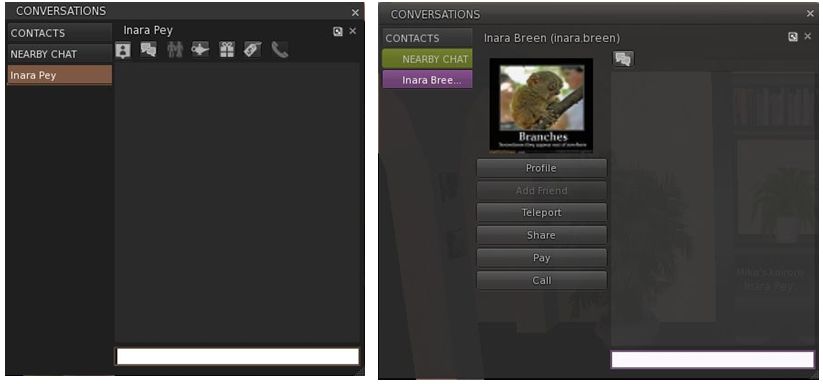
One of the major frustrations with Viewer 2.x has always been in the area of typewritten communications which has exhibited various flaws, including much in the way of wasted space through the use of avatar icons in the actual chat / IM windows. While things have improved over successive releases of Viewer 2, Kokua sadly takes a step backwards.
The problem is that both the chat and IM window tabs take up an excessive amount of space when compared to Viewer 2 because both include a central “column”. In the case of IM tabs, this is used to display the Profile picture of the person with whom you are conversing and a series of Action buttons (Pay, Teleport, etc), as shown below; in the case of the Chat window, it displays a list of icons representing everyone in your immediate vicinity.
IM tabs (Left: Viewer 2.x; right: Kokua)
Truth be told, while not always ideal, Viewer 2’s use of icons at the top of IM tabs is a far better solution to providing access the options to pay, teleport, etc. Where the chat window is concerned, the list of avatar icons is…wasteful.
View (Camera) Controls
On a more positive note, a nice touch within Kokua is a revised View / Camera control palette which includes buttons for camera zoom and for entering Mouselook, as well as the more familiar control options. These are a very nice touch.
Performance and General Feedback
In terms of performance and use, Kokua sits right up there for me. My frame rate was hitting 50-55 fps when on my own, and dropping to around the mid-30s when interacting with a few others. This actually puts it top of the tree for me in comparison to the likes of Firestorm and even Phoenix 908/977. However, activating dynamic shadows did give me a massive performance hit; one far greater than with Firestorm, with my frame rate collapsing to around 7-8 fps.
Rezzing was also extremely fast on Kokua when compared specifically to Phoenix and Firestorm – both of which it beat hands-down when logging on to the same location with each Viewer and with a cleared cache. While it might be my eyes, Kokua also seems to render objects with a far greater sharpness than seems to be the case with Viewer 2, Firestorm or Phoenix.
When installed, Kokua leaves one of the bigger footprints on a hard disk – 137Mb. This compares to the 102Mb used by V2, the 129 by Klee’s S21 and the whooping 154Mb required by Firestorm. Memory usage for the Viewer equated to that for both Firestorm and Klee, with similar overall core usage on a multi-core (quad core) CPU, where three cores shared the load.
Conclusion
There is of course much that is missing from this release – hence the “test” and “WIP” warnings in the Imprudence blog; so those anticipating a Viewer comparable to the pre-Alpha of Firestorm should perhaps wait until the next release of Kokua comes along. Certianly, anyone requiring the Media Filter, RLVa, radar or a choice of skins would do well to wait.
People also shouldn’t expect things like web Profiles or Avatar Physics – these became available after the version of Snowstorm Kokua is currently based on, so it is frankly unfair to expect either, or critique the Imprudence team because they are “not there”. Indeed, those expecting more would do well to read the Imprudence blog post caveats relating to the release, namely:
This is a test build. It will likely have many bugs. It might break your avatar or eat your pets. Use it for testing purposes only.
This is not a finished product. The UI is not final. The feature set is not final. Nothing about it is final.
We need your feedback to improve the viewer.
However, that said, there are two elements of the current release that I would change were I involved in Kokua. These are:
The current chat / IM window / tab layout: this is really irritating in the amount of screen real estate required to adequately display conversations – and it is simply not necessary. The central “column” for images and the like really serves no purpose that cannot be better met through other means. If nothing else, those routinely using SL from a laptop may well find the amount of screen display lost to chat very annoying
The Sidebar tabs really need individual options to close them in addition to being able to do so from the Sidebar button palette; relying on the palette alone is not really convenient.
Other than that, this looks like a promising start for Kokua, and I look forward to taking future, more advanced, releases for a more thorough test drive.
Phoenix .1050 was issued as a Release Candidate on the 21st April, and slightly surprisingly made the jump to a Final release on the 26th, without requiring any further downloads. The decision to flip the status of the Viewer to Final was bashed on a combination of reduced reported crash rates and generally good user feedback.
Bridge prim update (please see the Phoenix READ BLOG on this)
HTML link parser updates for local chat
Correctly identify server 2008 and 2008 R2, added detection for Windows 8 and Server 2012
Windows XP no longer shows as running compatibility mode in help → about
Added cookie support for internal web browser
Debug setting for making Linden chat blue (PhoenixColorLindensChat and PhoenixLindensChatColor)
URLs in picks and profiles are now clickable
Links in group charter are clickable
Sound fixed in Linux (no more needing to copy files from 373)
Sculpt rendering fixes (all those sculpts that didn’t look right should be fixed!)
Added more viewer tags
Added entries to GPU table to recognize more video cards
Messages that fail to send to a group now say what group it failed to send to
Ability to not show TP Offers (Prefs > Popups > “Show teleport offer popups”)
Added to windows install the ability to have this build used for handling SLURL links from web browsers.
Plus a series of bug fixes and under-the-bonnet interface improvements. From a personal standpoint, the clickable URLs are perhaps the biggest “new feature” in this release. As I run this and other blogs, having the means to direct people to them straight from my Profile without them having to copy/paste is a major boon. The same is very much true for any merchant advertising their goods on the likes of the Second Life Marketplace. If you plan to include URLs in your Profile, remember that they’ll only be active for others viewing your Profile – links will not work in your own view of your Profile.
There are still issues with 1050; many people are reporting reduced frame rates, while the amount of memory the Viewer uses appears far larger than either the last “Full” release (908) or the last Beta (977). Some have reported issues with rezzing and sculpties taking longer than expected to load as well. These last two points may be attributable to the fact that HTTP Get texture loading is now OFF by default. To turn the faster HTTP texture loading back on:
Preferences -> Phoenix -> Page 2 -> Advanced Graphics and check HTTP Get Textures and then APPLY.
You’ll be prompted that you’ll have to restart Phoenix for the change to take effect. This is because your existing texture cache must be cleared. On initial re-logging, allow time for your inventory to full reload.
Another potential performance gain would be to re-enable OpenGL Vertex Buffer Objects, which are turned off by default with this release:
Preferences -> Graphics -> click on the HARDWARE OPTIONS button
Check the option to Enable VBO and optionally enable Streamed VBOs.
In order to ensure these options are benefiting you, it is best to carry them out one at a time and monitor what happens – so enable HTTP Get and see if there is any significant improvements as you use SL before you try enabling VBOs.
The Phoenix release notes suggest that, as a last resort, you perform a completely “clean” install of the Viewer. However, before you do so, I would recommend you read Nalates Urriah’s excellent blog entry Second Life Clean install – it could save you a lot of time and frustration.
From a personal standpoint, I find 1050 a mixed bag; as stated, I like the click-enabled URLs when viewing other people’s Profiles, but at the same time, 1050 doesn’t get along well with my GeForce 9800-series graphic card as well as 977 or 908, and I’m still finding myself flipping between it and 977 at times.
Well, Enhanced Avatar Physics are finally formally released – and blogged about by Samuel Linden, aided by Amanda Linden (honestly, the bouncy bits are that big they require a double team effort?!).
The news isn’t exactly new; people have been blogging and filming the new undulating body parts and having mild fits of hysterics playing with the sliders for a while now.
And truth be told, the enhanced physics are fun and add another level of realism to SL (and without the angst associated with the way bewbs bounce in viewers like Phoenix).
However, we’ve come through nigh-on a month of almost deafening silence from Linden Lab while a myriad of things bork, bomb and basically bugger-up (OK, not quite so alliterative, but you get the point). So you can understand it when people take a tongue-in-cheek line of reportage on the subject, or indeed, mix a little acidity into their view on the news, as Marx Dudek did (sorry; hard to avoid that particular alliterative bit) on Twitter:
What I like best about SL jiggly bits: My breasts bounce with just the right amount of realism while I hover after another failed teleport.
Yes, bouncy bits are fun – but unless this announcement marks a renewal of the Lab actively communicating with the community, people are going to remain pretty unimpressed, even if those of us blessed with them can have bits that wiggle and jiggle and bounce and flounce.



 Inara Pey: Living in a Modemworld