This summary is published every Monday and is a list of SL viewer / client releases (official and TPV) made during the previous week. When reading it, please note:
It is based on my Viewer Round-up Page, a list of all Second Life viewers and clients that are in popular use (and of which I am aware) and which are recognised as adhering to the TPV Policy
By its nature, this summary will always be in arrears
The Viewer Round-up Page is updated as soon as I’m aware of any releases / changes to viewers & clients, and should be referred to for more up-to-date information as the week progresses
The Viewer Round-up Page also includes comprehensive links to download pages, blog notes, release notes, etc., as well as links to any / all reviews of specific viewers / clients made within this blog.
Updates for the week ending: 10 February, 2013
SL Viewer updates:
Beta version updated to 3.4.5.270034 on February 6th – release notes
CHUI development viewer reached release 3.4.6.270209 on February 9th
Kokua released version 3.4.425654 r6 on Feb 6th – core updates: Advanced Build Tools floater offers Imprduence layout and elements from Firestorm; Metropolis Metaverse added to OpenSim grid list – release notes
Cool VL updated on the 9th of February and again on the 10th to arrve at:
Lumiya has gone through a series of updates recently, cycling rapidly through versions 2.4.0 and 2.4.1 (the latter to fix an OpenSim teleport issue) on January 31st, and arriving at 2.4.2 on February 4th to fix some issues with mesh clothing uncovered by yours truly.
These releases see Lumiya introduces key features users have been waiting for, and start paving the way for future SL support. Taken together, the core updates comprise:
Support for mesh objects and clothing
Support for RLV
Support for server-side baking
Mesh Support
Mesh support works well with in-world objects, as the following image demonstrates.
A partial mesh house rendered in Lumiya (l) and a mesh enabled viewer (r). The inset images shows the hows as rendered in a non-mesh viewer
Mesh clothing was a little more problematic with the initial 2.4.0 / 2.4.1 release, for both rigged and non-rigged mesh clothing. While some would render correctly, other items would not, exhibiting issues with arms and / or legs, and even rendering as being worn back-to-front.
Mesh rendering in Lumiya 2.4.0 / 2.4.1. sometimes things went a little ka-ka…
The issue appeared to be with how the SL software treats both rigged and unrigged mesh. I’m not a technical expert (as most know), but was able to carry out a series of tests which gave Alina Lyvette, Lumiya’s developer, a start on carrying out her own investigations which resulted in her fixing the issue – hence version 2.4.2 appearing.
With the latest release, it appears the majority of problems have been solved, although there have been some reports of mesh attachments such as hair still failing to render correctly.
Certainly from my perspective, and while I admittedly have what is a far less than extensive mesh clothing wardrobe, the issues which all gave me problems while using the 2.4.0 and the 2.4.1 releases of Lumiya all now appear to be resolved, and my mesh clothing now all renders correctly for me, and I’ve had no problems with the likes of mesh footwear so far.
One side effect of this is that the mesh support has slightly impacted the positioning of avatar attachments with Lumiya. Alina has had suspicions that there might be a problem with attachments and the avatar skeleton which may affect Lumiya, and now the issue has been confirmed, it’s on her list of things to update.
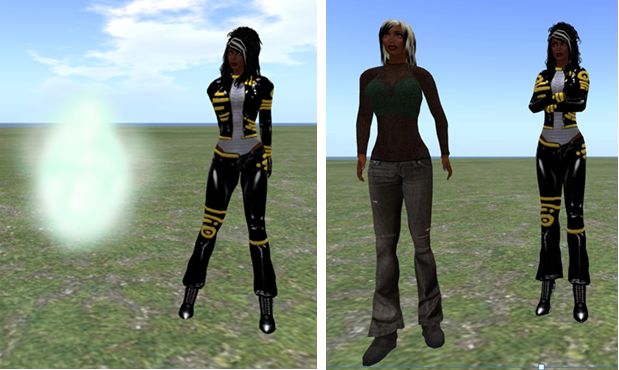
The magic of mesh in Lumia: a rigged mesh catsuit in Lumiya (l) and a regular viewer (r)
A new setting is also provided within Lumiya for users to define the quality of mesh rendering on their device – useful if using an older, less capable GPU. The options can be found under 3D View on the Settings menu (device menu key > Settings), and comprise five settings: High Quality, Medium Quality, Low Quality, Lowest Quality and Disabled.
RLV Support
Lumiya, from version 2.4.0 onward, provides RLV / RLVa support. As with a traditional viewer, RLV must be explicitly enabled by the user via the Settings menu (device menu > Settings > Tap RLV enabled to check and turn on). Also, as with a traditional viewer, a restart is required once RLV has been enabled the first time.
Once enabled, behaviours are as seen with an RLV-enabled viewer: locked items are non-detachable; restricted options are removed from menu options; movement restrictions enforced etc.
RLV in Lumiya: in the left two images, the 3D world view Settings menu showing how active RLV restrictions remove options (Inventory, Minimap) from that menu. On the right, two images showing the removal of the Detach option from the object menu for an item “locked” via RLV
RLV Support Notes
As Lumiya does not currently support particle rendering in the 3D view, chain links, etc., will not be rendered
Similarly, because Lumiya does not currently support windlight, any windlight controls / restrictions related to RLV will no be applied to the in-world view
There is currently no #RLV shared folder support
Disabling RLV in Lumiya will turn the functionality off without a need to re-log (all restrictions on detachment, menu options, etc., will be lifted).
Server-side Baking
Lumiya now provides support for Server-side baking (SSB, also referred to as avatar baking), and so is ready from when the new service is deployed to the main grid.
While there is a test area for SSB on Aditi (the Beta grid), I have encountered issues with logging-in to that grid using Lumiiya, and so have been unable to test and obtain images for this review.
Other Updates
Additionally. versions 2.4.0 through 2.4.2 add the following to Lumiya:
Avatar direction indicator added to Mini-map (a small arrow is displayed over your avatar, indicating the direction it is facing)
Animation requests are no longer auto-accepted
Fixed display of outfit folders in inventory
Fixed duplicate messages in chat
Fixed inventory appearing empty after teleport
Fixed broken teleports on OpenSim grids.
Feedback
Another series of updates which see Lumiya move even closer to matching viewer-based capabilities, making it even more a genuine alternative for those on mobile / tablet devices who wish to access Second Life / OpenSim while on the move. Both mesh rendering and RLV support are liable to be popular additions, and the server-side baking should stand it in good stead for upcoming changes to Second Life.
For those using an Android device, there simply isn’t a better means of access your virtual world.
This summary is published every Monday and is a list of SL viewer / client releases (official and TPV) made during the previous week. When reading it, please note:
It is based on my Viewer Round-up Page, a list of all Second Life viewers and clients that are in popular use (and of which I am aware) and which are recognised as adhering to the TPV Policy
By its nature, this summary will always be in arrears
The Viewer Round-up Page is updated as soon as I’m aware of any releases / changes to viewers & clients, and should be referred to for more up-to-date information as the week progresses
The Viewer Round-up Page also includes comprehensive links to download pages, blog notes, release notes, etc., as well as links to any / all reviews of specific viewers / clients made within this blog.
Updates for the week ending: 3 February, 2013
The major news for the week is that the Zen viewer has officially ceased development and has been delisted from the SL Third-party viewer directory at the developer’s request and all repositories removed from public access. The reason for this is unknown at the time of going to print with this summary.
SL Viewer updates:
Beta version rolled to 3.4.5.269698 on Janunary 31st – release notes
Development rolled to 3.4.6.269703 on January 30th
Mesh deformer project viewer rolled to 3.4.4.268558 on January 29th – core updates: code merged to 3.4.4 codebase
Sunshine viewer (avatar baking (SSB)) rolled to 3.4.5.269555 on January 30th – wiki page
CHUI development viewer rolled to 3.4.6.269797 on January 30th and then 3.4.6.269877 on February 1st
Dolphin rolled to 3.4.12.27293 on February 3rd – core updates: source up-to-date with latest LL development viewer code – release notes
Cool VL updates – three versions for the time being, all updated on February 2nd:
Stable version: 1.26.6.8
Legacy version: (v2.6 renderer) rolled to 1.26.4.51
Lumiya released version 2.4.1 on January 31st – core update: mesh object support; some mesh clothing support; RLV support; server-side baking (SSB) support; fixes and tweaks – release notes
Discontinued Viewers
Phoenix officially reached end-of-line for SL on December 31st – read more here
Zen viewer was withdrawn from the SL TPV directory and all repositories shutdown on January 27th, 2013.
Update February 28th: Nicky has posted that the CHUI code has now been merged with the main Kokua code, and a new version of Kokua is available for testing with it.
Nicky Perian, working on the Kokua viewer for SL / OpenSim, issued an experimental version of the viewer on January 24th which includes the new SL Communications Hub User Interface (CHUI).
Release 3.4.4 (CHUI) has a dedicated repository, and is available for Windows and Linux.
As reported on its launch, CHUI complete overhauls the communications floater within the official viewer, and introduces a new Conversations Logs floater, allowing users to access saved chat and IM histories from within the viewer. In updating the Conversations floater, CHUI brings some functionality to it which users of several TPVs may find somewhat familiar, even if the presentation doesn’t match anything they’ve been used to in the past.
CHUI goes purple: the initial integration of the CHUI code into Kokua
A Kokua blog post accompanying the release of the experimental viewer provides additional information:
The Communication Hub UI has Instant Messaging , Chat, and Voice controls in one floater as was done in version 1 viewers.
Imprudence users have asked that Kokua implement the Imprudence UI for communications. I would like comments from Imprudence users about this interface .
This merge affected many parts of Kokua code. Please test and report problems using our bug tracker.
There is also a link to the Kokua wiki page on recommended practices for using Kokua experimental viewers.
The implementation appears to be a “straightforward” merge of the code, with the familiar Kokua UI colour changes, but otherwise no additional updates. “Straightforward” is given in inverted commas because, as the Kokua blog post notes, the CHUI changes impact many areas of the viewer’s code, making integration somewhat difficult – particularly if the TPV merging the code already has modifications to how communications within the viewer are presented to the user.
The experimental viewer also includes the default “account creation” prompt found in the beta and development versions of the SL viewer which appears to be in relation to the forthcoming SL / Steam link-up, and which is displayed on the viewer’s log-in splash screen if no account details are found on the local computer when the viewer loads. As with other viewers which have merged-up with SL viewer development code, this should be taken as a sign that the code has been included in Kokua by default rather than having any deeper meaning associated with it.
Other recent updates for Kokua (from the 3.4.4.25633 release of January 13th, 2013) include:
The use of Vivox as the default Voice system, as a result of the latter relaxing licencing requirements for grids
The addition of a draw distance slider to the top right of the menu bar
The ability to set a minimum draw distance of 3 metres (seen as a means of improving performance for those involved in close-quarter combat / duelling)
Minor UI changes (such as the “Me” menu being renamed “Avatar”).
Overall, this looks to be a clean implementation of CHUI, and one which gives OpenSim users a further opportunity to get a look ad feel for the revised / new floaters for communications.
This summary is published every Monday and is a list of SL viewer / client releases (official and TPV) made during the previous week. When reading it, please note:
It is based on my Viewer Round-up Page, a list of all Second Life viewers and clients that are in popular use (and of which I am aware) and which are recognised as adhering to the TPV Policy
By its nature, this summary will always be in arrears
The Viewer Round-up Page is updated as soon as I’m aware of any releases / changes to viewers & clients, and should be referred to for more up-to-date information as the week progresses
The Viewer Round-up Page also includes comprehensive links to download pages, blog notes, release notes, etc., as well as links to any / all reviews of specific viewers / clients made within this blog.
Updates for the week ending: 27 January, 2013
The major news for the week is that the Zen viewer has officially ceased development and has been delisted from the SL Third-party viewer directory at the developer’s request and all repositories removed from public access. The reason for this is unknown at the time of going to print with this summary.
SL Viewer updates:
Development rolled to 3.4.6.269302 on January 22nd, then 3.4.6.269515 on January 25th
CHUI development viewer rolled to 3.4.4.269464 on January 25
Dolphin rolled to 3.4.11.27250 on January 24th – core updates: cursor now displays in the correct position on the input line of the Places floater; moving, animated linksets will not leave phantom prims behind (LL breakage); llLoadURL no longer includes a “?” when sending URL to a browser (VWR-17689); source up-to-date with latest LL development viewer code – release notes
Kokua issues an experimental CHUI viewer (3.4.4) on January 24, with dedicated repository
Niran’s Viewer updated to version 2.0.8 on January 22nd – assorted UI updates (About floater and fog settings, updates to playing local sounds); revised animations speed to control speed of all animations sseen through the viewer; improvements to custom always-on mouse steering mode; XML files clean-up – release notes
Cool VL updates – three versions for the time being, all updated on January 26th:
Stable version rolled to 1.26.6.7
Legacy version Legacy (v2.6 renderer) rolled to 1.26.4.50
It’s been a while since the last Singularity update, and the team have been hard at work updating the viewer and making in-depth changes to a range of functionality as well as providing new features and options.
Version 1.7.3.3624 was released on Sunday January 20th, 2013, which saw the viewer gain, among other things:
Merchant Outbox support
Large group management support
HTTP communications updates in line with recent v3 viewers.
Download and Install
The Windows download remains roughly the same size at previous releases, a touch under 23.9Mb. The release notes don’t explicitly mention the need for a clean install, but given I’m looking at the viewer for review purposes, I did my usual and removed the previous version (1.7.2) and all support files prior to installing. The installation process was, as ever, smooth and error-free.
HTTP Updates
Large Groups fully supported under HTTP in Singularity, in line with recent LL-driven changes (the SL Beta group has over 21K members)
Much work has been carried out on HTTP communications within Singularity in order to bring it into line with ongoing HTTP-based projects underway within the Lab.
Perhaps the most obvious evidence of this work is that this update incorporates Baker Linden’s Group Service code changes to support the management of large groups – which will now load successfully in Singularity and avoid the 10K members cap imposed on the UDP code for handling groups.
Additional work has been carried out on support of HTTP communications which is designed to both improve stability when using HTTP within the viewer and to pave the way for full support of further enhancement of LL’s HTTP services, including the upcoming new server-side avatar baking service.
Merchant Outbox
Version 1.7.3 of Singularity brings with it Merchant Outbox support (World -> Merchant Outbox). As with V3-style viewers, the outbox forms a separate floater, allowing folders to be dragged and dropped from Inventory with the same ease as v3-style viewers.
Right-clicking on objects in the Merchant Outbox provides the usual options of renaming / deleting them, together with an additional option to send them to your Marketplace store (allowing individual items / folders to be sent, rather than the entire contents of the Outbox see comments at the end of this article).
Snapshot Floater
The snapshot floater has been completely overhauled with this release, which now includes an option to upload images to your profile feed at my.secondlife.com.
The new (l) and old (r) Singularity snapshot floaters (click to enlarge)
The new floater is larger when opened-out, but offers a better snapshot preview, and is also somewhat context-sensitive with options; the temporary upload option is disabled, for example, when sending a snapshot anywhere other than to inventory. Aspect ratios have also been improved upon within the new floater as well, providing further flexibility when creating images.
Unfortunately, this release of Singularity does not appear to include the snapshot tiling fix (MAINT-628). I’m not sure if that is because of issues with the code fix or an oversight. However, increasing the images size to anything over my screen resolution when running in deferred mode immediately produced tiling lines – and actually did so on-screen.
Snapshot tiling issue still present: My screen resolution is 1440 x 900. Increasing the image resolution beyond this (in this case 1920×1200) when in deferred mode displays the familiar tiling lines (slick to enlarge)