Kokua offers .DAE exports

kokua-logoKokua have released a further update in the form of version 3.6.3.29169 (August 23rd). With it comes some important notes, and the addition of the .DAE (Collada) object export capability.

Installation Notes

This is the first release from Kokua to use the auto update mechanism from Linden Lab, which was incorporated into the viewer with release 3.6.2. However, for Windows users, there are two important points to note:

  • If you are a Windows user and have a pre-3.6.2 version of Kokua installed on your PC, you should first try to run the viewer and allow the auto-update process to fetch and install the latest release. This should work OK with versions of Kokua at least back as far as version 3.6.1.28998 (June 28th 2013).
  • Because all Windows versions from 3.6.2 onwards are installed into a folder called Kokua (rather than Kokua Viewer). So if you have a version older than 3.6.2 already installed on your PC, note that the new version will be installed alongside it, rather than over it. If you then subsequently remove the older version using the uninstaller, your settings (located in C:\Users\[username]\AppData\Roaming\Kokua) will be lost – so make sure you back-up / move this folder before removing any old versions of the viewer & then restore it afterwards.

Those on older versions of Kokua (pre-3.5.1? I’m not entirely clear on this from the blog post) may find that the updater will direct them to install the official SL viewer from the Lab. As Nicky points-out, this is not some conspiracy to force people into using the SL viewer. Should it happen, quit out of the installer and use the Kokua download links (and take note of the 2nd bullet point above).

Collada Export

The major update for Kokua 3.6.3 is the inclusion of the Collada .DAE export capability which was recently added to Singularity, together with the ability to export objects in Wavefront .OBJ format. As the Singularity team made the export options available under a LGPL licence,  Jessica Wabbit has extracted the.DAE export capability and contributed to Kokua.

The export option works in exactly the same manner as with Singularity: it respects object permissions, and you can only export those objects for which you are the creator and owner.

To export an item which fit the criteria, simply right-click on it and:

  • If you are using context menus, select EXPORT > COLLADA DAE
  • If you are using the pie menu, select MORE > MORE > EXPORT COLLADA DAE

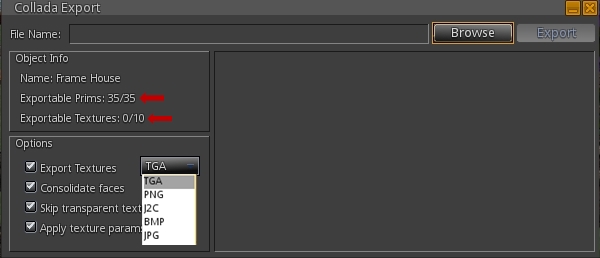
Either option will open a window allowing you to save the object to your hard drive. Once exported, the object can be used into applications which support the editing of .DAE files and / or imported as mesh to other virtual environments.

The DAE expoert options in Kokua's context and pie menus. If you're not the creator & owner of the item you're trying to export, they won't be available to you
The DAE export options in Kokua’s context and pie menus. If you’re not the creator & owner of the item you’re trying to export, they won’t be available to you

Note that if you do not have the requisite permissions to export the item, the export option will be unavailable on both menus.

Currently, the system only exports naked prims / sculpts (no textures), but this may be changing in the future – keep and eye on the Singularity team for news.

Commenting on the export capability, Kokua’s Nicky Perrian has said that if there is sufficient interest, the option to export to .OBJ may also be added to the viewer.

Additional Updates

This release sees Kokua use the Lab’s viewer 3.6.3 code base, and the following updates / additions:

  • The upcoming OpenSim Community Conference grid on OS Grid has been added to the grid drop-down list
  • Some tuning of the auto-update feature
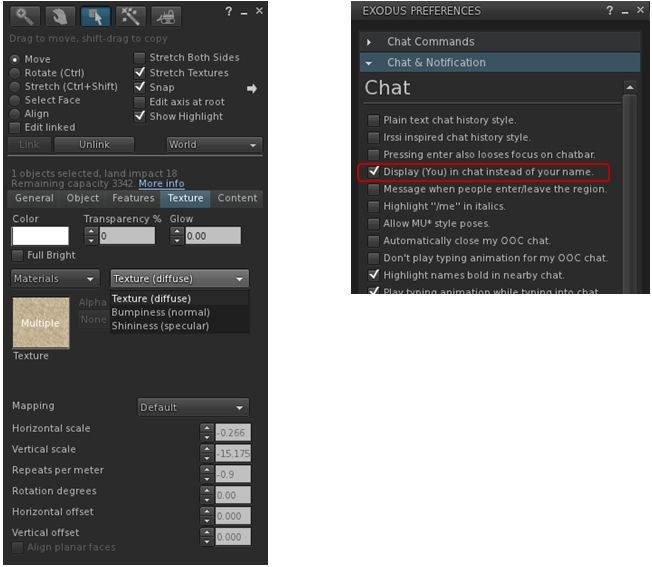
  • Addition of a plain text chat history option in the chat preferences tab
  • Addition of new “Permissions” sub-menu for friends on the People floater for setting the usual options of whether friends can see when you’re on-line, etc. Enabled options display the requisite icon alongside the avatar’s name
  • Addition of group and role UUIDs at the end of the group’s General and Roles panels.
(l) Setting permissions for friends can now be done via a sub-menu int he people folder; (r) the UUID for a group can now be obtained from the group's general tab (role UUID can also be obtained from the Roles tab)
(l) Setting permissions for friends can now be done via a sub-menu int he people folder; (r) the UUID for a group can now be obtained from the group’s General tab (role UUID can also be obtained from the Roles tab)

Feedback

Another, small, tidy update with Kokua which adds what is likely to be a popular feature, given the excitement which followed Singularity’s release with the export options. Using Kokua 3.6.3 myself (although again very briefly due to RL commitments), I found it to be fast, stable and smooth – pretty much as with 3.6.2.

As I already had 3.6.2 installed, I allowed the auto-updater to upgrade me. This actually took a few seconds to acknowledge that an update was available (the delay seemed to be longer than the official viewer, which often has the update pop-up appear as soon as the splash screen has loaded). This tiny point aside, update was smooth and returned me to the log-in splash screen when finished, with 3.6.3 ready to go.

It’s great to see Kokua rolling along like this.

Related Links

Kokua 3.6.2: all set for auto-update

Update August 21st: Nicky Perrian from Kokua has added a comment about a Windows issue with uninstalling, due to a change in the installer.

kokua-logoKokua released version 3.6.2.29072 on August 16th, becoming the first TPV to start operating LL’s viewer update capability since the Lab formally announced it was making the capability available to TPVs if they want to make use of it (Catznip has actually has an auto update capability since release R7, but I’m not clear on whether that uses any of the LL code, or is something the Catznip team built for themselves). Along with this change comes a number of smaller updates.

Download and Installation

The latest Kokua installer (Windows) weighs-in at 36.8 Mb. As expected, the installer runs without a hitch. As I’m still getting around to re-installing viewers on an “as needed” basis on the new PC, I didn’t have to perform a clean install (not that one is recommended in the release notes).

Auto Update

Oz Linden announced that the Lab would be making their viewer release mechanism available to TPVs via an e-mail earlier in the month and also at the TPV developer meeting on Friday August 9th, when he indicated that the Lab were already working with some viewer development teams to help them implement it, Kokua clearly being one of them.

Kokua implements LL's viewer update mechanism code
Kokua implements LL’s viewer update mechanism code

With Kokua, the update options are presented exactly as they are in the official viewer – complete with the check box to update to release candidates. Whether this means Kokua will be completely following suit with the overall release process implemented by the Lab, I’ve no idea.

Obviously, while the code is from LL, viewer updates obtained via it are still coming from Kokua – it doesn’t mean people sill suddenly start getting SL viewer updates!

The change does mean that from now on, updates will be obtained from Kokua’s SourceForge repository as the code does not work with BitBucket. However, the team are at present continuing to post updates to both BitBucket and SourceForge.

Additional Updates

This release brings the viewer up to parity with the Linden Lab 3.6.2 code base, which means it has the more recent materials processing code updates, although not necessarily the very latest to surface in the SL Materials Project viewer, and well as other recent updates within the official viewer. Other notable updates comprise:

  • A return to standard SL viewer Debug for the login menu. This allows the selection of Debug level before logging in
  • “Stop animating me” short cut has been assigned to Shift-S
  • There are several Linux build changes to allow compiling on current compilers (builds on gcc-4.7 and gcc-4.8 have webkit runtime issues)
  • Maximum number of groups has been corrected for OpenSim
  • Freeze/Unfreeze and Eject/Ban context menu options have been added to the people / radar floater, as per Feature Request #1254
  • The Reach Out slider on the people floater mini-map is renamed Radar Range, has been repositioned above the mini-map and now has a maximum range of 4095 metres
  • The Map button in the tool bar is renamed World Map
  • Clicking on the bandwidth or packet loss graph will bring up the Statistics floater
  • The middle mouse button can now be used as a paste function and / or to scroll the world map.

This is another small but very tidy update for Kokua, and the release notes are available on the Kokua blog. While I only had a very brief time to try it out over the weekend, I didn’t notice any issues of import / impact (other than the issue of mesh clothing on other avatars failing to render, which I frequently encounter on Firestorm and the official SL viewer, so is not a Kokua issue).

All-in-all a tidy update.

Related Links

Viewer release summary 2013: week 33

This summary is published every Monday and is a list of SL viewer / client releases (official and TPV) made during the previous week. When reading it, please note:

  • It is based on my Viewer Round-up Page, a list of  all Second Life viewers and clients that are in popular use (and of which I am aware) and which are recognised as adhering to the TPV Policy
  • By its nature, this summary will always be in arrears
  • The Viewer Round-up Page is updated as soon as I’m aware of any releases / changes to viewers & clients, and should be referred to for more up-to-date information
  • The Viewer Round-up Page also includes comprehensive links to download pages, blog notes, release notes, etc., as well as links to any / all reviews of specific viewers / clients made within this blog.

Updates for the week ending: August 19th, 2013

Official LL Viewers

LL Viewer Resources

Third-party Viewers

  • Kokua updated on August 16th to version 3.6.2.29072 – core updates: parity with LL 3.6.2 codebase; implementation of LL auto-update capability; assorted updates (release notes)
  • Restrained Love Viewer updated on August 16th to version 2.8.5.2 – core update: invisi-prims support fix; Linux and Mac version also updated to 2.8.5.2 (release notes)
  • Cool VL updated on August 17th to:
  • Singularity updated on August 12th to version 1.8.1.4863 – core updates: Media on a Prim (MOAP), Voice code update; Wavefront and Collada export; Web Profile and V3 Web Search support; Updated SSA code; OpenSim Hypergrid and high altitude building support, and more (release notes)
  • Group Tools updated on August 18th to version 2.2.20.

Additional TPV Resources

Depreciated / Discontinued Viewers

  • SL Second Life Beta viewer – depreciated as of version 3.6.2.278491, July 15, 2103
  • SL Development viewer – depreciated as of version 3.5.2.274629 April 24, 2013
  • Zen Viewer – discontinued by developer and no longer available, January 27th, 2013
  • Phoenix viewer – development and support ended on December 31st, 2012

Related Links

Singularity 1.8.1: MOAP, Voice Morph, Object & Shape Import / Export, and More

singularitySingularity updated to version 1.8.1 on August 12th, as noted on this week’s viewer round-up summary. There are a lot of updates in the release, including extended import / export capabilities.

The following is a look at the principal updates in the 1.8.1 release. For information on contribution credits, please refer to the Singularity release notes.

Windows Download and Install

The new version has seen some extensive code clean-up, which may have contributed to the installer weighing-in at 5Mb smaller than the 1.8.0 installer. As always, installation was painless and quick; as this is the first time I’ve installed Singularity on my new system, I didn’t have any concerns about clean installs (which tend to be a rarity with Singularity away, as it just gets on and does the job).

Media on a Prim / Shared Media

The headline announcement for the release is that Singularity supports Media on a Prim (MOAP), the ability to see and interact with shared media (such as viewing a web page displayed on a prim, or watching a YouTube video, etc. Shared media AutoPlay is disabled by default, but can be enabled if preferred, via Preferences > Audio & Video and checking Automatically Play Prim Media.

Import / Export Options

While MOAP is the headline update for Singularity, it’s the enhanced import / export options which are liable to be of particular interest, especially to content creators.

In covering this, I’m going to stay first-off and in large, friendly letters, that Singularity respects object permissions. Therefore, it will only export those items for which you are owner and creator in full, and it will not let people run away and do naughty things.

Support for uploading .anim files has been added to Singularity 1.8.1, along with the following.

linden_ genepool Export / Import

For those working with avatar shapes, perhaps the interesting news is that Singularity 1.8.1 now supports wearable export/import in linden_genepool format. This means shapes supported in this format (saved as XML) can not only be used in Blender/Avastar, they can be re-imported into SL with the need to fiddle with the shape sliders after being modified externally using something like Blender.

Wavefront and Collada Export

Pie menu .OBJ and .DAE export options

Singularity 1.8.1 also includes the ability to export those objects to which you have full permissions (again, creations which are entirely your own) as .OBJ or .DAE files (as well as to .XML via the pre-existing Export option).

The options can be accessed directly by right-clicking on the object in-world and selecting MORE > MORE > TOOLS in the pie menu. If you do not have permission to export the selected object, the export options will be grayed out and non-selectable.

Voice Updates

Voice morphing becomes available in Singularity with 1.8.1. This subscription service provided by Linden Lab allows people to use – wait for it – voice morphing in Second Life, and has been a part of SL since the arrival of Viewer 2.1. With Singularity, options are accessed via the Active Speakers floater (requires Voice to be enabled, obviously), and the overall UI changes are shown in the image below.

Voice morphing and updates in singularity 1.8.1 (image courtesy of the Singularity team)
Voice morphing and updates in singularity 1.8.1 – click to enlarge (image courtesy of the Singularity team)

Alongside this update is the ability to adjust your own voice volume from the Active Speakers floater.

Radar Updates and Avatar Lists Right-click Options

There have been a number of tweaks to the Radar floater with the new release, and those familiar with Singularity will quickly spot them.

This release also sees a right-click functionality added to avatar lists – such as the Radar – which allows you direct access to common actions you might want to carry out with another avatar, such as IMing them, paying them, offering them a teleport, and so on.

You can now right-click on avtar lists in singularity and carry out avatar / avatar functions (names removed from radar list for privacy)
You can now right-click on avatar lists in singularity and carry out avatar / avatar functions (names removed from radar list for privacy)

Web Profile and V3 Web Search Support

The Singularity avatar Profile floater now includes a button (top right) which will open the avatar’s web profile in a separate panel, allowing both it and the Singularity Profile panel to be viewed independently of one another and closed independently of one another.

Singularity 1.8.1 also sees an additional tab added to the Search floater, which contains the V3-style web search capability, and an option to search from a separate floater if preferred.

V3-style web search now in Singularity

For OpenSim

For OpenSim, Singularity 1.8.1 now offers hypergrid map support and high-altitude building.

And the Rest

For a complete list of the top-line updates to Singularity 1.8.1, please refer to the release notes, which provide more information on things like LSL support updates, improvements to the script editors, the ability to start / stop scripts running in an item directly from inventory, notes on new  shortcut commands and chat bar commands, an improved auto response function, performance and stability updates, the latest available SSA code updates, and more. The release notes also credit those responsible for the various updates and improvements.

No Materials

The keen-eyed may have noticed there’s no mention of materials processing support. This is because the Singularity team opted to pass on adding the support with this release. Given that Linden Lab are themselves still working on the viewer-side code, and have themselves just made a significant set up updates available to TPVs and users within the Materials Project viewer, this is actually an understandable move on the Singularity team’s part.

That said, preparatory work has been carried out in readying Singularity for materials processing support, so expect it to appear in an upcoming release just as soon as the team are satisfied LL are not about to drop a significant set of updates on people.

Volunteers Needed

One other change which has occurred with this release is that F1 no longer opens Help, although it will still open a web browser window / tab. This is because the Singularity team are thinking about picking-up a V3-style help; however, they need more hands to make this happen. So, if you are interested in giving them a hand and have the necessary skills to make it happen, please give Siana, Latif or one of the team a shout in-world.

General Feedback

As ever, a tidy set of updates incorporated into a v1-style viewer which is solid, reliable and which shouldn’t overly tax older computers. For those looking for a v1-style viewer which supports SSA (which Singularity has done since the release of 1.8.0 in April) and which offers a very credible list of additional TPV capabilities, then Singularity 1.8.1 is very much worth taking the time to look at and to take for a spin in-world.

Related Links

Firestorm meeting 10th August, 2013 – video and transcript

firestorm-logoOn Saturday 10th August, 2013, the Firestorm team hosted a question-and-answer session so they could outline the current status of the Firestorm viewer, the issues the team are facing, and outline plans for the future, as well as address questions from the audience.

While the meeting was recorded, the Firestorm team are aware that many of their users have hearing difficulties, and / or prefer to read text. It is because of this that this transcript has been provided. When reading it, please remember:

  • This is not a word-for-word transcript of the entire meeting. While all quotes given are as they are spoken in the video, to assist in readability and maintain the flow of conversation, not all asides, jokes, interruptions, etc., have been included in the text presented here
  • If there are any sizeable gaps in comments from a speaker which resulted from asides, questions to other etc,, these are indicated by the use of “…”
  • Timestamps are provided as guidance should anyone wish to hear the comments in full from any speaker on the video
  • Questions were asked in chat while speakers were talking. This inevitably meant that replies to questions would lag well behind when they were originally asked. Therefore, to provide context between questions and answers, questions in the transcript are time stamped at the point at which each is addressed by a member of the Firestorm team
  • Some questions were asked and answered purely in text. These have been excluded for one of two reasons. Either a) they lacked context with the voice conversation, or b) the seating arrangements in the auditorium meant there were some questions or answers which didn’t appear in my local chat window.

Please note: This transcript is provided for informational purposes only. As such, questions on technical issues relating to Firestorm and  / or project-specific questions cannot be answered here unless one of the Firestorm team drops by.

Video courtesy of Northspring

Continue reading “Firestorm meeting 10th August, 2013 – video and transcript”

Viewer release summary 2013: week 32

This summary is published every Monday and is a list of SL viewer / client releases (official and TPV) made during the previous week. When reading it, please note:

  • It is based on my Viewer Round-up Page, a list of  all Second Life viewers and clients that are in popular use (and of which I am aware) and which are recognised as adhering to the TPV Policy
  • By its nature, this summary will always be in arrears
  • The Viewer Round-up Page is updated as soon as I’m aware of any releases / changes to viewers & clients, and should be referred to for more up-to-date information
  • The Viewer Round-up Page also includes comprehensive links to download pages, blog notes, release notes, etc., as well as links to any / all reviews of specific viewers / clients made within this blog.

Updates for the week ending: August 11th, 2013 (with extras!)

Official LL Viewers

LL Viewer Resources

Third-party Viewers

  • Restrained Love Viewer (Windows) updated on August 12th to version 2.8.5 – core update: materials processing support (release notes)
  • Cool VL updated on August 10th to:
  • Singularity updated to version 1.8.1.4863 on August 12th – core updates: Media ob a Prim (MOAP), Voice code update; Wavefront and Collada export; Web Profile and V3 Web Search support; Updated SSA code; OpenSim Hypergrid and high altitude building support, and more (release notes)

Additional TPV Resources

Depreciated / Discontinued Viewers

  • SL Second Life Beta viewer – depreciated as of version 3.6.2.278491, July 15, 2103
  • SL Development viewer – depreciated as of version 3.5.2.274629 April 24, 2013
  • Zen Viewer – discontinued by developer and no longer available, January 27th, 2013
  • Phoenix viewer – development and support ended on December 31st, 2012

Related Links