Lab confirms “SL mobile” beta programme

secondlife

Update October 26th: As noted in the comments, it appears that the new client may be using the OnLive streaming service / application. This has been reported in a recent comment on the forum thread linked to in the article, and also in a further thread on the subject.

Linden Lab has been issuing an e-mail to a limited group of users inviting them to sign-up to be a part of a beta test for a Second Life client for mobile devices.

The e-mail, which has been popping-up in user’s in-boxes for the last day or so, reads:

We’re looking for enthusiastic beta testers to evaluate a version of Second Life designed for mobile devices.

Sound interesting? Then simply…

  1. Visit  [link removed] to create a FREE account with <link removed to be safe>, then
  2. Visit  [link removed] to complete a 5-minute questionnaire

You have to finish both steps to be considered for the beta.

We’ll email those selected when the program begins and check in periodically over the next couple of months to get their feedback. 

This is your opportunity to be among the first to try a new mobile version of Second Life, and we hope you’ll help us to make it a great product with your input.

Thank you for your consideration!

Linden Lab

Some concern had been raised on the SL forums as to whether the e-mail was genuine or not. While some were able to confirm it was indeed genuine. However, just to be clear, I contacted Peter Gray, the Lab’s Director of Global Communications, and to ask whether the Lab would be prepared to point to any specific platforms they’re looking at (iOS, Android, Windows Mobile, etc). He replied saying:

The email you’re referencing did indeed come from Linden Lab. The originating address is related to the system used to send the messages out, and there was initially an unfortunate problem with links, which has since been resolved.

It’s too soon to share details about this service that would bring Second Life to mobile devices (as you can see, we’re beginning a limited beta test), but we’re hoping that with the help of some enthusiastic beta testers, things may progress to a point where we can share more information with the community at large soon.

Do note that the beta programme is via invitation only; there is no public sign-up page available – so don’t go looking for one! Also, not all of those responding to the e-mail will necessarily be selected to participate in the programme.

Lumiya for Android has been the ground-breaking mobile client for Second Life and OpenSim since its launch at the end of 2011

Getting SL onto a mobile device has been a much demanded option. As I reported in April 2012, Comverse had a stab at getting SL onto the iPhone back in 2008, complete with graphics. Back then, it required an intervening server in place and didn’t get too much further than an initial proof-of-concept.

However, mobile devices have come some way in terms of power and capbilities, although until now all moves in the mobile arena have been left to third-parties, with text-focused clients such as LittleSight and Mobile Grid Client on the Android platform, and Pocket Metaverse on iOS, and of course the incredible Lumiya for Android with its rich graphical capabilities and which I routinely cover in these pages.

It’ll be interesting to see exactly what the Lab have put together, and the code they’ve used – home-built, or perhaps using something like Unity3D? Time will tell!

UKanDo a whole lot more with 3.6.8

logoConnor Monaron released an updated UKanDo viewer on Saturday October 20th. Version 3.6.8.27869 brings the viewer up-to-date with the latest viewer release code from the Lab, including the “hot fix” to prevent crashes for those using the latest AMD Catalyst drivers (13.9, 13.10, and 13.11), and adds a lot of useful nips, tucks, tweaks and additions.

Download and Installation

The Windows installer remains unchanged at 28.7 MB in size, and installation was, as with the first version of the viewer I reviewed, smooth and without incident.  I ran a completely clean install out of curiosity, and the viewer again installed without a hitch, and AVG Pro didn’t hiccup over things like the voice plugin, etc.

Improved UI

One of the things I found a little hard with UKanDo last time around was the UI colours. The white-text-on-blue-buttons was not always easy to read (for me, at least on my 1440×900 monitor). I’ve no idea if the issue was widespread, or if Connor felt the same, but 3.6.8.27869 sees buttons with black text / icons by default (text turns white when the button is active), which I do find easier on the eyes.

Buttons and Placement

Version 3.6.8 brings with it a couple of new buttons – Quick Tools and Area Search (both of which are looked-at below), and sees UKanDo gain improved toolbar button alignment. As with some other TPVs buttons on the bottom bar can now be ranged to the left or right, and buttons to the left or right of the screen can now be ranged to the top or bottom – kudos, Connor!

Quick Tools

UKanDo Quick Tools
UKanDo Quick Tools

This release brings with it a Quick Tools floater (and associated toolbar button), which is similar to the “Quick Prefs” floaters found in other TPVs, providing rapid access to things like Draw Distance, Bandwidth, Max Avatars, Particle Count, the Windlight presets and so on. The list of options isn’t as extensive as some TPVs provide, but what is here is more than enough to allow users to make rapid-fire adjustments to core settings when necessary – such as when operating in a crowded environment.

Also with this release, and found in the Quick Tools, as well as in Preferences > UKanDo > Miscellaneous, is the ability to set Windlight cross-fading when moving between different Windlight environments / changing Windlight settings.

 Area Search

Another popular TPV capability is that of area search: being able to locate a specific object within a region using a range of criteria – object name, creator name, etc.  This makes its debut in UKanDo version 3.6.8.27869, and is likely to be a welcome addition among users. It can be accessed either via a dedicated menu button or via the UKanDo menu or by pressing ALT-A.

Area Search comes to UKanDo

Context Menu Updates

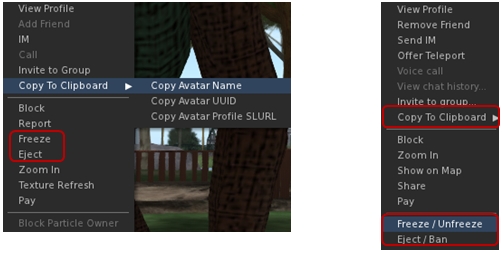
A couple of the context menus in UKanDo get updates as well. The right-click avatar context menu sees options added to copy an avatar’s name, UUID or Profile SLurl to the clipboard. Additionally, and in the case of estate owners / managers / parcel owners, the avatar context menu includes options to Freeze / Unfreeze and Eject / Ban where appropriate.

Options to copy an avatar's name, UUID or profile SLurl can now be found of the right-click avatar context menu (l) and context menu in the Nearby tab of the people floater (r). In addition, both menus can offer estate owners / managers / parcel owners options to freeze / eject avatars
Options to copy an avatar’s name, UUID or profile SLurl can now be found of the right-click avatar context menu (l) and context menu in the Nearby tab of the people floater (r). In addition, both menus can offer estate owners / managers / parcel owners options to freeze / eject avatars

These options are also available in the right-click context menu within the Nearby tab of the People floater (with the freeze / ban options only appearing for estate owners / managers / parcel owners).

Other Additions, Tweaks and Touches

  • RLV is updated to 2.8.5.8
  • Toolbar Buttons floater New “Close” button
  • World Map New “Clear Selection” button
  • Help->UKanDo Support Group menu option will either open the group profile or, if you are a member of the group, start group chat
  • Allow Media to Auto-play is defaulted to off
  •  Play Sounds from Gestures is defaulted to off
  • Option to allow Chiclet bar and/or Notifications to be placed top or bottom right
  • Viewer gives audible warning when trying to shift-drag while in edit linked parts/select face mode & object remains locked in place
  • Plus more – see the release notes

Feedback

Version 3.6.8.27869 represents a tidy set of updates and tweaks to UKanDo. The addition of Area Search is liable to be popular, as is the arrival of a Quick Tools floater. I personally like the additional button ranging options (I like my toolbar buttons over to the right of the screen and out-of-the way), and the ban / eject additions to context menus may well prove useful to some!

Performance-wise, this version of UKanDo is right up there with the last, and faces-off very well compared to the SL release viewer upon which it is based. In my PC, with ALM enables, ambient occlusion and shadows (Sun/Moon + projectors) enabled, and a couple of others on my home region, I was again hitting an average FPS of around 68-70.

I did find one or two things at odds in my version compared to the release notes (RenderVolumeLODFactor is reported as defaulted to 4.00, but in my clean install, I found it set to 1.25), but these were very minor issues and easily fixed. One thing I would recommend, however is that the icon for the Quick Tools button is revised. It is currently the same as the icon used on the Preferences button, and when operating with the buttons in Icon Only mode, it could lead to confusion.

I’d still like to see the media filter added to UKanDo, just for the added comfort when wanting to fiddle with media on other land; having something like Will Weaver’s Phototools appear in UKanDo would also be a blast – but these are purely personal preferences. As it is, UKanDo is a perfectly useable viewer, and for those looking for something sitting between the SL viewer and TPVs with all the bells and whistles, it’s worth taking a look at.

Related Links

Viewer release summary 2013: week 42

This summary is published every Monday and is a list of SL viewer / client releases (official and TPV) made during the previous week. When reading it, please note:

  • It is based on my Viewer Round-up Page, a list of  all Second Life viewers and clients that are in popular use (and of which I am aware) and which are recognised as adhering to the TPV Policy
  • By its nature, this summary will always be in arrears
  • The Viewer Round-up Page is updated as soon as I’m aware of any releases / changes to viewers & clients, and should be referred to for more up-to-date information
  • The Viewer Round-up Page also includes comprehensive links to download pages, blog notes, release notes, etc., as well as links to any / all reviews of specific viewers / clients made within this blog.

Updates for the week ending: October 20th, 2013 (with extras)

Official LL Viewers

  • Current Release updated on October 16th to version 3.6.8.282367 – core updates: Catalyst RC viewer with a start-up crash on latest AMD Catalyst drivers: 13.9, 13.10, 13.11 (download page, release notes)
  • Release channel cohorts (See my notes on manually installing RC viewer versions if you wish to install any release candidate(s) yourself):
    • Maintenance RC release on October 18th,  version3.6.9.282553 – core updates: finer access control for estate/parcel owners; CHUI: toggle expanding Conversations by clicking on icon; GPU table update + more (download and release notes)
    • “ShareStorm” RC viewer released on October 18th, version  3.6.9.282535 – core updates:  combines SLShare functionality (formerly 3.6.8.282036) and Snowstorm contributions (request teleport feature, et al – formerly 3.6.8.281997)  – (download and release notes)
  • Project viewers:
    • None at present

LL Viewer Resources

Third-party Viewers

V3-style

  • Black Dragon updated on October 15th to version 2.3.3 Alpha  – core updates: Machinima Sidebar overhaul; greyscale and posterization post processing options (unfinished) – (release notes)
  • UKanDo viewer updated on October 21st to version 3.6.8.27869  – core updates: AMD Catalyst driver hot fix; RenderVolumeLOD defaults to 4; RLV updated to version 2.8.5.8; numerous fixes and additions (release notes)

V1-Style

  • Cool VL updated on October 19th to:
    • Stable version: 1.26.8.34
    • Experimental version: 1.26.9.34
    • Release notes (both) core update: major bug fix for the “.32” releases. please update if you are running either one)

Additional TPV Resources

Related Links

Firestorm meeting and Q&A, October 12th: video and transcript

firestorm-logoOn Saturday October 12th 2013, the Firestorm team hosted another informal question-and-answer session. While the meeting was recorded, the Firestorm team are aware that many of their users have hearing difficulties, and / or prefer to read text. It is because of this that this transcript has been provided. When reading it, please remember:

  • This is not a word-for-word transcript of the entire meeting. While all quotes given are as they are spoken in the video, to assist in readability and maintain the flow of conversation, not all asides, jokes, interruptions, etc., have been included in the text presented here
  • If there are any sizeable gaps in comments from a speaker which resulted from asides, questions to other etc,, these are indicated by the use of “…”
  • Timestamps are provided as guidance should anyone wish to hear the comments in full from any speaker on the video
  • Questions were asked in chat while speakers were talking. This inevitably meant that replies to questions would lag well behind when they were originally asked. Therefore, to provide context between questions and answers, questions in the transcript are time stamped at the point at which each is addressed by a member of the Firestorm team, either in voice or via chat.

Please note: This transcript is provided for informational purposes only. As such, questions on technical issues relating to Firestorm and  / or project-specific questions cannot be answered here unless one of the Firestorm team drops by.

The TL;DR Summary

The numbers in braces are timestamps which refer to the section of this transcript where more details can be read, and to the section of the video recording where the relevant comments can be heard.

  • Current status for Firestorm, and potential time frames for the next release: end of October – unlikely; early December – possibly; early 2014 – if early December is missed, due to no change windows) [0:00:44-0:02:33]
  • Status with regards to LL’s viewer projects:
    • SSA updates (AISv3) – unlikely to make it into the next release and why [0:02:33-0:03:42]
    • SLShare (sharing with Facebook accounts) – possibly in next release, but low priority [0:03:42-0:04:22]
    • Group ban list – what it is and hopefully in the next release [0:04:22-0:06:30]
    • Interest list updates – unlikely to be in the next release and why [0:06:30-0:08:08]
    • Chat history capabilities from CHUI [0:18:50]
  • The hoped-for refactoring of the Preferences floater will not be in the next release [1:02:09]
  • What will be in the next release:
    • Materials, support for new particle capabilities, export features [0:08:08]
    •  Firestorm will include export capabilities, the majority of which have been in development in-house for a while, but which will include Singularity’s .DAE export capability. All export options will respect the SL permission system, so you will only be able to export things which are wholly your creation [0:09:57-0:16:14]
    • Linden Lab have introduced new particle capabilities, including a ribbon particle capability and a new means of dealing with particle griefing by right-clicking on particles to mute their source. These abilities will be in the next release of Firestorm [0:16:42-0:17:39]
  •  Firestorm may be getting a means for IM encryption in the future which will be more secure than OTR. This has arisen out of Firestorm being used as the default viewer for MOSES, the US Army’s Military Open Simulator Enterprise Strategy [0:23:50-0:28:50]
  • Firestorm is unlikely to gain 64-bit builds in the near future. So far, few advantages have been shown to exist with 64-bit builds compared to 32-bit builds utilising LAA, and 64-bit builds could present added complexity in trying to manage the project [0:33:28-0:41:39]
  • Firestorm and TPVs are experiencing much improved co-operation with the Lab, although striking a balance between openness and managing complex projects is hard to achieve and this leads to compromises [0:48:16-0:58:21]
  • The remainder of the meeting was more in the way of an open Q&A session covering a range of topics, and the transcript should be referred to for further details.

With thanks to North for the video.

Continue reading “Firestorm meeting and Q&A, October 12th: video and transcript” →

Viewer release summary 2013: week 41

This summary is published every Monday and is a list of SL viewer / client releases (official and TPV) made during the previous week. When reading it, please note:

  • It is based on my Viewer Round-up Page, a list of  all Second Life viewers and clients that are in popular use (and of which I am aware) and which are recognised as adhering to the TPV Policy
  • By its nature, this summary will always be in arrears
  • The Viewer Round-up Page is updated as soon as I’m aware of any releases / changes to viewers & clients, and should be referred to for more up-to-date information
  • The Viewer Round-up Page also includes comprehensive links to download pages, blog notes, release notes, etc., as well as links to any / all reviews of specific viewers / clients made within this blog.

Updates for the week ending: October 13th, 2013

Official LL Viewers

LL Viewer Resources

Third-party Viewers

V1-Style

  • Cool VL updated on October 13th to:
    • Stable version: 1.26.8.33
    • Experimental version: 1.26.9.33
    • Release notes (both) core update: major bug fix for the “.32” releases. please update if you are running either one)

Mobile / Other Clients

  • Lumiya updated on October 10th to version 2.5.5 – core updates: sliding gesture toggles between contact list and chat; ability to share / give inventory; llLoadURL() support; ability to view chat logs with the application (release notes)

Additional TPV Resources

Related Links

Lumiya 2.5.5: Share and enjoy

lumiya-logoThursday October 10th saw the latest release of Lumiya, the Android client for Second Life and OpenSim arrive.

Version 2.5.5 brings with a number of updates and improvements including:

  • Sliding gesture toggles between contact list and chat
  • Share inventory
  • Partner information in user profiles
  • Option to view chat logs within the application.

Slide Gesture for Chat / IMs and Contacts

iI5IrndThe slide gesture is a handy means of moving between your contacts list and an ongoing conversation either in open chat or IM without needing to use your device’s Back button.

To move between a conversation window and your Contacts list:

  • Start a conversation in chat or use Contacts to IM a friend
  • Place you finger on the screen and drag to the right. Your Contacts list will slide into view
  • Drag your finger to the left to return to the conversation
  • The image on the right, courtesy of Alina Lyvette, shows the function in use (the size of the image is unfortunately dictated by a limitation within WordPress.com when handling animated GIF files. Apologies if it is a little “in your face”.)

You can move between multiple IM windows by “sliding” back to Contacts and then tapping the name of the person you which to talk with and then “sliding” back and tapping the name of someone else.

Share Inventory

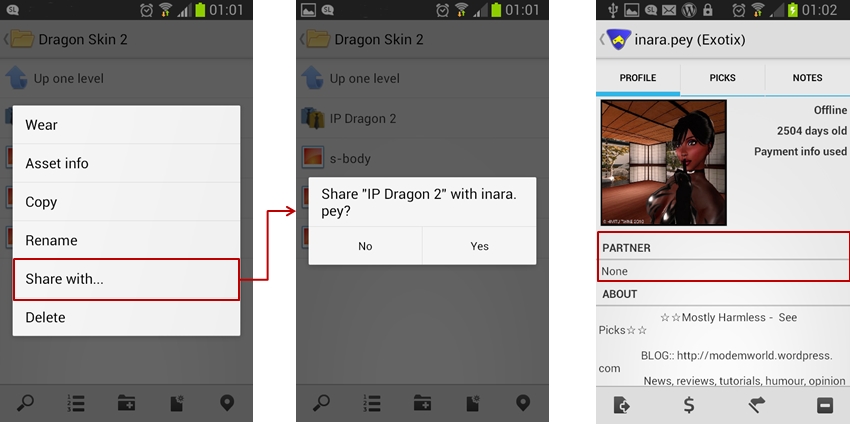
Version 2.5.5 allows you to share /give inventory items with / to others (subject to permissions, as usual).

To share and item:

  • Open you inventory and navigate to the folder containing the item you wish to share / give
  • Long touch the item for the context menu
  • Tap the Share With… button – this will open your Contacts screen
  • Tap the name of the person you with whom you wish to share the item
  • A pop-up dialogue will be displayed asking you to confirm that to wish to proceed. Tap Yes to do so.

Note that Lumiya doesn’t display the warning notification if you are sharing a Transfer / No Copy item, nor does it display the “User is offline….” message when the recipient is offline. However, a message confirming the object has been transferred is displayed in local chat.

Lumiya 2.5.5 allows you to share / give inventory items with / to others (left and centre) and also display partner information in the Profile display (right)

Partner Information

The ability for Lumiya to display partner information has been added to the Profile display.

Viewing Chat Logs within Lumiya

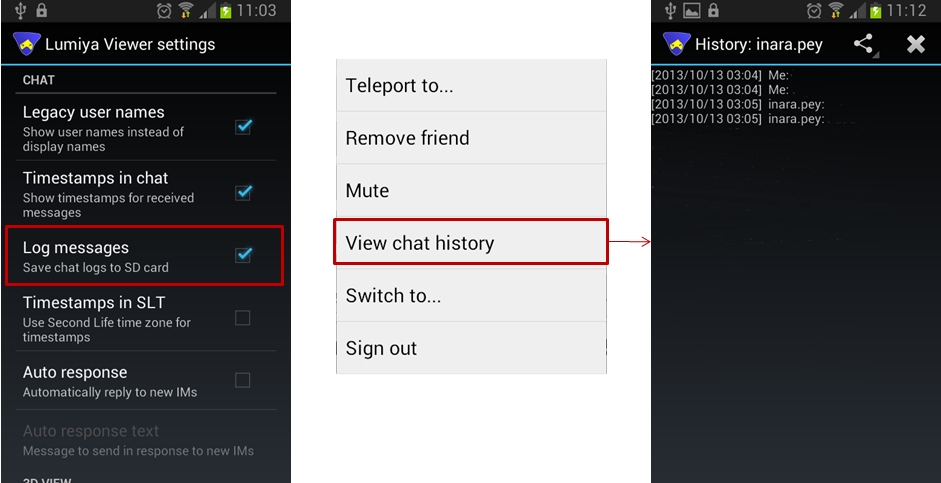
Lumiya 2.5.5 allows you to access chat logs (history) within the application. This does require that Log Messages is enabled in Settings.  Also note that due to a file name format change, chat logs saved in previous versions of Lumiya may not display.

  • Tap the Menu key on your device from Lumiya’s main screen and then tap Settings
  • Scroll down the Settings page to the Chat section and make sure Log Messages is checked
  • Initiate a conversation with someone
  • To see the chat history, tap the Menu screen from within the Chat / IM window and select View Chat History – note that if there is no recorded history log, this option will not be displayed in the menu
  • If a chat log file exists, it will be displayed.
View chat history: make sure the Log messages option is checked (l); from the chat / IM screen, tap the Menu button on your device and select the View Chat History option (c) to open the history, if available (r).
View chat history: make sure the Log messages option is checked (l); from the chat / IM screen, tap the Menu button on your device and select the View Chat History option (c) to open the history, if available (r). Note that if the option is not displayed, there is no history file to view

Other Items

Other updates in this release comprise:

  • Support for llLoadURL() – so you can now open a web page in a browser installed on your device, if a dialogue box is displayed asking if you wish to do so
  • Improved notifications
  • Bug fixes and performance improvements.

Feedback

Another very tidy update from Alina which adds some useful functions to Lumiya, with the ability to share / give items of inventory liable to be welcome among users. Kudos!

Related Links