This summary is published every Monday, and is a list of SL viewer / client releases (official and TPV) made during the previous week. When reading it, please note:
It is based on my Current Viewer Releases Page, a list of all Second Life viewers and clients that are in popular use (and of which I am aware), and which are recognised as adhering to the TPV Policy. This page includes comprehensive links to download pages, blog notes, release notes, etc., as well as links to any / all reviews of specific viewers / clients made within this blog
By its nature, this summary presented here will always be in arrears, please refer to the Current Viewer Release Page for more up-to-date information.
Project Valhalla (CEF media update) RC viewer updated to version 4.0.0.308641 on December 7th – replaces the LLQTWebKit system used in the Web media plugin with one based on the Chromium Embedded Framework (CEF) (download and release notes)
Black Dragon updated to version 2.4.4.5 on December 14th – core updates: crash fixes; corrections to Avatar Complexity code to prevent incorrect rendering of avatars; overhaul of the Places floater (release notes)
V1-style
Cool VL Viewer updated as follows: Stable version to 1.26.16.3 and Experimental branch to 1.26.17.1, both on December 12th (release notes).
This summary is published every Monday, and is a list of SL viewer / client releases (official and TPV) made during the previous week. When reading it, please note:
It is based on my Current Viewer Releases Page, a list of all Second Life viewers and clients that are in popular use (and of which I am aware), and which are recognised as adhering to the TPV Policy. This page includes comprehensive links to download pages, blog notes, release notes, etc., as well as links to any / all reviews of specific viewers / clients made within this blog
By its nature, this summary presented here will always be in arrears, please refer to the Current Viewer Release Page for more up-to-date information.
Maintenance RC viewer updated to version 3.8.7.308556 on December 3 – core updates: some 38 fixes and improvements, including updates for some regressions introduced into the viewer with the current release viewer (download and release notes)
Bright Canopy, the streaming service which allows users on low-end computers to access both Second Life and OpenSim, has announced it is effectively being absorbed by Frame, the cloud service provider which has been a technology partner with Bright Canopy from almost the beginning.
Bright Canopy came into existence after the demise of the SL Go service provided by the former Onlive games streaming company, after that company opted to offer itself for sale, only to have Sony Computer Entertainment buy out its IP and patents, ending the company as a going concern.
However, the going has been a little rough at times for Bright Canopy, particularly as no-one has attempted to provide access to Second Life and OpenSim in quite this way before (OnLive utilised their own dedicated servers and data centres), so it has been a journey into uncharted territory.
The most important things to note is that under the new arrangement, Bright Canopy will continue uninterrupted as a service for both Second Life and OpenSim, and the company’s founder, Bill Glover, will be joining Frame as Product Manager for Virtual Worlds.
Bill and Jerri Glover: creators of the Bright Canopy service
Bright Canopy largely came into existence as a result of a partnership between Bill and Frame. At the time of SL Go’s demise, I ruminated on the potential of a streamed service for accessing Second Life being provided through Amazon Appstream. This time was enough to get Bill seriously thinking on the idea and looking into ways of achieving it. A follow-up article prompted an invitation from Frame’s founder, Nikola Bozinovic, to try his service as a means to deliver a streamed viewer solution, and so the partnership was born.
Already with the technical expertise to manage and deliver high-end applications on a streaming basis through Amazon’s cloud services, and with the potential to leverage Microsoft’s Azure services in the future, Frame were an ideal partner for Bright Canopy. The synergy between the two companies allowed Bill to quickly establish a proof of concept for streaming the Second Life viewer. This rapidly developed into a closed alpha, which in turn rolled into a pre-lunch test beta. Thus, in just four months, Bright Canopy went from nascent idea to a service ready for launch.
Nikola Bozinovic, founder of Frame, has remained convinced of Bright Canopy’s viability since extending his initial invitation to use Frame’s infrastructure in April 2015.
Unfortunately, and as I reported at the time, a combination of very positive response to Bright Canopy’s launch and some drastic and unexpected fluctuations in Amazon’s Spot Instance pricing, meant that the original pricing model planned for the service could not be maintained, and Bill and Jerri had to reluctantly had to suspend Bright Canopy operations while alternatives were considered.
Although the service was relaunched in September 2015 with an alternative pricing model, both Bright Canopy and Frame have been seeking ways and means to make the service more appealing to users, particularly in the area of cost.
It is these explorations which have late to this latest situation, as Bill notes in the press release:
After brainstorming about some of the many things we could do together, I have accepted an offer to join Frame as Product Manager for Virtual Worlds. The Bright Canopy service will continue uninterrupted as it already runs on the Frame platform, and we will be looking to expand and improve it with new options and flexibility. Jerri will also continue supporting Bright Canopy as a community volunteer.
The news will not see any immediate change in Bright Canopy pricing – those avenues are still being explored.
However, one immediate benefit is that Bright Canopy’s support activities will be folded into those provided by Frame, streamlining issue management. What’s more, the move should also allow the Bright Canopy service to extend its reach into mobile devices: Frame already has a native iOS client, and can provide services to a number of Android devices through Chrome. Finally, the move might also allow further viewer options to be added to Bright Canopy’s stable alongside the Second Life viewer and Firestorm.
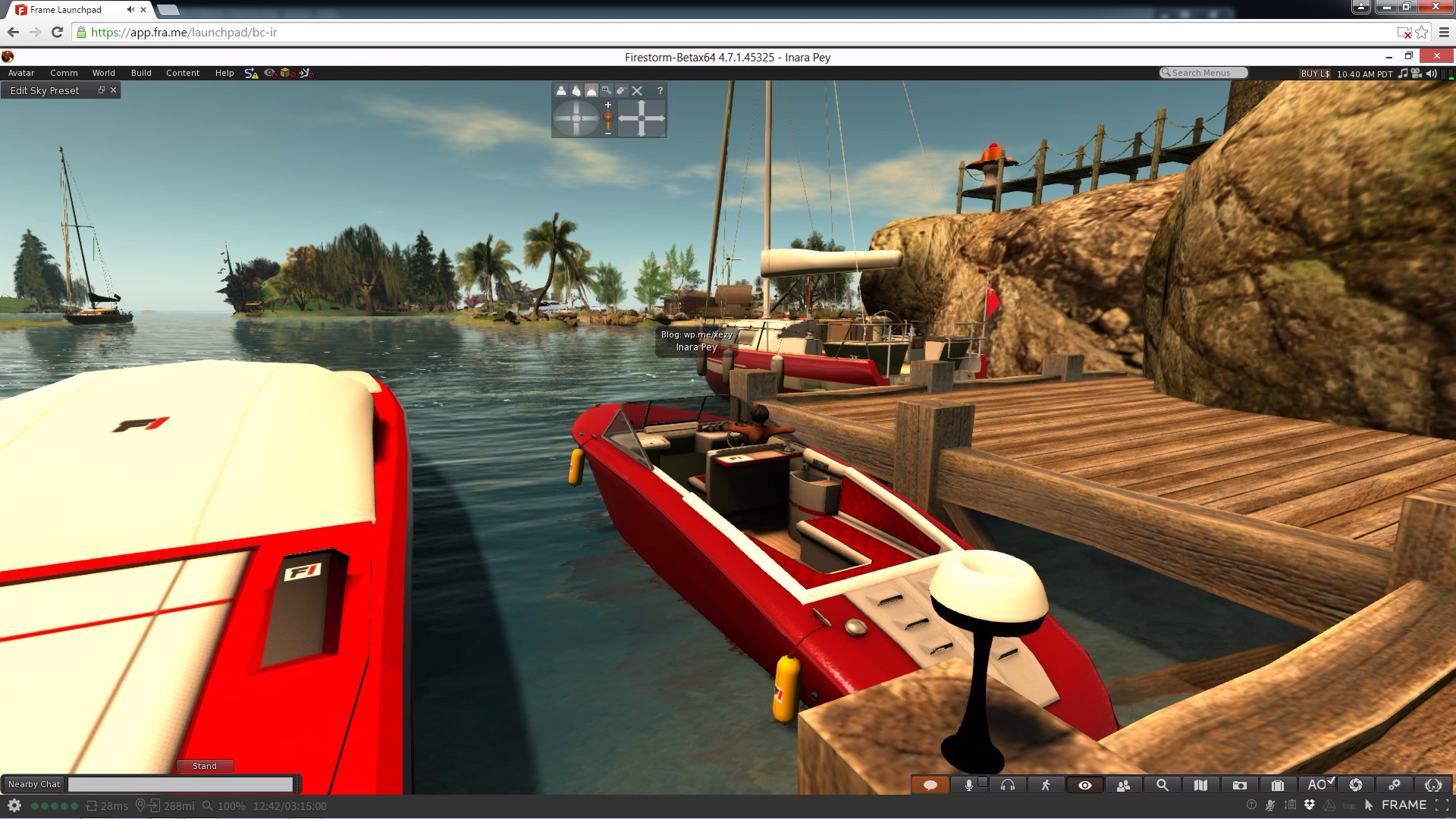
Running Bright Canopy on my Asus PCEE 1201N notebook with the graphics turned up to Ultra and everything enabled. The FPS was admittedly hovering just under 20, but given the Asus normally only manages low single-digit FPs nowadays with everything turned-off in the viewer – this is impressive
As well as announcing Frame’s direct involvement in Bright Canopy, which will see Jerri Glover continue her involvement in the project as a community volunteer, the press release also confirmed that there will be a special celebratory party at the company’s in-world location in Second Life to both celebrate the re-launch of the service back in September, and this latest news:
To celebrate, we will finally have that big relaunch party we’ve been promising with awesome gifts created just for the event. Come join us to celebrate. Where: Bright Canopy Island. Time: December 12 at noon SLT (That’s 12/12 at 12:00).
For my own part, and having been privileged to have played a small role in Bright Canopy’s initial start-up and development, I’d like to offer my congratulations to Jerri and Bill, and also to Nikola.
You can read more about Bright Canopy, as I’ve covered developments in this blog, by following this link.
On Sunday, November 29th, NiranV Dean released Black Dragon 2.4.4.4 (or 4.0.0.36527, depending on your personal preference). This release incorporates three significant features from the Lab, as well as Niran’s own nips, tucks, tweaks and changes.
First among the changes inherited from the Lab is the latest update to the Chromium Embedded Framework (CEF) implementation which is intended to provide modern media support (HTML 5.0, WebGL).
Of possible greater interest to the vast majority of users is the addition of the Avatar Complexity rendering and the graphics presets, as found in the Lab’s Quick Graphics RC viewer. I’ve previously provided two overviews of these, in August and June of 2015, so what follows is a brief summary and examination of Niran’s implementation, starting with the graphics presets capability.
Graphics presets, a capability contributed by Jonathan Yap (see STORM-2082), allows users to create, save and use sets of viewer graphics options designed to meet a specific requirement, with the intent to help with viewer performance, and which can be used by any account logging-in to SL using the viewer on which the presets have been created.
This means, for example, you can create a sets specifically for indoor use, limiting your draw distance, reducing levels of detail for things like terrain and sky and water reflections and so, boost your system’s performance when visiting stores, etc., while having another preset with all the bells and whistles enabled for photography. Then with a couple of mouse clicks, you can swap between these and any others you create to meet your needs as you travel Second Life, all without the need to fiddle with settings or relog.
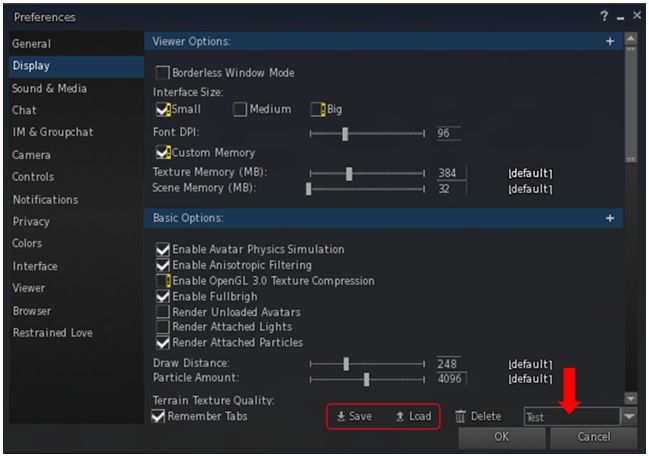
An issue with the official viewer’s implementation of graphics presets is that it requires the use of two rather clunky floaters which eat screen real estate. Niran avoids this by neatly integrating the core preset options (Save, Load and Delete presets) into the foot of the Display tab in Preferences. In doing so, he also makes creating a simple top-down flow through the Display tab options.
The new Graphic Presets Save and Load options can be found at the bottom of the Display tab in the Preferences floater. Simply add a name for the options you’ve set in the text box (arrowed) and click Save. To load a preset group when the floater is open on the Display tab, enter the name for the preset in the text box and click Load
This means that creating a new preset is simply a matter of running through the Display options, making sure those you want active are checked and those that you don’t need are unchecked, and that all relevant sliders are correctly adjusted. Then, when you’ve done so, enter a name for the preset group in the text box at the foot of the tab (arrowed above) and click the Save button – then repeat as required.
You can also load an establish preset group from here by typing the name into the text box and clicking Load. Any unwanted presets can be removed by entering the name and clicking the Delete button.
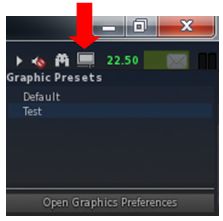
The Presets icon allow you to easily access your graphics presets
When it comes to swapping back and forth between preset groups, however, the quickest way to do so is via the Presets icon located in the top right of the viewer window. Hovering the mouse over this displays a list of all presets you’ve created; just click the name of the one you wish to activate.
This list also include a button which will open the Preferences floater at the display tab, allowing you to quickly set-up a new preset or modify and existing preset (just make your changes and save to an existing preset name to overwrite it).
As avatars can often be the single biggest impact on the viewer in terms of rendering, particularly in crowded places, Avatar Complexity has been introduced by the Lab as a mean by which those on lower specification systems can set a limit within their viewer for rendering particularly complex avatars (i.e. those with a lot of very high-resolution textures on them and their accessories, or using a lot of high-impact mesh and sculpt attachments etc). Any avatar exceeding this limit will then be rendered as a single, solid colour, vastly reducing the processing load on the user’s system. Because they are rendered as a solid colour, such avatars have been nicknamed ”Jelly Babies” after the sweet (candy) of the same name.
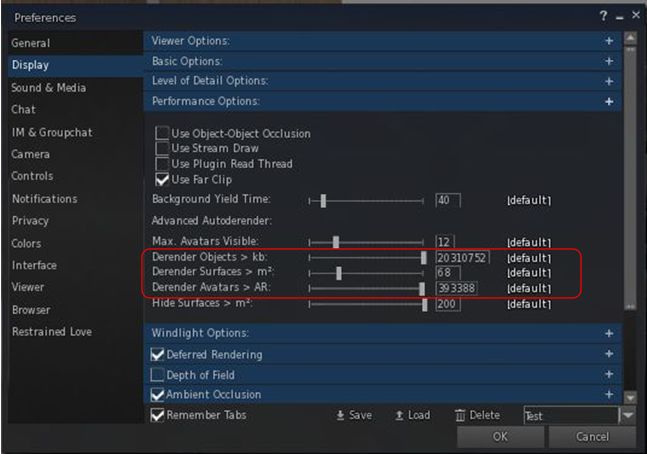
Within the official viewer, the control for Avatar Complexity is a single slider (Maximum Complexity) which controls avatar rendering. Within Black Dragon, Niran control is seemingly split between three sliders, Derender Objects > Kb, Derender Surfaces > m2, and Derender Avatars > AR. and some juggling between them may be required to achieve optimal results, if you play with all of them.
Avatar Complexity in Black Dragon
Avatar Complexity in the official viewer is still not perfected; this is reflected by the fact that avatars can often remain Jelly Babied even when Maximum Complexity is set to No Limit – you have to disable avatar imposters to get avatars stuck like this to render correctly (or relog). Black Dragon didn’t seem to exhibit this problem when I was fiddling with it,
This summary is published every Monday, and is a list of SL viewer / client releases (official and TPV) made during the previous week. When reading it, please note:
It is based on my Current Viewer Releases Page, a list of all Second Life viewers and clients that are in popular use (and of which I am aware), and which are recognised as adhering to the TPV Policy. This page includes comprehensive links to download pages, blog notes, release notes, etc., as well as links to any / all reviews of specific viewers / clients made within this blog
By its nature, this summary presented here will always be in arrears, please refer to the Current Viewer Release Page for more up-to-date information.
Project Azumarill (HTTP updates) RC viewer updated to version 3.8.7.308134 on November 25 – a complete replacement of the under the hood HTTP infrastructure within the viewer (download and release notes)
Black Dragon updated to version 2.4.4.4 on November 29th – core updates: incorporation of Lab’s Chromium Embedded Framework (CEF) support and Quick Graphics updates (Avatar Complexity and graphics presets) – release notes
V1-style
Cool VL Viewer Stable version updated to 1.26.16.1) on November 28th – core updates: fixes and improvements (release notes).
This summary is published every Monday, and is a list of SL viewer / client releases (official and TPV) made during the previous week. When reading it, please note:
It is based on my Current Viewer Releases Page, a list of all Second Life viewers and clients that are in popular use (and of which I am aware), and which are recognised as adhering to the TPV Policy. This page includes comprehensive links to download pages, blog notes, release notes, etc., as well as links to any / all reviews of specific viewers / clients made within this blog
By its nature, this summary presented here will always be in arrears, please refer to the Current Viewer Release Page for more up-to-date information.
Maintenance RC viewer updated to version 3.8.7.308081 on November 20 – core updates: some 38 fixes and improvements, including updates for some regressions introduced into the viewer with the current release viewer (download and release notes)
Project Valhalla (CEF media update) RC viewer version 4.0.0.307894 released on November 18 – replaces the LLQTWebKit system used in the Web media plugin with one based on the Chromium Embedded Framework (CEF) (download and release notes)
Vivox RC viewer version 3.8.7.3.8.7.307744, released on November 17 – corrects a number of Voice quality and connection issues on both Windows and the Mac (download and release notes)
Firestorm updated to version 4.7.5.47975 on November 17th – core updates: parity with LL 3.8.6 code (notifications viewer), wide range of additional features, fixes and improvements (release notes)
Kokua updated to version 3.8.6.37336 on November 17th – core updates: parity with LL 3.8.6 code (notifications viewer) and RLV 2.9.15.1 (release notes)
V1-style
Cool VL Viewer Stable version updated to 1.26.16.0(b) (Windows and (Linux)) on November 21(/22) – core updates: experimental CEF plugin (QTWebkit default media service) + fixes and improvements (release notes).




 Inara Pey: Living in a Modemworld