METAbolt updates to 0.9.71.0

Metabolt-logoMETAbolt is a lightweight text-based client for Second Life and OpenSim offering a range of features and capabilities. At the start of the year, there had been concerns that due to the long delay between updates (the last being August 2013), work on the client had stopped.

However, as I reported in February, this was not the case, but rather CasperTech were stepping-in to take over the project, as was announced on the METAbolt website at the time.

While it has taken a while for things to move forward since then, the initial interim updates from CasperTech have now started to appear.

The updated METAbolt log-in / splash screen highlighting the fact CasperTech are now maintaining it (Feb 2014)

The first of these was to update METAbolt from release 0.9.69.0 (Beta) to version 0.9.70.0 (release notes) on June 13th. As an interim update, this release did not bring with it new features or capabilities, but focused more on bug fixes and under-the-hood updates:

  • Bug fixes from CasperTech and contributed by users – for which CasperTach pass on thanks
  • The removal of x64 support – the viewer is now 32-bit focused and installs into C:\Program Files (x86) by default. The reason given for this is, “If METAbolt uses over 4gb of memory, it’s really not doing its job as a lightweight text client. Let’s use faster 32-bit pointers instead!”
  • Initial work on providing Mono support for Linux and Mac compatibility, although as the release notes state, it will be a while yet before this is complete

As this release resulted in an issue with METAbolt plugins, June 14th saw the release of version 0.9.71.0 (release notes) which, as well as fixing the plugins problem, also added a digital signature to the installer to prevent any security warnings from popping up on download.

Both of the releases present METAbolt as an installer .EXE, rather than packaging them as a ZIP file containing the installer and support files, as with previous versions. A little more work is required on cleaning-up some elements, as the installer does still refer to “METAbolt (64 bit)” and defaults to naming the installation folder “METAbolt (64 bit)” under Program Files (x86). However, this is purely a cosmetic thing, and not something that interferes with using the client.

The latest releases mostly contain under-the-hood updates and bug fixes. However a major code refactor for METAbolt is underway

Given the focus with these updates is on under-the-hood changes, the look and feel ofMETAbolt remains largely unchanged from earlier recent releases, other than the revised log-in / splash screen. Which is not to say additional work isn’t already underway.Tom Mettam, now leading the METAbolt project indicates that there is a major code refactor underway; as a part of this, CasperTech apparently plan to offer “bounties” for people willing to assist with the work. Those interested are advised to keep and eye on the Issues section of the METAbolt GitHub tracker for more information.

While I have not covered every release of METAbolt through this blog, those unfamiliar with the client may want to read my initial review, mush of which still appears to be relevant, and check the METAbolt category of this blog for those updates I do have.

Related links

Calling viewer developers: help enhance and improve SL Go!

SL go logoOnLive, the company behind the revolutionary SL Go service which streams the SL viewer and  SL content directly to the user’s computer or Android device, is looking to supplement the development of their version of the viewer by hiring contract developers to help with fixes and new features.

Since its introduction in March 2014, SL Go has proven popular among SL users, and OnLive have sought to improve the service in order to better meet users’ needs. In April 2014, for example, the company introduced a new pricing model in response to users’ feedback, and on Tuesday June 3rd, the company announced that the original 20-minute free trial period had been replaced by a 7-day free trial.

SL Go by OnLive: the full functionality of Second Life as seen on a Nexus HD 2013

Now, conscious of the pace with which the SL viewer is developing, OnLive want to ensure their viewer keeps up-to-date with developments coming out of the Lab and – potentially, as things progress over time – incorporate some of the functionality seen in other TPVs.

“We are looking to move forward with SL Go in many ways,” Dennis Harper, the Senior Product Manager for SL Go at OnLive informed me when he contacted me about this move. “The first order of business would be to merge our code to the latest branch of the SLV code, bringing SL Go completely up to date. Then, it becomes more features.  I’d like to do a number of tweaks on the UI and camera to make it easier to use on a tablet.  Then voice chat would be a huge addition.  The text chat system needs an overhaul.”

The work would be offered on a paid contract basis, and subject to applicants passing an interview process. However, the benefits could be far-reaching, as Dennis pointed out to me, “I would think that this would be a fantastic opportunity for developers,” he said. “They would get to create cutting-edge technology and work with a world-class development organisation.”

So, if you have a solid track record of viewer code development and enhancement, and you would like to be involved in a project at the very cutting-edge of viewer development and implementation, then OnLive would like to hear from you.

To make your interest known, please submit an e-mail with a brief summary of your background and experience to Dennis Harper, Senior Product Manager, OnLive, at this address: dennis.harper@onlive.com.

Related Links

OnLive extend SL Go’s free trial period to 7 days

SL go logoImportant note: The SL Go service is to be shut down on April 30th, 2015. For more information, please read this report.

On Tuesday June 3rd, OnLive announced that with immediate effect, the trial period of their SL Go service, which provides a full Second Life viewer experience to both computers and android devices, will be extended from 20 minutes to a full seven days for those who sign-up to the service.

The OnLive announcement came via Dennis Harper, OnLive’s Senior Product Manager for SL Go, and reads in full:

OnLive will now be offering new SL Go users a 7-Day Free Trial with sign up for an ‘unlimited access’ subscription package.  A valuable piece of feedback from the Second Life community has been that the 20 minute free trial is not sufficient to get a true experience of SL Go.  Now new users can try SL Go free for an entire week, experiencing Second Life on their Android tablets or seeing how SL Go can render ultra-high graphics even on a lower powered laptop computer.

Impressions of SL Go from the Second Life community have been brilliant so far, and this new 7-day Free Trial will hopefully encourage even more players to check it out.

Dennis Harper
Sr. Product Manager, OnLive

The SL Go service streams Second Life, including the viewer, directly to the user’s system or device. Because all of the processing occurs within the OnLive SL Go servers, and the fact that there is no viewer to install locally, SL Go is an ideal solution for those needing to access Second Life from low-end computers or who wish to access SL from a suitable android tablet while on the move.

SL Go now features a 7-day free trial period for subscribers

Since its introduction in March 2014, the service has proven popular with users, but has also received some criticism – which has been heard and reacted to by OnLive. In April 2014, for example, and a month after launching the service, the company announced a new pricing structure for the service directly in response to user feedback concerning the original pricing system.

The original 20-minute free trial period offered to new subscribers also came in for criticism – more so after the pricing change -, with users feeling that it wasn’t sufficiently long enough for them to gain familiarity with using the service, particularly from a mobile device when using the on-screen UI overlay. Extending the trial period is a direct response to this criticism and should allow users more than enough time to familiarise themselves with the service.

Second Life user Mondy Bristol has produced a video showing SL Go in use on her Nexus 7 (2012).


CtrlAltStudio 1.2.1: Xbox 360 Controller support

CAS-logo Update, May 25th: Dave has released an update to the Windows version of CtrlAltStudio 1.2.1 to correct some issues with the controller not being recognised by the viewer. The updated version is 1.2.1.41169, available from the same CtrlAltStudio blog post as linked to in this article.

On Monday May 12th, Dave Rowe (Strachan Ofarrel in SL) released CtrlAltStudio version 1.2.1.41169 (Win) and 1.2.1.41167 (Mac). This brings with it a number of fixes and updates, and sees CtrlAltStudio maintain parity with the Firestorm 4.6.5, which appeared on Sunday May 11th. Most intriguingly, it includes support for the Xbox 360 controller, which appears to be aimed at reducing reliance on the keyboard for a range of tasks when wearing an Oculus Rift headset (although it is by no means constrained to just that use).

The release is for both Windows and Mac, and it is strongly recommended that a clean install is performed.

Xbox 360 Controller Support

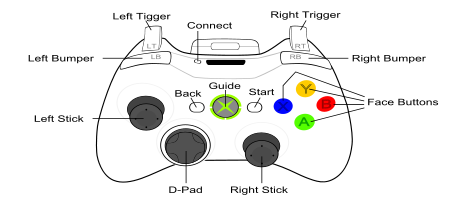
CtrlAltStudio 1.2.1401169/67 allows you to use the Xbox 360 Controller to walk, fly, use flycam, orbit about points in 3rd person view, click on objects and use context menus with objects. It works in 3rd person view and Mouselook and can be used with normal, stereoscopic 3D, and Oculus Rift display output. However, please note that so far, this has only been tested on a Windows system.

By default, the controls are configured as follows:

Xbox 360 Controller buttons
Back: Toggle flycam on/off
Start: Toggle Left / Right Sticks between avatar & cursor movement
Avatar Movement Cursor Movement
Left Stick: Move forward / back / left / right Cursor up / down / left / right
Right  Stick: Change camera pitch and roll Zoom view
Left + Right Stick Fly down / up No Action
Back + Start: Toggle Rift or 3D stereoscopic 3D on/off
Left Stick click: Jump up / stop flying
Right Stick click: Toggle 1st person view
Left / Right Bumpers: Left or right mouse click (configurable by user)
Y button: Escape
X button: Control
B button: Shift
A button: Alt
D-pad: Not used

Once connected to your computer, the Xbox 360 Controller should be calibrated (e.g. by using the device’s properties provided via Windows’ Devices and Printers folder). It can then be enabled for use with SL by launching CtrlAltStudio 1.2.1 and enabling the controller via Preferences > Move & View > Movement > Enable Joystick and then using the Joystick Configuration button to configure it for SL.

Enable the Xbox 360 Controller and configure it as you would any joystick controller, via the Joystick Configuration options

Note that the settings displayed in the Joystick Configuration panel are not those supplied by LL; they have been adjusted to provide defaults specific to the Xbox 360 Controller.

Other Notable Updates

As well as the Xbox 360 support and parity with Firestorm 4.6.5 (reviewed here), this release of CtrlAltStudio also includes the following (again, please refer to the release notes for a full list of updates & any specific credits for them):

  • Fixed crashing with stereoscopic 3D display over HDMI when Set Output to 120Hz is checked
  • Fixed start-up in full screen overriding current display resolution so that can reliably use 720p stereoscopic 3D on a 1080p display
  • Fixed problems dragging physical objects
  • “Set output to 120Hz” display option only enabled on Windows, as it’s not used on other operating systems
  • Changed the minimum draw distance from 32m to 8m
  • Exiting flycam while in Riftlook  no longer causes the camera to start moving to the right
  • Improved the tool tips in the Rift display preferences
  • Avatar jumping at less than maximum walk speeds fixed.

I don’t actually have an Xbox system (360 or otherwise), so I cannot say how the controller works. However, Dave notes that BillyBob Snowpaw did a considerable amount of testing, so those with a controller shouldn’t experience anything untoward happening.

With Linden Lab continuing to work on the Oculus Rift integration. Given the problems inherent with using that HMD with a keyboard, it’s good to see that other options are being looked at by TPVs. while the Xbox Controller won’t help with typing, it would certainly appear to make avatar / camera / cursor movement a lot easier when used in combination with an HMD, and even with stereoscopic glasses.

Related Links

OnLive and LL announce new pricing structure for SL Go

SL go logoImportant note: The SL Go service is to be shut down on April 30th, 2015. For more information, please read this report.

In March 2014, Linden Lab and OnLive, the games streaming service, announced the open beta of OnLive’s new SL Go service, a means by which SL users could access Second Life via tablets and mobile devices using a full viewer streamed directly to the user’s device.

At the time of the launch, I was one of a number of people who were able to provide a review of the service, having been offered access to it ahead of the launch.

One area of upset with the service which quickly became apparent was the payment plan, which was based on a pay-as-you-go approach, with an hour of use costing $3.00, three hours $8.00 and ten hours $25.00. In response to criticism of the model, OnLive sought to make it clear through various mediums – notably Designing Worlds and Drax Files Radio Hour – that the plan was only an initial step, a means to gain data and feedback, and that options such as subscription plans had not been ruled out. The service also came in for criticism that it was only available in the USA, UK and Canada.

SL Go by OnLive: streaming Second Life to your tablet - but the initial pricing model caused upset
SL Go by OnLive: streaming Second Life to your tablet – but the initial pricing model caused upset

On Thursday April 3rd, OnLive followed-up on these comments by announcing they are both introducing a revised payment plan and extending the service to more regions.  Linden Lab also followed-up with a post of their own. The OnLive announcement reads in part:

Since launching the beta of SL Go about a month ago, OnLive reports they’ve seen a very positive response to the Second Life® Viewer for Android™ that allows users to access Second Life over wifi or 4G LTE on tablets and laptops. Today, OnLive has updated the SL Go beta with new pricing:
  • Monthly unlimited-use subscription for $9.95 (USD) / £6.95 (GBP). No contract and no commitment
  • Reduced hourly rate: $1 / £0.70 per hour.
The previously available offer of a 20-minute free trial still stands.

In addition, and with the announcement, SLGo is now available in 36 countries worldwide, including Austria, Belgium, France, Greece, Iceland, Israel, Luxembourg, Scandinavia – even the Vatican City! The full list of supported countries can be found in the OnLive blog post.

SL Go on my Nexus 7 HD + keyboard

Commenting on the move, OnLive’s Vice President of Product and Marketing, Rick Sanchez, said:

We’re grateful for the opportunity to support the Second Life community, and pleased to be working with such a passionate and creative group.  We look forward to further developing SL Go with their feedback and suggestions.

How popular this makes the service, remains to be seen. But for those on low-end computer systems who would like to have access to Second Life in all its glory, $9.95 might not be considered too much to pay per month until such time as they upgrade their systems.

Certainly, the $9.95 price-tag for the monthly is lower than the figure I had been anticipating following post-launch activities by OnLive; I’d been expecting the price to perhaps be on a par with their CloudLift service ($14.95 a month), which launched at the same time as SL Go. Similarly, dropping the pay-as-you-go rate to flat $1.00 per hour should make the occasional access via tablet or mobile device even more attractive you those who might need it. For those who are interested, and following-up from my initial review, I also have an article about running SL Go on a Nexus 2013 HD.

CtrlAltStudio 1.2.0 released

CAS-logoOn Wednesday March 26th, Dave Rowe released CtrlAltStudio version 1.2.0.40751.

While the release does not contain significant updates to either Oculus Rift support or to the stereoscopic 3D capability, the version number change 1.2, as Dave notes, serves to reflect the convergence of the 1.0 and 1.1 Alpha versions, and also brings CtrlAltStudio to parity with Firestorm 4.6.1.

With regards to the latter, this means CtrlAltStudio now includes all updates found in the  Firestorm 4.5.1 and 4.6.1 releases, including a number of significant LL-driven viewer updates, such as:

  • Fitted mesh support – for those unfamiliar with Fitted Mesh, I have an overview here
  • HTTP updates for improved rendering
  • Request Teleport feature
  • Region Restart updates
  • SL Share (link to Facebook)
  • CHUI updates
  • Particle capabilities, including particle muting
  • Materials support
  • Temporary attachments no longer get removed improperly
  • and more

(Further information on the recent Firestorm releases, please refer to my 4.5.1 review and my  4.6.1 review.)

In addition to the above, the release includes a number of fixes:

  • Fixed turning off Basic Shaders while in Riftlook messing up display.
  • Fixed Kinect fly up and fly down gestures sometimes being swapped when shouldn’t be.
  • Removed –riftlook command line option which wasn’t working properly.

An important point to note, again as Dave points-out, is that this release does not include any of the Lab’s own Oculus Rift support – for the simple reason that the code hasn’t been made available for integration into TPVs.