Niran’s Viewer 1.30: pushing the envelope

Note: Niran subsequently released versions 1.31 and 1.32 following this review. Both contain tweaks and additions to 1.30, including further floater layout alignments (most notably the People floater (1.31) and the Merchant Outbox is translated and functional in German (1.32). You can catch these updates on Niran’s blog

NiranV Dean has released version 1.30 of Niran’s Viewer, which is described as “a complete overhaul” – and there is enough that has gone into it to justify that comment.

The Viewer has been something of a differentiator in the TPV world on a number of fronts: elements of UI presentation are markedly different (such as the menu presentation and things like the Build floater), the Viewer also offers a huge amount of nips, tucks, tweaks and changes to the graphic end of things which, while geared towards higher-specification machines, offer much that is of benefit to machinimatographers and photographers. Finally, and as the Viewer has developed, NiranV has not been afraid to seek to incorporate more of a game-like approach to things.

The changes in this release are extensive – and some are not always obvious (such as localisation in the log-in and log-in progress screens),, which doesn’t make them any less time-intensive to produce. I’ve aimed this piece at covering the more visible changes.

Over-the-Shoulder

The first noticeable difference between 1.30 and earlier versions is that the camera default position has been moved to an over-the-shoulder view. This may not be to everyone’s liking, but it does offer an improved world-view in many respects. As someone already using Penny Patton’s camera offsets to achieve a similar result, I found the look very familiar and comfortable when I logged-in, although the camera position is a little closer than I’m accustomed to seeing. This isn’t a problem until one uses the DOWN ARROW / S-key for moving backwards; while this now turns your avatar around, it also tend to have your avatar well over to the left on-screen, making navigation even over a short distance a little harder. For those that aren’t keen on these views, it’s obviously possible to reset to a more “traditional” view.

Staying with the camera for a moment, mouselook also gains the ability to use the SHIFT key in combination with mouse movements to smooth the motion of the latter on-screen and provide precise tracking. Handy for those in combat / shooting situations.

Floating Away

NiranV’s work on redesigning various floaters continues. With this release, People and Mesh Upload come in for attention.

The People floater joins Build in going horizontal – – and this works particularly well with Nearby, wherein the people list and mini-map can be displayed without having to have a long vertical panel opening on-screen.

Revised People floater

Another nice touch with this is that both ONLINE and ALL are displayed side-by-side (although may require extra scrolling if you have an extensive list of friends!).

The Mesh Upload floater has been compressed and the lay-out tided so that it also doesn’t require so much on-screen real estate. The result is a clean, compact approach that is still relatively easy on the eye, although the ability to resize it via dragging might not go amiss for those who would prefer it to be a little bigger.

Mesh upload

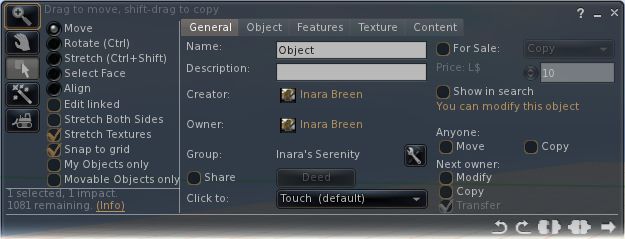
The Build floater has been further tweaked and again provides a cleaner display and appears less cluttered than early iterations.

Menus and floaters have also had their transparency adjusted to give a consistent feel right across the Viewer, and to aid in readability.

“Pick a colour, any colour…”

Perhaps the biggest single update in terms of the ability to customise the Viewer is that users can now set the colour and transparency of every common floater in the Viewer and set colours against every common widget.

UI colour and transparency options for floaters

Changes to floaters require a Viewer restart to take effect, while changes to widget colours will be applied immediately.

For those missing KLee’s Viewer, a small nod has been added to Niran’s 1.30: the UI buttons can now by displayed in KLee Viewer style.

And there’s more…

As well as these changes, 1.30 also sees:

  • More work on translating the UI for German and French users
  • Improvements and tweaks to various Preferences panels
  • Fixes to media roll-off and max sliders
  • Incorporation of the latest Shining fixes
  • Text compression (which may help with some crash issues on older cards, but not recommended for ATi systems)

A full list of changes can be found at the end of the blog post on the release.  Gone from this release is the “main menu” option and the SL Kinect2 option. The former is being reworked, the latter may be gone for good due to compiling issues with Linux.

Feedback

I’ve always liked Niran’s Viewer – the “dares to be different” approach has meant that the Viewer has been very innovative and something very different from “standard” 3.x-based offerings. My experience has suffered over the last few releases because my PC has struggled to manage the Viewer, particularly when running some of the more advanced deferred rendering options. Whereas early versions ran very well – frame rates up in the mid-30s sans deferred options, more recent releases have been barely half that.

Release 1.30 goes some way to reversing this trend, allowing me to achieve frame rates of between 28-32 with 3 or 4 others on-sim, and deferred rendering is back on a par with earlier releases (around 8-9fps). This still isn’t as fast my PC can manage with other Viewers, but it’s a lot faster than I’ve enjoyed of late with Niran’s, and as such is very welcome.

In all, the Viewer runs smoothly, exhibits no proclivity towards crashing on me (it rarely has), and I had no lock-ups when taking lots of snapshots with deferred rendering turned on (an issue I tend to get with other viewers, particularly if I move the camera around a lot with the snapshot floater open when running in deferred).

In terms of the UI changes, the ability to make the UI multi-hued may find a lot of appeal among those who like a highly individual look to their Viewer. For me, I like the general tidying done to the Build floater – which is starting to grow on me – and I very much like the new People floater, which really maximises the use of space. The new default camera position is also something that appeals, given I already use something similar, although I’d personally prefer to set my camera back a little further.

Overall, a lot of work continues to go into this Viewer, it’s still one of my two preferred Viewers when it comes to my amateur attempts at photography, and given I’ve got a slight boost in performance with this release, it may well see a lot more use again as I hop around the grid exploring and snapping pictures.

Kudos!

Related Links

Call for Imprudence volunteers – meeting this weekend

When the decision to proceed with the development of Kokua was made, a problem remained for the Kokua / Imprudence team in how to support those users in the wider metaverse who still prefer to use – or even rely on – Imprudence. While the team hoped to be able to bring the 1.4 release of Imprudence to maturity, it was noted that this would only be done if it did not impact work on Kokua.

Following on from this, Onefang Rejected, aka David Seikel who is known to many as the developer of the Meta-Impy Viewer (itself based on Imprudence 1.4) stepped forward with a stated desire to continue Imprudence development.

As a result of Onefang’s willingness to volunteer himself, the Kokua team have opted to bring him into the fold as a team member, where he can hopefully build and lead an Imprudence-focused team that will work alongside of, but independently from, the core Kokua team.

To help establish this new Imprudence team, the Kokua / Imprudence project has put out a call for volunteers, requesting that anyone interested in getting involved in Imprudence as a  developer or tester or some form of support category put themselves forward. Those wishing to join the team are asked if they can attend the next All Hands meeting, which will be devoted to Imprudence and its future.

As ZATZAI (Sean Greyhound) put it in the Kokua blog, “This will not be a ‘reboot’ of the project but a continuation. So for all of you out there who lamented the ‘death’ of Imprudence, here is your chance. Join us this Sunday, be you a potential developer or tester and help us to bring Imprudence into the future alongside Kokua.”

The meeting will take place at the usual time and venue: 12:00 midday SLT (20:00 GMT), Sunday February 26th at the Hoagie sim of the 3rd Rock Grid. Requests for further information should be directed to the Kokua / Imprudence blog.

Niran’s Viewer 1.23.5 and more: daring to be experimental

NrianV Dean has been putting in a lot of work on Niran’s Viewer over the past couple of months, with new versions rolling-out fairly regularly. Many of these have experimental functions added to them – so much so that NiranV has taken to jokingly referring to the development work as coming from Niran’s Lab. He’s been keeping me appraised of updates and changed almost daily, but in-world projects and real life concerns of late have meant that I’ve not really been able to take Niran’s Viewer for a proper spin since release 1.13.

Releases 1.24 (Feb 14th) and 1.25 (Feb 15th – gives you some idea of the speed of updates!), have given me cause to play a little bit of catch-up. Release 1.24 was itself essentially a series of fixes and tweaks to the 1.23.5 release (also made on the 14th February), while version 1.25 adds version 0.2 of Qarl’s Parametric Deformer to the Viewer and includes some graphics related tweaks. You can therefore take this review as more-or-less a n outline of the key elements from all three of these releases (1.23.5 through 1.25).

If you’ve previously installed Niran’s Viewer – particularly 1.23.5, it’s probably best that you opt for a completely clean install of either 1.24 or 1.25, although I do comment on a couple of pre-1.23.5 updates as well.

There are two flavours of the Viewer EXE on offer – dedicated 32- and 64-bit variants. As Niran’s is compiled Large Array Aware, I’m not entirely clear on the difference, but I gather the 32-bit version of the EXE was a special request.

On start-up, there are no overt changed to the Viewer’s UI: as is common for Niran’s, the buttons are split between the left and right sides of the screen, the Navigation / Favourites bars are on, and the Destination Guide initially opens by default, as is common for most V3.2-based Viewers.Which is not to say the changes aren’t there.

Navigation Bar: Now You See Me, Now You Don’t

For those that both like to use the Navigation / Favourites Bar but at the same time find it slightly intrusive on their world view, Niran’s now includes a nifty auto-hide function. Enabled through PREFERENCES->VIEWER->UI SETTINGS, this will automatically hide the Navigation / Favourites Bar when the mouse isn’t positioned over it, and replace it with the Mini-location Bar. hovering the mouse at the top of the screen automatically displays the Navigation / Favourites Bar once more. Neat!

“Are you lookin’ (down) at me….?” – Camera Updates

On the subject of views, the Camera options have been altered. NiranV is keen to introduce more game-like elements to the Viewer – we’ve seen it with the experimental “Main Menu” (F1 – of which more below). Now with the camera, he’s replaced the traditional Front view with an overhead view. As a slight aside: does anyone actually use the Front View? I always tend to find myself orbiting the camera around myself.

Looking down on oneself

To me, the initial view is somewhat high, so many using the option are liable to find themselves using the Camera View Angle slider (PREFERENCES->ADVANCED-> CAMERA) to close the distance between themselves and their avatar.

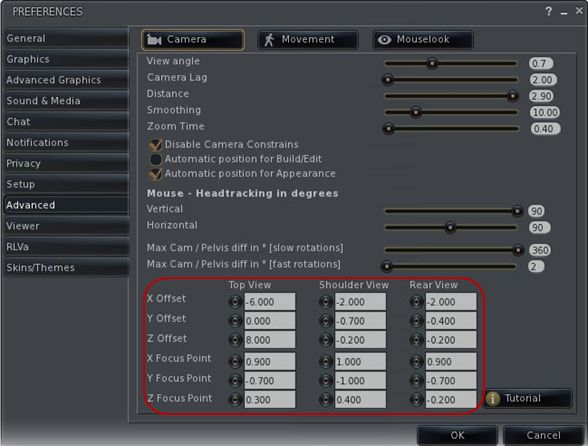
Staying with the Camera and Preferences, 1.24 introduces something I’ve been waiting for in Viewers for a goodly while: the ability to alter camera offsets without the need to twiddle about with Debug options. As many know, I’m a firm convert to Penny Patton’s Camera Offsets for SL (if you haven’t tried them, you should), so it’s great to see a Viewer that includes the ability to change offsets on-the-fly through Preferences. Kudos, NiranV!

Camera offsets within Preferences

Staying with Preferences

Regular Niran’s users will noticed as well that the entire Advanced tab has been revamped in this release, with Camera, Movement and Mouselook options separated into their own button-activated sub-tabs. This also marks a departure from the more usual “sliding panel” approach seen to date within Niran’s Viewer with regards to sub-tabs (and which can still be seen within the Viewer tab, for example. Referring to this re-vamp in his blog, NiranV states the new button approach may be added to the Viewer and Advanced Graphics tabs should it prove popular with users.

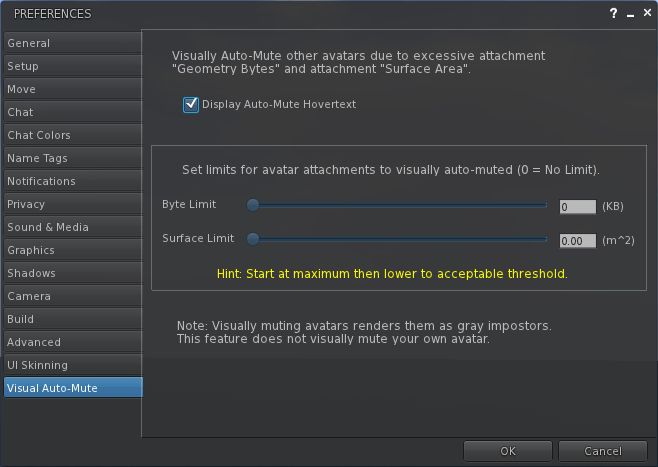
Also new to the Viewer (from version 1.22 onwards), and found in the Advanced Graphics tab are control from the new Visual Auto-mute function, complete with colour-codes guides to possible settings.

Visual Auto-mute controls

Avatar Animations

Work has been done around avatar animations with this release. Most notably for those developing animations, release 1.24 of Niran’s provides full support for uploading .ANIM files, as supplied by Jonathan Yap (see STORM-1803). Niran also adds his own touches in the form of options to control how your avatar reacts when being rotated. NiranV has included a couple of videos to demonstrate the functions, and I’ve taken the liberty of embedding one of them here.

Build, People and Rendering

Having just completed a vast amount of work on an obsession of mine, which involved working with some relatively small cross-section prims, I found myself constantly annoyed at the way in which the white stretch anchors repeatedly blocked access to the red, green and blue X, Y, Z stretch points on a prim. NiranV offers a solution to this problem: providing WASD is set to movement (rather than starting chat), you can press and hold the X key to eliminate the white “corner” anchors to ease access to the X, Y ands Z stretch points.

NiranV has also revised the People floater with this release, replacing the FRIENDS tab with an ACQUAINTANCES tab, his argument being most people we have on our lists are more like acquaintances than true friends, and one cannot fault his logic on this in many respects. Also with this release, the Acquaintances List will show the full set of permissions you’ve set for friends (ability to map you, etc.).

Finally, and also coming out of Niran’s Viewer Labs, is a new rendering option that may have potential use in the future. NiranV explains it thus on his blog: “One thing big has been done here except Tofu´s new project which has been merged, it’s called worldspace semi-random macro-dappling, which creates random big darkness spots on a SIM and your Avatar depending on the sun position. Later this could be combined with the cloud X and Y movement to create a good but faked cloud shadow effect!” At present only the depth / darkness of the effect can be altered – but it will be interesting to see where this goes.

The Main Menu

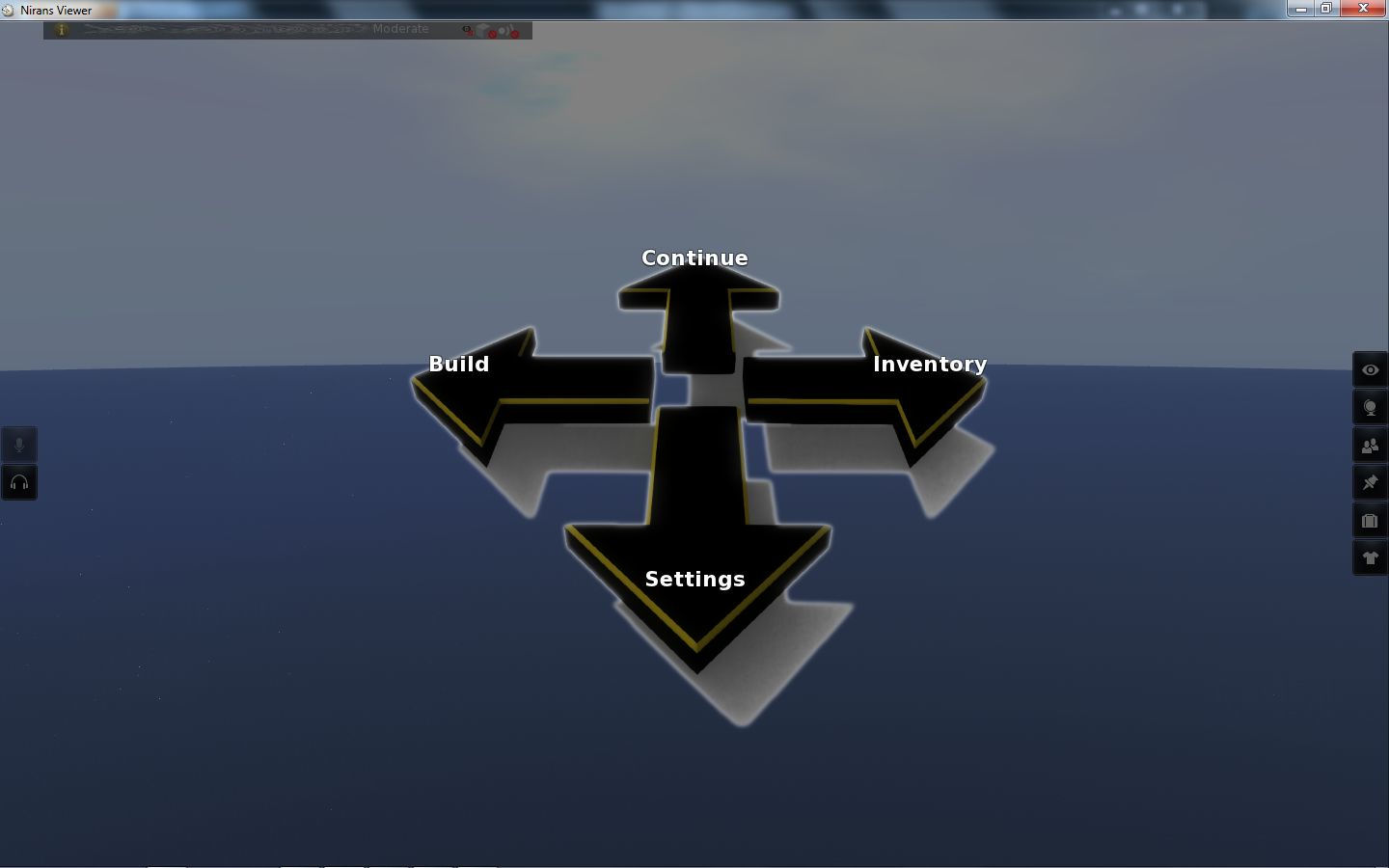
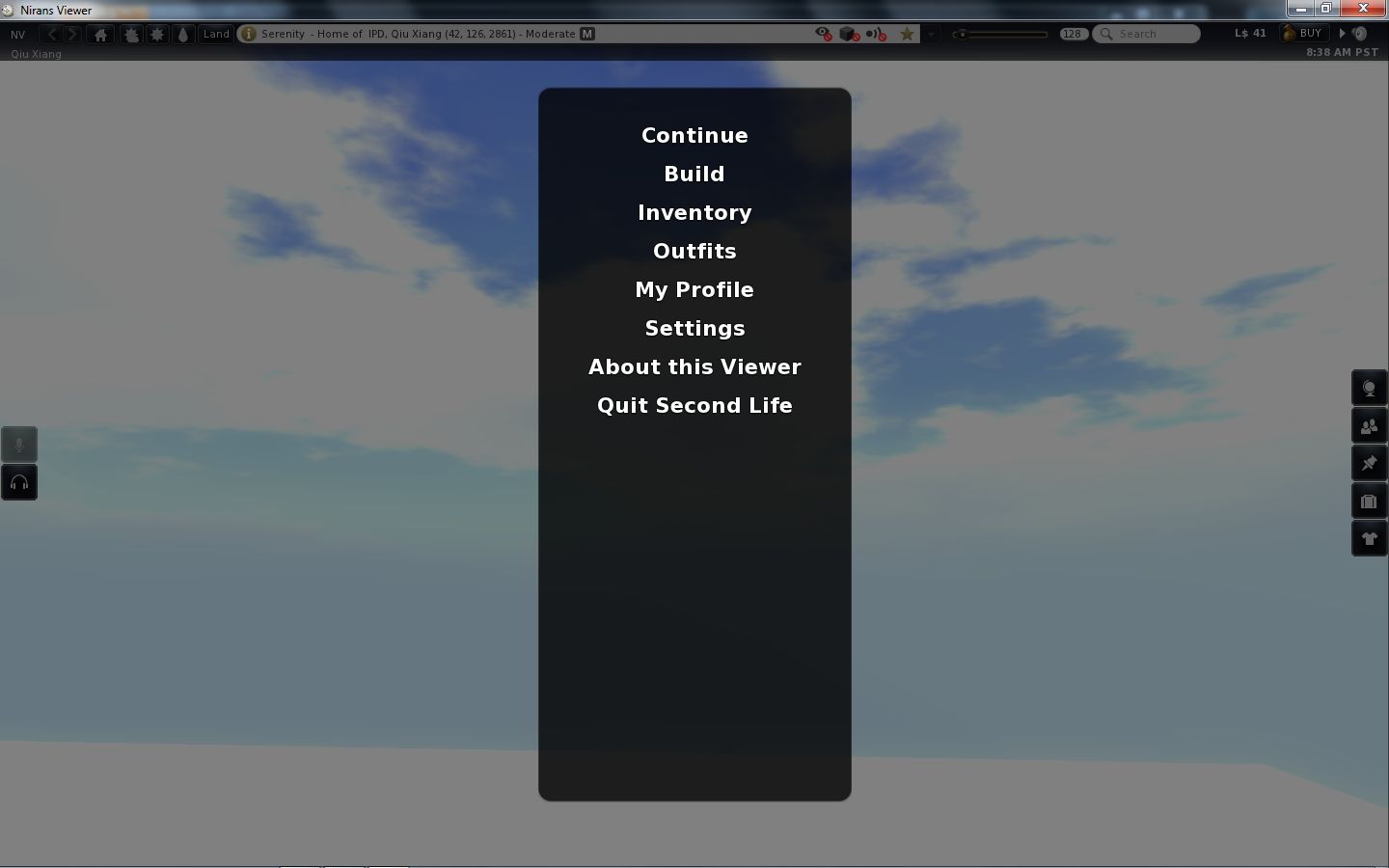
Finally, Niran has been working on his Main Menu idea for the last few releases. I first covered this in my review of release 1.13. Back then I commented on the fact that using ESC to invoke the menu wasn’t perhaps the best choice, given that key is traditionally associated with the Camera. NiranV took this on-board, and the menu has, for the last few releases, been accessed by pressing F1. The style of the menu has also been changed, as shown below.

Main Menu – “compass”

The look is apparently borrowed from a popular video game. I’ll be honest and stay that while I have no idea how well it has gone down with regular Niran’s users, I actually find it jarring and incongruous compared to the rest of the Viewer, factors that tend to make me shy away from using it.

Performance

Niran’s Viewer is intended for high-end machines and continues to get tweaked in that direct and further releases come out. As such, it’s a little unfair of me to comment on performance in some respects, because my hardware is well below the recommended hardware specifications for the Viewer (the closest I get to meeting them is that I’m running a quad-core CPU). My graphics card in particular now struggles mightily with Niran’s if I attempt to use deferred rendering & shadows, a factor that has, sadly, prevented me from using the Viewer quite as much as I might otherwise like.

That said, I’ve put the Viewer to several hours of reasonable use, bouncing around the grid, trying different environments, playing with the settings (as some of the screen caps here will show!) and generally poking and prodding, and the Viewer has taken it all in its stride (albeit without deferred rendering). The changes NiranV is introducing to the Viewer are both novel and leading-edge. There are some that are very practical – for me, the camera offsets in Preferences are a great addition, and those wishing to make use of the Visual Auto-mute option will find the inclusion of both that as a set of sliders and the annotation for settings that goes with it as being of benefit. Other additions – such as the top-down camera view are potentially more specialised, and it’ll be interesting to see how popular these prove to be for a wider audience of user.

Related Links

Increasing your Zen: Viewer updated

Update January 27th, 2013: The Zen viewer has been discontinued by its creator.

Zena Juran released a new version of the Zen Viewer over the weekend – something I almost missed due to being busy with other things in-world (of which I’ll say more another time). As mentioned in my original review earlier in the month, Zen is aimed at bringing an enhanced build experience to the V3.2 environment.

Currently still only available for windows, this new release (3.2.8.7) remains based on LL 3.2.8 Development / Project Viewer code, but sees some major changes and additions in terms of the TPV code that has been merged.

Installation and Start-up

The EXE retains more-or-less the same size as the 3.2.8.6 release, and the Viewer installs the same, complete with dedicated user folders and cache locations (rather than using the SL defaults).

Logging-in reveals little in the way of changes between 3.2.8.7 and earlier releases – other than the fact that the UI buttons are no longer transparent (more on this in a moment), the layout is the same as 3.2.8.6 and prior releases. However, open up Preferences, and the updates immediately make themselves apparent.

New Preferences Tabs

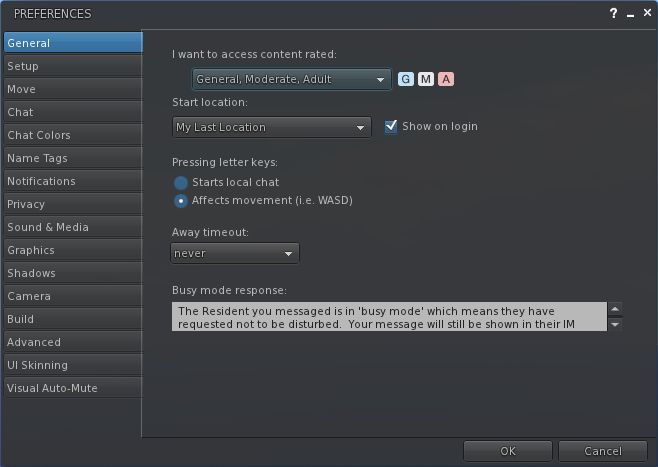
In my original review, I commented that Preferences were little-changed from V3.2, but Zena would be adding to the list of capabilities over time. Well, she has – and massively so! At the same time she’s also re-arranged things somewhat.

Expanded Preferences

Release 3.2.8.7 sees one tab in Preferences removed (LSL Pre-processing), and five new tabs added, together with an overall re-ordering of things which may initially catch used to operating by wrote a little off-guard (Graphics, for example has gone from near the top of the tab list to fairly well down the order of things). This shouldn’t interfere with overall usability, however.

The five new tabs are (in the order displayed:

  • Name Tags: Pulls together the V3.2 (usually found in the General tab) and popular TPV options relating to name tags (setting colours, etc.) together into a single tab
  • Shadows: pulls-in the shadow options popular among TPVs, and which can be found in a variety of locations (a sub-tab under graphics, for example)
  • Camera: pulls-together “standard” options such as view angle & distance (from MOVE & VIEW),  disabling camera constraints (from the Advanced menu), depth of field on/off (duplicated from Graphics), and camera / DoF sliders again found in other TPVs
  • Build: presents  the Build enhancement tools first seen in the likes of Emerald / Phoenix, and now widely used in TPVs

Visual Auto-Mute

This is perhaps the most interesting change within Zen (and potentially the most drama-risk feature to pop-up in the Viewer code in general for a while), and is the first merge I’ve seen of a new functionality from LL that was recently released as a changeset (my apologies to other TPVs if they’ve in fact merged it as well, I’m still trying to catch up on 3 days of missed blogging and updates).

Visual Auto-mute

Essentially, this functionality allows you to set thresholds above which avatars with a very heavy load (high-res textures, complex attachments (multiple prims, flexi prims, sculpts, and what have you), etc., – but not scripts, which are a completely different kettle of fish) will not be rendered by your Viewer. Instead, they will appear as “grey ghosts”, similar to when you’ve muted someone; however, you will still be able to IM them and chat with them. This should theoretically reduce the load placed on the Viewer and your system in terms of rendering, and lead to an improved SL experience.

I’ve covered Visual Auto-mute elsewhere, so will not dwell on it further here.

Graphics Preferences

The Graphics tab in Zen’s Preferences has also been updated, with an improved overall layout, largely due to the removal of the low-med-high-ultra slider from the top of the tab (itself no real loss), although a full screen option has yet to appear.

Graphics tab updates

UI Skins and Button Transparency

This release sees the range of skin options (colours) expanded, with gold, purple and red being added to the original LL teal and Zen blue. It also appears that Zena has taken-up the comment I made in my original review about having the transparency of the UI buttons user-adjustable. This release sees an opacity slider for the buttons added to the UI Skinning tab – so while the buttons are initially solid on first-time start-up, you can adjust them to a level of transparency to suit your needs.

Zen Menu Updates

Zen menu

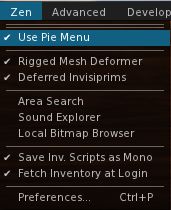
The Zen menu sees a couple of updates. The Notifications to Top for moving incoming notifications to the top right of the screen has gone (it can now be found in PREFERENCES->NOTIFICATIONS). This moves the Pie Menu option (on by default) to the top of the menu, while an option for accessing Preferences slips-in at the bottom.

I’d still prefer to see a button added to simplify accessing preferences, but this is still a logical addition that streamlines access to frequently used menu options.

Opinion

This release moves Zen up a notch. While performance is unchanged on my usual system (no surprises there given it’s still effectively the LL 3.2.8 Development / Project Viewer code base), the additional preferences options help make the Viewer more accessible and potentially feature-friendly to SL photographers who prefer something closer to the “official” Viewer rather than plunging into Exodus or Niran’s (although Zen does not have the advanced capabilities of either of these two Viewers, obviously).

The Build heritage for Zen is clear – drawing heavily on Firestorm in terms of floater layout and the availablity of popular tools. I’d personally still like to see the camera floater get some button functionality, and still am undecided on the complete removal of button-based functions from some of the menus. Some might find it feature-light compared to other TPVs (the list of what’s not there is still pretty much as it was for 3.2.8.6), but I don’t count this against Zen in any way. Overall this is still a Viewer that presents something of the best of both worlds – good, solid building capabilities wrapped up in LL’s 3.2 code. With it now listed in the TPV Directory, it’s worth a look by anyone who might be considering easing away from the official Viewer to take advantage of TPV-originated tools, but who doesn’t necessarily want to get swamped with additional features and options.


Niran’s Viewer: release 1.13

Update Jan 24th:  Version 1.14 is now available which fixes the snapshot floater iessue meantioned in the article, and which also see the Main Menu moved to F1 from ESC, thus resolving the camera / Mouselook reset issue also mentioned here. The download location remains the same.

Nirans-logoGood grief! I turn my back on SL for 1/2 a day to go shopping and take care of that “real life” thing, and what happens? Another Viewer update pops up! :).

NiranV Dean has been busy scribing away (do coders scribe, I wonder?) on Niran’s Viewer of late, with 1.12 appearing earlier in the week and now we have 1.13 arriving. NiranV’s aim with the Viewer is not to come up with the fastest (in terms of frame rates) or the most features and functions – but rather to focus on developing better graphics and a more flexible user interface. This combination has made Niran’s Viewer daringly different  – and release 1.13 continues with this.

Main Menu

On starting the Viewer there is also little sign of any changes within the release. However, tap ESC and you’ll receive an interesting surprise: the Viewer has a “main menu”!

Niran’s: Main menu

The options on the menu are self-explanatory, and NiranV clearly states this is only an initial pass at the menu – the style and layout will be subject to change, and constructive feedback on the idea is welcomed via his blog.

I have to admit that when the idea was first explained to me, I was sceptical as to its use – but I’m not sure I fully understood what NiranV was proposing. On seeing the menu, I can see that there is potential here. However, I’m not sure that using ESC is the right key function. While I understand it may be a common approach in “traditional” games (I’m genuinely not qualified to comment either way on computer games), it has to be said that ESC has long had a “traditional” use in SL: for resetting your camera view or popping out of ML. Ergo, there is a risk here that putting ESC to another use is going to cause frowns among some users, other options for getting into / out of ML notwithstanding.

I did have problems with the My Profile and Outfits options on the menu (neither worked for me), but again, this is an experimental feature.

Snapshot Floater

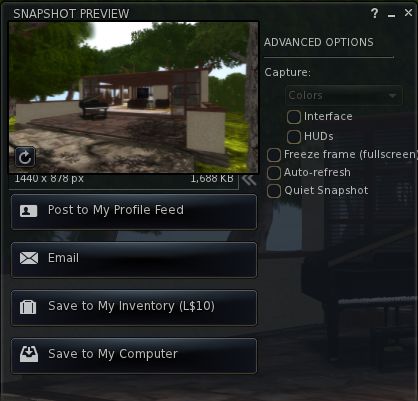
The revised snapshot floater in V3.x has always struck me as being a tad on the large size. Niran’s addresses this by offering a more compact floater, although it needs a couple of tweaks to finish things off – the “expand” chevron and image resolution information is somewhat squeezed by the image preview pane, and the expanded Advanced Options slider could do with being just a little wider (the closing bracket of “(fullscreen)” seems to “fall off” the edge of the panel a little. However, this is, to me at least, an improvement over the default floater in terms of size.

Snapshot floater: a trifle squeezed?

Looking at Snapshot actually reminds me to comment on the top-to-bottom fade found in the floaters on Niran’s Viewer. I’m not sure how recent a change this is – I first noticed it on the 1.12 release – but it is really rather smart and I find it adds a little something to the Viewer as a whole.

Gestures Enhanced and Other Bits

This release sees gestures enhanced with additional trigger options, as NiranV explains, “You can now use additional trigger keys for gestures, which are E Q R F I T Y Z G C V M O P and Space, you can set them in the Shortcut key combo NOT MODIFIER!”

Also in this release as an experimental option is the ability to bulk upload .anim files via NV->FILES->UPLOAD->BULK UPLOAD.

The revised Build floater, introduced in 1.12 has gained popular feedback from the core Niran’s Viewer users and has received some nips and tucks as a result.

Build floater: nips and tucks

Version 1.12 also suffered from locking issues that appeared to be related to Shining fixes. However, following investigations, NiranV found the problem seems to actually be connected to inventory loading, and has this to say on the issue and Shining fixes in general within 1.13:

“Well with 1.12 I added some Shining fixes that seemed to cause initial freezes on login, but no ….its your Inventory! IF you freeze several times on login before [the] World turns smooth, then your Inventory has been fetched … If you want, I can do an option to disable initial fetching.

“Apart from that, I´ve added a few other Shining fixes which fixed the Underwater Crash I´ve noticed when you look into the “void” (the blue water fog at the end of a sim) and transparent meshes -> meshes should now render correctly when setting them to 1% transparency or having a transparent texture on them … instead of vanishing completely. [Be aware that] the bump map on mesh crash is still present; don’t set bump maps on meshes unless you want to crash. The bump map will be set after your relog.”

Feedback

Niran’s Viewer doesn’t have everything I like to see in a Viewer – but then again, if it and every other Viewer did have everything we all wanted, they’d all likely be exactly the same. However, it is still very much a Viewer I enjoy using. However, recent releases have suffered where I’m concerned, as they have tended to push my system to its limits when I’ve wanted to use the bells and whistles.

While Niran isn’t focused on the “traditional” elements of performance (and remembering that they are always subjective and subject to a myriad of factors that cannot always be managed in everyday use of the Viewer), I have to say the 1.13 has so far reversed performance issues for me somewhat, and has been more amenable to me running with shadows, occlusion and so on switched on. This has been a pleasant surprise, as alongside Exodus, Niran’s is my Viewer of choice for what passed for photography in my hands.

Outside of this, I think the main menu idea could well have more traction than I’d given previous credit. The inclusion of such a menu may seem out-of-step with Viewer development to date, but I have to admit that were it to be used in a Viewer specifically aimed at new users, for example, it could have considerable positive impact. As it is, it’ll be interesting to see how the idea develops within Niran’s Viewer, and whether any other TPVs adopt the approach.

All-in-all, an interesting update, with more to come in the future, going on NiranV’s blog comments!

Links

The Zen of Second Life

Update January 27th, 2013: The Zen viewer has been discontinued by its creator.

Note: January 17th, 2012: I’ve received a number of complaints from the Firestorm team relating to elements included in the Zen Viewer. One in particular relates to the client-side AO, which in its current form I’d previously been given to understand had its roots in another Viewer & enhanced in Firestorm. However, I’m more than happy to correct this and give due credit to the Firestorm team.

No, I’m not going all metaphysical on you. Yet.

Zen is the name of the latest Second Life Viewer to cross my path, coming to me by way of a Twitter-poke from Cinder Roxley. Being developed by Zena Juran, this is a rather nice take on the LL Viewer, not altering too much, while adding some very nice touches.

Core Data

Currently available for the Windows platform, Zen is based on the latest 3.2.7 code from Linden Lab. This means it has the very latest in the Shining fixes, mesh upload, the  updated snapshot floater, etc. In addition, it also includes:

  • The alpha parametric deformer
  • Client-side AO and particle editor
  • Temporary texture & sculpt uploads and local sculpt and texture browsing
  • Area search
  • Pie menus
  • Toggle notifications between top / bottom right of the screen
  • LSL pre-processor and save / load scripts locally
  • Copy/Paste Object/Texture Parameters
  • Qarl’s prim alignment tool
  • Texture Refresh
  • Derendering option
  • Fetch inventory at log-in
  • Move orphaned system folders for deletion
  • Copy UUID on right-click
  • Resized View/Camera floater
  • Adjustable region restart timer.

In addition, the Viewer also has some useful defaults pre-set from the get-go which are liable to save most people using it time in getting things initially set-up.

The version I review here is version 3.2.7 (1), released 15th January, 2012, although version 3.2.7 (2) is available as of the 16th January, incorporating various tweaks and fixes.

Installation and First Looks

The installation EXE is 26.9Mb in size, pretty much par for the course nowadays, and installs Zen directly into its own directory without any hitch. On starting-up, Zen reveals the familiar 3.2 UI with a couple of interesting alterations from the norm: the Destination Guide doesn’t open by default, and the Mini-location Bar is displayed in preference to the Navigation/Favourites bars.

Zen default UI presentation

Transparent Buttons

Another, perhaps more obvious difference, is that the buttons – all positioned along the bottom of the window – are semi-transparent. Some may find them harder to see as a result, but I have to say I quite like it, although an option to adjust the level of transparency (if possible) would be welcome.

The buttons that are active by default are, it’s probably fair to say, the ones most people will prefer to see active from the get-go: Chat, People, Snapshot, Profile, MiniMap, View, World Map, Search, Build, Inventory and the AO buttons (on/off & settings). Other than the AO buttons, there are currently no additional buttons included in Zen’s Button Toolbar.

Menus

Menu-wise, Zen offers something of an eclectic mix, with a couple of the menus somewhat altered from the V3.2 offerings, others largely unchanged. Of particular note in a couple of the menus is the absence of many of the options that have corresponding buttons; there are no menu options for Choose an Avatar, Picks, Places and Camera Controls in the ME menu, for example, and World lacks a Destinations option.

Button access only: the ME menu from Zen (l) and from V 3.2.7 (r)

On the one hand, this appears to make sense – if the functions have buttons, why have duplicate menu option to access them?  Where a function is in frequent use, then it is likely it will be accessed through the button far more than through the menus. There is also the argument that experienced users (and Zen is aimed at those more familiar with SL, as are most TPVs) are unlikely to require access to some options (such as Choose an Avatar) while others will be more routinely accessed via Search (such as Destinations).

However, in some cases the menu options do offer a convenient means of accessing options that may not otherwise be used frequently enough to warrant having the button active at all times. As such, I’m not totally convinced removing some of the menu options (such as Picks and Places) is perhaps the right way to go.

Also missing from the ME menu, given it is built from the official 3.2.7 code, is the Merchant Outbox. However, this actually makes sense, as Direct Delivery isn’t yet available on the Main grid, so it’s hardly something people are going to miss at this point in time.

Zen menu options

Like many TPVs, Zen has its own dedicated menu called, appropriately, ZEN. This provides quick access to a number of  functions not found in the official Viewer: the ability to turn off / on Pie menus, disable / enable the mesh parametric deformer alpha, etc.

There may not be a lot of options here – but that’s intentional; Zen isn’t meant to be a feature-heavy Viewer, and to compare it with those that are would be a mistake. Zen is aimed at a very specific niche: building, as Zena explained to me, “I prefer to use  the official Linden Lab Viewer It has the best performance, but it does lack features found in other TPVs that I find very useful for content creation on the grid”. Full marks to her for defining the goal of the Viewer so clearly.

Preferences

This approach is also reflected in PREFERENCES, which currently sees little deviation from the official Viewer in terms of tabs and options. The only easily spotted differences are the inclusion of a LSL Pre-processor tab for scripters and a UI tab for skinning the Viewer.

LSL pre-processing options

The skin options are currently limited – you essentially get a choice of a blue highlighting for things like menu selections, etc., or the more traditional LL teal effect (complete with options to change other aspects of the UI). However, this is something Zena is again working on, so more options are liable to be available with future releases.

UI Skinning

Defaults

However, just because there aren’t a lot of extra menus options and Preferences, doesn’t mean there aren’t a lot of “under the hood” tweaks to the Viewer that may not at first be obvious. Zen actually differs itself from the herd in that several common defaults are pre-set to how many experienced users prefer them. For example:

  • Limit select distance is OFF
  • Camera constraints are DISABLED
  • Inventory is pre-set to SORT BY NAME and SYSTEM FOLDERS TO TOP is OFF
  • Inventory hover tips are disabled by default
  • Default cache size set to 1Gb rather than 512Mb
  • Network bandwidth is set to 1500Kbps (see this article on bandwidth settings) rather than the usual 500Kbps.

All of these tend to make getting started on Zen a lot less fussy, although it might be fair to say that many users would also like to see Chat and IM pre-set to use the “old style” non-header layout as well – Zen currently uses the LL default with headers active.

Camera Floater

The Camera floater in Zen has been nicely resized, and includes an option to quickly reset Draw Distance. The resizing is welcome – the camera floater on the official Viewer is somewhat supersized. However, in achieving the resizing, the more familiar zoom slider and viewing angle buttons have been removed. Again, I have very mixed feelings towards this approach.

Take the Mouselook button for example. While it is true that press the M key will drop you into Mouselook – it is equally true that this only works if you have your WASD keys set to move your avatar. For those that don’t, and who prefer to have WASD set to starting local chat (rather than having to tap ENTER first), the lack of a Mouselook button on the camera floater might cause a frown or two.

Animation Overrider

This is the “standard” client-side AO first seen in Firestorm and now found in most recent TPVs, which includes the ability to run multiple AO configurations, “build” AO sets “on the fly”, etc. In keeping with Dolphin, Zen currently uses the two-button configuration as mentioned above (one for accessing the AO floater, the other for turning the selected AO on / off), rather than the single-button approach used within Exodus.

Build Options

Zen offers all of the most frequently used build options found in the TPV “market” today. The build menu accepts four digits after the decimal point, there is Qarl’s alignment tool, the ability to copy / paste parameters, temporary uploads, sculpt and texture browsing, additional scripting tools, and for those working with mesh clothing, the parametric deformer alpha. Add to this the choice of using either the context menu or the Pie menu, and creators are supplied with a good range of options.

For me, there is only one item I’d like to see added, which is currently in Exodus, and that’s the ability to save / load position and rotation information of an object into /from it’s description field; when working on a number of builds and having limited space on my build platform, I find this a real boon for my work over copying / pasting co-ords manually.

What’s Not There

Again, it’s important to remember that this is focused Viewer aimed at delivering an improved building experience based more closely on the “vanilla” official Viewer when compared to other TPVs and that Zen is also something of a new development. As such,  the Viewer doesn’t currently include options such as radar or things like RLV and the media filters. This doesn’t mean these options won’t appear in time, but it would be unfair for people to dismiss the Viewer on the basis of their absence.

Viewer Status

Zen is TPV Policy compliant, and Zena informs me that, “I have an application submitted to be listed on the TPV directory and have been in contact with Oz Linden. As soon as Oz reviews the Zen Viewer it should (hopefully) be listed on the TPV directory.” The source code is available on Bitbucket, as is a fledgling wiki for documenting the Viewer and an issue tracker, which Zena requests is used for support issues / requests, rather than contacting her in-world.

Performance and Opinion

As Zen is based on the official 3.2.7 release I was expecting it to perform well on my usual system given my recent experiences with 3.2.5 and 3.2.6. So far, I’ve not been disappointed. Performance has largely matched my experiences with 3.2.5 (different environmental variables accepted, and remembering this is not intended as precise benchmark test), and frequently improved upon them (having shadows enabled at altitude, for example had the viewer running at around 15-16fps, slightly faster than 3.2.5, while on the ground, the rates were around those of 3.2.5 (about 11-12fps).

Overall, and in running Zen for a couple of days, I’ve found it to be a pleasant, crash-free experience (other than one issue which Zena fixed in the 3.2.7 (2) release). When building, the Viewer is easily as capable as my “default” Viewer choices (and I’ve given it a good run in this respect, given I’m (again) rebuilding my house…). Certainly, the additional build options made getting the work done a breeze, and it was nice to have a Viewer in which I can both build and have shadows running without suffering refresh stutter every time someone enters or leaves the sim.

Overall, the Viewer offers some nice build enhancements over the official Viewer, and those who prefer to use the LL-supplied Viewer, but would like to have some of the additional build options at their disposal without necessarily swapping to a TPV for general use should find Zen offers a very solid alternative.