Text clients reviewed 1: Libretto

Note: Libretto ceased development in 2013.

We’re all familiar with the Second Life Viewer in one flavour or another. But what about the non-graphical “lightweight” clients that are available for accessing SL when using a “full” Viewer isn’t always an option?

Like the Viewer, these “lightweight”, or text-only clients come in a number of flavours, some of which can run on computers and others on mobile devices. Given I don’t have a suitable mobile device, I thought it might be interesting to take a look at the former, focusing on the Windows platform, and given some kind of insight into their features and capabilities for those who have never used them. So over the course of three articles, I’ll be taking a look at Libretto, Metabolt and Radegast – all of which are on the SL TPV Directory, and all are still very much under enhancement.

Libretto

  • Platform(s): Windows
  • Available from: http://www.librettoviewer.com/
  • Version reviewed: 0.13.0

Libretto describes itself as, “A light weight, text-only viewer for Second Life. It’s designed to resemble and function as an instant messaging client, that can be used in an office environment, on low performance/bandwidth computers, or when multiple instances are needed.”

It is delivered as a standard .EXE install file for Windows, requiring a quick A/V scan prior to a double-click to install it with minimal fuss.

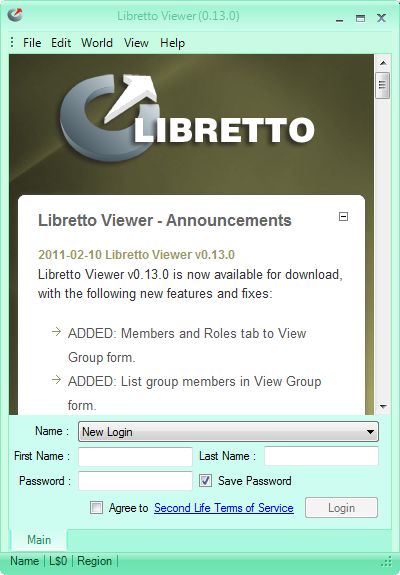
Once installed, it certainly looks somewhat like Microsoft Messenger, with the log-in screen comprising a window onto Libretto announcements and a log-in area with the obligatory check-box for accepting the SL ToS (with link for reviewing!) for people using the client for the first time.

A nice touch is once you have logged in with an avatar, the details for the avatar are saved by Libretto and can be accessed from the drop-down list displayed next to NAME.

As you are logged in, the Libretto window splits into a two-pane display, with any Message of the Day from LL is displayed in the upper section (where all messages appear), while the lower section lists all those in your immediate vicinity (if any).  There are several elements to this display, which are explained below.
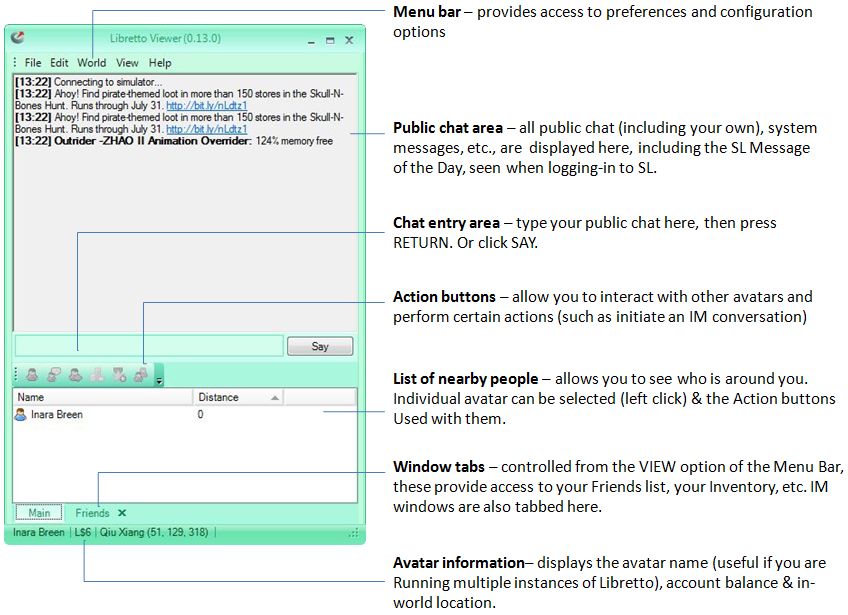
The Menu Bar

  • File: allows you to Logout of Second Life and return to the Libretto log-in screen, or Quit (log out of SL and shut down Libretto)
  • Edit: currently displays the Preferences pop-up which allows you to:
    • Define your e-mail preferences
    • Select whether to run Libretto whenever you start Windows
    • Select Libretto to automatically log you in to Second Life when it is started (useful if you predominantly use only the one avatar with Libretto)
  • World: currently allows you to teleport to your home location – note this can cause Libretto to go unresponsive while the teleport is in progress
  • View: allows you to display / hide the Window tabs (see below) at the bottom of the Libretto window, and change the default colour for the Libretto client
  • Help: displays information about the Libretto client.

Action Buttons

The Action buttons are displayed in both the “people nearby” window pane and the Friends tab, and allow you to carry out a range of tasks:

  • View a person’s profile (seen in a separate pop-up window that closely resembles the old Viewer 1.x style of profile display)
  • Open an IM conversation with them
  • Teleport them to you
  • Pay them
  • Remove them as a Friend
  • Invite them into a Group.

A down-pointing arrow to the right of the buttons takes you to an option to remove or add buttons to the list. Buttons are activated by left-clicking on an specific avatar name and then clicking on the required button (buttons become coloured when active).

Window Tabs

Controlled from the VIEW option in the Menu Bar, these provide access to a range of dedicated tabbed windows:

  • Friends: displays your Friends list, complete with the Action Buttons, described above
  • Groups: displays all your Groups, with a set of Action Buttons that allow you to: display information on a specific Group (left click the Group name to select); IM the Group; activate the Group tag for your avatar; leave the Group
  • Objects: displays a list of objects surrounding your avatar (may need to use the Refresh button to get the list to display), together with buttons to Sit on a selected object (left-click to select the object from the list), and your avatar’s status will change to SITTING at the bottom of the Libretto window while the SIT button will change to STAND; and a button to Touch a selected object
  • Inventory: allows you to peruse your inventory, with a Share button to give items to other avatars (click on the item to be given, then SHARE & select the name of the avatar (from those nearby & your Friends list) to whom you wish to give the item (permissions allowing). Note that you can also accept inventory offers from others using Libretto as well
  • Find People: opens a search window allowing you to search for a specific avatar (first name; first name+ last name). Matching results are displayed in a list, and the window includes the Action Buttons described above to view an individual’s profile, etc.

Clicking on an tab name in VIEW will open the associated tab, which can then be closed either by clicking on the tab name in VIEW or by clicking on the X in the tab itself, at the bottom of the Libretto window.

Multiple Instances

Libretto handles multiple instances without issue – simply double-click on the application icon to start an additional session.

Website

The Libretto website is adequate, if a little basic in looks and information – but then, the application is so intuitive, you’re unlikely to be spending a lot of time there.

Use and Opinion

Using Libretto is very intuitive and easy to get to grips with. It may not offer all the capabilities found in other text clients, but it really does do, “exactly what it says on the packet” without the need to refer to lengthy help files or anything. Working in chat or IM is easy, while the Action Buttons provide enough functionality to get things done.

Libretto is still a work-in-progress, and it is certainly the most lightweight of the three clients I’m reviewing. The window layouts are all clean and easy-to-follow (although the colours are perhaps not so easy on the eye: for “red” read “pink” and for “blue” read “violet”). The current options are sufficient to take care of many basic tasks that don’t rely on an in-world view.

Overall, an extremely intuitive application that exceptionally easy to pick-up and use.

Over the Rainbow

Rainbow Viewer

One of my first experiences with V1 TPVs was via the Windows Cool Viewer compiled by Boy Lane, and which became the Rainbow Viewer. For a long time, this was simply my Viewer of choice. I was therefore intrigued to see that after over a year, Rainbow has been overhauled and made available once again.

Based on the 1.22 release of Viewer 1, Rainbow has a core of die-hard fans, and the new release does much to bring it up to par with the likes of Phoenix and Imprudence 1.3/1.4, given it now includes:

  • Client-side AO
  • Media filtering
  • TP history
  • Display Names
  • Multiple attachments (but like other V1 TPVs, no multiple wear for the same layer of clothing)
  • Tattoo and Alpha layers
  • Outfits creation
  • Prim alignment tool
  • Multiple grid support

Using Rainbow is like a blast from the past. At installation, you’re informed that you need to obtain several files from either the “official” Viewer 1 or from Snowglobe. This is something I haven’t had to do in ages, and while I can understand why Boy has gone this route (better performance where the Kakadu system is concerned), I nevertheless wonder as to how vulnerable this leaves Rainbow: Viewer 1 is no longer available and there is no guarantee LL might not at some point simply remove snowglobe access, given it is now a dead project.

Once in the Viewer – and my use of Firestorm of late notwithstanding – there was something nostalgic in using Rainbow; the interface, the Preferences options – all hark back to the “good old days” in many respects when things were indeed, “fast, fun and easy”. However, the nostalgia is actually very short-lived. There is much that Rainbow lacks that I find hard to do without: there is no vertical tabbing for IM windows, for example, and no Quick Preferences option (although granted, both may come). Even the inclusion of avatar physics is – to be honest – now dated. The Viewer 2 system (already adopted by Firestorm) is far superior for those willing to give it a go.

Where Rainbow is likely to score is in being aimed at other OS Grids. I tested it with InWorldz and Avination, both with few issues other than getting the “you have been logged out” message, complete with options to review chat / IMs each time I logged out of InWorldz, rather than getting s “clean” exit. Other than that, performance was easily as smooth at Imprudence 1.3, and a lot better than the likes of Phoenix. As such, it is a welcome addition to the list of Viewers that can access other grids.

In terms of SL, however, I do wonder about the Viewer’s longevity. As I’ve already commented, the reality is that V1-based TPVs for Second Life are likely coming to their End of Days, what with the Search issues, mesh, and so on.

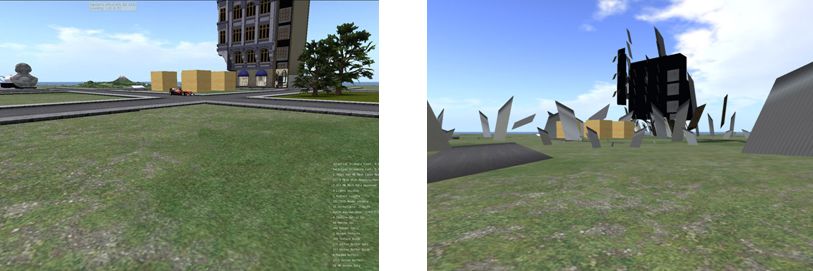
One of the problems facing Rainbow: Mesh as seen in the V2 Mesh Viewer (left) and in Viewer 1 (right) – with thanks to Linden Lab

To be fair to Boy Lane, the Viewer has been released with a clear statement of intent:

“Rainbow does not intend to be a competitor of viewer 2 or any other of the 3rd party viewers around. All of them are based on either V2 or Snowglobe code. Rainbow is based on 1.22, and playing in a league of it’s own. To support legacy hardware, and to support all my friends in Opensims.”

The last part of this statement is a worthy goal in itself – and again, full kudos to Boy for providing OS grid users with a greater choice. However, where Second Life is concerned, and even with a loyal following, given all that is coming down the road in the next few weeks and months, it’s hard to see this latest Rainbow release as having a decent shelf life.

Making an Ascent on Second Life

While Phoenix remains by far the most popular of the Third Party Viewers on offer for use with Second Life, a new arrival in the last couple of months is beginning to show some promise – particularly when it comes to implementing features from the Viewer 2.x stable – and which again, like Phoenix and Imprudence, does not require the initial installation of either the “official” 1.23.5 or Snowglobe Viewers as a prerequisite to its use.

Ascent has probably caused some eyebrows to rise, given it is apparently based on the Inertia Viewer code base. Inertia was a non-TPV compliant Viewer that was developed by the infamous “Hazim Gazov” – who was by turns, banned from Second Life by Linden Lab, the “whistle-blower” who first started to “reveal” genuine concerns around the Emerald Viewer (while also sharing in the rumour-building) and who was the target of Phox’s failed (and idiotically suicidal as well as moronically childish) DDoS attack which was in part responsible for Emerald being “banned” as a Second Life Viewer. Ascent is now maintained by one Charley Levenque, aka Charlotte Wirtanen, an unknown quantity in both cases, although in the latter guise, has been around since 2006.

Now to the Viewer itself. The setup EXE downloaded smoothly. It did cause a raised eyebrow, however, as it came in at almost twice the size of the likes of the Phoenix, Imprudence and other 1.23.5 Viewers – although I’ve been informed this is often the case with Viewers based on the Snowglobe code, which apparently forms the foundations for Ascent. An anti-virus scan revealed nothing untoward in the EXE (not entirely unsurprisingly) so I went ahead and ran it. As one would expect from a TPV of this nature, the overall installation was quick and clean, ending with an option to run Ascent at once.

The splash screen showed the Ascent download page, and was in the “official” blue skin display. Logging-in revealed the familiar 1.23.5 UI – but with the ADVANCED menu already listed on the menu bar, so no need to press CTRL-ALT-D.

At first glance, Ascent looks little different to the likes of Phoenix, Imprudence and others: the menu bar and toolbars along the bottom of the screen are largely unchanged, the in-world View is obviously the same – but just a little digging reveals that thought has been put into making Ascent not only different to other TPVs – but potentially more useful.

Clicking on COMMUNICATE, for example reveals several new features. At the top of the CONTACTS list is a CONTACT SEARCH box. Enter the first few characters of a name here, and a list of matching contacts is displayed. Type in a full name, and just display that avatar. Above this is a CONTACT GROUP drop-down, although functionality for this appears to be awaiting implementation. Replacing the Import / Export buttons found in the CONTACTS list of some Viewers is a count of the number of Contacts one has (and the number actually online), and a count of the number currently highlighted within the list. The Search function I can see being very handy for those with massively long Contacts lists – such as store owners – who need to contact someone quickly.

The RADAR (Avatar List) window offers the same functionality as most of the TPV’s that now include this function ported originally from Meerkat. However, unlike Phoenix, Ascent still includes the majority of avatar functions as a series of buttons at the bottom of the display, rather than moving them to a context menu displayed when right-clicking an avatar’s name in the list. When originally introduced into Emerald, this latter functionality caused divisions among users: people either accepted it, or demanded the return of all the buttons. Phoenix has something of a compromise, in that some of the buttons are back at the bottom of the screen; however, I find the context menu just fine, and personally think that Ascent has taken a step backwards here: the Avatar List is a useful tool in many ways, but Ascent’s simply takes up too much screen real estate.

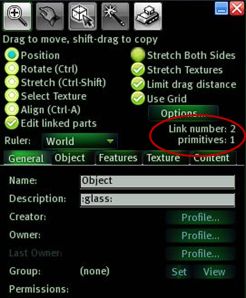
BUILD incorporates functionality found in other TPVs, albeit relabelled. For example: the ability to OPEN the Group profile for a selected object is called VIEW. A nice touch on the Build menu is that when editing linked parts of an object, the “Selected Objects” count common to some other TPVs is replaced by a “Link number” display, as shown on the left. This functionality can be found in “Experimental” releases of Imprudence, but of the standalone installation TPVs, Ascent is the first to offer it in a “full” release.

For people utilising scripts that handle primitive counts to set a specific prim to a specific display (say, lettering on a scrolling prim notice), this strikes me as a useful little feature, and one I’d like to see pop up in other viewers.

INVENTORY offers pretty much the standard fayre for good TPVs, including the ever-handy RESTORE TO LAST POSITION option in the event you TAKE a linkset back to inventory, only to find you’ve missed linking a couple of prims. God knows, *I’ve* needed it enough!

Preferences

As with the majority of TPVs it is in the Viewer Preferences that Ascent shows clear differences. All the usual tabs are there: General, Input & Camera, Network, Web, Graphics… and so on. Two two unique tabs here are ASCENT SYSTEM and ASCENT VANITY.

ASCENT SYSTEM offers a number of additional tabs – less than the likes of Phoenix – each with either a less confusing array of options, or with options that have been better-organised. In summary:

  • General: offers a subset of functionality found in the TP/Login tab from Phoenix and others (double-click teleport, always allow fly, always rez under land group when available, as well as several Ascent-specific functions:
    • Enable Power User functionality: “unlocks” the ability to set an animation priority up to 7, rather than the usual limit of 4. How this is reflected when said animations are used in other Viewers is unclear.
    • Destroy Objects: anything you have the power to DELETE is deleted permanently, bypassing the Trash can.
    • Explode Objects: temporarily renders an object physical and then delinks it.
  • Chat/IM: neatly combines the more welcome elements of the IM and CHAT tabs again found in other TPVs, providing access to options such as allow MU* poses and auto OOC actions in chat; turning off the typing sound for chat, use vertical IM tabs, toggle the announcement of incoming IMs. This tab also includes the very useful Auto-response option for IMs, and (for some reason) includes options to display the time in either 12- or 24-hour notation and the date in US or European formats.
  • Performance: captures the progressive draw distance option from other TPVs, although without the slider bar to adjust. It also includes:
    • An option to turn off the annoying wind howl, pulled up from the Windlight settings and made easily accessible
    • The ability to turn off the Classic Cloud layer (the one that exists at around the 200m level) at log in, rather than having to twit around and find the option in your Windlight settings. I’m very in favour of this, as it does lead to a nice little performance boost.
  • Command Line: sees a subset of the text short cut commands available through the likes of Phoenix continued in Ascent.
  • Security: gathers together the more innocuous options from Emerald’s infamous “shield” options, presenting the user with a degree of privacy without going too far in the direction of impinging on the privacy of others.
  • Building: offers a subset of options originally found in the Emerald Build tab.

ASCENT VANITY gathers together the kind of settings one might like to set for one’s various avatars (if you happen to have more than one), and includes options to set tag and map colours to highlight friends, etc., as well as turn things like the teleport screens on/off or set breast and other dynamics.

Ascent does away which much that has in the past been looked at as controversial in some Viewers: IM encryption, for example is not present, nor are some of the more intrusive options to bounce in on people. It does have a couple that some may yet object to, although in the scheme of things, they are trivial. The first is the ability to fake your AWAY status – when active, AWAY will say visible in your tag even while you are camming around or engaging in IMs with others, etc. The second is the ability to see how long the people around you have been inactive.

Elsewhere, the pie menus have been reordered somewhat. Imprudence did this as well, with the aim of rationalising the pie menus and making them flow more logically – and it succeeded. It also offers the option of reverting to the more familiar pie menus if people have trouble getting their heads around the reordered versions. Ascent both reorders and adds functionality. I had no problems with the pie menus, but I can see those who want “all the latest but leave it as it is” bemoaning the pie menus at times.

Viewer 2.x Functions

As one would expect, Ascent includes Viewer 2.x’s Alpha Mask and Tattoo layer support – so no surprises there. What is a very pleasant surprise, however, is the inclusion of the Viewer 2.x multi-attachment support for prim attachments. This means that you can now wear multiple items on the same attach point (multiple rings on one HAND, for example)  – and have them render correctly in all Viewers. This is a major step forward when compared to the likes of Phoenix and Imprudence – and the work in getting it into Ascent is largely down the Henri Beauchamp. With multiple clothing layer support also promised (i.e. wear 2 jacket layers at the same time), this puts Ascent head-and-shoulders above other TPVs of its kind.

Beyond this, Ascent has the welcome inclusion of a client-side AO, the ever-useful Area Search functionality, and just about everything else that has proven useful in other TPVs. If it lacks anything at all, it is potentially that the Radar / Avatar List doesn’t include the additional listing fields found in Henri’s CL Viewer and, more to the point for many within SL, RLV/a support is lacking at the moment (although it is on the “to do” list) – which seems to be an odd feature to miss out.

There are a couple of functions I don’t entirely understand – such as using the “Ascent System Inventory”, which adds a couple of additional folders to the Inventory window whose precise function is unclear to me. Are they intermediary way points for uploads, located on Ascent’s own servers? The option to upload temporary textures suggests this – in which case, I have to admit to being leery of the functionality. I’ve searched the Ascent wiki for further information here, but have drawn a blank. “Downloading Inventory in the background” also seems to be an odd option. How is this different to the usual inventory caching, which is already dynamic and a background task?

Performance-wise Ascent feels a lot more stable than the likes of Phoenix, and certainly comparable to the “full” release of Imprudence. For me, it scores over the latter in having a wider range of skin options, and also retaining the more usable “large” Avatar List. Although it does miss out in not having a spell checker.

Ascent also appears to run somewhat faster (for me) than the official 1.23.5 Viewer, Imprudence and Phoenix. In comparison with the latter, my preferred Viewer at the moment, Ascent runs at around 10-12 fps faster on a “busy” sim and about 15 fps faster on a “quiet” sim. I have no idea if Ascent is SSE optimised, but overall the performance is good.

I have noted a couple of very minor issues, and given I’ve only been fiddling with it for 24 hours will doubtless find things that will niggle me – but currently, the fact that the Tp screen still momentarily flashes up, despite my setting the option to disable it and relogging after – does cause a frown, if nothing else.

Overall, Ascent is a commendable effort; I’m not qualified to look under the bonnet, so to speak, but from a pure user perspective, I have to say that it has the potential to become a Viewer of choice when certain other functionality has been added. That said, I would prefer to see higher visibility where the developers are concerned before I committed to a full jump to Ascent – and again, kudos to Jessica over at Phoenix in this regard. Nevertheless, providing no unpleasantness emerges around Ascent (one feels there should not be any, but the pedigree of  the Inertia viewer hovers in the background), Ascent could come to easily rival Phoenix in the TPV environment. It is already off to a very good start.

The Green goes

Linden Lab have sounded the death knell for Emerald.

Well done, Phox (I wonder if that was an infantile play on “pox”). I sincerely hope a real lifetime ban follows for you, and Fractured Crystal. Not that I begrudge you anything, you understand, its just that – well, SL will be a lot more savoury without you.

For those panicking about their favourite Emerald features – fear not and look here. The future is bright. The future is winged….

Phoenix has now cleared self-certification (and do I ever wish some people would understand that term does not mean “approved by Linden Lab” or even “approved”!), and is now listed on the entirely voluntary TPV Directory.

So – onwards and forwards!

Addendum

Within 12 hours of appearing on the TPV Directory listing, Phoenix had achieved some 50,000 unique logins to Second Life. While a portion of these are going to be people running alts and potentially “bots”, the vast majority are going to have been unique users. As such, this is an extraordinary figure to hit in a so short a period. And without wishing to stir the Viewer 1.23.5 vs Viewer 2.x debated, one has to admit that it does show how loyal established users (who are the most likely to be aware of the entire Emerald debacle) remain to the older Viewer, despite LL’s best efforts at enticement, cajoling and denial.

Emerald: unfortunate developments

I’ve supported Emerald. I’ve been happy to use it for around 18 months. In that time a lot has been made about it being a malicious viewer, with many, many claims going around that it does everything from raiding your L$ balance to spying on your granny while she’s having a bath…and they all remain pretty unsubstantiated. Emerald has also come in for more than its share of people misrepresenting its capabilities (such as making your avatar “invisible” allows you to run around griefing people. If you’ve ever used the “invisible” function, you’ll appreciate how ludicrous these claims are).

However, there comes a time when one is forced to sit up and take notice of what is being said – and that time is when it is being said by one of the Emerald developers.

LordGregGreg Back is not someone I classify as an SL friend or even an acquaintance. Our dealings have always been at a distance, via IMs usually. BUT…throughout the time I’ve been using Emerald, I’ve never found him to be anything less than honest in his dealings with people. It has been because of his involvement (alongside that of Chalice Yao) that I’ve remained an Emerald user. Yes, both at times have had to do *some* verbal acrobatics when being pushed to defend the antics of others, and in doing so have potentially harmed their standing in the eyes of others. But just because they have, does not, and has not meant their efforts and work with regards to Emerald have been anything less than honest.

So when Greg up and publishes his own misgivings about Emerald, I admit I sit up and take notice.

The crux of the matter is the manner in which a .dll is being used – in this case emkdu.dll – which is related to texture loading and which allowed a viewer’s title bar and executable path to be broadcast in an obfuscated manner (and possibly recorded by other in-world devices). Despite promises the issue had been fixed, made to both Greg and Emerald support manager, Jessica Lyon, it wasn’t. Instead, encryption was used to further obfuscate what was going on, and further requests for the code to be cleaned up only increased the degree of encryption being applied.

The worrying this here is that the encryption meant that the code could not longer be properly vetted and verified – Greg’s role in the Emerald team. This, as Greg explains, undermines trust. Encryption  / obfuscation is suggestive of malign intent, whether or not it is in fact the case. So why do it? Probably because the individual responsible cannot help but jerk an immature middle finger at his detractors at the thought of them scrabbling around trying to prove the code is in fact malicious, then giggling himself to sleep at night.

But in doing so, the individual concerned pretty much jabs a finger vertically at the rest of the Emerald team with the result that those with a conscience feel they have no option but to gradually bow out. And this is a shame, as it lessens the value of Emerald while simultaneously enabling a further round of accusations and drama.

More than this, it leads to an undermining of faith in Emerald as held by existing users. After all, one developer is actively seeking to mask what the code is doing from his fellow developer and placing active barriers in the way of ensuring the code is properly verified as “clean” – so why on Earth should any of us continue to trust and use Emerald?

Greenlife Emerald Viewer (revised)

Those who know me know I’ve been a long-time fan of Boy Lane’s iteration of Henri Beauchamp’s Cool Viewer – still am, in fact. However, I’ve recently been trying out the Greenlife Emerald Viewer – and I have to say, I’m impressed!

This viewer has grown from the Open Source SL code and features contributions from some of SL’s leading lights of the coding world – for me, notably Chalice Yao and Zwagoth Klaar. It includes features common to the most recent “official” releases, features we used to know and love within the Viewer (but were done away with on the whim of LL) and many features developed by third parties that are either plug-ins to the official viewer or which have never been officially supported – such as Marin Kelley’s Restrained Life API (even if this is somewhat flawed).

Emerald is, from the outset, both comfortingly familiar and yet startlingly different from other flavours of the Viewer – and this in no bad thing. Even with the likes of Cool Viewer, things in Viewerland have become somewhat staid. We’ve all settled into a nice little rut of Things We Like within the Viewer that for the most part, we tend to load-up, sit down and make a few surface tweaks to the UI (set the skin, fiddle with the buttons, turn on various options / objects) and do very little else. We even tend to choose our Viewer based on the functionality we like to see there ready and waiting for us, rather than having to fiddle-fart: again, I like Cool Viewer not only for the “built-in” nature of RLV, but because it harks back to the good old days of the Friends list and boots the cumbersome Communicate into touch.

Emerald, on the other hand goes a lot further. It brings to bear a raft of options and tools that have clearly been designed to improve our SL experience (take note, LL), and which just beg to be used. Here’s a short summary:

  • Double-click tp: simply cam anywhere you like in a sim (or even in a neighbouring sim, if visible), double-click, and ping there you are! (cannot override tp hubs, etc., however – this is an SL defined limitation)
  • Disable the teleport screen – Yay! no more black screen and progress bar when Tping (note your avatar may appear to freeze during the tp process as all the sim-to-sim handshaking still needs to take place)
  • Built-in radar system: no more need for radars and scanners that impinge on server-side resources to operate; click on the button to bring up a list of avatars up to 4096 m away, together with a host of resource buttons (IM button, Profile button, tp-to-avatar button, etc.)
  • Built-in lag prevention methods – such as blocking spammed calling cards, etc.
  • An auto-response system for IMs: automatically respond to those IMing you, and select categories of people to who you wish to auto-respond (e.g. non-friends, people previously muted, etc.)
  • Ability to turn off the typing sound from others (Yay!): OK, so you have turned off the typing anim on YOUR avatar – but you still have to put up with the irritating clickety-clickety-click from those who haven’t – well, not any more!
  • Command line capability: type a defined command into Chat and have it happen, gesture-like) – e.g. teleport to ground level or teleport to a given height or position sim the sim

The list really is quite impressive, and the options are so easy to access and set-up, thanks largely to the the care and effort put into the EMERALD tab in PREFERENCES.

The Emerald Tab in Preferences

EMERALD neatly lays out the majority of the viewer’s additional functions in a series of additional tabbed pages:

Teleport / Login: set-up your Tp and login options from here, including disabling various screens

Voice: set additional Voice options

Shields: select your preferred spam prevention, etc.

IM: set-up your additional IM preferences and auto-responses

Misc: set-up additional options (such as enabling Restrained Life functionality, disabling your typing animation muting the typing sound from others, etc.)

Cmdline: configure the chat-line commands you wish to use

Avatar: accesses some vaery useful tools for your avatar – tweak your selection beam particle effect from her or – with care – manipulate your Avatar’s bounding box (so you can raise / lower your position, for example, without altering your shape)

Got to love this!
Got to love this!

Build: a host of useful pre-sets for those of us who love to build.

Not only are these options available through PREFERENCES -> EMERALD, the more useful of them can be accessed via the EMERALD option on the menu bar of the Viewer – surely again, one of the most useful updates to any viewer. Cool Viewer could certainly benefit from the inclusion of a similar menu option rather than constantly diving into PREFERENCES.

For me, the killer aspects of Emerald can be summarised as:

  • Speed – I’ve found it comparable to Cool Viewer for Windows (providing the “go faster” pack is downloaded and installed!)
  • Stability – It has yet to crash on me, or even wobble
  • Radar – true, it is a little chunky and eats into screen space, but the tools it provides are very handy; I just worry that due to its size, most will leave it off and still opt for lag-inducing in-world scanners and the like
  • The build tools – this for me is a Godsend, and totally overdue in the “official” viewer. Kudos to the Emerald team for its inclusion. Just having the ability to quickly and easily specify default textures for created prims is a boon – I can now swap and play with my “placeholder” and “orientation” textures without having to create custom prims sitting in my inventory
  • Double-click tp; speaking as an Estate Manager, this is marvellous: I can zap around checking things out and fixing things without all that tedious mucking about with flying.
  • Protection tools: in line with the above, the ability to act on problem avatars quickly and easily without the need for additional tools or needing to be physically present, is simply great.

Emerald also have perhaps the smoothest installer going – not only does it slip into its own folder, providing you already have a Second Life Viewer installation, it’ll also go grab the non-distributable files other third party viewers need you to manually copy across. I was particualrly impressed with this feature because a) I only have Cool Viewer and Imprudence installed on my PC (nothing under “C:\program files\SecondLife”) – yet Emerald grabbed the required files from one of these other Viewers OK; b) It also grabbed some of my other preferences, such as my Busy response, and my preferred location to store chat / IM logs (something other viewers generally require you set-up manually yourself after installation).

If there are any negatives to be voiced about the viewer, they really come down to three things – at least for me:

  1. The radar window issue mentioned above – again the button options that are included are certainly nice, but how many of them are actually going to be regularly used by the majority of users? Could the window just be made a little less intrusive to encourage its use?
  2. Documentation – there isn’t really, as yet, any real documentation to steer the novice through the various options and features included in the Viewer other than the brief Features and New Preferences options of the website. More needs to be done in this area – and I’m half contemplating volunteering to help!
  3. A small flaw in the RLV implmentation. RLV is designed to enhance the BDSM experience by making restraints harder to remove (they will in theory *not* detach in an RLV-enabled Viewer). This is a psychological boon to BDSMers as it increases the mental thrill of bondage. Emerald is supposedly an RLV-compliant / capable Viewer – BUT it fails to fully meet the RLV criteria. By dint of a menu option readily accessible through the ADVANCED menu – any locked restraint can be accidentally or deliberately knocked off. What is more, due to the IM controls in Emerald – it is entirely possible that the keyholder for such a locked item will not be informed the items has been either removed or replaced. This is something of a critical gameplay flaw, and one that does need addressing for Emerald to truly carry the “RLV badge”.

About the only thing that induced a “meh” response was the selection of skins included with the Viewer. While they are impressive when looked at in PREFERENCES, the majority are pretty eye-boggling from a graphics design perspective. Granted, there is only so much you can ever tweak and change in the UI, and so all skins are going to be limited in application and appeal – but it has to be said, the majority of those included in Emerald make even the boring default blue look interesting. I’ll therefore be sticking with the tried and trusted (and easiest on the eyes) Silver.

There are a couple of things I do miss from Cool Viewer, however – and would love to see incorporated into Emerald. These are:

  • Allowing MU* pose styles, so that “:” can be used in place of “/me” to denote emotes (e.g. “:smiles” instead of “/me smiles”)
  • Auto-close of Out-of-character brackets (i.e. automatically adding “))” to the end of all comments starting with “((” )

Both of these features within Cool Viewer are a major boon to role-players across the grid.

That said, none of the above are in any way showstoppers preventing the widespread use of Emerald. Rather, they are niggles – even if the RLV issue is one that particularly disappoints. And “niggles” brings me on to the last “negative” with this Viewer. Which is this: just why has Emerald been the victim of so much unfounded and downright inaccurate vitriol in SL?

People have been blabbing about it being “lag inducing” (it isn’t – it is perhaps the Viewer that has gone the furthest to try and reduce lag), through to the idea that the developers are hacks after your credit card details (utter nonsense). Yet the fact is, Emerald presents no greater risk to users than any other 3rd party viewer, whether they fully conform to the Open Source gpl standards (such as Hippo, CV, etc.), or have been tweaked by a creator who refuses to release the code back into the OS environment (such as KLee’s Viewer). Quite why Emerald has been subjected to more scare-mongering than its “rivals” is beyond me.

Maliciousness, perhaps, on the part of those simply opposed to Open Source? Who knows.

Anyway, the only true way of discovering how good (or bad) a Viewer is, is to try it for yourself. Right now, I stand convinced. I’ll even live with COMMUNICATE being back on my Viewer buttons and FRIENDS disappearing once more; Emerald will, alongside of Cool Viewer, now be my Viewer of choice.

But don’t just take my word for it – go take a look for yourself.