The following summary notes were taken from the Tuesday, June 21st, 2022 Simulator User Group (SUG) meeting. It forms a summary of the items discussed and is not intended to be a full transcript. A video of the entire meeting is embedded at the end of the article for those wishing to review the meeting in full – my thanks to Pantera for recording it.
Note: little discussed, as this was the summer solstice Party.
On Tuesday, June 21st, the SLS Main and Event channel servers were restarted with no deployment.
On Wednesday, June 22nd, the RC channels will be updated to simulator release 572665, containing fixes for cases where llRequest*Data would return incorrect result; also, llGetVisualParams() now accepts hand_size as a parameter.
Available Official Viewers
There have been no official viewer updates at the start of the week, leaving the current crop as:
Release viewer: version 6.6.0.571939 – formerly the Performance Improvements viewer, dated May 25th – no change.
Nomayo Maintenance RC (Maintenance N) viewer, version 6.6.1.572179, June 1.
Makgeolli Maintenance RC viewer (Maintenance M) viewer, version 6.5.6.571575, May 12.
Project viewers:
Performance Floater project viewer, version 6.5.4.571296, May 10.
Mesh Optimizer project viewer, version 6.5.2.566858, dated January 5, issued after January 10.
Legacy Profiles viewer, version 6.4.11.550519, dated October 26, 2020.
Copy / Paste viewer, version 6.3.5.533365, dated December 9, 2019.
In Brief
The issue of simulators that have been running for “4-5” days are ceasing to send Friends lists to those logging into them and requiring a restart to fix, continues for some. It’s not clear how widespread the issue is, but LL are aware of the issue.
The following notes were taken from my audio recording and chat log of the Content Creation User Group (CCUG) meeting held on Thursday, June 16th 2022 at 13:00 SLT. These meetings are chaired by Vir Linden, and their dates and times can be obtained from the SL Public Calendar.
This is a summary of the key topics discussed in the meeting and is not intended to be a full transcript.
Official Viewers Update
No changes to the list of official viewer through until Thursday, June 16th, leaving them as:
Release viewer: version 6.6.0.571939 – formerly the Performance Improvements viewer, dated May 25th – no change.
Nomayo Maintenance RC (Maintenance N) viewer, version 6.6.1.572179, June 1.
Makgeolli Maintenance RC viewer (Maintenance M) viewer, version 6.5.6.571575, May 12.
Project viewers:
Performance Floater project viewer, version 6.5.4.571296, May 10.
Mesh Optimizer project viewer, version 6.5.2.566858, dated January 5, issued after January 10.
Legacy Profiles viewer, version 6.4.11.550519, dated October 26, 2020.
Copy / Paste viewer, version 6.3.5.533365, dated December 9, 2019.
General Viewer Status
Bugs are still being ironed-out of the release version of the Performance Improvements viewer.
It is hoped the Legacy Profiles project viewer will start to move forwards once more.
There’s a further dedicated graphics project viewer in the wings, which may be appearing in the near future.
Materials and PBR Work
Please also see previous CCUG meeting summaries for further background on this work, with notes specific to the reflection probe work available in my week #22 and week #20 meeting summaries.
Outline of Work
Work on an implementation of reflection probes which can be used both with PDR shading and with legacy content.
The overall aim of this work is to provide a means to support more physically accurate reflections in SL than can be currently generated (seen as a requirement for PBR support).
It applies to both PBR generated content, once available, and to legacy content.
Creating a materials type with an associated inventory asset. This will initially comprise the ability to copy a texture entry (with its specific parameters) to inventory, to be followed by initial work to work implement a PBR graphics pipe in the viewer.
Reflection Probes Progress
Simulator-side support for reflection probes has been on test using an experimental view and simulator-side updates available on Aditi through the DRTSIM542 channel (Materials 1, Rumpus Room, Rumpus Room 2, and Materials Adult).
Materials Progress
Prototype Materials editor
Work is continuing on glTF materials import, and the hope is to have something that is functional within “the next week or two”. This uses the same unpacking mechanism as Unreal 4.
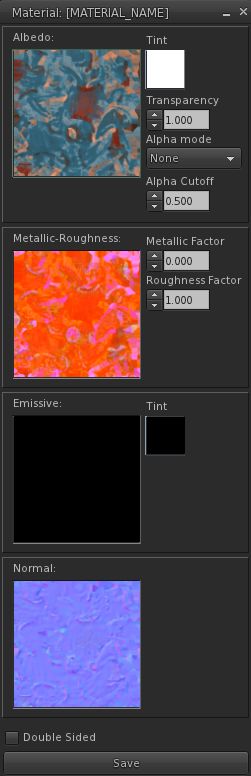
Materials will be uploaded with an additional editor (shown right), which will allow some manipulation and delivery the materials as an inventory item when uploaded.
Supported textures / capabilities:
RGB albedo + transparency.
RGB Occlusion/Roughness/Metalness: R = occlusion, G = roughness; Blue = metalness.
RGB emissive.
RGB normal (- alpha).
Double-sized supported (disables backface calling before issuing the draw call).
Two-sided lighting (so if the back of a triangle is visible, it flips the normal around).
Functionality not initially supported will be the ability to change the UVU wrapping Mode (so everything will sill be repeat); no ability to change the metification / magnification filter per texture;
The process separates the materials from the mesh, so the materials can’t know if things like tangents are present.
Texture will initially have to be packed by a creator’s preferred toolset; once the project gets to a state of polishing, the importer should re-pack the textures itself, unless importing from a non-glTF source, in which case self-packing will still be required.
Normals will likely be MikkTSpace, as per the glTF specification, but work needs to be done to see if supporting this could lead to clashes with the current normal maps rendering. This does mean that current Normal maps will not work on PBR materials.
Uploads will be L$10 per texture, so L$40 if all four used.
Brad Linden is working on getting the import into inventory working.
ALM Proposal / Work
At the #week #23 TPVD Developer Meeting (notes here), it was indicated that LL are “leaning” towards removal of the non-Advanced Lighting Model (ALM) (aka “forward rendering”) rendering path from the viewer, leaving just ALM rendering (aka deferred rendering”).
This was triggered as a result of a bug report which initially appeared to suggest the Performance Improvements viewer unintentionally alters the render order of object faces. While it later proved that the issue was more an edge-case in the way a piece of content had been created, efforts to try to correct it and to ensure it rendered as desired in both ALM and non-ALM rendering, raised the question as to whether it would simply be easier to remove the non-ALM path.
Were non-ALM rendering to be removed from the viewer, it would:
Only be done if it can be shown that this does not adversely impact performance (e.g. ALM runs roughly as well as non-ALM for those using the latter) on the broad cross-section of hardware most commonly operated by SL users.
Include a slider to manage the number of rendered local lights, as these are unlimited under ALM but can cause performance issues on low-end systems; thus a slider will help those on lower spec hardware to determine how many local lights they wish to have rendered.
Likely include a “data saving mode” that will prevent the download of materials for those on metered connections (to reduce the amount of data crossing their connection) and / or help those who find that materials loading can impact performance. This will have a UI warning that when employed, some objects may not look the way they are supposed to look.
In terms of the last point above and “data saving mode” the focus is currently on how many users would need it *if* the Lab goes forward with the idea. This will help determine how much the mode is needed and how best to approach it.
Given the ongoing work to support PBR and a more rounded set of materials, moving to deferred (ALM) rendering without fallbacks to non-ALM rendering – providing, again, the caveats noted above can be met / implemented – will help ensure a more reliable / consistent viewing experience.
Rigged Attachment Render Order
In terms of render order of object faces on rigged meshes, LL are considering adding a “render order number” that can be used by creators to ensure the orderly rendering of faces for transparent rigged attachments (thus allowing pre-loading of textures on “invisible” faces, etc.).
This would hopefully overcome issues of implicit render ordering (which may change due to other viewer dependencies), and of interpretations of the rendering order by creators that can lead to the kind of issue noted in the ALM discussion above.
There are complications in attempting this -e.g. render order is not per object, but per mesh, and is part of an overall schema for rigged attachments (attach order, linkset order, face index order); questions around overall outfit changes, where multiple attachments are being made, etc.
Providing such an approach does not break masses of existing content, it would allow creators to continue to use the implicit ordering (and risk odd behaviours should LL make changes in the future that affect the order), or use the ordering system to explicitly set the order, no matter what changes might occur down the line.
None of this work should impact the attachment order, but could significantly reduce the number of avatar draw calls.
The Forgotten, April 2022 – click any image for full size
The following summary notes were taken from the Tuesday, June 14th, 2022 Simulator User Group (SUG) meeting. It forms a summary of the items discussed and is not intended to be a full transcript. A video of the entire meeting is embedded at the end of the article for those wishing to review the meeting in full – my thanks to Pantera for recording it.
Nomayo Maintenance RC (Maintenance N) viewer, version 6.6.1.572179, June 1.
Makgeolli Maintenance RC viewer (Maintenance M) viewer, version 6.5.6.571575, May 12.
Project viewers:
Performance Floater project viewer, version 6.5.4.571296, May 10.
Mesh Optimizer project viewer, version 6.5.2.566858, dated January 5, issued after January 10.
Legacy Profiles viewer, version 6.4.11.550519, dated October 26, 2020.
Copy / Paste viewer, version 6.3.5.533365, dated December 9, 2019.
In Brief
The weekend some some issues with Group chat, with the Lab making some rapid fixes. Longer-terms fixes are still a work-in-progress.
With the disbanding of the Governance user group, it was confirmed that question, etc., on matter of policy should be passed to Support.
Friends Lists:
Some have reported that simulator that are running for “4-5” days are ceasing to send Friends lists to those logging into them, a issue only fixable via a simulator restart. This has been noted by LL and is to be looked into.
BUG-232256 “No longer receiving spare calling card when adding friends” has ben noted has an issue.
The following notes were taken from the video recording by Pantera (embedded at the end of this piece, my thanks to her as always for recording the meetings) of the Third-Party Viewer Developer (TPVD) meeting on Friday, June 10th, 2022 at 13:00 SLT. These meetings are chaired by Vir Linden, and dates for them can be obtained from the SL Public Calendar.
Important: as from this meeting, the TPV Developer meeting has moved to a four-week schedule.
Please note that this is a summary of the key topics discussed during the meeting and is not intended to be a full transcript of either. However, the video does provide a complete recording of the TPVD meeting, and timestamps to the relevant points within it are included in the notes below.
Nomayo Maintenance RC (Maintenance N) viewer, version 6.6.1.572179, June 1.
Makgeolli Maintenance RC viewer (Maintenance M) viewer, version 6.5.6.571575, May 12.
Project viewers:
Performance Floater project viewer, version 6.5.4.571296, May 10.
Mesh Optimizer project viewer, version 6.5.2.566858, dated January 5, issued after January 10.
Legacy Profiles viewer, version 6.4.11.550519, dated October 26, 2020.
Copy / Paste viewer, version 6.3.5.533365, dated December 9, 2019.
General Viewer Notes
The Performance Improvements viewer has had a couple of “significant issues” raised against it, which are being pulled into the Maintenance RC channels for resolution. One of these might be BUG-232200 (extreme mouse sensitivity based on DPI), although no specifics provided at the meeting.
The Legacy Profile project viewer (finally) looks like it may be getting some attention in the near future, in the hope it can move forward to RC status at some point.
This work is currently focused on implementing a new materials asset type that will allow materials surfaces created utilising the PBR workflow to be imported to SL and then applied to their desired object face(s).
A parallel piece of work is adding sport to SL for reflection probes to update the generation of the environment maps (because the current cube mapping used by SL is limited and would not work will with PBR).
Current Progress
Simulator-side support for reflection probes is being added, together with updates to the EEP system in support of the changes. This work is being implemented so that (hopefully) viewers without the necessary rendering updates will not see any “breakages” to the environment as the simulator work progresses through Aditi to Agni.
These updates are currently on Aditi on the DRTSIM542 channel (Materials 1, Rumpus Room, Rumpus Room 2, Materials Adult).
LSL support for this work still TBD.
There is now a test version of the viewer for the materials work available through the SL Discord server #content-features channel.
A glTF importer will “hopefully be ready in the next week or so”, although it will be a work-in-progress,
There is a texture streaming overhaul in progress. This changes the number of threads used in texture decoding and how the decoding on the background threads is handled, and should see a noticeable improvement in texture rendering when available & incorporated into viewers.
This work will likely be available ahead of the materials work mentioned above, but it has not been determined if it will form a dedicated project / RC viewer or be folded into a Maintenance RC.
TPV developers who may have been working recently on the texture threads, may want to take note of this and listen to this portion of the video, given that a number of threads have been removed o eliminate conflicts.
Part of this work is focused on trying to get a “good honest answer” from the operating system running the viewer as to how much video memory is actually free for the viewer to use.
In general (and despite the VRAM slider) the official viewer typically uses between 512 MB and 2GB of video memory (when available on a system), but runs into trouble trying to balance using anything over 512 MB with the 512 MB “limit”, thus causing issues of texture thrashing.
This work will likely see the removal of said slider as well.
Once completed, these changes should see the viewer work more “cooperatively” with other applications running on a client system:
As video memory is required by other programs, to the viewer will relinquish it; as video memory becomes available, so the viewer will attempt to use it.
As video memory is relinquished, the viewer will attempt to “intelligently” unload textures – such as those in the background/occluded, those far away, etc., to reduce the amount of visible texture blurring / unblurring as textures are unloaded /reloaded.
This work will hopefully benefit the viewer across all operating systems, although there are issues around getting Mac OS to report the amount of free video memory, and AMD GPUs are also proving a little difficult in their reporting of memory use.
The structure being used for the Windows enquiries can be found here.
In Brief
[Video 22:50-27:52] Discussion on alpha masking on avatars / rigged mesh, including reports on some content with transparent rigged meshes appearing broken as a result of changes to the draw order.
A lot of the reported breakage appears to be the result of creators “cranking the handle” to achieve results, without actually fully understanding either what they are doing or how the viewer’s rendering system works.
The changes being made now are part of trying to make the draw order more logically consistent with a view “maybe someday” being able to explicitly set the ordering priority for the draw order.
[Video 28:11-36:00] Advanced Lighting Model (ALM) vs. non-ALM (aka “forward rendering”). LL are strongly leaning towards getting rid of the non-ALM rendering path, providing it can be shown that this does not adversely impact performance (e.g. ALM runs roughly as well as non-ALM for those using the latter) on the broad cross-section of hardware most commonly operated by SL users.
This may raise concerns among the minority on metered connections (as it will increase the amount of data crossing their network in handling materials, etc.), so consideration is being given to including a “data saving mode” into ALM that will prevent the sending for materials data.
Another problem is that of general education. A lot of people still think that enabling ALM means they “must” run with shadows enabled (which does cause a significant performance hit), without realising they can disable shadows from Preferences → Graphics the Shadows drop down. De-coupling automatic shadows enabling from ALM may help rectify this.
Similarly, local lights can be a performance hit with ALM as the number can be unlimited, as opposed to the cap of six rendered lights under non-ALM rendering), so the suggestion is to have a slider to allow the user define how many local lights are rendered in their view under ALM.
[Video: 38:22-39:48] removing the non-ALM rendering path would also mean the removal of the Atmospheric Shaders checkbox, the avatar cloth checkbox (which user generated content cannot access anyway), the Bump Mapping and Shiny (low, medium high) drop-downs,
[Video: 36:10-40:04] The Performance Improvements Floater viewer (still at Project viewer status at the time of writing, and not to be confused with the Performance Improvements viewer now at release status) makes some changes to graphics pre-sets:
The object mesh detail is not always set to Low (as per some TPVs already).
Changes to max no of non-impostor avatars is based on the graphics quality slider.
The core benchmarking for setting all pre-sets has been revised.
This work is all part of the “auto-FPS” improvements that for a part of the Performance Improvements Floater viewer.
The following summary notes were taken from the Tuesday, June 7th, 2022 Simulator User Group (SUG) meeting. It forms a summary of the items discussed and is not intended to be a full transcript. A video of the entire meeting is embedded at the end of the article for those wishing to review the meeting in full – my thanks to Pantera for recording it.
On Tuesday, June 7th, the SLS Main and Event channel servers updated to simulator version .572237, which includes fixes in support of the upcoming Premium Plus capability.
Wednesday, June 8th should see the RC channels will be restarted without any code deployment.
Available Official Viewers
There have been no official viewer updates at the start of the week, leaving the current crop as:
Release viewer: version 6.6.0.571939 – formerly the Performance Improvements viewer, dated May 25th – No change.
Release channel cohorts:
Nomayo Maintenance RC (Maintenance N) viewer, version 6.6.1.572179, June 1.
Makgeolli Maintenance RC viewer (Maintenance M) viewer, version 6.5.6.571575, May 12.
Project viewers:
Performance Floater project viewer, version 6.5.4.571296, May 10.
Mesh Optimizer project viewer, version 6.5.2.566858, dated January 5, issued after January 10.
Legacy Profiles viewer, version 6.4.11.550519, dated October 26, 2020.
Copy / Paste viewer, version 6.3.5.533365, dated December 9, 2019.
In Brief
Region crossing issues were raised, with some defining them as “the” immersion-breaking issue of SL – a claim that is subjective, based one a person’s particular. Responding to the problem, Rider noted that what is needed is a top to bottom evaluation on the entire transfer protocol. This will take resources that are working on other projects.
The above led to further discussions on the issue of vehicles hitting a parcel ban / ban lines are “bounced” (see: BUG-231802 “Prevent vehicles from entering parcels their riders cannot access”). This work is still pending. However, it in turn saw a general discussion on overly-aggressive security orbs, vehicles, fire-breathing chickens and parcel bans in general, with different viewpoints expressed, per the video, in which it was noted the above Jira won’t help with aggressive orbs.
An issue of point here is an property-holder’s right to protect their privacy either on the ground or in skyboxes) versus the ability for vehicle users to pass through (particularly by air) to travel through multiple connected regions.
The problem is, trying to regulate orb systems so that, for example, all conform to a minimum time delay before ejecting trespassers, would have to be retro-active, and next to impossible to ignore.
BUG-225227 “Report Cause of Teleport to Scripts” entered the last part of the conversation, and looks like it will be put back in the “under consideration” queue for feature requests.
BUG-227303 “collisions makes a script stop running and revert its mono status” was brought up for the Lab’s attention once more.
BUG-6477 “Feature Request: Script operational function or constant for allowing all functions using list inputs to typecast list values to expected types”
The following notes were taken from my audio recording and chat log of the Content Creation User Group (CCUG) meeting held on Thursday, June 2nd 2022 at 13:00 SLT. These meetings are chaired by Vir Linden, and their dates and times can be obtained from the SL Public Calendar.
This is a summary of the key topics discussed in the meeting and is not intended to be a full transcript.
Official Viewers Update
A new Maintenance RC viewer – Maintenance N, code-named Nomayo – version 6.6.1.572179 – was issued on June 1st. The viewer should offer improvements on media playback of web content, etc.
The rest of the official viewers remain as:
Release viewer: version 6.6.0.571939 – formerly the Performance Improvements viewer, dated May 25th – NEW.
Release channel cohorts:
Makgeolli Maintenance RC viewer (Maintenance M) viewer, version 6.5.6.571575, May 12.
Project viewers:
Performance Floater project viewer, version 6.5.4.571296, May 10.
Mesh Optimizer project viewer, version 6.5.2.566858, dated January 5, issued after January 10.
Legacy Profiles viewer, version 6.4.11.550519, dated October 26, 2020.
Copy / Paste viewer, version 6.3.5.533365, dated December 9, 2019.
A reflection probe will be a sphere or cube (mesh, prim or sculpt) set within a scene with specific properties allowing it to create a cube map of all objects within its bounding box. Anything within that bounding box with a “reflective” (shiny) surface (with the possible exception of worn attachments) will then offer “reflections” based on that cube map.
Cube maps for probes are a purely viewer-side artefact, and are updated approx. once every 30 seconds at 60 fps, although this will “get smarter” in the future and be based on actual probe location (e.g. in or out of the current field of view, etc.).
So, think of probes as mapping where reflections should be coming from in a scene, not as a tool for deciding which object should be reflecting things.
The viewer will hopefully be able to handle up to 256 probes at any one time (the number of probes in a region can be unlimited), each with a (current) maximum effective draw distance of 64 m.
Probes will:
Be detected by the viewer on load, much like lights already are (reflection probes use a lot of the code originally developed for light state management), with revisions to prevent issues associated with lighting such as flickering.
Have an influence volume, an ambience setting (which overrides the environment ambience) and a “near clip” parameter to help control what is rendered into the cube map (e.g. so items close to the centre of the probe and which might otherwise dominate any generated reflections, are not rendered into the cube map).
Require “PBR enabled”, and when this is set, legacy objects using glossiness and / or environment shine will render the reflection generated by a cube map respectively in accordance with the degree of glossiness / the sky environment, as well as any objects using the upcoming PBR materials.
There are a lot of nuances with the above bullet point such that legacy content won’t simply “work” with reflection probes, some degree of adjustment on object glossiness / shine might be required.
Work independently of LOD.
Probes will not be designed for use as attachments.
In Brief
Custom pivot point work: currently awaiting simulator updates & will require viewer-side changes; the focus is slowly moving towards trying to move the latter part of the work forward “in the not too distant future”.
It was noted that the mesh optimiser (as in the current release viewer) still has issues that need to be addressed,
One such issue is when the LOD generator is implicitly asked to simplify a model, and it cannot hit a target without destroying UV seams, it will destroy the UV seams (whereas GLOD will delete triangles, leaving holes in models). This appears to be happening on models with a lot of UV islands, resulting in texels becoming visible when they should never be drawn.
LL acknowledges that neither the optimiser issue nor the GLOD issue are ideal.
Issues with the mesh uploader are requested via Jira with objects included, if possible.
In response to a question, LL currently have no plans to alter the LI calculations for Animesh, however, with the performance improvements (and given part of the LI “penalty” was to compensate for the performance hit of animating Animesh characters), there is a suggestion it should perhaps be re-visited, particularly given most at the meeting with an opinion felt the 15LI penalty was a “blocker” to developing Animesh content.
The above points led to a general discussion on LODs, decimation, Land Impact based on size, the ARCTan project (still something LL would “like to get back to”), the impacts of draw calls over poly counts, etc., but with no actionable points raised.
There is a fork in the texture rendering pipeline underdevelopment that should, once available, ensure that only the required texture resolution is loaded when it is required (e.g. so the tiny buttons and the little broach and the earring etc., on an avatar won’t all be displayed at 1024×1024 all the time, but the system will only ever download at use a 128×128 version of the textures used).
Work is also in progress to ensure the official viewer uses all available video memory. This will eventually see the VRAM slider in Preferences → Graphics vanish.
Note that this is available video memory – not necessarily the total on your system; obviously, running SL and multiple browser tabs and other windows will impact how much memory the viewer can actually access, leading to the potential of textures being uploaded.




 Inara Pey: Living in a Modemworld