Linden Lab has gone to a lot of effort to provide mesh. Some of it perhaps hasn’t been handled too well at times (given the problems around Prim Equivalency, the weakness of the uploader, etc., would it really have hurt to delay the launch by a month so that some of these issues could be address as they are being already in the latest Mesh Project Viewer?).
One of the biggest issues around mesh is clothing. Simply put, the way mesh works means that options to resize worn items are limited. In some cases very limited. Even with alpha layers, it can be a case of modifying your shape to fit the item – and there are times when alpha layers aren’t suitable…leading to more and bigger issues.
Maxwell Graf suggested a means of handling the problem – a parametric deformer. He’s blogged about the idea – so have many others. He’s raised a JIRA on the subject and received the support of just about every mesh clothing designer in SL. It’s generated a lot of discussion.
It appears to have been universally ignored by Linden Lab.
Charlar Linden has commented elsewhere on the subject and suggested there might be alternative methods to employ, etc., but the lack of open commentary is confusing.
And now the JIRA has been downgraded to someday / maybe – a stance that doesn’t sound too hopeful.
Theories have been put forward as to why the JIRA has been downgraded – some have cited the recent code breakages for attachments and PRIM_PHYSICS – the suggestion that these and other issues have higher priorities, et. But such explanations really don’t make sense: this issues are under the control of a different team at LL.
Are the Lab generating an alternative? Do they simply think this is a non-issue? It’s impossible to say.
Only one this is clear right now – the stubborn silence evidenced from linden Lab isn’t winning them any favours. We’ve long been promised better and more informed communications (wasn’t that, after all what all the hoo-ha with the Lithium “Community Communications Platform”?) Rod Humble himself has promised (via Twitter) that the silence would end some time back – yet the fact remains that outward communications from Linden Lab are sporadic and frequently noteworthy for telling us what we’ve already discovered for ourselves.
Of course, one doesn’t expect LL to inform users of absolutely everything that is going on – but given the ballyhoo around mesh, the concern over limitations on mesh clothing / body attachments (which otherwise have the potential to be a huge market in-world), it would really help matters if someone, somewhere inside Battery Street actually stood up and said something on the matter of what on Earth is going on.
Rodvik? Over to you.
In the meantime, if you are cuious about mesh clothing – limitations and all – I recommend a read of Couldbe Yue’s excellent overview and guide.
[POSTED 8:22PM PDT Aug 22, 2011] Rolling restarts for regions on the main Second Life server channel will be performed on Tuesday, August 23rd at approximately 5:00am PDT. Please make sure to save all builds and refrain from making purchases during this time.
Mesh: transformative? (w/thanks for Claudia222 Jewell)
With this simple notice, mesh commenced its roll-out to the remaining portion of the Main gird that has yet to see it (approximately 70%), as per the server release notes.So, assuming all goes well, the entire Main grid will be mesh enabled from today.
This isn’t the end of the mesh project, but really the beginning; thing’s are going to suddenly change overnight – it’s going to take time for mesh to make its presence felt, and as Linden Lab themselves admit, there will be further updates, revisions and improvements ahead.
As a result of this, we can doubtless expect the Beta “Viewer 3” to go to full release status shortly (if not today as well), which brings with it mesh support with some added features. Please see the update at the end of this article.
For those wishing to see mesh, issues still remain: the code for rendering mesh objects has yet to be incorporated into a number of third-party 2.x Viewers, and it unclear as to whether the code can be backported into the 1.x code.
In the meantime – a video from rockerfaerie featuring some of Claudia222 Jewell’s remarkable mesh art.
Updates
At 1300 SLT Nyx Linden confirmed the following:
All channels of the Main grid now support mesh except the BlueSteel RC channel (which one assumes will get mesh during the RC channel restarts on Wednesday 24th August)
The Default official Viewer is now Viewer 3 (currently 3.0.0.238864)
The “additional feature” referred to in this article was the ability to disable mesh rendering in a region. However, in commenting on a JIRA raised in relation to the capability, Charlar Linden stated:
Charlar Linden updated SH-2341:Status: Expected Behavior (was: Open) Resolution: Not Applicable – thanks – this flag would have no effect, and is being removed soon.
So it would appear the option to disable mesh is not intended to be a part of the Viewer.
Linden Lab has closed the Mesh/Live Volunteer programme and applications from private full sim owners to join the programme will no longer be accepted.
This can be taken as a further sign that the mesh roll-out is progressing, and according to Charlie Linden some 30% of the Main grid is now mesh-enabled, including both the Magnum and Le Tigre Release Candidate channels (Le Tigre was prepped for mesh last week, and the initial mesh project roll-out occurred on the 10th August).
The public mesh sandbox region (SLurl) is still available for use, which includes two adult-rated sims as well as the G-rated sims.
For those wishing to se mesh on the Main grid, or have a play, the “Viewer 3.0.0″ Beta candidate with mesh support can be downloaded here.
Alongside the release of the Beta of “Viewer 3.0“, Linden Lab have confirmed that the following main grid regions are now all mesh-enabled:
All regions assigned to the Secondlife RC Mesh channel (presumably those sim that have, to date, been a part of the Mesh/Live Volunteer programme
All regions on the Magnum RC channel.
So, if you’re on the Magnum RC channel, want to play with mesh but haven’t been able to – now you can, subject to meeting the upload requirements (having Payment Information On File and completing the upload status tutorial/questionnaire) and possibly the OK from your sim owner.
The “Viewer 3.0.0” Beta candidate with mesh support can be downloaded here.
Charlie Linden reports there are currently 100 mesh-enabled sims on the main Grid – but LL wants to treble that number. In an e-mail posted to the the opensource dev group by Oz Linden, Charlie states:
We’re at about 100 regions right now – but we want to be at 300+ by the end of the week.
Now we want to accelerate the process, and to do that, we need more volunteers. If you have a region, or know a resident who has one, the mesh team would love for you to volunteer it to run mesh.
Those interested in joining the initial roll-out should go to the Mesh/Live Volunteers wiki page to find out more – including risks and limitations (programme is only open to private sim owners, Mainland sims cannot participate, for example).
For those wishing to see what mesh is like for themselves, there are a series of mesh-enabled sandboxes located around Mesh Sandbox 0 (Surl). However:
Alternatively you can visit Morbidette, a private sim that is mesh-enabled, but does not require you join the Volunteer Group – you will, however still need a mesh-enabled Viewer.
With thanks to Opensource Obscure for the info on the call for additional volunteers & info on Morbidette.
But what exactly does it all mean for those of us who have only a passing interest in such things? What will be the impact on the consumers among us rather than the content creators? What are we going to be seeing, what do we need to be aware of?
There are a lot of very basic questions such as these that are being asked – some of which are, in fairness, addressed in the SL mesh wiki pages (albeit with a lot of techspeak) – so I thought I’d try to put together a very simple outline of some of the key aspects to it all.
Note that this is not in any way a technical discourse on mesh and its pros and cons or how to create and upload mesh objects – articles penned by others far more competent than I are available in a number of blogs. Nor is it meant to be an exhaustive overview of mesh. It is simply a primer on the subject from the point-of-view of the consumer rather than the creator, and a look at what some of the fuss (good and bad) is about.
What is mesh?
A mesh – or rather a polygon mesh – is a means of generating 3D computer graphics. Polygon meshes come in a variety of forms, and can be created using a range of software applications. Second Life actually already uses meshes to some degree: avatars, for example are basic mesh objects. “Mesh” within Second life therefore really refers to the ability for users to create polygon mesh objects using suitable 3D rendering tools and then import them into Second Life for general use.
Why have mesh?
Second Life has often been critiqued for it’s somewhat primitive look: the in-world tools and shapes can be very limiting when it comes to trying to replicate more organic, natural, and real-world shapes. The use of mesh should allow content creators and Second Life users to import far more realistic-looking objects and items, overcoming this perceived limitation.
Multi-face rigged avatar mesh textured in SL (with thanks to LL)
Three types of mesh can be imported into Second Life:
A simple mesh is a mesh with a single face. It can have a single colour and texture
A multi-face mesh is a mesh that can have multiple colours and textures
A rigged mesh is a mesh that conforms to your joints and motions. This means that you can wear a rigged model that changes the length and orientation of your avatar’s limbs and animates accordingly.
Note: it is possible for a mesh object to be a combination of these types; it can, for example be a multi-face rigged mesh, like “Seymour” in the image above. Meshes can also be textured prior to upload, as a part of the creation process, or once in-world.
Mesh objects for use in SL can be created in any 3D modelling tool that support the use of Collada 1.4 .DAE files for export. Such tools include high-end applications such as Autodesk Maya ($3,000+) through to the free tools like Blender and Google’s Sketchup. Linden Lab maintain a list of suitable applications on their wiki pages.
Common terms associated with mesh
Those familiar with building in SL may find it easier to consider mesh in the following ways:
Mesh – A collection of triangles with a single transformation matrix, roughly analogous to a “Prim” in SL (although not necessarily the equivalent of a prim – see PE, below).
Submesh – A subset of a mesh, equivalent to a face/side on a normal prim.
Model – A mesh or collection of meshes, equivalent to a coalesced (or linked) prim object.
PE – Prim Equivalence (now Land Impact)
Prim Equivalence (or to give it the official title: Prim Equivalent Weight) – abbreviated to PE, is one of the most important concepts for the “casual” mesh user / consumer, as well as a vital consideration for mesh creators. It has also been the subject of much controversy even before mesh has been launched on the Main grid. So with these points in mind, excuse me if I go on about it at some length.
Basically, PE is a means of trying to ensure that mesh objects and traditional prim objects receive fair shares of Viewer and server resources. Perhaps the easiest way to understand PE is to think of it as the number of prims that would be required to achieve the same level of detail, were they to be used instead of the mesh object.
PE itself is arrived at by taking the highest result from three performance weighting calculations made at the time a mesh is uploaded to Second Life. These are:
The server weight – (also referred to as the simulation weight in the wiki) the impact an object has on the server-side resources needed to manage it.
The streaming weight – essentially the bandwidth required for an object to be downloaded to your Viewer and rendered. Basically, the more complex the object = the higher the streaming weight
The physics weight – possibly the hardest to grasp, refer to the complexity of an object’s physics model. (This is also where Viewer developers have issues with coding their Viewers to enable mesh uploads, as I’ve reported on previously, as the code used by LL to calculate the physics weight utilises the Havok physics engine, which is not open-source. Therefore TPV developers need to find a means of calculating the physics weight either by using a suitable open-source physics engine, or by obtaining a Havok license.)
These weightings are calculated based on the complexity of the mesh itself and how well it has been defined and optimised during the creation process; they can also (in the case of the streaming and physics weights) be adjusted during the upload process. Get everything right, and a mesh object should have a manageable PE value. Get anything wrong, and one can end up with a horribly-massive PE count.
And even when it is done right, it is possible for an object to still end up with a PE count in the high hundreds, or for a mesh object to come off less favourably than it’s prim / sculptie equivalent (take a mesh tree with a PE of 9 or 10; are you more likely to buy that, or a sculptie tree that is just 1 or 2 prims, even if it is of a potentially lower visual quality?).
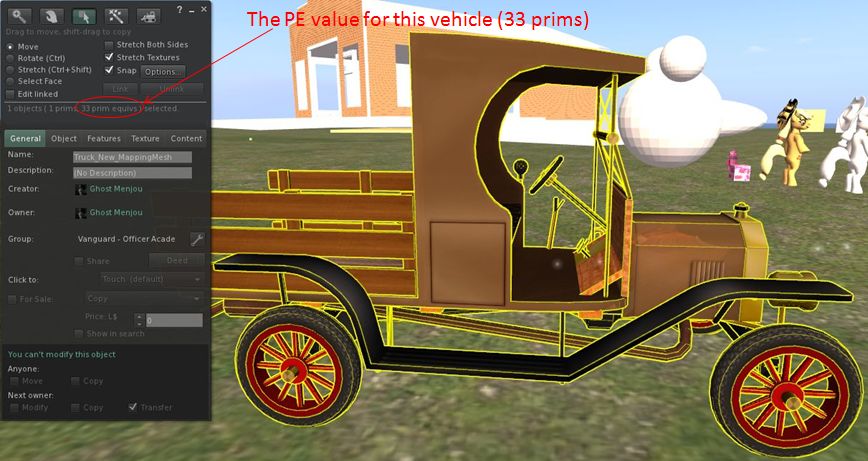
The PE for a mesh object can be seen using the Build menu of any mesh-capable Viewer, as shown below.
(model originally created for mesh upload testing by Jennifur Vultee)


 Inara Pey: Living in a Modemworld