SL projects update week 23 (2): server, viewer, SSB/A, new LSL functions

Server Deployments, Week 23

As usual, the latest updates, feedback and comments can be found on the deployment discussion thread. Anyone encountering a specific bug is asked to file a JIRA.

  • There was no SLS Main channel roll out this week
  • On Wednesday June 5th, the Release Candidate channel received the following packages:
    • BlueSteel and LeTigre were updated with a new server maintenance project.  This project addresses a disconnection issue and also fixes a crash mode – see my notes from week 22, and a fix for a crash mode
    • Magnum remained on the same interest list improvement project as originally deployed to LeTigre in week 21, and to Magnum and BlueSteel in week 22, with some updates. Two of these fix what Andrew Linden describes as “two rare crash modes”. The package should also include the same disconnection issue fix.

Interestingly, the “large” scripts issue I reported on in part 1 of this update was given as the reason why there was not Main channel deployment this week. As previously reported, the fix for this issue, which prevents the text of previously saved scripts from being displayed in the script editor for users on slow connections, failed to make the cut for the week 23 deployments.

There are continuing reports of “invisible avatars” on Magnum regions. This issues was first reported following the week 22 deployments, and described as “on an in-region teleport when landing all surrounding avatars de-rezz and cannot be seen until the person re-logs. Everything else appears normally.” The problem appears to be random in nature, and was also noticed at one club which enjoys a high level of attendance. and which still appears to be encountering the same issue. During the Beta Server meeting on Thursday June 6th, this issue was discussed, and appeared to be most strongly linked to v1-based viewers.

SL Viewer News

The next release of the materials beta viewer arrived on Wednesday June 5th (3.6.0.276961 with the release notes here), and as I indicated in part one of this report, sees the beta once more installed into the “correct” folder (SecondLifeBetaViewer). This means the initial beta release needs to be uninstalled separately, as the updated version obviously won’t over-write it.

The materials project beta viewer had its first update on June 5th, with the release of 3.6.0.274961
The materials project beta viewer had its first update on June 5th, with the release of 3.6.0.276961

In terms of beta releases in the future, it’s worthwhile again pointing-out that once the new viewer release process comes into effect, beta viewers will be installed into folders identified by their project name (e.g. something akin to “SecondLifeBetaMaterials”). Viewers should be fairly well self-contained (although they may still share the same default settings location, as that remains to be seen once things start rolling), so the uninstalling of individual beta versions (or RC versions) shouldn’t be a problem once they reach release status.

Work continues in preparing the new viewer release process for … release (or implementation). It’s still unclear whether it will arrive before or after materials moves to the release viewer. As reported in week 22, the current pipeline of releases we should be seeing as the new release process rolls forward includes:

  • A collection of open-source contributions to the viewer which is hoped will appear as a release candidate viewer pretty quickly
  • A “pretty substantial batch” of maintenance fixes for the viewer
  • Vivox updates, which Oz described as, “Finally getting attention again, and will probably be in a release candidate version ‘real soon’ now”
  • An Experience Tools viewer which is also expected to appear “real soon”
  • An interest list update viewer, which is believed to be getting closer to being stable

Server-side Baking / Appearance

Investigations have been continuing into the SUN-74 issue which affects non-SSB/A updated viewers (notably Phoenix), with Nyx Linden commenting at the Server Beta meeting that, “Thanks to the support from the phoenix/firestorm team, we’ve been able to identify the cause of that issue. We’re looking into what options are available to us. [It]  took some backflips to get it in a debugging environment, but managed to hunt it down – a combination of factors from not having the last 4 years of appearance fixes :)”

Continue reading “SL projects update week 23 (2): server, viewer, SSB/A, new LSL functions”

SL projects update 23 (1): server releases, general notes

Apologies for the slight delay in getting this update out, real life is proving a little time-consuming at the moment.

Server Deployments, Week 23

As usual, the latest updates, feedback and comments can be found on the deployment discussion thread. Anyone encountering a specific bug is asked to file a JIRA.

Second Life Server (Main) Channel

No rolls are planned for the week 23.

Release Candidate Channels (RC)

On Wednesday June 5th, the Release Candidate channel should receive the following:

  • BlueSteel and LeTigre should get a new server maintenance project.  This project addresses a disconnection issue and also fixes a crash mode – see my notes from week 22, and a fix for a crash mode
  • Magnum will remain on the same interest list improvement project as originally deployed to LeTigre in week 21, and to Magnum and BlueSteel in week 22, with some updates. Two of these fix what Andrew Linden describes as “two rare crash modes”. The package should also include the same disconnection issue fix.

A further fix had been planned for the RC channels. This relates to people’s inability to download “large” scripts. This relates to the code path used for script uploads  / downloads having a bug, such that you can write a lengthy LSL script and save (upload) it, but on trying to edit it once more, the text of the script will not display. The issue is thought to be related to bandwidth use, and while a fix has been developed by Andrew Linden, but it failed to make the QA cut for this week’s RC releases.

Viewer News

There have been reports of issues with the materials beta viewer, including:

  • Crashing when logging-in to SL on systems using Intel graphics
  • Issues with transparent alphas showing as white and semi-transparent alphas showing as black, which also appears linked to systems with Intel-based graphics

The Lab is currently working on a fix for the Intel issue, but the alpha issue is apparently providing difficult to consistently reproduce

That the materials beta viewer (3.6.0.275764) installs into a different folder to previous SL beta viewers (SecondLifeBeta rather than SecondLifeBetaViewer), as reported in my overview of the materials beta release, appears to have been an error on the Lab’s part, and it appears likely the additional releases will revert to the SecondLifeBetaViewer folder until such time as the new viewer release process comes on-stream.

Server-side Baking / Appearance

The Lab continues to investigate SUN-74, although there has been no major progress since my last update. The JIRA itself has been updated as a result of further TPV testing.

In terms of any deployment time frames, the Lab still will not be drawn on dates at the moment (again, understandably, even the likes of SUN-74 and the need to try to push more users into updating to viewers which do support SSB/A). Replying to a question on possible deployment beyond the current close beta regions at the Content Creation UG meeting on monday June 3rd, Nyx Linden would only say, “SSA will be deployed slowly and carefully when its ready, we’re working with third-party devs to make sure the last of the bugs are found and hunted down.”

Interest List Update

Andrew Linden
Andrew Linden – who marked his 11th rezday on June 4th, 2013!

As Andrew has been involved in trying to resolve the “large” script bug described above, he’s not had time to make further progress on the “Meeroo issue”, which can affect other scripted animals, etc., as well, and which he describes as:

If you turn your camera away from a crowd of Meeroos, wait several seconds, then turn back around… the Meeroos will be updated, but not quite in the right order. So sometimes you’ll see a head move to the new position, then a fraction of a second later the rest of the body.  So I have a theoretical fix that doesn’t crash the simulator (anymore).

As noted recently, he has developed a partial fix for this problem was deployed as a part of the current interest list updates, and he now hopes he’ll be able to focus on developing a more complete fix, which will mark the final aspect of server-side interest list work for the moment.

Continue reading “SL projects update 23 (1): server releases, general notes”

SL projects Update 22 (3) SSB/A issue update, upcoming viewer releases

Server-side Baking / Appearance

Yesterday, I reported on the SUN-74 issue (Apparent avatar skin and eye texture asset corruption with Server Side Appearance), which can impact users with avatars wearing modifiable skin and/or eyes and/or hairbase who enter (via teleport or crossing a region boundary) an SSB/A-enabled region while using a non-SSB/A enabled viewer (e.g. such as Phoenix or the v1.23.5 viewer) and leave them with a corrupted copy of the worn skin / hairbase or eyes. At the time I noted that the matter was under investigation by Linden Lab, and no decision had been made on how to handle it.

Whirly Fizzle demonstrates the result of the SUN-74 issue
Whirly Fizzle demonstrates one aspect of the SUN-74 issue – on a non-SSB/A viewer, her MOD skin has turned black / invisible and her MOD eyes have turned white as a result of entering an SSB/A-enabled region and responding with YES to the given prompt.

Speaking at the TPV Developer meeting on Friday May 31st, Oz Linden provided an update on the issue and spoke more generally on the issue of the use of olfder (non-SSB/A capable viewers) going forward:

We don’t actually know what’s ultimately going to be done about that; that’s a subject of vigorous discussion that’s going on even as we speak, so we’ll see how that plays out. I think it’s fair to say that regardless of what happens with that particular issue … I will just make the observation that there are still people really, really old viewers [and] there is no way, no way at all, that we could even begin to test for compatibility back with all of those viewers.

As it is, as recently as this last week there were 1,665 different viewer version strings reported as connecting to the main grid (these include 151 versions of Singularity, 50 versions of Phoenix, 262 labelled as Firestorm, and so on). Some of these may be “one offs” self-compiled builds (which may or may not have the most recent updates to support something like SSB/A), but even so, given the overall number of viewer strings, it is understandable why the Lab view attempt to ensure so many different viewer versions were fully compatible with anything on the grid is a next to impossible task.

This does not mean that the Lab is going to ignore SUN-74, right now they are still investigating the problem and trying to reproduce it in a consistent manner (which is apparently proving difficult for a number of reasons, not the least of which is that some older viewers simply crash when attempting to repro the corruption). However, what it does underline is the need for people to upgrade to an SSB/A-enabled version of their preferred viewer sooner rather than later.

The reason for this is that very soon the Lab will start undertaking more widespread testing of the new service by enabling it across a number of regions across the grid. These regions may not necessarily be constrained to any of the usual RC channels, but could well be a mix of regions from all of the various simulator channels, making them harder to identify and avoid. This testing will be to gain greater insight into how the service stands up under “real avatar loads” – something which is impossible to carry out to any great depth on Aditi, as there simply isn’t the volume of users active there.

Once this more widespread testing starts, then it is entirely possible that users who remain on non-SSB/A capable viewers are going to encounter issues and problems beyond seeing grey avatars which the Lab are not going to address, simply because the issues can be resolved by a viewer update.

So the word really is, update, update, update.

Continue reading “SL projects Update 22 (3) SSB/A issue update, upcoming viewer releases”

Materials processing reaches beta – overview and more

After recent delays as the code passed through QA, the Materials Processing viewer unexpectedly reached beta release on Friday, May 31st with the release of version 3.6.0.275764, accompanied by a blog announcement from the Lab.

What is Materials Processing?

In case you’ve missed the news to date (if you already are, feel free to skip to the info on the viewer :)).

Materials processing brings normal and specular maps to object surfaces in Second Life (prims, sculpts and mesh – but not avatar skin / clothing layers). The capability has been developed as a collaborative effort between TPV developers (notably from the Exodus, Catznip and Firestorm teams), content creators and Linden Lab.

Note: The following two sections are not intended to be a technical discussion on computer graphics mapping or a detailed analysis of normal & specular maps. It is intended purely as a broad, non-technical of the latter.

Normal Maps in a Nutshell

Normal maps (sometimes referred to as bump maps, although they are more rightly the most common form of bump map) are a means of faking high levels of detail on an otherwise bland surface by means of simulating the bumps and dips that create the detail. Normal maps can be created in several ways.

For example, when working with 3D models, a common method is to make two models of the same object: one a very complex, highly detailed model with a high polygon count, the other a much lower polygon count model with significantly less detail. An overlay process is then used to generate a normal map of the detailed model’s surface features which can be applied to the less complex model, giving it the same appearance as the highly detailed model, but for just a fraction of the polygon count, reducing the amount of intensive processing required to render it.

Using a normal map to enhance the detail on a low-polygon model. The image on the left shows a model of some 4 million triangles. The centre image shows a model with just 500 triangles. The image on the right shows the 500-triangle model with a normal map taken from the model on the left applied to it (credit: Wikipedia)

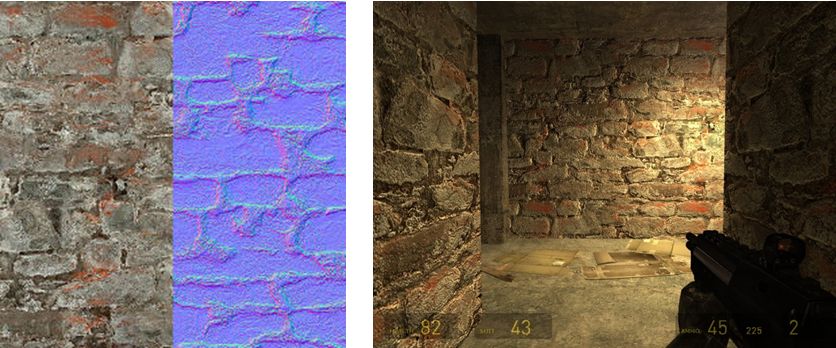
Another common way to produce a normal map is to generate it directly from a texture file. Most modern 2D and 3D graphics programs provide the means to do this, either directly or through the use of a plug-in (such as the nVidia normal map filter for Photoshop or the GIMP normal map plugin). When combined with diffuse maps, the normal map creates the impression of surface detail far greater than can be achieved through the use of the texture alone.

Normal map from a texture: left – the original texture (diffuse map) and its normal map shown as a split view; right – the material resultant from applying both maps to surfaces inside a game (credit: Valve Corporation)

Specular Maps in a Nutshell

In the real world, every highlight we see in an object is actually the reflection of a light source. Surfaces and surface details reflect light differently to one another, depending on a range of factors (material, lighting source point(s), etc.). Specular maps provide a means of simulating this by allowing individual pixels in an object to have different levels of brightness applied to them, giving the illusion of different levels of light being reflected by different points on the object.

When life gives you lemons: a mesh lemon with (l) a normal map applied, and (r) a normal and a specular map together. Note how light is apparently being reflected across the surface of the latter (credit: Mind Test Studios)

Like normal maps, specular maps can be produced in a number of ways, both within 3D graphics modelling programs and in tools like PhotoShop. As shown above, they can be combined with normal maps and textures to add detail and realism to 3D models and flat surfaces.

Second Life itself already includes a very dynamic example of how materials can be combined to create in-world effects in the form of Linden Water. This is created using an animated normal map to create the wave-like effect for the water, while an animated specular map adds the highlights and reflections. The result is a very realistic simulation of moving water able to catch and reflect sunlight.

Some key points about materials processing:

  • Effects will currently only be visible when using the Materials Processing beta viewer
  • In order to be visible in your world view, whether you are creating objects using materials processing OR whether you simply want to see them in-world, you must have the Advanced Lighting Model (previously “Lighting and Shadows” and often referred to as “deferred rendering”) option in Preferences > Graphics enabled
    • Note that this does not mean you also have to enable shadows themselves – you can leave the drop-down set to None and still see materials in use in-world, thus minimising any impact on your frame rates
    • The Lab has done a lot of work on the rendering pipeline to improve performance; as such, if you’ve not run with the Advanced Lighting Model / deferred rendering enabled on your computer due to previous performance issues you might find you can now enable Advanced Lighting Model in your viewer without experiencing a dramatic loss of frame rates
  • When creating objects which use materials processing, note that they will automatically move to the “mesh” accounting system for land impact, which can affect  the impact value assigned objects and models
  • Materials capabilities do not work when under Linden water.

Continue reading “Materials processing reaches beta – overview and more”

SL projects update 22 (2): SSB/A issues, materials, server issues

Server Deployments – week 22

The server channel deployments were delayed 24 hours this week due to Monday May 27th being Memorial Day in the USA.  This being the case:

  • On Wednesday 29th May, the Main channel received the server maintenance project previously on Magnum. This includes bug fixes, comprising two for crash modes and one for BUG-2424 (Overriding “Sitting on Ground” animation while sitting on the ground makes “stand up” button disappear). This deployment also included the LSL support to create and parse JSON-formatted strings, which also included the bug fixes for this capability deployed to Magnum in week 21 (see my SL projects update report from week 21). Release notes
  • On Thursday 30th May, the three Release Candidate (RC) channels received the interest list improvement project deployed to LeTigre in week 21. The core change in this update should reduce scene loading time when entering a new region (again, please refer to my week 21 report for background information). Release notes (BlueSteel, but applicable to all three RCs).

Server-side Baking / Appearance

As noted in these pages, the Lab formally announced the forthcoming arrival of SSB/A on May 29th. This has prompted questions of “when?” Again, as I’ve previously reported, the Lab is proceeding cautiously towards a server-side deployment, even though they are encouraging people to swap to a version of their preferred viewer which is SSB/A-enabled sooner rather than later.

Currently, the two regions for TPV testing have been enabled with the new service and TPVs are putting the new capability through its places – and this has already revealed a reason for the Lab’s understandable reluctance to give out firm dates, as a potentially major issue has been identified.

SUN-74, raised on May 29th, shows that if you are wearing a MOD skin, hairbase or eyes and you enter an SSB/A-enabled region using a non-SSB/A enabled viewer, an alert will appear on your screen which, on clearing, is followed by an innocuous-looking prompt.

The alert and prompt which are displayed when using a non-SSB/A enabled viewer when entering an SSB/A-enabled region
The alert and prompt which are displayed when using a non-SSB/A enabled viewer when entering an SSB/A-enabled region (image courtesy of Whirly Fizzle)

Clicking YES in reply to the prompt can result in the currently worn skin / eyes / hairbase to become irreparably corrupted, with a skin turning  a mixture of black / invisible and eyes turning white. Rebaking will not fix the issue. Relogging to an SSB/A-enabled viewer seems to result in the avatar rendering as a cloud, and / or ending up with a default skin and ruthed. Replacing the affected items (skin and/or eyes and/or hairbase, depending on which has / have been corrupted) with others from you inventory will fix the issue, but re-wearing the corrupted item(s) results in the avatar once more appearing corrupted (and again ruthed, if running an SSB/A-enabled viewer).

Whirly Fizzle demonstrates the result of the SUN-74 issue
Whirly Fizzle demonstrates one aspect of the SUN-74 issue – on a non-SSB/A viewer, her MOD skin has turned black / invisible and her MOD eyes have turned white as a result of entering an SSB/A-enabled region and responding with YES to the given prompt.

Continue reading “SL projects update 22 (2): SSB/A issues, materials, server issues”

Lab formally announces Server-side baking / appearance

Regulars to this corner of the SL blogsphere know I’ve been covering Project Shining – the various projects the Lab is currently undertaking to improve Second Life on the technical front in order to give us all a (hopefully) better experience.

Part of this work includes Project Sunshine, which is more colloquially know as server-side baking (SSB) or server-side appearance (SSA) or server-side baking/appearance (SSB/A) – the choice is yours, depending on personal preference, and which I’ve covered throughout numerous reports in this blog. The primary aim of project Sunshine is to resolve the issue of avatar bake fail – those situation wherein your avatar (or other avatars) fail to render correctly to either yourself or to others around you.

Today, the Lab itself moved to formally announced the forthcoming arrival of SSB/A with a special blog post of their own on the matter, which includes a short video explaining matters:

As the post indicates, SSB/A is being deployed in three parts:

  • A viewer update  – which is available now for the majority of commonly used SL viewers
  • The deployment of server-side changes, which should be commencing shortly
  • A further viewer-side update once the server deployments are completed.

The server-side deployment will take a while to complete, as the new service will require a degree of testing. As such, it is expected that a number of regions on the main grid will be enabled for SSB/A (if they have not been already), and these will be used to measure performance over a period of time prior to a decision being made on “throwing the switch” to enable the entire grid is SSB/A enabled (the test regions may even be scaled-up over time, depending upon how the initial testing goes.

Server-side baking: find out what it is and why you'll need to update your viewer if
Server-side baking / appearance: must viewers should (or will shortly) support SSB/A – make sure you update to a current release of your preferred viewer to avoid seeing grey avatars as the server-side of the new capability is deployed in the coming weeks.

As you won’t be able to tell which regions are using the new SSB/A service and which are using the existing avatar baking service, it is important that you make sure you are using a viewer which supports both capabilities – otherwise you might find yourself encountering grey avatars in increasing numbers. This means updating to a viewer which has the SSB/A code; at the time of writing, these are:

Doubtless, Catznip (R8 with SSB/A has been in development for a while), Dolphin and Exodus will have SSB/A-capable viewers out shortly as well.

Those wishing to obtain a further overview on SSB/A and also on the most recent updates out of LL on the server-side deployment plans are welcome to refer to the following reports from this blog: