Logos representative only and should not be seen as an endorsement / preference / recommendation
Updates from the week ending Sunday, May 15th, 2022
This summary is generally published every Monday, and is a list of SL viewer / client releases (official and TPV) made during the previous week. When reading it, please note:
It is based on my Current Viewer Releases Page, a list of all Second Life viewers and clients that are in popular use (and of which I am aware), and which are recognised as adhering to the TPV Policy. This page includes comprehensive links to download pages, blog notes, release notes, etc., as well as links to any / all reviews of specific viewers / clients made within this blog.
By its nature, this summary presented here will always be in arrears, please refer to the Current Viewer Release Page for more up-to-date information.
Note that for purposes of length, TPV test viewers, preview / beta viewers / nightly builds are generally not recorded in these summaries.
Official LL Viewers
Release viewer: version version 6.5.5.571282, – formerly the MFA RC viewer, dated April 26, promoted Wednesday, May 4th – No change.
Release channel cohorts:
Performance Improvements RC viewer version 6.6.0.571736, May 12.
Makgeolli Maintenance RC viewer (Maintenance M) viewer, version 6.5.6.571575, May 12.
Project viewers:
Performance Floater project viewer, version 6.5.4.571296, May 10.
The following notes were taken from the video recording by Pantera (embedded at the end of this piece, my thanks to her as always for recording the meetings) of the Third-Party Viewer Developer (TPVD) meeting on Friday, May 13th, 2022 at 13:00 SLT. These meetings are chaired by Vir Linden, and dates for them can be obtained from the SL Public Calendar.
Important: as from this meeting, the TPV Developer meeting has moved to a four-week schedule.
Please note that this is a summary of the key topics discussed during the meeting and is not intended to be a full transcript of either. However, the video does provide a complete recording of the TPVD meeting, and timestamps to the relevant points within it are included in the notes below.
The Makgeolli Maintenance RC viewer (Maintenance M) viewer updated to version 6.5.6.571575.
The Performance Improvements RC viewer updated to version 6.6.0.571736.
On Tuesday, May 10th, the Performance Floater and Auto-FPS project viewer updated to version 6.5.4.571296.
The rest of the currently available official viewer versions remain as:
Release viewer: version version 6.5.5.571282 – formerly the MFA RC viewer, dated April 26, promoted Wednesday, May 4th – NEW.
Project viewers:
Mesh Optimizer project viewer, version 6.5.2.566858, dated January 5, issued after January 10.
Legacy Profiles viewer, version 6.4.11.550519, dated October 26, 2020.
Copy / Paste viewer, version 6.3.5.533365, dated December 9, 2019.
General Viewer Notes
The Performance Improvements RC viewer remains the next in line for promotion to de facto release status, the latest update to this viewer awaiting data on crash rates prior to potentially being promoted.
MFA Enforcement: the eventual plan with multi-factor authentication (MFA) is to “enforce” it for all users who have opted-in to using it so that when logging-in to SL on a viewer without MFA support, they will see a message requesting they either swap to using one with MFA support or disable MFA from their Second Life account dashboard.
It is not clear when such enforcement will commence. However, the official viewer, Catznip, Kokua and Cool VL are all known to support MFA, and an MFA version of Firestorm is in the works, so it is likely that the “enforcement” could come in the relatively near future.
There will be no change to logging into the viewer for users who have not opted to use MFA or who decided to disable it on their account.
https://viewer-login.agni.lindenlab.com/ is a URL referenced in the viewer log-in code, but is currently a redirect and not actually used. LL is therefore planning on removing it.
This work is currently focused on implementing a new materials asset type that will allow materials surfaces created utilising the PBR workflow to be imported to SL and then applied to their desired object face(s).
LL hopes that creators using PBR will also supply textures entries (e.g. a diffuse map + normal & specular maps (if required) + associated parameters as we know them today in the build floater) so that systems / clients that cannot / do not run the supporting PBR code can display these texture entries instead, rather than leaving objects with blank faces.
It has been suggested than any such use of “fallback” texture entries be an automated process, rather than something that has to be done manually by the creator.
Longer term, there will be some form of LSL support for this as well, although the extent of this has yet to be fully determined. However, it is liable to be along similar lines to texture application using LSL.
Once defined, the materials assets will be stored using the glTF 2.0 specification.
Reflection Probes / Environment Maps
A parallel piece of work is adding sport to SL for reflection probes to update the generation of the environment maps (because the current cube mapping used by SL is limited and would not work will with PBR).
The key point here is that the introduction of reflection probes + updated cube maps will work with both “PBR” and “legacy” content.
This work has been underway for the last couple of weeks, including input from some content creators / viewer developers.
“Outdoor” probes will likely be subject to automated placement, but with a hierarchy applied such that they don’t override probes placed inside structures.
General Notes
In terms of user testing, the approach to this work is similar to that taken with Mesh:
Testing will initially be carried out on Aditi (the beta grid) as things develop, allowing various “PBR” and “legacy” content to be uploaded and tested, well before anything is implemented on the main grid or made widely available to users through the viewer.
Content creators wishing to test content are strongly advised to join the Discord discussions and join in with testing from there.
glTF mesh objectuploads: this is on the roadmap of things the Lab would like to include in the initial project. However, depending on how work progresses and time frames imposed, it may not form a part of the initial work that is shipped and slip to being “tackled at some point”.
[Video 21:09-23:30] The simulator fixes for off-line Group and Friend invites failing to update following acceptance should be surfacing on the RC channels in week #20.
[Video 22:44-27:40] a discussion on rigged meshes and bounding boxes focused on a change that was made to overcome issues of people creating oversized bounding boxes for their rigged meshes in order to avoid providing LODs (and forcing the viewer to always render them at a performance impact) that was recently reverted.
Runitai Linden explained that the revision was actually the result of changes made within the Performance Improvements Viewer that clashed with the rigged mesh bounding box changes, and that there is still an open issue to ensure the rigged mesh bounding box is always an appropriate size.
This rolled into a broader discussion on the complexities of rigged mesh visual size, scaling, bounding boxes / LODs selection, impact of the animation system, etc.
[Video 28:04-End] The above leads into a discussion on LODs in general and the idea of auto-LODding content vs. (good and bad) custom LOD creation (and what constitutes “good” LOD modelling – e.g. basing on surface area or triangle count?), LOD / LI conflicts, and trying to strike an equitable balance such that LODs can be “properly” defined and used.
As this discussion covers a lot of ground, I refer those interested to the video.
The following summary notes were taken from the Tuesday, May 10th, 2022 Simulator User Group (SUG) meeting. It forms a summary of the items discussed and is not intended to be a full transcript. A video of the entire meeting is embedded at the end of the article for those wishing to review the meeting in full – my thanks to Pantera for recording it.
Server Deployments
Apparently, there was an “issue” with the week #18 deployments which has lead to changes being deployed this week. .
In short, the list of avatar appearance details for a given agent that could be returned by llGetVisualPrameters (which went grid-wide with the deployment of server release 571166 to the Main SLS channel in Week #18) gave rise to a host of “Shape Stealing HUDs” that allowed people to obtain the full set of avatar body shape details for any shape (including those sold as “No Mod” by shape creators.
As a result, both the SLS Main deployment on Tuesday, May 10th, 2022 and the RC deployments of Wednesday, will see the list of returned values significantly reduced to:
33 – height
503 – platform_height
756 – neck_length
38 – torso_length
616 – shoe_height
814 – waist_height
80 – male
692 – leg_length
842 – hip_length
198 – heel_height
693 – arm_length
11001 – hover
Available Official Viewers
There have been no official viewer updates at the start of the week, leaving the current crop as:
Release viewer: version version 6.5.5.571282, – formerly the MFA RC viewer, dated April 26, promoted Wednesday, May 4th.
Release channel cohorts:
Performance Improvements RC viewer version 6.6.0.571507, May 5.
Makgeolli Maintenance RC viewer (Maintenance M) viewer, version 6.5.5.570983, April 26.
Project viewers:
Performance Floater project viewer, version 6.5.4.569531, March 18.
Mesh Optimizer project viewer, version 6.5.2.566858, dated January 5, issued after January 10.
Legacy Profiles viewer, version 6.4.11.550519, dated October 26, 2020.
Copy / Paste viewer, version 6.3.5.533365, dated December 9, 2019.
In Brief
There was a general discussion on multi-region events, in part focused on a) the incorrect assumption that adjoining regions are running on the same simhost (this has never been guaranteed, pre- or post-AWS uplift) b) visibility issues for those in the “audience” region of a multi-region event (i.e. being unable to see everything in the “performance” area that sits in another region); and c) the new Event regions (see: LL launches Event region product + some thoughts).
On the subject of Event regions, Mazidox Linden has provided information on how LL evaluated the region performance on the forum thread about the product.
There was further discussion on the requested scripted object capabilities for EEP See the week #18 summary), which will be “coming Soon™” – at some point.
In keeping with the statements made on the release of Catznip R13 (which is overviewed here), the Catznip team released a Maintenance update to the viewer on Sunday, May 8th, 2022, which is available for Windows (32-bit and 64-bit) and Mac OSX ((10.11 or later).
As work is progressing well on the next full release (R14), this maintenance update – called simply Catznip R13.1 – is not packed with news features and options, but does, in keeping with its function as a Maintenance release, offer some nice additions, some fixes, and one or two new items.
As always, full details of the changes and updates in this Catznip release are available through the official release notes; what follows is a general summary of the more interesting updates.
MFA provides additional security to your Second Life account. It is entirely optional – you do not need to use it if you don’t want to – but it currently provides additional account security when trying to access particularly sensitive information about your Second Life account (e.g. trying to view your billing info or transaction history, trying to cash out (“process credit”) money out of your account, trying to change the e-mail address associated with your account, etc.).
You can find out more on MFA in general by following the links below:
Anyone who has opted to use MFA will, every 30 days, will be required to provide an MFA token in addition to their user name and password when logging-in to SL via any viewer / client supporting MFA.
Anyone who has not opted to use MFA, or decides to disable it after initially opting-in, will not see any change to how they log-in to SL via a viewer /client.
For those who have enabled MFA on their account:
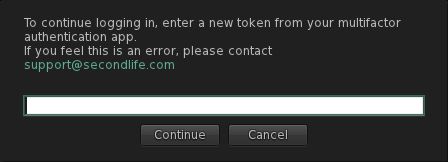
The first time you use Catznip R13.1 you will have to use your preferred authentication method to generate a new token (6-digit code) and enter it into the viewer when prompted (after entering your user name and password).
The MFA prompt for a token, which will be seen in Catznip R13.1 (and other viewer supporting the Lab’s MFA code) once every 30 days.
Some authenticators generate their token as 2 groups of 3 digits (e.g. XXX YYY). Where this is the case, you can enter the code with or without the space.
Note that the token will remain valid for 30 days, as noted above, so you do not have to provide a token every time you log-in to the viewer.
Catznip Improvements
Group Activation and Accessing Notices
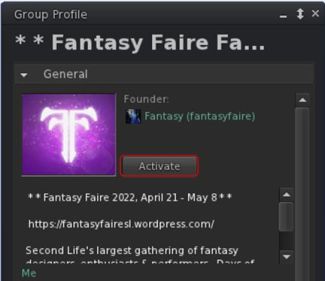
Catznip’s new Group Activation button displayed in profiles of Groups you have joined
This release of Catznip offers two new options for activating a Group tag, and a new option for viewing group notices:
You can activate the tag for any Group of which you are a member directly from the Group’s Profile floater, by clicking the Activate button.
You can also active the Group’s tag (again, you must already be a member) but right-clicking on the Group’s SLurl when displayed in local chat and selecting Activate from the drop-down menu.
You can also use this latter method (right-click on the Group SLurl in chat) to select the Show Group Notices option from the drop-down and view notices.
Teleport History Pruning
Regions come and go in Second Life, and if you spend a fair amount of time hopping around the grid visiting places, it is possible to end up with the Teleport History panel that is full of landmarks that are no longer valid (e.g. because the shop has moved, or the region has changed owners / user, or has gone away completely, etc.). You may also want to ease searching for LMs in history by pruning out those “one off visits” you’ve made.
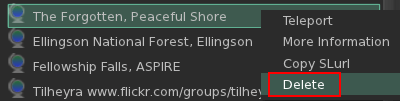
Deleting LMs from your Teleport History tab in Places
Catznip R13.1 now makes this possible:
Open you Teleport History (Me → Places → Teleport History).
Either:
Right click on the landmark in the history list.
Select Delete from the drop down menu.
Or:
Left-click on the landmark in the history list.
Click the dustbin at the bottom of the of the floater.
Conversations Navigation
Catznip R13.1 adds an additional set of keyboard shortcuts to assist in navigating between tags within the Conversations floater:
Action
Horizontal Chat Tabs
Vertical Chat Tabs
Page to the next tab
ALT-Right Arrow
ALT-Down Arrow
Page to the previous tab
ALT-Left Arrow
ALT-Up Arrow
Page to the next tab with unread messages
ALT-SHIFT-Right Arrow
ALT-SHIFT-Down Arrow
Page to the previous tab with unread messages
ALT-SHIFT-Left Arrow
ALT-SHIFT-Up Arrow
Mouselook Improvements
Catznip R13.1 adds the following three options to using Mouselook:
Allow script dialogues.
Do not immediately snap the mouse back to the centre of the screen after a (scripted touch) click.
Show the hand cursor while holding down the CTRL key in Mouselook to indicate touchable faces.
Feedback
A small but tidy group of updates well suited to a maintenance release and which ensures Catznip is MFA compliant (which will be required of all viewers / clients in the near future). I admit to particularly liking the Teleport History pruning capability; would that the other viewers I use adopt it – some of my history lists tend to get jammed full of LMs, and purging the lot from outside of the viewer just to start over has never really been ideal.
Again, for the complete list of updates and bug fixes, please refer to the Catznip R13.1 release notes.
Logos representative only and should not be seen as an endorsement / preference / recommendation
Updates from the week ending Sunday, May 8th, 2022
This summary is generally published every Monday, and is a list of SL viewer / client releases (official and TPV) made during the previous week. When reading it, please note:
It is based on my Current Viewer Releases Page, a list of all Second Life viewers and clients that are in popular use (and of which I am aware), and which are recognised as adhering to the TPV Policy. This page includes comprehensive links to download pages, blog notes, release notes, etc., as well as links to any / all reviews of specific viewers / clients made within this blog.
By its nature, this summary presented here will always be in arrears, please refer to the Current Viewer Release Page for more up-to-date information.
Note that for purposes of length, TPV test viewers, preview / beta viewers / nightly builds are generally not recorded in these summaries.
Official LL Viewers
Release viewer: version version 6.5.5.571282, – formerly the MFA RC viewer, dated April 26, promoted Wednesday, May 4th – NEW.
Release channel cohorts:
Performance Improvements RC viewer updated to version 6.6.0.571507, May 5th (MFA).
The following notes were taken from my audio recording and chat log of the Content Creation User Group (CCUG) meeting held on Thursday, May 4th 2022 at 13:00 SLT. These meetings are chaired by Vir Linden, and their dates and times can be obtained from the SL Public Calendar.
This is a summary of the key topics discussed in the meeting and is not intended to be a full transcript.
Official Viewers Update
On Wednesday, May 4th, the de facto release viewer was updated to version 6.5.5.571282, formerly the MFA RC viewer, dated April 26. See my notes on this viewer here.
On Thursday, May 5th, the Performance Improvements RC viewer updated to version 6.6.0.571507.
The focus for this viewer is now bug and crash fixes, rather than adding functionality.
This update also sees the viewer merged with the release viewer MFA code base, and so will require anyone who uses MFA and who has not logged-in to Second Life using an MFA token to do so -follow the link above for details.
The rest of the official viewers remain as:
Release channel cohorts:
Makgeolli Maintenance RC viewer (Maintenance M) viewer, version 6.5.5.570983, April 26.
Project viewers:
Performance Floater project viewer, version 6.5.4.569531, March 18.
Mesh Optimizer project viewer, version 6.5.2.566858, dated January 5, issued after January 10.
Legacy Profiles viewer, version 6.4.11.550519, dated October 26, 2020.
Copy / Paste viewer, version 6.3.5.533365, dated December 9, 2019.
Graphics Update
During the previous CCUG meeting, the potential direction for Physically Based Rendering (PBR) materials support was discussed at length, and concerns were raised that for PBR to be effective, SL’s lighting / reflections model would need to be updated.
As a result, these branches of work have commenced:
The foundational work in creating a materials type with an associated inventory asset, as per the week #16 meeting. This will initially comprise the ability to copy a texture entry (with its specific parameters) to inventory.
Foundational work on the PBR graphics pipe in the viewer.
Work on an implementation of reflection probes which can be used both with PDR shading and with legacy content. This formed the focus of this meeting.
Reflection Probes
Runitai Linden envisages two forms of reflection probes:
Those that are part of a scene’s environment and are automatically placed, but which can (hopefully) be adjustable by scene builders – this is the current focus of the work, with the reflection probes married to the octree so they will align with octree nodes.
Reflection probes which can be specifically placed within structures by their creators (e.g. a probe within each room of a house) or which can be created and added to a legacy structure.
These would override “environment reflection probes” to prevent clashes (so that, for example, your nice shiny kitchen worktop is not reflecting the sky outside, but is offering reflections of the static objects on and around it.
Their size would be based on the volume they are attached to, which would allow for parallax correction, allowing the reflections to be accurately generated within a room space.
“Environment reflection probes” used with legacy content: on the left, shiny surfaces of a prop engine as most of us are used to seeing them today. Right: the same engine but with its shiny surfaces now showing reflections generated via a reflection probe in the scene. Credit: Runitai Linden
These probes:
Comprise an object (prim) defined as a reflection probe which essentially uses the 360º snapshot code viewer to produce a cube map of its surroundings with each face set to 512×512 resolution (so 6 x 512×512), which can then be used to generate object “reflections” on surfaces within their volume of control.
This will require some additional checkboxes to be added to the build floater / viewer, but otherwise means probes can be inserted into “indoor” scenes using the existing build toolset.
Capture everything except avatars (so no reflections of your avatar walking past a shiny surface).
Initially trigger the generation of their cube maps by the viewer on entering a scene.
Maps are cached on disk, with up to 64 held in memory.
Currently only 8 maps are active at any one time. However, given sampling of just 8 maps for rendering can take up to 70% of an RTX 3080 GPU, this number is likely to be dropped to 4, unless a more targeted means of sampling for a given pixel can be determined.
Are updated whenever the number of objects in them changes or the Day Cycle changes, although the update rate is no more than one probe per frame.
Glossiness and reflection probes: in this image, the centre left row of spheres have a white face, and the centre right all have black faces. Each pair, front-to-back, has a matching and increasing level of glossiness applied. Note how the greater the amount of glossiness, the sharper the reflections of the probe’s cube map. Credit: Runitai Linden.
The overall aim of this work is to provide a means to support more physically accurate reflections in SL than can be currently generated (seen as a requirement for PBR support). This work can then both:
Be integrated into the PBR work as that is added to Second Life.
Improve the existing SL environment map so that legacy content does not clash with PBR content as badly as might otherwise be the case – although it will not be a perfect blending of the two.
However, it will be “very, very hard for this to not break [some] content”, although the overall result should improve so SL looks.
Given this, the capability will need a lost of assistance with testing.
Concern has been raised about how to limit / control the use of probes so as not to cause potential performance issues (e.g. by creators including a probe with all of their products that have a shiny / reflective surface).
The plan is to have every single pixel in a rendered scene covered by at least one probe via the automatic placement, so objects that are outside certainly should not need their own reflection probes.
Even so, it has been suggested that time is taken to produce a “best practices” guide to using reflection probes and to provide examples of bad probe set-ups.
It was also suggested that a flag for “do not reflect” should be provided to help control what is included in a cube map in a given setting. It was not clear if this would be possible, so the question was set aside for the next meeting.
General Notes:
This work is still in its early stages, and elements may change.
Several aspects of reflection generation have yet to be tackled (e.g. handling 100% transparent and 100% alpha textured surfaces).
The work has yet to be tied-into the existing graphics controls in the viewer so that everything works consistently and logically.
Some of the additional work required for generating reflections might be compensated for by optimising other elements of the shader system as this work progresses.
At some point this work will be available within a project viewer for testing on Aditi.
Note: while reflection probes formed the core of this meeting, this does not mean this work will be shipped ahead of the more PBR-related work. All three project branches are in their early stages, and so no decision on prioritisation among them has been taken.
PBR-Specific Work
The PBR graphics pipe is still being plumbed-in.
No work has really started with the PBR shader set.
The plan is still to follow the glTF specification.
As this embraces the PBR Metallic Roughness workflow, this will be the first to be supported.
If demand surfaces, LL might add Specular Glossiness as a follow-up.






 Inara Pey: Living in a Modemworld