Viewer 2 Gets “Real-Time” Lighting

Linden Lab are certainly ramping-up Viewer 2. On top of yesterday’s announcement about the inclusion of Windlight settings for sim owners, comes the release of Viewer 2.7.1 with – among other things, “real time” shadows.

Users of many TPVs will already be familiar with the use of Dynamic Shadows, but until now, these haven’t been available in the “official” Viewer 2. This new release changes all that – and what’s more, it does so with less of a performance compromise for many GPUs.

I don’t have a top-end PC or graphics system – I have a 3-year-old Q6600 quad core and a 1Gb nVidia Ge9800. It can render shadows, but the performance hit means that the Viewer is pretty much crippled as far as doing anything else is concerned (although Kirstenlee’s marginally less so that the like of Phoenix).

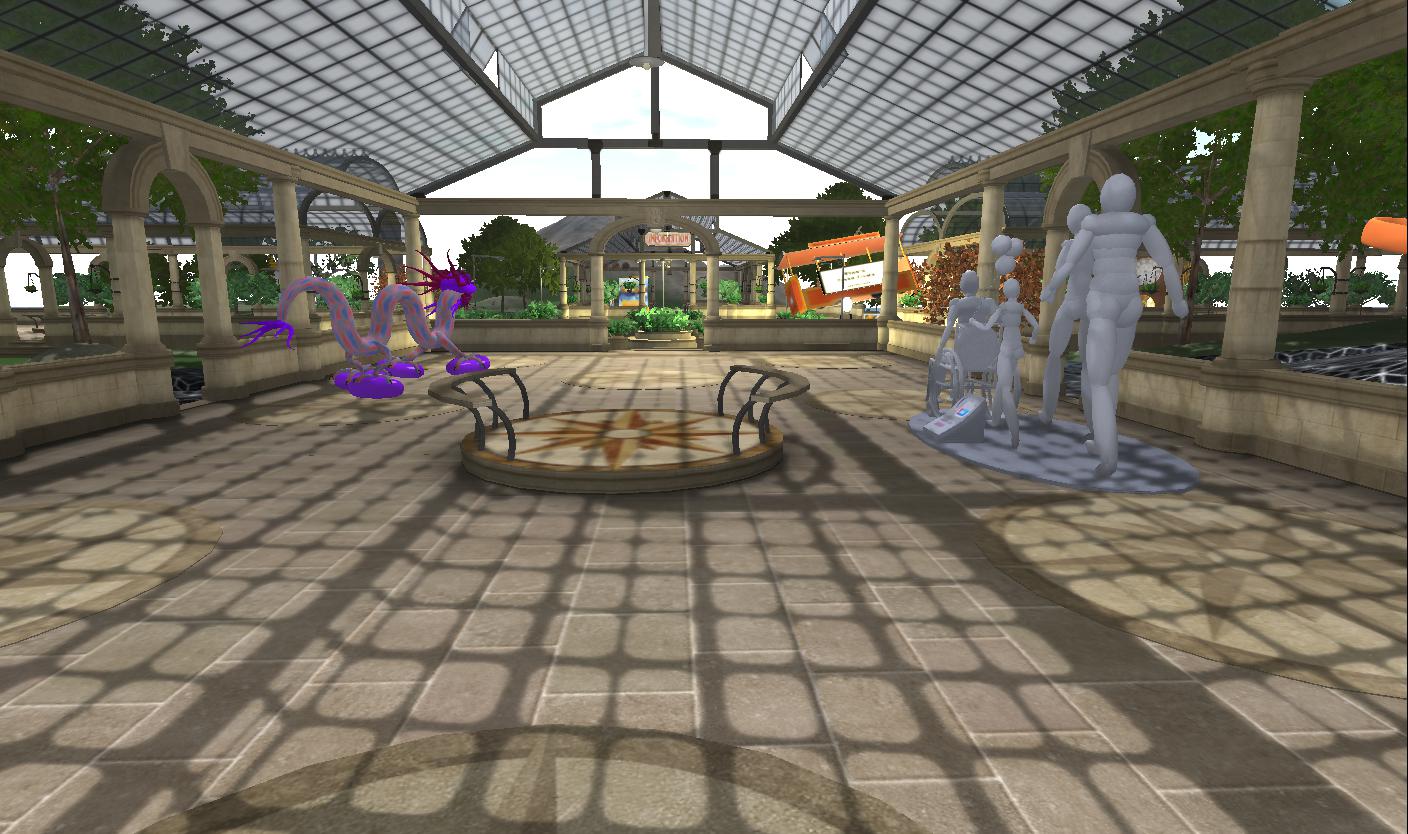
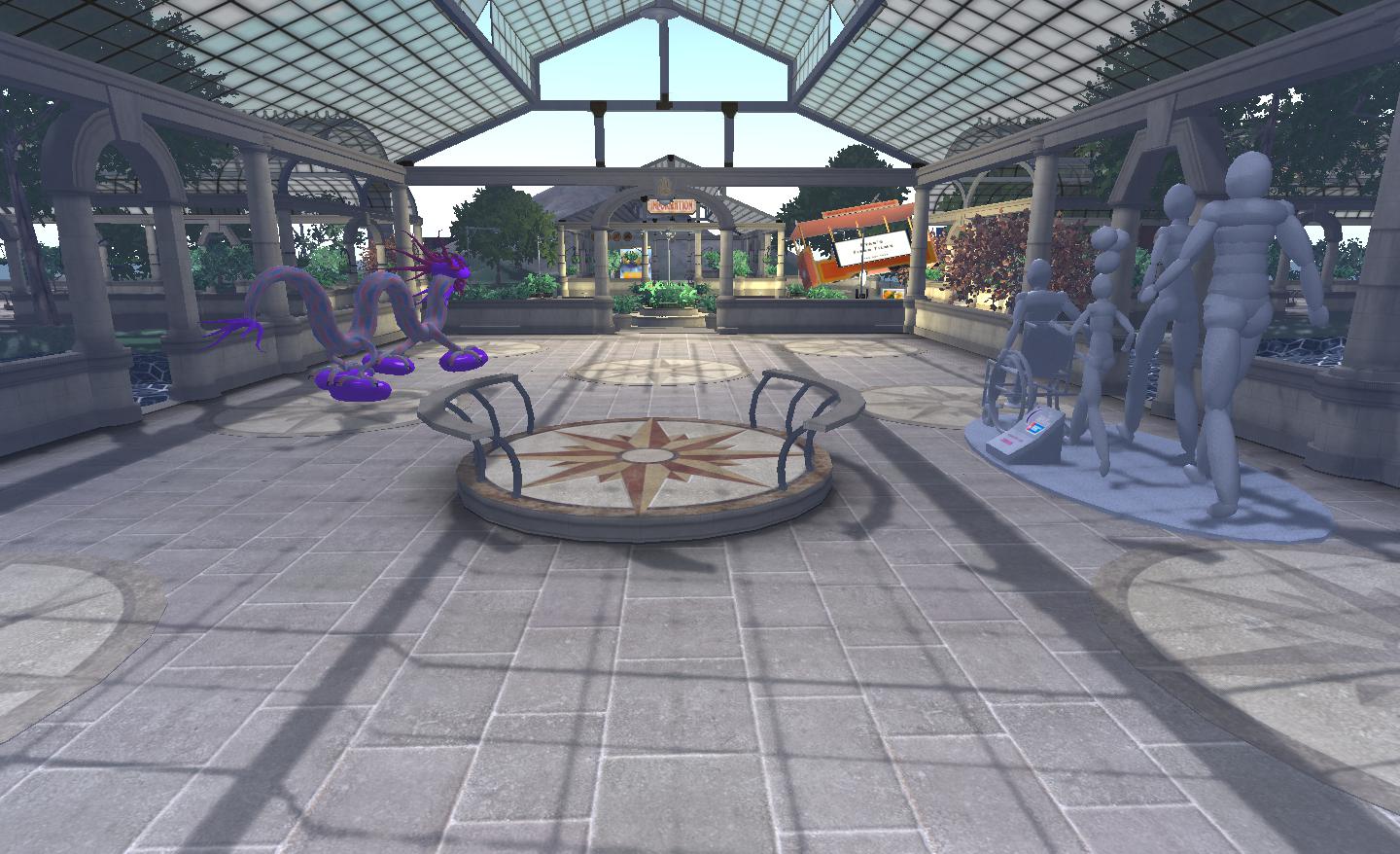
With Viewer 2.7.1, however, I find the “hit” to be a lot less: fps tumbles to around 18, but that is massively better than the 5-8 fps I get elsewhere. I can actually walk around and do things! Viewer 2 also renders shadows far more crisply than I can get with other Viewers.

Me and my shadows: Phoenix (left) and Viewer 2.7.1 (right). Note how in Phoenix the Alpha Mask fails to hide my feet & the blobby shadow I cast. no such issues in Viewer 2..7.1

Another problem I get with Phoenix and the like when dynamic shadows are enabled is that items of prim clothing can flicker on avatars around me and alpha masks frequently fail (so that people’s feet are visible through there shoes). This is probably an artefact of my graphics card…but Viewer 2 eliminates it completely!

Combine shadows with the depth-of-field option (which creates a natural blurring of objects in accord with distance) and set the occulsion option, and you can get some stunning shadow effects, day and night.

The new release isn’t limited to the shadows option, either. Further improvements have been made to Search – although I’ve not actually tested that, to be honest.

Driving 2.7.1 with shadows enabled left me feeling very happy. My system may not render as well as more recent machines, but the fact that I can finally move around and interact and have smooth camera movement with shadows enabled is a massive plus.

I just hope that whatever LL have done with the code finds its way into Firestorm – while it has the same lighting options – doesn’t appear to have them implemented as yet (at least, they make no difference on my machine). When that happens, I’ll be one very happy little bunny: a much improved user interface and shadows! Bliss!

Find out more on lighting and shadows in Viewer 2.

Windlight project viewer released

Linden Lab has released the Windlight Project Viewer for Viewer 2. This is a much-anticipated Viewer that puts Windlight environmental controls directly into the hands of sim owners.

Most of us are familiar with Windlight presets – they allow us to alter the day / night settings and general ambience of the sim we’re in – so you can make it foggy or give it a psychedelic sunrise – but until now, these effects have been restricted to your Viewer – everyone else will see things howsoever they’ve set the time of day  / whatever Windlight settings they like.

With the new Windlight Project Viewer all this changes: howsoever the sim owner sets the sim’s Windlight defaults will automatically be reflected in the Viewers of visiting avatars. So, if you have a role-play sim that is set in London of the 1880s, you’ll be able to set the sim’s environment to reflect this: nighttime, foggy, etc., – any everyone entering the sim will see precisely that by default – unless and until you opt to change it for your own personal view.

As the Linden Lab announcement warns, any effects set server-side will initially only be seen by those people using the Windlight Project Viewer – but as the code is incorporated in the main viewer 2 code base, so defaults and settings will be seen by everyone.

This is pretty cool stuff, especially for those with themed sims and role-play sims, and kudos to LL for getting the controls into the server code!

Windlight and me: four views of my home, three using Windlight presets. The ability to set a sim’s environment through Windlight is now available in the Windlight Project Viewer

You can find the Viewer on the Windlight Project Viewer wiki page.

Mesh uploads to be gated

Tateru Nino relays the news that Mesh imports to Second Life are to be separately gated. According to the SL wiki page on Mesh Upload Enablement:

“In order to prevent usage of intellectual property with the mesh upload tool, prior to uploading a mesh with a Mesh enabled viewer, 2 checks will occur before the user will be allowed to upload. The first check will be to verify payment information is on file and the second is a chance to educate the user with a short tutorial. After the user completes the tutorial, they will be enabled to upload content.

“A flag will be added to the CSR tool which will allow supoort [sic] to enable and if approriate disable the ability to upload mesh. The viewer will use the user’s enable mesh flag to activate the upload mesh capability. If it is disabled, a message will appear and a link to the secondlife.com link for the tutorial. The scope of this testing is to confirm expected results for this setting on Mesh and non Mesh viewers as well as test the tutorial and ensure it enables mesh ability accordingly.”

Once the criteria of having PIOF and going through the tutorial have been met, people will essentially be “licensed” to upload mesh creations. However, like any license, the ability to upload mesh can be revoked:

“If Lab determines user is in violation of IP mesh upload terms, user can be indefinitely flagged as not mesh enabled regardless of how many times they continue to complete the tutorial.”

Clearly this is intended to help deal with matters relating to IP and copyright violations, DMCA claims and suchlike, all vital to protect the authors of mesh files and content in the event of theft. Let’s face it, the whole issue of IP and copyrights are convoluted when it comes to mesh; therefore caution is required.

 Take a look at the picture on the left. It’s a mesh model of Frank Lloyd Wright’s famous Kaufman house, “Fallingwater”. It’s available on a website for $75.00USD. It can apparently be purchased legally.

But who actually owns the copyright? The website? The creator? Or the Frank Lloyd Wright Foundation?

The question is important because the FLW Foundation is jealously guarding anything and everything it considers to be its intellectual property. Just last year, after cooperating with it, they issued cease and desist letters against the Frank Lloyd Wright Museum in Second Life, forcing it to close its doors. As such, who is to say that even a product like this, brought in good faith, will not land someone wishing to upload it to SL up in a world of hurt? And the FLW Foundation isn’t alone in guarding its property.

Right now, mesh is the elephant in the room; hard to ignore, but not the easiest thing to deal with. The risk of copyright violations, claims of illegal usage, the potential involvement of legal teams from major organisations is a risk; just a glance at all the Star Wars, Star TreK, DC Comics and other meshes available off the web has to give rise to the question, “Yes, but how much of it is actually licensed? Ergo, Linden Lab need to take steps to protect themselves against major upsets and openly discouraging people from knowingly uploading content they shouldn’t be bringing in-world – and making the accounts they use to upload said content personally linked to those using them is certainly one way of going about it.

But it also means that those creators who would stick to only uploading their own creations but who have preferred not to / been unable to give PIOF are going to find themselves ostracised, and this could well result in the new requirement being subject to upset and consternation.

Gating uploads also has a secondary potential benefit: mesh is both an unknown quantity and a complex subject. While it has been under extensive testing on the beta grid, its still not entirely clear as to what impact it might have on the main grid – and there is a risk that poorly-developed meshes could do more harm than good when it comes to sim performance. Ergo, providing a means of blocking ill-developed models from being imported until such time as the creator can improve their technique and keep within whatever parameters are required without having to block their account in its entirety would also seem to be a wise step to take.

Mesh starts rolling in July

The Mesh timeline has been published. Well, “timeline” is a bit of a stretch, but the details are now out. To save you from clicking a link, here’s the announcement in full:

“Of all of the things that excite us about Second Life, and there are many, Mesh is near the top of our list. Since the Mesh Project Viewer has been available, many content creators have given it a try on the test grid and we have only seen a small glimpse of the unlimited creative potential that this technology brings to Second Life. On behalf of everyone at the Lab, we want to thank everyone who have participated in the test and created these cool videos demonstrating the power of Mesh. 

“So, now that you are excited about trying it out on the Main Grid, we wanted to share the launch time line, as promised.

“In July, we will enable a limited set of regions to use Mesh and will it roll out, in a phased approach, throughout August. By the end of August, everyone in Second Life will be able to import Mesh objects. Of course, if we run into unforeseen issues or bugs, then this time line will need to shift. 

“We know that you must have a lot of questions regarding policies, costs, and how Mesh objects will be weighted. Although we cannot share these details yet, we will continue to keep you informed on our progress and other relevant news on this blog. 

“So buckle up and get ready for a whole new wave of creativity in SL.”

Or you can read the above here.

Mesh has been a long time coming – and the announcement is somewhat welcome, a little more depth-of-detail would have been helpful. I’m assuming at this stage that the regions for the initial roll-out will be connected to a specific Server Release Channel. If so, will sim owners on that channel be given the opportunity to opt out until later in the roll-out? Mesh is obviously a complicated subject, hence the caveats in this announcement – but I certainly hope we’ll be seening a greater depth of information as July draws closer.

Search Project Viewer released

Linden Lab have released a new Viewer Project to sit alongside their exiting Mesh-enabled Alternative Viewer. This is the Search Project Viewer, which is promising to deliver a new and better Search experience in Viewer 2.

Given that Search has long been a contention where Viewer 2 is concerned – where it initially started out as a massive step backwards in so many respects – the fact that LL have moved it to a dedicated Viewer should be welcome news, in that it gives people the opportunity to properly test the new features, provide feedback and for LL to finally ensure that Search is providing what the user community wants and expects.

I’m not going to go into a long review of the new engine – Ciaran Laval has already done that, and I see no reason to repeat the work he’s done. Certainly the new Search looks very promising, although some of the more irritating problems with the engine remain – such as the number of steps you have to go through simply to be able to see the information you want to get to, regardless of the fact that the Search engine can finally now locate it.

What is interesting to note is that Linden Lab state in the blog post that:

New search will soon be available to you in the official SL Viewer and we will not be implementing it for the 1.23 Viewer. To be clear, you can still use the 1.23 Viewer, but search functionality will be impaired once new search is released into general availability, after the test period. 

Specifically, searches using the ALL and GROUP tabs of the 1.23.x Search will be impaired. So, where does this leave existing 1.x-based Viewers? Again the blog post provides a part of the answer:

 (We cannot speak to which Third-Party Viewers will adopt the new search technology.) All of our development efforts are focused on making SL Viewer with Basic and Advanced modes exceptional for all Residents–new and seasoned. 

In other words, as far as the “official” version of Viewer 1, already frozen in development in many respects, this pretty much marks the end of the road, and it will by up to TPV developers themselves to overcome any functional impairments in search by adopting the new “search 2”. How easy / difficult this might be remains to be seen, but it would certainly seem to add to the burden 1.x TPV developers are having to carry in their attempts to keep things going.

Given that many are already producing Viewer 2 alternatives (Dolphin 2, Firestorm, Kokua, Kirstenlee’s S21, to name but four), this might push them towards making a full and final switch to Viewer 2-based development and allowing any 1.x Viewer offerings they have depreciate.  This many not be a popular move among the wider user community should it happen, but the fact is – and Oz Linden has pointed out – there is a lot coming down the tracks in terms of new functionality within the Viewer that trying to maintain two code bases, or simply trying to backport functionality into the older code, may simply reach a point where it is no longer viable.

If you wish to try out the Project Search alternative Viewer, you can fins the downloads on the Alternative Viewer wiki page.

Voice comes to the Basic Mode Viewer 2

Viewer 2’s Basic Mode gains a new feature today – that of Voice.

While I don’t use Voice myself – I have nothing against it, I just move largely in the world of role -play in SL, and Voice can be illusion-shattering in that regard – I think it’s a pretty good option to have within Second Life, and adding it to the Basic Mode makes sense. To a point.

The problem is, a lot of things are “coming” to the Basic Mode (or have been indicated at coming) – currency, for example. To be fair, I’ve suggested some additions myself, although they appear to be fewer than those LL are contemplating. Which leads to a problem I’ve touched on before.

If LL keep adding to the Basic Mode, how long until it ceases being the “Basic Mode” and becomes “The Viewer”?  The function of a Basic Mode, I thought, was to ease new users into the Second Life / Viewer experience. Ergo, it makes sense to keep the Basic Mode relatively simple and clean. While things like Voice are very useful to have, the fact remains that if things keep getting added to the Basic Mode, then it won’t be long before any advantages gained in introducing it are going to be washed away.

In discussing this with Rodvik a while ago, I pointed out the need to provide a better transitional experience between the Basic and Advanced modes of the Viewer. It’s something he apparently generally agreed with, although he also appeared to imply that Basic might be more to do with making Viewer development more iterative, and that at some point in the future, Basic may merge with Advanced – presumably because the code base has been overhauled and made somewhat more modular, making future Viewer maintenance a lot easier.  If so, this throws the purpose of the Basic Mode into a whole different category than “simply” being a tool to help new users – and it’s future becomes somewhat more intriguing.

Personally, while I’m all in favour of making the Viewer a lot more modular (something I understand Bagman Linden (Jeff Petersen) is quite keen on) to the point of potentially making elements of the Viewer “optional”  / “installable as required” where users are concerned, I still think that the Basic Mode holds a lot of potential where new users are concerned, providing LL address its current shortfalls without overloading it with features and providing they add the means to bridge the gap between it and the Advance Mode smoothly.

It’ll be interesting to see which direction they do opt to take.