The Exodus team released Exodus 13.09.21.1 (Beta) on September 21st, which sees support for materials processing arrive in the viewer.
The release is only available for Windows and Linux, but it sees Exodus come pretty much up to par with the official SL viewer, including the most recent materials fixes and updates which saw light of day as an RC viewer prior to becoming the de facto SL viewer release in week 38. Also included in the release are updates from the recent SL CHUIStorm release, the FMODex updates and the Cocoa updates.
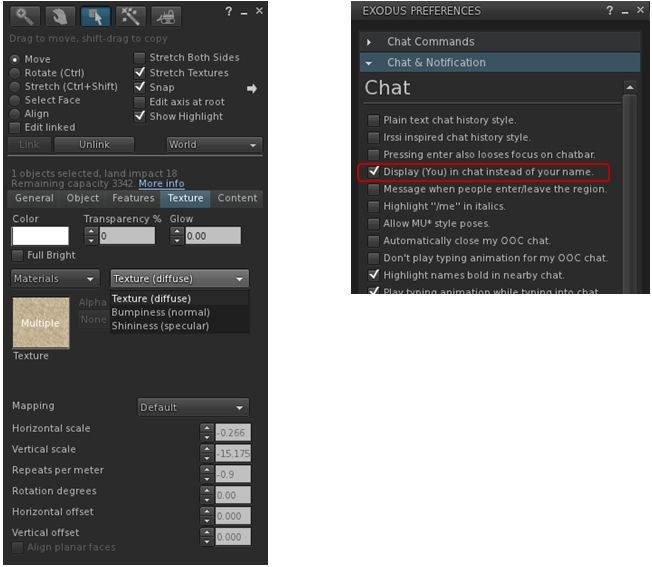
Visual changes to the viewer include the additional texture map options for materials, and an option in the Exodus Preferences floater to enable / disable the replacing of your avatar name with “you” in your chat.
Exodus 13.09.21.1 includes materials processing support (l) and an option to replace your avatar’s name with “you” in your chat window
The installer weighs-in at 35 MB, and installation was for me, as usual, smooth and without incident, including the required Windows extras. One point to note that this release see the Windows installation move from “ExodusViewerBeta” to “ExodusViewer” – so if you have a previous version installed, it will not be overwritten, but can be removed independently of this viewer (just use the uninstaller within the older version’s installation folder). This change is a part of Exodus adopting the Lab’s version update mechanism, becoming the second v3 viewer to do so alongside Kokua.
The release notes give a rather false impression of the amount of work which has gone into the update, but for those who wish to check on what has been included, the viewer’s commit history provides a complete breakdown.
Overall a nice update which brings two versions of the viewer back up to speed. The release notes indicate that this version “will not contain an OS X release”, so I assume Mac users will have to wait for a future release to get back on a par with their fellow Windows and Linux users.
This summary is published every Monday and is a list of SL viewer / client releases (official and TPV) made during the previous week. When reading it, please note:
It is based on my Viewer Round-up Page, a list of all Second Life viewers and clients that are in popular use (and of which I am aware) and which are recognised as adhering to the TPV Policy
By its nature, this summary will always be in arrears
The Viewer Round-up Page is updated as soon as I’m aware of any releases / changes to viewers & clients, and should be referred to for more up-to-date information
The Viewer Round-up Page also includes comprehensive links to download pages, blog notes, release notes, etc., as well as links to any / all reviews of specific viewers / clients made within this blog.
Updates for the week ending: September 22nd, 2013
Official LL Viewers
Current Release channel updated on September 19th to version 3.6.6.280963, formerly the Materials RC viewer (download page, release notes)
Maintenance RC updated on September 24th to version 3.6.7.281385 (download and release notes) – support for new particle capabilities; automatic avatar render limit and feedback system
Snowstorm Contributions RC updated on September 20th to version 3.6.7.281199 (download and release notes) – request teleport feature
Black Dragon updated on September 18th to Alpha 2.3.2 – core updates: merge to SL 3.6.6 code base; addition of Tofu Buzzard’s Screen Space Reflections; tone mapping tweaks (release notes)
Exodus updated on September 21st to version 13.09.21.1 (Windows & Linux only) – core updates: merge to SL 3.6.6 code base; materials processing; FMODex updates; Options to enable / disable “you” chat in CHUI; assorted bug fixes (release notes)
Kokua updated on September 19th to version 3.6.6.29733 – core updates: merge with SL 3.6.6. code base; OpenSim 4096 region TP but fix; stream enhancements, incl ability to copy stream URL to clipboard; ability to zoom-in on an object via context menu; assorted updates (release notes)
As always, please refer to the week’s forum deployment thread for the latest news and updates.
On Tuesday September 17th, The Main channel received the HTTP updates previously deployed to Magnum in weeks 36 and 37. See here and here for details. These changes are pending a viewer-side update in order to be effective.
One Wednesday September 18th, the RC channels were updated as follows:
BlueSteel and LeTigre remained on the same maintenance package as week 37, but gained a fix for a crash mode and the server-side HTTP work
Magnum received the BlueSteel / LeTigre updates, a series of crash fixes and an update to parcel access priorities.
Some people have reported issues with sculpties only partially rendering following the deployments. This seems to be occurring when teleporting into a region, and has been noted with sculpted trees and foliage with a low LI. One suggested solution has been to raise the RenderMinimumLODTriangleCount debug from its default of 16 to 28 or 32.
BlueSteel / LeTigre Crash Mode Update
In part one of this week’s report, I mistakenly assigned the crash mode fix referred to as being something Andrew Linden had been working on. In fact, the crash mode was only created as a result of the week 37 deployment to these channels. Related to region crossings, it would only occur under very specific, non-exploitable conditions involving vehicle-riding avatars, and would result in the region just left crashing. This issue never got beyond the two RCs, and has now been confirmed as fixed.
Magnum Parcel Access Priorities Update
Speaking at the Server Beta meeting on Thursday September 19th, Maestro gave further information on this fix, “There was a longstanding bug where an avatar who was on the ‘Allowed Residents’ list of a parcel was still not able to enter the parcel, due to other access restrictions.” So if someone was on the access list, but had no payment information on file, and the parcel required it, they could still not enter the parcel. With this fix, Maestro explained, “If the parcel is set to ‘allow payment info on file always’, somebody on the ‘allowed residents’ list can always enter, regardless of their PIOF status.” The change does not alter anyone being on the banned list being unable to access a parcel,
As the sun sets, the Server Beta attendees gather …
Week 39 Deployments
While the final decisions on deployment packaged are not made until the start of the week in which they are due, Maestro reports the data on both the Magnum and the BlueSteel / LeTigre packages deployed this week are good. However, he suspects the Magnum package will most likely be promoted to the Main channel in week 39 (week commencing Monday September 23rd.
Viewer Updates
The release viewer was updated on Thursday September 19th, when the Materials release candidate (release 3.6.6.280963) was prompted to the de facto release viewer (release notes & download). This currently leaves just two release candidates in the release channel at present: the Snowstorm contributions RC, which includes the Request Teleport feature, and the maintenance update, which includes the viewer-side updates for the “new” particle capabilities.
Other Items
LSL Parcel Access Function
Jenna Felton raised a question at the Server Beta meeting on whether it would be possible to have a LSL function which could determine if a specified avatar can enter a specified location within a region, or is able to pass through every parcel on a given path through the region. She explained why such a function might be useful:
The reason is when you build a vehicle or a physically working teleporter, you face a problem: Although you can read the parcel flags and determine for example if a parcel uses ban list, but you can’t determine if any sat passenger is on the list or not. So you get false positives and refuse teleport even if the vehicle would cross the parcel. Now, even if you are ok with that, you have to perform a large number of such checks to be sure at no position of your path you are entering a parcel or cross an edge of a parcel using ban list.
So I’d like to know if such a function is reasonable, that takes two vectors and determines if the path connecting them is safe for objects with seated avatars to move along. A reasonable range of systems would benefit from it.
This prompted some discussion of the idea, apparently continuing a discussion Maestro and Simon Linden had prior to the meeting. This took-in a number of ways in which such a check might be achieved, including a look-up based on agent_id and parcel_id, through to using the location-to-parcel ID lookup or extending llCastRay to have parcel detection. Simon Linden also pointed out it would be possible to do something similar now, saying: “It’s not too hard to create a function in LSL to do that, Jenna … you’d just move along your path 4m in X or Y at a time, use llGetParcelDetails() and if the ID changes, then check if you can enter”, although as Jenna pointed out, this would require around 64 calls during a region crossing.
There may be further discussion on this idea in the future, with Maestro suggesting Andrew Linden be given a poke on the matter, as a result of his recent work on parcel encroachment.
Meeting Venue Update
Maestro revealed he’s going to be revamping the Server Beta meeting area on Aditi soon. The gym will be going to be replaced with … well … here’s the preview!
Apparently, attendees will be invited to bring their own chairs / dance poseballs!
Letter Ponnier, one of the core support staff on the Firestorm viewer, runs her own blog, which often focuses on Second Life, the user’s experience and more. Obviously, as a member of the Firestorm team, many of her posts are Firestorm-centric – but this doesn’t make them any less a worthwhile read. When it comes to understanding SL and the viewer in general, Letter has much to say that is very much worth taking the time to read.
In a recent post, she covered The Three Hours That Can Change Your Second Life. As many know, the Firestorm team run regular classes throughout the week focusing on many aspects of Firestorm and getting to grips with it. In her blog post, Lette points to four lessons the team run, three of which could lead to anyone, regardless of their viewer preference, to enjoy their SL experience a lot more and gain a deeper understanding of the intricacies of the viewer and Second Life.
These classes are:
Preferences 2 – covering the Graphics and Network & cache tabs – which is definitely of use to anyone using SL, regardless of viewer
Lag – a mini-class which explains the major types of lag and dispels many of the myths surrounding lag – once again useful for anyone who has ever felt their SL is suffering as a result of “lag”
Basic Troubleshooting – which may be useful to anyone who experiences issues and problem, again regardless of their viewer
Reporting Bugs, Requesting Features – which is more Firestorm-centric, but can still be useful for those using any viewer which has a JIRA-based bug reporting system.
Details on when these lessons are held can be found on the Firestorm wiki.
As well as the blog post, which provides an overview of each of the classes, Lette has provided an audio recording for those who can multi-task and wish to listen while doing over things. You can find the recording at Vocaroo.
If you are at all interested in making your SL experience more enjoyable and / or in getting to grips with your viewer, I recommend three things – take a read of Lette’s post or listen to the audio, read Lette’s blog (you’ll also find a link in my blogroll, right), and try popping along to the Firestorm lessons.
Singularity 1.8.3 has been released and as promised by Latif, it sees the recently added export capability updated.
With the new version, the Collada .DAE export option can now also include textures, rather than just exporting the bare prims. Additionally, it has the ability to apply texture parameters such as repeats, offset and others to the exported UV map, combine prim faces with the same texture and colour into one submesh and optionally skip transparent faces.
This makes the export tool even more powerful for those wishing to save their own in-world creations locally. Again, it’s important to remember that the export capabilities will only work if you are the creator of all elements of the item you are attempting to export – including the textures.
To export an item, including textures using the Collada DAE format:
Make sure you are the creator of all parts of the item (and any textures used with it that you wish to export)
Right click on the object and select More > More > Tools > Save DAE (if you cannot export the item, this option will be unavailable)
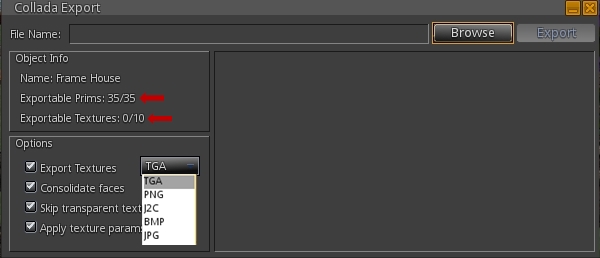
A floater will open displaying information on the item, including the prims and textures you can export
Use the Options section to define whether or not you wish to export the textures, the format in which you want them exported (.TGA being the default), and whether you wish to export the texture parameters (repeats, rotation, offsets, etc), and / or wish to skip transparent textures / consolidate faces
Select a save location for the object and save it.
The Collada export option now has its own floater, which will indicate the prims / textures in an object you can export (arrowed) & which allows you to set additional options for the export, including the preferred format for textures
The item will be exported and saved, and can be uploaded as a mesh .DAE object into any grid supporting mesh / mesh uploads. Note that if you don’t have the right to export any of the textures in the object, they will be stripped from the copy of the object on export.
If you export an item you created but which includes textures to which you don’t have the right to export, they will not be saved with the object
4096 Bug Fix
This version of Singularity also offers a fix for the “4096 bug” in OpenSim, wherein teleporting more than 4096 regions can lead to problems / failure. See also SVC-2941 and FIRE-11593.
Other Updates
In addition, version 1.8.3 includes the following updates Please refer to the release notes for the correct attributions):
Restored Teleport, Pay, and Log buttons in the IM window
Spanish translation update
Audio code crash fix
Fix for crash when RLV is enabled and viewing inventory forbidden
Made the map dot color for everyone else customizable
New debug settings
ResetViewTurnsAvatar allows preventing avatar turning when camera position is reset after zooming (addresses VWR-27956)
LiruNewMessageSound allows users to mark a specific chat session important, so “ding” sound is played for every message, not just when the conversation first starts
NewIMsPerConversation when set will count number of new IM conversations, not just total number of new IM messages when the communicate window is closed
NewIMsPerConversationReset allows new IMs button’s visibility to be reset when the communicate window has been opened and closed
LogShowHistoryLines allows setting the number of lines displayed in a new IM window from the previous conversation.
As always, please refer to the week’s forum deployment thread for the latest news and updates.
Second Life Server (SLS Main) Channel – Tuesday September 17th
The Main channel received the HTTP updates previously deployed to Magnum in weeks 36 and 37. Overviews of these changes, which will be transparent to users pending viewer-side updates, can be found here and here. These changes introduce new capabilities for mesh fetching operations and should lead improvements in the reliability in viewer / server connectivity when fetching mesh and textures as the viewer-side updates are released.
Release Candidate Channels – Wednesday September 18th
BlueSteel and LeTigre should remain on the same maintenance package as week 37, but additionally should receive two updates to the package:
A fix for a newly discovered crash mode
The HTTP updates deployed to Magnum in weeks 36 and 37 and to the Main channel on Tuesday September 17th.
Magnum should receive a new maintenance package which again includes the BlueSteel / LeTigre updates, and includes a number of crash fixes and an update to parcel access priorities “making it so that avatars who are on the ‘allowed’ list can bypass some of the other access restrictions (payment info on file was listed specifically)”
Commenting on the crash mode fixed on BlueSteel / LeTigre, Andrew Linden said, ” The crash bug I fixed was actually rather rare… a corruption of the terrain data when building packets. Happened maybe… 5 times in three weeks. But we thought maybe it was related to some interest list changes so I looked into it anyway.”
Viewer Updates
Maintenance RC Release
A new RC viewer reached the release channel on Friday September 13th. Second Life RC viewer 3.6.6.280939 includes the following core updates:
Automatic avatar render limit and feedback system
Support for the additional LSL particle parameters.
rendering optimizations
avatar render cost information
simple impostors
graphics pref update
new debug setting “RenderAutoMuteRenderCostLimit” sets render cost cut-off point (default 0 = disabled cutoff check)
The glow effect basically looks the same as the prim glow setting on prims, adding PSYS_PART_START_GLOW and PSYS_PART_END_GLOW, which take a float in the 0.0 to 1.0 range
The particle blending takes 2 parameters, PSYS_PART_BLEND_FUNC_SOURCE and PSYS_PART_BLEND_FUNC_DEST, and each of those takes one of the 8 ‘values’ listed underneath, so there are actually 8*8 = 64 blend options. It exposes OpenGL’s glBlendFunc to LSL, see the glBlendFunc documentation at http://www.opengl.org/sdk/docs/man/xhtml/glBlendFunc.xml
An example of how the now ribbon capabilities might be used in SL, showing the arc of the sword through the air, supplied by Maestro Linden (courtesy of Hollowfear.com)
The new ribbon capability should allow for much better particle effects for things like ropes and chains links between objects (amount other things), using a ” go-from” prim/position (the prim centre), and a “go-to” prim/position (defined by PSYS_SRC_TARGET_KEY), the advantage being there would no longer be any gaps in the particle stream. However, there may be times when the ribbon effect may not be facing your camera (so there may be times when you need to reposition your camera in order to see the effect).