As always, please refer to the week’s forum deployment thread for the latest news and updates.
Second Life Server (main channel) – Tuesday December 10th, 2013
The main channel was updates with the server maintenance project that was on the RC channels in week 49. This project includes a few miscellaneous bug fixes. These include a fix for BUG-4431, which Maestro Linden, speaking at the Server Beta meeting on Thursday December 5th, described as:
A fix for avatars with crouch / crouchwalk animation overrides. Previously, the llGetAgentInfo() LSL function would only return AGENT_CROUCHING if the avatar was playing the default crouch or crouchwalk animations, so if your avatar had an AO which replaced those animations, (either with llSetAnimationOverride() or possibly with classic AOs too), scripts couldn’t tell when you’re crouching. But with the fix, the function is looking at whether you’re actually crouching, regardless of which animations are playing.
This should be the only “visible” fix within the package.
Second Life Release Candidate Channels – Wednesday December 11th, 2013
All three RC channels should receive a new server maintenance project containing a single bug fix related to vehicles becoming stuck in the ‘sat upon’ state (which prevents parcel auto return).
This issue is related to vehicles getting into a “bad” state if they lose the passenger right at region crossing. The vehicle is left with what is effectively a “ghost rider” sitting in it, which defeats parcel auto return, leaving the vehicle in-world.
SL Viewer
The SL release viewer was updated on Tuesday December 10th to version 3.6.12.284506, formerly the NameUpdater release candidate. This release does not contain any updates to the viewer’s functionality, but does change installer naming and fixes an updater issue.
Code Freeze / No Change Window
Week 50 marks the last week for deployments to release, main and RC channels by the Lab for both the viewer and the servers prior to the Christmas / New Year code freeze / no change window commencing on Monday December 16th. The no change window extends through until the start of January, and will see no significant releases (other than possible emergency updates, if they are required), although there may still be updates to project viewers.
The main reason for the no change window is to allow Linden staff, notably support personnel, have a decent break over the holiday period without the risk of having to deal with significant issues as a result of a change or update immediately prior to the actual holiday period. To ensure this is the case, the code freeze starts ahead of the actual holiday period so that the Lab can ensure those final releases for the year which are made are robust and stable and unlikely to give a major cause for concern while still having staff available to deal with matters should things get a little higgledy-piggledy*.
Other Items
“Uniform Scaling” LSL Functions
Andrew Linden has been working on a set of “uniform scaling” LSL options which would allow an object / linsket to be rescaled via a single LSL call – such as uniformly increasing or decreasing its size by a factor of 2. The work is still experimental and won’t be deployed until 2014. However, commenting on the work at the Simulator User Group meeting on Tuesday December 10th, he said:
One problem with scaling by multiplicative factor is that the scale operation might fail for a number of reasons; there are four categories of failures: hit the “prim is too small” limit. (2) hit the “prim is too big” limit (3) violation of linkability rules for linked set (when making bigger) (4) misc failures because of navmesh or other things.
The current API includes three calls: (A) llGetMinScaleFactor(), (B) llGetMaxScaleFactor() ; (C) llScaleByFactor(float). I currently handle failures (1) through (3), and the llScaleByFactor() will return FALSE if it fails, but it won’t tell you why it failed. You can use llGetMaxScaleFactor() and friend to ask what the max/min multiplicative factors are possible for reasons (1) through (3). Needs some work, but it is in progress.
A further concern / failure point was raised at the meeting: rescaling an object containing mesh and hitting the land capacity for a region as a result of the LI value increasing. One suggestion for avoiding this would be to have a function which could determine how far an object can be scaled prior to hitting the capacity limit for a parcel (e.g. returns the potential LI for a given scale value before an object is rescaled; however how this might be accurately achieved is unclear, particularly as LI scaling with mesh objects can be subject to a range of factors.
It will be interesting to see how this progresses.
*For those unfamiliar with the term “higgledy-piggledy”, I offer the following explanation:
Higgledy-piggledy explained courtesy of Mr. Berke Breathed
Alina Lyvette released version 2.5.6 of the Android Second Life / OpenSim Lumiya client on Sunday December 8th, with a further release of version 2.5.7 on Monday December 9th; with both came a chance to have a real play with my latest toy: a gorgeous new Asus Google Nexus 7 HD 2013!
Between them, these two updates comprise:
2.5.6:
View your own profile and your transaction history
Send and receive group invites;
Persistent mute/block list support
Improved performance when handling large chat histories and of flexible prims in 3D mode
Fixes for an issue with touching complex mesh objects and a few known crash issues.
2.5.7:
Quick fix for broken Unicode support in instant messages
Support for editing scripts, both in inventory and objects.
Note that with this review, I am using a 7-inch display screen, and so have split screens enabled. If you are using a device with a smaller screen / without spilt screen functionality enabled, your screen displays may differ from those shown in this review. All examples may not be the only means of accessing specific functions; they are based on my preferred usage of Lumiya.
Viewing Your Own Profile or Transaction History
Until now, Lumiya has only offered the opportunity to view other people’s profiles. With version 2.5.6+ you can now view your own. you can also view your transaction history, which will list any transactions made during your current log-in session.
To view your profile, display the Chat or 3D world view and tap on the More option (three vertical dots) at the top-right of the screen. This will open a menu of additional options. Tap on My Avatar.
If you have split screens enabled, your profile will be displayed on the right, with the My Avatar options on the left
If you are not using split screens, tap My Profile to display your profile.
To view your transaction history, follow the steps above to display the My Avatar options, then tap L$ Balance option. All transactions which have taken place while you’ve been logged-in will be displayed.
Send and Receive Group Invites
Lumiya 2.5.6 starts into providing more group management functions with the ability to send / group invites with those groups in which you have be granted the required ability, or to receive group invites from others.
Sending A Group Invite
Currently, you can only send an invite to join a group to people recorded on your Recent, Friends or Nearby lists, there is no name picker to allow you to search for and invite anyone.
Tap Chat to display your Chat / Group options
Tap the name of a group to which you wish to invite new members. The group’s panel will open
Tap the invite icon located at the top right of the group’s panel.
Lumiya 2.5.6+: the new invite option for inviting people to join your groups
A pop-up is displayed, allowing you to select the person you wish to invite from your Recent, Friends or Nearby Lists
Tap the name of the person you wish to extend an invite. A role picker pop-up is displayed
Tap the role you wish to assign to the person. The role is selected and an invite is automatically sent.
Receiving a Group Invite
As with any graphical viewer, when you receive an invitation to join a group, Lumiya displays the invitation in you Chat panel, with the name of the person sending the invitation, details of the group you are being invited to join and option buttons to join the group or decline the invitation.
Persistent Mute / Block
Lumiya 2.5.6 introduces the ability to mute / block IMs and group chat sessions, either for the current log-in session or persistently across all sessions until the block is lifted.
Muting an Individual or Group
There are a number of ways to mute an individual or group:
Muting via the chat list:
If the person or group you wish to mute is in your local chat list, long-touch the name.
A pop-up menu is displayed:
If you have selected an individual, it will include the option to Block them. Tap this. You will be prompted to confirm your action; doing so will add the individual to your Block list
If you have selected a group, it will include an option to Close and Mute the group chat. Tapping this will prompt whether you wish to mute the group chat for just the current log-in session or permanently (until unblocked). Tap the required option to add the group to your Block list.
You can mute / block group chat for your current log-in session or persistently across all log-in sessions, including via other viewers
Muting via the Friends, Group or Nearby lists or from within an IM or Group chat session:
You can block someone via an open IM session, or by starting an IM session and selecting the mute option
Select the individual you wish to mute / block from your Friends or Nearby lists OR tap on the name of the group you wish to mute chat from in your Group list
The IM or Group chat panel will open. Tap the More option icon (three vertical buttons) to display a further list of options. Tap Mute.
You will be prompted whether you wish to cancel, or mute the individual / group for the current session or persistently across all log-ins – tap your desired preference.
Muting an individual in group chat:
Long-touch the individual’s name within the Group chat panel
A pop-up is displayed allowing you to Copy Message Text or Block the individual
Tap Block to add the individual to your Block list.
Muting via the Block list:
From Chat or the 3D world view, click the More icon (three vertical dots) in the top right of the screen
Tap My Avatar
Tap Block List to display a list of blocked individuals, groups and objects
Tap the ADD button (top right of the list)
A pop-up is displayed for your Recent, Friends and Nearby lists. Tap the required list to display a list of names
Tap on the avatar name you wish to block, it will be added to your Block list
Repeat for any additional names you wish to block.
Blocking an Object
To block a spammy object:
Locate it in Chat and long-touch it
A pop-up is displayed which includes the option to Block it
Tap the Block option to add the object to your Block list.
Unmuting / Unblocking an Individual, Group or Object
The easiest way to unblock an individual or group is via your More menu:
From Chat (or the 3D world view, click the More icon (three vertical dots) to display further menu options
Click My Avatar
Click Block List to display a list of blocked individuals, groups and objects
Scroll through the list to the item you wish to unblock and long-touch You’ll be prompted to confirm the action
Once you have confirmed, the individual, group or object will be unblocked.
Note that you can also unmute an individual or group by tapping on the name in your Friends / Nearby / Group list to start an IM / Group chat session, then tapping the More icon and tapping the Unmute option.
Script Editing
Lumiya 2.5.7 allows users to view and edit scripts to which they have the requisite rights both from within inventory and contained within an object.
Open a Script from Inventory
Tap the Inventory icon to open the Inventory panel
Navigate to the folder containing the script to be edited
Locate the script in the folder’s contents and tap it
The script editor is displayed, together with the selected script in view mode.
Open a Script in an Object
In the 3D world view, long-touch the object containing the script you wish to edit
Tap the More button to display additional options
Tap Open Contents. A panel displaying the objects content is displayed
Locate and tap the script to be edited. The script editor is displayed, together with the selected script in view mode.
Lumiya 2.5.7+: viewing and editing your scripts
Editing a Script
Tap the Edit Script button at the bottom of the script editor
Position the cursor at the point at which you wish to start editing
Use the Save or Discard Changes buttons as required.
Lumiya on the Nexus 7 HD 2013
And now, a short aside.
Until now, I’ve been running Lumiya on a Samsung Galaxy S2. However, when updating my mobile (cell) phone recently, my new service provider offered me a bundled deal of a new ‘phone and free Nexus 7 HD 2013 (and other goodies) for the same monthly tariff rate I had been paying for just the S2. Needless to say, I took the deal.
Lumiya has always worked well on the S2 for me, although it did struggled at times and the relatively small screen tended to make some operations difficult. With the Nexus 7 HD, Lumiya is nothing short of glorious.
Not only do I now have the benefit of full split-screen functionality on a screen big enough to handle it when operating in landscape mode, I have the power of two quad-core processors to handle the application and graphics and twice the available memory to play with. As a result, the 3D view is a joy to behold and move around in, with very fast rendering (as compared to the S2), and much smoother movement – both of which go a long way towards making Lumiya even more of a desirable travel companion.
The in-world view is also given something of a boost as a result of the Nexus 7 HD’s screen resolution: 1920×1200 which is a higher resolution than I’m getting on my main monitor (1440×900) and at an amazing 323ppi. This presents a really crisp, clean in-world image when using the 3D view which is very pleasing to the eye; so much so that I don’t feel a screen cap really does it justice.
My home on Lumiya and the Nexus 7
The Nexus does still struggle when using the High Quality Textures setting, particularly at higher draw distances (48-96 metres), but given the load this is placing on the tablet in areas rich in textures, many of which will be of very high-resolution, I’m not actually surprised by this.
As I plan to use (and already have used) the Nexus to do “serious” work when moving around, I opted to invest in a bluetooth keyboard to go with it; and I have to say it is an absolute joy to have – part of this article was actually written on the Nexus using the keyboard and Kingsoft Office. The keyboard really adds to using Lumiya in that it obviously avoids the need to use the on-screen keypad, and the cursor keys / WASD keys can make moving around a lot more natural in feel if you’re used to using them on a viewer. Another benefit with a keyovard is the reduction in the amount of finger prints and smears appearing on the screen as you work.
I’m actually rather chuffed with the keyboard, which I obtained via ebay for £15.00 (around 18.00 Euros or $24.00 USD). When not in use it forms a protective cover for the screen, clipping securely around the tablet. Despite being aluminium in construction, it adds very little physical bulk to the Nexus when “closed”, and also has the benefit of solid-feeling keys which have a decent travel distance, which aids typing considerably. With Lumiya, it certainly adds a huge amount of ease to chatting and (now) to editing scripts! If you’re a Nexus user and decide to get one, just make sure you get the version which matches your Nexus model (2012 or 2013).
A suitable bluetooth keyboard can further enhance using Lumiya
Feedback
Two more outstanding updates for Lumiya which significantly enhance its capabilities, although on smaller screen the script editor may have limited appeal due to issues of trying to correctly position the cursor for editing and seeing what you’re actually doing when an on-screen keypad is open as well. On a tablet, the editor performs much better, although big fingers may still have problems positioning the cursor. As noted above, use of a suitable keyboard easily overcomes this problem (although are not always easy to use when on the move), and also makes chatting and IMs massively easier for those who aren’t keen on on-screen keypads.
The group and mute / block options are likely to be heartily welcomed by those putting Lumiya to extensive use and / or who routinely visit busy places. Both work very well using the methods I’ve indicated in these notes, and the functionality appears flawless.
All told, these are more than worthwhile updates to Lumiya further enhancing its reputation as the go-to solution for anyone on android who needs to access SL for a broad range of tasks while on the move.
This summary is published every Monday and is a list of SL viewer / client releases (official and TPV) made during the previous week. When reading it, please note:
It is based on my Viewer Round-up Page, a list of all Second Life viewers and clients that are in popular use (and of which I am aware) and which are recognised as adhering to the TPV Policy
By its nature, this summary will always be in arrears
The Viewer Round-up Page is updated as soon as I’m aware of any releases / changes to viewers & clients, and should be referred to for more up-to-date information
The Viewer Round-up Page also includes comprehensive links to download pages, blog notes, release notes, etc., as well as links to any / all reviews of specific viewers / clients made within this blog.
NameUpdater RC version 3.6.12.284506 released on December 3rd – core updates: – changes installer naming and fixes an updater issue; no changes to viewer functionality – download and release notes
Project viewers:
Fitted Mesh project viewer updated on December 5th to version 3.6.12.284458 – core updates: removal of the new “handle” bones, addition of new upper and lower back bones as a part of fixes for STORM-1985, updates to the avatar skeleton XML files – download and release notes
Black Dragon updated on December 4th to version 2.3.9.2 maintenance 4 – core updates: “realistic Mouselook” implementation; UI tweaks and updates; windlight updates – release notes
CtrlAltStudio Experimental version updated on December 2nd to version 1.1.6.34389 Alpha 6 – core updates: walk / fly faster / slower option added; option to swap Kinect fly up / fly down gestures with one another; separate Riftlook options for context menus – release notes
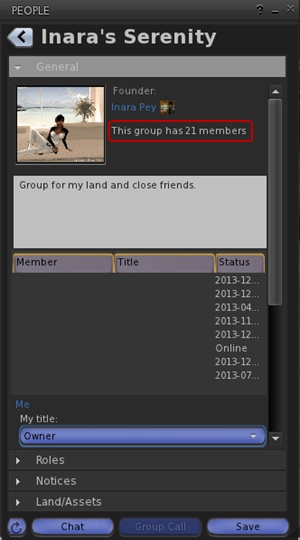
UKanDo updated on December 8th to version 3.6.11.27919 – core updates: show number of people in group in Group floater if you are a member; additional options to hide / show status bar sliders, buttons, info displays; windloight additions; user name drop-down on log-in page for mutiple account; assorted fixes and tweaks – release notes
Release notes (all) In general: GPU tables additions, assorted bug fixes and optimisations; Experimental branch: port of further fixes from viewer-interesting and from Fitted Mesh project.
Clients
Lumiya updated on December 8th to version 2.5.6 – core updates: send / receive group invites; persistent mute / block list; view your own profile; L$ transaction log; performance improvements & bug fixes – release notes
As a part of the holiday period, and as mentioned in various SL projects reports of min over the last few weeks, Linden Lab operate a code freeze / no change window in which no major updates to either the viewer or the simulator code are made, other than those required to fix significant issues impacting Second Life. This code freeze, which this year comes into effect on Monday December 16th and extends through until the start of 2014, encompasses all thing server, and the SL viewer release channel (the release viewers and RCs). The aim is to give LL’s support personnel and contractors a chance to enjoy the holiday period as well.
However, as well as encompassing the server and LL’s viewer, the Lab also request that TPVs refrain from making major releases during the same period, again to help lessen the load on LL’s viewer support team, who take a lot of TPV-related calls when users encounter problems.
This means that the window for TPVs to get significant updates out is closing fast, and both Black Dragon and UKanDo have both had what is likely to be their last updates this side of the new year (although in Black Dragon’s case, it appears the reason is because Niran is having fun relaxing with a new computer game!). Both updates are small, tidy packages, and as such, both are overviewed here.
Black Dragon 2.3.9.2
Released on Wednesday, December 4th, hard on the heels of version 2.3.9 and 2.3.9.1, both of which appeared on December 3rd, Black Dragon 2.3.9.2 is described as “Maintenance #4”, and is the latest in a line of maintenance releases of the viewer which build on existing functionality and UI changes, rather than adding anything significantly new to the viewer.
That said, version 2.3.9.2 does offer what is something of a new feature: “realistic Mouselook”. Traditionally, when in Mouselook, the camera is positioned / locked towards the centre of the avatar frame (around chest level). With this release, Niran has moved the camera position so it is effectively in the avatar’s head.
This may sound a trivial, but it does make something of a difference when operating in Mouselook, as movement in Mosuelook as a lot more responsive to avatar animations. While it is somewhat dependent upon the animations you are using, it can mean, for example, that when running, your mouselook view with “bounce” in time with your avatar’s running strides.
To help demonstrate the difference, Niran has produced a video showing what happens when in Mouselook with Black Dragon 2.3.9.2; you might want to compare it to your own experience using Mouselook in a viewer without the updates.
The option can be toggled off / on via Preferences > Camera > Mouselook Options. Additionally, Niran recommends that when using it, Mouselook Smoothing (same section of Preferences) is enabled.
A further Mouselook fix with Black Dragon 2.3.9.2 comes by way of Adeon Writer, which corrects the issue of hand attachments (weapons, etc., behaving oddly and appearing to move away from the avatar when entering Mouselook or when crouching in Mouselook.
The remaining updates for the release as recorded in the release notes comprise:
Addition of all windlight presets found in other versions of Niran’s viewer (other than his own “realistic” settings)
Updates to a number of floaters, include People, which has been a little reduced in size and the addition of the Send button to the Notices floater
Updates to the loading screens and a fix to the version history link on the log-in screen.
Total number of users in a group displayed for those groups you have joined (see below left)
This release offers another small package of tidy changes, several again gathered from other TPV offerings, and it’s good to see that credits for imported features are starting to appear in the release notes as well. The latter list the updates within the release as comprising:
Merged:
Updates from RLV
Tweaks:
Addition of Penny Patton’s windlight settings
Re-write/clean-up of the Status Bar code
Possible speed improvements
UKD_Logo icon updates.
Fixes:
Black background in the address bar combo list’s scroll bar fixed
An old bad merge for the avatar context menu in chat which didn’t show at the time
Net Stats graph now shows correct Kb and wdiget now clickable
Features Added:
Show the total member count on the Group panel’s General tab if you’re a member of that group
Edit option added to the Area Search floater’s context menu
Username login drop-down combo box for multiple accounts
Frames-Per-Second displayed on StatusBar (from NiranV Dean). Modified and clickable (Hidden by default)
Additional Status Bar show / hide options for FPS, Net Stats, Avatar Offset Slider and Draw Distance Slider.
Additional show / hide options for elements in the status bar (sliders, buttons, info displays)
Feedback
Both of these releases offer neat packages of updates to their respective viewers, both of which continue to be developed and enhanced in small, relevant steps and which also keep track with most of the recent code base updates from Linden Lab.
Performance-wise, both viewer showed more-or-less consistent performance levels on my primary PC as shown with earlier releases, and I had no difficulty in running both viewers with the major graphics bells and whistles enabled (ALM on, Ambient Occlusion Enabled, shadows set to Sun/Moon + Projectors, etc.), at home and in wandering.
The following notes are taken from the TPV Developer meeting held on Friday December 6th. A video, courtesy of Northspring, can be found at the end of this report. The numbers in braces after each heading (where given) denote the time stamp at which the topic can be listened-to in the video.
TPV Developer meeting (stock)
Release Channel Viewers
Name Updater Release Candidate
[00:17-01:40]
The Name Updater RC viewer, also released on December 3rd, has been updated to version 3.6.12.284506. This contains no functional changes to the viewer itself but contains two sets updates, hence the odd name.
The first of these is a fix for the viewer updater where problems can occur if a new update to the viewer is downloaded by the updater but deleted somehow prior to the installer itself being executed. The second set of updates cover:
Changes to how the viewer packaging is done and cleans-up how the viewer channel (used to recognise the viewer and allow it to connect to the SL servers when logging-in) is distributed and established
Makes some changes to the viewer start-up parameters
Changes the package names to a uniform format which is the same for all of the operating system platforms.
The aim of these changes is to further improve the viewer build process and reduce the number of places changes have to be made in order to change the viewer channel name when building different flavours of the viewer (LL’s own or a TPV).
The RC has been performing well in terms of low crash rates, etc., and looks set to be promoted to the de facto release viewer in week 50 (week commencing Monday 9th December), and so will see-out 2013 as such if this is in fact the case.
Google Breakpad
It is possible a further Google Breakpad RC may appear in week 50.
Maintenance Release Candidate
[02:00-02:16]
The Maintenance RC viewer 3.6.12.284430, released on December 3rd suffered an abnormally high crash rate, prompting it to be withdrawn in order for it to be looked at and crash issues diagnosed / fixed. Once these issues have been dealt with, the viewer will be returned to the release pipe.
Project Interesting Viewer
[39:24-41:07]
The Project Interesting (aka “viewer-interesting”) RC viewer has been in RC for a while and is suffering a high number of crashes, which are currently being investigated by the Lab. Unlike the Maintenance RC viewer, it has been left as an RC simply because issues are being found with it, because of both the number of people using it and the broad range of systems on which it is being run and which the Lab couldn’t possibly account for in their own testing.
At the moment, the Lab are trying to put together an update for the viewer, but they still have a couple of “pretty serious” crash issues which have yet to be resolved. However, the hope is that this may actually make it out into the world before the no change / code freeze window comes into force on Monday December 16th, which affects all server releases and all viewer release channel releases. This would allow the updates made to get further “in the field” testing during the code freeze / holiday period.
That both the Project Interesting and Maintenance RCs are experiencing issues is something of a validation of the new viewer release process introduced by the Lab earlier this year, in that the problems being encountered with both of these viewers are not blocking the viewer pipe, unlike the situation of just over a year ago, where a series of crash issues with the old beta viewer completely halted all significant viewer updates.
Fitted Mesh Project Viewer
[02:20-03:16 / 32:05-39:20]
As noted in part 2 of this week’s report, the Fitted Mesh project viewer received a set of updates (including new avatar skeleton files) in the form of release 3.6.12.284458. The project viewer has so far received a very low number of downloads – somewhat unsurprisingly – with the total number of people using the viewer thought to be under 2,000. This means that it hasn’t as yet been used widely enough to generate meaningful crash statistics.
The response to the skeleton changes within the viewer has been “good”, and the viewer has seen a reasonable number of JIRA issues raised under the FITMESH project, etc., although the Lab cautions against anyone using the changes contained in the viewer in anything other than an experimental version of their own viewer until such time as the code reaches a Release Candidate status. The latter will not happen before the end of 2013, although there may be a further project viewer update for Fitted Mesh before the end of the year.
One thing which may happen when the viewer is approaching a release status is that it will bring with it a “significant bump” to the viewer version number, not the least of which is because users on viewers without the code may see some bizarre, or at least oddly fitting clothing on avatars using garments weighted to use the new system, as noted in my launch preview of the Fitted Mesh project.
Overall, it appears that the Lab is “pretty happy” with the way the work is developing, although they would like to see more people involved in using / testing the viewer, particularly anyone proficient in rigging mesh garments, etc, especially given the nature and state of the project, as Oz Linden pointed-out:
This is one of those times when things are in flux and can be changed… We have never made changes to the avatar skeleton casually, and we’re making a round of changes now; we’re wildly unlikely to make another round of changes for years. So if there is feedback to be had, this is the time to have it.
So if you are a creator and do have an opinion on how things might be better handled within the Fitted Mesh solution, now is the time to be involved and potentially influencing the Lab’s thinking. not every idea put forward may be taken-up; but on the other hand, waiting until the changes have been made and the viewer released will certainly mean that any ideas someone may have will have passed their sell-by date.
The Delay in Opting for this Solution
Part of the general feedback voiced when the Lab announced the Fitted Mesh viewer came in the form of questioning why it took the Lab so long to reach the decision to go with the approach. Part of the reason appears to be that mesh deformation and Server-side Appearance projects required the same expertise with the Lab to be applied to them, and so were vying with one another for manpower – and the decision was made to give the SSA project priority.
Oculus Rift Update
[24:46-26:26]
During the Server Beta meeting on Thursday December 5th, VoidPointer Linden indicated the work on making the viewer operate with the Oculus Rift headset was now “feature complete”, and that a (presumably project) viewer will be appearing “soon” with support for the headset. How soon is open to question, given VoidPointer had to be somewhat circumspect. However, following the TPV developer meeting, it appears that “soon” might actually be a little more in the realm of “later” than may be the case.
Oculus Rift viewer: “soon” probably not as close as either “real soon (TM)” or “pretty soon (TM)”!
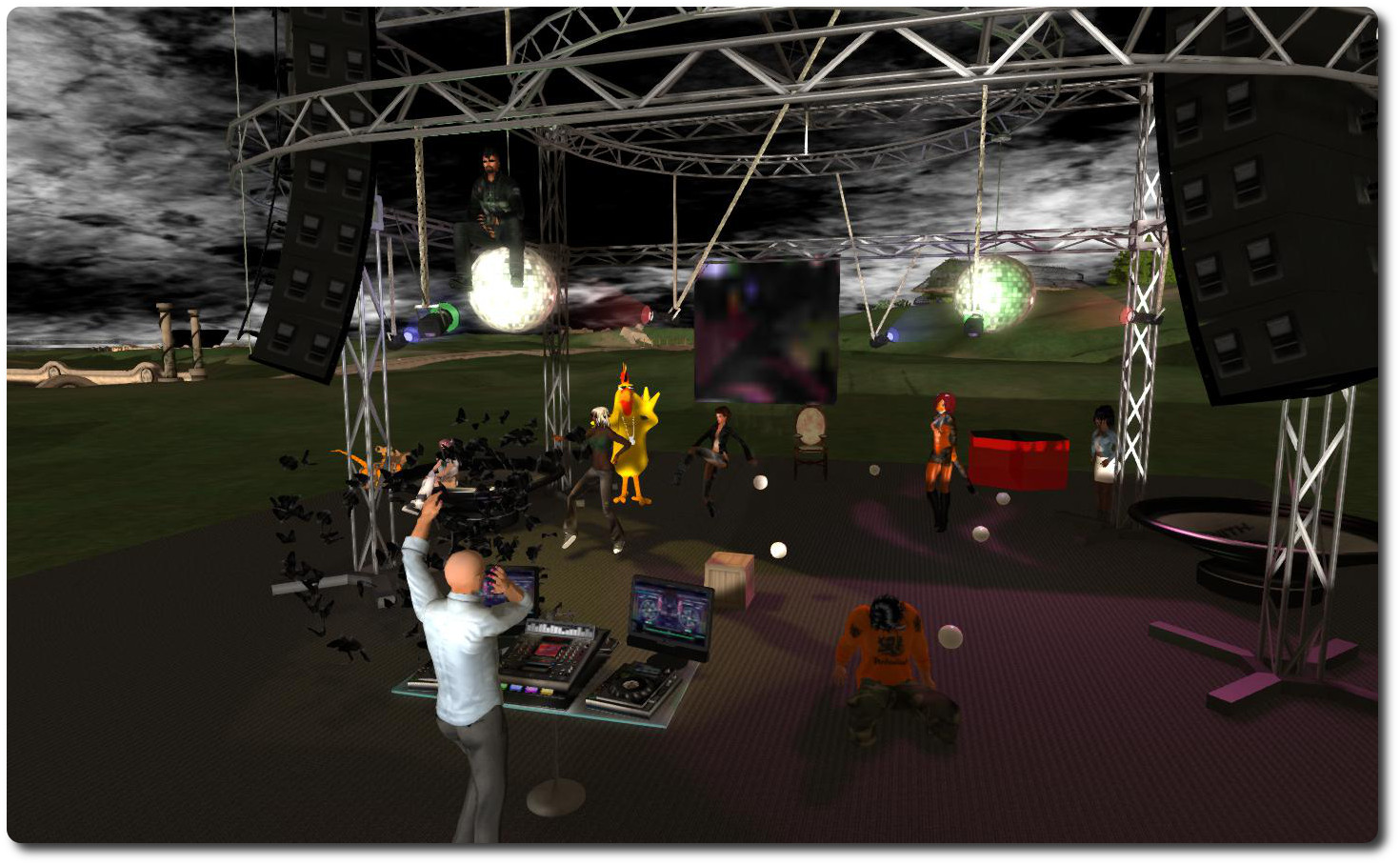
Maestro Linden (foreground) leads the Server Beta meeting. The colony of bats to his left is VoidPointer Linden, who is working on the Oculus Rift project
Server Deployments week 48 – recap
As always, please refer to the week’s forum deployment thread for the latest news and updates.
Main channel, Tuesday December 3rd: received the maintenance package deployed to BlueSteel and LeTigre in week 47
All three Release Candidate channels, Wednesday December 4th: received a new maintenance package comprising a crash mode fix and a fix so that llGetAgentInfo() now detects AGENT_CROUCHING correctly for avatars who have custom ‘Crouching’ or ‘CrouchWalking’ animations (BUG-4431[c])
Issues with Main channel deployment
Two issues were discovered post-deployment of the Main (SLS) channel updates:
BUG-4637 “”Can’t rez object at { x, y, z } because the owner of this land does not allow it”when rezzing any object from Library”
BUG-4635 “”Selected / sat upon:” incorrectly shows objects that are not actually selected or sat upon. “
Maestro has verified a fix for the latter issue, which he described as occurring with vehicles which get into a “funky” state, ” The vehicle gets ‘bad’ if it loses the passenger right at region crossing,” he said by way of explanation, leaving them appearing to have somebody sitting on them per parcel accounting rules, but who is effectively a “ghost rider”.
It is hoped that these fixes will form a RC release together with some additional small updates prior to the no change window / code freeze kicking-in on Monday December 16th.
Animation fixes
Commenting on the llGetAgentInfo() update deployed to the RC channels at the Server Beta meeting on Thursday December 5th, Maestro Linden said:
The only change which should be visible normally is a fix for avatars with crouch / crouchwalk animation overrides. Previously, the llGetAgentInfo() LSL function would only return AGENT_CROUCHING if the avatar was playing the default crouch or crouchwalk animations, so if your avatar had an AO which replaced those animations, (either with llSetAnimationOverride() or possibly with classic AOs too), scripts couldn’t tell when you’re crouching. But with the fix, the function is looking at whether you’re actually crouching, regardless of which animations are playing.
He went on to note that there is a similar issue with ground sit, wherein if you sit on the ground, the viewer only presents the ‘stand’ button if your avatar is playing the default ground sit animation. Originally, llsetanimationoverride() allowed the ground sit animation to be replaced with something else, but this led to situations where a seated avatar could not stand up.
To fix this latter issue, Kelly Linden implemented a workaround for this problem by making “ground sit” play two animations, the default ground sit and any custom ground sit specified by the user, with the priority of the default ground sit hopefully being low enough not to clash with any custom animation also used. The change was viewed as a compromise to make the AO system compatible with viewer 2x/3x, and is why the SL wiki alludes to in ‘ State “Sit on Ground” will play the default animation in addition to any override set. This is required for correct viewer behaviour. ‘
SL Viewer
The Fitted Mesh project viewer was updated to version 3.6.12.284458 on December 5th. The update addresses:
LL internal JIRA MAINT-3311 (Skinning to some collision volumes is broken)
STORM-1985 (Mesh garments don’t adapt to changes in avatar shape)
In addition, it includes the updated avatar_lad.xml and avatar_skeleton.xml file developed by Jeremiah Linden in accordance with his notes on FITMESH-2 (notes dated December 2nd, 2013).
Oculus Rift Support
Oculus Rift: release of a “feature complete” viewer with Rift support “soon”
Also attending the Server Beta meeting, Voidpointer Linden reported that support for Oculus Rift is feature-complete and should be released “soon”.
There will be a formal announcement when a viewer with Rift support is released (no date as to when this will be as yet), however, a few clues were given out during the meeting:
The same viewer can be used in both a “normal mode” and a “Rift mode”
There will be no apparent changes to the viewer / UI when in “normal mode”
Frame rates when in “Rift look” will be very much down to the user’s own hardware (unsurprisingly). Voidpointer apparently attended the meeting using a Rift headest and reported that he was getting frame rates ” pretty comparable to normal,” but also noted he has a good machine on which to run SL.
Details on the presentation of the UI, etc., were not provided, as these are apparently still under wraps. In the past, it had been indicated that the UI had been set to be floating “overhead”, just outside of your normal point-of-view, so you had to look up to see them. Whether this is still the case, remains to be seen.
There have been reports of people using the Rift (in general, not just with SL) suffering from nausea and motion sickness. Commenting on this, VoidPointer said, “I’ve been using it for a while now and I don’t really have problems with nausea at this point. [But] the Rift is very sensitive to frame rate, vsync, and other things. Before the rendering was fully hooked up or optimized,it wasn’t as fun, I’ll say that.” He also revealed the Rift headset can be somewhat adjusted so it can be worn over glasses, if necessary.
As the Rift is not currently commercially available, those with the headset and SDK will be able to make use of the new viewer once released, and will require a DVI cable connected to the headset and their system for the video output and a USB connection for the head tracking capability (so the screen view follows the wearer’s head move to present them with the expected view). Commercial versions of the system will use HDMI for the video.
Rod Humble tries out Oculus Rift in a photo released on July 18th
There was a lot of additional talk about possible future options for presenting in-world views with the Oculus Rift, however, as Voidpointer advised, “Heh, let’s get Rift support first, then talk about more :).”
Whether support for the Rift will be announced before or after the end-of-year break remains to be seen.