On Tuesday February 4th, Linden Lab released the new Server-side Appearance (SSA) / Advanced Inventory System (AIS v3) Sunshine project viewer – version 3.6.14.285190.
The SSA “polish” / AIS v3 Sunshine project viewer was released on February 4th
The SSA updates in this viewer primarily comprise:
Stability and performance improvements for SSA: retry logic, removal of redundant requests, detecting various appearance stuck conditions
Code cleanup with the removal of a lot of code related to the old client-side baking framework
Bug fixes, mostly appearance-related.
The AIS v3 updates require server-side updates to be deployed as well in order to be used. Once this has been done, users should note improved the reliability of outfit changes, including speed of changes and a further reduction in the failure rate experienced when changing outfits.
There is no current release date for the server-side support for AIS v3, and there will likely be further testing prior to a deployment being made; the Lab has actually been waiting for more TPVs to produce test viewers with the AIS code in order for this to happen. Hopefully, with the code now in a project viewer, more TPVs will be in a position to build test viewers for this purpose.
However, anyone wishing to specifically test the AIS v3 code, particularly if they have been experiencing outfit change issues, might want to try the project viewer on the four SunshineTest regions on Aditi.
Lance Corrimal has given a couple of short updates on the status of his efforts to get his Dolphin viewer back up to speed.
In a brief update on January 25th, he reported that the work had seen Dolphin gain:
Latest Viewer-Release+RLV
The Sailor’s Mini Map V2
Avatar name in the title bar
Several bugfixes
However, as he goes on to note, there’s still a fair amount still to be done, including: improved build tools and area search, the machinima floater and the Flickr upload capability, the inventory Worn tab and the advanced inventory search / filter, as well as things like viewer rebranding and preference pages for the Dolphin-specific features. Nevertheless, progress is being made.
In a further update on January 29th, he provides an update on Dolphin and openSUSE:
openSUSE 12.2 is officially End-Of-Life as of January 27, 2014. That means, I won’t be providing rpm packages of the Dolphin Viewer 3 for openSUSE 12.2 anymore. The last one available for openSUSE 12.2 will be 3.4.14.
That being said, if you are running openSUSE 12.3, and have been using the Dolphin Viewer 3 through packages from the RPM repository, try a “zypper install dolphinviewer3-beta” if you feel like it
Once I have an actual release, the beta version will uninstall itself, just like magic.
There’s still no actual release date on the horizon for an updated Dolphin; things are dependent upon RL and Lance’s work schedule – so please don’t ping him asking, “When?”! Suffice it to say that further updates will appear on the Dolphin blog as they become available.
This summary is published every Monday and is a list of SL viewer / client releases (official and TPV) made during the previous week. When reading it, please note:
It is based on my Viewer Round-up Page, a list of all Second Life viewers and clients that are in popular use (and of which I am aware) and which are recognised as adhering to the TPV Policy
By its nature, this summary will always be in arrears
The Viewer Round-up Page is updated as soon as I’m aware of any releases / changes to viewers & clients, and should be referred to for more up-to-date information
The Viewer Round-up Page also includes comprehensive links to download pages, blog notes, release notes, etc., as well as links to any / all reviews of specific viewers / clients made within this blog.
Official LL Viewers
Current Release version: no change (version 3.6.13.284995, formerly the PackageFix RC)
Release notes (all) – core updates: backports from Singularity incl. fix for crash on mesh uploads, an NVIDIA-specific optimisation to vertex buffers handling, fix for issues with animations using the Avatar Center joint, additional “minor” fixes and optimisations; OpenSim updates, incl: InWorldz crash fix when using Edit > contents > New Script, Kitely login URI updated, fix for rezzed objects edited scripts not being saved; backport of LL’s Quicktime media plugin improvement; assorted fixes and optimisations
Singularity updated on Tuesday January 28th to version 1.8.5.5617 – core updates: Fitted Mesh support; HTTP updates; new “mouse move” capability; significant updates and improvements to graphics and rendering; underwater shadows; Mouselook and camera placement improvements; numerous fixes and enhancements (release notes)
On Tuesday January 28th, the Main channel received the server maintenance project previously on the three RC channels, which contains a single fix for a crash mode.
On Wednesday January 29th, all three RC channels received a new server maintenance project, which includes a crash mode fix and a fix for llModifyLand() modifying the wrong location in region, when called in a child prim – see part one of this report for further details.
SL Viewer Updates
The following notes are taken from the TPV Developer meeting of Friday January 31st, a video of which is included below. My thanks, as ever, to North for the latter.
Fitted Mesh
As noted in part one of this report, a new version of the Fitted Mesh viewer arrived in the release channel as an RC on Monday January 27th. Version 3.7.0.285669 includes a number of fixes, included a hoped-for resolution for FITMESH-6 and FITMESH-20. However, there is an issue with the fix, as reported by Latif Khalifa of the Singularity team, and which the Lab has confirmed. The viewer will therefore have a further RC update in week 6 (week commencing Monday 3rd February). If the new RC proves stable and reliable, then the Fitted Mesh viewer will be looked at as a contender to go to release status.
Interest List
Despite having been reported as having a much improved crash rate, the Interest List RC, version: 3.6.14.285213 released on January 14th, still appears to be reporting higher than expected crashes. The Lab is not 100% convinced the crash measurements are correct, and they may be measuring high. This is being poked at, but means in the interim the viewer will remain an RC.
HTTP Viewer
The HTTP RC viewer, version 3.6.14.285253 released on January 16th, is performing well and now stands as the strongest contender for the next promotion to the de facto release viewer.
Maintenance Viewer and GPU Table
The Maintenance viewer, version 3.6.14.285499 released on January 23rd has generated interest due to the inclusion of MAINT-3131 “Death to GPU Table”.
Essentially, the GPU table is used to define your graphics card to the viewer and the default graphics settings which are applied as a result when you first start the viewer. As many will be aware, the GPU table is manually maintained, and as a result is not a very effective mechanism for managing GPU evolution.
MAINT-3131 is part of ongoing work which the Lab hopes will eventually eliminate the GPU table. Discussing the work, Oz said:
The idea is to do two things: ask the [graphics] driver [on a local system] what version of OpenGL it supports, and use whatever capabilities that can be relied on to find that out; and then to measure the performance of the GPU by doing a series of memory bandwidth tests. Basically copying big blocks of video memory back and forth a few times and seeing how long it takes. The theory is that it ends up being at least as good a predictor of what the GPU is capable of as we’re currently getting by the guesses in the GPU table, and maybe better.
The code linked to MAINT-3131 is believed to be the code needed to carry out the memory bandwidth tests (and likely recording the results), the idea being that it can be monitored to note how well it measures the performance of things the Lab believe they understand, and see if it handles them more effectively / efficiently. Should this work proceed the way the Lab hopes, then the hope is the GPU table can be removed from the viewer in the future. It is thought that the bandwidth testing, which will likely only take place when or shortly after the viewer has launched (and then only after the GPU identifier string has changed), will be a “pretty good proxy” for measuring a GPU’s performance a GPU compared to just asking the OpenGL driver what it can do.
The Singularity team have issued a new release of their viewer – version 1.8.5.5617 – which brings with it a host of new features, options, additions and fixes. There’s quite a lot packed into the release, so this is another overview of the updates, rather than an in-depth review.
Fitted Mesh
With this release, Singularity now supports Fitted Mesh. Reading FITMESH-6, I believe I’m correct in saying this release includes the fixes from Runitai Linden which addresses those issues and FITMESH-20, although there may be a couple of outstanding points in the fixes.
Sadly, I can’t test the viewer against the fitted mesh test articles the Lab supplied to me in order to preview the release of the original project viewer as I, um, managed to accidentally delete said assets *cough* …
“Mouse Move” and Additional Mouselook Options
I emphasise “mouse move” is my term, not that of the Singularity crew, although it pretty aptly describes the function. Most people are probably familiar with the fact that we can left-clicking and holding the button down, it is possible to turn our avatar. In Singularity, it is now possible to point to your avatar, left-click (and hold) the left mouse button and then right-click (and hold) the right mouse button, move around.
This may sound odd, given the various ways avatar movement can already be achieved, but as I use a trackball, I have to say I found it particularly effective in moving around (although fingers did tend to get a little tired when moving for extended periods, but that’s more to do with the position of my trackball, rather than a problem with the implementation. I can see the option potentially being useful when moving around game / combat environments and when used with “worn” means of transportation.
Mouselook Options
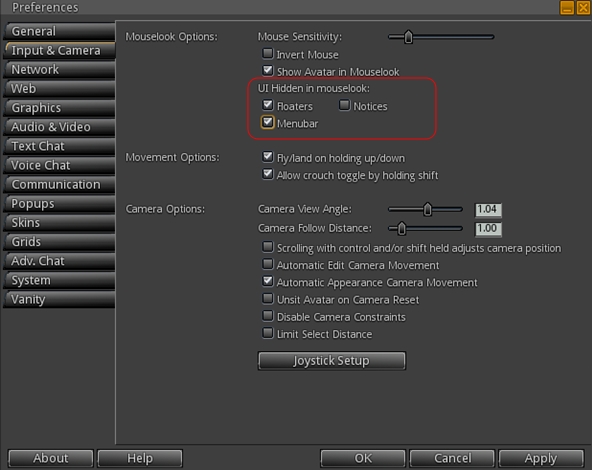
Version 1.8.5 includes the ability to select which parts of the UI to show when in Mouselook. The options are floaters, menu bar and notices and can be toggled on / of via check boxes in Preferences > Input & Camera >UI Hidden in Mouselook. Note that checking items means they will not appear in Mouselook.
Select which UI elements you wish to hide / se when in Mouselook
Also, when operating in Mouselook, you can now ALT-Tab between Singularity and other open applications and back without getting thrown out of ML.
Camera Updates
There are a couple of very useful camera updates with this release:
Allow alt-camming and terrain parcel selection from farther away, easing tasks such as partitioning regions and zooming around
A Reset Camera Preset Angle to Default option has been added to the View menu for undoing changes made to camera angle by CTRL and/or SHIFT+scrolling. In relations to this, the release notes additionally state: option to change camera angle through this method is now off by default, and that if your camera angle had been messed up in the last release, this option can spare you a full reset
Underwater Shadows
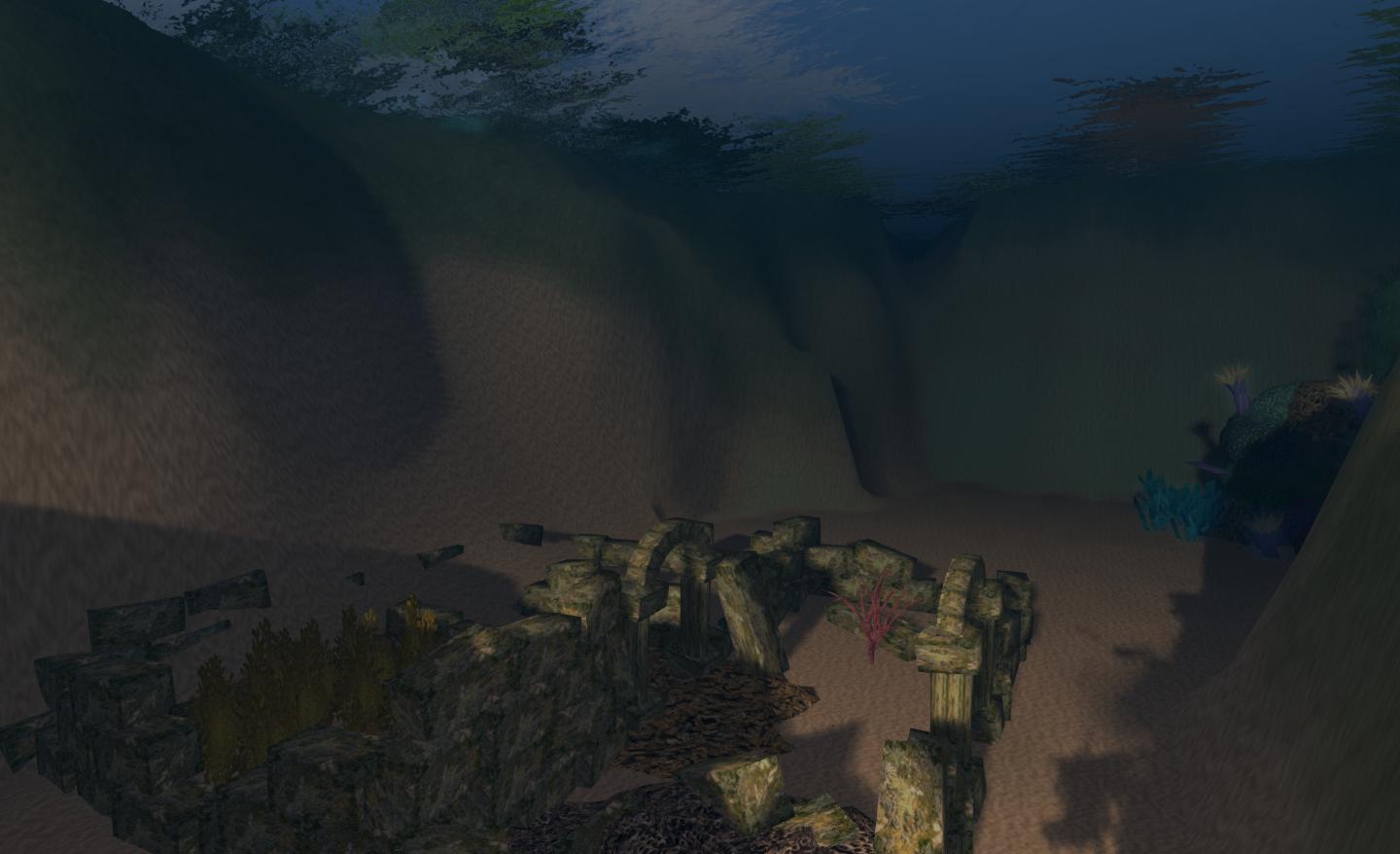
Merfolk and those into underwater exploration can now have their time beneath the waves enhanced as Singularity will now render shadows underwater (requires ALM and shadows to be enabled via Preferences > Graphics).
Underwater shadows
Rendering / Graphics Updates
This release sees some significant updates to rendering / graphics, including:
Fixes to shader compilation problems and standards compliance issues
Enhanced support for Intel GPUs on Linux
Enhanced support for Nvidia cards (NVAPI) which among other things allows automatic use of discrete GPU in dual GPU systems
SSAO separated into its own shader allowing speed optimization by running it at a lower-than-native framebuffer resolution
Several improvements to the performance of the rendering engine.
Improved performance of glow and ribbon capabilities
Ability to display cost per sq. m. for parcels on sale on the map
Ability to resize the Appearance floater.
There are also a number of bug fixes and other enhancements, so please refer to the release notes for a full run-down of everything from the team.
Feedback
Quite an extensive update from the team again, and one which should more than satisfy Singularity users. The addition of Fitted Mesh, enhanced support of particle capabilities and the linkset scaling are liable to please a lot of people, and the list of fixes for issues should also keep users happy.
As noted above, I quite like the new “mouse move” option in third-person view; using my trackball meant I could wander around and adjust my camera height somewhat to give me a good variation when looking ahead a lot more easily than when using the cursor keys (which is usually how I move). This proved very useful when negotiating confined spaces, such as inside my boat. The underwater shadows are also a pretty (literally and figuratively) cool addition.
All-in-all a very tidy release, and kudos to the Singularity team.
On Tuesday January 28th, the Main channel received the server maintenance project previously on the three RC channels, which contains a single fix for a crash mode.
RC Channels
On Wednesday January 29th, all three RC channels should receive a new server maintenance project, which includes a crash mode fix and a fix for llModifyLand() modifying the wrong location in region, when called in a child prim.
Speaking at the Server Beta meeting on Thursday January 23rd, Maestro Linden described the llModifyLand() fix thus:
For example, if a child prim is offset by <8,4,0> from the root prim, then calling that function in the child prim will try to modify the terrain at <8,4,0> of the region, which may or may not work depending on who owns the parcel.
The fix is to make it modify the land underneath the child prim (which of course follows the same permissions rules – you can only modify land owned by the script owner.
SL Viewer Updates
The Fitted Mesh RC was updated on Monday January 27th with the release of version 3.7.0.285669. This includes a number of additional fixes, include those for FITMESH-20 and FITMESH-6, which can be summarised as:
FITMESH-20: certain non-rigged mesh invisible with ALM disabled
FITMESH-6: worn mesh which is not rigged to the collision bones is seen to stretch away towards the 0,0,0 point of the region the avatar is standing in when using the Fitted Mesh
An interesting emerging issue with Fitted Mesh – which likely won’t delay its eventual promotion to release status – is that it prevents the Firestorm Bridge from attaching.
The Bridge is a is a scripted object which is used by the Firestorm viewer for a number of functions, notably: Move To Teleport, Flight Assist, Script Count, some radar functions, and Movelock. The problem here is that the Bridge uses a dedicated attachment point (127), which doesn’t seem to be supported or allowed in the Fitted Mesh viewer code. It is currently unclear as to how this might be resolved.
There has yet to be a promotion to the defacto release viewer. If there is to be such a promotion this week, it would seem likely that the Interest List RC would be the one to make it.
Other Items
Viewer Script Debug Window
During the Simulator UG meeting on Tuesday January 28th, Jonathan Yap asked, “Has any thought ever been given to a script debug window? t would let you input commands to trigger events etc.”
Kelly Linden, chairing the meeting in Simon Linden’s absence, replied:
Short answer is yes it has been thought about. A lot of what you expect from a debugger is very difficult in LSL and harder in LSL-on-Mono, such as most of looking at the actual state of the script. Being able to trigger events is an interesting idea but I think it has some security concerns if not handled very carefully.
So, to elongate Kelly’s initial short answer, while it has been thought about, it’s not something that is likely to happen any time soon.