Important note: The SL Go service is to be shut down on April 30th, 2015. For more information, please read this report.
In March 2014, Linden Lab and OnLive, the games streaming service, announced the open beta of OnLive’s new SL Go service, a means by which SL users could access Second Life via tablets and mobile devices using a full viewer streamed directly to the user’s device.
At the time of the launch, I was one of a number of people who were able to provide a review of the service, having been offered access to it ahead of the launch.
One area of upset with the service which quickly became apparent was the payment plan, which was based on a pay-as-you-go approach, with an hour of use costing $3.00, three hours $8.00 and ten hours $25.00. In response to criticism of the model, OnLive sought to make it clear through various mediums – notably Designing Worlds and Drax Files Radio Hour – that the plan was only an initial step, a means to gain data and feedback, and that options such as subscription plans had not been ruled out. The service also came in for criticism that it was only available in the USA, UK and Canada.
SL Go by OnLive: streaming Second Life to your tablet – but the initial pricing model caused upset
On Thursday April 3rd, OnLive followed-up on these comments by announcing they are both introducing a revised payment plan and extending the service to more regions. Linden Lab also followed-up with a post of their own. The OnLive announcement reads in part:
Since launching the beta of SL Go about a month ago, OnLive reports they’ve seen a very positive response to the Second Life® Viewer for Android™ that allows users to access Second Life over wifi or 4G LTE on tablets and laptops. Today, OnLive has updated the SL Go beta with new pricing:
Monthly unlimited-use subscription for $9.95 (USD) / £6.95 (GBP). No contract and no commitment
Reduced hourly rate: $1 / £0.70 per hour.
The previously available offer of a 20-minute free trial still stands.
In addition, and with the announcement, SLGo is now available in 36 countries worldwide, including Austria, Belgium, France, Greece, Iceland, Israel, Luxembourg, Scandinavia – even the Vatican City! The full list of supported countries can be found in the OnLive blog post.
SL Go on my Nexus 7 HD + keyboard
Commenting on the move, OnLive’s Vice President of Product and Marketing, Rick Sanchez, said:
We’re grateful for the opportunity to support the Second Life community, and pleased to be working with such a passionate and creative group. We look forward to further developing SL Go with their feedback and suggestions.
How popular this makes the service, remains to be seen. But for those on low-end computer systems who would like to have access to Second Life in all its glory, $9.95 might not be considered too much to pay per month until such time as they upgrade their systems.
Certainly, the $9.95 price-tag for the monthly is lower than the figure I had been anticipating following post-launch activities by OnLive; I’d been expecting the price to perhaps be on a par with their CloudLift service ($14.95 a month), which launched at the same time as SL Go. Similarly, dropping the pay-as-you-go rate to flat $1.00 per hour should make the occasional access via tablet or mobile device even more attractive you those who might need it. For those who are interested, and following-up from my initial review, I also have an article about running SL Go on a Nexus 2013 HD.
On April 1st, the Firestorm team released and April Fools video in the spirit of their 2013 “Firestorm Mobile” hoax.
As fun it was, there was a secret within the joke which many – including me – missed at the first watching of the video, largely because we didn’t follow the suggestion and manually type the URL at the end of the video into a web browser.
For those who may have missed things, and to provide a frame of reference, I’m including the video in this post as well.
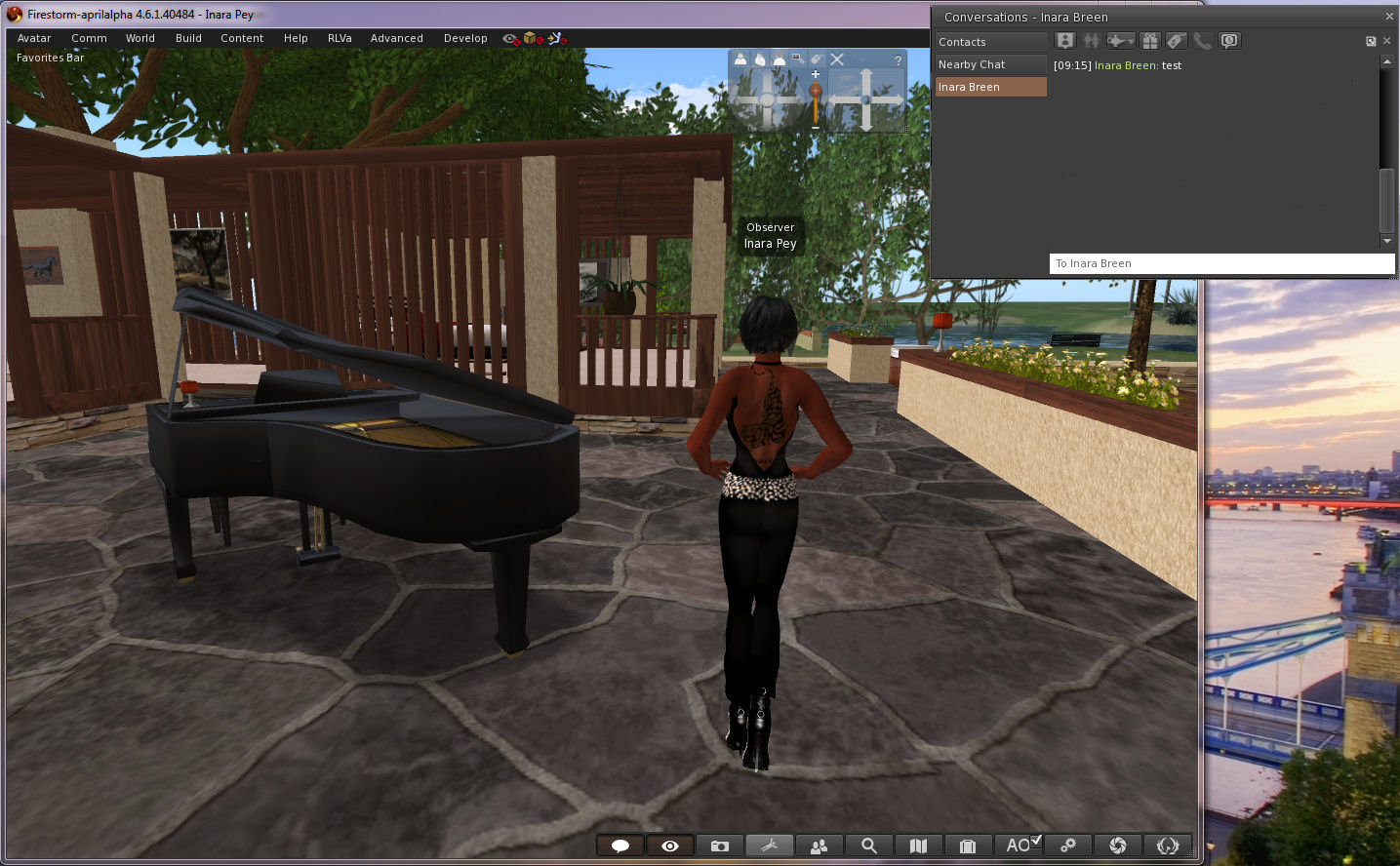
Jessica Lyon contacted me just after I’d published a post on the Firestorm and Catznip April Fools and gave me a proper “Gotcha!” So, having taken the time to stay quiet on the matter, as Jessica requested (and in order to go wipe the egg from my face!), I’m here to say, as many Firestorm users have been poking me about over the last 24-hours, that the Firestorm Dynamic User Interface isn’t a joke. It’s here. I’m using it. What’s more the Firestorm team have now blogged to confirm it.
The viewer,Firestorm 4.6.1.40484 is available for download for Windows only, and will run on both Second Life and OpenSim.
It really isn’t an April Fools – Firestorm 4.6.1.40484 really does allow you to move some floaters outside of the viewer window!
Now, the viewer – as Jessica and the team wish to express loud and clear – isn’t the finished article. It’s currently experimental, and as such, subject to unpredictable behaviour. It is not recommended for use as a primary viewer.
There are also some other points to note:
Not all of the floaters in the viewer may be capable of being pulled out of the viewer window. Those that can appear to float “above” the viewer window, rather than “in” it
Not all of thefloaters work smoothly at this time, and may be subject to jumping and / or, flickering, and options on menus associated with them may not be accessible as a result. There may be other issues, such as:
You cannot drag / drop items from the Inventory floater in-world
Conversations in the communications floater tabs may not scroll soothly
Floaters outside of the viewer window cannot be resizedYou cannot resize those floaters which can be moved outside of the viewer window
Torn-off menus cannot as yet be floated
The conversations floater can be pulled out of the viewer – but if you detach a specific IM tab, it will bounce back into the viewer window and cannot currently be dragged back out
Discussing the viewer with me after pointing out I’d been had with the April Fools video, Jessica said:
The intention is that we want to release this code in the hopes that ALL open-source developers out there, TPVs included, will pick it up. fix it, improve it, expand its capability and most importantly SHARE it with one another. It is my hope that this may become a catalyst to renew interest in viewer development among inactive developers and that ultimately this will open a whole new realm of possibilities for SL viewer technology moving forward.
We will not be assigning the gentleman’s agreement on this… it’s too important to make this about credit. I don’t care who releases it first as long as the code is shared equally. We will also work on improving it, but I think this should be a community effort.
Having detachable floaters like this has been one of the Holy Grails for the SL viewer, and has long, and oft been requested. However, the Lab has generally taken the view that to get something like this working would take a considerable amount of effort. The Firestorm’s team work is therefore very much pre-proof-of-concept, as their blog post on the matter indicates:
Firestorm DUI is little more than a very early proof of concept that a dynamic user interface is in fact possible with Virtual World viewers … our very own Nicky Dasmijn managed to come up with this in a relatively short amount of time, and we hope that it will translate to this functionality being available in a reasonable amount of time …
So, if you haven’t already taken it for a test-drive, and remembering the Firestorm DUI isn’t a release, and there may be issues with using it, and that it is not supported by Firestorm at this point in time. So again, when using it, please do notuse it as your primary viewer.
Please don’t report any issues with the viewer here; I’m not a part of the Firestorm team, and cannot help you. As mentioned above, the DUI viewer is currently unsupported!
As always, please refer to the server deployment thread in the forums for the latest news and updates.
Main (SLS) Channel
On Tuesday April 1st, the Main channel received the server maintenance package deployed to the Magnum RC in week 13. This package comprises:
Crash mode fix.
Fixed a rare case in which certain users were unable to log in (BUG-5130)
Fix for a case in which multiple scripts in the same prim calling llTakeControls() with heterogeneous ‘accept’ and ‘pass_on’ parameters would not receive a control() event correctly in some cases (BUG-5281)
Updated LSL syntax file to use a new schema (fixes STORM-2000) related to a viewer in testing and apart of STORM-1831.
As the roll-out progressed, there were reports on the forum thread that some regions are having a double restart. After investigating the issue, Caleb Linden reported: “I got the word from engineering that the double rolls were manually triggered by accident but they shouldn’t compromise the sims’ performances once up. This only affected a small group of regions.”
Release Candidate Channels
On Wednesday April 2nd, all three RCs should receive the same maintenance update, which incorporates the bug fixes deployed to the Main channel and which also sees AIS v3 support returned on the Magnum RC, after it was disabled / removed in the week 13 deployment. There seems to be yet more confusion over that actual status of AIS v3 server-side. and whether this means it will actually be enabled on all three RCs, or just re-deployed.
SL Viewer Updates
The SL Voice RC returned to the release channel on Monday March 21st, with the arrival of version 3.7.5.288516. This viewer pulls in Vivox 4.6.x libraries instead of 4.5 for improved voice stability and to address Mavericks issues (download and release notes).
the Sunshine / AIS v3 Rc should return to the channel later in the week if all goes according to plan.
SL Share 2 Project Viewer
As I’ve reported here, on Tuesday april 1st, Linden Lab released the SL Share 2 project viewer, version 3.7.5.288424. This includes:
An option to connect to Twitter and upload tweets / snapshots from in-world to your Twitter account
An option to connect to Flickr and upload snapshots
An updated Facebook floater with revised snapshot upload tab incorporating the features found in the Flickr and Twitter snapshot uploads, and a new Friends tab.
An interesting element in this viewer is the use of filter effects which can be applied to snapshots, and which allow users to add their own filter options.
Group Chat and Group Bans
There’s little to report here, other than:
At the Simulator User Group meeting on Tuesday April 1st, Simon Linden said of the most recent group chat test, ” We had a good group chat test last week that gave me a few more things to fix. They weren’t new issues, but showed some more ways the current system can fail. So it was a good test.” It’s not clear whether this means the testing will now move to Agni and a selected group with a large number of users, or whether there will be further Aditi testing first.
With group bans, and as reported last time on the subject, Baker Linden is busy repairing the code that want broken / lost during a merge process and trying to make sure everything is back together and working properly,
This summary is published every Monday and is a list of SL viewer / client releases (official and TPV) made during the previous week. When reading it, please note:
It is based on my Current Viewer Releases Page, a list of all Second Life viewers and clients that are in popular use (and of which I am aware), and which are recognised as adhering to the TPV Policy
By its nature, this summary will always be in arrears
The Viewer Round-up Page is updated as soon as I’m aware of any releases / changes to viewers & clients, and should be referred to for more up-to-date information
The Viewer Round-up Page also includes comprehensive links to download pages, blog notes, release notes, etc., as well as links to any / all reviews of specific viewers / clients made within this blog.
Official LL Viewers
Current Release updated to version 3.7.4.288138 (formerly the FmodEX Hotfix RC, dated March 18) on March 24 – core updates: assorted MAINT fixes (download page, release notes)
Merchant Outbox RC updated to version 3.7.5.288408 on March 28th – fixes for accurately detecting Merchant status and improves recovery for Merchant Outbox errors (download and release notes)
“Project Interesting” RC updated to version 3.7.5.288404 on March 27th – improved scene loading (download and release notes)
StatTest RC version updated to 3.7.5.288371 on March 27th – Tthis RC is not intended for formal release, but assists in bug-fix support for Google Breakpad (download and release notes)
Project viewers:
Project Zipper viewer updated to version 3.7.5.288507 on March 28th – faster viewer installation (download and release notes)
CtrlAltStudio updated to version 1.2.0.40751 on March 26th – core updates: convergence of release and alpha versions; parity with Facebook through to 4.6.1; small fixes / tweaks (release notes)
Kokua updated to version 3.7.4.32111 on March 28th – core updates: parity with LL 3.7.4 code base; attachment inventory edit + assorted TPV and Kokua team updates (release notes)
UKanDo updated to version 3.7.24.27968 on March 25th – core updates: new UI skin & skinning option; revised Preferences floater; revised menus; Kokua scene refresh capability (release notes)
V1-style
Cool Viewer updated on March 29th to the following versions: Stable: 1.26.10.16; Experimental: 1.26.11.16; Legacy: 1.26.8.53 – core updates: numerous backports from LL code trees, bug fixes, code-clean-ups (release notes)
Mobile / Other Clients
Pocket Metaverse updated to version 1.9.0 on March 31st – core updates: parity with iOS 7; bug fix to address Second Life sign-in problems (release notes)
A TPV developer meeting took place on Friday March 28th. The core items discussed in the meeting are reported below, with timestamps in the relevant paragraphs indicating the point at they are discussed in the video embedded here. My thanks as always to North for the latter.
Release Candidate Viewers Status
Stat Test RC and Google Breakpad RC
[00:10] The Stat Test release candidate viewer (version 3.7.5.288371 at the time of writing) is not intended to ever move to a formal release status. Its function is to help with identifying how big an impact a bug within the Google Breakpad RC was having on viewers by comparing crash rates.
The fix contained in the Stat Test viewer is now also in the Google Breakpad RC, which was updated on Thursday March 27th to version 3.7.5.288464 (download and release notes). It’s thought that this RC is getting “pretty close to final form”, something that will likely be confirmed once the new update has been in the release channel sufficient long enough for decent statistics to be gathered in week 14 (week commencing Monday March 31st).
Interest List RC and Merchant Outbox RC
[01:00] As noted in part 2 of this report, the Interest List RC returned to the release channel wither version 3.7.5.288404 (download and release notes). This RC had been removed from the release channel on March 21st due to the number of RC viewers in the channel at that time.
The Mechant Outbox RC, which contains fixes for accurately detecting Merchant status and improves recovery for Merchant Outbox errors, was updated on Friday March 28th to version 3.7.5.288408 (download and release notes). This update means that as of Friday March 28th, all RC viewer in the release channel were up-to-date with the current release version of the viewer.
Voice RC and Sunshine / AIS v3 RC
[01:35] These two release candidates were withdrawn from the release channel on March 21st to reduce the number of RC viewers vying for promotion to release status. These have yet to be updated with the current release viewer code, however, it is anticipated that the Voice RC will be returning to the release channel early in week 14, and that the Sunshine AIS will hopefully reappear later in the week.
The binaries for the Vivox updates are currently available to TPVs for testing an incorporation, so the removal of the Voice RC from the release channel should not have unduly impacted any work being undertaken by TPVs in updating or offering Vivox 4.6.x to Windows and Mac users. Unfortunately, Vivox have yet to supply updates for Linux.
Project Viewers
Project Zipper
[01:52] The Project Zipper “fast installer” viewer was updated to version 3.7.5.288507 on March 28th, also bringing it up to parity with the current release viewer, although it remains at project status (download and release notes).
Oculus Rift
The Oculus Rift project viewer is currently on a closed beta, and so the code is not publicly viewable. The beta is reported to be going “really well”, although other sources indicate that there is a lot of dissatisfaction in how the UI works, up to an including demands that the entire UI needs to be re-thought.
Given any change in the viewer UI tends to attract a high degree of negativity right out of the gate (and also given the fact I’ve not actually seen the “Riftlook” UI), it’s hard to say how many of the concerns are objective as opposed to subjective in nature (e.g. the issue is genuinely one of ease-of-use as opposed to it being one that is considered “unusable” because it’s either not how it’s worked in the past, or requires a re-training of muscle memory) . However, if the issues are objective and indicate significant issues of usability, it will be interesting to see how the Lab responds.
Upcoming Viewers
Group Bans
[02:24] The Group ban viewer is progressing, as noted in part 2 of this report, a new version is available through the Server Beta wiki page, and can be tested on the Morris region on Aditi. There is yet more work to be done on this, so it’s unlikely to move to an official project viewer or RC status in the short-term.
Snowstorm
A new Snowstorm RC viewer is in development, and Oz Linden is hoping to include a few more things in it. I believe this viewer may include the LSL syntax updates of STORM-1831, although the hope is apparently to get some more items into it alongside what is already there. As there are already so many viewers either in, or queuing-up for RC status, there is currently no rush to move this viewer forward.
Release Viewer
[04:02] Commenting on the current release viewer version: 3.7.4.288138, formerly the FmodEx Hotfix RC, Monty Linden indicated that there are almost a year of fixes the stream threading between the current viewer and previous versions. These include many fixes for issues where the viewer can drop a stream entirely. However, whether these include a fix for the issues where a stream containing externals ads (for cars, insurance, etc. – see FIRE-12798) can be completely dropped by the viewer and require a re-log in order to reconnection, is unclear. However, Monty has offered to take a poke at things.
SLS Share / Facebook Photos Upload
[07:26] As reported on March 20th, the ability for users to upload photos from the viewer to their Facebook accounts was disabled by Facebook, apparently because of the inclusion of SLurl with the photo uploads.
The Lab has made changes in the viewer and in the intermediate server layer which should address Facebook’s concerns, however, Facebook has yet to unblock the upload capability at their end, and at the time of writing there has been no word on when this might be done.
The viewer-side updates have yet to reach the release viewer, but are currently in all of the release candidates in the viewer release channel.
The SL Share photo upload panel as it is in the current release viewer (3.7.4.288138) on the left,complete with the option to include a SLurl; and as it appears in the RC viewers on the right, with the SLurl option removed to meet Facebook’s requirements
Mac Issues
[08:30] A request has been made for the Lab to provide a list of Mac / Cocoa issues to help TPVs keep track of things. As reported last time this issue was raised, the Lab are hampered in trying to deal with Cocoa-related issues, as their Mac developers are working on a number of projects, and so specific issues are dealt with individually, rather than as a part of an overall project.
HTTP Issues
Monty Linden:
[19:53] The Firestorm team asked if the Lab had any data on how well the HTTP code changes were going and if they were seeing anything unexpected with server-side loads. The prompt from this question came by the fact that as downloads of the Firestorm 4.6.1 release have increased, so the number of user complaints which appear as though they might be related to HTTP have increased. Monty Linden replied:
Not that I can tell. Nothing is getting to me if there is any such story. I’ve heard the anecdotes, and whenever I’ve looked into them, the stories behind them are generally pretty random. It’s people associating recent changes with behaviour they’re seeing and assuming some correlation where there isn’t any.
Now, that said, there are some patterns that continue to persist that have existed for the past few years that I’ve been dealing with transport issues. The simulators always have had problems in the lib services with connection quotas being exceeded, and that’s still going on today. A busy region on a busy sim hots is still a problem, but I can’t say it’s worse than before. It should be better, but the data I’m getting – which is almost none – doesn’t point to any problem. I’m sorry that’s not definitive, but it’s all I’ve got at this point.
It has been reported that HTTP downloads on sims which have a lot of textures and objects, but few avatars are significantly better than HTTP downloads where there is a large number (20+) avatars. In the latter circumstance, it has also been reported that switching back to UDP appears to improve downloads. However, Monty warned against this, as UDP puts significantly more load on the simulator, which can have a noticeable impact for every user connected to that simulator.
In discussing how to confirm whether or not users really are seeing HTTP issues, Monty continued:
The first thing would be to look at the log file. If you’re getting permanent failures in texture HTTP, it’s going to show up in the log file with a fail on a final retry with an error code and a bunch of related information.So you can pretty much confirm pretty quickly whether or not they’re getting serious permanent failures for texture operations … and these will be distinct from 404s. 404s are nots founds, and you’ll see those every now and then simply because the texture reference is not valid. But other reasons for a permanent failure would be interesting.
When I updated the texture console, I put mesh errors in, but I didn’t do anything about HTTP errors, but there would be another useful area to put things in the future for monitoring error counts. but for now the log file will have the truth. Let me know what you find, because that will point us in one direction or the other.
On our services, I absolutely definitely see busy sim hosts having their input channels saturated. And when that happens, you are going to have retries, and I’ve seen some pretty hard cases of that. Some of the big social things that get put on Second Life [such as RFL] often get put on concentrated sim hosts, and these really get victimised by this problem. But again, permanent failures, they’ll be in the logs and you can look at that. Beyond that, I’ll se what i can find out.
A problem with obtaining logs is that people will often encounter problems like this a few times and the revert back to an earlier release of the viewer. So, if you are using a viewer (SL or Firestorm) with the HTTP updates and encounters persistent rendering issues or failures when moving around SL, please consider taking a couple of minutes to fill-out a JIRA, attach your log file and submit it. Monty is very sensitive to HTTP issues, but in order to respond to them, he needs data, not anecdotes.
Other Items
AIS v3
[02:56] Oz Linden reported that ther server-side AIS v3 code will be enabled across all three RC channels (LeTigre BlueSteel and Magnum) in week 14. As BlueSteel and LeTigre had AIS v3 enabled with server update 14.03.07.287758 and Magnum with update 14.02.21.286985, I can only assume that it was disabled again with the Magnum update 14.03.12.288004 in week 13.
Male Avatar Chest Rendering Broken / Mesh Clothes Breaking on Male Avatars
This issue related to BUG-5537, where there is a discrepancy on how the AV mesh shape is rendered/viewed by oneself and by others in the male AV chest portion, so that while an item of rigged mesh clothing looks fine to the user when viewing his avatar, other people see parts of the avatar’s chest still poking through the outfit. There has also been discussion of the issue on the forums.
The Lab is currently investigating the issue, but have no definitive answer on the problem as yet.
On Friday March 28th, the Kokua viewer updated to version 3.7.4.32111. This sees the viewer come to parity with the SL viewer code releases through to 3.7.4.
This means that Kokua now has:
FmodEx updates (SL viewer 3.7.4.288138)
The most recent MAINT fixes (SL viewer 3.7.3.287491)
The HTTP updates (SL viewer 3.7.2.286707)
In addition, the viewer includes a number of TPV code additions. Note that attributions are given where known.
Avatar Shape Import
You an import previously saved shapes (XML) via the Edit Shape floater
This option, from Firestorm, allows you to import an .XML avatar shape from your computer to your inventory.
Shapes are imported via the Import button on the Edit Shape floater.This opens a file picker window, allowing you to navigate to the folder in which the required shape has been saved, and then import it into Kokua.
When importing a shape, please note that it will replace the existing parameters for the shape you are currently wearing, and will be saved on exiting Edit Shape.
If you wish to retain the original shape, make sure you use the Save As button at the bottom of the floater, opposite the Import button, before you import a shape.
If you do forget to save your original shape to a new file name before importing a shape and replacing it, you can use Undo Changes to revert to your original shape. You can then use Save As to create a copy of it in your inventory, prior to re-importing your new shape.
Note that shapes you create can be exported to XML via the Develop menu (Ctrl-Alt-Q) > Avatar > Character Tests > Appearance to XML.
Attachment Inventory Edit
This is a popular TPV capability by Kitty Barnett.
Got a small attachment embedded in your avatar, or which you’ve dropped rather than detached, and cannot find? Go to your inventory, locate the object, right-click on it and select Edit. The edit crosshairs will be displayed over the object, allowing you to reclaim or reposition it.
Other Items of Note
Restore items to last position (from Firestorm): if you return an object to inventory by mistake, or delete it from in-world, subject to region permissions, you can now restore it to its last known position by locating it in inventory (use the Restore Item option if it is in your trash can) and then right-clicking on it and selecting Restore to Last Position. Again, note that this will only work if you have rezzing permissions at location 0,0,0 in the region
Maximum Frames per Second (MaxFPS) debug setting (from Firestorm): sets a maximum threshold for viewer frame rates to ease loads on GPUs and reduces the amount of viewer / server traffic. A value of -1.0 sets MaxFPS to off. As a rule, the human eye cannot discern differences in refresh rates above 60 fps
A number of defaults have been altered: Draw Distance Range is now 0 -1024 metres for all slider locations; Object Mesh Detail maximum is increased from 4 to 8; Limit Select Distance is off; Disable Camera Constraints is on; the left toolbar button area is set to align buttons at the bottom
The Advanced Build Constraints menu entry is removed and the debug entry is defaulted on due to conflicts and duplications between the Build constraints code and limit overrides set by server-side awareness of Aurora code
OpenSim legacy search fixed so that searches which fail to yield a result advance to “Not Found” rather than remaining at “Searching”
Crash logging is on but, reports are not being sent. This will allow more detailed crash reports that users may attach to issue tracker reports.
Another compact update for Kokua helping it to maintain parity with emerging SL viewer capabilities and feature while at the same time absorbing several more useful TPV viewer capabilities.
 Important note: The SL Go service is to be shut down on April 30th, 2015. For more information, please read this report.