Updates for the week ending: Sunday, May 24th, 2015
This summary is published every Monday, and is a list of SL viewer / client releases (official and TPV) made during the previous week. When reading it, please note:
It is based on my Current Viewer Releases Page, a list of all Second Life viewers and clients that are in popular use (and of which I am aware), and which are recognised as adhering to the TPV Policy. This page includes comprehensive links to download pages, blog notes, release notes, etc., as well as links to any / all reviews of specific viewers / clients made within this blog
By its nature, this summary presented here will always be in arrears, please refer to the Current Viewer Release Page for more up-to-date information.
Attachment fixes RC viewer (Project Big Bird) updated to version 3.7.29.301943 on May 21 – core updates: a number of fixes for various attachment issues (download and release notes)
Black Dragon updated to version 2.4.2.5 on May 23rd – core updates: updates unified snapshot floater; experimental cinematic camera (release notes)
Restrained Love updated to version 2.9.10 on May 19th, and then to version 2.9.11 on May 25th – core updates: bug fixes (release notes: 2.9.10 and 2.9.11)
The UKanDo viewer, maintained by Connor Monaron updated to version 3.7.28.34230 on May 11th.
As the version number suggests, this brings the viewer to parity with the Lab’s 3.7.28 code base, and specifically with the Viewer-Managed Marketplace (VMM) functionality.
For those who may not recognise VMM, and keeping things relatively brief, the aim of the project is to enable merchants to manage the creation and management of Marketplace product listing through the viewer, bypassing the need to use the Merchant Outbox (and have copies of items stored on the Marketplace inventory servers) or using Magic Boxes.
It does this by adding a new Marketplace Listing panel to to viewer, which will eventually replace the Merchant Outbox entirely, and by adding additional back-end and web functionality which allows merchants to carry out a number of tasks associated with their Marketplace listings from within the viewer, and by enabling products to be delivered to customers directly from the Lab’s asset servers, rather than having to store them as separate inventory on the Marketplace servers.
Rather than go into a detailed explanation of all the functionality here, if you haven’t come across VMM before, please read my notes from the initial testing in 2014.
The Merchant Listing panel for VMM, as see in the UKanDo beta, with some of my migrated items
The key point here is that, at the time of writing, VMM is still very much undergoing beta testing, and the viewer-side code has yet to reach a release candidate status in the official viewer, so the 3.7.28 release of UKanDo is slightly ahead of the curve – the Lab prefer that TPVs don’t release code which the Lab themselves have not issues in release candidate form.
To this end, Connor has clearly indicated this 3.7.28 release is a beta version of UKanDo, and the earlier 3.7.27 update remains available as the full release.
It’s also worth pointing out that initially, the current VMM beta was by invitation, so if you want to try the functionality either using the UKanDo beta or the Lab’s own project viewer, you’ll have to apply to join the beta via the link towards the bottom of your Merchant Home Page on the Marketplace.
All that said, I’ve been driving the VMM version of UKanDo over the last couple of days, using it to gradually convert my own modest store on the Marketplace from Direct Delivery to VMM (as shown in the image above right, taken as I got started), and have found absolutely no issues with it – not that I was actually expecting any. Everything works smoothly, and updates made via UKanDo are accurately reflected when checked in the official VMM project viewer.
For Merchants who prefer using UKanDo over the official viewer, and who would like to try-out VMM as the Lab moves it gradually towards full deployment (which could occur in June 2015), the 3.7.28 presents an opportunity to do so.
Note that as a VMM beta release, the 3.7.28 update does not contain any other functional or other updates compared to the UKanDo 3.7.27 release.
VMM allows merchants to carry out some Marketplace listing related tasks from within the viewer (subject to how they have web browsing set-up) – here I’m editing a listing associated with an item in my Merchant Listing panel – click for full size, if required
On Tuesday, May 19th the Main (SLS) channel received the server maintenance package previously deployed to the three RC channel, comprising Internal server logging changes, back-end system bug fixes and a change to Reply-To e-mail addressing on snapshots. There were no RC deployments on Wednesday, May 20th.
SL Viewer
The Attachments Viewer RC (Project Big Bird) was updated to version 3.7.29.301943 on Thursday May 21st. As noted in part 1 of this week’s report, the initial RC release of this viewer had an elevated crash rate compared to the current release viewer, including a crash-on-exit bug, so this release will hopefully address those issues.
Group Chat
A fix for issues around BUG-9130, where some people were unable to see any posts in some or all of there group chats, including their own posts, while everyone else in the same group could see their posts, has started to be deployed across the chat servers, and should be completed on Friday, May 22nd.
“The chat servers got stuck with bad info about where the sender was, so the messages never reached them,” Simon Linden said at the Server Beta User Group meeting on Thursday, May 21st, reiterating an explanation given at a recent Simulator UG meeting. “And unfortunately it wouldn’t fix with relogging or even a chat server restart.”
“Loading…” Issue with Names in Group Chats
This is a viewer-side problem which causes avatar names to appear as “Loading” under certain circumstances in group chat (see BUG-3829 and STORM-2114). A contribution by Ansariel Hiller is currently with the Lab and is expected to be released as a part of the next Snowstorm contributions viewer, which is expected to appear soon.
Other Items
Region Restart Glitch
There has been something of a rise in reports of regions experiencing issues following recent following restarts – most noticeably caps failures. This is something the Lab is looking into, and Simon commented, “we have a suspicion that after rolls, as that server host starts up regions, it’s doing enough of them at about the same time that things get overloaded. It’s still a theory but makes some sense why we’d get cap failures like that.”
On Tuesday, May 19th the Main (SLS) channel received the server maintenance package previously deployed to the three RC channel, comprising:
Internal server logging changes
Back-end system bug fixes
Reply-To email changed in postcard sends
As previously noted in these pages, the “reply-to email changed in postcard sends” relates to changing the way snapshots forwards to e-mail are handled. Until now, the Lab has substituted the user’s e-mail address in the “from” field of snapshots sent to e-mail, rather than displaying the “secondlife.com” address.
However, this added to issues of e-mail originating from “secondlife.com” being treated as spam by a/v software and ISPs. With the new format employed with this change, the sender’s e-mail address is given as the “reply to” address in the snapshot, and the “from” is “no-reply@secondlife.com”, thus avoiding the issue of LL looking like spammers who are forging invalid addresses.
There will be no RC deployment on Wednesday, May 20th.
SL Viewer
The week has not so far seen an RC viewer promoted to release status. If there is any promotion, it would most likely be the Layer Limits RC (currently version 3.7.29.301305). The Experience Tools RC viewer is still awaiting the completion of back-end work, while the Attachment Fixes RC (Project big Bird) currently has an elevated crash rate compared to the current release viewer, which includes a crash-on-exit bug, so further work is required on that RC.
CDN Provider Move
The Lab has been moving between CDN providers, and as a result, some people may have been experiencing particular texture / mesh / avatar rendering delays of late. Commenting on the process at the Simulator User Group meeting on Tuesday, May 19th, Oz Linden said:
We’ve just finished moving from one CDN provider to another, and it may take the caches a little while to catch up. We tried to do it gradually in a way that would be minimally disruptive, but when you’re dealing with as much data as we are, there are no perfect solutions.
One of the cases it is hoped the move will assist is with SL users in Florida (and neighbouring states) in the US who use Mediacom as their ISP, and who have found that there have been what appear to have been issues with Mediacom throttling the service at certain times of the day. Preliminary feedback from users so affected who have been involved in testing with the new CDN provider has been positive.
What Goes Through the CDN, And How
During the CDN conversation Oz reinterated the data that is currently delivered to the viewer through the CDN: textures, world map tiles, avatar baking data, and mesh data. In terms of in-world objects, two distinct operations are taking place:
Where an object is, how big it is, and so on, comes to the viewer via the simulator, together with the UUIDs fr the relevant objects / textures
The viewer then uses the UUIDs to fetch the mesh and texture data directly from the CDN.
As previously noted on these pages, this should mean faster loading of things like textures and mesh in-world, as the data is coming from a CDN node that is “local” relative to you, rather than coming to you from the Lab and through the simulator itself. However, experience is showing that for a small number of people, this isn’t always the case, and there can be situations where mesh and texture loading aren’t what might be expected. However, the Lab continues to try to improve things.
Second Life Network Architecture
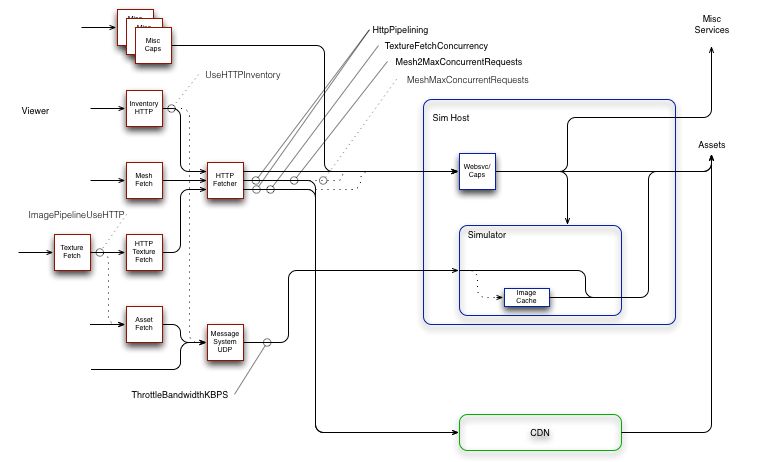
Writing on the forums, noted SL photographer Jackson Redstar recently asked meshmaxconcurrentrequests – does anybody know the real setting? In the ensuing debate, Monty Linden offered an updated overview of the SL network architecture.
Monty Linden’s updated SL network diagram
To borrow from Monty’s explanation:
On the left, in red, are pieces of the viewer; on the right, in blue are simhost/simulators and other backend services; at the bottom (green) are new CDN services
Solid lines with arrowheads are communication paths, either UDP or TCP/HTTP; dashed lines are legacy communication paths that are now or soon will be deprecated, obsoleted and/or deleted
Sold ball-and-stick indicators (e.g. TextureFetchConcurrency) indicate a viewer debug setting and the communication path or paths that setting influences; dashed ball-and-stick indicators (e.g. MeshMaxConcurrentRequests) indicate obsolete debug settings.
Monty goes on to say:
Generally, things are moving in the direction of simplification and less resource conflict. The mesh and texture HTTP traffic, which is usually the greatest load, tends to part ways with the UDP traffic a few network hops after a user’s router or modem. Lacking TCP’s throttling mechanism, UDP often wins in a fight (give-or-take the efforts of fairness algorithms along the path). Allowing UDP to overrun the path between viewer and simulator does still degrade the experience and the bandwidth setting remains an effective tool for avoiding this problem.
Other settings should generally be left alone. A lot of bad advice was spread around in the community in an effort to work around throughput problems. We’re trying to undo that history and get back on track with more typical (albeit aggressive) HTTP patterns.
Viewer Caching
During the Simulator UG meeting, Oz repeated a call he originally made at a TPV Developer meeting recently, asking that if there is developer wishing to volunteer for a “deep dive” into viewer caching, he’d like to hear from them.
While interest list updates made key changes to how the viewer’s cache is used, there are numerous issues which appear to be viewer-side caching related, so a deep investigation into the code could go further towards improving things.
One long-standing issue, which is thought to be caching related, is If someone uses a texture rezzed in-world same texture for a group profile image or their avatar profile image or in a profile pick, the object will never fully load the texture.
So, if you’re a developer willing to looking into viewer-side caching, Oz would like to hear from you.
Updates for the week ending: Sunday, May 17th, 2015
This summary is published every Monday, and is a list of SL viewer / client releases (official and TPV) made during the previous week. When reading it, please note:
It is based on my Current Viewer Releases Page, a list of all Second Life viewers and clients that are in popular use (and of which I am aware), and which are recognised as adhering to the TPV Policy. This page includes comprehensive links to download pages, blog notes, release notes, etc., as well as links to any / all reviews of specific viewers / clients made within this blog
By its nature, this summary presented here will always be in arrears, please refer to the Current Viewer Release Page for more up-to-date information.
Attachment fixes RC viewer (Project Big Bird) version 3.7.29.301361 released on May 13 – core updates: a number of fixes for various attachment issues (download and release notes)
The following notes are primarily taken from the TPV Developer (TPVD) meeting held on Friday, May 15th, and from the Server Beta meeting held on Thursday, May 14th. A video of the TPVD meeting is included below, with any time stamps in the following text referring to it. My thanks as always to North for the recording and providing it for embedding,
There was no Main (SLS) channel deployment on Tuesday, May 11th. On Wednesday, May 12th, the three RC channels were all updated with a new server maintenance package, comprising internal server logging changes, back-end system bug fixes, reply-to email changed in postcard sends (see below for more).
Group Chat
The Server Beta User Group meeting on Thursday, May 14th, saw a test of a group chat update it is hoped will fix the issue of some people not seeing all or some chat when the group chat window is open (see BUG-9130). The test appeared to yield positive results, with Simon reporting no unusual event logging. The problem here is that the instances of the problem seem to be so rare, it’s hard to guarantee a small sampling of testers will catch any problems which might still exist.
SL Viewer
[00:15] It has been a quiet week on the viewer front. As noted in part 1 of this week’s report, the attachment viewer (Project big Bird) reached RC status, other than that there has been not additional movement with either the current selection of RC and project viewers.
A further update to the mesh importer project viewer (currently at version 3.7.28.300878) is with LL’s QA team and should be released relatively soon. Updates are also being made to the Viewer-Managed Marketplace project viewer (which is likely to go to RC status once through LL’s QA process) and the Oculus Rift project viewer.
Snapshots to E-mail
[02:22] Commenting at the TPV Developer meeting, Oz Linden gave a little more information on the “reply-to email changed in postcard sends” update deployed to the RCs, indicating this was indeed a fix aimed at preventing snapshot to e-mail being tagged as spam by ISPs and a/v software due to the way they handle the “from” field (see my TPV Developer meeting report for week #17), which had caused the Lab to consider removing the snapshot to e-mail capability.
“Instead,” Oz told the meeting, “we found we could get around that by sending the e-mail differently … So the way it’s changed now is that instead of sending the ‘from’ address as the sender’s address, we send the ‘reply-to’ address; and the ‘from’ address is ‘no-reply@secondlife.com’ … so that ducks the problem of us looking like spammers who are forging invalid addresses.”
This should hopefully negate any need to remove the snapshot to e-mail capability, and retain compatibility with sending snapshots to the likes of Snapzilla and the SLU forums.
Unified Snapshot Floater
[04:40] NiranV Dean, who submitted the unified snapshot floater to LL (and which has most recently been integrated into Firestorm among the TPVs) asked if there had been any feedback on it. Both Oz and Grumpity Linden indicated that overall, feedback has been positive, although some have complained at the amount of screen real estate it takes up with the preview panel open. As this allows the snapshot preview to match the aspect ratio of the user’s screen, there’s not a lot that can be done about it – and the preview window can always be closed / the panel minimised when initially setting-up shots.
The unified snapshot floater – further work is being carried out by TPV devs for contribution to LL, including the possible full integration of the Facebook, Flickr and Twitter upload options
Niran is proposing a further set of updates (one of which, a fix for auto snapshot, is in the works at the Lab), including possibly making the preview screen detachable from the main floater. Cinder Roxley also indicated she is working on fully integrating the Facebook, Twitter and Flickr options into the main snapshot floater (they currently retain their own floaters due to the authentication workflow required for each. This work will be contributed to the Lab for consideration / integration when complete.
Viewer-Managed Marketplace (VMM)
[08:09] Over the last two weeks, as a part of the on-going beta of VMM, around 15-20 volunteers have had their stores migrated by the Lab from Direct Delivery to VMM. Brooke linden reports that the exercise has uncovered “pretty much minor issues” which the Lab can address. A further batch of volunteer migrations is planned to help further test the robustness of the process in the next week or so.
As noted above, the VMM viewer is now heading for an RC release once it has cleared LL’s QA testing. However, the time frame on when this might happen is a little vague; it might be in the next week or so, or it might be longer.
Avatar Complexity
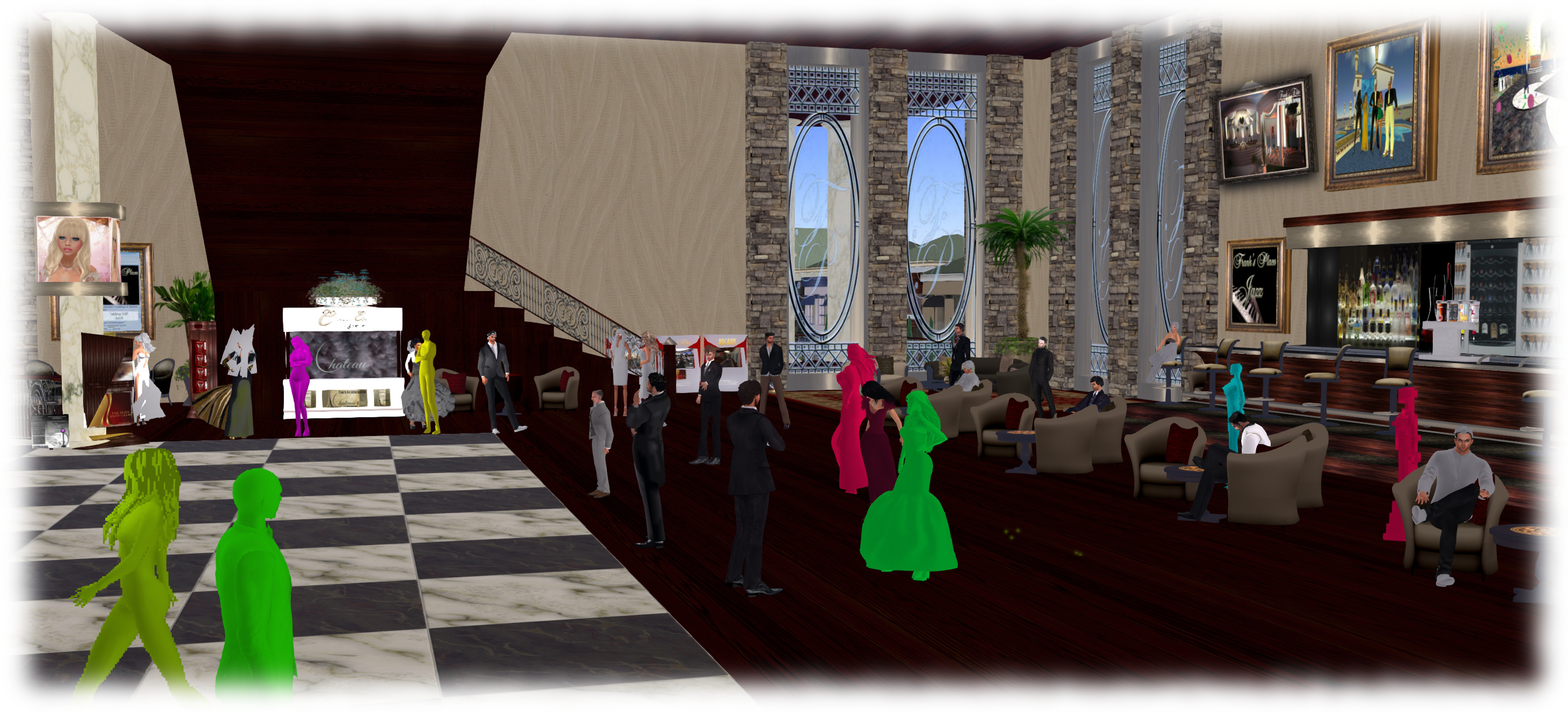
[17:34] The next Snowstorm contributions viewer is progressing internally at the Lab. This is the viewer which includes the new Avatar Complexity (aka “Jelly Babies” or “rainbow avatars”) functionality which allows users to define a level of complexity (a weighting number) which will render any avatar exceeding that value as a solid colour, rather than a full avatar. The aim of this is to help reduce the rendering load placed on people’s computers, particularly in very busy locations. The value is adjustable, as so can of course be varied to suit your current needs.
Avatar complexity is intended to help those who may hit performance issues as a result of their GPU struggling to render complex (hight render cost) avatars, by rendering such avatars as solid colours.
A slight hiccup has occurred in that in making some changes to the code, Oz accidentally broke the code such that instead of rendering as a solid colour, avatars exceeding the limit are currently rendering as transparent, and this is yet to be fixed. Code has been added to the viewer to report how many people around you are rendering your avatar as a solid colour (should your avatar be complex enough to be rendered thus), but this has yet to be made visible through the viewer UI, and simulator support for this is now in place on the RC channels and will be rolled to the Main channel in the coming week.
Mac Updates
[19:36] Cinder Roxley has a set of contributions for using the viewer with Mac Retina displays ready to go to the Lab, and it seems likely these will flow into a further Snowstorm contributions viewer in development alongside the one containing the Avatar Complexity updates.
A question was also asked whether there were plans to update the Mac viewer to use a newer OpenGL core profile. The Lab is not working on this, as their rendering team believe there is little or no benefit to be gained from it. However, they would accept any contributions offered for consideration (subject to a “long, terrible QA process”). However, a good part of this would require working through some eight years of OpenGL code.