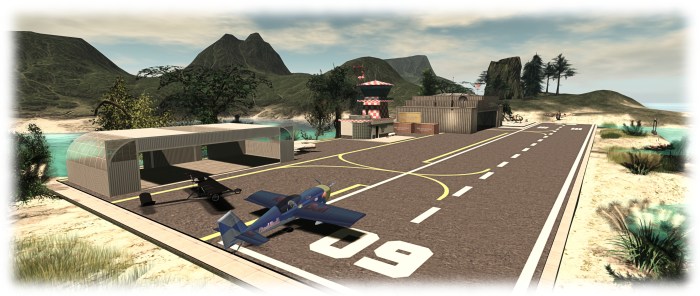
The Firestorm Gateway provides new users with essential orientation in using the viewer and the opportunity to learn about a range of SL activities, such as aviation – but it needs marketing and promotional support
The Firestorm team have announced they are seeking a volunteer to handle marketing and promoting Second Life to potential new SL users through the Firestorm Community Gateway and website.
The Firestorm Gateway is a part of a forthcoming trail programme being implemented by the Lab which will see up to 20 community-lead gateways active within Second Life and geared towards helping incoming new users get to grips with the platform more positively, and hopefully improving the chances that they’ll “stick”.
However, in order to attract new users into Second Life, the Gateway – and particularly its associated website – needs to be actively promoted to audiences beyond SL – hence Firestorm’s call for a marketing volunteer.
The marketing volunteer will be responsible for presenting and promoting the Gateway and – particularly the Gateway website – to potential audiences and target across the Internet, to encourage people
The Firestorm team is specifically looking for someone who is an existing user in Second Life with a solid grasp on what Second Life is and means to its residents, and who has extensive experience with internet marketing, including the use of social media tools.
The full list of requirements and the benefits offered in return are listed in the official Firestorm announcement, and those interested in applying are asked to send a note card with their information, experience and ideas to Jessica Lyon in-world, or via e-mail to jessica.lyon-at-phoenixviewer.com.
On Tuesday, November 10th, the Main (SLS) channel was updated with the same server maintenance package as deployed to the RC channels in week #45, comprising a fix for group invite throttle notifications, and an internal server code clean-up
A new server maintenance package had been due for deployment on Wednesday, November 11th. This packed includes simulator-side enforcement checks against attachment point IDs (attachments using invalid attachment point ID will be moved to the chest attach point), and validation checks against animation and mesh to prevent the upload of animations and meshes weighted to invalid attachment points.
However, it was initially postponed after testing revealed the upload validation checks to be too stringent. (see BUG-10607 ‘Back end enforcement for animation upload is blocking upload of many of my animations – “references unknown joints”‘). As a result, the deployment was postponed while the Lab revisited the code to address issues, and a revised package was then rolled to all three RCs on Thursday, November 12th.
Firestorm 4.4.2 Bridge
In terms of the attachment ID and valid attachment points, one group of users who will be affected by the update are those on Firestorm 4.4.2, which uses an invalid attachment point ID for the Firestorm Bridge. Such users will only be affected if they log-in to an updated RC channel (keeping in mind this code will likely be deployed grid-wide in week #47), with the result that the bridge creation process will fail, leaving them with a boulder belly – a default rock shape embedded in their avatar.
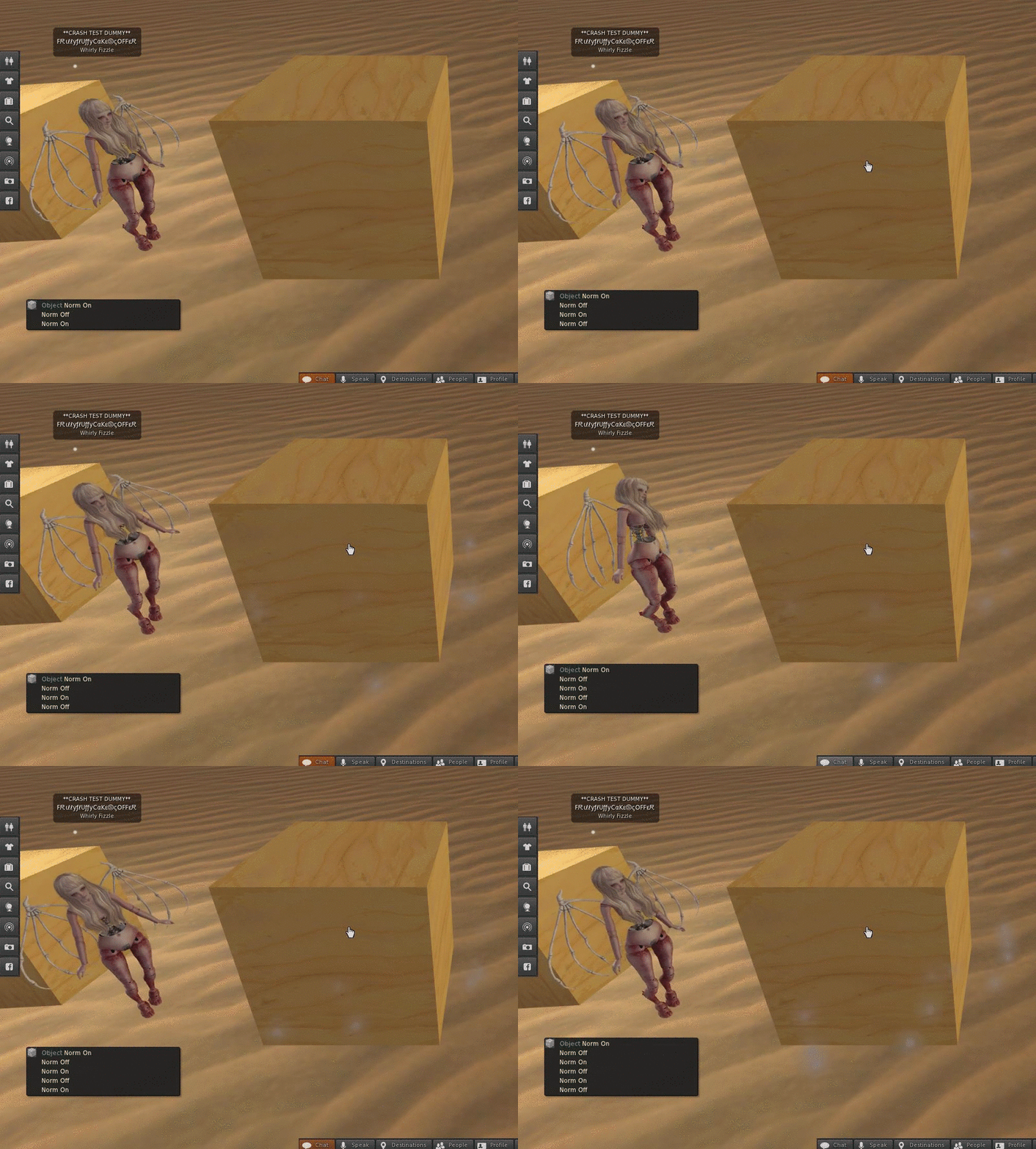
Firestorm 4.4.2 users may find themselves with a boulder through their avatars as a result of the simulator code deployed to the RC channels this week. The issue will not affect Firestorm versions from 4.6.9 onwards (image courtesy of Whirly Fizzle)
As Whirly Fizzle explains in the deployment thread, to avoid this, those users on Firestorm 4.4.2, and who can, should update to 4.6.9 or later. Those who can’t, and who wish to avoid getting stoned, should disable the bridge creation process (Avatar -> Preferences -> Firestorm -> General -> Untick “Enable LSL-Client bridge” -> Apply -> OK and detach the Bridge attachment).
SL Viewer Updates
The Quick Graphics viewer containing the new Avatar Complexity capability and the ability to set multiple graphics presets was updated to version 3.8.7.306758 on Thursday, November 12th. This update sees the removal of a number of issues previously marked as resolved:
MAINT-5541 “[QuickGraphics] 0 complexity avatar renders as jelly”
MAINT-5567 “[QuickGraphics] A mesh attachment causes avatar to be jellybaby while Avatar complexity is set to No Limit”
MAINT-5620 “[QuickGraphics] clicking on Graphics Preset title triggers favorite”
The removal of these fixes would seem to suggest this viewer will remain at RC for a while longer.
HTTP RC Viewer Withdrawn
Also as noted in an addendum to the first part of this week’s report, the HTTP RC viewer (Project Azumarill) was withdrawn from the viewer release channel. This viewer had been suffering from a number of issues, including disconnecting from the simulator during teleports, and also issues such as BUG-10230 – “Voice often fails to connect on the Azumarill viewer”, and BUG-10391 – “Avatar often bakes fails on Azumarill”. These may all have contributed to the removal of the viewer from the channel while the issues are worked on.
On Tuesday, November 10th, the Main (SLS) channel was updated with the same server maintenance package as deployed to the RC channels in week #45, comprising a fix for group invite throttle notifications, and an internal server code clean-up
There will be no RC deployment on Wednesday, November 11th.
Simulator Behaviour Changes
A RC deployment had been planned for week #46, which would have included new simulator side validation checks for mesh and animation uploads and attachment point validation.
However, when testing the simulator code on Aditi, Whirly Fizzle found that some of the checks are a little too stringent, and that even valid animations and mesh might be blocked – see BUG-10607 ‘Back end enforcement for animation upload” is blocking upload of many of my animations – “references unknown joints”‘, with even the default official bvh animations being blocked.
As a result of this, and following discussions at the Simulator User Group meeting on Tuesday, November 10th, the Lab postponed the deployment pending a re-examination of the new validation code.
SL Viewer Updates
A new Maintenance viewer was released on Tuesday, November 10th. Version 3.8.7.307376 brings with it some 38 fixes and improvements, including updates for some regressions introduced into the viewer with the current release viewer (version 3.8.6.305981).
The CEF project viewer (Project Valhalla) was also updated on Tuesday, November 10th. Version 4.0.0.307535 includes 17 fixes and updates compared to the initial release of the viewer.
Update November 11th: The HTTP (Project Azumarill) release candidate viewer was removed from the viewer release channel. As noted in my last TPV Development meeting report, the latest iteration of this viewer was generating assorted issues, including viewer disconnects on teleporting, and this may have led to the removal, although no official reason has been cited.
Other Items
HTTP Request Throttling
The server deployment to the main channel in week #45 introduced a throttle on HTTP requests. It had been introduced to prevent a griefing vector which could crash a region. However, the throttle was sufficient to cause llHTTPRequest to give NULL_KEY returns, which impacted a range of in-world systems include skill gaming systems, breedables, and tools such as Sculpt Studio (see BUG-10627 “llHTTPRequest appears to return NULL_KEY even if throttle is not reached”).
Commenting on this at the simulator user group meeting, Simon said:
I’m looking at relaxing that more with (hopefully) next week’s maintenance release; perhaps sooner (but no promises). I also need to update the llHTTPRequest() wiki page. It really needs details on how scripters should handle a NULL_KEY return; basically they need to code for it … wait about a minute before retrying, and don’t kill your breedables if you can’t talk to your server. [The griefing vector] really caused some problems. So we need that limit, but hopefully without killing off herds of SL animals.
Scripted normal & specular texture change Issues
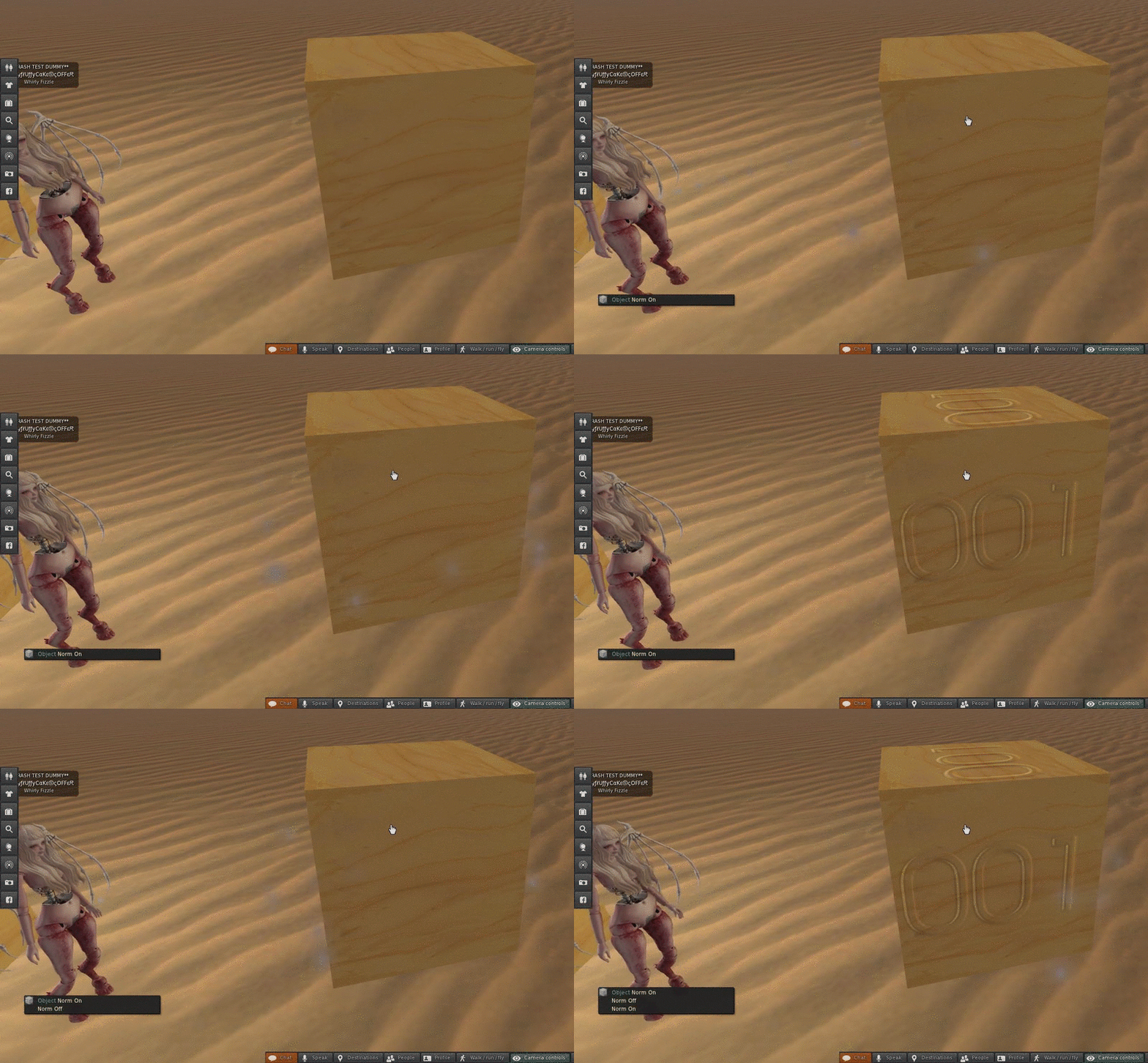
Whirly Fizzle has reported a viewer-side issue within the current release viewer (version 3.8.6.305981) which can occur when manipulating materials on in-world objects or worn attachments via script.
The problems are outlined in BUG-10601, “Scripted normal & specular texture changes do not work correctly and screw up other materials enabled objects on the region”, and the problems affect normal and specular maps, and as Whirly notes in the report, the impact can be a little erratic. In sort, using scripts to toggle normal and / or specular maps on a surface on / off fails to result the expected behaviour.
On on the Left, how things should work as Whirly uses a script to toggle a normal map on / off to reveal the “001”; on the right, how the same script fails to achieve the same result in the 3.8.6.305981 viewer – click either images for full size
Whirly provides a full description of the problems which can occur, and it should be noted that while annoying when seen, the circumstances under which they occur are most likely narrow enough so as not be to be a major issue for users. The bug has been accepted by the Lab, and Marine Kelley has offered a hotfix which, if needed, might help in formulating a “full” fix for the problem.
Aditi Log-in Sync Issues
A recent breakage in the update mechanism for syncing passwords and inventory between the main grid and Aditi, led to further issues for some users in trying to use both grids (see this forum thread and BUG-10634).
At the start of week #46, the Lab deployed a new method of syncing between Agni (the main grid) and Aditi, which it was hoped would resolve problems. Unfortunately, things didn’t work out as planned, and the new system had to be rolled back.
As a result, and as Simon notes on the forum thread, those wishing to sync their grid passwords and inventory between the two grids should file a Support ticket asking that your account be copied from the main grid to Aditi.
This summary is published every Monday, and is a list of SL viewer / client releases (official and TPV) made during the previous week. When reading it, please note:
It is based on my Current Viewer Releases Page, a list of all Second Life viewers and clients that are in popular use (and of which I am aware), and which are recognised as adhering to the TPV Policy. This page includes comprehensive links to download pages, blog notes, release notes, etc., as well as links to any / all reviews of specific viewers / clients made within this blog
By its nature, this summary presented here will always be in arrears, please refer to the Current Viewer Release Page for more up-to-date information.
Project Azumarill (HTTP updates) RC viewer updated to version 3.8.7.306796 on November 2 – provides improved performance and stability. Impacts include: asset uploads, AISv3 inventory manipulation, VMM, Experience management, LSL compilation, Simhost event polling, etc. (download and release notes).
Project viewers:
Vivox Project viewer,version 3.8.7.307189, released on November 6 – correcting a number of Voice quality and connection issues on both Windows and the Mac (download and release notes).
The following notes are primarily taken from the TPV Developer (TPVD) meeting held on Friday, November 6th 2015. A video of the meeting is included at the end of this report, and time stamps to it are provided. My thanks as always to North for the video recording and providing it for embedding.
Server Deployments Week 45 – Recap
On Tuesday, November 3rd, the Main (SLS) channel received the server maintenance package previously deployed to BlueSteel and LeTigre, comprising a simulator crash fix
On Wednesday, November 4th, all three RC channel received a new server maintenance package comprising a fix for group invite throttle notifications, and an internal server code clean-up.
Following the main channel deployment, issues were variously reported with llHTTPRequest returning NULL_KEY even when it should not be throttled (see BUG-10627). The issue was initially noted with skill gaming mechanisms, but has also been encountered by those using Sculpt Studio, and reportedly with breedable systems.
SL Viewer Updates
[0:20] A further Maintenance RC viewer due to be released in week #46, which includes a range of fixes, including some for the regressions present within the current de facto release viewer (version 3.8.6.305981).
It currently appears that the next viewer promotion to release status will either be this maintenance viewer or the HTTP viewer – however the promotion is unlikely to occur in week #46, due to the Maintenance RC only just having been released and because the HTTP viewer his a number of issues to be resolved – see below.
Quick Graphics RC Viewer
[0:35] There are still issues with this viewer which although described as “nothing terrible” in the Lab’s view, are sufficient to prevent its promotion in the immediate future.
HTTP (Project Azumarill) RC Viewer
[1:04] There are a number of issues which have been identified by both the Lab and reported by users which are sufficient to block the promotion of this viewer to release status. One of these is an increased number of viewer disconnects on teleporting. The causing of this is proving elusive as it seem to only occur for some people with others never encountering issues. Other significant reported issues include:
BUG-10230 – Voice often fails to connect on the Azumarill viewer
BUG-10391 – Avatar often bakes fails on Azumarill.
CEF (Project Valhalla) Project Viewer
[1:19] The Chromium Embedded Framework viewer is performing well on Windows in the Lab’s estimation, and is getting “really close” on the Mac. The hope is that this viewer will progress from project status to a release candidate “pretty soon”.
[16:40] There have been some reports of issues with this viewer, including BUG-10598, logged out when tping from one LM to another, which is likely related to the disconnect issues being experienced with the HTTP viewer (both the HTTP viewer and the CEF viewer are closely related).
[17:25] There has been a report of “major” HTML video performance issues (see BUG-10558). However, running 30+ YouTube videos via HTML 5 in a single location is viewed by the Lab as possibly excessive and, as noted on the JIRA, the problem hasn’t been easy to reproduce and the video footage supplied might suggest a problem other than simply with running multiple HTML 5 videos.
Vivox Project Viewer
[1:44] A new project viewer, version 3.8.7.307189, was released on Friday, November 6th. The Vivox project viewer should correct a number of Voice quality and connection issues on both Windows and the Mac.
The Lab requests that anyone who has experience Voice issues to try this viewer, and if it does not resolve their issues to raise a JIRA, being sure to cite this viewer’s version number in the report. Those failing to indicate they have tried the project viewer are liable to be asked to do so, simply because Vivox has asked the Lab not to forward bug reports to them unless they have been tested against the Vivox package included in this viewer. For a list of fixes, please refer to the release notes in the above link.
Simulator Behaviour Changes
Attachment Point Validation
[30:15] As noted in the last TPVD meeting in October, the Lab are shifting a number of validation checks from the viewer to the simulator. One of these is attachment point validation checks, which will mean that attachments attempting to fix itself to an invalid attachment point ID will be attached to the chest by the simulator.
Mesh Upload Validation Checks
[31:15] A further simulator-side check the Lab has been considering would prevent the upload of animations and meshes weighted to valid attachment points. The Lab have been discussing this given the feedback given in October (see also FIRE-17144 and BUG-10543 for feedback as well), and have decided to investigate options further rather than implementing any immediate changes. However, they do note that there is no guarantee the ability to upload meshes weighted in this way will continue in the future.
[32:05] The Lab has made it clear what will be implemented in the near future is a simulator validation check to prevent the upload of animation or mesh items weighted to use joints /attachment points which are not a part of the recognised set of avatar joints.
Other Items
Gateway API
[22:20] An issue has emerged around the upcoming gateway trial programme which is loosely connected to the avatar updates mentioned above. The new avatars (mesh and “Classic”) are only available via the Lab’s “new” registration API. Currently, the API presented to gateways is the older version, which relies on the default Character Test avatar.
As noted at the TPVD meeting, this could be immediately off-putting to new users entering Second Life through the new trial gateways. However, the Lab appears to be “pretty close” to being able to switch the gateway SPI to using the newer set-up – and this may be one of the reasons the trail gateway programme hasn’t as yet been officially announced.
Firestorm Release
Not directly related to news from the Lab, but the next release of the Firestorm viewer should be around Monday, November 16th or Tuesday, November 17th. However there are still dependencies on this, and it is not a hard set of dates.
As always, please refer to the server deployment thread for the latest information and feedback.
On Tuesday, November 3rd, the Main (SLS) channel received the server maintenance package previously deployed to BlueSteel and LeTigre, comprising a simulator crash fix
On Wednesday, November 4th, all three RC channel received a new server maintenance package comprising a fix for group invite throttle notifications, and an internal server code clean-up.
Part of the code-clean up for the RC channels deployment appears to involve a fix for the region edge issue I reported on in my week 44 report, with Simon Linden commenting at the Simulator User Group meeting on Tuesday, November 3rd, “The new code going into RC has one interesting tool in it for our support staff … there’s a sim console command to reset the land edges to match what’s visible.”
SL Viewer Updates
The HTTP release candidate viewer (Project Azumarill) updated to version 3.8.7.306796 on Monday, November 2nd, possibly the last update before this viewer gets promoted to the de facto viewer in week #46.
Group Issues
There are a number of issues with groups the Lab is aware of, including those who are ejected from a group whilst in a group chat session still being able to continue using the chat until they close the window (see SVC-32), an issue not fully resolved when group bans were introduced.
This issue is one that the Lab is hoping to address, however, it is dependent upon some infrastructure changes being made, so may now happen in the immediate future, although the hope is to get the underpinning work done “pretty soon”.