Logos representative only and should not be seen as an endorsement / preference / recommendation
Updates for the week ending Sunday, December 13th
This summary is generally published every Monday, and is a list of SL viewer / client releases (official and TPV) made during the previous week. When reading it, please note:
It is based on my Current Viewer Releases Page, a list of all Second Life viewers and clients that are in popular use (and of which I am aware), and which are recognised as adhering to the TPV Policy. This page includes comprehensive links to download pages, blog notes, release notes, etc., as well as links to any / all reviews of specific viewers / clients made within this blog.
By its nature, this summary presented here will always be in arrears, please refer to the Current Viewer Release Page for more up-to-date information.
Note that for purposes of length, TPV test viewers, preview / beta viewers / nightly builds are generally not recorded in these summaries.
Official LL Viewers
Current release viewer version 6.4.11.551711, formerly Cachaça Maintenance RC viewer promoted on November 12th – No Change.
The Legend of Wooley Swamp, October 2020 – blog post
The following notes are taken from the TPV Developer meeting held on Friday, December 11th, 2020.
These meetings are generally held every other week, unless otherwise noted in any given summary.
The embedded video is provided to Pantera – my thanks to her for recording and providing it. Time stamps are included with the notes will open the video at the point(s) where a specific topic is discussed.
Note these summaries are not intended to be a full reporting on all topics discussed, but focus on those items that are more directly user-facing.
Another exceptionally brief meeting, with some user-user discussion in chat at the end (post-meeting) on Open Metaverse, so please refer to the video as well.
There have been no updates to the current group of official viewers in the pipelines, leaving things as:
Current release viewer version 6.4.11.551711, formerly Cachaça Maintenance RC viewer promoted on November 12 – No Change.
Release channel cohorts:
Dawa Maintenance RC Viewer, version 6.4.12.553053, released December 3rd.
Custom Key Mappings project viewer, version 6.4.12.552100, November 12.
Project viewers:
Project Jelly project viewer (Jellydoll updates), version 6.4.12.552224, December 4.
Simple Cache project viewer, version 6.4.11.551403, issued on November 12.
Legacy Profiles viewer, version 6.4.11.550519, October 26.
Copy / Paste viewer, version 6.3.5.533365, December 9, 2019.
Project Muscadine (Animesh follow-on) project viewer, version 6.4.0.532999, November 22, 2019.
360 Snapshot project viewer, version 6.2.4.529111, July 16, 2019.
General Viewer Notes
Both the Key Mappings and Dawa Maintenance RC viewers are approaching the point where either one could be considered ready from promotion to de facto release status. However, give the low crash rate and high stability data coming from the current release viewer, is is possible that neither one of these RCs will be promoted before the new year.
Two more RC viewers should be appearing shortly:
The Simple Caching viewer that replaces the current VFS cache with a much simpler mechanism. This is currently in review for promotion as an RC viewer.
The current Jellydolls project viewer is also approaching the point of being promoted to RC status.
[7:03-7:53] There are a number of EEP issues that have been flagged as “priority”, but its not clear if these will be addressed in the next Love Me Render (LMR) RC viewer or not (due to voice break-up as Vir was discussing).
There is an expectation within LL that any updates to the rendering system (including what are regarded as “critical EEP fixes” by some users) will be condemned as further “breakage” in EEP.
Thanksgiving Bakefail: LL believe they now have a fix for this issue, which is awaiting deployment.
BUG-229824: “[EEP] Cannot apply any EEP setting to ANY parcel or region:” reported on December 11th, a fix for this issues has been deployed, which should correct it. HOWEVER, any settings assets uploaded between 14:40 SLT on Thursday, December 10th and and 11:50 SLT on Friday December 11th, will not work. They will need to be deleted and replaced.
[5:24-6:23] The Lab is “fast closing in”on having all SL services transitioned to operating via AWS. The percentage of remaining systems to be migrated in being put at around 3%.
Again, please note that this is only the migration work; there will be further work to come with regards to fine tuning, performance updates, etc. For now the focus is on gathering statistics on how simulators, systems and services are all running.
[8:29-13:50] general discussion in chat and voice on how best to manage user / creator expectations on what may “break” or be altered as a result of upcoming work on the viewer’s rendering system.
There may well be “breakages” / changes because an overhaul of the rendering system is unlikely to try to achieve a “like for like” swapping of issues between one rendering pipe and another, but to try to improve things as and where possible; as such, so “breakages” are perhaps inevitable.
One problem here is the number of workarounds that have been employed over the years in order to circumvent perceived / actual issues within the current rendering system, and which may not continue to work as expected as changes are made.
Another issue is when to try to inform users and creators – the rendering system work is liable to be long-term, and made not yield immediately changes; ergo, providing notification too early could lead to a lot of upset and concern, only for it to evaporate and the warning of changes to be forgotten, if the changes are not immediately implemented.
Further to this is just how to inform the majority – many users do not read official blog posts and forums (and even when news is pushed through third-party blogs, such as this one, it still only tends to reach a narrow audience). The viewer message of the day also has limited impact, simply because the official viewer is not the most widely used viewer in SL.
Plus, even with forewarning, the natural course of things is for people to keep using with which they are familiar right up to the point where changes are made.
However, once the Lab has a better idea of what subsets of rendering elements are likely to change, efforts will be made to communicate these to users in advance.
[13:55-16:25] Another change with the viewer is the on-going removal of code that is not longer being actively used. A further example of this is that there are two protocols used for handling requests for logging-in to SL. One of these (XML-RPC) is almost never used nowadays, so this code may well be removed – with warning beforehand – in the future.
On Wednesday, December 9th, 2020, Firestorm issued a release version of their viewer – 6.4.12.62831. This is the formal release of Firestorm supporting the Lab’s Environment Enhancement Project (EEP); it also includes a number of other Lab-specific updates to the viewer, such as the Camera Presets capability.
Note: while there has been an EEP beta release – 6.4.5.60799 (July 2020) – this summary has been written for those who may still be running the 6.3.9.58205 release from May 2020.
Also, given limitations of my own time (coupled with an inability to run 6.3.9.58205 in direct comparison with 6.4.12.62831), this is a much briefer overview of changes for a Firestorm release in comparison to past overviews in these pages.
There is no need to perform a clean install with this release if you do not wish to.
Do, however, make sure you back-up all your settings safely so you can restore them after installing 6.4.12.
Again, please refer to the Firestorm 6.4.12 generic release notes for additional details of all changes and updates in this release.
Register Firestorm as Default Hander
Starting with this release, towards the end of the installation process, Firestorm will display a prompt:
Do you want to register Firestorm as default handler for virtual world protocols?
A response of Yes to this prompt will set the viewer to open map SLurls for example.
Linden Lab Derived Updates Overview
Firestorm 6.4.12 brings the viewer to parity with the Lab’s 6.4.11 viewer code base. As such, it incorporates updates from Linden Lab previously included in the 6.4.5 Beta release and from the following Lab viewer releases:
The Chrome Embedded Framework (CEF) Update 2020, viewer 6.4.4.543157, providing better support for media playback options win the viewer, including the ability to live stream into Second Life.
The FMOD Studio update, viewer 6.4.3.542964, updating the viewer’s audio playback support to use FMOD Studio.
The Environment Enhancement Project (EEP) viewer 6.4.0.540188 – see below for more.
New to the 6.4.12 Firestorm release are updates and improvements from the following Linden Lab viewers:
ToolsUpdate2 viewer, 6.4.6.545962, viewer build tools update to Visual Studio 2017, a more recent version of XCode and Boost.Fiber, dated August 10th, 2020.
Love Me Render #4 viewer, 6.4.9.549455 – rendering updates with a focus on EEP bug fixes, dated September 24th, 2020.
Mesh uploader viewer, 6.4.10.549686 – Linden Lab’s implementation of the uploader improvements previously found in Firestorm, with additional changes from the Lab. Dated October 14th, 2020.
The following Maintenance releases with assorted fixes and updates:
Maintenance Arrack, version 6.4.7.546539, dated August 19th, 2020.
Maintenance Bormotukha, 6.4.8.548890, dated September 18th, 2020.
Maintenance Cachaça, version 6.4.11.551711, November 6th, 2020.
Camera Presets
Camera Presets provides the ability for users to create one or more custom camera positions to define where and how the viewer camera is placed relative to your avatar, More than one set of presets can be created and saved, so that you can, for example have a camera position for general exploring, another suitable for combat games, another for building, etc., all of which can easily be accessed and used at any time via the Camera Presets drop-down.
For a general introduction to Camera Presets, please refer to: Tutorial: Viewer Camera Presets. However, when doing so, please note that the Firestorm Camera Floater is laid out differently to the official viewer, being more compact, as shown in the image below.
Camera Presets: options and floaters, as seen in Firestorm 6.4.12.
Presets can quickly be selected from the Camera Presets button in the top right of the viewer, which will open a drop-down menu. By default, this drop-down will display the standard viewer camera positions of Front, Rear, and Side. Additional presets will be displayed as you create them.
A button on the drop-down will open the Camera floater, if not already open. As well as controlling the camera position, this floater now contains the options for creating and saving camera presets.
The most accurate way to establish new camera defaults is to use the Camera Position spinners and slider that can be accessed by clicking on the Position button in the Camera floater – again, see my Camera Presets tutorial for more on this approach.
When you have created your desired preset, use the Save as Preset button to save it as a viewer setting. This opens the Save Camera Preset floater, which allows you to save the preset settings under a unique name or to overwrite an existing setting.
Alternatively you can manually adjust the camera position relative to your avatar using the camera controls then click on the current settings button to open the Save Camera Preset floater and save the settings as described in (4.).
You can also select any defined Camera Preset by clicking on the gear icon in the Camera floater to display a list of available presets – default and your own – and then clicking on the desired one.
If you only wish to select a preset you have created, click the Use Preset button on the Camera floater to display a drop-down of available presets that excludes the viewer defaults of Front, Rear and Side. If you have not created any defaults yourself, the drop-down will be empty.
Environment Enhancement Project (EEP)
It is unlikely that many people have not heard of the environment Enhancement Project (EEP). But in short:
EEP Replaces the use of Windlight .XML files to control the water and sky environments seen in Second Life.
Environment settings are saved within environment assets that you can keep in your inventory and / or share with and sell to others.
These environment settings can be applied to a region or to a parcel (subject to region permissions) and / or to your avatar (thus allowing those travelling in vehicles to maintain a consistent environment across multiple region crossings).
EEP allows:
For up to four different, independently controlled sky layers.
The Sun, Moon and Cloud textures to be replaced with custom textures uploaded to the viewer.
EEP also provides:
An extended day cycle of up to 168 hours, thus allowing a 7-day, 24-hour day / night cycle to be defined, for example.
A Personal Lighting floater that allows you to make viewer-side adjustments to the local environment for the purposes of photography.
New LSL functions to allow scripts to interact with parcel environments and that can be used with experiences.
EEP Resources
EEP is a large and complex overhaul of environment settings for Second Life, and there are numerous resources available for it. If you have not used EEP before, and as the Firestorm implementation is more-or-less as per the official viewer, I recommend reading some of the following:
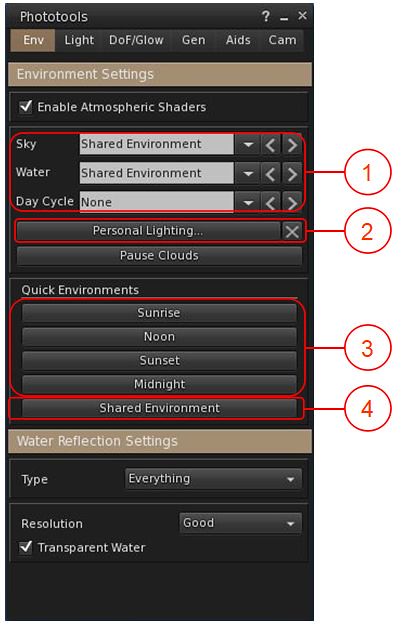
One of the popular elements within Firestorm is the Phototools floater. This has been updated to work with EEP, with the most noticeable changes being to the WL tab, now renamed Env, with the changes within it outlined in the image and notes below.
EEP and Phototools
Environment drop-downs for Fixed Sky, Linden Water and Day Cycles. These display the currently-used environment settings for their respective environment types as seen in your viewer.
Click the down arrow for a list of all available environment asset types available to you in your inventory and via the Library → Environments folder.
Click on the required asset name to apply to your viewer only.
Accesses the EEP Personal Lighting floater, which you can use to modify the current environment settings as seen in your viewer only.
The X button to the right of Personal Lighting will cancel any changes you have made to the current environment, and revert your viewer to displaying the settings for the selected asset.
Quick Quick Environment buttons for setting the time of day to the SL default Sunrise, Noon, Sunset and Midnight settings.
Shared Environment: presumably intended to re-apply the shared environment as set by the region / parcel holder. However, in testing, this did not appear to work.
Notes:
The drop-downs in (1) can also be found in the Quick Prefs panel, as can a button to open the EEP Personal Lighting panel.
As these options are applied to your viewer, note that the selected Day Cycle will not necessarily reflect the expected time of day – as Day Length / Offset can only be set at the parcel / region level.
Firestorm EEP Preferences
Firestorm provides two EEP-specific Preferences options. Both can be found in Preferences → Firestorm, and comprise:
A slider that allows you to set the interval in seconds over which manual environment changes will blend, with 0.0 being instantaneous. In previous versions of Firestorm, this was known as crossfade.
A checkbox to allow any personally applied EEP setting to persist between log-in sessions.
Firestorm 6.4.12 EEP Preferences
Additional EEP Notes
There are around 200+ EEP environment settings to be found in the Library → Environments folder. These have been provided to Linden Lab by Whirly Fizzle of the Firestorm team, and are available to all EEP-capable viewers.
As noted in the image above, these can be accessed via the WL tab in Phototools and via the drop-downs in Quick Prefs.
If you want to edit these any of the environment settings in the Environments folder, you must first copy them to a folder in your inventory (e.g. your Settings folder, or a sub-folder within it).
As per my tutorial, you can import the Windlight settings you have on your local drive and convert them to EEP settings – see Importing Windlight Settings as EEP Assets.
The week sees a series of deployments between Monday and Wednesday:
On Monday, December 7th, the simulators on the SLS Main channel were updated to simulator release 553168 contacting “some internal tweaks”.
On Tuesday, December 8th, the RC channels were updated to simulator release 553176, which again contains “some internal tweaks”.
If all goes will with the RC deployment, 553176 will be deployed to the SLS Main channel on Wednesday, December 9th.
Commenting on the week’s deployment, Rider Linden said:
So. We’re just about done with the tight sequence of rolls. Tomorrow [Wednesday 8th] we should be doing the main channel again, and then all will be right with the world. We are hoping that that is the final roll of the year. In January we should be back onto our regular Tuesday/Wednesday schedule. We know that the packed schedule has been disruptive over the last week, so thank you for being patient with us.
While there are no planned deployments between the end of this week and year-end, it is likely all regions will be restarted before the holiday break at the Lab to “keep things fresh”.
SL Viewer
The Start of the week has seen no change to the current crop of official viewers, leaving them as follows:
Current release viewer version 6.4.11.551711, formerly Cachaça Maintenance RC viewer promoted on November 12 – No Change.
Release channel cohorts:
Dawa Maintenance RC Viewer, version 6.4.12.553053, released December 3.
Custom Key Mappings project viewer, version 6.4.12.552100, November 12.
Project viewers:
Project Jelly project viewer (Jellydoll updates), version 6.4.12.552224, December 4.
Simple Cache project viewer, version 6.4.11.551403, issued on November 12.
Legacy Profiles viewer, version 6.4.11.550519, October 26.
Copy / Paste viewer, version 6.3.5.533365, December 9, 2019.
Project Muscadine (Animesh follow-on) project viewer, version 6.4.0.532999, November 22, 2019.
360 Snapshot project viewer, version 6.2.4.529111, July 16, 2019.
In Brief
Map tiles are still not being regularity updated, however the Lab both identified the cause of the issue and a possible fix, however, it now seems probable this will not be deployed until after the holiday break.
LL have suggested that the Map system might be looked at in the future, with a request being made as to what people would like to see, were such a project to go ahead. Some of the suggested made at the meeting included:
The ability to add a logo over regions, rather than having to make one from prims (allowing for constraints that would be required to prevent abuse (such as having an expanded set of iconography?).
Allow the map to ignore region surrounds so the terrain can be seen on the map, rather than the map tile being a blank coloured square.
Heat maps showing traffic over varying time periods, a-la the old Metabolt client.
Better zoom capabilities.
Indicators / textures for showing whether the region is currently in daylight or night-time.
Work is continuing to try to improve the teleport issues some are experiencing.
Logos representative only and should not be seen as an endorsement / preference / recommendation
Updates for the week ending Sunday, December 6th
This summary is generally published every Monday, and is a list of SL viewer / client releases (official and TPV) made during the previous week. When reading it, please note:
It is based on my Current Viewer Releases Page, a list of all Second Life viewers and clients that are in popular use (and of which I am aware), and which are recognised as adhering to the TPV Policy. This page includes comprehensive links to download pages, blog notes, release notes, etc., as well as links to any / all reviews of specific viewers / clients made within this blog.
By its nature, this summary presented here will always be in arrears, please refer to the Current Viewer Release Page for more up-to-date information.
Note that for purposes of length, TPV test viewers, preview / beta viewers / nightly builds are generally not recorded in these summaries.
Official LL Viewers
Current release viewer version 6.4.11.551711, formerly Cachaça Maintenance RC viewer promoted on November 12th – No Change.
Release channel cohorts:
Dawa Maintenance RC Viewer, version 6.4.12.552224, released December 3rd.
Project viewers:
Project Jelly project viewer (Jellydoll updates) updated to version 6.4.11.551213 on December 4th.
The following notes were taken from my audio recording and chat log of the Content Creation User Group (CCUG) meeting held on Thursday, December 3rd 2020 at 13:00 SLT. These meetings are chaired by Vir Linden, with dates available via the SL Public Calendar.
A new Maintenance RC viewer, version 6.4.12.553053, was release on Thursday, December 3rd. Otherwise, the current selection of official viewers remains unchanged:
Current release viewer version 6.4.11.551711, formerly Cachaça Maintenance RC viewer promoted on November 12 – No change..
Release channel cohorts:
Custom Key Mappings project viewer, version 6.4.12.552100, November 12.
Project viewers:
Simple Cache project viewer, version 6.4.11.551403, issued on November 12.
Project Jelly project viewer (Jellydoll updates), version 6.4.11.551213, November 2.
Legacy Profiles viewer, version 6.4.11.550519, October 26.
Copy / Paste viewer, version 6.3.5.533365, December 9, 2019.
Project Muscadine (Animesh follow-on) project viewer, version 6.4.0.532999, November 22, 2019.
360 Snapshot project viewer, version 6.2.4.529111, July 16, 2019.
ARCTan / Jellydoll / Imposter Avatars
Vir has most recently looking at timers / frame rate variability.
As a reminder:
The current ARCTan work is focused on the viewer-side updates to avatar complexity calculations.
Work on providing in-world object rendering costs (LOD models, etc.) which might affect Land Impact will be handled as a later tranche of project work, after the avatar work.
Graphics
Work has commenced on separating out the rendering of viewer UI elements from scene rendering.
The reason for this is that the UI currently gets rendered on per frame basis, which is performance expensive on what is essentially a relatively static element of the viewer.
The aim is to revise the UI such that it is only re-drawn was needed, and it is hoped this will result in a performance gain in terms of viewer frame rates.
When this work is in a condition where it can be released, it will appear in its own project / RC viewer, and not as a part of the Love Me Render graphics-specific viewer pipeline.
There may be an issue with the viewer ignoring avatar custom joint positions if they do not have a weight associated with them. This appears true for .DAE files exports from Maya, and possibly with exports from Blender 1.7.9.a / 1.7.9.b (although Avastar may automatically compensate for unweighted custom joints by given them a default weighting). However, it is not clear if the issue lies with the modelling software or the mesh uploader, and its been requested that those experiencing these issues check the mesh upload data to see if anything is being pruned.





 Inara Pey: Living in a Modemworld