Kokua 7.1.10: going Delta(FPS)

On September 27th and 29th, Kokua updated their viewer with the release of version 7.1.10.

As is common with Kokua, the viewer is provided in three variants utilising the same code:

  • No RLV, version 7.1.10.56206
  • RLV and “Full time” RLV, version 7.1.10.59780.

The key aspects of this release are parity with Linden Lab’s DeltaFPS viewer code base, and changes made to the Linux system requirements. The following is an overview of some of the key changes between this release and the previous Kokua 7.1.8 release.

Table of Contents

Also note that Kokua did not provide a release to match the Lab’s 7.1.9 Altasaurus viewer. However, updates from that viewer are a part of DeltaFPS; as such, the release notes for the Altasaurus viewer are referenced below for those interested.

Installation

  • Only download Kokua via the Kokua website. Do not utilise and other third-party site purporting to offer the Kokua viewer.
  • There is no need to perform a clean install with this release if you do not wish to.
  • Do, however, make sure you back-up all your settings safely so you can restore them after installing 7.1.10.

Linden Lab Updates

DeltaFPS

  • Viewer version number 7.1.10.10800445603, dated September 17th  – release notes in full.
  • Core updates: performance improvements, building on the improvements in viewer 7.1.9; viewer-side WebRTC support.

Altasaurus

  • Viewer version number 7.1.9.10515727195 – release notes in full.
  • Date of promotion to release status: 26th August, 2024.

The release notes for both of the above should be referred to for complete information on updates and resolved issues, only some of which are summarised below.

WebRTC

WebRTC communications protocol (RTC=”real-time communication”) is the new Voice communications protocol for Second Life, replacing Vivox Voice.

Why Make The Change?

Voice in Second Life has been supplied through an arrangement with Vivox. This has required Linden Lab to utilise a viewer plug-in tool – SLvoice.exe – to manage voice services within the viewer., which in turn has made LL both reliant on Vivox for bug fixes for the plug-in, and subject to changes in support for operating systems imposed by Vivox such as the latter ending native support for Linux some years ago).

WebRTC by contrast is the predominant telephony protocol used by web-based applications, such as Google Meet, and is integrated into most common browsers. It has almost all the features common to Vivox in supplying a voice service – spatial in-world voice; peer-to-peer sessions; Group voice (including moderation) and multi-user Voice conferencing – although the are some limitations (see below).

Benefits and Improvements

WebRTC Offers a range of benefits over Vivox, including, but not limited to:

  • 48khz audio bandwidth providing cleaner sound.
  • User control over:
    • Audio noise reduction – high reduction for noisy environments, no reduction for clean audio sources (performers, etc.)
    • Automatic gain control – less need to individually tune other user’s audio levels.
  • Audio/video device selection.
  • Improved: spatialization,  audio echo cancellation and audio sampling rates for improved audio quality.
The WebRTC options added to Kokua’s Voice preferences

Most significantly, WebRTC removes all reliance on a third-party plug-in for the viewer. Instead, it is supplied as a library and wrapper within the viewer. This means:

  • Linden Lab has greater ability to address Voice related issues directly, without having to await fixes from a supplier.
  •  WebRTC potentially opens the door to adding features and capabilities to SL Voice in the future, including some which have been long-requested.
Limitations
  • WebRTC does not support the existing Voice Morphing capability in Second Life.
    • This is because voice morphs are tied to the Vivox service, and cannot be utilised with WebRTC.
    • Those who do use the current Voice Morphing capability are directed to this SL Wiki article on Voice Morphing, which provides a list of solutions which can be used with WebRTC.
    • Note that the Voice Morphing options remain available in Kokua 7.1.10 because at the time of release, Vivox Vorph Morphing remains available on Vivox-enabled regions.
  • Conferences and group voice calls are limited to 50 participants.
Security

The Second Life implementation of WebRTC addresses security issues such as potential eavesdropping, exposing users’ IP addresses, etc., by routing communication through proxy servers managed directly by LL .

Deployment Notes

At the time of writing, simulator support for WebRTC is limited; deployment is due to become more widespread from October 16th, 2024, and hopefully be grid-wide by the end of October 2024. During this transitional period, peer-to-peer, conference calls and group chat sessions might be subject to various disruptions (e.g. they will not work between those on simulators running Vivox and simulators running WebRTC).

Usability Updates

Object Take
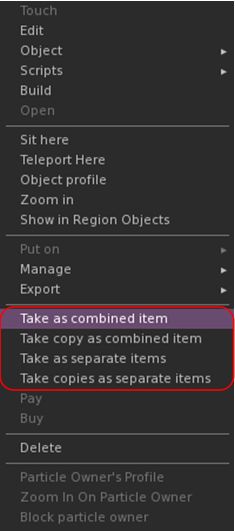
The update multi-object take options

Kokua 7.1.10 includes the Lab’s updates to picking-up objects in-world using the right-click context menu:

  • When selecting an individual item, the right-click context menu will display the expected Take and Take Copy options.
  • When selecting multiple items, the right-click context menu will display the following new options:
    • Take As Combined Item: return all the selected objects to inventory as a single, coalesced object.
    • Take Copy As Combined Item: return copies all the selected objects to inventory as a single, coalesced object, leaving the originals in-world as individual objects.
    • Take As Separate Items: return all the selected objects to inventory, but list them as individual items, not as coalesced.
    • Take Copies As Separate Items: return copies all the selected objects to inventory, but list them as individual items, not as coalesced, leaving the originals in-world.

Note that all of the above Take options will be available in accordance the SL’s permissions system (as with Take / Take Copy).

Avatar Rendering Updates

Linden Lab added new options to enable the prioritisation of rendering avatars using the following criteria:
  • Limit by complexity – any avatar with a complexity greater then your Avatar Maximum Complexity” setting will be rendered as a Jellydoll.
  • Always show friends – your friends will never be rendered as Jellydolls, no matter what their complexity
  • Only show friends – all avatars except your friends will be rendered as Jellydolls.

Within Kokua, this options are found under Preferences → Graphics, with the Exceptions drop-down also repositioned in the panel.
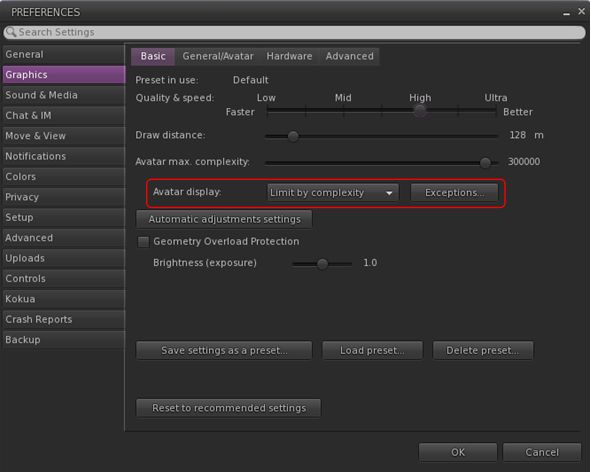
New Complexity options from LL within Kokua’s Preferences → Graphics → Basic, including a move of the Exceptions drop-down (also see below)

General Updates / Improvements

  • Add Images to Inventory Items in Bulk: select up to 50 inventory items → Right click selection → Image.
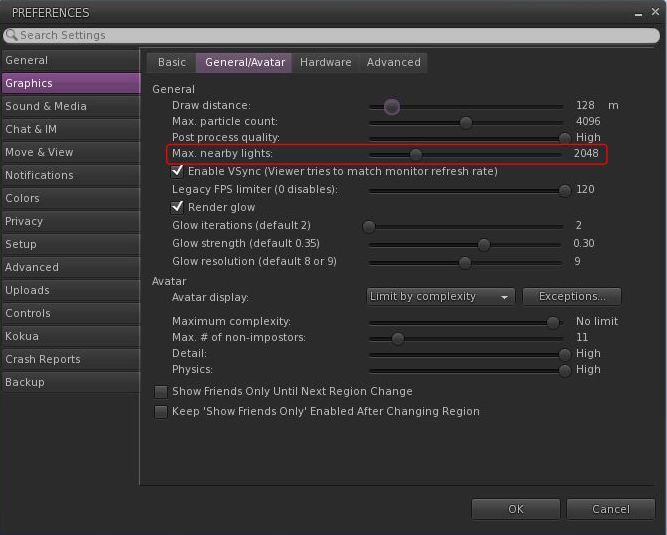
  • Option to control the amount of lights: Preferences → Graphics → General/Avatar → Max Nearby Lights slider.
Control nearby lighting through the nearby lighting slider
  • glTF model preview: use a prim to preview the appearance of a glTF scene / model:
    • Edit the prim. then Top menu bar → Develop → GLTF → Open.
    • To enable the Develop menu, either go to Advanced → Show Develop Menu or press Ctrl-Alt-Q or go to Preferences → Advanced → check  Show Developer Menu
  • Note that this feature is still in the early stages of development and that glTF models will only appear locally in your own viewer, they will not be rendered for others to see in their viewers.
  • Better MOAP URL handling in order for users to not only be able to CTRL-C or Cmd-C copy but also to see decoded URL payloads for easy inspection. In the nearby media list, you can also right click a media/data link and Copy URL/Copy Data.
  • Mirrors disabled by default for all graphics quality levels to improve performance.
    • You can choose to enable mirrors manually in Preferences → Graphics → Advanced→ Mirrors.

Selected Kokua Updates

Preferences

  • With the introduction of the new avatar complexity settings by the Lab:
    • Kokua’s options Show Friend Only Until Region Change and Keep ‘Show Friend Only Enabled Avatar Changing Region have been relocated:
      •  From: Preferences → Graphics → Basic
      • To: Preferences → Graphics → General/Avatar.
    • Kokua’s Always Render Friends checkbox is removed from Preferences → Graphics → Basic.

Improve Graphics Speed

  • The Improve Graphics Speed →  Auto-Adjust Settings panel is now correctly sized to fit the displayed information (no overflow).
  • The Enable VSync options have been inverted so the explanation and note are at the top (Improve Graphics Speed →  Auto-Adjust Settings → Enable VSync.

Linux Updates

  • Kokua 7.1.10 requires a newer Linux system than previous releases; GLIBC 2.35 is required, meaning Ubuntu 22 or better and Debian 12 or better.
  • This version of Kokua may run on older Linux variants (e.g. Ubuntu 20), however CEF will not run, so web pages within the viewer will not be available.
  • There are some known bugs in the Linux version which we considered minor enough to proceed with the release.
    • 360 snapshot doesn’t work
    • Need wine installed for Vivox voice
    • GLIBC 2.30 systems could still run the viewer, but with a broken internal browser.

This Linux version of Kokua runs much more smoothly due to LL fixing a number of the causes of frame stall which were most noticeable on Linux.

Kokua Team Request

Kokua is provided through time and efforts of a two-person project team. Understandably, the majority of work two people can perform on the viewer is largely focused on tracking and integrating with official viewer releases from Linden Lab. This means that there is limited time for bug fixing and for implementing additional features and requests. The team also has a limited capacity for maintaining the Linux flavour of the viewer.

Because of this, the Kokua team is seeking additional help. In particular they would like to hear from:

  • People interested in working on bug fixes and enhancements for Kokua, thus reducing the said backlog.
  • A Linux specialist to help with maintaining the Linux version of Kokua.

Those interested in volunteering their time should drop an e-mail to chorazinallen AT gmail.com. When doing so, please note that:

  • Experience with C++ is essential.
  • Familiarity with working with the viewer is a bonus.

Related Links

October 2024 SL Web User Group summary

The Web User Group meeting venue, Denby

The following notes cover the key points from the Web User Group (WUG) meeting, held on Wednesday October 2nd, 2024. They form a summary of the items discussed and is not intended to be a full transcript. A video of the meeting, recorded by Pantera Północy, is embedded at the end of this summary – my thanks as always to Pantera for recording it and making it available.

Note: This meeting was entirely text-based.

Meeting Overview

  • The Web User Group exists to provide an opportunity for discussion on Second Life web properties and their related functionalities / features. This includes, but is not limited to: the Marketplace, pages surfaced through the secondlife.com dashboard; the available portals (land, support, etc), the forums.
  • As a rule, these meetings are conducted:
    • On the first Wednesday of the month and 14:00 SLT.
    • In both Voice and / or text.
    • At this location.
  • Meetings are open to anyone with a concern / interest in the above topics, and form one of a series of regular / semi-regular User Group meetings conducted by Linden Lab.
  • Dates and times of all current meetings can be found on the Second Life Public Calendar, and descriptions of meetings are defined on the SL wiki.

General Update

Data Feeds

[Video: 1:38-2:36]

  • Updates to the Lab’s internal data warehousing infrastructure resulted in some breakages to the data feeds API providing metrics (number of users logged-in, etc), for use by external services and the count of users in regions listed in the Destination Guide.
  • These breakages should now all be now be fixed.

Multi-Factor Authentication (MFA)

[Video: 2:42-3:21]

  • MFA is being extended across all of the Lab’s web properties, so those opting-in to MFA will find at times that they may have to re-authenticate when accessing a wider range of Second Life web properties.
  • This work is expected to surface during the October-December 2024.
  • Hopefully, a blog post will be provided as this role-out goes ahead.

Marketplace and Web Properties Updates

[Video: 3:23-5:30]

  • The Marketplace has been undergoing a facelift with its layout, together with other web properties.
  • With the MP, the changes have been intended to make in more Mobile-friendly and making it more responsive, particularly with mobile.
  • The deployment on the MP to Mobile had been referenced in the July 2024 WUG meeting, and it is hoped MP for mobile will be “totally shipped” by the end of October 2024.
Some of Marketplace page layout updates: 1 – Buy L$ & current balance display enlarged; 2- new user-related menu dropdown providing access to list and other options; 3 – (partially hidden) updates purchase option buttons; 4 – new scroll bars for viewing additional item images. Note: selected listing for illustrative purposes only
  • More is to be done with this, and once things are moved further along, it is likely their will be a more formal announcement on changes made and why.
  • [Video: 6:33-6:56] The overall aim of the changes across all web properties is to make them all consistent in terms of look and general functionality (e.g. colours, were to find links, etc., in the header / footer areas, etc.
  • There was assorted feedback provided for the MP page layout (e.g. the image sliders, the use of orange, the layout of the a user drop-down menu and use of sub-menus to display options, together with concerns over colour choices and readability for those with visual impairments.

  General Discission

  • [Video: 5:33-5:59] Marketplace Variants:
    • Variants (at one time “Styles” – e.g. having multiple colour options for an item in a single listing) was again raised.
    • Despite being something stated as being in the works by Reed Linden (since departed from LL) as long a two years ago, and being reported as close to being available for release a year ago, it is once again something the Lab “want to do”.
    • Apparently, there designs for the idea, but “it’s definitely not happening this calendar year” (no surprises there), but is is noted as something “people want”.
  • [Video: 9:54-10:30] Dark Mode UI:
    • “Most” web properties will move towards offering a dark mode UI, “but its going to be a while” before this reaches the Marketplace.
The Linden Homes web portal offers an example of the dark mode UI the Lab is moving towards
  • [Video: 10:49-12:35]  Further Web Property Updates / Refreshes
    • As a part of the web properties refresh, both the Second Life dashboard (secondlife.com) and the associated Account pages below it will be received some TLC.
    • The Log-in and download pages for the viewer will also be receiving a more responsive, dark mode update.
    • This work is apparently targeting Q4 of 2024.
  • [Video: 12:43-19:03] New user sign-up discussion – and extensive discussion on user sign-up page, including:
    • Lack of explanation around the choice of user name and its potential impact (e.g. being display in the avatar’s name tag, etc.). Which has in turn led to people using their physical world names or gibberish name in the believe that this information will not be shown and they’ll have the ability to create an alias / persona once in-world (as done with many MMOs).
    • Lack of any password confirmation field to account for mis-types when entering a password.
    • It was noted that some joining the Lab have the same issue vis: user name.
  • [Video: 19:33-23:18] Marketplace Categories a discussion on potential new categories and overhauling the Categories listing. Please refer to the video.
  • [Video: 23:56-37:35 and 42:38-44-35] Discussion on flagging items on the MP and on the stars + reviews:
    • Categories for flagging.
    • Ability to flag reviews that have been responded to as responded to / resolved.
    • Providing a guide for star rating (e.g. 1 = bad; 3 = perfectly OK; 5 = absolutely outstanding).
    • Providing review incentives / reminders.
    • Suggestions on (God help us) “Marketplace Influencers” based on the reviews they give.
    • Allowing reviews on the MP for items purchased in-world but available on the MP (which is under discussion at LL using CasperVend).
    • Refer to the video for more.
  • [Video: 44:39-49:29] L$1 demo discussion – please refer to the video.
  • [Video: 49:40-50:48] Marketplace API:
    • This has been requested a number of time.
    • LL is engaged in some design work around the idea.
    • However, due to the complexity of the Marketplace and its development history, it is not an easy task to tackle. There are also some “non-Marketplace technical hurdles” to cross as well.
  • Please refer to the end of the video for the rounding-out of the above discussions of listing, demos, and categories.

Next Meeting(s)

  • Wednesday, November 6th, 2024.

SL Mobile Now Available to Plus Subscribers

SL Mobile – via Linden Lab

On Wednesday, October 2nd, Linden Lab announced the Second Life Mobile (SL Mobile) beta programme is now extended to Plus subscribers, meaning that it is now open for all three levels of subscription tiers to try out and provide feedback on.

In addition, the announcement highlighted the following updates and additions to the App:

  • Full Access to All Regions – Premium Plus, Premium, and Plus members now have the freedom to explore ALL of Second Life – including regions across all maturity ratings! on both Android and iOS.
  • Experimental: Spatialized Voice Chat using WebRTC. This can be tested on the following regions, pending the deployment of WebRTC support across the grid later in October 2024: WebRTC1, WebRTC2WebRTC3WebRTC4)
  • Improved Controls – Now easier-than-ever to navigate with reduced sensitivity controls.
  • Group Tags, Push Notifications & More.
  • Ability to use L$ to pay objects and avatars.

Full details on the most recent update now available via the release notes.

Alongside of the update, the Lab issued a new video highlighting the updates and providing an overview of what’s likely to be coming soon.

How To Get It

Plus, Premium and Premium Plus Second life subscribers can go to Second Life Mobile and follow the links for Apple iOS or Google Android.

Reviews in This Blog

While I have been trying out the Mobile App since the public beta opened, I will refrain from offering any in-depth reviews until after SL Mobile on Android until it is a more rounded application and is fully available to all.

Lost in Space(: 1999) in Second Life

Space: 1999 – Moonbase Alpha

September 13th, 2024 marked the anniversary of a momentous and crippling event in Earth’s history. It was on that day that a nuclear waste disposal site on the far side of the Moon reached critical mass, causing a thermonuclear detonation of immeasurable force, shattering the Moon and hurling it from Earth’s orbit and into the depths of space, carrying with it the 311 surviving souls on Moonbase Alpha.

Passing beyond the range of their fleet of Eagle Transporters and making a full-scale evacuation evacuation, and with Earth unable to mount a rescue mission, the people of Moonbase Alpha could only signal their survival as they departed, never to be heard from again. 

– Extract from Pey’s Encyclopaedia of Space Exploration (2024 edition)

Of course, nothing like the above ever happened – but in 1974, the premise of the Moon being flung into interstellar space as a result of a massive chain reaction of thermonuclear events (and aided by the odd wormhole or two, amongst other things), carrying the 311 people trapped on Moonbase Alpha with it, lay at the heart of the Anglo-American television series Space: 1999.

Space: 1999 – Moonbase Alpha

I didn’t personally catch-up with Space:1999 until the 1990s, and while it struck me as perhaps and little too focused on the Alien of Week type of threat, providing disbelief was sufficiently suspended, it could be a fun watch – and it cannot be denied that considerable work went into making Moonbase Alpha a believable place and the Eagle Transporter perhaps one of the most well-conceived and “real world” space vehicle designs to be featured on television as coming from a near-future period in our development of spaceflight technology.

While the series was cancelled after just two seasons, the show lived on  – as with many sci-fi series – in the world of fandom, where continues to enjoy much support and popularity. This support and interest continues into Second Life,  where fans and role-players can take up a active role in operations within Moonbase Alpha, thanks to Mitch Charron. His Space: 1999 – Moonbase Alpha is an impressive representation of significant parts of Moonbase Alpha as seen in the first season of the series, bringing together familiar and iconic elementsfrom the show, including the commander’s desk, the comm-posts standing along the corridors, the station’s surface buggies and – of course – the Eagle Transporter.

Welcome to Moonbase Alpha! Inspired by the Space: 1999 70s SciFi TV series, MBA is an-going project of themed roleplay of space exploration and alien encounters, set a few years before Breakaway (and working our way there and beyond :). The Moonbase is still under construction, evolving and expanding but fully operational. We create multi-session ‘episodes’ which we play out over a period of time. While Alpha is our home base, our scenarios often involve multiple sims developed by members depending on the needs of our episodes.   

– From the information notecard available at any of the station’s comm posts.

Space: 1999 – Moonbase Alpha

And when I say impressive, I mean exactly that; it is clear that considerable effort has be put into the interior design, faithfully reproducing the aesthetics of the original sets and interiors and their signage / iconography. As well as Main Mission and the commanding officer’s expansive office space (complete with the large sliding doors to separate it from the bustle of Main Mission for conferences and the like), the interiors include a part of Doctor Helena Russell’s medical centre, a portion of the science facilities (one lab of which appears to be for Professor Victor Bergman), the station’s solarium and nuclear generation plant (both, I believe, seen in the episode Force of Life), a section of the travel tube network, and a series of corridors connecting all of these elements together and linking them to crew accommodation and recreation facilities.

Explorations of the facility start at a Landing Point neatly situated within the passenger pod of an Eagle Transporter. From here, the starboard doors from the pod (when facing towards the flight deck) open into a travel tube car, and its opening is accompanied by the initial fanfare of the show’s original (and best, I think) theme tune for those with local sounds enabled – and in this regard, having them enabled is recommended, as many of the sounds from the series can be heard throughout the facility, adding further depth.

Space: 1999 – Moonbase Alpha

Two exits are available from the travel tube car. One leads to the nuclear generating facility mentioned above, and the lifeblood of Alpha (just beware the warning beams!) or exit into Alpha itself via a security station and passing the airlock (surface EVA possible through the latter). Following the corridors from her will take visitors past all of the major facilities and to the elevator up to Main Mission. Here it is quite easy to imagine Paul Morrow overseeing operations with Sandra Benes dependably at his side, and perhaps Victor Bergman caught in a technical discussion with David Kano.

As noted in the introductory notecard, RP in the setting is intended to be relaxed and fun, with the station also forming a hang-out for those involved. In addition to Alpha, the setting currently also includes a part of the nuclear waste facilities and their monitoring station. During my visit, Mitch informed me he’s working on other elements such as the space station where the Ultra Probe has been constructed prior to the events of the series (and seen in flashbacks during Dragon’s Domain – an episode which utilised Tomaso Albinoni’s Adagio in G Minor so movingly and emotively to help drive the story, making it for me the best of Space: 1999).

Space: 1999 – Moonbase Alpha

Those wishing to join with the role-play are encouraged to read the introductory notecard for information on the likes of Alpha uniform sleeve colour, in-world availability of uniforms and Alpha spacesuits, etc.

With some gentle touches of humour mindful of how set builders oft utilised off-the-shelf items to dress sets (Commodore, anyone?), Space 1999 – Moonbase Alpha is an engaging build for visitors and RPers alike.

Slurl Details

2024 SL SUG meetings week #40 summary

*80 Days*: Copper Canyon, August 2024 – blog post

The following notes were taken from the Tuesday, October 1st, 2024 Simulator User Group (SUG) meeting. They form a summary of the items discussed, and are not intended to be a full transcript, and were taken from my chat log and Pantera’s video of the meeting, which is embedded at the end – my thanks to her for providing it.

Meeting Overview

  • The Simulator User Group (also referred to by its older name of Server User Group) exists to provide an opportunity for discussion about simulator technology, bugs, and feature ideas.
  • These meetings are conducted (as a rule):
  • Meetings are open to anyone with a concern / interest in the above topics, and form one of a series of regular / semi-regular User Group meetings conducted by Linden Lab.
  • Dates and times of all current meetings can be found on the Second Life Public Calendar, and descriptions of meetings are defined on the SL wiki.

Simulator Deployments

  • On Tuesday, October 1st, the SLS Main channel saw the deployment of the Picnic /Doubtfire update, making it grid-wide.
    • There were apparently some issues with the deployment, resulting in it taking longer than anticipated, due to a need to fix them on the fly.
  • Wednesday, October 2nd should see all RC channels restarted without any deployment.

WebRTC Simulator Deployment Status

    • As a result of an Engineering team summit in week #41 (commencing Monday, October 8th), it now appears the deployment of the WebRTC updates to some of the main RC channels will now not take place until Wednesday October 16th.
    • In the meantime, WebRTC can still be tested on the four WebRTC regions (WebRTC1 through 4) on the Pop Rock channel, and on the Preflight test RC channel.

SL Viewer Updates

No changes at the start of the week:

  • Release viewer: version 7.1.10.10800445603, (formerly the DeltaFPS RC), dated September 11th, was promoted to de facto release status on September 19th. This includes:
    • Performance boosts. Memory management has been optimized and users will experience a higher FPS across various systems. A comprehensive range of bug fixes are also provided. This includes better PBR material handling and resolving frequent crashes. See the release notes for more.
    • UI for scheduling region restarts now available via a new button located in the Region/Estate floater. (Note: there is currently an issue with scheduled region restarts working correctly and a fix is due to come in the next server release).
  • Release Candidate: ExtraFPS RC, version 7.1.11.11074622243, issued September 30th.
    • Performance improvements: enhanced texture memory tracking, broader hardware compatibility and higher FPS gain.
    • Aesthetics improvements: new Antialiasing setting – SMAA; Contrast Adaptive Sharpening; Khronos Neutral Tone Mapping (can be changed to ACES via the RenderTonemapType Debug setting).

In Brief

Please refer to the video below for the following:

  • Game Control:
    • This work has apparently not been merged into the initial release of ExtraFPS. A bug fix failed to pass QA, causing issues on the Mac flavour of the viewer.
    • It is hoped that this issue can be resolved and the code merges in the near future.
  • Combat 2.1:
    • Rider Linden has published a new proposal specification for “Combat 2.1”,  the next update to the Second Life Combat System (SLCS), this one expanding on teams and respawning.
    • Feedback is being sought on this, with the note that it should be offered sooner rather than later by anyone who may not have seen it, as Rider is hoping to start converting it into actionable items, after which he can then start to implement.
  • A fix for at least some of the attachment dropping / loss / ghosting issues (see: Attachment loss on RC channel 2024-08-29.10619830788) which can be experienced during region crossing (TP or physical) is being deployed and tested.
    • The plan is to deploy it with either the WebRTC simulator updates or the Barbecue maintenance update that will follow, depending on which is the the next to go out (currently WebRTC, as noted above).
    • However, the fix is currently available on Aditi (the Beta grid) for those wishing to test it.
  • Rider Linden is working on llSetAgentRot (turns the avatar to face the direction indicated by rot., with a +/- 3 degree variance), which should be going into the Barbecue simulator update.
    • However, there is a corresponding viewer change it requires in order for the avatar turning to be seen viewer-side, and this update is going into the viewer Develop branch for a future viewer update.
    • This sparked a further discussion which ran into the topic of Child Agents (instances of an avatar which are registered in regions adjacent to the region the avatar is in, allowing the avatar to be “tracked” in case it is actually going to move from the region it is in to the region in which the Child Agent is registered, for example) and the subject of ghosted objects.
  • LDPW have requested a new LSL function – llTransferOwnership – which would allow a scripted change of ownership for an item with Transfer permissions.
    • This sparked an end-of-meeting discussion on how it might work and suitable safeguards.
    • As the function is still in the discussion phase at this point in time, please refer to the video below for further information.

Date of Next Meeting

  • Tuesday, October 15th, 2024, due to the Engineering Team summit meeting.

† The header images included in these summaries are not intended to represent anything discussed at the meetings; they are simply here to avoid a repeated image of a rooftop of people every week. They are taken from my list of region visits, with a link to the post for those interested.

Colours of Life – art and artists in Second Life

Black Tulip Gallery, October 2024

I returned to Black Tulip Gallery as October brought with it the kind of weather that made me feel as though hiding under the duvet would be a snugly-good idea. However, I braved the walk to my study(!), in order to take a peek at the October exhibition at the gallery. Operated and curated by Zoey Rhodan (ElizabethZoey), Black Tulip is a small, boutique-style gallery space located within the Confederation of Democratic Simulators (CDS), offering a richness of art and artistry within its exhibitions.

For this exhibition, entitled Colours of Life, the gallery features the work of no fewer than thirteen artists from across Second Life, and does so without feeling overcrowded in the process, given its relatively small size. The pieces displayed are from Zoey’s personal collection, and as the name suggests, the exhibition has been built around the theme of reflections on life and on living.

Black Tulip Gallery, October 2024: CybeleMoon

The participating artists comprise: AmandaT Tamatzui, Cayla (YumiYukimura), CybeleMoon (Hana Hoobinoo), Duna Gant, Ellie Baily, Hadiya Draper, Milena Carbone (Mylena1992), Raven Arcana, Sophie de Saint Phalle (Perpetua1010), and Tess (Therese Carfagno), (all one image apiece); Bamboo Barnes and Mareea Farrasco (two apiece); and Christian Carter (3 pieces). The art itself ranges from pieces generated via pictures captured in-world, through AI generated art / digital compositions to physical work by the artist uploaded to and rendered within SL.

As reflections on life and living, they are as richly varied as the styles and techniques used to produce them; from single-frame stories in either black and white or colour (such as CybeleMoon’s – someone whose presence in SL I greatly miss – The Shell Seekers and Raven Arcana’s When the Sun Goes Down) through to the expressive experimentalism of Bamboo Barnes and the abstract art of Tess, to the social commentary found in the likes of Christian Carter’s Fake, with its portrayal of loneliness hidden by the masks of mood we so often feel obliged to wear for the world. As such, all are pieces which have a lot to say as we regard them.

Black Tulip Gallery, October 2024: Bamboo Barnes and Tess (Therese Carfagno)

Another aspect of the exhibition I like is the division between styles: colour images are located on the lower floor, and the monochrome pieces on the upper. This gives a subtle sense of the gallery hosting two smaller exhibitions, the pieces in each linked as much by this division in styles, with all of them – lower and upper – united by the core theme of the exhibition to form a whole.

Ideally curated and presented, Colours of Life is a further engaging exhibition in what is a series of such exhibitions hosted within an equally engaging space.

Black Tulip Gallery, October 2024: Christian Carter