
Catznip R13 maintenance 1 release overview

In keeping with the statements made on the release of Catznip R13 (which is overviewed here), the Catznip team released a Maintenance update to the viewer on Sunday, May 8th, 2022, which is available for Windows (32-bit and 64-bit) and Mac OSX ((10.11 or later).

As work is progressing well on the next full release (R14), this maintenance update – called simply Catznip R13.1 – is not packed with news features and options, but does, in keeping with its function as a Maintenance release, offer some nice additions, some fixes, and one or two new items.

As always, full details of the changes and updates in this Catznip release are available through the official release notes; what follows is a general summary of the more interesting updates.

Linden Lab Derived Updates – MFA

Catznip R13.1 incorporates Linden Lab’s viewer-side Multi-Factor Authentication (MFA) code, which recently reached the Lab’s official release viewer (see: Lab extends MFA to the official viewer for Second Life).

MFA provides additional security to your Second Life account. It is entirely optional – you do not need to use it if you don’t want to – but it currently provides additional account security when trying to access particularly sensitive information about your Second Life account (e.g. trying to view your billing info or transaction history, trying to cash out (“process credit”) money out of your account, trying to change the e-mail address associated with your account, etc.).

You can find out more on MFA in general by following the links below:

Inclusion of MFA in a viewer means that:

  • Anyone who has opted to use MFA will, every 30 days, will be required to provide an MFA token in addition to their user name and password when logging-in to SL via any viewer / client supporting MFA.
  • Anyone who has not opted to use MFA, or decides to disable it after initially opting-in, will not see any change to how they log-in to SL via a viewer /client.

For those who have enabled MFA on their account:

  • The first time you use Catznip R13.1 you will have to use your preferred authentication method to generate a new token (6-digit code) and enter it into the viewer when prompted (after entering your user name and password).
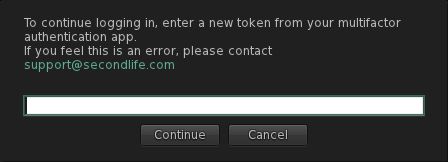
The MFA prompt for a token, which will be seen in Catznip R13.1 (and other viewer supporting the Lab’s MFA code) once every 30 days.
  •  Some authenticators generate their token as 2 groups of 3 digits (e.g. XXX  YYY). Where this is the case, you can enter the code with or without the space.
  • Note that the token will remain valid for 30 days, as noted above, so you do not have to provide a token every time you log-in to the viewer.

Catznip Improvements

Group Activation and Accessing Notices
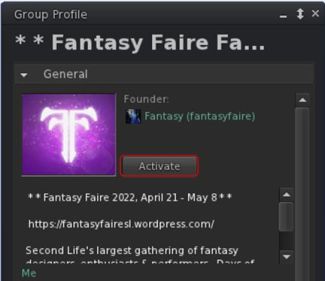
Catznip’s new Group Activation button displayed in profiles of Groups you have joined

This release of Catznip offers two new options for activating a Group tag, and a new option for viewing group notices:

  • You can activate the tag for any Group of which you are a member directly from the Group’s Profile floater, by clicking the Activate button.
  • You can also active the Group’s tag (again, you must already be a member) but right-clicking on the Group’s SLurl when displayed in local chat and selecting Activate from the drop-down menu.
  • You can also use this latter method (right-click on the Group SLurl in chat) to select the Show Group Notices option from the drop-down and view notices.

Teleport History Pruning

Regions come and go in Second Life, and if you spend a fair amount of time hopping around the grid visiting places, it is possible to end up with the Teleport History panel that is full of landmarks that are no longer valid (e.g. because the shop has moved, or the region has changed owners / user, or has gone away completely, etc.). You may also want to ease searching for LMs in history by pruning out those “one off visits” you’ve made.
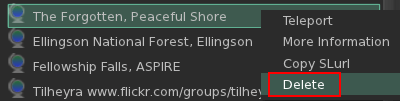
Deleting LMs from your Teleport History tab in Places

Catznip R13.1 now makes this possible:

  • Open you Teleport History (Me → Places → Teleport History).
  • Either:
    • Right click on the landmark in the history list.
    • Select Delete from the drop down menu.
  • Or:
    • Left-click on the landmark in the history list.
    • Click the dustbin at the bottom of the of the floater.

Conversations Navigation

Catznip R13.1 adds an additional set of keyboard shortcuts to assist in navigating between tags within the Conversations floater:

Action Horizontal Chat Tabs Vertical Chat Tabs
Page to the next tab ALT-Right Arrow ALT-Down Arrow
Page to the previous tab ALT-Left Arrow ALT-Up Arrow
Page to the next tab with unread messages ALT-SHIFT-Right Arrow ALT-SHIFT-Down Arrow
Page to the previous tab with unread messages ALT-SHIFT-Left Arrow ALT-SHIFT-Up Arrow

Mouselook Improvements

Catznip R13.1 adds the following three options to using Mouselook:

  • Allow script dialogues.
  • Do not immediately snap the mouse back to the centre of the screen after a (scripted touch) click.
  • Show the hand cursor while holding down the CTRL key in Mouselook to indicate touchable faces.

Feedback

A small but tidy group of updates well suited to a maintenance release and which ensures Catznip is MFA compliant (which will be required of all viewers / clients in the near future). I admit to particularly liking the Teleport History pruning capability; would that the other viewers I use adopt it – some of my history lists tend to get jammed full of LMs, and purging the lot from outside of the viewer just to start over has never really been ideal.

Again, for the complete list of updates and bug fixes, please refer to the Catznip R13.1 release notes.

Related Links

2022 viewer release summaries week #18

Logos representative only and should not be seen as an endorsement / preference / recommendation

Updates from the week ending Sunday, May 8th, 2022

This summary is generally published every Monday, and is a list of SL viewer / client releases (official and TPV) made during the previous week. When reading it, please note:

  • It is based on my Current Viewer Releases Page, a list of all Second Life viewers and clients that are in popular use (and of which I am aware), and which are recognised as adhering to the TPV Policy. This page includes comprehensive links to download pages, blog notes, release notes, etc., as well as links to any / all reviews of specific viewers / clients made within this blog.
  • By its nature, this summary presented here will always be in arrears, please refer to the Current Viewer Release Page for more up-to-date information.
  • Note that for purposes of length, TPV test viewers, preview / beta viewers / nightly builds are generally not recorded in these summaries.

Official LL Viewers

  • Release viewer: version version 6.5.5.571282, – formerly the MFA RC viewer, dated April 26, promoted Wednesday, May 4th – NEW.
  • Release channel cohorts:
    • Performance Improvements RC viewer updated to version 6.6.0.571507, May 5th (MFA).
  • Project viewers:
    • No updates.

LL Viewer Resources

Third-party Viewers

V6-style

V1-style

Mobile / Other Clients

  • No updates.

Additional TPV Resources

Related Links

Hera’s reflections on War in Second Life

WAR, May 2022 – click any image for full size
The situation in the world at the moment has obviously been on my mind, like everyone else. And I wanted to express those feeling in some way. This is the result.
Visually, it is heavily influenced by Scarfe’s visions for Pink Floyd’s the wall. Please switch to shared environment as this build relies heavily on its lighting for full effect.

– from the introduction to WAR

Having almost not opened to the public, WAR by Hera (Zee9) is a build that has as its foundations – as the introduction notes – the naked aggression on the part of Vladimir Putin against Ukraine. However, to characterise it as purely a commentary on that situation would be inaccurate. Rather, it is a powerful statement against humanity’s willingness to repeatedly wage war on itself with increasingly devastating results for those caught in the fighting.

WAR, May 2022

To achieve this, Hera has created a simple but utterly effective environment: an outer façade of burning buildings blasted into ruin and rubble, within which sits the remnants of the great church, blasted into a skeletal shell, and upon which a great black eagle-like bird appears to perch as blood drips from a giant cross suspended before it.

A circular road encloses this church, sitting between it and the outer ring of shattered buildings, four great bridges spanning the chasm between road and church to provide access to the latter. Broken and in places covered by the wreckage of war, the road runs by way of shells of buildings, cement bunkers from which searchlights pan the sky, whilst the bridges extending from it to the carcass of the church carry their own battle wounds and scars. To the east, beyond the church, a great tower, aflame but otherwise unbroken by the tide of fighting and bombing rises into the sky, black wings of death spreading from its tallest face, a giant skull spewing blood down onto the flames below.

WAR, May 2022

Caught under a heavy sky of scudding clouds and with carrion crows circling, four great figures of death face outwards as they surround the church, each on its own island of rubble and wreckage. Holding a slender sceptre in one hand rather than the more usual scythe, they are brooding and tall, their presence adding further weight to the build’s commentary on the pointless destruction and loss arising from conflict.

Within all of this there is much more to be seen, from the weapons of war themselves and the chaos they have wrought and the death they have brought, through to reminders that conflict brings with it the kind of atrocities in the name of “country” we would normally refuse to allow and that it can not only end lives but also entire ways of life, whilst also preying most viciously on the most innocent: the young.

Perhaps the most powerful element in the piece for me is the statue not far from the landing point depicting a woman bidding a man farewell as he leaves for war. There is something deeply Russian in the piece, such that it offers an echo of what may have happened across Russia 80+ years ago during the Great Patriotic War. In doing so it shines a light on just how much Putin, in waging war on Ukraine and forcing those he has in the past referred to as Russia’s kin to take up arms and say farewell to one another, has twisted history.

WAR, May 2022

In presenting WAR, Hera offers three songs that give the build further depth. The first is the Temptations-written 1969 Vietnam War protest song, War (What is it Good For?), released in 1970 with Edwin Starr providing the song’s powerful vocals. The sentiments within it are obvious to all, and it provides an aural underscoring to WAR’s theme.

Then, and most particularly, Hera offers Pink Floyd’s Goodbye Blue Sky (1979) released in 1979 with a striking animated film by Gerald Scarfe, and which is strikingly echoes within this build, as Hera notes in her introduction. Finally, there is Russians by Sting. First released in 1985 as a protest against the west / east policy of MADA – Mutually Assured Destruction – under which both parties developed and built an insane number of nuclear weapons and systems to visit them upon one another, and which today has a particular relevance, as Sting himself notes in introducing the song in the video linked-to here.

WAR, May 2022

Hera states she is not sure how long WAR will be open – but I hope she leaves it up for as long as she can; as a statement against war, it is a powerful piece. Do make sure when visit to use the local environment (World → Environment → Use Shared Environment), and have local sounds enabled.

SLurl Details

  • WAR (Island of Jahesa, rated Adult)

Hollybrook Regional Park in Second Life

Hollybrook Regional Park, May 2022: click any image for full size

Hollybrook estate is a two-region estate comprising the Hollybrook Farming Community, located on a Full private region utilising the private Full region Land Capacity bonus, and a Homestead region, which forms the home of the Hollybrook Regional Park, the focus of this article.

A beautiful newcomer and family friendly mountain range with horse trails, hiking, camping and more.

– from the Hollybrook Regional Park About Land Description

Hollybrook Regional Park, May 2022

Designed by estate owner Truly Whitlock (really4truly), Hollybrook Regional Park is specifically designed for SL horse-riding (although exploration on foot is welcome) and offers plenty of opportunities for photography.The landing point sits on the north side of the park, alongside a small cabin offering information on the estate, a rental vendor for the homes within the Hollybrook Farming Community (see below for more on this), and a series of Hollybrook Park Rezzing Permit vendors, allowing those who would like to rez props for their photography for L$90 per 24 hours. The cabin also offers a Teagle horse rezzer for visitors who wish to ride the trails of the park (those who have a wearable horse can opt to use that instead, if they wish).

Hollybrook Regional Park, May 2022

The trails around and through the region are a mix of routes marked by stones, grassy paths, dirt tracks and surfaced paths. These all present multiple route of exploration. Eastwards, a dirt track run past the local equestrian centre, where stables can be rented for those who want a home for their horse, and a practice area for jumping. This also includes a teleport to an arena for jumping, but you’ll need to have the group tag and use the rezzable horses.

This route also offers a way up into the central hills within the centre of the setting while the dirt track carries on past the equestrian centre to where a bridge crosses into the farming community lands or south through cultivated fields and around the base of the hills and on to the park’s farmhouse.

Hollybrook Regional Park, May 2022

Westwards, the trails lead the way around the region’s coast to a beach, and provides access to a large body of water nestled in the arms of the hills.

To the south-west, the hills rise to a rocky plateau which, in practical terms, would not be overly nice to horses but which offers a trio hideaways for those who want some quiet time. These are matched by a little camp site sitting atop the central hill close to where a pair of pools feed water down to the lake below.

Hollybrook Regional Park, May 2022

In terms of the farming community, this can be reached by two bridges crossing the creek that separates the two regions. Tracks from the bridges offer routes through the region and visitors are welcome to travel them. However, please do remember that the residential properties within the region are private – should you be interested in renting one, please refer to the local vendors or the Hollybrook Community website.

A beautiful countryside awaits you. A family and LGBTQ friendly farming and breedable animal community. Come stake your claim today!

– from the Hollybrook Farming Community Website

There are public spaces – a waterfront to the north, a manicured park towards the middle overlooked by an open market, but again, do be aware of the townhouses that sit between the waterfront area and the park.

Hollybrook Regional Park, May 2022

To return to the park, this offers further areas of exploration not mentioned here – but I’ll leave you to discover them – and it is finished with a subtle sound scape that, along with the local wildlife, helps to bring the setting to life, making Hollybrook Regional Park a more than worthwhile visit.

SLurl Details

Dido’s Fade to Grey in Second Life

Nitroglobus Roof Gallery: Dido Haas – Fade to Grey

It was back to Dido Haas’s Nitroglobus Roof Gallery for me for the second of the May / June exhibitions on offer there. Fade to Grey, offered within Dido’s space at the gallery is an exhibition of Dido’s own images, all of which have been rendered as monochrome pieces, with some additionally post-processed to give the impression of drawings.

Dido is perhaps best known for her curation of Nitroglobus Roof gallery where – as I’ve oft stated in these pages – she is able to encourage artists from across Second Life to present exceptional exhibitions of their art. She is also, again as I’ve noted, a gifted photographer-artist herself. What may be less well known is that she is a blogger and Second Life traveller.

Since July 2009 I put a lot of my SL time in writing for my blog ‘Exploring SL with Dido‘, however the emphasize shifted more and more from text to images. In line with this I started to place my best blog images and more private photos in my Flickr account … Being so busy with curating the gallery, I have little time left to make images myself … But sometimes when I am in the right mood I do make images, most of them black/white. 

– Dido Haas

N

The eight images reflect Dido’s talent for black-and-white images and her love of exploration. They have been captured in various regions around Second Life, including Furillen, Quoted Memories and AEAEA islands. However, seven of the images are all very much studies in narrative, the focus being both Dido herself, and the embodiment of mood and emotion, while the eighth is presented as a self-portrait, finished as a drawing, an arm stretched forward as if in greeting / encouragement. All of them together offer an invitation for us to step into Dido’s Second Life and share in both her artistic view of our digital world and in her personal time in-world.

Small in size, intimate in content, Fade to Grey is a warm exhibition that can be enjoyed for itself – and for those who might like to, Dido suggests viewing the exhibition whilst listening to the most successful single released by British synth-pop group Visage, and which has the same name as the exhibition (and, as it was originally written as an instrumental piece, there’s also this version, if you prefer).

Nitroglobus Roof Gallery: Dido Haas – Fade to Grey

SLurl Details

2022 CCUG meeting week #18 summary: reflection probes

Cherishville, March 2022 – blog post

The following notes were taken from my audio recording and chat log of the Content Creation User Group (CCUG) meeting held on Thursday, May 4th 2022 at 13:00 SLT. These meetings are chaired by Vir Linden, and their dates and times can be obtained from the SL Public Calendar.

This is a summary of the key topics discussed in the meeting and is not intended to be a full transcript.

Official Viewers Update

  • On Wednesday, May 4th, the de facto release viewer was updated to version 6.5.5.571282, formerly the MFA RC viewer, dated April 26. See my notes on this viewer here.
  • On Thursday, May 5th, the Performance Improvements RC viewer updated to version 6.6.0.571507.
    • The focus for this viewer is now bug and crash fixes, rather than adding functionality.
    • This update also sees the viewer merged with the release viewer MFA code base, and so will require anyone who uses MFA and who has not logged-in to Second Life using an MFA token to do so -follow the link above for details.

The rest of the official viewers remain as:

  • Release channel cohorts:
    • Makgeolli Maintenance RC viewer (Maintenance M) viewer, version 6.5.5.570983, April 26.
  • Project viewers:
    • Performance Floater project viewer, version 6.5.4.569531, March 18.
    • Mesh Optimizer project viewer, version 6.5.2.566858, dated January 5, issued after January 10.
    • Legacy Profiles viewer, version 6.4.11.550519, dated October 26, 2020.
    • Copy / Paste viewer, version 6.3.5.533365, dated December 9, 2019.

Graphics Update

  • During the previous CCUG meeting, the potential direction for Physically Based Rendering (PBR) materials support was discussed at length, and concerns were raised that for PBR to be effective, SL’s lighting / reflections model would need to be updated.
  • As a result, these branches of work have commenced:
    • The foundational work in creating a materials type with an associated inventory asset, as per the week #16 meeting. This  will initially comprise the ability to copy a texture entry (with its specific parameters) to inventory.
    • Foundational work on the PBR graphics pipe in the viewer.
    • Work on an implementation of reflection probes which can be used both with PDR shading and with legacy content. This formed the focus of this meeting.

Reflection Probes

  • Runitai Linden envisages two forms of reflection probes:
    • Those that are part of a scene’s environment and are automatically placed, but which can (hopefully) be adjustable by scene builders – this is the current focus of the work, with the reflection probes married to the octree so they will align with octree nodes.
    • Reflection probes which can be specifically placed within structures by their creators (e.g. a probe within each room of a house) or which can be created and added to a legacy structure.
      • These would override “environment reflection probes” to prevent clashes (so that, for example, your nice shiny kitchen worktop is not reflecting the sky outside, but is offering reflections of the static objects on and around it.
      • Their size would be based on the volume they are attached to, which would allow for parallax correction, allowing the reflections to be accurately generated within a room space.
“Environment reflection probes” used with legacy content: on the left, shiny surfaces of a prop engine as most of us are used to seeing them today. Right: the same engine but with its shiny surfaces now showing reflections generated via a reflection probe in the scene. Credit: Runitai Linden
  • These probes:
    • Comprise an object (prim) defined as a reflection probe which essentially uses the 360º snapshot code viewer to produce a cube map of its surroundings with each face set to 512×512 resolution (so 6 x 512×512), which can then be used to generate object “reflections” on surfaces within their volume of control.
      • This will require some additional checkboxes to be added to the build floater / viewer, but otherwise means probes can be inserted into “indoor” scenes using the existing build toolset.
    • Capture everything except avatars (so no reflections of your avatar walking past a shiny surface).
    • Initially trigger the generation of their cube maps by the viewer on entering a scene.
      • Maps are cached on disk, with up to 64 held in memory.
      • Currently only 8 maps are active at any one time. However, given sampling of just 8 maps for rendering can take up to 70% of an RTX 3080 GPU, this number is likely to be dropped to 4, unless a more targeted means of sampling for a given pixel can be determined.
    • Are updated whenever the number of objects in them changes or the Day Cycle changes, although the update rate is no more than one probe per frame.
    • Include Fresnel calculations when generating cube maps.
Glossiness and reflection probes: in this image, the centre left row of spheres have a white face, and the centre right all have black faces. Each pair, front-to-back, has a matching and increasing level of glossiness applied. Note how the greater the amount of glossiness, the sharper the reflections of the probe’s cube map. Credit: Runitai Linden. 
  • The overall aim of this work is to provide a means to support more physically accurate reflections in SL than can be currently generated (seen as a requirement for PBR support). This work can then both:
    • Be integrated into the PBR work as that is added to Second Life.
    • Improve the existing SL environment map so that legacy content does not clash with PBR content as badly as might otherwise be the case – although it will not be a perfect blending of the two.
    • However, it will be “very, very hard for this to not break [some] content”, although the overall result should improve so SL looks.
    • Given this, the capability will need a lost of assistance with testing.
  • Concern has been raised about how to limit / control the use of probes so as not to cause potential performance issues (e.g. by creators including a probe with all of their products that have a shiny / reflective surface).
    • The plan is to have every single pixel in a rendered scene covered by at least one probe via the automatic placement, so objects that are outside certainly should not need their own reflection probes.
    • Even so, it has been suggested that time is taken to produce a “best practices” guide to using reflection probes and to provide examples of bad probe set-ups.
  • It was also suggested that a flag for “do not reflect” should be provided to help control what is included in a cube map in a given setting. It was not clear if this would be possible, so the question was set aside for the next meeting.
  • General Notes:
    • This work is still in its early stages, and elements may change.
    • Several aspects of reflection generation have yet to be tackled (e.g. handling 100% transparent and 100% alpha textured surfaces).
    • The work has yet to be tied-into the existing graphics controls in the viewer so that everything works consistently and logically.
    • Some of the additional work required for generating reflections might be compensated for by optimising other elements of the shader system as this work progresses.
    • At some point this work will be available within a project viewer for testing on Aditi.

Note: while reflection probes formed the core of this meeting, this does not mean this work will be shipped ahead of the more PBR-related work. All three project branches are in their early stages, and so no decision on prioritisation among them has been taken.

PBR-Specific Work

  • The PBR graphics pipe is still being plumbed-in.
  • No work has really started with the PBR shader set.
  • The plan is still to follow the glTF specification.
    • As this embraces the PBR Metallic Roughness workflow, this will be the first to be supported.
    • If demand surfaces, LL might add Specular Glossiness as a follow-up.

Next Meeting

  • Thursday May 19th, 2022.