Currently open at Selen’s Gallery operated by Selen Love (Selen Minotaur) is an immersive multimedia installation by 9Volt Borkotron (with additional lighting support by Adwehe) entitled Sphereeletrik. It is actually one of three installations within the gallery’s spaces which between them feature the work of four artists (the other artists being Moya Patrick (Moya Janus), Livio Korobase and Bohemio Love (Bohemi0) – the latter two sharing the same exhibition space), and all of which opened on November 3rd, 2022. All of these exhibitions are worth of a visit, and can be reached via the main intra-exhibit teleport at the gallery’s main landing point, but here I want to focus solely on Sphereeletrik.
However, before I get down to discussing it in detail, there are a trio of points that need to be noted by those intending to drop into it if it is to be fully experienced:
Advanced Lighting Model should be enabled (Preferences → Graphics → make sure Advanced lighting Model is checked).
You should set your local environment to Midnight (to avoid media appearing washed-out).
You must enable MEDIA playback in the viewer (chick the movie camera icon in the top right of your viewer (v6) or in the media settings (v1.x) and accept the media stream. Failing to do so means you will not see the greater part of the installation.
Selen’s Gallery: 9Volt Borkotron – Sphereeletrik
The short form description of this installation is that it offers an enclosed space in which a variety of objects sit, hang or float. These range of sculptures to floating cubes and spheres to seating areas to exotic-looking plants. Some of these objects are static others are animated and may, like the walls, feature animated textures (in lieu of the media playback). Ramps slope and spiral into the upper reaches where – if you do not enable media – white prim faces appear to hang.
With media enabled, however, these faces, together with the walls and several other elements within the installation are transformed, becoming media surfaces on which patterns, images and colours are displayed and flow and dance – and not just randomly, as 9Volt explained to me:
It’s music I am streaming that generates the visuals. I created a server which uses a Fourier transform and other mathematical algorithms to measure the stream at 256 frequencies. The results are then displayed in real-time with the music in various ways, with the music offset just enough so it’s displaying exactly as the visuals appear for people in world. The data rate is about 320kbps – about the same as streaming an MP3 into SL, so it shouldn’t cause delay in viewer playback.
– 9Volt Borkotron
Selen’s Gallery: 9Volt Borkotron – Sphereeletrik
In addition to the external server handling the transforms and other calculations, the installation features an in-world script utilising sine wave controllers to count the prims and change some of their traits in iterative stages. This results in media played across some elements being staggered; for example, a pattern plating on one prim reaches a certain point in media playback, so it starts on the next, and on that playback reaching the same point, so the next starts, like a singing canon-in-the-round.
When taken as a whole, the results are – as noted – entrancing, and while walking around the installation is possible, I suggest sitting in one of the cushions and trying the installation in Mouselook and simply looking around at the different elements to see the play for media and patterns, images and colour and the way they chance over time in response to the music.
It’s likely that some of the latter may not be to everyone’s liking, as varied as it is (I’m admittedly not a great fan of EDM, which showed up on a couple of the tracks while I was visiting). However, there is a purpose to the mix of music within the installation (which incorporates instrumentals, pop songs, etc., as well), as 9Volt again noted to me during my visit:
My Gran, who was a music lover her whole life, was going deaf, so I thought that using images and light would allow her to appreciate her music using tunes she knows well, and letting her “see” the notes she could not hear, playing them back through SL and onto her TV screen. My hope is that this installation will give those in SL with hearing impairments a visual expression of music when otherwise they might only hear the bass parts of the music.
– 9Volt Borkotron
Selen’s Gallery: 9Volt Borkotron – Sphereeletrik
As a part of this, 9Volt is interested in gaining feedback from SL users with hearing impairments about this aspect of the installation, and in possibly working with them to further refine the technique to help those with hearing difficulties further enjoy music in alternate ways.
Intriguing as a concept, engaging as a visually immersive installation, and richly varied as a multimedia arts piece, Sphereeletrik makes for an engaging visit.
Monverdun, November 2022 – click any image for full size
November has rolled around once more, and in the northern hemisphere, winter is wrapping its arms slowly around us, prompting thoughts to turn towards thoughts of white Chirstmases, snowy holidays, skating, jingling bells, a chubby chappie with a bushy white beard (as he has become, courtesy of Haddon Sundblom), and more.
All of these “traditions” tend to come to the fore in Second Life as the end of the year rolls rapidly closer, with regions across the grid being re-dressed with snow and decorated trees to offer the opportunity for winter walks and /or romance, winter fun and photography. These regions take many forms, so much so that we are often spoiled for choice in terms of where to visit, what to see and do, so I’m getting this one in early, after taking the recommendation of my “sim sleuth”, Shawn Shakespeare.
Monverdun, November 2022
Monverdun is a Homestead region designed by yoyo Collas with the support of AmyDenise which offers, as the About Land description notes, a variety of winter / seasonal offerings liable to suit anyone, no matter what their wintertime preferences. And for me, that description is not wrong, as I’ll get too shortly.
Whilst describing itself as a “city”, the setting is really far more rural than that. Cut through from east to west by a broad river bordered on one side by a major road which does suggest it is a major artery leading to / from a major conurbation, and beyond which lie high snowy peaks suggesting this is a place sitting within a broad (and possibly formerly glacial) valley.
Monverdun, November 2022
Between the river and road and the mountain slopes, the landscape is largely wooded, the southern side of the setting dominated by a large country-style house. Across the frozen waters of the river are two former boathouses, now converted into riverside cabins with plenty of cosy warmth within them. Sitting between the two cabins is a large skating rink, blazing braziers and a hot chocolate kiosk offering the chance to warm both hands and insides for those who find the air and setting a little cold.
The rink – which offers the visitors the chance to skate – and cabins have attracted the attention of a string (or stud) or horses, the line of which passes behind them to stretch across the river and back through the woods near the country house. Okay, so maybe the rink and cabins aren’t the attraction for the horses; they are more likely moving to find pastures that are possibly easier to reach through the snow to be found on the north side of the region. However, their passage past the cabin and rink offers an additional sense of magic to both rink and cabins.
Monverdun, November 2022
However, these horses, making their way over the frozen water, form a rounded pointer back towards the large country house on the south side of the region suggesting they may have come from it – a suggestion possibly supported by the fact the house has stables along one wing. And it is this country house that actually attracted me to the region – although the reason for this is slightly convoluted and has little to do with Second Life.
This is because – a fair while ago now – the Christmas period for me was a time spent away from home at a country house hotel that offered a complete “non-Christmas, Christmas” – good company among friends, warm fires, wonderful meals, the opportunity to go to the local parish church services for those who wished, and most of all (as selfish as it might sound) the chance to just escape the rest of the world for a few days.
Monverdun, November 2022
Whilst that country house did not feature a Christmas market sitting before its main entrance, nor does it sit alongside a major road, there is something about the looks and styling of the house within Monverdun which carried me back to those days of Christmas getaways. For others, the region’s setting might offer different attractions and memories.
For example, with the hints of the 1940s in some of the traffic together the snow and lights, it’s not too hard to imagine Jimmy Stewart as George Bailey rushing along one side of the road, running back to town and home to face his future in It’s A Wonderful Life; while the hansom cab outside the gates leading to the country house offer a suggestion of Victorian Christmases (something not entirely unconnected to Capra’s 1946 film mentioned above).
Monverdun, November 2022
Richly photogenic and engaging Monverdun makes for a visit that will likely sit one’s imagination, offering much of the seasonal spirit without being overbearing.
Vibes Gallery: Like Blood, Like Fire, Like Passions in Second Life – Difficult Conundrum (l) and Dae Fangs (r)
Now open at Vibes Gallery, curated by Eviana Robbiani, is a further ensemble exhibition featuring the work of a dozen artists from across Second Life entitled Like Blood, Like Fire, Like Passions. It is an exhibition focused on the colour red, as the introductory notes for the exhibition explain:
Red is the colour of extremes. It’s the colour of passionate love, seduction, violence, danger, anger, and adventure. Our prehistoric ancestors saw red as the colour of fire and blood – energy and primal life forces – and most of red’s symbolism today arises from its powerful associations in the past.
A deep immersion in the magical sensuality of the colour red , which brushes vibrant images.
– from the introduction to Like Blood, like fire, like passions
Vibes Gallery: Like Blood, Like Fire, Like Passions in Second Life – Tutsy Navarathna
The participating artists comprise: Dae Fangs, Difficult Conundrum, Joanna Kitten and Peuxswau (Theatre 7); Dragonangelus, Exzoo McDonnel and Tutsy Navarathna (Theatre 8); and Amberly, Apple Roses, Jo Molinaro, Milhailsk Syros and The Base of Bad Ideas (Theatre 9).
Together, these are very different artists, some of whom I am familiar with, whilst the exhibition formed my first acquaintance with others, and whilst the number of pieces presented by each artist is variable, it cannot be denied that all of the pieces offered are striking in tone and content.
Vibes Gallery: Like Blood, Like Fire, Like Passions in Second Life – Amberly (l) and The Base of Bad Ideas (r)
Given the description of the exhibition, it should come as no surprise that the primary focus of most of the images is that of avatars; but the sheer richness and variance in the art – and the use of red within them is striking. As such, picking individual pieces or artists seems narrow-minded; but the fact is I have to admit I found myself heavily drawn to the work of Difficult Conundrum – one the artists whose work I had not encountered prior to this exhibition.
Offered as two sets of images – Tension, Back to You and Seeing Red, together with -08358 and Voyage – these piece are striking for their very different styles, with the formal presented as a trio of painting-like pieces which reflect a modern approach to physical world artistic statement.
Vibes Gallery: Like Blood, Like Fire, Like Passions in Second Life – Exzoo McDonnel (l) and Dragonangelus (r)
How well individual pieces reflect the central themes (passion, love, danger, anger, the representation of fire and blood) is a matter of personal responsiveness to the individual pieces, but again, I found myself drawn to those pieces with a more subtle suggestiveness / narrative within them – such as the images by Apple Roses and Amberly. But again, picking out individual pieces / artist within this exhibition would be unfair – all of the works offered are extraordinary in their sheer vibrancy and depth.
Puppetry demonstration via Linden Lab – see below. Demos video with the LL comment “We have some basic things working with a webcam and Second Life but there’s more to do before it’s as animated as we want.”
The following notes have been taken from chat logs and audio recording of the Thursday, November 10th Puppetry Project meetings held at the Castelet Puppetry Theatre on Aditi. These meetings are generally held on alternate weeks to the Content Creation User Group (CCUG), on same day / time (Thursdays at 13:00 SLT).
Notes in these summaries are not intended to be a full transcript of every meeting, but to highlight project progress / major topics of discussion.
Project Summary
Previously referred to as “avatar expressiveness”, Puppetry is intended to provide a means by which avatars can mimic physical world actions by their owners (e.g. head, hand, arm movements) through tools such as a webcam and using technologies like inverse kinematics (IK) and the LLSD Event API Plug-in (LEAP) system.
Note that facial expressions and finger movements are not currently enabled.
Most movement is in the 2D plain (e.g., hand movements from side-to-side but not forward / back), due to limitations with things like depth of field tracking through a webcam, which has yet to be addressed.
The back-end support for the capability is only available on Aditi (the Beta grid) and within the following regions: Bunraku, Marionette, and Castelet.
Puppetry requires the use of a dedicated viewer, the Project Puppetry viewer, available through the official Second Life Alternate Viewers page.
No other special needs beyond the project viewer are required to “see” Puppetry animations. However, to use the capability to animate your own avatar and broadcast the results, requires additional work – refer to the links below.
There is now a Puppetry Discord channel – those wishing to join it should contact members of LL’s puppetry team, e.g. Aura Linden, Simon Linden, Rider Linden, Leviathan Linden (not a full list of names at this time – my apologies to those involved whom I have missed).
Bugs, Feature Requests and Code Submissions
For those experimenting with Puppetry, Jiras (bug reports / fixes or feature requests) should be filed with “[Puppetry]” at the start of the Jira title.
The puppetry team is working on updating the viewer and LEAP plug-in, and an update to the project viewer is liable to be released in week #46.
This viewer includes:
The ability to move the avatar pelvis.
Ability to stretch other bones – although this is awaiting testing at the time of writing. However, the reference frame scale is that of the normal puppetry targets, so you would have to scale the data correctly; therefore additional work on this is required to provide a way for the plug-in to get the data necessary to know now to scale individual joint bones (e.g. change their parent-relative positions).
It still won’t be possible to clear puppetry target/config data, which remains on the teams “to do” list.
Aura Linden noted the new LEAP module it initialises on-demand rather than via instantiation (as with puppetry). LL will provide demos of using the new module.
Kincect v2 Support
Simon Linden has been working on an experimental plug-in taking inputs from a Kincect v2 device.
He describes the the code as being “pretty rough” and using only basic geometry, but it allows avatar elbows / arms to be moved around.
This work in part utilises the data syntax described in OPEN-366 “Simplify Puppetry Configuration Through LEAP”, the new protocol proposed by Leviathan Linden as per previous meeting notes.
The code is not ready to be pushed to a public branch as let, and doing so is somewhat dependent on feedback from developers /creators.
Avatar Constraints / Interactions
OPEN-368 “[Puppetry] [LEAP]: Location Constraints” – LL have indicated there is “much” within this Jira they would like to support “eventually”.
The feeling at the Lab is that constraints can “definitely” be improved – although what this may look like has yet to be properly determined. However, the general feeling is that there should be constraint data associated with a given skeleton, for example, so we’re not just imposing a human-centric model on the SL avatar.
A good portion of the meeting was given over to a general discussion of how best to handle puppetry and avatar animations – and the potential to need to move away from canned animations and provide a more direct means of avatar animation.
Avatar-object interactions are potentially complex issue (e.g. how can an avatar accurately take and hold an in-world object – say an apple) through puppetry? If the apple is a physical object, does it collide when held? Does it become an attachment? If the latter, how is this registered, together with hold is it properly released from the attachment system? etc.).
A suggestion for handling avatar’s handling objects is to have some for of temp-attach system or to use a key frame motion (KFM) system to match the position to the avatar’s hand, allowing the avatar can hold the object without directly “owning” it (thus also avoiding permission system issues).
Collisions also raise questions: avatar arms currently do not collide, and so would not under puppetry. So what about cases of simple interactions – flicking a light switch or similar. These are not “proper” collisions per se, but are rather event-triggered; how can this be managed if there is no actual collision between the scripted object and an avatar’s arm / hand to trigger the associated event?
In Brief
It has been suggested that a version number is included in puppetry-related messaging, so that changes to message formats are not read by versions of the viewer unable to do so, thus reducing the risk of crashes during development / testing.
It has been indicated that puppetry will eventually have LSL support for LEAP. Although what form this will take and how the simulator will track things is still TBD, as currently animations are entirely viewer-side and untracked by the simulator.
There is concern that understanding of the potential of the puppetry project isn’t being fully understood by creators (and others) as it is being seen more as a “VR thing” than an ability to much improve avatar animations and their supporting systems / constraints, including the IK system.
How to manage network latency also formed a core discussion, together with making better use of the Havok physics sub-licence to allow the viewer do a lot more of the work, and simply stream the results through the simulator to other viewers.
Asian Mist, November 2022 – click any image for full size
Asian Mist is a Full private region offering a mix of public spaces and private rentals. Designed and operated by JasmineSnow (jasminesnow333) as a part of her Jasper Estates, it offers a lot for the casual visitor to appreciate as well as those looking for a new home to consider.
In keeping with some of her previous region designs, Jasmine has been careful to keep the public and private elements of the region somewhat separated, the latter sitting to the north and south of the region, offering a total of nine furnished and unfurnished properties of varying sizes for those looking for a home.
Asian Mist, November 2022
The public spaces sit on an east-west line through the middle areas of region, largely separated from the private residences by a body of water that forms a series of interlinked pools sitting with smaller islands between, bridges and stepping stones allowing renters to reach the public spaces whilst offering a clear, natural buffer between there homes and the more open parts of the region and the risk of trespass.
As the name suggests, the public areas of the region have a distinctly Asian feel, mixing a range of Asian and Oriental elements together in a setting ringed by high peaks, and with a central peak rising from the region in a manner that offers the faint hint that this is a place sitting within the bowl of an ancient impact crater – albeit it one with ridiculously high surrounding walls.
Asian Mist, November 2022
The landing point sits on the east side of the central peak, a place taken up by series of decks for live music / DJs and dancing, flanked to one side by a café and terrace and on the other by an open-air video space and a small bathhouse reached via tiered gardens and steps. These garden spread north and south around the central spire of rock, paths leading to further gardens, outdoor pools, places from rest and falls which tumble from on high.
Romantic Asian Rain Forest theme sim. Enjoy large garden and pond. hidden cave with dance Intan and many detailed areas for cuddling or visiting.
– About Land description, Asian Mist
Asian Mist, November 2022
To the east, the gardens extend outwards and downwards to the water’s edge, encompassing a large koi pond, walks under Torii gates, more places to sit – and a pair of elephants as they lend their own uniqueness to the setting. African they may be, but again, as I’ve oft mentioned in reference to Asian settings, it’s not easy finding good examples of Elephas maximus within Second Life.
Those who follow the paths around the island will inevitably find their way to a cavern offering a home to an inner cove of water and sand, open to the sky above thanks to what might be a collapsed sinkhole, the detritus of which has long been cleared away from the cavern so that it might offer a further retreat for romance, music and dancing, the mouth of the carven looking towards a view between the surrounding peaks to the world beyond.
Asian Mist, November 2022
Beside the elephants and koi, the region is home to a range of birds, wildfowl, pandas, squirrels, and cats – although whether the latter are feral or domesticated is hard to tell. Meanwhile, the rich diversity of flora within the region gives it a deeply natural look and feel, suggesting a setting where wildflowers and shrubs are cultivated just enough to keep them under control, leaving the island both wild, but not so wild that paths, trails and places to sit are lost or hard to find, but rather sit as much a part of the landscape as the surrounding plants.
With lanterns floating overhead, a warm soundscape and caught under a blanket of cloud that reflects the late Sun, Asian Mist offers far more to see than the words here present, all of which is – needless to say – highly photogenic. As such, and for those who enjoy exploring / photographing public spaces in Second Life, I highly recommend a visit.
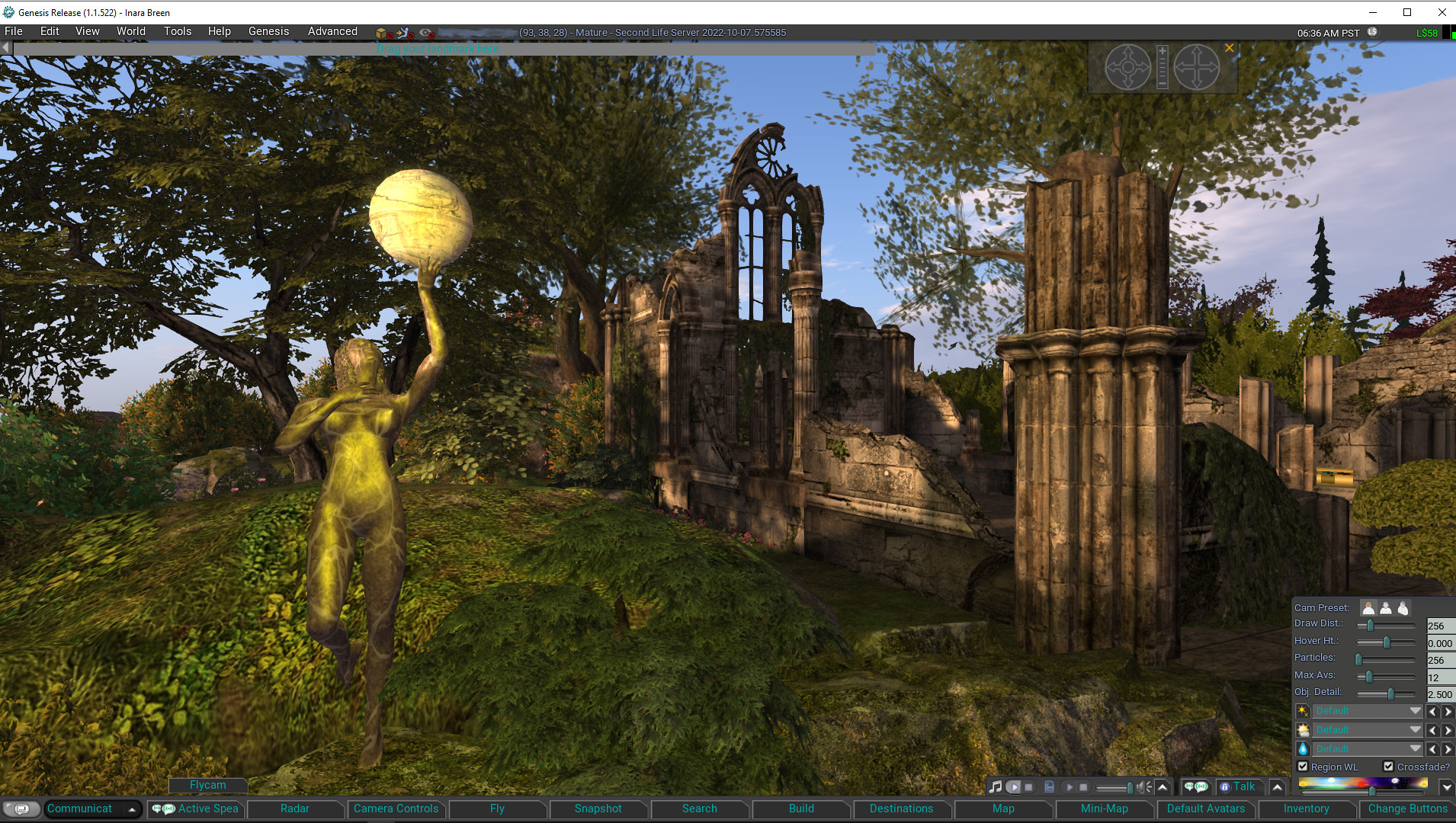
Genesis is the name for a new v1.x UI styled viewer, officially released on November 5th, 2022 (although nightly builds have been available for some time via the Genesis website). It is primarily by MelanieCosti and Torric Rodas, supported by a group of QA and nightly build testers.
At the time of writing, the release version is 1.1.522, and accompanying the release is a set of video resources available via the Genesis Viewer You Tube Channel (see below) to help people gain some insight into the viewer and also to learn how to use some of the features incorporated into it – notably those obtained using code provided by other TPVs.
The following is not intended to to be a full review of the Genesis viewer 1.1.522 release, but rather to provide a general overview of the viewer (particularly from the perspective of those more familiar with the v6.x UI style of viewers, which include the likes of the official viewer, firestorm, Kokua, etc.) and the supporting material; although some important exclusions from the current release are also noted.
Genesis Viewer splash screen
What is the Genesis Viewer?
The Genesis viewer is:
Based on a fork of the Singularity viewer, with a lot of under-the-hood reworking, together with a host of capabilities adopted from other TPVs as well. To quote from the Genesis website, it is:
A fast, responsive, low memory footprint viewer designed with laptop users in mind.
We inherited some very old code and settings, better suited to computers over a decade ago and have brought the code and settings up to date. A low-spec computer manufactured in the past ten years, should be able to run Genesis and enjoy improved performance.
Officially available for Windows only.
However, it should run on Linux Ubuntu/Mint, and a video guide is available for those wishing to try – see below for more.
Supported by a combination of release notes and change log notes on the Genesis website (click the tabs at the top of the page to switch between the two).
For those unfamiliar with it, the “1.x UI style” is a reference to Genesis being among a small group of viewer that utilise a general UI layout that reflects the original official viewer for Second Life, generally referred to as the 1.x (or sometimes the 1.2x) viewer.
The reason for this is that when first released, what is now the “v6.x” UI (and which started life as “Viewer 2.0”) had some significant design flaws that made it less-than-popular during the early days of its use (circa 2010-11). While these issues were largely addressed over time, there was also a certain amount of subjective resistance to change among some users that was sufficient to warrant some TPV developers to produce viewers which largely retained the front-end look and feel of the old “viewer 1” those users preferred.
The most notable differences when comparing the v1.x UI style found within Cool VL Viewer and Genesis (as the two currently-maintained v1.x UI style viewers with a release cycle) can be found within the menus (titles and options) and the toolbar and its button / options.
As the menu systems found on v6.x UI style viewers also tend to vary in naming and options from one viewer to the next, and the use of the toolbar buttons is perhaps the most visual difference in UI presentation between the two flavours of viewer, I will only expend time on the latter.
Genesis Viewer showing the default set of toolbar options and the expanded Settings (aka “quick preferences” in other viewers) panel, accessed via the ∧ at the extreme right of upper row of toolbar options. Note hat local chat can be displayed on this upper row as well by clicking on the chat balloon button at the far left end of the toolbar (local chat is also displayed within the Communicate floater as per v6.x style UI viewers
In short, the V1.x UI toolbar:
Is fixed at the bottom of the viewer window – there is no support for placing buttons to the sides or top of the window, according to personal preference.
Comprises two rows:
An upper row used to display the local chat bar (also displayed in the Communicate floater), and media playback options, Voice chat options, and the Settings (aka “quick preferences” in other viewers) panel.
A lower row of fixed buttons.
This lower row of buttons can be customised to a degree using either clicking Change Buttons (displayed by default at the right-hand end of the button row) or via View → Change Toolbar Buttons in the menu.
Both of the above will display a list of available toolbar buttons. Toggle the check marks to the left of each to add / remove the associated button to / from the toolbar.
Note that:
Buttons will be automatically resized to fit the available space (fewer buttons = larger button sizes and vice-versa).
There is no ability to change the order of the buttons by dragging them left or right, as with v6.x UI style buttons.
There is no ability to switch the button displays between text or text / icon or icon only, again as per v6.x UI style toolbar buttons.
Genesis toolbar options – check those to be displayed in the toolbar button area at the foot of the viewer window, uncheck those you do not wish to see displayed
The Change Buttons floater does include a lot of options – far more than is the case with most other viewers, and it would appear a number have been included for those who are particularly keen on viewer performance – useful if you are running on older hardware / a poorer connection and find you need to tweak things. It would perhaps be nice to see the button options ordered alphabetically for easier scanning of the floater, but that’s a personal observation.
Functionality
There can be a mistaken view that “v1.x UI” means “outdated”. However, this is not accurate. Yes, by comparison to the v6.x UI, viewers using the older style UI can appear to be harkening back to a bygone era of UI design (which is not to say the v6 UI is anything close to leading edge!), but it is what is under the hood that is important in terms of overall functionality – and as the Cool VL viewer has shown, there is absolutely no reason why viewers presenting the “older” style of UI cannot maintain parity with the underpinning viewer code base.
Given this, the Genesis viewer is building towards supporting all of the capabilities offered directly by Linden Lab as the “core” viewer code base, and also folds into to the more popular options offered by TPVs (some of which came by way of Singularity, which had also incorporated them). Thus, Genesis includes popular feature to be found in other TPVs such as (but not limited to):
“Legacy” style search
Area Search.
Client-side AO.
Contact sets (via the Communicate floater).
Right-click an inventory folder and select Open in New Window to open it in a separate Inventory floater.
Radar.
RLV/RLVa support.
Support for both the Pie Menu and right-click context menus.
The Genesis viewer also includes some nice touches of its own, including (but again not limited to):
Automatic complexity display: hover the mouse over an avatar and their complexity will be displayed under their name and Group tag.
Communications – Genesis Group button: need help with Genesis? Click the button top right of the Local Chat tab labelled Genesis Group to ask for assistance.
Teleport improvements: work has been put into addressing teleport issues, including About Land not updating and physical region crossings which leave the avatar walking without control until the viewer disconnects.
A lot of effort has apparently gone into general code clean-up and refactoring in order to provide a more responsive viewer. While I have not had the time or the means to objectively test this, in the time I subjectively tested and used the viewer of the weekend, I will say that I found Genesis to be at least as performant as any v6/x viewer I routinely use.
Exclusions with Version 1.1.522
That said, there are some important exclusions with this initial release. These will be dealt with in future Genesis releases (the decision having been one of ship with what is currently implemented, they build from there, rather than constantly playing a game of catch-up with more recent LL releases). For now the more notable exclusions comprise:
No support for:
Multi-Factor Authentication.
360-degree snapshots
Limited EEP functionality:
No ability to run EEP day/night cycles.
No ability to create new EEP environments.
No ability to:
Open profile floater from mute list.
Sort log-in names on log-in page.
Make favourite bar movable.
Pop-Outa person’s Profile from search.
Set transaction thresholds.
Genesis on You Tube
For those wishing to try Genesis – either a new-to-SL-users or those wishing to swap away from the v6.x style of viewer, the Genesis You Tube channel provides a range of tutorial and overview videos, including (but not limited to):
– Network Bandwidth is set to Adaptive by default. This makes your connection to SL the best it can be. It checks for packet loss and ratchets down during times of trouble then upward again. You can override this setting should you wish: Prefs > Network and set your own limits. You should, from time to time check for “packet loss” as the viewer will relinquish monitoring, when adaptive was disabled. (Stats: Ctrl+Shift+1).
Feedback
Which style of viewer UI a person prefers tends to be something of a “Marmite choice”, one version is either loved or hated; I admit I much prefer the v6.x UI style, and so Genesis is unlikely to sit on my “preferred” list of viewers. Which is not to say I dislike it or have any issues with it in terms of functionality. Variety, as they say, is the spice of life, and it’s good to see another maintained viewer utilising the V1.x style UI become available for those who do prefer that UI styling, and it’ll be good to see the various holes in the current functionality for Genesis viewer get plugged in upcoming releases and seeing it continue forward.
Given my personal preferences in viewer use, I cannot promise to offer reviews of every Genesis release, but I will obviously track them via my Current Viewer Releases page and weekly Viewer Release Summaries.