Update: Shortly after I published this article, Casper dropped me a line to say the distributable version of the Support the Victims kiosk is now available on the SL Marketplace, price: L$0.
Strawberry Singh has a powerful post on the Orlando shootings, including how those in Orlando, in Florida and around the world can offer physical and practical support for the victims and their families.
For those of us in Second Life in particular, Strawberry (and Linden Lab, via Xiola Linden) point to a donation kiosk Casper Warden has established at his in-world store specifically to raise money for the official Pulse Victims Fund page for Equality Florida, the state’s lesbian, gay, bisexual, and transgender (LGBT) civil rights organisation, which is collecting contributions via GoFundMe to support the victims of this horrific shooting at Orlando’s Pulse Nightclub.
Strawberry, a resident of Orlando, notes:
Hate and extremism can be dangerous and dividing, I wish people would see that. I wish one day I would open my eyes and the world would be completely tolerant and non-judgmental. I wish we all could just live and let live.
I can only join Strawberry in that wish; it is sad that human nature is what it is, and that ideas such as tolerance, understanding, and plain common sense and compassion appear to be utterly alien concepts in what seems to be an increasingly divided world.
In the meantime, please show your support, be it through Casper’s kiosks (he informs me he hopes to have a distributable version which people can rez in their own stores and locations in due course) or directly on the Equality Florida GoFundMe page.
It’s time to kick-off a week of story-telling in voice, brought to our virtual lives by the staff and volunteers at the Seanchai Library. As always, all times SLT, and events are held at the Library’s Second Life home at Bradley University, unless otherwise indicated.
Sunday, June 12th
13:30: Tea Time with The Jungle Book
Bryn Taleweaver presents selections from Rudyard Kipling’s great adventure.
Monday June 13th, 19:00: The Alchemyst (The Secrets of the Immortal Nicholas Flamel #1)
Faerie Maven-Pralou reads Michael Scott’s mystical novel.
According to the records, Nicholas Flamel was born in Paris on 28 September 1330 and died in 1418. Only his tomb has forever lain empty, because Nicholas Flamel is the greatest Alchemyst of all time. Entrusted with the care of the Codex – also known as the Book of Abraham the Mage – Flamel found within it the secret of eternal life.
But there is much else in the Codex which, if used by the wrong minds, could very well bring about the end of the world. So, for 700 years, Nicholas Flamel has guarded the Book, keeping it from all those who might otherwise seek to abuse its secrets.
Until John Dee steals it. And John Dee has the desire to unlock the Codex and bring about the very cataclysm Flamel has always feared. Without the book, he and his wife, Perenelle, will age and die, whilst with the book, Dee can thwart all attempts to recover it.
Enter 15-year-old twins, Josh and Sophie Newman. Prophecy has foretold of a time when the world would be threatened – and of the two youngsters gifted with extraordinary powers who will save it. Flamel recognises the Newman twins as those youngsters, and sets out to awaken their magical talents. So it is that Josh and Sophie find themselves cast into the middle of the greatest tale – the greatest confrontation – of all time.
Tuesday June 14th, 19:00: Southern Ladies and Gentlemen
The writings of Florence King continue at Seanchai Library as Trolley Trollop presents Southern Ladies and Gentlemen (1993),
Looking for guidance in understanding the ways and means of Southern culture? Look no further. Florence King’s celebrated field guide to the land below the Mason-Dixon Line is now blissfully back in print, just in time for the Clinton era.
The Failed Souther Lady’s classic primer on Dixie manners captures such storied types as the Southern Woman (frigid, passionate, sweet, bitchy, and scatterbrained–all at the same time), the Self-Rejuvenating Virgin, and the Good Ole Boy in all his coats and stripes. (The Clinton questions–is he a G.O.B. or isn’t he?–Miss king covers in her hilarious new Afterword.)
No one has ever made more sharp, scathing, affectionate, real sense out of the land of the endless Civil War than Florence King in these razor-edged pages.
Wednesday June 15th 19:00: Raymie Nightingale
Caledonia Skytower reads Kate DiCamillo ‘s 2016 children’s story.
What do you do when your father takes off with a dental hygienist? Be upset? Miss him? Rail against him? Or hatch a plan to get him to come home?
Raymie Clarke decides on the latter course of action. Dad needs to come home, and it’s down to her to see that he does – and that means winning the Little Miss Central Florida Tyre contest. Doing so will get her name and picture in the papers, which are sure to be read by her father, prompting his return.
Except… In order to win the contest, Raymie must do good deeds and learn the graceful art of baton twirling. Worse, she has to go up against the nauseating, show-business steeped Louisiana Elefante, who has fainting for effect down to an art form. Then there is Beverly Tapinski, who has entered the contest not to win it, but to wreck it for everyone else. So Raymie faces a mountain of challenges she must overcome.
Then fate plays a hand, circumstance and events bringing the three girls together in an unlikely friendship in which each has a role to place in supporting and aiding the others.
Thursday, June 16th
19:00:The Scrying Glass with Shandon Loring
Scrying (also referred to as “seeing” or “peeping”) is the practice of using objects such as crystal balls, smooth crystals, reflective of translucent glass and even water or smoke, to divine the past, the immediate future or the far future. Also on Kitely – check the Seanchai blog for details during the week.
21:00 Seanchai Late Night
With Gyro Muggins.
—–
Please check with the Seanchai Library SL’s blog for updates and for additions or changes to the week’s schedule.
The featured charity for May / June is Habitat for Humanity, with a vision of a world where everyone has a decent place to live – a safe and clean place to call home.
The Lab has recently released two new project viewers, the VLC Media Plugin viewer,and the Visual Outfits Browser viewer.
As they are both project viewers, they are not in the viewer release channel, and must be manually downloaded and installed via the Lab’s Alternate Viewers wiki page. Also, as they are project viewers, they are subject to change (including change based on feedback), and may be buggy.
The following notes are intended to provide a brief overview of both. Should you decide to download and test either, please do file JIRAs against any reproduceable issues / bugs with them, please do file a JIRA, giving as much information, including the info from Help > About Second Life and any log files which you feel may be relevant.
Visual Outfits Browser
The Visual Outfits Browser (VOB) viewer, version 4.0.6.316123, appeared on Monday, June 6th. Simply put, it allows you to use the Appearance floater to capture / upload / select images of your outfits and save them against the outfits in a new Outfit Gallery tab within the floater.
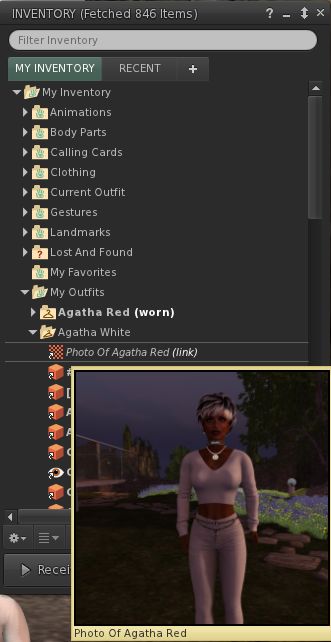
The new Outfit Gallery tab in the Visual Outfit Browser allows you to create photos of any outfits saved to My Outfits as thumbnails. You can then use the Appearance floater to scan your outfits to decide what to wear, and use the context menu to wear the one you want
The new Outfits Gallery tab (right-click your avatar > select My Appearance > Outfits Gallery) should display all of your created outfits as a series of folder icons, each one displaying the name of the outfit beneath it. You can replace these icons with an image of the outfit in one of three ways:
You can wear the outfit, then right-click on its associated folder icon and select Take a Snapshot (shown above left). This will open the snapshot floater with save to inventory selected by default, allowing you to photograph yourself wearing the outfit and upload the image to SL, where it automatically replaces the folder icon for the outfit
You can use Upload Photo to upload an image of the outfit your previously saved to your hard drive, and have it replace the folder icon
You can use Select Photo to select an image previously saved to your inventory, and use that to replace the folder icon for the outfit.
When using the capability there are a number of points to keep in mind:
Both the Take a Snapshot and the Upload Photo options will incur the L$10 upload fee, with the images themselves saved in your Textures folder
In all three cases, link to the original images are placed in the outfit folder
This approach only works for outfits you’ve created using the Appearance floater / the Outfits tab. It doesn’t work for any other folders where you might have outfits – such is the Clothing folder.
Feedback
How useful people find this is open to debate; I actually don’t use the Outfits capability in the viewer as I find it clumsy and inefficient for my needs. However, it would seem that pointing people towards the appearance floater in order to preview outfits, when most of us tend to work from within our inventories, would seem to be somewhat counter-intuitive.
As such, it’s hard to fathom why the Lab didn’t elect to include something akin to Catznip’s texture preview capability within the VOB functionality. This allows a user to open their Inventory and simply hover their mouse over a texture / image to generate a preview of it (as seen on the right).
Offering a similar capability within the VOB viewer would, I’d suggest, offer a far more elegant and flexible means of using the new capability than is currently the case*. Users would have the choice of previewing outfits either via the Outfits Gallery tab in the Appearance floater or from within Inventory.
There are also a number of wardrobe systems available through the Marketplace. While these may require RLV functionality and come at a price, they may still be seen as offering a more flexible approach to managing and previewing outfits. As such, it will be interesting to see how the VOB capabilities are received by those with very large outfit wardrobes.
VLC Media Plugin Viewer
As Apple recently announced they are no longer supporting QuickTime for Windows and will not be offering security updates for it, going forwards, the Lab is looking to remove all reliance on the QuickTime media plugin, which is used to play back media type likes MP3, MPEG-4 and MOV, from its viewer, and replace it with LibVLC (https://wiki.videolan.org/LibVLC/).
This project viewer – version 4.0.6.316087 at the time of writing – replaces QuickTime with LibVLC support for the Windows version of the viewer only. The OS X viewer is currently unchanged, as Apple are continuing to support QuickTime on that OS. However, the Lab note that they will eventually also move the OS X version of the viewer to use LibVLC as their 64-bit versions of the viewer start to appear, as the QuickTime APIs are Carbon and not available as 64bit.
*I’ve been informed, and hadn’t appreciated, that this approach can be graphics memory intensive – see FIRE-933.
The Lindex has been in a state of flux of late, something that has been the subject of discussion and speculation on a number of fronts. Reader Ample Clarity first pointed things out to me earlier last week via IM (I’ve been rather focused on other things of late, so haven’t been watching the broader news as much as I should), and I’ve been dipping in-and-out of conversations and reports on things since then.
The fluctuations started towards the end of 2015, and were perhaps first discussed on the pages of SL Universe. The discussion resumed in April, when further swings were noted, causing additional concern among those looking to cash-out L$ balances, while sparking some of the more widespread discussion.
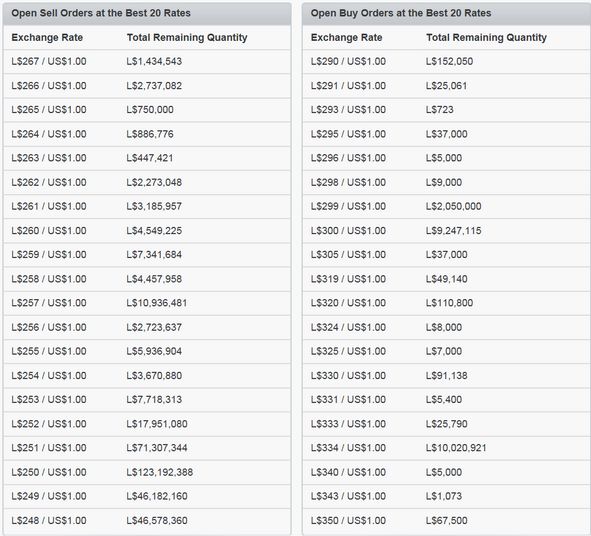
Lindex fluctuations (with thanks to Eku Zhong for the screen capture)
Various theories (and not a few conspiracies) have been put forward to explain what has been happening – although determining precisely what the cause is, is pretty much anyone’s guess. But purely in terms of the more recent fluctuations, New Worlds Notes (NWN) is promoting a theory which might just be plausible: that one (or more) large land estates have been liquidating L$ stocks in order to realise additional US dollar funds to take advantage of the Lab’s grandfathered buy-down offer.
The theory actually comes from Plurker T-Kesserex, who is quoted by NWN as saying:
I think it’s people cashing out to get capital for the $600 dollar sim price reduction … If you own 10 sims you need $6000, so that’s not easy without some cashing out.
At the start of the buy-down offer, Tyche Shepherd, of Grid Survey fame, estimated that around 85% of Homestead regions were already grandfathered, but only around 11% of full-priced regions of all types, leaving enormous potential in the market. During the first month, this figure increased to almost 21%, with the number of grandfathered full-priced regions rising from around 1,039 to 1960, demonstrating a thirst for conversion. Thus, the idea that one or more large estates might be liquidating L$ stocks to cover the cost of further conversions isn’t an unreasonable speculation.
But even if it is a fair assessment of the situation, it doesn’t offer any hint as to what – market forces or otherwise – has been pushing at the Lindex since late 2015. Nor does it offer any comfort to those concerned about cashing out at a reasonable – or at least stable – rate. All that can be said for certain is that, if you have the need for L$ in your account, buying them hasn’t been this attractive in a good while.
Avatar Complexity is a means to help people who may suffer from performance issues in crowd areas
On Wednesday, May 18th, Linden Lab promoted the long-awaited Quick Graphics viewer to de factorelease status. This viewer includes two important new features:
The updated Avatar Complexity settings
The ability to create, save and load different groups of graphics settings quickly and easily.
Avatar Complexity
As avatars can often be the single biggest impact on the viewer in terms of rendering, particularly in crowded places, so Avatar Complexity adds a new slider to the viewer which can be used to set a level above which avatars requiring a lot of processing will appear as a solid colour – the casual term to refer to them being “Jelly Dolls” – greatly reducing the load placed on a system compared to having to render them in detail, so improving performance.
The idea is that you can adjust the setting according to circumstance, so that when in a crowded area with lots of avatars, you can dial down the Avatar Complexity setting, found in Preferences > Graphics (and in the Advanced Settings floater), with the result that more of the avatars around you are rendered as solid colours, reducing the load on your graphics card and system, thus improving performance. Then, in quieter areas, the setting can be dialled back up, allowing more avatars to fully render in your view.
Note: this only applies to other avatars in your world view: your own avatar will always fully render in your view.
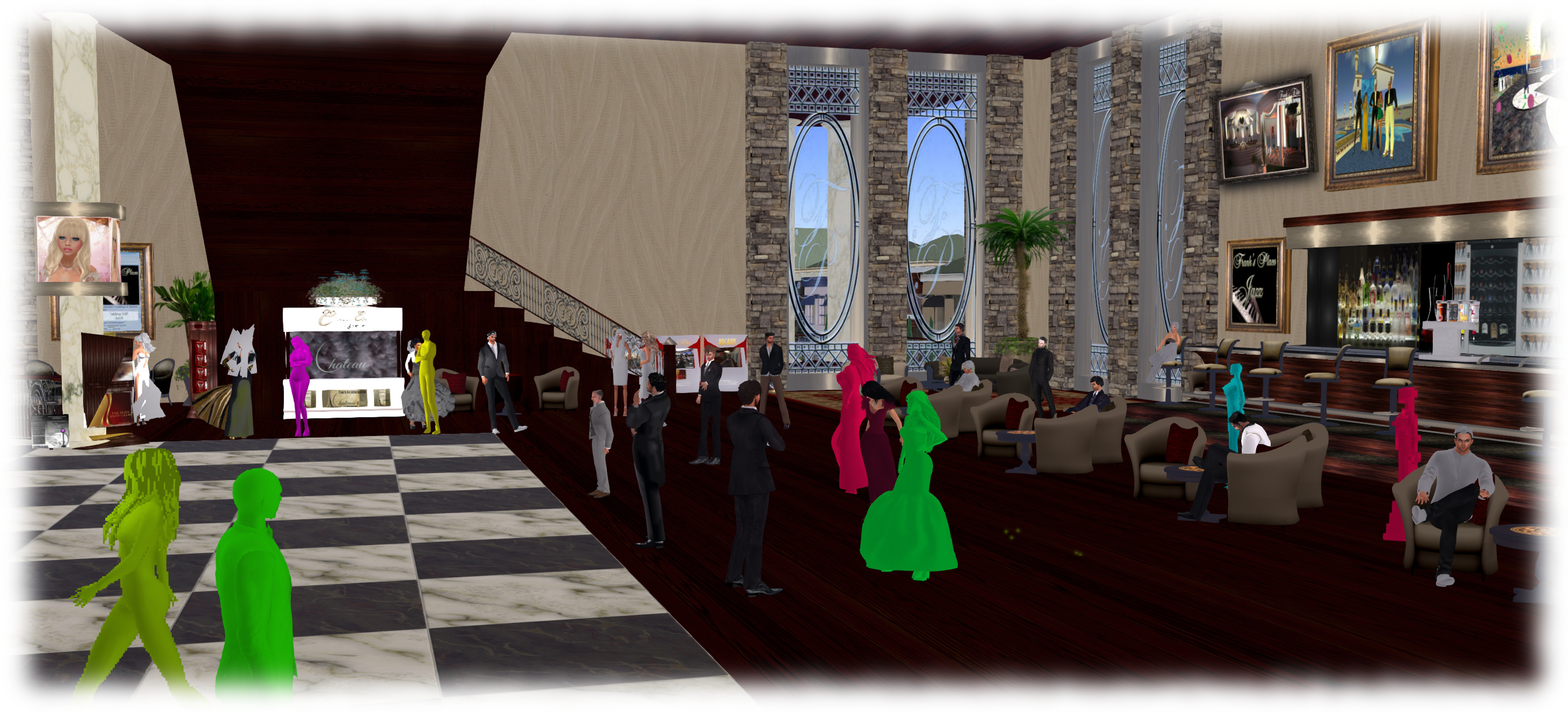
The Avatar Maximum Complexity slider sets a threshold on avatar rendering by your viewer. Any avatars in your view exceeding this value will be rendered as a “Jelly Doll”, sans attachments
If you have a good system with a high-end graphics car, you can set the value on the slider quite high and thus ensure all avatars render fully for you wherever you are.
Note: You can sett the Avatar Maximum Complexity to “No Limit”. However, this is not entirely recommended. some irritants in Second Life still use worn graphics crashers to overload GPUs and crash the viewer. If you set Avatar Maximum complexity to “No Limit”, then such tools, should you ever encounter an irritant using one, will still be effective; so it’s better to set a reasonable high value, leaving your viewer with a cut-off point which should defeat their efforts in crashing you.
There are a few other points to note with Avatar Complexity:
You can opt to always render or to not render avatars around you, regardless of your Avatar Maximum Complexity setting by right-clicking on them and selecting your desired action from the context menu
To help you understand how complex you own avatar is, every time you change your appearance, each time you change the appearance of your avatar, a small notice with your new complexity value will appear in the upper right of your display for a few seconds
The complexity value of your avatar is transmitted to each simulator as you travel around Second Life. In return, you’ll get a brief notice in the upper right of your screen telling you approximately how many of those around you are (or are not) rendering you because of your complexity
If you have a friend or friend you wish to see fully rendered no matter how low you dial Avatar Maximum Complexity (while out at a club, for example, where it may be beneficial to set a lower complexity threshold), you can right-click on those individuals and select “Render Fully” from the context menu
Similarly, and if you prefer, you can selectivity render avatars in your view as grey imposters, by right-clicking on them and selecting “Do Not Render” from the context menu.
Note: Both “Render Fully” and “Do Not Render” will only apply during your current log-in session; the options are not persistent between re-logs.
To help people understand Avatar Complexity, the Lab has produced the following:
A blog post to accompany the promotion of the Quick Graphics viewer to release status
I normally keep a close eye on outgoing communications from the Lab, but this week I’ve had other things distracting me, and so haven’t been keeping an eye on the official blog for posts and updates. My thanks therefore to reader BazdeSantis for pointing me to April Linden’s Tools and Technology update, The Story Behind Last Week’s Unexpected Downtime.
April has very much become the voice of the Lab’s Operations team, and has provided us with some excellent insights to Why Things Sometimes Went Wrong – a valuable exercise as it increases both our understanding of the complexities inherent in Second Life, and also what is likely to be going on behind the scenes when things do go drastically sideways.
April’s post refers to the issues experienced on Friday May 6th, when a primary node of a central database failed, with April noting:
The database node that crashed holds some of the most core data to Second Life, and a whole lot of things stop working when it’s inaccessible, as a lot of Residents saw.
When the primary node in this database is off-line we turn off a bunch of services, so that we can bring the grid back up in a controlled manner by turning them back on one at a time.
There’s an interesting point to note here. This is the same – or very similar – issue to that which occurred in January 2016, which again goes to show that given the constant usage it sees, Second Life is a volatile service – and that the Operations team are capable of turning major issues around in a remarkably short time; around 90 minutes in January, and less than an hour this last time.
Both events were also coupled with unexpected parallel issues as well: in January, the database issue was followed by issues with one of the Lab’s service providers – which did take a while to sort out. This time it was the Grid Status service. As I’ve recently reported, the Grid Status web pages have recently moved to a new provider. A couple of changes resulting from this have been with the RSS Feed, and integrating the Grid Status reporting pages with the rest of the Lab’s blog / forum Lithium service. However, as April also notes:
It can be really hard to tune a system for something like a status blog, because the traffic will go from its normal amount to many, many times that very suddenly. We see we now have some additional tuning we need to do with the status blog now that it’s in its new home.
She also points out that people with Twitter can also track the situation with Second Life by following the Grid Status Twitter account.
April’s posts are always welcome and well worth reading, and this one is no exception. We obviously don’t like things when the go wrong, but it’s impossible for SL to be all plain sailing. So, as I’ve said before (and above), hearing just what goes on behind the scenes to fix things when the do go wrong helps remind and inform us just how hard the Lab actually doe work to keep the complexities of a 13-year-old platform running for us to enjoy.







 Inara Pey: Living in a Modemworld