To mark Second Life’s fifteenth anniversary, Linden Lab has announced a series of Town Hall meetings at which Second Life users can hear members of Linden Lab and well-known groups within SL talk about the platform, their work, and answer questions offered by users.
The announced sessions will comprise:
Linden Lab CEO Ebbe Altberg.
Members of the Firestom team.
Residents of Bay City.
The Designing Worlds team.
The first of these town hall meetings will feature Ebbe Altberg in a double session on Friday, April 20th, at the following times:
09:30 SLT.
13:00 SLT.
User are invited to offer questions for Ebbe via the forum thread A Conversation with Linden Lab CEO Ebbe Altberg. Questions will be selected from those submitted, and as many as possible will be answered within the time frame set for the meetings.
Users can attend the meetings by teleporting to one of the three following landing points at Town Hall Island:
It’s a huge effort. Right now the Second Life grid is a proprietary set-up in a hosting facility that we have customised for the purposes of what we’re doing – which made sense a decade and half ago. But these days, with the services from Google and Amazon and Microsoft with cloud infrastructures, it makes a lot of sense to shift our technologies to be on top of those cloud infrastructures instead of having our own.
Ebbe Altberg, VWPBE, March 15th, 2018.
That the Lab is working on moving Second Life to the cloud is becoming more and more widely known. First mentioned by Landon Linden (aka, Landon McDowell, the Lab’s Chief Product Officer) during his SL14B Meet the Lindens session, it was “officially” announced in August 2017 via a blog post.
Landon Linden, June 2017, talking about the Lab’s hope to move Second Life services to the cloud.
It’s a long-term project, which will extend well into 2019 (at least), building on a relationship with Amazon dating back to 2008, and which today both Blocksworld and Sansar (see: “Project Sansar”: an Amazon ECS case study), from which the Lab hope to gain a range of benefits, including – in time – perhaps the opportunity to offer a broader range of products at more comfortable (for users) price points.
There are some significant technology challenges the Lab faces with the move. However, progress is being made. Some non-user visible services are already running in the cloud, and more recently, the Lab has started preliminary testing with cloud-based simulators – although they are fair from ready for users to access, as Oz Linden outlined at the March 16th TPV Developer meeting:
We have actually run experimental regions on cloud servers, and it worked. There were some functional limitations that we have to do a lot of work to solve before we could begin to do regions that ordinary users can get to … It’s something we’re pursuing as aggressively as we can [but] I’m not even sure we have a sufficiently comprehensive view of the problems … some of them will only become apparent as we actually put things into production.
Oz Linden, TPVD meeting, March 16th, 2018 – full audio below.
Oz Linden, March 16th, 2018, talking about progress to date, and how things are likely to progress.
For the Lab, the benefits of the move to the cloud include things like a reduction in their capital expenditure – no need to maintain their own dedicated hardware (or continuously update / replace it) within a dedicated operating environment. It also means they can more dynamically scale consumption according to needs – this could be beneficial for a number of the back-end systems within Second Life.
It turns it into less capital expenditure to have to buy all the equipment and doing all the maintenance on that. You kind-of pay for what you use; with Second Life [right now], once we’ve bought a piece of hardware, we have to sit on it whether it’s being utilised or not, whereas you can kind-of dynamically scale your consumption as necessary when you use something like AWS … which we believe will reduce costs for use and then ultimately, we hope to pass that on to customers.
Ebbe Altberg, VWBPE, March 15th 2018.
Once the transition has been completed and the Lab has had time to evaluate things, the move might allow them to offer a more varied land product – something again touched upon in Ebbe Altberg’s 2018 VWBPE address, and allow them to more extensively “re-balance” the revenue model – something that is also an ongoing project at the Lab.
We’re really thinking hard about the economic model of Second Life. We share a belief inside the Lab that land is quite expensive. so we’re constantly looking at ways to lower land prices and find other ways to find revenues. So I think you will see us try to shift from what I would say [are] high real estate taxes to more consumption taxes or fees to create an environment where it’s easy for people to create and own experiences, and we [the Lab] participate more in all the transactions that take place.
Ebbe Altberg, VWBPE, March 15th, 2018.
Given that land tier provides the lion’s share of the Lab’s revenue, this re-balancing is far from easy to say nothing of the potential for user outcry at any fee increases). Ergo, having better means to lower fees such as through reduced operating costs and a broader spread of more “affordable” products could – depending on the time frames involved – go a long way towards helping the Lab achieving that re-balancing goal.
So what might the move to the cloud mean for users? That’s hard to quantify at the moment, simply because the project has so far to go.However, some hints at what might happen have been offered.
For one thing – and on the subject of different land products – it might allow the Lab to offer two broad categories of region / server type; I’ll call them “always on” and “on demand”.
“Always on” would be simulators running 24/7 as with SL at present. These would be ideal for handling Mainland, large open spaces like Blake Sea and the larger, contiguous private estates. Such regions might have a similar type of fixed-fee tier cost associated with them as we have today (although not necessarily the same price points).
“On demand” would be simulators that are only active (and charged for) when in active use. When devoid of avatars, they are saved to disk and spun down. These types of region could be ideal for special events, or for private business / residential regions which don’t have any surrounding regions, and would only be charged for when avatars are present; once the last avatar leaves, following an appropriate pause, the region is saved, and the instance spun-down.
Such an approach has been alluded to by Ebbe Altberg:
Some experiences might want to have continuous persistence over time, and maybe that’s one type of pricing model, for an “always on” type of scenario. Maybe other will be fine with, “hey, I’m only using this for a few hours in a class a few times a week” or something. and if that can spin-up in a few seconds, and then I just need to basically pay for the time that I’m utilising it. Those could be potential options for us to explore.
Ebbe Altberg, VWBPE, March 15th, 2018.
Land offerings could be broadened in other ways. Again, as Ebbe Altberg indicated at VWBPE 2018, there might be high-performance, high-capacity, “upper tier” servers available for those needing them for specific uses (e.g. events need high concurrency levels or similar), sitting alongside more moderate, lower-cost servers for things like residential use.
More intriguingly, cloud hosting might even allow the Lab to more readily geo-locate simulators / regions with their physical world audience. Such regions wouldn’t necessarily have to be grouped together in-world, they are simply located a lot close to the user base that most frequently uses them, potentially improving performance for that audience.
Today we are located in the US, which means that people from Australia or Asia or Europe have to travel quite a ways, which is hundreds of extra milliseconds of latency. So if you want to have a very dedicated community in Australia or somewhere, we could maybe start to distribute our server infrastructure to be closer to where the actual customers of those regions are, which would make things more performant.
Ebbe Altberg, VWBPE, 15th, March 2018.
There will be more to come on SL and the cloud and the Lab provide further updates as the work progresses, and I’ll hopefully report on them as they are made public. In the meantime, and for those who haven’t waded all the way through the VWBPE 2018 video with Ebbe Altberg (and Brett Linden), or who don’t want to read either my transcript of that event or the bullet-point summary, here’s the audio of Ebbe’s comments on SL and the cloud:
Update, March 22nd: At the Content Creation User Group meeting, Oz Linden indicated the return of last nameswill be somewhat similar to the “old” system – users select a last name from a list. However, people will be able to change their names as often as they like (although a fee will apply). See more in my summary update.
He also indicated that the Lab might take suggestions from users for last names which can be included in the various sets of names offered.
As promised during the VWBPE 2018 conversation with Linden Lab CEO Ebbe Altberg and Brett Atwood (Brett Linden), Senior Manager for Marketing at Linden Lab, the company has provided a blog post presenting something of a “roadmap” for Second Life.
The post, which also serves as something of a launch of Second Life’s 15th anniversary, starts with a recap of the Mainland price restructuring announced on March 14th, 2018, and goes on to provide an interesting list of items – some of which could prove to be highly popular.
Key among these is the promise that – after years of requests – last names will be returning to Second Life.
No time frame is given – beyond later this year. Note that this is not necessarily the return of the “old” system of last names, but appears to be a means for people to more readily change their last name, the blog post stating:
The return of Last Names – You’ve asked for it (a lot!), so we will provide a way to customize your last name in Second Life! More details will be available later this year.
Another item which may well be of interest to existing users is a new attempt by the Lab to raise the level of new user retention within Second Life, with the post noting:
Themed Learning Islands – Getting connected to people who share your interests will be easier than ever with “Themed Learning Islands.” Soon newcomers may start their adventures in one of several themed areas, so their first experience in SL will be among Residents who share similar interests. This new initiative is in addition to our existing Community Gateway program which empowers independent communities to develop their own newcomer-friendly experiences.
Speaking at a recent Third-Party Developer meeting, Grumpity Linden, a Senior Product Manager at Linden Lab provided an overview of what this will entail:
Another intriguing change will see the Mainland Land Auction system overhauled, including integration with Place Pages and the ability for users to auction their own land.
Merchants are liable to be interested in the news that the Marketplace will see improvement, with the blog post noting:
We’ve got a number of improvements to Marketplace in the works, too! We’re integrating many long-requested features that will help to reduce clutter and improve the functionality of listings as the Marketplace gets a facelift later this year.
Among the more general items listed in the blog post – at least for those who follow this blog – is a summary of some of the new capabilities and updates which are coming to Second Life:
It’s also worthwhile that alongside of the EEP work mentioned in the blog post, there is also a project – no time frame available – to improve the Second Life’s atmospheric shaders – which could help update SL’s general appearance and more easily allow atmospheric effects like Godrays.
The work to move Second Life to the cloud gets a mention in the blog post. Credit: Linden Lab / Amazon Web Services Inc.
The work to move Second Life to the cloud also gets a mention – and I’ll have a blog post on this up and available soon, largely as a result of the VWBPE 2018 event mentioned above, and also comments made by Ebbe Altberg and Oz Linden at a recent Third-Party Developer meeting. In the meantime, the blog post notes the work to enhance and improve SL’s performance both on the server-side and in the viewer.
Elsewhere. it is noted that Premium members will see further benefits as the year unfolds:
Additional benefits for merchants with Premium membership, which may have come out of / been hinted at during Web User Group meetings.
Linden Homes are going to get a (long overdue) revamp.
Premium users will be able to run Experiences that are enabled anywhere on the grid (unless specifically blocked by a landowner). This is again something many Experience creators have requested since the introduction of Experiences.
Finally – and as some have noted with the arrival of new region groups on the grid in recent weeks – a further new Experience-based game is on the way. Expect to see that, according to the official blog post, closer to the actual SL15B celebrations.
All told, the list of 15 expectations is an interesting mix of news, some of which those actively engaged in Second Life will already be aware, as note. Others – again, perhaps notably the upcoming return of last names – could generate excitement among users. I’m personally keen to see the new themed learning islands, and will hopefully have more information on them as the project launches in the new future. I’ll also continue to cover the technical enhancements to the platform through my weekly project updates.
Linden Realms, first introduced by the Lab in 2011, has proven surprisingly popular among residents. An early example of the Lab’s (then) nascent experience tools, the appeal of the game is – in part at least – its relative simplicity (coupled with the Linden Dollar rewards). In short, players are delivered to a 12-region location (there are several – all identical – on the grid) – where they can receive a game HUD and instructions. Then it is a case of running around the landscape collecting crystals which can be exchanged for Linden Dollars.
Crystals come in three colours, reflecting their rarity / value, and they can be collected by running over them. However, this being a game means there are a range of hazards – from the rock monsters patrolled the regions and which will chase you if you get too close, through to toxic waters, fireball-spewing rock carvings, treacherous caverns and so on. However, no-one actually dies from these hazards – being “caught” by any of them will lead to players being teleported to one of several “resurrection circles” (generally the one closest to the point where they were “caught”), and then they can resume the game. Or those are the basics.
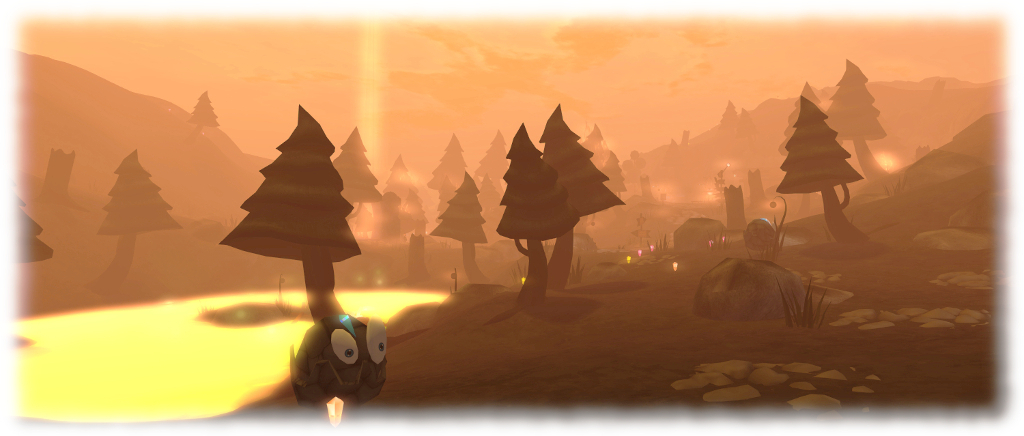
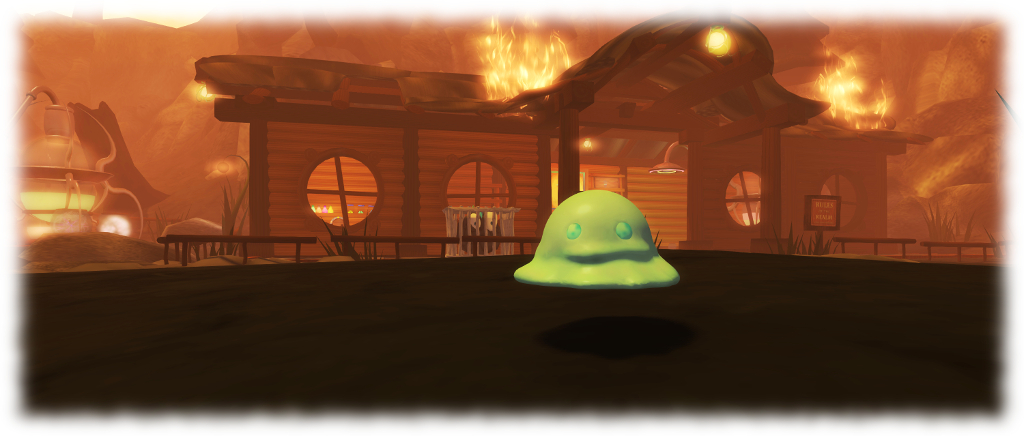
Linden Realms: the threats are still there, despite the flames
The game has been tweaked a few times along the way (such as being opened to all SL users a month after it opened, rather than remaining Premium-only), and on Thursday, March 15th, the Lab announced the latest of these tweaks: a new fiery look for the Realm regions. In a very brief back story, it seems the wicked Ruth (she of the villainy in Tyrah and the Curse of the Magical Glytches – see my review here) has used Magellan Linden’s coffin (launched into space as part of the prologue to the Tyrah story), to divert a comet so it has crashed on the Realms, leaving them in flames (technically, it should have flattened them, but I’ll push the space fan in me to one side 🙂 ).
From the – admittedly brief – time I spent there, game play is still the same as previously, just now within a lurid, smoky-orange environment where trees and building equally burn. How long it will remain so is hard to say, but right now, and allowing for the aforementioned point that Linden Realms has retained popularity through the last 6+ years, the new look and feel does appear to be attracting the curious and encouraging them to play.
Should you opt to renew your acquaintance with Linden Realms (or even hop over to play it for the first time), don’t forget that the regions are also available for the capture of Glytches from Tyrah and the Curse of the Magical Glytches mentioned above. Just be sure to wear your Tyrah HUD and Glytch capture weapon at the ready, as the note in local chat reminds you on first arriving within the Linden Realms regions:
If you would like to play Tyrah and the Curse of the Magical Glytches on this parcel (and many others) you need to be wearing a HUD and a weapon for collecting Glytches. If you do not have a HUD or weapons for collecting the Glytches, you can collect them from Hartyshire (144,126,23). You can read more about the game Tyrah and the Curse of the Magical Glytches at this URL: https://wiki.secondlife.com/wiki/Linden_Lab_Official:TCMG.
Glytches are also in Linden Realms, and can be hunted and caught is you’re wearing the Tyrah and the Curse of the Magical Glytches HUD (the Glytches will ignore you if you don’t)
And happy hunting, whether it is for crystals or Glytches – or both.
Linden Realms, Tyrah and other Linden-created destinations can be reached via the Portal Parks:
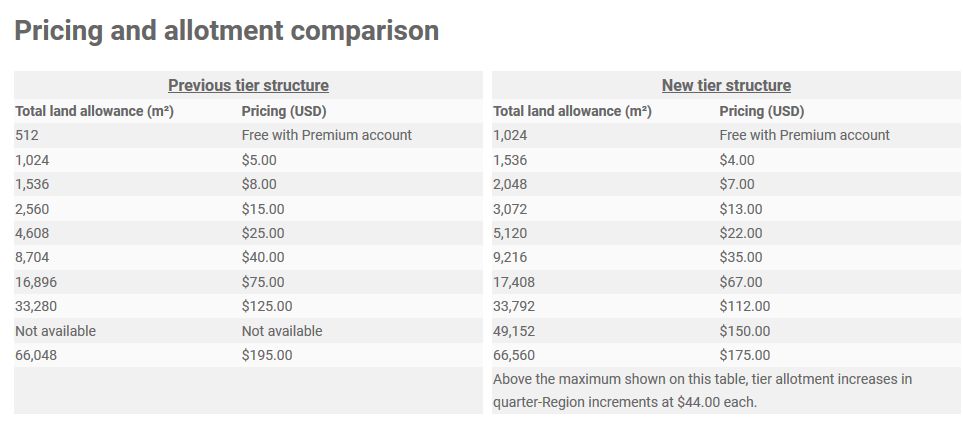
On Wednesday, March 14th, 2018 Linden Lab announced a restructuring of Mainland tier costs, with allotment of “free” land for Premium members doubled from 512 sq metres to 1024 sq metres.
The announcement was made via a blog post, which reads in full:
We’ve got some exciting news for both aspiring and existing Landowners who think the cost of land is too darn high in Second Life. Effective immediately, we’ve reduced Mainland costs by over 10 percent.
But, wait…there’s more!
Premium members now also get DOUBLE the Mainland allotment! That’s twice as much space to build, create and design your own home, business or experience in Second Life at no extra charge! Premium subscribers now have 1,024m² included with their membership: you could keep your Linden Home and still have another 512m² left over, or use your entire 1024 allotment towards a parcel on the Mainland. To learn more about specifics of this change, view our Pricing and Allotment Comparison chart.
As Second Life begins to celebrate its fifteenth birthday, we hope that this latest price drop will be welcome news to those who aspire to explore their creativity in 2018 and beyond.
The new Mainland tier rates for Premium members (right), with the new “free” allowance of 1024 sq metres of land, compared to the pre-March 14th tier rates
Of course, when people talk about tier being “too damned high”, they are generally referring to the cost of private regions (particularly Homesteads), so this change in Mainland rates many not be looked upon favourably in some quarters. But the fact remains – as I pointed out in 2013 – lowering private region tier isn’t as easy a proposition for Linden Lab as some tend to think, the (roughly) 23% reduction in tier revenue the Lab has seen since November 2013, notwithstanding.
As such, this should be seen for what it is – an attempt by the Lab to encourage land take-up – and leave us not forget there have also been calls to re-invigorate Mainland with all of its abandoned land – without unduly exposing their bottom-line. So, if nothing else, it will be interesting to see what this offer does both in terms of Premium subscriptions and in encouraging people to take-up their “free” 1024 square metres of Mainland (or go bigger and use the 1024 “free” + the reduced difference in remaining tier).
A slight spanner in the works here, of course is that obtaining Mainland parcels can be time-consuming, and comes with the initial overhead of the purchase price. Nevertheless, it will also be interesting to see if / how this affects Linden Home ownership. A complaint against the latter is that while they come with a 175 LI allowance and a house which does not count towards that total, the houses themselves are oft viewed as unattractive. So, will these changes encourage some of those with Linden Homes to abandon them in favour of a 1024 sq m parcel (the aforementioned pain in finding and purchasing a suitable parcel notwithstanding) with at least 350 LI and a house of their own choosing, even if it does count against that total?
As noted in my recent article on the promotion of the Lab’s Alex Ivy 64-bit viewer to release status, there is currently no official 64-bit support for Linux at this time.
It is hoped with will change: the Lab is establishing a viewer build environment to build a Debian version of the viewer with the various specialist libraries required by the various flavours of Linux. The hope being that this, with contributions from the open-source community, will provide a means for the Linux flavour of the viewer to continue, with viewer developers adding the specific libraries they may need as required.
It’s not clear how long it will take for all of this to mature, and for a Debian version of the viewer to appear. In the meantime, it means that as the Lab baseline their viewer build process on Alex Ivy, and existing project and release candidate viewers are updated to the Alex Ivy code, they will cease having Linux versions. This can already be seen with the 360 snapshot viewer, the project render viewer, and the Nalewka RC at the time of writing (versions 5.1.0.506743, 5.1.1.511873, and 5.1.1.511871 respectively), none of which have a Linux flavour of the viewer. As the remaining project and RC viewers currently in the pipeline are updated with the new code case, they will also be without a Linux version for the time being.
To help compensate for this, on Thursday, January 18th, 2018, the Lab release the Linux Spur release candidate viewer, version 5.0.9.329906. Dated November 17th, 2017, this viewer is in fact the Martini RC viewer which was promoted to release status on November 29th, 2017 – the latest viewer to be promoted to release status prior to Alex Ivy being promoted.
While it is not explicitly stated in the release notes, it is unlikely this version of the viewer will be updated with bug fixes, updates, etc., but will be offered until such time as a Linux viewer using the 64-bit libraries is made available. As such, it may offer a means for SL viewer users on Linux wishing to continue using that viewer, rather than a TPV flavour of Linux.
Obviously, those TPVs providing their own Linux flavour of the viewer are free to continue to do so.
 To mark Second Life’s fifteenth anniversary, Linden Lab has announced a series of Town Hall meetings at which Second Life users can hear members of Linden Lab and well-known groups within SL talk about the platform, their work, and answer questions offered by users.


 Inara Pey: Living in a Modemworld