April Linden blogs on the May 13th/14th downtime

The week of May 13th-17th saw a planned period of Second Life network maintenance work, as announced in the Grid Status updates.

The first tranche of this work – Monday, May 13th through Tuesday May 14th – appeared to go well, until there was a completely unexpected 4(ish) hours of downtime, which at the time caused significant upset.

On May 17th, April Linden, the Second Life Operations Manager, has provided an insightful blog post on both the work being carried out and the cause of the downtime.

This week we were doing much needed maintenance on the network that powers Second Life. The core routers that connect our data centre to the Internet were nearing their end-of-life, and needed to be upgraded to make our cloud migration more robust.

Replacing the core routers on a production system that’s in very active use is really tricky to get right. We were determined to do it correctly, so we spent over a month planning all of the things we were going to do, and in what order, including full roll-back plans at each step. We even hired a very experienced network consultant to work with us to make sure we had a really good plan in place, all with the goal of interrupting Second Life as little as we could while improving it …

Everything started out great. We got the first new core router in place and taking traffic without any impact at all to the grid. When we started working on the second core router, however, it all went wrong.

– Extract from April Linden’s blog post

In essence, a cable had to be relocated, which was expected to cause a very brief period of impact. However, things didn’t recover as anticipated, and April resumes her explanation:

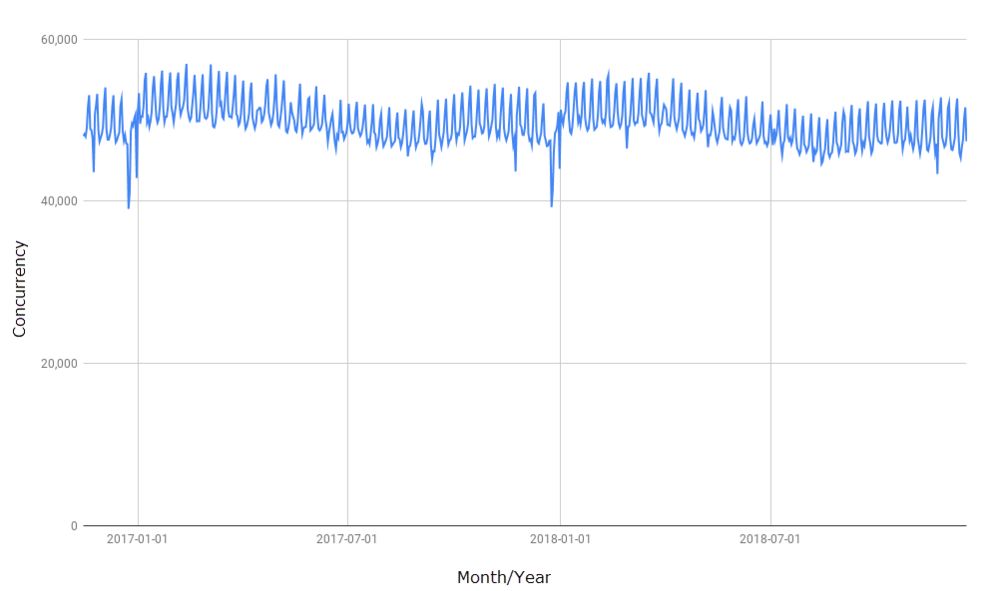
After the shock had worn off we quickly decided to roll back the step that failed, but it was too late. Everyone that was logged into Second Life at the time had been logged out all at once. Concurrency across the grid fell almost instantly to zero. We decided to disable logins grid-wide and restore network connectivity to Second Life as quickly as we could.
At this point we had a quick meeting with the various stakeholders, and agreed that since we were down already, the right thing to do was to press on and figure out what happened so that we could avoid it happening again…
This is why logins were disabled for several hours. We were determined to figure out what had happened and fix the issue, because we very much did not want it to happen again. We’ve engineered our network in a way that any piece can fail without any loss of connectivity, so we needed to dig into this failure to understand exactly what happened.

– Extract from April Linden’s blog post

April Linden

In other words, while it may have been painful for those who were unceremoniously dumped from Second Life and found they could not get back in, the Lab were working with the best of intentions: trying to find out exactly why connectivity was lost within a network where such an event should not cause such a drastic breakage – and its worth noting that as per April’s blog post, even the engineers from the manufacturer of the Lab’s network equipment were perplexed by what happened.

As always, April’s blog post makes for an invaluable read in understanding some of the complexities of Second Life, and goes so far as to answer a question raised on the forums in the wake of the week’s problems: Why didn’t LL tell us exactly when this maintenance was going to happen? – in short there are bad actors in the world who could make use of publicly available announcements that give them precise information on when a network might be exposed.

If you’ve not read April’s blog posts on operational issues like this, I really cannot recommend them enough – and thanks are again offered April for providing this post. And while things might have hurt at the time, there is a silver lining to things, as she notes:

Second Life is now up and running with new core routers that are much more powerful than anything we’ve had before, and we’ve had a chance to do a lot of failure testing. It’s been a rough week, but the grid is in better shape as a result.

New SL viewer release notes pages: an overview

Update, May 21st: The Alternate Viewers wiki page has been retired and replaced by a new Alternate Viewer page, which follows the same broad format as the Release Notes page (making the two slightly confusing, as they both reference recent RC viewers. However, this new page also draws a distinction between RC and project viewers, thus overcoming some of the concerns voiced in the second half of this article.

As noted in my week #20 SL Content Creation summary, Linden Lab have unveiled their new viewer release notes pages.

At the time of writing, the new pages are focused on the release candidate (RC) viewers that are in development and currently available as download cohorts in place of the de facto release viewer. It is not currently clear if project viewers will be included in the new format or not.

As Steven Linden from the viewer team notes in a Tools and Technology blog post on the subject, these new pages are part of a new website for viewer release information. This website comprises a dedicated home page with an introduction to viewer release notes. together with links on the left side to:

  • “Recent viewer releases”: a clickable list of the most recent RC viewer updates, provided as viewer version numbers. These are provided in release date order, with the most recent updates at the top.
  • Additional links to viewer-related support information:
The new Release Notes home page – access specific viewer release notes via the version numbers outlined in red on the left

Individual viewer release notes can be accessed by clicking one of the the listed version numbers, which will open a page specific to that viewer. These pages comprise:

  • Icon links to the available OS versions (Windows 32/64-bit, Mac OS).
  • The general release notes (description, etc.).
  • A list of resolved issues.

A significant change in these pages is that, where relevant, Jira links in the Resolved Issues section now, wherever possible, reference “public” bug reports (e.g. BUG-XXXXXX), rather than the Lab’s internally cloned versions of such bugs (e.g. MAIT-XXXXXX).

Currently, the new pages can also be accessed from the existing Alternate Viewers wiki page, (click the Release Notes link for an RC viewer on that page). However, whether this page will remain relevant if the release notes for project viewers are also converted to the new format, remains to be seen.

An example of the revised release notes for a viewer (in this case the Teranino Maintenance RC) – note the use of “public” Jira numbers where relevant, in the known issues list

The new pages are a lot easier on the eye, although I have a number of reservations at this time.

  • While I understand understand why version numbers are used to reference individual viewers (they are URLs and so can be dropped into the pages without necessarily requiring human intervention), they are less user friendly to those wishing to quickly look-up the specifics on a viewer.
  • The “recent Viewer Releases” lists can include links to multiple versions of a given viewer (at the time of writing, two versions of the EEP and Teranino RC viewers are listed, for example). This might cause a degree of confusion for some users, who may mist he “most recent at the top” arrangement of the list.
  • If project viewers are to be added to these pages, I would hope there will be some form of clearer distinction between them and any listed RC viewers, other than just a top-down list of version numbers, again for ease of user reference.

Related Links

SL Maintenance reminder: May 13-16th 2019

Just a reminder (or advanced warning for those who may not have seen it): Second Life will be subject to up to 4 days of network maintenance, commencing on Monday, May 13th. This work may possibly run through until Thursday, May 16th.

The details are available on the Second Life Grid Status pages, but are reproduced in full below:

Our engineers will be performing maintenance on the Second Life network May 13 – 16. We hope to perform most of the maintenance early in this window, but it may extend several days if needed.

Residents may experience problems connecting to, being disconnected from, or an inability to log in during this time, as well as possible issues rezzing objects, teleporting, or crossing regions. We hope to keep these disruptions to a minimum and greatly appreciate your patience during this time as we work to make Second Life more robust.

We will resolve this status once the maintenance has been fully completed.

So, if you do experience issues at the start of, or during the week, be sure to keep an eye on the Grid Status pages for updates to this announcement.

Celebrating Fran’s life, Saturday, May 11th 2019

Fran Swenson (Fran Seranade) and her daughter Barbara Richard (Barbi Alchemi) – image courtesy of San Diego Union-Tribune / Bill Wechter

On March 7th, 2019, I sadly wrote about the passing of one of Second Life’s most recognised residents, Fran Seranade (Fran Swenson in the physical world).

Fran, a Parkinson’s Disease sufferer, came to prominence in Second Life and in the media due to the remarkable positive effect her involvement in the platform had on her condition. I had the privilege to write about Fran’s story far back in 2013 in Of Parkinson’s, Second Life and a story worth reading, after coming across an on-line article by the San Diego Union-Tribune. Her situation became both the focal point of studies into the benefits of virtual worlds on a variety of physical and mental conditions, and was the trigger for Fran’s daughter, Barbara Richards (Barbie Alchemi in-world), with the help of her brother (AlmostThere Inventor in SL), to establish Creations for Parkinson’s, designed to  raise funds to support the work of The Michael J. Fox Foundation for Parkinson’s Research and to provide an in-world meeting place for those stricken by the illness and those seeking a sense of community and support.

Event schedule

At the time of Fran’s passing, it was noted that an in-world memorial event for her was being planned – and this has now growth into a celebration of Fran’s life and times, which will take place throughout Saturday, May 11th, 2019.

Commencing at 11:00 SLT and running through until 21:00 SLT at the Savoy Ballroom in Creations Park, the event will feature the voices and talents of some of Second Life’s best-known performers, many of whom knew Fran directly, by both performing at her 90th birthday celebrations two years ago, and in performing in support of Creations for Parkinson’s events.

As with all events at Creations Park, the celebration will present people with the opportunity to show their support for the work of the MJF Foundation by offering donations to Team Fox, the official fund-raising arm of the Foundation.

Those who cannot attend the event, but who would like to commemorate Fran’s life and the work of Team Fox / the MJF Foundation can do so by donating through any of the kiosks at Creations Park or by visiting the following web page:

In addition, and planned to be available by June 1st, 2019, a memorial honouring Fran and this celebration will be established at the Savoy Swing Era Museum, and will be available online at SavoyBallroom.org/fran.

Additional information and links to performer details can be found at: https://www.savoyballroom.org/may-11.html.

SL Marketplace: store managers introduced

On Thursday, May 2nd, 2019, Linden Lab deployed the latest updates to the SL Marketplace, chief among which is the introduction of the store manager.

A store manager is another user a merchant with a Marketplace store can designate to manage some operations of their MP store. This is a capability that merchants have long requested, both through the forums and the Web User Group meetings, and the response to the deployment has already been positive.

Key points with store managers:

  • Merchants can nominate up to five store managers.
  • By default store managers can:
    • Edit store details.
    • Edit product details.
    • List an unlisted item.
    • View store and product details.
  • In addition, merchants can optionally allow store managers to:
    • Unlist an item.
    • Redeliver items (including changing automatic redelivery status).
    • Add/remove revenue distributions.
    • Add/remove listing enhancements.
    • Change prices.
    • However,these additional permissions can only be added once for a store manager: if they are to be changed at all, the store manager must be removed, and then re-added with the changed permissions.
  • If a store manager does not have any of the additional permissions, those fields appear as inactive in the edit and bulk edit pages. Similarly, the associated controls do not appear for store managers that do not have permission to unlist items, add/remove revenue distributions, or add/remove listing enhancements.
  • Store managers can access the store using their own log-in credentials – not the merchant’s.
  • All store manager action (creation, settings permissions, removal) are set through the merchant’s My Marketplace > Merchant home options.
  • Instructions for adding / removing Store Managers can be found in the official Second Life Marketplace store managers Knowledge Base article.
Store Managers are added via the My Marketplace > Marketplace Home page (1), then clicking Edit Store Information (2) and scrolling to the bottom of the Store Information Page to click Add Manager (3). Add the name of the Store manager and setting the additional permissions for term via the pop-up (4), then clicking the ADD button when all is set (5). Remember that if permissions are to be changed, the Manager must be removed and re-added with the required permissions

In addition, and to provide merchants with oversight of the actions taken on their store:

  • All actions taken by (a) store manager(s) are logged and can be reviewed by the merchant (My Marketplace >  Merchant Home > View audit logs in the left menu.
  • E-mail alerts can also be set to be sent whenever a store manager performs an action on the merchant’s store.
  • Additionally, no store manager will be able to:
    • Archive products.
    • Add/remove other managers.

Again, full details on managing Store Managers can be found in the Knowledge Base article, and any specific issues with the system should be reported via the Jira.

Second Life: new Linden Homes security system

Bellisseria – New Linden Homes

Following the launch of the new Linden Homes, those sailing around / flying over the new continent quickly ran into an issue: banlines being thrown up around parcels.

On Tuesday, April 16th, 2019, the Lab responded to this problem by disabling the use of parcel banning across the estate. At that time, and to prevent the use of overly aggressive home security systems, the Lab indicated they would be providing a dedicated security option for the new Linden Homes for those who feel security options are warranted.

This new system was officially issued on Friday, April 26th, 2019, via a forum announcement by Patch Linden. In short, the system:

  • Can be obtained via the House / Houseboat Content Creation Pack available through the Linden Homes selector (mail box or life buoy) outside of each type of home.
  • Is automatically set to give a formal 15-second warning before ejecting someone from a parcel.
    • This time cannot be shortened, but longer times can be set, if desired.
    • It is intended to give loiterers enough time to remove themselves from a parcel.
    • Ejection has been selected, rather than TP home, in order to allow passers-by who may have been distracted to resume their journey.
  • Can be used in a Linden home or any skybox placed over it. However:
    • The system will only operate to a maximum of 400m above/ below its current location.
    • The system will not work between 100m and 2,000m above sea level (2,000m being the minimum height at which skyboxes must be placed).
  • Includes options for Group access and for individual white listing of visitors.

The system is contained within its own box in the House / Houseboat Content Creation Pack, which contains the security unit, an instructions note card and sample configuration note card for setting your white list, if required.

Designed to be wall mounted, the system is a simple (5 land impact) panel with five buttons:

  • The enable / disable button and the Help button (displays brief notes in local chat) either side of the status light at the top of the panel (red = off; green=active).
  • Here: sets the altitude of the panel – this must be done on placing or moving the panel.
  • Upper Limit: sets maximum operating height above the system’s current position in which it will be effective (cannot exceed 400m).
  • Lower Limit: sets the maximum distance below the system’s current position in which it will be effective (cannot exceed 400m), when used in a skybox.

The Upper Limit and Lower Limit buttons display similar dialogue boxes, allowing the range of each to be increased / decreased in 50,m 100m, and 300m increments.

The new security panel (shown alongside a house control panel) and the distance dialogue boxes. In this example, the panel is set at 23.3m above sea-level and will operate up to 23.3m above and 26.6m below its current location. Click for full size, if required

At the time of the April 16th blog post, it had been indicated that all other security systems would be outlawed from use within Bellisseria. However, as Patch notes in his forum post, this is not currently the case – so long as personal security orbs and the like operate within the guidelines set above:

We feel as a compromise, at the present you may only use other security systems that conform to the same Linden Homes Security System standards (warning time no shorter than 15 seconds, no greater detection range than 400m in height; must only work within the boundaries of your parcel, and eject instead of teleport-to-home). If we incur too many issues with non-conforming security systems, we will update the policy to prohibit the use of all non-Linden provided security systems in the new Linden Homes regions.

Hopefully, the new panels will, alongside the parcel ban list (which still functions), and the house access options for all doors, meet all the security requirement people might feel they need with their Linden Home. From my perspective, they are an excellent compromise from the Lab that allow people maintain the security / privacy they might feel they require whilst still fostering freedom of movement within Bellisseria which may in turn (hopefully) encourage a greater sense of community among residents and help build friendships and community activities.