The Lab has announced the latest round of the Premium Membership promotions – this one with a decidedly Halloween feel.
As usual, the offer is 50% off of membership for those upgrading, but only if they opt for the Quarterly billing plan, and the discount is applied only to the first quarter billing period. The offer begins on Wednesday the 15th of October at 08:00 am Pacific Daylight Time (PDT) and expires on Monday the 3rd of November 2014 at 08:00 am Pacific Standard Time (PST).
Alongside of the membership discount, comes the Premium gift offer, which this time has a Halloween theme, which includes “jack o’lanterns, witches’ brooms and more – including a bone-shaking skeleton avatar”. The gift pack can be obtained through the Premium Gift kiosks.
I admit I’ve not picked-up my gift, as it doesn’t really appeal. This being the case, I’ll also avoid my usual grumblings about the way Premium membership is pitched, and instead say that whether or not you feel upgrading to Premium is worthwhile is purely a matter of individual choice. However, I would say that if you’re considering on the basis of “exclusive gifts” or “more privacy”, then you’re probably better off sitting down and thinking again.
Part of the Halloween 2014 Premium Gift (image va Linden Lab)
Launched alongside the Premium Membership offer, and included in the same blog post as the Premium offer stuff, is news about the Haunted Halloween Tour, the latest offering from the Lab to feature Experience Keys. This can be accessed via the Lab’s Portal Park, and I’ve covered it in a companion article to this one.
On Wednesday October 15th, and as a result of the Padding Oracle On Downgraded Legacy Encryption (Poodle) vulnerability reported by Google, the Lab issued a Grid Status update, warning those who use the viewer’s built-in browser may not be able to access certain websites.
[Posted 12:15 PM PDT, 15 October 2014] Residents may be unable to open certain websites using the viewers internal browser. This is due to a security related change made by many web sites in response to a vulnerability announced today by Google. This issue will affect Media-on-a-Prim for those sites, and will block initial setup of some SLShare accounts.
You may be able to access those sites by setting your viewer to use an external browser: go to Me/Preferences/Setup and check “Use my browser (Chrome, Firefox, IE) for all links.
We are aware of the issue and working on a fix.
Unlike recent security vulnerabilities, like Heartbleed, Poodle targets the client-end of things. It does this by exploiting a flaw in the design of SSL 3.0 protocol, which despite being 18 years old, is used as a fallback security protocol within most browsers, including Chrome, Firefox and Internet Explorer. However, there are a couple of caveats to its effectiveness: for the attack to work, the attacker must be on the same wireless network as you (or in the path of your communications), and your client must be running JavaScript.
Essentially what happens is that the attacker initiates a series of connection failures between the browser and website, which in turn trigger what is called a “downgrade dance” where the browser eventually falls back to using the SSL 3.0 protocol to maintain communications. The attacker then uses the vulnerability within SSL 3.0 to grab sensitive data.
Because of its nature, and the fact that certain requirements must be met (as noted above) in order for it to work, Poodle is regarded as less far-reaching than something like Heartbleed. However, it has prompted Google to issue an advisory that websites disable SSL 3.0 support or that tools that support TLS_FALLBACK_SCSV (Transport Layer Security Signalling Cipher Suite Value) are used which prevent the “downgrade dance” attacks on services that can trigger the vulnerability. Google have also stated they plan to scrub SSL 3.0 support from its Chrome browser, and Mozilla are going to do the same with Firefox.
On Thursday October 8th, the UKanDo viewer updated to version 3.7.17.28056 for both Windows and Linux.
The new version leap-frogs over a 3.7.16 release (the September release being 3.7.15), and instead combines the Lab’s 3.7.16 and 3.7.17 code base updates into a single release.
UKanDo version 3.7.17.28056 incorporates the Lab’s updated log-in splash screen, which sees one of two different screen displayed, depending upon whether the user is logging-in to SL for the first time (or has performed a completely clean install), or is returning to SL having previously logged-in (the screen shown below).
With the 3.7.17 release, UKanDo adopts the new-look Lab log-in splash screen layouts
As well as the log-in screen update, the release also includes the last set of maintenance updates from the Lab to become the release viewer, and which comprised fixes and updates for: inventory & outfit management; appearance editing; group & group ban management; multi-grid support for favourites; camera controls; notifications management and stability improvements, as well as various UI bug and viewer crash fixes.
The new Status bar option to show / hide your L$ balance
There are also a number of updates requested by UKanDo users included in the release:
An option in the Status Bar menu to show / hide your L$ account balance (shown by default) – useful for those taking snapshots or screen captures which include the UI, as they can hide their account balance if they wish. when unchecked, the account balance display slides out of sight
An option to show the UI in Mouselook has been added to Preferences (Preferences > General > Camera). This is disabled by default, requiring the use of the ALT key to move the cursor
The “Save to Disk” button in the Snapshot floater has been re-labelled “Save to Computer”.
Further updates in this release comprise:
FModEx updated to 4.44.41
lqtwebkit updated to 4.8.1 (contributed by Drakeo), which should fix Flash video not working for GNU/Linux users
FS pose stand updated with additional validation checks (via Ansariel Hiller).
On Wednesday May 21st, Linden Lab publicly released the Oculus Rift project viewer, offering initial support for the Oculus Rift DK1.
Things have moved on since, most notably with the release of the Oculus DK2, versions of which the Lab received in July 2014, and have been using to update the project viewer to provide DK2 support.
Oculus Rift: Lab launches project viewer with DK2 support
On Monday October 13th, the Lab announced that the updated version of the viewer is now available.
A few months ago, we released a Project Viewer that made it possible to use the first generation Oculus Rift development kit (DK1) anywhere in Second Life.
Since then, Oculus Rift has released a second generation development kit, DK2. The new hardware offers an even more immersive experience when used with Second Life – there’s less likelihood of feeling motion sick thanks to the motion-tracking features, and less of the “screen-door effect” on the visuals, thanks to higher resolution and brighter display.
We’ve integrated the DK2 with Second Life, and today are releasing a new Project Viewer so that virtual reality enthusiasts with the DK2 can use it anywhere in Second Life, just as DK1 users can.
Unfortunately, though, there are still some bugs impacting the experience, which we won’t be able to fix until we receive the next SDK from Oculus Rift. Because Second Life uses OpenGL in its browser, we cannot support direct mode in the Rift until Oculus releases a version of the SDK that supports that.
In addition, juddering is an issue (as it is with most DK2 demos).This can be significantly improved on Windows by turning off Aero, which allows the Rift to use its full refresh rate rather than being limited to the refresh rate of the primary monitor. This refresh rate is a major factor in the judder and turning off Aero can significantly improve your experience.
We’ll continue to fix bugs and improve the experience as quickly as we can once we get the next SDK, but in the meantime, we wanted to get this Project Viewer out into testers’ hands. If you have an Oculus Rift development kit, you can download the new Project Viewer here.
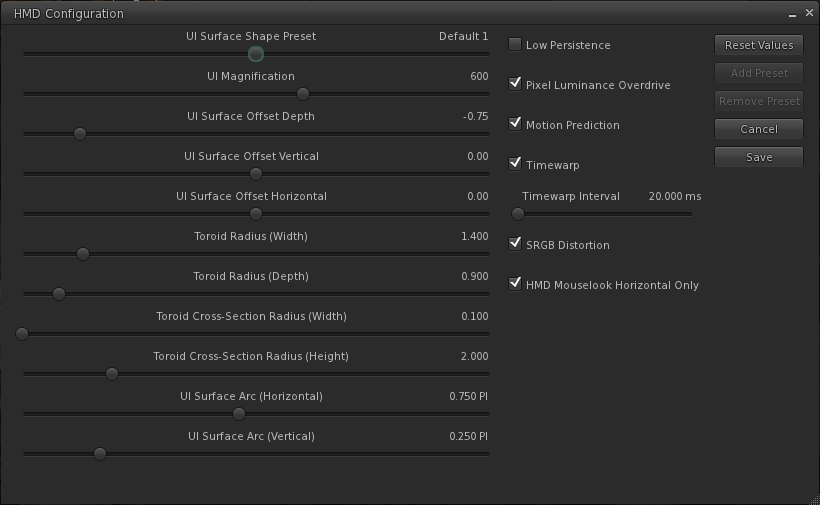
The update includes an expanded HMD configuration panel, which can be accessed via Preferences > Move and View > click on the Head Mounted Displays button.
The expanded HMD configuration panel
As with the original project viewer, this configuration panel can also be accessed via a dedicated toolbar button.
The release notes for the viewer include some additional hints and tips:
In Windows 7 turn OFF Aero (go to Windows Basic setting in the “Personalize” right-click menu on the desktop).
In the Windows display settings, adjust the refresh rate on the DK2 to 60hz rather than 75hz.
Make sure your Oculus config runtime and firmware are up to date.
Make sure the power cable is plugged in to the Rift.
If using an NVIDIA card, update to the latest drivers, which have some Oculus/VR specific optimizations.
Turning on Triple buffering in the NVIDIA control panel may help in some cases. Results may vary.
To increase framerate try reducing the Second Life Viewer draw distance and/or disable Shadows and the Ambient Occlusion.
On the HMD setting panel in preferences try experimenting with turning low persistence mode on and off. We’ve found that is some cases it can exacerbate ghosting and jitter.
If you’re in Mac OS X, it is recommended that you exit HMD when uploading files, such as images or models. There is currently an issue that can get your viewer stuck in a bad state if you attempt to upload files while HMD Mode is enabled.
Key Controls
Enter HMD mode – CTRL + SHIFT + D
Align to look – Q
Center Mouse Pointer – Z
Action key – X
Camera Mode – M (Press multiple times to cycle through 3rd Person, HMD Mouse look, and 1st Person modes)
The blog post from the Lab also includes the video released at the time the original Oculus Rift project viewer was launched.
Since November 2013, the Lab has been attempting to operate in compliance with US Internal Revenue Service requirements by ensuring those Second Life users meeting “certain transaction thresholds” have filed required IRS documentation with the Lab (whether or not they are US residents).
News of this move first broke via an SL Universe forum thread, and was subsequently followed-up by bloggers such as Ciaran Laval and myself, and by the Lab also blogging on the matter.
As the tax and documentation requirements continued to cause some confusion, clarification was sought from the Lab, and additional documentation was published in February 2014 to further help people understand the requirements and how to comply with them. However, as the year has progressed, there have continued to be occasional issues with people actually getting the required paperwork processed by the Lab, affecting their ability to withdraw funds.
As reported by Ciaran Laval at the start of October, some people have once again recently encountered delays in seeing their submitted documentation processed by the Lab. His post prompted a reply from Pete Linden, providing some insight into why delays are occurring:
Due to a significant volume of payout request in recent weeks, payout requests may take longer to process than expected. We apologize for the delay, and we are working hard on clearing the backlog and process requests as quickly as possible. In the meantime, we advise residents to please address any specific questions through their Support cases. We appreciate the cooperation and patience from all residents, and hope to have payout request processing times back to normal soon.
As Ciaran notes in following-up on Pete’s comment, it’s not clear why there has been a significant volume of payouts recently, although he suggests that it could be tied to the recent changes to the Lab’s Skill Gaming policy, which may have caused an increase in the number of people filing payment information with the Lab in order to engage with skill gaming regions.
Whatever, the reason, the Lab is aware of the situation, and hopefully taking the necessary steps to ensure delays are minimised and, as Ciaran states, “everything will be back on track in the near future and normal.”
During the TPV Developer meeting on Friday October 10th, the Lab announced that there will be changes coming in 2015 to how merchants interact with the SL Marketplace.
These changes are in part the result of the Lab working to resolve outstanding issues around Direct Delivery, including the fact that not all use cases for Marketplace sales could be solved through Direct Delivery, but still require the use of Magic Boxes.
Brooke Linden was on-hand at the meeting to provide and overview of the forthcoming changes – which are unlikely to be implemented in full until the end of the first quarter of 2015, although broader testing with them is set to commence towards the end of October or in early November 2014.
The new functionality is discussed in detail in the October 10th meeting video. The following notes are intended to provide a general overview of what is planned, and includes audio of key statements from Brooke for reference.
The major aspects of these changes will be:
The changes are being referred to as “viewer-managed marketplace”, or VMM
Items for sale on the Marketplace will not longer be stored on the Marketplace servers – they will remain in the merchant’s inventory (so there will not longer be any need to upload stock to the Marketplace)
There will be a new panel (as yet apparently unnamed) within the viewer. This will replace the Merchant Outbox and provide merchants with more information on their stock (e.g. information on whether or not an item is listed, stock levels on No Copy items, etc), and allow them to carry out the following Marketplace tasks from within the viewer:
Create new listings with stock
Associating inventory to an existing listing
Remove items from a listing
Unlist goods entirely.
(Note that other Marketplace activities will still require logging-in to the SL Marketplace web interface as is the case today.)
Brooke Linden provides an overview of the upcoming changes to the Viewer and the SL Marketplace
As a part of these changes, there will be a migration process, which the Lab hopes to make as smooth as possible. This will involve updating current Marketplace listings so that they correctly point to the inventory servers (rather than the inventory store on the Marketplace servers), and which will return items to the merchant, where they will be visible in the new Marketplace panel.
The plan is to make the migration process as automated as possible, with migration times scheduled with larger merchants as stores and listings will be temporarily unavailable during the migration process. However, for those who prefer, their will also be a manual migration process.
Brooke Linden on the migration process once the new functionality starts rolling-out in 2015
As noted above, the Lab is looking to deploy the new functionality around the end of the first quarter of 2015. In the meantime, a project viewer with the new panel will be deployed, most likely before the end of October, and it will be possible to under take testing on the new capabilities on Aditi (the Beta grid) starting wither towards the end of October or in early November.
Testing will initially involve those merchants who have been involved in providing input into the development of this new functionality, together with TPV developers. However, the plan is to then broaden it out and invite other merchants into the testing to generate broader feedback and input. Following the Aditi testing and feedback, there will be a beta phase using the production Marketplace prior to a full migration / switch-over.
Full updates on the changes will be forthcoming through future meetings as well as, hopefully, via a Lab blog post at some point in the future.
 The Lab has announced the latest round of the Premium Membership promotions – this one with a decidedly Halloween feel.