On Tuesday April 1st, I previewed the new SL Share 2 project viewer, which has options to share messages and photos with your Twitter account, and upload photos to your Flickr account. The viewer also includes updated photo capabilities for Facebook sharing (as well as a new Facebook Friends tab).
On Wednesday April 2nd, the Lab officially announced the launch of the project viewer with a blog post which reads in part:
This SLShare update will allow you to share your Second Life experiences beyond Facebook. Twitter and Flickr sharing is just as quick and easy, complete with specific options relevant to each social network.
For Flickr, you will be able to name and add a description to your image. We have tagging capabilities so you can ensure other users can find the images you want to share. Maturity settings are a requirement for Flickr, so we’ve made it easy for you to set this right from the Viewer.
As noted in my preview, the viewer includes new photo processing capabilities, which the blog post describes thus:
This update will also introduce a set of post-processing filters that you can run your pictures through to create cool one-of-a-kind images! The new filters were inspired by the images posted to Flickr by Second Life Residents. With more than a million uploads, most of them enhanced by some post-processing, we thought it would be great to include this feature right in SLShare. These filters will work regardless of which social network you choose to share your Second Life pictures to.
But it doesn’t stop there. For those more technically savvy, we designed this feature to be modifiable by our users. If you’d like to create your own filters, check out the wiki page on this for more information.
The Twitter floater and preview pane, showing one of the preset photo filters applied – users can also create their own filters for inclusion in the floaters (Twitter, Facebook and Flickr)
As noted in my preview, the project viewer can be obtained from the release notes page, which includes download links to the Windows, Mac and Linux versions (as does the viewer’s entry in the Alternate Viewers wiki page). or by following the link in the Lab’s own blog post.
Update April 3rd: As per this LL blog post, the Facebook photo upload has been re-enabled by Facebook.
Update April 2nd: The lab have now officially announced this project viewer – see my blog post here. I’ve also included the filters wiki page link below, now it is publicly accessible
On Tuesday April 1st, Linden Lab introduced the SL Share 2 project viewer, version 3.7.5.288424, which incorporates support for both Flickr and Twitter.
These options are designed to work alongside the existing SL Share to Facebook feature, and provide the means to link your SL account with your Twitter and / or Flickr accounts and then send tweets (and photos) or upload photos.
The new options have their own dedicated toolbar buttons (Flickr and Twitter) and can also be accessed through the Communicate menu.
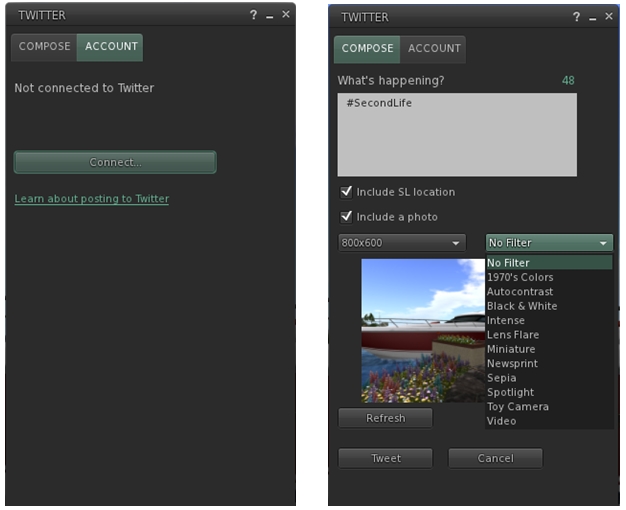
The SL Share 2 Twitter Floater tabs. note the filter drop-down list displayed in the Photo tab
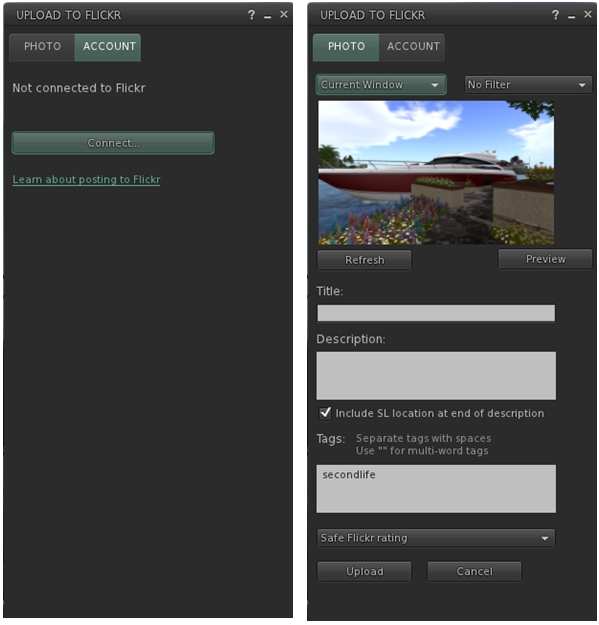
The two floaters are similar, in that they include a tab for connecting to your Flickr or Twitter accounts, and a tab for uploading messages / snapshots.
The account connection options will open floaters allowing you to log-in to Flickr or Twitter and authorise the linking of your SL account to them. Once linked, the Twitter floater allows you to send Tweets either with or without snapshots attached. Both of the floaters allow you to include your current in-world location as a part of a Tweet / with a snapshot.
The Share 2 Flickr floater tabs
Insofar as snapshots are concerned, both capabilities provide the following options:
A refresh button
An image size drop-down
A filter options drop-down (users and developers can design their own filtering scripts if they so wish using the filter documentation in the wiki
A preview button for checking how shots will look prior to upload.
Additionally, the Flickr floater includes the ability to provide snaps with a title, description, and Flickr tags.
The updated SL Share to Facebook floater, with the location option removed, and the filter options added
Finally, the SL Share to Facebook floater has also been updated with this viewer:
The photo floater includes the same filter options, etc., as the Twitter and Flickr options, although there is no longer an option to include a SLurl, as per Facebook’s requirements (see right)
There is a new Friends tab, which I assume lists all your Facebook friends when you SL account is linked to your Facebook account. I have no idea if any additional functionality is available in the tab, as I don’t use Facebook and so cannot check.
At the time of writing, it is unclear whether or not the Facebook photo upload block has been lifted by Facebook or not. As I reported in my week 13 SL projects updates, LL believe they have updated both the viewer and the back-end intermediate process linking to Facebook in order to comply with Facebook’s requirements. However, any official lifting of the block by Facebook as yet to be confirmed by the Lab.
Currently, the new SL Share 2 features are only available in the project viewer, and will not be available in the release viewer until they progress to a release status.
In the meantime, details on the new project viewer can be obtained from the release notes page, which includes download links to the Windows, Mac and Linux versions (as does the viewer’s entry in the Alternate Viewers wiki page).
I actually managed to miss this earlier in the week, but on Tuesday March 25th, UKanDo updated to version 3.7.4.27968.
This release brings UKanDo up to parity with the LL 3.7.4 code base (so HTTP et al included), and also includes a number of additions and updates. It also updates the viewer’s RLV to version 2.8.5.11.
The following is a short overview of the release.
Viewer Skin
The last version of UKanDo (3.7.2) included the option to swap between the viewer’s own skin and the original LL viewer skin. At the time, while the option added a further degree of customisation to the viewer, I was a little critical of it because of the need to download a ZIP file, shunt files around, restart the viewer etc. I also mused on whether or not UKanDo would move in the direction of other TPVs offering skinning options, and provide a less cumbersome means to select and change skins via a Preferences option.
With the 3.7.4 release, the LL skin has been included as a part of the viewer installation, eliminating the need to download it separately, and an option has been added to the viewer to switch skins without manually moving (and renaming) files. In addition, the default skin used by UKanDo has been changed, and is now the Starlight Orb Blue skin.
The new default skin is one I hadn’t used prior to taking UKanDo 3.7.4 for a spin, and it is certainly very stylised in comparison to the likes of Firestorm’s skin options and the LL viewer skin, utilising rounded or oval buttons and drop-down list items. For those who prefer the previous look, it is also included under the title Nostalgia Blue.
Unlike other v3 TPVs offering skinning options, UKanDo doesn’t provide the mean to change skins through the viewer Preferences. Instead, the option is found at the bottom of the viewer’s log-in splash screen, alongside the log-in options. Simply click on the button drop-down and select your preferred skin and restart the viewer to log-in.
UKanDo 3.7.4 allows users to set the viewer skin from the log-in splash screen
Should you choose, once you have switched to your desired skin, the skin selection option on the log-in splash screen can be hidden via Preferences > Advanced > uncheck Show Skin Selection at Log-in.
Preferences Updates
UkanDo 3.7.4 sees further updates to the Preferences floater. The most prominent changes here lay with the removal of the UKanDo tab and its replacement by the Building tab. The latter now contains all of the options which used to reside under the Preferences > UKanDo > Building sub-tab.
The new Preferences > Building Tab in UKanDo 3.7.4
The Avatar and Chat (- IM) sub-tabs previously found under the UKanDo tab have been relocated under the General tab, together with the Camera, Inventory and RLV sub-tabs.
Film Menu
The Starlight Film menu in UKanDo 3.7.4
This release of UKanDo includes the Starlight Film Menu as well.
Turned off by default, this can be toggled on / off via Preferences > Advanced > Show Film Menu.
When enabled, the menu appears at the top of the viewer, between the RLV and Help menus, providing quick access to those options which may be of assistance when involved in shooting in-world video.
Scene Refresh
UKanDo 3.7.4 includes the Refresh Scene option from Kokua, which can be found under the UKanDo menu (or use CTRL-ALT-SHIFT-R). This is primarily aimed at mitigating the missing prim issue, and when selected, carries out a number of tasks in quick succession, effectively re-rednering the in-world scene:
Basic Shaders are deselected, increasing the viewer’s frame rate and allowing the viewer to more quickly pull-in the basics of a scene
A message is sent to the viewer log, allowing the viewer to run a little longer without the shaders
Basic Shaders are re-enabled to complete re-dressing the scene, which should now be correctly rendered.
Along with this, the UKanDo menu also includes an option to toggle wireframe on / off (also: CTRL-SHIFT-R), also to assist with missing prim issues.
Other Items
The 4.7.4 release also includes:
Alt-Shift-S now toggles sit/stand
Removal of the multi Username login box
Ability to temporarily derender objects, attachments, and/or avatars until a region change or log-out
Addition of a “Teleport Here” option to go along with the “Sit Here” in context menus
New status bar widgets hidden when in Mouselook mode
Help->About Release notes now points to the UKanDo Release Notes URL.
For a full list of updates and changes, please refer to the viewer’s release notes.
Feedback
Another small, tidy update. The addition of the skin selection option is an improvement over the 3.7.2 release, while the Scene Refresh capability from Kokua could well be welcomed by UKanDo users.
The Drax Files Radio Hour 11 heads (back) along the VR road, covering the arrival (in July) of the Oculus SDK-2, which can be pre-ordered now and features an updated headset with low-latency positional head tracking, a price-tag of $350.00 (+ tax and shipping, I presume), and comes with a suggestion from OculusVR that those just wanting to try one out should really wait for the consumer version.
VR is an interesting subject, don’t get me wrong on that score, my doubts about it having quite the impact on SL as is perhaps hoped notwithstanding. But I have to say that two back-to-back episodes of TDFRH on the same subject coming on top of all the other flag-waving on the subject going on just about everywhere, did pushed me towards VR overload. Yes, I appreciate that the main reason for this was the Game Developer’s Conference, which itself was pumped full of VR from Oculus VR, Sony and others, but VR fatigue is starting to take its toll hereabouts.
Nevertheless, I’ll include the video from Oculus CEO Palmer Luckey, who has some interesting things to say on the Rift and the upcoming SDK 2.
As well as the Rift, there’s mention of Sony’s Morpheus headset for the PS4, and just after the podcast came further news that Microsoft is definitely looking at the VR bandwagon as well, most likely in respect of the Xbox (and the obvious link with Kinect) and which may well be connected with their Project Fortaleza.
Outside of VR, a few other items are touched upon briefly in the show, such as the recent uptick in SL region numbers. While it is far to early to say whether we’re seeing a new trend or merely the usual March uptick is too soon to say.
The SL bikini banner ad campaign (if I can call it that) is poked at as well. It’s proving controversial on a range of blogs and social media. Some have said it’s simply following in the footsteps of IMVU’s advertising, others that it is simply celebrating spring and the approach of summer, while others have called it tacky. To me, and aside from saying, “all of the above”, it again demonstrates a couple of things. The first of these being that LL is again trying to reach a very narrow audience with this style of campaign and in doing so, it is just liable to turn people away from SL as much as attract them. Kudos to Drax for his observation on the lack of diversity evident as well.
My second thought is that it again leads me to the conclusion that the Lab are still utterly failing to harness the potential of the platform to tell its own story. I’ve long argued for the Lab taking a more narrative marketing approach to promoting the platform, and seeing ads like this one just leave me wanting to pull out my soapbox and start over again on the subject. The Lab has an enormous resource at their disposal by which narrative marketing could really work for them (witness Drax’s TDF video series), yet they persist in remaining blind and deaf to the idea.
Maybe I should get the soapbox and drum out again…
This segment of TDFRH was supposed to have included an interview with Richard Goldberg, but this has been pushed back a week, much to my disappointment. I’ve been working alongside Richard since September 2013, and have found him to be insightful and balanced in his views. I was therefore looking forward to him discuss the August ToS changes from a content creator and businessman’s standpoint, particularly as I know he and I very much share the same views.
Emily Short also declined to being interviewed specifically about Versu and LL. While this was another interview I was looking forward to, I can’t blame Emily for saying no. She has very eloquently and graciously said all that needs to be said on the matter via her blog and in an interview with Gamasutra. Nevertheless, I do hope she accepts a future invitation to join the show and talk about Interactive Fiction in general; it’s a fascinating genre.
With Richard and Emily absent this episode, and in keeping with the theme of the podcast, Ben Lang from The Road to VR took centre-seat for the main interview, and it’s here that the feeling of VR fatigue really started to kick-in – which is not to say I didn’t listen. Indeed, I found the interview somewhat fascinating, but perhaps not for the reasons one might expect.
Ben makes some interesting points on VR’s potential, should something like the Rift really enter mainstream consumer consciousness, and I certainly don’t nay-say his points, and it was good to hear him precede his comments with “if” a lot of the time – too many commentators seem to think it’s a done deal where the Rift is concerned, and that may not be true, even if VR itself does go on to achieve popular consumer success, which would seem a given over time and as headsets become more ergonomic and portable.
Update April 3rd: As per this LL blog post, the Facebook photo upload has been re-enabled by Facebook.
SL Share is the viewer-side capability which allows Second Life users to share pictures, thoughts, etc., with their Facebook account.
Since its launch, it has proven extremely popular among SL users who have no issue in linking their SL and RL identities, and who see it as a means of telling friends about their SL activities. However, a recent spike in usage of the capability highlighted the fact it is in violation of Facebook’s policy by posting SLurls with images sent to Facebook.
As a result, the Lab has announced that the photo upload capability within SL Share has been disabled by Facebook, and the Lab are now working with Facebook to resolve the issue.
The Lab’s blog post announcing the situation reads in full:
Facebook recently contacted us to let us know that the Photo Upload feature of SL Share is not permitted to automatically include location SLURLs in posts made from the application. We’re working with them to get a hotfix out ASAP, but in the meantime the Photo Upload feature in SL Share will not work, as Facebook has temporarily disabled that part of the application. SL Share’s Status Update and Check-In features will continue to work.
When SL Share’s full functionality is restored, SLURLs will no longer be included when you share a picture using Photo Upload, but you will still be able to let your Facebook friends know where to join you in Second Life by using the Check-In feature.
We apologize for the inconvenience this may cause you and are working to get a fix out ASAP. We’ll use this blog to keep everyone posted with any updates and will of course let you know once the issue is resolved as well. Thank you for your patience.
SL Share: the inclusion of SLurls with uploaded images (2nd image from left) is against Facebook policy
The situation likely means that any TPVs what have also included the SL Share capability into their offering will need to adopt any hotfix forthcoming from the Lab once it has been made available.
Episode 10 of The Drax Files Radio Hour focuses on the Oculus Rift.
The springboard for the show is the Lab’s call for beta testers to help check-out the Rift-enabled capabilities which are being developed within the viewer (and have been under development for some time now), which came coupled with the news that Oculus VR are now out-of-stock with Rift development kits and that components are in short supply. So if you have a headset – sign-up for the beta, and if you haven’t got a headset … oops.
Although that said, the pool of SL users with a headset is described elsewhere as “surprisingly large” …
Before getting to all things Rift, the LL Terms of Service are touched upon, with a reference to an upcoming interview with an SL content creator due for podcast #11. The ToS situation remains a bone of contention, despite reassurances from the Lab and clear-cut comments from Ebbe Altberg that the intention is not to “steal” content (as the more hysterical outcries against the August 2013 changes have claimed), together with an explanation as to why it would be suicidal for the Lab to even try to move in that direction. Being in the know as to who is slated to be interviewed for episode #11, I can say it’ll be a very balanced, informative point-of-view that is presented.
Of equal interest to me is the news that Emily short will also be participating in the next TDFRH podcast, talking about her situation vis-a-vis the Lab’s axing of Versu, which I’ve also covered here.
What I can’t help but consider to be VR hype pops up in a reference to Valve’s “VR room”, which was demonstrated at the Valve’s Steam Dev Days. This has Lee Vermeulen predicting homes having a VR room in “five years”. Whether he means a dedicated room or, as discussed in the show, a room of the house which is “VR / AR capable” with mo-cap, etc., is moot to me. Both predictions seem to be well ahead of the curve.
Gartner see VR as still being between 5-10 years away from reaching its “Plateau of Productivity” – the point at which it is in accepted, widespread use. so are people getting a little ahead of themselves in voicing expectations of what is coming in the next 3-5 years? (click to enlarge)
Call me a stick-in-the-mud for saying this, but a lot of what I’m hearing about VR right now seems to be far too close to the typical technology hype cycle for me not to look at a lot of what is being said vis-a-vis VR headsets in general with something of a jaundiced eye. Perhaps more so given that Gartner themselves see things like wearable UIs (seen as a necessary adjunct to VR headsets) as just starting on the slide into the Trough of Disillusionment within their own particular hype cycle, and VR systems themselves yet to start the climb up their own Slope of Enlightenment towards productive use – with an estimated time frame of 5-10 years before reasonable maturity and adoption may be reached.
So, what about the Rift and SL? Widely Linden is interviewed in the show. He’s overseeing integration of the Rift into the viewer. He dives into more of the technical elements of presenting the UI within “Riftlook” (to use Dave’s Rowe’s term for it), describing it as “following you” and being “fully customisable” and being fully familiar to those who have used the UI in its traditional presentation.
The idea that the UI is presented in a 3D form is intriguing – Maestro describes it as a toroidal form. Widely describes the 3D projection, and how far it appears to be from the user as customisable, and – most intriguingly – describes it as being somewhat Iron Man-ish, in that information is displayed peripherally towards the sides / top and bottom of the Rift display, ready to be looked-at when needed.
 On Tuesday April 1st, I previewed the new SL Share 2 project viewer, which has options to share messages and photos with your Twitter account, and upload photos to your Flickr account. The viewer also includes updated photo capabilities for Facebook sharing (as well as a new Facebook Friends tab).


 Inara Pey: Living in a Modemworld