Cloud Party: the new kid on the block

Note this is a 3-page piece. Please use the page options at the bottom of the article to page through.

There has been a lot of chat recently about Cloud Party, the newest “SL-like” virtual world to come into existence – due in part to the fact that it is backed by SL’s co-founder, Cory Ondrejka, thus giving it something of a high visibility. Like Kitely, Cloud Party is hosted within Amazon’s cloud computing architecture (hence part of the reason for the name of the platform), and – again as with Kitely’s initial beta phase – requires a Facebook account in order for all of the capabilities to be used.

Unlike most traditional grids, however, Cloud Party doesn’t require a dedicated viewer or client – it runs entirely within your preferred web browser (although users of the latest flavours of Internet Explorer may have issues as Cloud Party runs on WebGL, which isn’t natively supported in IE).

Also unlike most grids, cloud island doesn’t feature the usual 256×256  metre (or larger) default land mass; instead, regions are “islands” floating among the clouds (again, hence the name of the service). The precise size of these islands is hard to judge and at this point it time it is unclear if islands can be “joined” in away way to provide larger land masses.

Islands in the sky: a typical in-world view in Cloud Play

That Cloud Party log-ins are (for the foreseeable future) only fully enabled via Facebook might also be off-putting for some. However, if you’re not a Facebook user, you can still log-in with limited functionality on an anonymous basis and at least get a feel for the app, which is what I did for several hours on Friday June 22nd.

Logging-in to Cloud Party is facilitated via the website.This offers the options of logging-in  via Facebook or anonymously. This also present you with the obligatory “click to accept terms and conditions” pop-up, and options to use either “Gamer” movement controls or “Tablet” control features and a choice of male or female avatar.

Arriving in Cloud Party – what you’re seeing here is the full UI (see below)

A pop-up welcomes you on logging-in for the first time (or if you are logging-in anonymous, for the first time since closing your browser completely), and also opens-up a tutorial on the left of your screen. The tutorial covers a couple of subjects: Getting Started, which covers the basics of moving, camera movement and chatting, changing clothes, etc., while Building introduces you to the basics of building (at least if you sign-on with Facebook; building is disabled with anonymous accounts).

The Getting Started tutorial is fairly straight-forward, and while it may appear to be teaching those familiar with virtual worlds how to suck eggs, it is a handy way of getting people started, and having it open on the initial log-in is something LL should learn to do with the HOW TO option of their Viewer, rather than dumping newbies in-world with a nice (but initially pointless) Destination Guide display.

The interface itself is clean and simple. Top right of the screen you have a button to log-in via Facebook: if you have logged-in anonymously, this will allow you to switch over to your Facebook account (if you are currently logged-in to FB), with a simply log out/log in. If you’re not logged into FB itself when you hit the button, you’ll be logged out of Cloud Party and prompted to either log-in to your FB account.

Your Cell Phone: access to additional Cloud Party functions

Next to the FB button is your cellphone.Clicking on this opens up additional options and capabilities. Again, not all of these are available when logged-in anonymously. For example, as an anonymous user, you’re not connected to the Cloud Party asset library, so you have no access to the build tools and while you can open the Outfits option, you won’t have anything to wear. The cell phone is looked at in more detail below.

Bottom left of the app window is the Local Chat tab. Clicking this opens – yes, you’ve guess it – the local chat window, which functions pretty much as you’d expect from using SL, although irritatingly, it doesn’t appear to like the apostrophe, the use of which seems to close the chat window and switches focus back in-world. You can also right-click on people’s names in the chat window and open you Cell Phone to IM them, etc.

Getting Around

Cloud Party offers two options for movement when you log in: “Tablet” and “Game”. The latter works pretty much the same as most game systems, using both “click to move” whereby clicking on the ground moves you to that point or you can use the arrow keys WASD (when not focused in chat). “Tablet” apparently allows Tablet-like screen-touches to move your avatar.

You can also teleport directly to locations or people on the current island or to other islands you can see in the sky by right-clicking on an object / person  / island and selecting TELEPORT HERE from the menu.
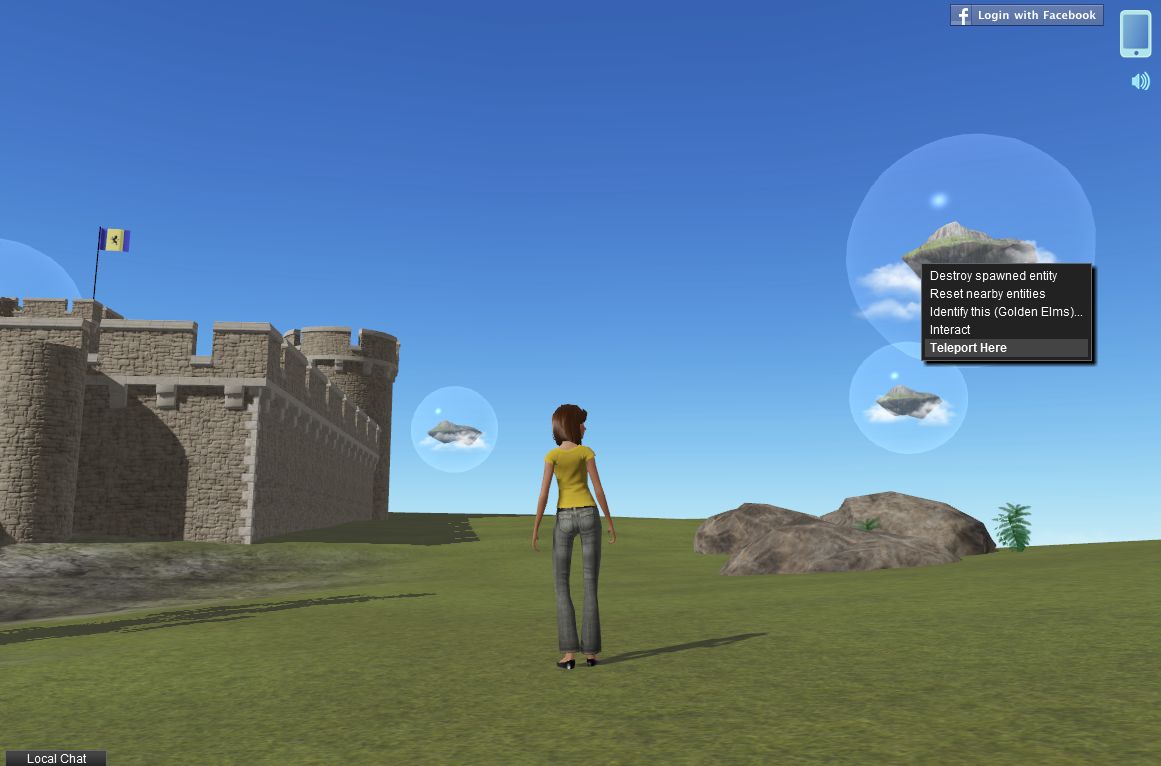
Right-click on avatars, objects or other islands to teleport to them

There doesn’t appear to be any privacy features available – or at least none in obvious use – as I managed to happily island-hop, jump to people’s homes (where the arrival point had been set in-doors) and so on without any let or hindrance. But again, this is an early beta, so privacy options – assuming I’m not missing them – may be coming in the future.

There’s one other means of getting around worth mentioning here, and that’s via the Navigate option on your Cell Phone. Clicking on the Navigation icon displays your “phone” in landscape orientation, with a range of categorised navigation options.

The Navigation “phone” floater with the Popular category displayed

Use the buttons at the top to display the various categories of destination available to you, and then scroll down / up the displayed lists to find a place of interest – then click the green GO button to teleport. Note that destinations in Navigate may be other Cloud Party islands or individual locations within an island, and that currently there is no means to search for a specific destination.

The default female avatar

Right-clicking on avatars, as well as allowing you to teleport to them, also presents you with options to start a private chat with them or view information about them. I’m not sure if these options are functioning as yet or whether I was unable to use them due to being logged-in anonymously.

The avatars in Cloud Party are pretty basic at present, and are somewhat mindful of early Unity 3D avatars. customisation is limited (restricted to skins and outfits, no sliders, etc. for altering shape), and they have a gawky default pose with rather a lot of rubbernecking. Those used to the sophistication on SL and OpenSim are liable to find Cloud Party avies limited – but again, this is only a beta!

Kitely: KCs now virtual currency; web messaging added

The last few weeks have seen Kitely roll out further features to enhance their on-demand virtual world service.

Today, June 10th, the company has announced that Kitely Credits have become a full virtual currency and that web messaging is now a part of the Kitely service.

Kitely Credits as currency

You can now use your Kitely Credits (KC) in-world. This finally makes it possible to sell goods and pay for goods and services in-world. Your current KC balance is shown in your Viewer  – although note that some Viewers may show the balance as “L$” rather than “KC”. Additionally, all of your KC transactions will appear in the History tab on your Kitely account web page, and some transactions can be clicked to get more information such as the name of the item that you bought or sold.

Note that KCs cannot be purchased through the Viewer. This is because the BUY button is hard-coded for the purchase of Linden Dollars. Please continue to use the website to purchase your Kitely Credits.

This is just the first step in Kitely developing KCs, and further features will be added in the coming weeks, including the ability to earn them through charging people to access your world and the ability to pay your monthly payment plan using KCs. Anti-fraud mechanisms will also be rolled out, which will allow in-world ATMs to be created and used (although Kitely recommend ATMs are not implemented by users until the anti-fraud controls are in place).

Web Messaging

The web messaging capability enables Kitely users to contact one another through the website. Wherever a user’s name appears in the website (i.e. on the history page for a world, in the Public Worlds list, etc., you can right-click on the name to display a pop-up menu, which will contain an option to Send Message. Click on this to open a message pad.

Simply type your message into the pad and click on Send. The recipient will get your message the next time they log-in to Kitely, if they are not already logged-in. If they are logged-in at the time you send the message, they will receive it as an Instant Message in-world.

Updates to Group Policy

There have also been a few changes to the Kitely Group Policy:

  • It now costs 100 KC to create a group.
  • Users can join a maximum of 100 groups (note that some viewer may only display a maximum of 42 Groups, but the limit is 100)
  • You must add at least one other member to a group when creating it in addition to yourself. Any group with less than two members will be automatically deleted two days after creation

Note that existing groups were grandfathered in: they didn’t incur the new charge of 100 KC, and have not been deleted if they have only one member.

Finally, there have been a number of additional improvements and tweaks – including the Kitely plugin now supporting the Teapot browser.

In May, the company added the ability to intelligently replace world contents and an automatic disconnect for idle users.

Replace World

The replace world function allows the contents of an existing world to be updated with a new OAR file, retaining some of the settings associated with the world, rather than overwriting them. In particular, the world’s URL remains the same and all Facebook likes and Twitter tweets associated with it are kept. In addition:

  • All of the settings in the Manage World dialogue, e.g. the world’s description and its access controls.
  • Where possible, all parcel settings will be retained. This is handled by the OAR upload process comparing parcel names in the world with those in the OAR file; where the names are the same, the existing settings for the parcel are retained, rather than being replaced by settings in the OAR file. This affects the parcel’s flags (e.g., “No Build”), and the parcel’s permissions: which group it belongs to; which users can enter it; etc.

The Replace World feature is located in the Files tab of the Manage World dialogue (previously called Edit World – note that the Export World feature has also been moved to this tab).

Disconnect idle users

The disconnect idle users helps to ensure you do not remain unduly connected to Kitely (and using either time or Kitely Credits) when real life takes you away from your computer for extended periods and you haven’t logged out. This feature can be used to both ensure you are logged out from Kitely should this happen, and can be used to remove avatars that have been “parked” (i.e. left unattended for extended periods) on your worlds.

Idle avatars can be disconnected automatically after 30 minutes of inactivity in one of two ways:

  • To ensure your own avatar is automatically disconnected: go to your account settings page and ensure Disconnect from worlds when idle is checked (under the General section)
  • To ensure other avatars are automatically disconnected from your own worlds: go to Manage World, then click on the Access tab and make sure Disconnect idle visitors is checked

Transit of Venus

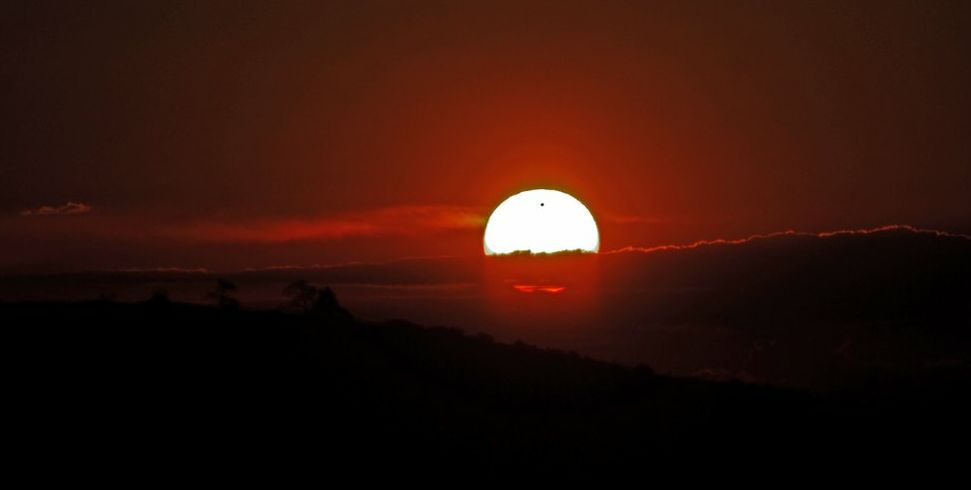
Update June 7th: Two additional images added to this article showing the Black Drop and a wonderful sunset view from Greece.

Well, we didn’t get an in-world venue sorted, but on the night of 5th / 6th of June 2012, a bunch of us gathered (with thousands of others) on Twitter to share in the Transit of Venus. Feeds were widely available from NASA and elsewhere, although many of us stayed with http://www.slooh.com, which provided feeds from telescopes right across the world – Norway, Sweden, mainland USA, Japan, Hawaii, the Pacific, New Zealand, Australia – ten locations in all, hoping to ensure the widest possible coverage should inclement weather interfere with things.

The transit itself has been written about rather a lot – so if you want an overview of the historical context, Wikipedia offers a very informative piece, including the sad tale of Guillaume Le Gentil, which was referred to several times in the SLOOH webcast, and which has itself been immortalised in a the play Transit of Venus. The article also touches on James Cook’s role in observing the transit of 1769.

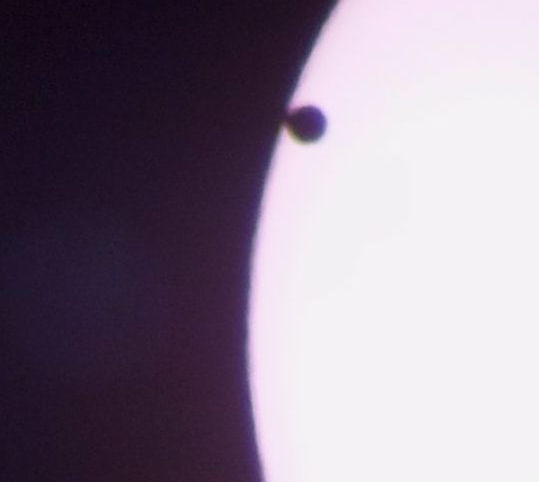
Balu Pulipaka of Indiana captured this image of the “Black Drop” effect as Venus passes through 2nd Contact
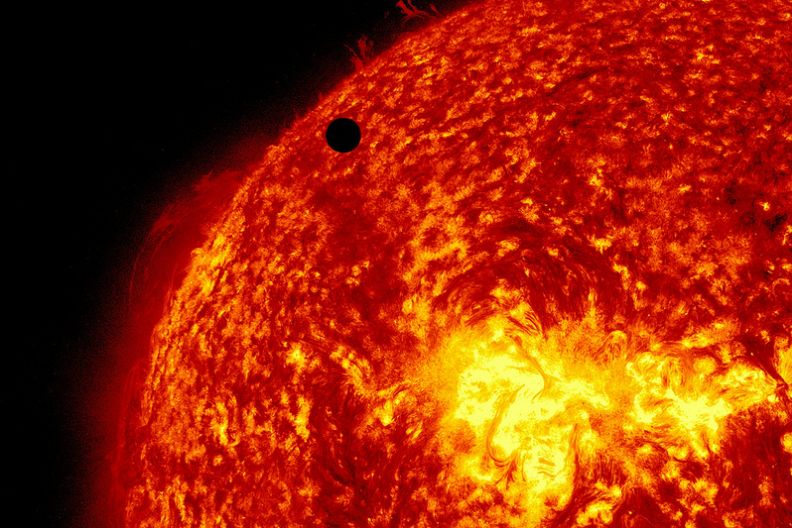
Venus imaged by NASA’s Solar Dynamics Observatory

Today, the Transit is no longer used to help us understand the broader sweep of the solar system per se, but has, in both 2004 and 2012,  been used to assist scientists in the study of exoplanets. In this, the 2012 transit is liable to have been more valuable than 2004, due to increased solar activity as we approach a period of Solar Maximum in the Sun’s (roughly) 11-year cycle.

The view from Greece: Spyros Skikos captures a unique sunset with his camera, Venus prominent against the Sun
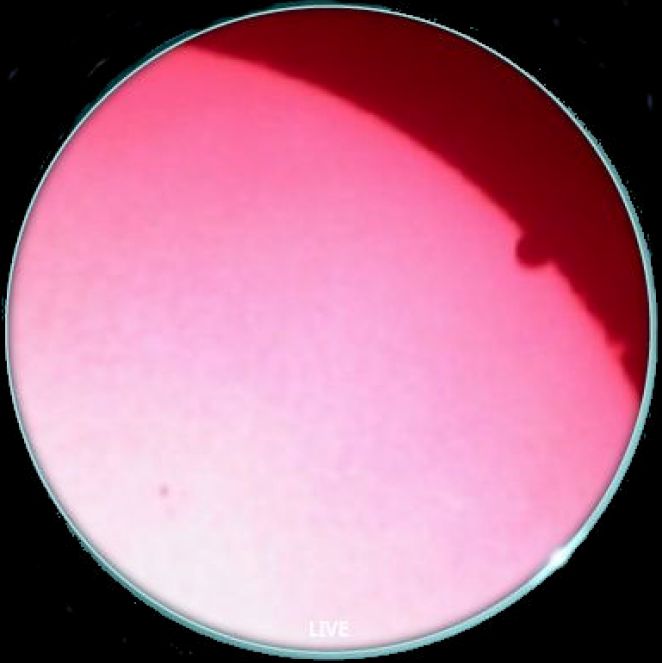
A pink-filtered image from the University of Oslo, showing the end of the transit, with Venus between 3rd and 4th contacts. Note the solar prominence on the limb of the sun just below it (image: http://www.slooh.com)

The 2012 event also helped with the calibration of instruments aboard NASA’s Solar Dynamics Observatory, while observations of the event taken from the Svalbard archipelago coupled with those from the European Venus Express mission in orbit around the planet will also hopefully increase our understanding of the planet’s atmosphere and climatology.

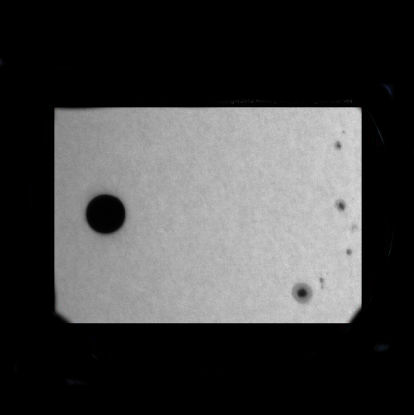
Black & white images from Broome, Australia, showing Venus (left) and sunspots on the face of the sun (image: http://www.slooh.com)

For casual observers, the four periods of contact were perhaps the most enthralling – the points where Venus first “touches” the limb of the sun, then slowly moves inside the sun’s disk until it is entirely “inside) (1st and 2nd Contact) and the point at which it touches the limb of the sun on the other side on its way “out” (3rd Contact), before vanishing entirely (4th Contact).

Of these in turn, the 2nd and 3rd contacts are of interest as they give rise to the so-called “black drop”. This is when light distortion possibly due to sunlight refracting through Venus’ atmosphere  appears to “pull” the edge of Venus to the edge of the sun, elongating it into a tear-like shape, with the limb of the sun appearing to “bend in” towards it.

I’ve compiled a modest slideshow of the event from a number of the SLOOH feeds. The first 10 are from the University of New Mexico feed, while the last ten are from Oahu and the Haleakala volcano observatory, Hawaii. You get the opportunity to see the next transit of Venus live until 2117…

[gigya src=”http://www.flickr.com/apps/slideshow/show.swf?v=71649″ width=”500″ flashvars=”offsite=true&lang=en-us&page_show_url=/photos/inara-pey/sets/72157630005587049/show/&page_show_back_url=/photos/inara-pey/sets/72157630005587049/show/&set_id=72157630005587049&jump_to=” allowFullScreen=”true” ]

(Click here to see the slideshow full screen)

NASA also offer a composite video of the event using images captured by SDO:

A Dragon of a different kind

As I’ve previously posted here on occasion, and as friends on Twitter will know, I has a soft spot for space exploration. Last year I wrote some pieces about the space shuttle Endeavour, and included some favourite images of her prior to her final return to Earth.

Endeavour and the shuttle fleet have now gone; retired to museums and their missions confined to history. However, the last week or so saw the opening of a new chapter in low-Earth orbit space operations as the Dragon space vehicle, developed by Internet entrepreneur Elon Musk’s SpaceX Corporation, became the first privately funded vehicle to dock with the ISS under NASA’s Commercial Orbital Transportation Services programme.

May 22nd 2012: Dragon lifts-off atop SpaceX’s own Falcon 9 launch vehicle (image: SpaceX)

First flown in 2010, the Dragon space vehicle was put through its paces during May 2012 in an aggressive mission to demonstrate its core capabilities of launching a payload to orbit, rendezvousing with the ISS, where it would be captured by a robotic arm on the station and manoeuvred into a hard dock for cargo transfer, before returning to Earth with a payload from the station (in this case, 590 kilos of items, including “quick return” packages intended to demonstrate that SpaceX could return time-critical experiments from the ISS and deliver them to NASA within 48 hours of the Dragon vehicle detaching from the station).

Dragon is designed to be a highly versatile workhorse vehicle, capable of delivering some 3,310kg of cargo to the ISS and returning up to 2,500kg safely to Earth. What’s more the vehicle’s heat shield is designed to withstand re-entry velocities from possible lunar and Mars missions.

Russia’s Progress (l), Europe’s ATV (c) and Japan’s HTV (r)

The ability to make a return to Earth places Dragon is a league of its own compared to the other cargo vehicles currently operating to resupply the ISS. The Russian Progress vehicle, European ATV and Japan’s HTV all burn-up in the upper reaches of the Earth’s atmosphere after departing the space station.

Nor will Dragon be limited to cargo flights: development is under way of the DragonRider variant – a vehicle capable of lifting up to seven people to  / from the ISS. Two further variants of the vehicle are under development: DragonLab, which will see the vehicle operate commercially on its own as an unmanned orbital research platform, with full return-to-Earth capabilities; and RedDragon, which has been proposed as a NASA Discovery mission slated for 2018, which would see a modified version of the unmanned Dragon fly to Mars and deliver a 1-tonne payload to the surface in order to try to sample subsurface water reservoirs.

Dragon approaching the ISS, May 25th 2012 (NASA)

Dragon was launched on its initial COTS mission on May 22nd, 2012. Once successfully in orbit, it commenced a 2-day “chase and rendezvous” flight with the ISS, gradually easing its way up to the space station, where it performed a series of check-out manoeuvres, prior to making its final approach to the station ready for capture and docking on May 25th.

The ISS captured by Dragon’s thermal camera prior to final rendezvous and capture (SpaceX)

Rather than docking directly with the station, as with the likes of the Shuttle, Progress and Europe’s ATV, Dragon gently manoeuvres up close to the station prior to a robotic arm on the ISS itself being used to “grab” the vehicle and then gently ease it into a berthed positioned against the station’s Harmony module.

May 25th capture: “Houston, we have a Dragon by its tail!” Astronaut Don Petit reported upon successfully grappling the vehicle with a robot arm (NASA)

Once successfully docked, Dragon spent several days mated to the ISS while the station crew off-loaded some 460kg of food, water and other items, then packed the vehicle with 560kg of equipment and items for the return to Earth.

Docked! (NASA)

Return operations commenced on May 31st, when the robot arm was used to detach Dragon from the ISS and move it to a distance of some 10 metres before releasing it. Manoeuvring thrusters then gently backed the vehicle away from the ISS prior to it commencing a series of manoeuvres that moved it ahead of the station by a few hundred kilometres, and started the de-orbit process.

Departure (NASA)

After successfully re-entering the Earth’s atmosphere, the main capsule having been detached from the orbital “trunk” of the craft, Dragon safely deployed its parachutes and splashed-down on-target a little under 900 kilometres off the coast of California, where it was recovered by waiting support ships, bringing the flight test phase of the mission to a successful conclusion.

A Dragon in the water (SpaceX)

Dragon is due to fly to the ISS once more in September 2012 in the first official Cargo Resupply Mission, which will see it carry a full load into space. This will be followed in October by Orbital Science’s Cygnus vehicle (which, like Progress et al, is designed to burn-up on re-entry), to mark the further expansion of the COTS programme.

Orbital Sciences’ Cygnus vehicle

For now, however, all eyes remain on SpaceX and their remarkable – and potentially highly versatile – Dragon vehicle; here’s to a successful mission in September! In the meantime, I’ve put together a little slideshow of images from NASA and SpaceX images highlighting the mission.

[gigya src=”http://www.flickr.com/apps/slideshow/show.swf?v=71649″ width=”500″ flashvars=”offsite=true&lang=en-us&page_show_url=photos/inara-pey/sets/72157630013618220/show/&page_show_back_url=photos/inara-pey/sets/72157630013618220/&set_id=72157630013618220&jump_to=” allowFullScreen=”true” ]

(Click here to see the slideshow full screen)

Annular eclipse

May 20/21 2012 saw an annular eclipse of the Sun. This is when the disk of the Moon comes between the Earth and the Sun, but the Moon is moving towards apogee in its orbit (the point at which it is furthest from the centre of the Earth), so that while the Sun, the Moon and the Earth are all aligned in syzygy, the disc of the moon is not large enough to cover that of the Sun to leave only the solar atmosphere visible (as with a total eclipse), but instead sits “inside” the disk of the Sun, creating what is called a “ring of fire”.

The eclipse was observable from China through Japan, Canada and much of the US from the west coast through to Texas. Images of the event were carried via a number of streams across the Internet, allowing thousands more to share in it.

I watched the event on-line (the sun having set in the UK a long time before the eclipse took place), along with a number of other SL friends who are also interested in astronomy, leading to a lively discussion about the eclipse itself and the possibility of hosting similar events in-world in the future. Our main stream for watching the event was provided by SLOOH Space Camera, which had cameras active in both California and New Mexico, although I was also keeping an eye on another feed from Reno, Nevada, which was transmitting via Ustream.

Annularity captured by the SLOOH camera in New Mexico, May 20/21 2012

SLOOH is a superb resource for people interested in astronomy and space exploration, regularly hosting events like observing the eclipse and their images are really excellent. I took the liberty of capturing screen shots of the event, as seen through both of the SLOOH cameras and have put them together in a Flickr slideshow (together with some initial images from the Reno feed and a brilliant photo obtained via the BBC) to try to capture the event.

A closer view through the SLOOH New Mexico camera. Note the sunspot close to the black disk of the Moon

The next major astronomical event SLOOH will be covering is the Transit of Venus next month, and if technology allows, there may be a chance people will be meeting-up in Second Life to witness the event, which will not occur again for another 105 years. If this can be arranged, I’ll be carrying information on the gathering on this blog nearer the dates of the transit (June 5/6).

In the meantime, the slideshow:

[gigya src=”http://www.flickr.com/apps/slideshow/show.swf?v=71649″ width=”625″ flashvars=”offsite=true&lang=en-us&page_show_url=/photos/inara-pey/sets/72157629835513416/show/&page_show_back_url=/photos/inara-pey/sets/72157629835513416/show/&set_id=72157629835513416&jump_to=” allowFullScreen=”true” ]

(Click here to view the slideshow full-screen)

ETA: found this amazing shot of the Moon’s shadow on Earth, seen from the ISS (click to enlarge & enjoy):

Transit of Venus

SunAeon has added a new model to their website: Transit of Venus. As the name suggests, it tracks the forthcoming transit of Venus across the disk of the sun which will occur on the 5th / 6th June 2012, and allows you to experience the transit, even if it is not visible from your location at the time the event occurs.

Transits of Venus across the disk of the Sun are among the rarest of planetary alignments. Only seven have occurred since the invention of the telescope (1631, 1639, 1761, 1769, 1874, 1882 and 2004). Such transits are only possible during early December and early June when Venus’s orbital nodes pass across the Sun, and have a pattern of recurrence at intervals of 8 and 121.5 years, then 8 and 105.5 years. This means that the next close pairing of transits will occur over a century from now in December 2117 (105 years from this year’s transit) and December 2125.

According to NASA, “The entire transit (all four contacts) is visible from northwestern North America, Hawaii, the western Pacific, northern Asia, Japan, Korea, eastern China, Philippines, eastern Australia, and New Zealand. The Sun sets while the transit is still in progress from most of North America, the Caribbean, and northwest South America. Similarly, the transit is already in progress at sunrise for observers in central Asia, the Middle East, Europe, and eastern Africa,. No portion of the transit will be visible from Portugal or southern Spain, western Africa, and the southeastern 2/3 of South America.”

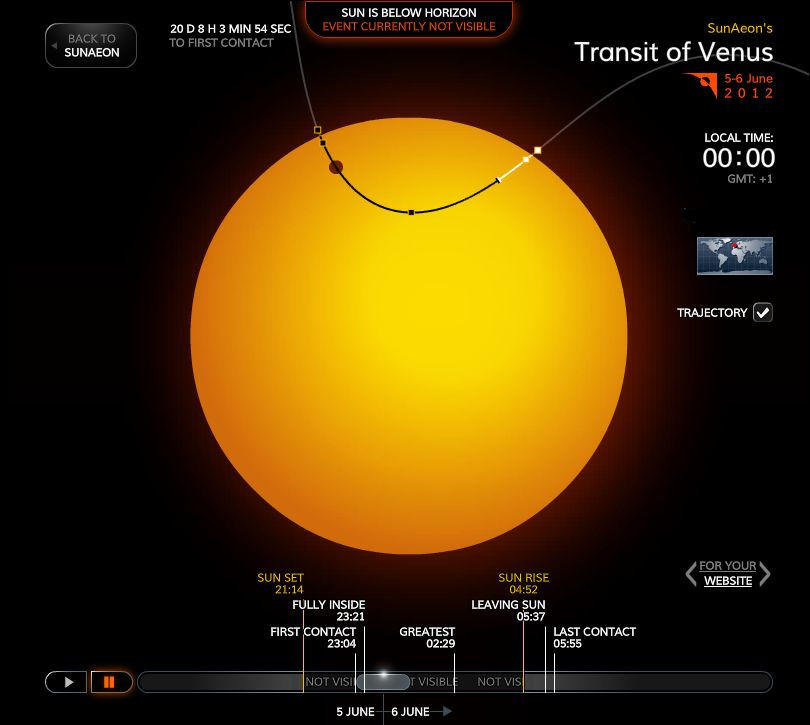
The SunAeon Transit of Venus model

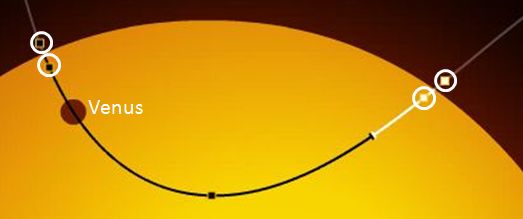
The SunAeon model is an animated representation of the transit, showing all four contacts together with a timeline of events at the bottom. Starting the model with advance the animation through the entire transit sequence, with annotations clearly showing if / when any portion of the transit is visible from your geographic location – making it a handy tool for determining if you want to observe the transit for yourself (and if you do, please observe safe methods of doing so).

For those running astronomy websites, the model also includes a tool for generating code which can be used to embed it in your site.

Venus in transit and the four contacts (circled) in the model

About SunAeon

SunAeon is an educational / immersive project being run by a small team based in Slovakia. It presents an interactive model of the solar system users can explore at leisure, visiting worlds examining data, etc. The team is planning to add further models to the main SunAeon portal, together with other features, including opportunities for social interaction.

Related Links