When I reviewed Kitely, the on-demand virtual world mid-month, I commented on the lack of world-to-world teleports and a couple of problems I encountered with the Viewer plug-in. The ever-vigilant (and ever-helpful) Ilan Tochner from Kitely contacted me to let me know that both a new version of the plug-in and world-to-world teleports were in the pipeline and would be available “soon”.
Little did I realise that by “soon” he meant before the end of the month!
Yesterday, Kitely’s Oren Hurvitz announced that both world-to-world teleports and a new Viewer plug-in, complete with expanded Viewer support had been rolled out. The blog announcement reads in part:
Teleport Between Kitely Worlds
Teleporting between Kitely worlds finally works! If you try to teleport to a world that is online then you’ll be teleported to it immediately. If you try to teleport to a world that is offline then the world will be started; you’ll remain active in the world you are currently in; and once the destination world is ready you’ll be teleported to it automatically.
Teleport options include:
Pressing the Enter World button on the World page for your desired destination
Clicking on a region in your viewer’s grid map
Searching for regions inside your viewer and requesting to teleport to one of them
Opening a Landmark from your inventory and using it to teleport to the landmarked location
Accepting a teleport offer from another user.
This is an excellent move, and one that many have been waiting for. However, it’s probably fair to say that even more welcome is the news that the Viewer plug-in has been overhauled and provides both new features and expanded Viewer support.
Required Upgrade
The new plug-in is a required update, and the process is very smooth. If a Kitely user hasn’t updated, they’ll be informed they must do so, together with a concise 4-step set of instructions, when they click the ENTER WORLD button on any World page. The steps comprise:
Downloading the plug-in
Closing all browser windows
Installing the plug-in
Re-starting their browser
Simples!
The new plug-in now automatically supports some of the most popular Viewers available:
Catznip Viewer
Dolphin Viewer
Exodus Viewer
Firestorm
Imprudence
Kokua Viewer
Nirans Viewer
Restrained Love Viewer
Second Life Viewer
Firestorm Default
The Kitely default Viewer has also changed. for those who have no Viewer installed on their computer when they attempt to enter a world, Firestorm will now be downloaded, replacing Imprudence as the default. There are very logical reasons for this: Firestorm supports both mesh and media-on-a-prim, both of which are seen as important tools for in-world use. It’s also fair to say that with the latest release, Firestorm offers potentially the most flexible UI of any Viewer, and should sit well with those users who like the V1-style UI (available through the “Phoenix” mode) or a customised V3.2 UI. I spent some
I certainly applaud the team for the move – and for expanding the list of supported Viewers to include the other top TPVs, allowing users a very wide choice which includes potentially the best two Viewers for photography and / or machinima: Exodus and Niran’s.
Change Your Viewer from the Settings Page
Your choice of Viewer can now be easily changed from your Kitely Settings page:
Change Viewer through the Settings page
Accessing Kitely Directly from a Viewer’s Grid Manager
With these updates, it is now possible to start Kitely directly from a Viewer – although you will still have to ensure the world itself is running first via its World page.
Details on configuring a Viewer’s Grid Manager can be found on the Kitely website (which also includes instructions for configuring Viewers without a Grid Manager). Once this has been done, the steps to enter a world are:
Go to a World Page and click “Enter World”.
Once the world is ready, you’ll be asked to start your viewer.
Start your viewer; select Kitely in the grid manager; enter your login information.
Click “Login” to log-in to Kitely and your selected world.
These changes bring new flexibility and new capabilities to Kitely, and have been warmly received by users.
Kitely, the “on-demand” grid service recently added Twitter and e-mail sign-up / log-in capabilities to its existing Facebook option. This has opened the service to far more potential users, many of whom were put-off by the Facebook-only approach that was put in place during initial start-up – and I was one of them. However, with the new options available, I decided to drop in to Kitely and take a look around.
For those not in the know, Kitely is a cloud-based VW that utilises an on-demand service operated through Amazon’s S3 and EC2 services. Essentially, if a “world” (analogous to an SL region) is not in use it is stored away rather than running constantly on a server, but can be instantly enabled when someone wishes to access it. This frees Kitely from having to operate complex infrastructure on a 24/7 basis, and allows them to offer a product that is markedly different to other grid-based offerings, as demonstrated by their payment plan – all levels of which provide at least one world / region to every user…
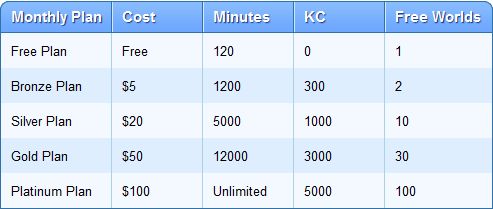
Payment Options
Payment plans (click to enlarge)
The payment options are a mix of fixed monthly plans and what is essentially pay-as-you-go. In this, it very much resembles the types of tariff options offered by cellphone / mobile phone operators.
By default, every new user on Kitely gets a free account. This gives them 2 hours a month access and a “world” (region) of their own if they wish to create one. With this option, additional time in-world is gained through the purchase of Kitely Credits (KCs), which can be brought via PayPal in packs starting at $5 for 1,000. KCs can then be used at the rate of 1 KC per minute of in-world time so a $5 pack can give you an additional 16 hours in-world per month.
The payment plans start from $5 a month. This gives you 20 hours of in-world time, two worlds to use and 300 Kitely Credits a month. The latter can be used to pay for additional in-world time over the allotted 20 hours at the rate of 1 KC per minute (if not used elsewhere), giving you a potential total of 25 hours of in-world time (20+(300/60=)5).
World owners can also define who pays when you visit their worlds – you or them. By default it is you – but to encourage visitors, some worlds are set so that time spent visiting is deducted from the world owner’s KC balance, leaving the balances of any visitors unchanged (so it’s essentially “free” access to the world). Users can also “earn” free time through encouraging those new to Kitely to sign-up and visit their world for 5 minutes or more prior to visiting anywhere else. For every new user who does this, the world owner gains 200 minutes of in-world time.
Finally, as well as the default world available with each payment option, you can also purchase as many additional worlds as you require at the rate of 1 KC per day for each world you require.
Sign-Up
Three options for sign-up to Kitely are available: Facebook, Twitter and E-mail. All three require a valid e-mail address for account validation purposes. The sign-up process is essentially the same for all three: you define your preferred avatar name and gender, provide your e-mail address & accept the Kitely ToS (available to read from the bottom of the website). If you use either Facebook or Twitter, then your credentials from these are used to verify you when logging-in to the system. If you are using the E-mail option, you’ll need to use the e-mail address you supply and password when logging-in.
There are a few points of note with the sign-up / log-in process:
If you have both a Twitter and Facebook account, you can have them linked, allowing you an either / or option to log-in to Kitely – useful if either Facebook or Twitter has a major hiccup
If you log-in using Facebook, you’ll see your Facebook Friends and Facebook Groups; when you log-in via Twitter, you’ll see Twitter Followers and Twitter Lists
The mechanism you use for logging-in may also impact your ability to access Kitely worlds. This won’t be a problem when accessing public worlds (see below), but may affect your ability if attempting to access a specific world. for example: if a world owner has set their world to be accessed by people on their Facebook Friends list, and you are one of those people, but log-in via Twitter, you won’t be able to access that particular world until you re-log to Kitely via your Facebook credentials
As you can only use one e-mail address per account, if you wish to sign-up an Alt at any stage, you’ll have to use an additional e-mail address.
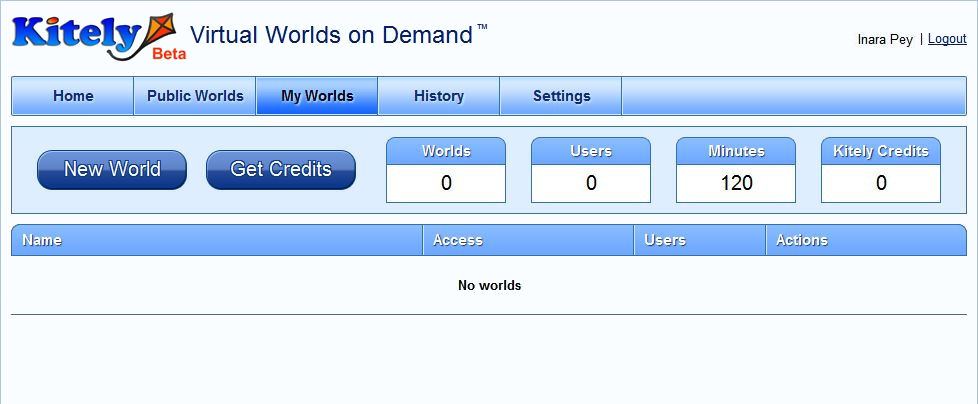
Once you’ve completed the sign-up form and verification process, you can log-in to Kitely. This displays a pop-up advising you on what you can do next – create your own world, visit other worlds or buy Kitely Credits. Clearing this drops you into your My Worlds page, which provides summary information on your account and the world(s) you have created.
My Words summary page, as seen by a new account holder
Accessing Worlds: the Kitely Plug-in and Viewer Selection
Accessing a world within Kitely requires two steps:
Logging into the Kitely website
Logging-in to the required world via the world’s web page
However, the very first time you attempt to enter a world, there are two additional steps you must take: downloading and installing the Kitely plug-in.
You’ll be asked to do this the very first time you click on the ENTER WORLD button from within the Kitely website (see below) – after that, logging-in to a Kitely world from the website is seamless. The plug-in itself takes less than a minute to download on any decent connection, and around the same time to install. It performs a two-fold function:
It launches your Viewer of choice / default Viewer (providing a Viewer is installed)
It automatically completes the username and password fields in the Viewer, allowing you to access your selected world without having to log-in manually through the Viewer
By default, the Viewer selected is the last Viewer installed on your computer. However, it is possible to change this if necessary by following some straightforward instructions.
This is actually a very clean and efficient means of logging-in to Kitely, and gives the appearance that everything is being run directly from the website; but it does assume that everyone coming to Kitely has prior exposure to grid-based VWs and has at least one Viewer installed on their computer. Users new to VWs and without a Viewer will find themselves stuck at the ENTERING WORLDS prompt, quite possibly with no idea as to what has gone wrong.
Note, 16th March: As per Ilan’s comment ion this article, the plug-in should in fact prompt for a Viewer download should no Viewer be detected. The current Viewer is Imprudence, but this may change to Firestorm in the future.
I understand from Ilan Torchner, Kitely’s CEO, that the plug-in is due to be re-written. Whether this will enable it to also install a Viewer (such as the ubiquitous Hippo or similar) as a default is unclear. However, it would appear to be a prudent capability to add as the service increases its user base and increases public awareness of its existence.
Creating Your Own World
Clicking the NEW WORLD button on your MY WORLDS page displays a two-tab pop-up. The first tab allows you to supply the desired name for your world together with any descriptive text (which can be formatted and include images and URLs to websites, etc.) you wish to supply. You can also chose to have the land delivered “empty” (flat default terrain) or with a collaborative environment that includes a number of prefab buildings, or you can opt to upload your own OAR file, if you have previously saved one from another grid.
The second tab of New World enables you to set up who actually pays for their time visiting your world – your visitors or you in terms of minutes / KCs deducted from accounts (default is your visitors), and to set-up access lists of allowed visitors. Once you have satisfied yourself with your initial set-up, click the CREATE button, and the world will be generated and added to your MY WORLDS list.
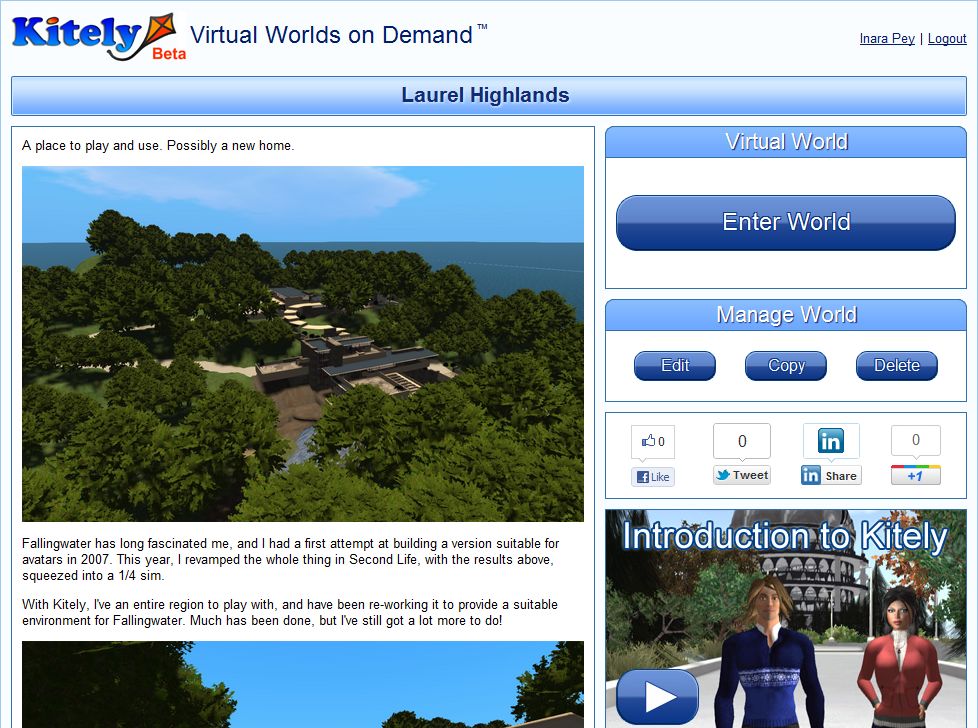
To enter your new world, click on the world name in MY WORLDS. This will display the world page, which includes a large ENTER WORLD button. Clicking this will launch your browser and automatically log you in to your world (duly noting the plug-in installation described above).
My Kitely world page for my (first?) Kitely world…
Entering Your World
Once logged-in via the Viewer of your choice, you’ll have a default male / female avatar in a default outfit there seem to be a number of avatar option for each gender; a friend who logged-in to also take a look at Kitely arrived with a very different default outfit to the one my avatar was wearing.
If you haven’t used an OAR file to define your world, you’ll have a familiar flat, grass / sand 65K+ square metres to play with and – wait for it – 100,000 prims. You also have full region / estate tools access, allowing you to import terrain files, adjust terrain levels and appearance, etc.
Mesh import on Kitely
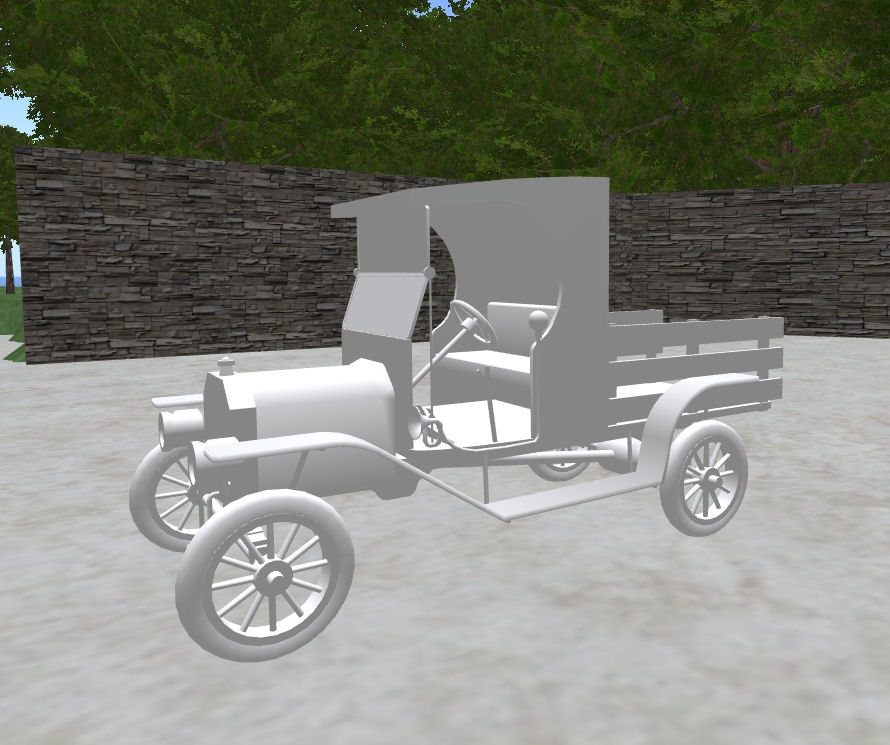
Building and terraforming in Kitely is the same as for SL / OpenSim, and sculpts / mesh are supported. I tested both of the latter using my own sculpt maps generated for Fallingwater and by temporarily uploading a familiar mesh demo model from SL for the latter (right).
XML imports are supported through a suitable Viewer such as Imprudence, allowing you to import content you have created elsewhere and have been able to save locally. There are currently no upload costs to Kitely (including no charges for mesh), making the upload / import of content and your own sculpt maps, textures, etc., easy on the pocket.
 When I reviewed Kitely, the on-demand virtual world mid-month, I commented on the lack of world-to-world teleports and a couple of problems I encountered with the Viewer plug-in. The ever-vigilant (and ever-helpful) Ilan Tochner from Kitely contacted me to let me know that both a new version of the plug-in and world-to-world teleports were in the pipeline and would be available “soon”.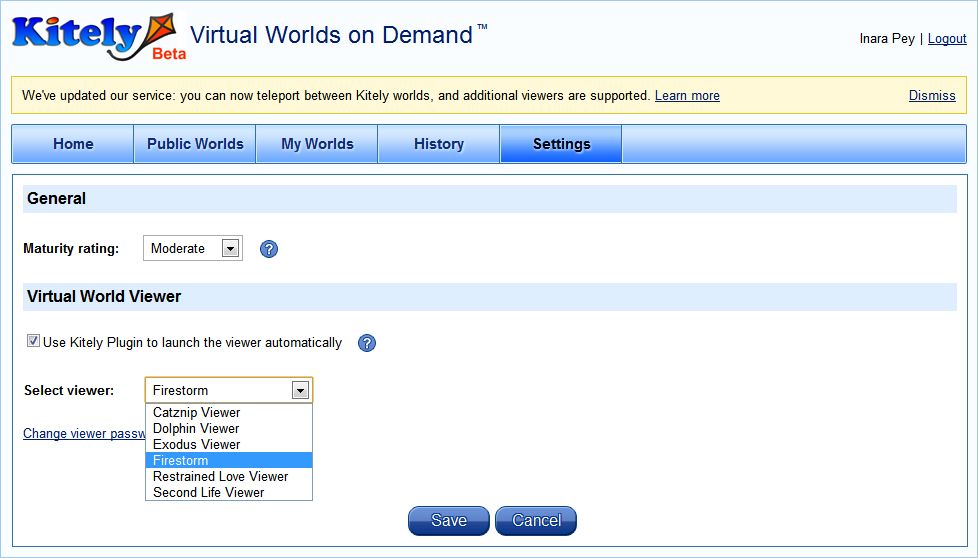

 Inara Pey: Living in a Modemworld