2025 week #6: SL SUG meeting – 2K Bakes on Mesh is live

The Outer Garden, December 2024 – blog post

The following notes were taken from the Tuesday, February 4th, 2025 Simulator User Group (SUG) meeting. They form a summary of the items discussed, and are not intended to be a full transcript, and were taken from Pantera’s video of the meeting, which is embedded at the end – my thanks to her for providing it.

Meeting Overview

  • The Simulator User Group (also referred to by its older name of Server User Group) exists to provide an opportunity for discussion about simulator technology, bugs, and feature ideas.
  • These meetings are conducted (as a rule):
  • Meetings are open to anyone with a concern / interest in the above topics, and form one of a series of regular / semi-regular User Group meetings conducted by Linden Lab.
  • Dates and times of all current meetings can be found on the Second Life Public Calendar, and descriptions of meetings are defined on the SL wiki.

Simulator Deployments

  • On Tuesday, February 4th, 2025, the simulators on the Main SLS channel were restarted with no update.
  • On Wednesday, February 5th, 2025:
    • The Banana Bread update will be deployed to the BlueSteel channel. This include expansions to llGetObjectPermMask that let you get an object’s permission mask taking into account the permissions on its inventory, and that ability has been added to llGOD.
    • The remaining RC channels will be restarted, most likely without any deployment.

SL Viewer Updates

  • Default viewer: version 7.1.11.12363455226, formerly the ExtraFPS RC (multiple performance fixes, aesthetic improvements and UI optimisations), dated December 17, promoted December 20 – No Change.
  • Release Candidate: Forever FPS, version 7.1.12.12999043440, February 4, 2025.
    • Numerous crash and performance fixes.
  • SL Mobile (Beta) version 2025.1.542 / 0.5.533 – Create / Delete accounts, fixes – February 4,  2025.

2K Bakes on Mesh is Live

2k BoM is now live! As of yesterday, we’ve switched over to the new bake service, and we’ll be posting a blog post soon!

– Pepper Linden

This deployment does not require a viewer update, and is grid-wide – more in the Lab’s official blog post (published February 6th). The update should also see faster bake times.

In Brief

Please refer to the video below for the following:

  • There are reports of an uptick in packet loss in simulator – viewer exchanges (reportedly 20% on average), and some are reporting associated lag with local chat.
  • Rider Linden is working on updates to llSetGroundTexture:
    • This will allow a region owner/EM to set and adjust ground textures on a region, including some of the PBR features like rotation, offset and scale.
    • This work should be surfacing in the next simulator update after Banana Bed – called Carrot Cake.
  • Those who have tested ForeverFPS are reporting it offers an improve Linden Water appearance (fresnel reflection/refraction).
  • A request for increased terrain resolution led to a discussion on overhauling the terrain system in various ways, during which Leviathan Linden offered some history about Second Life and Linden World:
The terrain layer currently uses lossy DCT compression … The reason it uses DCT is ancient history: in the beginning SL (or Linden World as we called it back then) was expected to be sending dynamic layer data (terrain, water, wind, clouds, moisture, and ???). For dynamic layers we thought we should be using more compact compression. So terrain was a “layer” and grouped with the others. Eventually all the other layers were dropped and we ended up with a single mostly static layer that is using the wrong compression scheme.
  • The above was interwoven with a discussion on KVP data.
  • Various discussion on Luau and scripting.
  • A general discussion on region crossings.
  • Questions were asked on the Havoc physics engine. Currently, the viewer-side sub-library is being updated to Havok 2022, the simulator is running 2012.1, with Leviathan Linden noting that Havok has tried to “encourage” LL to update on the server-side; however, no physics update is likely to occur in the next year.

† The header images included in these summaries are not intended to represent anything discussed at the meetings; they are simply here to avoid a repeated image of a rooftop of people every week. They are taken from my list of region visits, with a link to the post for those interested.

SL Mobile gains account creation workflow (and more)

Second Life accounts can new be created directly through SL Mobile

On Tuesday, February 4th, 2025, the SL Mobile app updated to version 2025.01.542 (Android) / 0.5.533 (iOS). Chief among the enhancement included is the promised Create Account options, together with the ability to delete an account (if you really want to).

Account Creation

The Create Account workflow is similar to that found when signing-up to Second Life via the official Second Life website, but laid out in a manner suitable for smaller screens, and the key points aspects are:

  • Account creation is initiated directly from the SL Mobile log-in splash screen, which now has a Create Account option directly under the account credentials fields.
  • Tapping this option takes the user to the Account Creation screen where a user name, password, email address, date of birth, etc., can be entered.
    • As per the web sign-up process the e-mail account must be verified within 24 hours by replying to the message that has been sent to it.
  • This page also requires the acceptance of the Terms of Service and Second Life Terms of Service – again, just like the web-oriented sign-up, and which are presented to links to read both.
  • There is also an option to opt-in to the receipt of emails, etc., from the Lab, and a requirement to check a Capcha box.
Initial steps in account creation via SL Mobile: the splash screen option (l) and the sign-up page ((c) and (r)
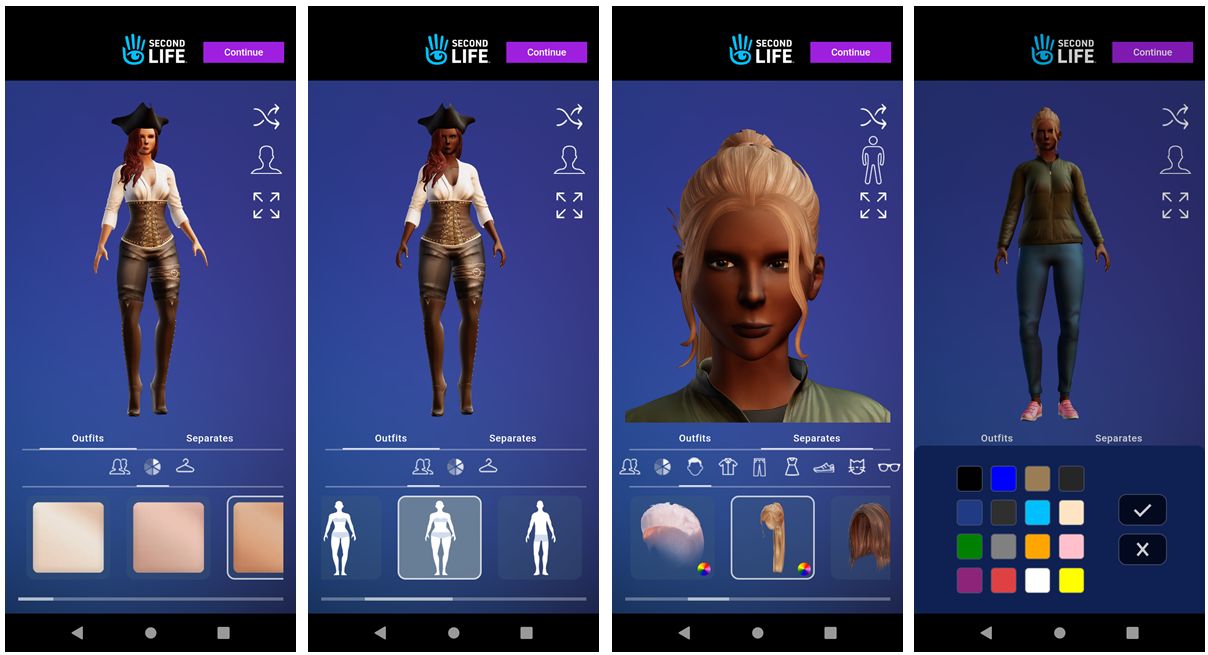
  • Once completed, the form is processed and the user moves on to avatar selection – gender, facial appearance, hair style, outfit selection / clothing selection, etc, again much as the web sign-up process operates.
  • This section uses sliders and tap options to move between selections and to make specific choices (e.g. skin, clothing hair colours, style on clothing, footwear, etc.).
  • Once that avatar shale, gender, skin, clothing, etc., have by set to the user’s satisfaction, tapping the Continue button at the top of the screen will complete the avatar selection process and take the used back the the SL Mobile logging splash screen, complete with their user name entered in the top field.
The avatar selection process through SL Mobile flows much the same workflow as seen when signing-up via the SL website
  • The new account password can then be entered, and the account logged-in, delivering the avatar to Campwich Forest, the default arrival location for those joining via SL Mobile.

Account Deletion

It is now possible to delete an account directly from the SL Mobile app, should you wish:

  • Display the app’s menu.
  • Tap Help
  • Tap the Delete Account option and follow the required steps. Options to progress through the deletion request process will become enabled as required fields are completed.
It is now possible to delete accounts through SL Mobile, with options to progress becoming enabled as required fields are updated by the user

Additional Updates

  • The new Bone Attachment Developer Tools option (requires restart)

    A fix for the formatting issues with off-line Group notices.

  • A new setting in Developer tools – Bone Attachment Point Handling.
    • This is off by default – so no behaviour change from previous versions of the app.
    • When enabled, can improve avatar mesh appearance handling – although a restart is required after changing the setting to see the results.
    • Warning: this option might also cause new problems! If you see anything untoward as a result of enabling – please provide feedback to the Lab.
  • More debug information relating to rigged meshes is sent for developers to use.

Personal Feedback

My own experience of the sign-up process was – painful, with the first page of the sign-up process repeatedly causing SL Mobile to repeatedly freeze.

I have no idea where the problem lay (my hardware – Android 13, with Octa-core (2×1.6 GHz Cortex-A75 & 6×1.6 GHz Cortex-A55) CPU; Mali-G57 MP1; 8Gb primary RAM + 8Gb from 256Gb internal storage -; my wi-fi or something within the app and how it was processing the sign-up page (the avatar selection / customisation process was a lot smoother). Hopefully, this is not a common problem, as adding account creation to SL mobile is a good move for obvious reasons.

As a general note to the Lab, I would suggest placing an avatar mover at the default landing point at Campwich Forest. My test avatar arrived among a group of 12 so tightly packed together no-one could move without slamming into one another (and getting stuck, as push did not appear to be working).

By contrast, account deletion was straight-forward (bye-bye test account!), but I did not experiment with the new Bone Attachment option, as I’ve not noted any issues with the rigged meshes I routinely wear, so see no reason to toggle the setting.


Dreamer’s Landing: a community supporting new users in Second Life

Dreamer’s Landing, February 2025

Update, March 27th: Dreamer’s Landing is being overhauled and is currently closed. 

Co-founded by Ⱥvalon Bouvier and Fire (Fire3850), I first dropped into Dreamer’s Landing in mid-December 2024, drawn by the concept of a setting which brings together both those new to Second Life and those engaged with the platform in order to foment a sense of community, learning, encouragement and support, in which new users gain a better foothold in-world, from being able to find a free home through to having the opportunities for direct mentorship and to engage in social events – users can even apply for jobs within the setting.

At the time of my first visit, there was still work going on setting-up parts of the region, so I had intended to hop back again at the start of the New Year and take a detailed look at Dreamer’s Landing; unfortunately, things being what they were, I didn’t manage to do so until later January – so my apologies to Fire, Avalon and their team for the delay in getting this article put together.

Our mission at Dreamer’s Landing is to provide housing, mentorship and community to new and experienced SL members, where everyone contributes and respects the people within the community. We do this by attracting seasoned residents who want to create community and mentoring.

– Dreamer’s Landing Mission Statement

Dreamer’s Landing, restaurant – February 2025

Occupying a Full private region utilising the Land Capacity bonus offered by Linden Lab, Dreamer’s Landing is not currently a part of the Lab’s Community Gateway programme, as re-launched in 2017. This is primarily because it is more a “next step” community for new users rather than a place for leaping in from sign-up and getting started; however, it does have links with several community gateways, including the Lab’s own welcome hub, where such on-boarding does occur. By keeping a little apart from the usual mix of on-boarding, focused learning (mixing self-learning with mentor support) found within “traditional” Community Gateways, Dreamer’s Landing is able to focus more on personalised support built around the overall sense of community.

In addition, Members of the team may have their own homes within the community and are very much a part of social activities; thus, the sense of friendship and community is further fostered, and this helps lower any embarrassment newer users might otherwise feel when it comes to asking questions / seeking assistance. Within this, Dreamer’s Landing wraps within itself the concept of paying forward; new users obtaining a home within the region are asked to give a little back to the community in support of others, as Avalon noted to me.

We have about 12 mentors at the moment who are volunteering to spend time with our new residents, and we have onboarded 14 new residents so far, hopefully giving them all a lift up to their new life in SL. Part of the project is that we encourage new users to give back by becoming greeters at the Landing Point or by contributing directly to the rest of the community here. We also try to encourage them to discover things they’d like to do in-world. 

– Avalon Bouvier, co-founder, Dreamer’s Landing

Dreamer’s Landing, February 2025

The Landing Point is located on the ground level of the region, which has been attractively laid out in a style of 18th and 19th century French metropolitan architecture, with some Greco-Romano touches. A region surround offers a sense of greater space, whilst the region as a whole mixes community spaces, a small business district, gardens, and residential rentals, all brought together by cobbled avenues and boulevards. As well as the gardens and parks, copses of trees and the waterway cutting through the region help to avoid any sense of the setting being overcrowded.

The residential properties here are kept to the outer edges of the region to offer those renting them with a sense of personal space. If I understand things correctly, these units – taking the form of large classical French townhouses as might be found in Paris – are available to volunteer mentors and new users who wish to remain a part of the community.

The Landing Point sits within the small business district with boutique-style shops focused on fashion, couture and avatar customisation, together with gallery spaces to introduce newcomers to SL’s art scene, and similar.  It is rounded-off by the local café,  which joins with the dancing / music / games square towards the centre of the setting, the restaurant to east with its outdoor terrace / dance area build over the waters of a small cove, and the pool, spa and beach to the south-west as the major event and activity spaces.

Dreamer’s Landing – new user homes, February 2025

Getting around the ground level is easy enough on foot, but the various areas are also linked by the Dreamer’s Landing teleport system which also provides access to the region’s sky platforms. These include:

  • The Education Centre – where classroom lessons can be obtained for those who prefer them, together with self-help guides (touch the bookcases), and residents can apply for volunteer and paid jobs within the community (ads for these can also be found on the ground level). This level also includes the Dreamer’s Landing passport centre and a gifts centre to help new users to get started.
  • The Sandbox – where community members can unpack boxed items they have obtained, practice building, etc., and where community paintball games might be held.
  • The Walk-in Closet – offering space for users to sort their inventory, try outfits, learn about (and purchase) web-based inventory management systems, change their appearance / adjust the positioning of non-rigged attachments  and try them out with various poses, etc., with with the assistance of others or in private changing facilities if they prefer.
Dreamer’s Landing – Education Centre, February 2025

And of course there is the new user free housing. This takes the form a chalet-style housing spread over a sky platform with light landscaping, with personal touches added by the Dreamer’s Landing team, such as a sign welcoming incoming users to their new home and small outdoor community spaces as well.

We currently have 24 free homes for new residents, with about half occupied. Each house is supplied with furnishings and décor, and have an additional 50 LI for personal use. However, if someone wants to have the supplied furniture removed, they can, and that will give them up to 100 LI for personal use. Houses are generally supplied for a two-month period to help people get started, although this might on occasion be extended according to circumstance.

– Fire3850, co-founder, Dreamer’s Landing

Dreamer’s Landing – new user homes, February 2025

From my multiple visits to Dreamer’s Landing, I can personally attest to the friendliness and helpfulness of the folk at Dreamer’s Landing – both established and those who are more recent to Second Life and have volunteered to help within the community. If you know of any recent arrivals to Second Life who are looking for somewhere they might initially treat as home and be among a helpful community – be sure to direct them towards Dreamer’s Landing. Further information on the community – including the schedule of events and entertainment – can be found at the Dreamer’s Landing website.

SLurl and Links

2025 SL viewer release summaries week #5

Logos representative only and should not be seen as an endorsement / preference / recommendation

Updates from the week through to Sunday, February 2nd, 2025

This summary is generally published every Monday, and is a list of SL viewer / client releases (official and TPV) made during the previous week. When reading it, please note:

  • It is based on my Current Viewer Releases Page, a list of all Second Life viewers and clients that are in popular use (and of which I am aware), and which are recognised as adhering to the TPV Policy. This page includes comprehensive links to download pages, blog notes, release notes, etc., as well as links to any / all reviews of specific viewers / clients made within this blog.
  • By its nature, this summary presented here will always be in arrears, please refer to the Current Viewer Release Page for more up-to-date information.
  • Note that for purposes of length, TPV test viewers, preview / beta viewers / nightly builds are generally not recorded in these summaries.

Official LL Viewers

  • Release viewer: version 7.1.11.12363455226. formerly the ExtraFPS RC, dated December 17, promoted December 19 – No change.
  • Release Candidate: Forever FPS, version 7.1.12.12999043440, February 4, 2025.
    • Numerous crash and performance fixes.

LL Viewer Resources

Third-party Viewers

V7-style

  • No updates.

V1-style

  • Cool VL Viewer Stable: 1.32.2.34, February 1, 2025 – release notes.

Mobile / Other Clients

  • SL Mobile updated to version 2025.1.542 (Android) / 0.5.533 (iOS) – February 4.

Additional TPV Resources

Related Links

A look at the Thousand Islands Linden Homes theme in Second Life

Premium Plus Thousand Islands Linden Homes theme – Tiki style units

The newest Linden Homes theme – this one again for Premium Plus subscribers – was launched on Monday, February 3rd, 2025. Entitled Thousand Islands, it comprises the tiki-style homes – which topped-out the list of requested Linden Homes styles – and, for the first time for any Linden Home theme, underwater Grotto Homes.

Set around tropically-styled islands, both themes occupy and same shallow waters, the tiki homes sitting on rafts and the grotto homes scattered across the sandy bottom of the seas, marked by their own floating platforms. As common with Linden Homes, each type come in different styles – six for Tiki, two for Grotto.

Premium Plus Thousand Islands Linden Homes theme – Ohana Tiki Home

The Tiki comprise:

  • Luau – two circular interconnected rooms, a circular pool with a surrounding deck, and a covered deck with an upper level curricular room reached via an external spiral staircase.
  • Ohana – a total of five interconnected circular lower-level rooms, two with upper level connected rooms reached via an interior stairway, with the larger having a balcony. A kidney-shaped pool with large deck area fronts the design with a smaller deck to the rear.
Premium Plus Thousand Islands Linden Homes theme – Puka Tiki Home
  • Puka – a suite of three interconnected circular rooms with a wrap-around deck outside, fronted by a circular pool.
  • Lanai – A rectangular multi-room structure built around three sides of a swimming pool, with covered front walkway / deck and an exposed deck.
Premium Plus Thousand Islands Linden Homes theme – Liani Tiki Home
  • Makai – a main room and two (bedroom?) wings to either side, all built around a raised deck fronted by a lower deck with swimming pool, and two smaller decks to the rear.
    Hula – circular in from with a single round roof over a central room with glass floor section (which can be “shuttered” with wood), fronted by a covered deck to the front and flanked to either side and the rear by three rooms, each with access to a narrow wrap-around deck.
Premium Plus Thousand Islands Linden Homes theme – Puka Tiki Home

The Grotto homes come is two similar styles: the Scallop and the Abalone, each taking the form of a large hollowed rock cut through with glazed window openings, fronts doors and interiors with self-like levels and spaces.

All of the new styles can be previewed at the BelliHub Linden home Demo area, and on first looks, the tiki styles are attractive, with the Ohana giving the greatest amount of internal space, albeit at the cost of mooring space of any boat you might want to leave rezzed out. By contrast, Lanai and Makai offer perhaps the easiest in direct mooring. The inclusion of swimming pools with most of the Tiki designs is a nice touch – although the pools with the Luau, Makai, Ohana styles could benefit from steps/ ladders for getting out of them, rather than having to rely on jumping / flying.

Premium Plus Thousand Islands Linden Homes theme – Abalone (l) and Scallop (r) Grotto homes

The release of the Thousand Islands theme came with a blog post announcing it to be part of a Month of Surprises for Members – those with a Plus, Premium or Premium Plus subscription to Second Life. This being the case, members should keep their eyes on the official blog through the rest of February.

Additional Information

Between the Clouds in Second Life

Between the Clouds, February 2025 – click any image for full size

Over the years I’ve covered many of region settings designed by Bella (BellaSwan Blackheart), and have always enjoyed my time exploring them and taking photos. So when I saw via Bella’s Second Life profile that she now has a place called Between the Clouds, I was curious to see what it might be all about.

Sitting within a Full region split into 16 4096 sq metre parcels – something which, as a by-the-by, I haven’t dropped into in a very long time – Between the Clouds is much smaller than Bella’s other settings. As a result, and upon arrival, the setting might be mistaken as a sky build mostly comprising building shells and – other than upper portion of a tower block apparently thumbing its nose at gravity – little else. But first impressions often deceive, and such is the case here: there is a lot going on and waiting to be discovered.

Between the Clouds, February 2025
Welcome to this little hideaway high upon the sky and discover the hidden spots this place has to offer. Feel free to enter the buildings that are accessible and hang out wherever you want. No nudity or any sexual activities please! 

– Between the Clouds About Land description

Take, for example that floating tower block roof area; it forms the setting’s Landing Point, and the rooftop on which people arrive is speckled by colourful paper cranes whilst the roof over the elevator winch room has been imaginatively turned into a little swimming pool.

Between the Clouds, February 2025

The stairs alongside the winch room lead down to the rest of the remnants of the tower – including the upper doors of an elevator shaft. However, given the rest of the building is not longer there, trying to call for the elevator might be a little difficult. Instead, the stairways offers the most immediate route down – but do beware of the last step, it’s a big one (although a paddling pool has thoughtfully been provided to enable incoming bodies to splash down 😀 ).

Further progress to the setting’s street level requires a further leap of faith. Or at least a leap; one which will drop you down into a grassy courtyard with little businesses tucked into it – although most of these appear to have been shuttered and to have seen better days.

Between the Clouds, February 2025

Two routes out of this courtyard are offered; a narrow alley link through to a much larger square, again overgrown with grass and around which various businesses are arrayed on the ground floors of stubby apartment blocks, one of which appears to have never been completed. The second route away from the courtyard is via stairs leading between more squat buildings. However, this doesn’t go too far – but it down offer a route to a couple more of the little spaces set aside throughout the setting for people to sit an pass the time.

What then of all the little details I mentioned? Well, these take many forms – find the right door, and you can take the stairs up to a trio of small apartments being put to various uses, for example. Another door offers a similar upwards climb ending in the rather unsettling sight of a couple of hazmat-suited figures in heavy gas masks apparently observing the square from behind the gaping maws of frameless windows, one of which has an equally not-too-reassuring sign reading FALLOUT SHELTER beneath it. This little tableau, together with the office space in the same building where a monitor screen warns NO SIGNAL PLEASE STAND BY, possibly offer the makings of a narrative for the setting – but I’ll leave you to work out what form any story might take.

Between the Clouds, February 2025

Also in the large square is a sturdy builder’s scaffold; but while there are building blocks on and under it, it now appears to be in support of a stone statue and fountain, adding another mystery to the setting – a mystery furthered by the apparent hints of habitation which suggest whoever lived here may have rapidly departed: bicycles sit in a rack or propped against walls along with a deserted moped; underwear hangs on a washing line; slippers await feet by an armchair and, most intriguingly of all, a pair of glasses holding paper papers with scribbled sketches and partner by an old cell phone and a stagnant cup of tea, as if suddenly abandoned.

Not that the place is entirely devoid of life; beside the two strange figures up in the apartment building, this is a place rich in bird song and the cooing of pigeons; there’s even a big dog apparently awaiting the return of its owner, who appears to have left some handwritten cards and little bear (perhaps a toy for the dog?) on the bench  – and  I’ll leave you to find the other dog 🙂 . Then there are the setting’s cats; around a dozen of them are scattered around, some keeping an eye on things, other catching up on their sleep – and one taking on the role of an unusual star of a television!

Between the Clouds, February 2025

Deceptively engaging, Between the Clouds is one of those locations which demonstrates you don’t have to have a complete region in which to allow your imagine loose; small can be equally as a captivating and photogenic.

SLurl Details