Leloo’s Jingle Bells Trails, November 2023 – click any image for full size
LeLooUlf is back with another setting for the end-of-year holiday season, Leloo’s Jingle Bells Trails. This delightful sky platform setting is probably best described using LeLoo’s own words:
An enchanting outdoor Holiday Season festival that promises a magical experience for all! Bring your skates and get ready to glide around the frozen pond using the skating system for singles and couples. You can also skate along the beautiful icy paths with the soft glow of twinkling lights. Then take a well-deserved break and visit the outdoor café for some hot cocoa or a cup of mulled wine … Everyone is Welcome to this PG event!
– Jingle Bells Trails
Leloo’s Jingle Bells Trails, November 2023
This is a place that is unabashed in its celebration of the modern spirit of Christmas; there’s a Christmas market, ice skating, snow, reindeer, snowmen, decorated trees, baubles, a mistletoe kissing booth, hot chocolate – the list goes on.
Two paths lead away from the landing point. One is signposted the Skating Path, and the reason becomes clear as to why after travelling along it for a short distance visitors will find it turns to ice and a skate giver and sign where it does – allowing them to continue along the path on foot or by skating along it, passing under a pair of trestle tunnels with glittering lights as the path meanders onwards to reach a junction.
Leloo’s Jingle Bells Trails, November 2023
Here the main path turns to the right, whilst a short stretch continued onwards into the Playful Pond, where a little skating can be had (if the pond is not too crowded for you!). Passing onwards, however, the main path allows visitors to reach a little chapel which, in keeping with the Christmas theme, has a little nativity scene and a decorated tree within.
From here the way loops back towards the landing point once more, a small junction and a footpath enticing visitors to drop in on the setting’s one house, a cosy little place with a fire in the hearth and goodies to be enjoyed in the kitchen. Meanwhile, running westwards, the skating path once again slips under a couple of light-festooned trestle tunnels, one with another path leading away from it to offer a further little diversion – this to visit the setting’s horses.
Leloo’s Jingle Bells Trails, November 2023
Prior to getting back to the landing point, this arm of the path provides access to the main skating pond (around which it largely loops) where among other things, you can join a slightly odd-looking but fun-filled snowman in a dance (or several!) if the skating doesn’t appeal; and he certainly knows his dances (up to and including David Brent’s spectacularly weird dance from The Office – that’s the original UK version, not the US remake). That said, the skating options displayed under the tree occupying the middle of the pond offer an extensive range of opportunities for having a little icy fun.
Just beyond the entrance to the pond, the icy surface of the path gives way to snow, and that to cobbles and the setting’s café, where hot drinks and suchlike are on offer. From here, it is a short walk back to LeLoo’s little market and the landing point. But there is also much more the see and enjoy as you wander: there are little comic vignettes to cause a smile, polar bears who seem to be making the most of the wintery setting, LeLoo’s art to be enjoyed and lots of little photo opportunities. All of which makes for an engaging visit in preparation for the upcoming holidays.
It has been confirmed that Firestorm 6.6.16.70339 has a bug within the client Animation Override (AO) which is affecting multiple users. Because of this, version 70339 is being withdrawn from the Firestorm download page, and will be replaced once a version with the necessary fixes is available. In the meantime, those affected by the issue (not all Firestorm users necessarily are) should consider rolling back to release 6.6.14 to escape the problems.
On Monday November 27th, 2023 (SLT), the Firestorm team released version 6.6.16.70339 of their viewer. This is another release to bring Firestorm up to parity with the more recent releases from Linden Lab as well as adding some new / improved options from the Firestorm team. It is also important for two additional reasons:
It clears a path for Firestorm to move towards a PBR Materials release in line with the Lab’s move to PBR Materials / reflection probes.
It provides a final 32-bit Windows build of the viewer. Going forward, only the 64-bit Windows version will be built and released. See below for more.
This article is not intended to cover every update / change / improvement within the release. These can be found within the Firestorm 6.6.16. release notes, which also provide full credit details for the changes.
This review focuses primarily on the new features included with Firestorm 6.6.16, together with an overview of its parity with Linden Lab’s official viewer code base and and overviews of various updates, improvements and fixes I believe will be of specific interest to Firestorm users in general.
Finally, I have not had time to personally try this release to any great extent, so am not offering any personal feedback on it.
Please note this release is not a Firestorm PBR release. PBR support will be in the next update.
Only download Firestorm from the Firestorm website. Do not utilise and other third-party site purporting to offer the Firestorm viewer, and remember Firestorm will never ask for log-in credentials in order to download a release version of their viewer.
There is no need to perform a clean install with this release if you do not wish to.
Do, however, make sure you back-up all your settings safely so you can restore them after installing 6.6.16.
Version Blocking
As per the Firestorm’s teams standard practice of only supporting 3 active versions of the viewer at any time, note that version 6.6.3 will be blocked from accessing Second Life three weeks from the date of version 6.6.16’s release.
End of 32-Bit Windows Builds
Linden Lab has recently moved their automated viewer build process to Github Actions (GHA) – see here for more. The positive side of this is that Firestorm is particularly well-placed to leverage this change, reducing their own overhead in maintaining a build process whilst also producing more frequent updates. The negative side, however, is that in making this move, Linden Lab removed all of the code libraries required for building a 32-bit Windows version of the viewer.
This means Firestorm 6.6.16 will be the last Firestorm release to support Windows 32-bit, bringing the windows version into line with the Linux and Mac versions
A Note on Inventory Updates
This viewer includes numerous Inventory updates (see below), some of which see changes to the way in which communications between the inventory service and the viewer re managed. Whilst these changes fix a long-standing bug wherein some deleted items became orphaned from the inventory folders and thus invisible, they also mean that these “orphaned” items will now be restored to your Lost and Found folder. So you might want to check Lost and Found and ensure everything in it is for deletion – or move any returned treasures elsewhere before clearing it.
As this re-creation of old items in Lost and Found can occur randomly, JIRA has been raised with the Lab – see BUG-234508.
Linden Lab Updates
Firestorm 6.6.16.70339 is fully merged up to the following recent Linden Lab viewer releases:
Core features – Inventory item preview image; single folder inventory view. See below for a short overview.
Updated Object Profiles: right clicking an inventory item → Properties will display an update profile, which includes the ability to view an associated thumbnail (and create one if there is not one available).
Firestorm users can switch back to the old object profile via Preferences → User Interface → Interface Windows → Use Legacy Object Properties
Notes:
When using the inventory extensions for the first time, the pop-up shown on the right will be displayed.
This version of Firestorm includes and upstream fix from that Lab to suppress false reports of packet loss and log spam noise when visiting GLTF enabled regions on a non-PBR-enabled viewer. See BUG-234550.
Increased limits to the number of Estate Managers and Ban list entries in Estates.
A move to VLC for improved parcel audio playback (streaming audio).
New option: Show Ban Lines On Collision (World → Show) when enabled, will only show ban lines around parcels will only be visible on collision, rather than whenever they are within draw distance.
Inventory Extensions Summary
The Inventory Extension viewer introduced two new features intended to make browsing the contents of your inventory easier. These comprise:
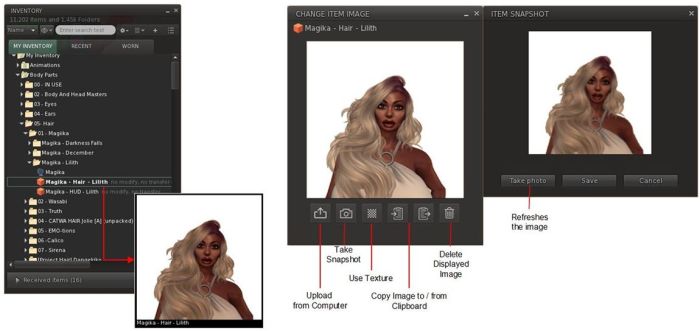
Inventory Item Preview – the ability to include thumbnail images (either your own or supplied by the item’s creator) of items within inventory (clothing, body parts, accessories, attachments). These images are persistently linked to the item / folder (unless intentionally deleted or changed) and displayed whenever the mouse pointer is hovered over the related element.
Single Folder view: the ability to see the contents of a single inventory folder in its own window.
The Item Preview capability comprises two parts:
The ability to view the included thumbnail images on on mouse-over, as noted above.
A dedicated tool for creating thumbnail images, as shown below, right
Note that thumbnails can also be created via an object’s Properties floater.
Elements from the Inventory Extensions capabilities – view and generating thumbnail images
The Single Folder View allows users to open an Inventory folder within a floater of its own, allowing the contents to be viewed without distraction, with them displayed in in one of three ways:
Gallery view – displaying only the thumbnails of those items in the folder for which thumbnails have been created.
List View – all of the folder’s contents, displayed much as they are seen within the open folder in Inventory.
Combination View – those items with an associated thumbnail will have that thumbnail displayed, those which do not will be listed.
Any folder in Inventory can be opened in this manner by right-clicking on it and selecting Open In New Window from the Inventory Context Menu. Further, the floater displaying the open folder includes:
Search (including filtering options) and navigation controls at the top of the floater.
The same tools for accessing additional Inventory management options at the bottom of the floater as those found in the main Inventory panel, together with and additional trash can icon to which items can be dragged-and-dropped to move them to Trash (or can be clicked on when one or more items are selected to move all of them to Trash).
The Single Folder View (right) as supplied by Linden Lab and incorporated in Firestorm 6.6.16, and the menu option used to access it. Note the floater here is set to display in the combined view, in this case showing the thumbnail image supplied by the item’s creator
Important note: Firestorm has had a “Show in new window” option offering similar (but with lesser functionality). This option remains in the viewer for the present, but may be removed in the future. Unfortunately, the Context Menu option for accessing it is displayed directly above the new Open In New Window option (see image above), and the two should not be confused.
The ability to page back and forth between visited Inventory folders in a manner akin to the page back / forward buttons in a browser, and to move back up the folder tree via a similar button. These can all be found in the top left of Inventory floaters.
Inventory Settings
Firestorm 6.6.16 adds a new option called Inventory Settings to the gear icon in the lower-left corner of all Inventory floaters. When clicked, it will display a floater defining how the Inventory view button (again found at the bottom of Inventory floaters, to the left of the Elements count) and how the Show in Inventory option (right-click on an attachment you are wearing and select from menu) and the Find Original option Inventory option (used with inventory links) all behave.
See the images below for both the menu option and the floater it displays with its options.
The Inventory Settings option and floater. Use the radio buttons to set the options in the latter
Preferences
New option for sorting in “Attach to” menus: Preferences → Firestorm → Build 2 → Sort Attachment Spots in “Attach to” Menus Alphabetically (Requires Restart).
When enabled, attachment spots are sorted alphabetically after a restart.
When disabled, attachment sports are ordered according to the hierarchy for alpha priority.
Menus: the Help → Report Problem now redirects to an informational / instructional page on obtaining help from both the Firestorm team and Linden Lab, as shown below.
The new Firestorm Help informational page
Rendering
The issues with motion blur / ghosting after enabling / disabling Shadows has been fixed. This also fixes the related bug that caused saved snapshots to be too dark when Shadows were disabled if Ambient Occlusion was disabled. See: BUG-234275, BUG-234461 and FIRE-33151.
Other Updates of Note
Firestorm 6.6.16 includes numerous bug fixes and improvements – notably with viewer skinning in light of the new Inventory Extensions UI elements, and numerous small improvements to UI element layouts. Please refer to the release notes for details.
Library Updates
FMOD Studio updated to version 2.02.18 – Release Notes.
KDU updated to version 8.3.
Linux Updates
CURL changes: as the use of CURLINFO_SIZE_DOWNLOAD and CURLINFO_SPEED_DOWNLOAD has been deprecated since Curl version 7.55 (2017), the respective replacements are CURLINFO_SIZE_DOWNLOAD_T (documentation here) and CURLINFO_SPEED_DOWNLOAD_T (documentation here). This change will correct the deprecation warnings when compiling with newer versions of curl on Linux.
Library Updates:
SDL updated to version 2.28.4.
Curl library updated to version 8.3.0.232750741.
Nghttp2 library updated to version 1.56.0.232750738.
OpenSSL library updated to version 1.1.1w.232750656.
The IME checkbox has been renamed from “Use IME Text Input” to “Enable Full IME Support” per FIRE-32074.
OpenSim Updates
For OpenSim the Estate Ban limit and number of Estate Managers remain at 500 and 15 respectively, and the new Second Life limits of 750 and 20 respectively are ignored. OpenSim developers will need to add server-side support to enable the higher limits on their grids to make use of the increasing in the viewer.
A fix has been implemented for a potential region crossing crash.
General note: OpenSim does not current support the Inventory Extensions features outlined above.
The following notes were taken from the Tuesday, November 28th Simulator User Group (SUG) meeting. They form a summary of the items discussed, and is not intended to be a full transcript. A video of the meeting is embedded at the end of this summary, my thanks as always to Pantera for recording the meeting and providing it.
Apologies for the lateness of this summary, RL is not playing nice at the moment.
Meeting Overview
The Simulator User Group (also referred to by its older name of Server User Group) exists to provide an opportunity for discussion about simulator technology, bugs, and feature ideas.
They are open to anyone with a concern / interest in the above topics, and form one of a series of regular / semi-regular User Group meetings conducted by Linden Lab.
Dates and times of all current meetings can be found on the Second Life Public Calendar, and descriptions of meetings are defined on the SL wiki.
Simulator Deployments
Tuesday, November 28th: support for PBR Materials was deployed to the SLS Main channel, making it grid-wide.
Wednesday, November 29th: the “Fall Colours” maintenance update should be deployed to the BlueSteel RC. This will include llRezObjectWithParams, llIsFriend, but will not include the game controller updates.
“Fall Colours” is liable to be the last simulator update for 2023.
Viewer Updates
The glTF / PBR Materials viewer, version 7.0.1.6894459864, dated November 17th, was promoted to de facto release status on November 28th, in line with the grid-wide deployment of PBR Materials.
Other viewers in the pipe remain as:
Release channel cohorts:
Maintenance X RC, version 6855926535, issued November 21 – usability improvements.
Maintenance Y, version 6.6.17.6935642049, issued November 21 – My Outfits folder improvements; ability to remove entries from landmark history.
Puppetry project viewer, version 6.6.12.579958, May 11.
Game Controllers
The code remains under internal review at the Lab, particularly around the UI elements needed to support it in the viewer.
Runitai Linden has suggested seeing if it is possible to support a system where the scripter can specify custom input names, which show up in the UI with a select-and-toggle method of mapping game device inputs to those channels, as Leviathan Linden explained at the meeting:
Suppose you were making some custom game with very custom input names (e.g. not “Strafe” and “Jump”), like a Twerking game and you wanted “Wiggle”, “Waggle”, and “Bop” to be the names of your inputs. The scripter would be able to call something like… llGameControlMappings([“Wiggle”, GAME_CONTROL_AXIS_0, “Waggle”, GAME_CONTROL_AXIS_3, “Bop”, GAME_CONTROL_BUTTON_2]); The viewer would then get that info and be able to provide custom UI for setting those input names to the various axes or buttons on whatever device you happen to be using.
– Leviathan Linden describing a proposed custom button names for games controllers
This led to an extended discussion on game controller, mapping buttons, options and approaches.
Leviathan also noted the current version of the back-end support for games controller will be made available on a simulator channel on Aditi (the Beta grid) later in the week.
In Brief
The straw man document Rider Linden has been putting together on combat system improvements is now being circulated within the Lab for comments and feedback. Expect more probably in the new year.
The above, together with BUG-233210 “Third Person View With Mouselook Functionality”, led to a discussion on camera positions, remote vehicle control, etc., which in turn led to a broad conversation on camera placement options and camera control.
Region Crossings: no major update from Monty, who has been out of the office.
A mixed discussion on frame rates (including confusion between server-side frame rates and client FPS performance), region crossings co-habiting regions which are adjoining one another as a defined group on the same simhost server, and much else that was mostly user-side in terms of input. Please refer to the video below.
† The header images included in these summaries are not intended to represent anything discussed at the meetings; they are simply here to avoid a repeated image of a rooftop of people every week. They are taken from my list of region visits, with a link to the post for those interested.
My SL island home, as rendered on the PBR Materials viewer
Second Life is about to undergo something of a revolution in terms of the viewer’s rendering capabilities and – in the future – other capabilities as well as, after around than two year’s worth of development and testing, Linden Lab has deployed physically based rendering (PBR) into Second Life as part of an on-going project to overhaul rendering and other capabilities within the platform, with a focus on adopting as much of the Khronos® glTF™ ¹ 2.0(+) specification as can reasonably be achieved.
“PBR” and “glTF™” are terms which have referenced a lot in forum discussions, Lab Gab sessions, etc., but for many Second Life users it might not be entirely clear as to what it all means. I’ve therefore written this article to offer a layman’s overview of what is happening and what people can expect. I’ve intentionally tried to avoid making this a “one stop tour of everything PBR”, and to keep it as a relatively simple and (hopefully) informative introduction, with a resource list people can use to find out more.
The Terms
Khronos® Group¹
The Khronos® Group is a consortium of 170+ organisations focused on developing, publishing and maintaining open, royalty-free standards for a range of computing applications including 3D graphics, to enable software applications and middleware to effectively harness authoring and accelerated playback of dynamic media across a wide variety of platforms and devices. Some of these standards – such as COLLADA and OpenGL – are already used within Second Life (as the current file format for the import of mesh objects and the graphics API in the viewer respectively), and another Khronos® API – Vulkan – is also being considered as a replacement API for OpenGL in the viewer.
Find out more about the Khronos® Group via Wikipedia.
glTF™ ¹
Developed by the Khronos® Group, the graphics library Transmission Format, or glTF™ specification, is now regarded as the leading standard for sharing 3D and related assets (models, scenes, animations, etc,) authored in multiple tools across multiple platforms and devices in a optimised manner, minimising things like the processing overheads required to render those assets. It also enables content produced in accordance with it to be more easily shared across platforms and services by content creators.
To achieve this, the specification covers many aspects of 3D modelling and rendering, leveraging recognised rendering methodologies to manage the appearance of 3D models and assets, such as physically based rendering (PBR).
Find out more about the glTF™ specification via Wikipedia.
Physically Based Rendering (PBR) is a method of shading and rendering that provides a more accurate representation of how light interacts with material properties, with the aim of making both the environments and objects in a 3D environment appear more life-like in terms of the ambient lighting, haze, light diffusion, how surfaces respond and reflect the lighting within a scene – and in their general appearance.
To put this all into some form of context in how it relates to the PBR Materials project within Second Life: Linden Lab has committed to gradually transitioning Second Life so it more and more adheres to the glTF™ specification.
Note: glTF™ is a core specification. Associated with it are additional features and schema referred to as extensions. Until such extensions are formally adopted into the core glTF™ specification, they are outside the scope of consideration for adoption by Second Life.
Hang On! Second Life Already Has Materials!
A materials system was first introduced into Second Life in 2012/13 (coincidentally the time when the first implementation of PBR-like rendering was being attempted within video games). However, that system of materials handling was based on the Blinn-Phong reflection model, which has roots reaching back as far as the 1970s (Phong), although it was more directly defined to leverage OpenGL and Direct3D. The key point with Blinn-Phong is that it is based on a mix of ad-hoc assumptions and approximations of lighting and reflection, rather than anything modelled in the physical world.
As noted above, PBR is based far more on how physical world light interacts with surfaces and objects, etc., in order to provide a greater sense of depth and realism to rendered scenes. As such, PBR Materials might be said to be more integrated with the overall environment / scene, properly leveraging lighting, rather than being a capability added “on top” of the scene to provide an approximation of surface shine and reflectivity.
To help achieve this more realistic look, the Second Life PBR Materials system supports up to four texture maps: the base colour (which includes the alpha); normal map; metallic / roughness map and emissive map, each with independent scaling. Further, PBR Materials come as a bundle of textures and primitive parameters, such as face tint and specular colour which travel as a single unit and are applied all at once.
Note: I appreciate the above is a rather simple explanation, but as state at the top of this piece, I do not want this article to be overly technical. Others have already provided resources which explain the system in this regard far more capably than I ever could, so I’ll simply leave you to use the resources listed at the end of this article – such as the official PBR Materials Overview in the SL Wiki – to find out more.
Co-Existence
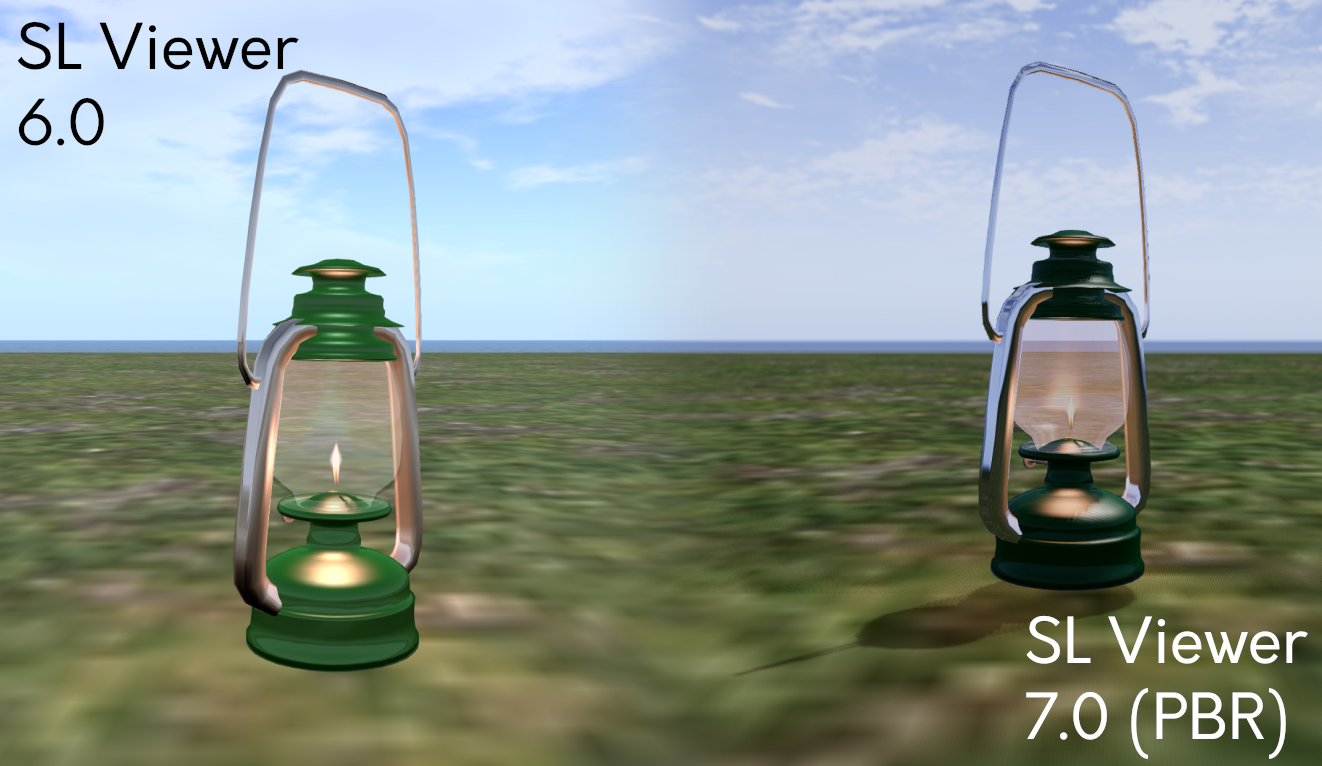
However, this should not be taken to mean the current materials system is now entirely obsolete and no longer useable. It remains possible to use “classic / legacy” materials (texture (diffuse), normal and specular) if required; steps have been taken to ensure that as far as possible, these will render reasonably well via the PBR shaders – but there will be some discernible differences that pop up.
How big / noticeable these differences might be is down to how the “classic / legacy” materials have /are been / being used (e.g. have they ever been exposed to local lighting with SL?). Therefore, users should anticipate objects using the older materials system potentially looking “different” when viewed on a PBR-enabled viewer, but outside of some edge-cases, not excessively so.
Bringing PBR to Second Life means updating the basic calculations of how light is represented and interacts with the world of Second Life. The goal is to integrate these changes while minimally changing how everything that presently exists in Second Life that was designed prior to the introduction of PBR. While the preservation of creative intent and the aesthetic appeal of items users have enjoyed for over two decades of Second Life is always a priority, Second Life is an ever-evolving platform, and to continue to do so, some changes are inevitable.
– PBR Materials Overview in the SL Wiki
The lamp in this screenshot uses “classic / legacy” SL Materials and was created before PBR’s integration into SL. Here it demonstrates some of the visual differences to existing content. The environment used for the screenshot is the viewer’s default Midday preset (Note that the PBR viewer has a new Midday preset). Credit: Jenna Huntsman, via Linden Lab
Some of the Visible Changes Users Can Expect
Some of the updates to the Second Life Build / Edit floater to support PBR Materials
Note: PBR Materials require the use of a PBR-Materials enabled viewer. It may take time for the code to be implemented on all third-party viewers.
The introduction of PBR Materials has required a large-scale overhaul of the viewer’s rendering pipeline (and numerous back-end updates which fall outside the scope of this article). Some of the more visible changes users can expect to see include:
More realistic and immersive reflections (related: see Reflection Probes, below).
More natural ambient lighting within scenes, including a new Midday sky preset).
The use of high-dynamic range (HDR) rendering and tone-mapping, which should result in colours in Second Life generally appearing more saturated, with less detail being lost in shadows and highlights.
Updates to the viewer’s Graphics Preferences, comprising:
The removal of:
Hardware settings – Texture Memory slider, Fog distance Ratio slider and Gamma slider.
Shaders – Bump Mapping and Shiny, Local Lights, Terrain Detail slider, Avatar Cloth, Water Reflections drop-down, Atmospheric Shaders and Advanced Lighting Model.
The repositioning of:
The Sky detail slider.
The Shadows drop-down options.
Ambient Occlusion (renamed: Screen Space Ambient Occlusion).
The introduction of:
Enable / disable Screen Space Reflections.
Drop-downs to set Reflection Detail and Reflection Coverage.
Exposure slider.
Updates to the viewer’s Build Edit floater:
Ability to switch between “classic / legacy” materials (still referred to as “Textures”) and PBR Materials (referred to as “PBR Metallic Roughness”).
Options to copy attributes (colour tint, transparency, glow, materials) between editable objects / object faces.
Of the above, the removal of the Advanced Lighting Model checkbox might be viewed with alarm, given its (not always correctly) linked to viewer performance. However, given the amount of work already completed in viewer rendering performance under the Graphics Improvements project, the loss of this option and the ability to disable atmospheric shaders should have a minimal impact for most users.
That said, for those who are on particularly low-end hardware and have relied on these options to help boost the viewer’s performance on their hardware, please refer to this section of the PBR Materials documentation for guidance on adjusting settings within PBR-enabled viewers.
Capabilities for Content Creators / Modifiers
Note that this is not an exhaustive list, but a simple-to-grasp summary.
Ability to use tools with PBR workflows without sacrificing visual quality on import.
A new Build → Upload option for uploading Materials to Second Life.
Generate new Materials assets which can be sold to other users in-world / via the Marketplace and otherwise exchangeable in accordance with their defined permissions, just like any other texture in Second Life.
Drag and drop Materials asset from inventory and onto an object face.
Perform limited editing on PBR Materials (again in accordance with their specified permissions).
As I am in no way qualified as a content creator, I will leave it to Boston Blaisdale to present an introductory course on creating, uploading, applying and editing PBR Materials, courtesy of the Second Life University.
Reflection Probes
As noted in the above video, a key component within the PBR Materials capability is the idea of a new Second Life volume type called a reflection probe.
“Automatic” reflection probes are located within regions and cannot be moved or edited; they are intended to provide a “default” or “ambient” reflection solution.
Reflection probes can also be created manually, when they are intended to be used in interior spaces such as rooms, homes, etc., or where a specific style / use of reflections is required. They are used to calculate and present reflections based on proximity to them, the local lighting, etc., and will override the default (/ambient) solution (e.g. so an object will not reflect things like the sky outside of a building).
Manually-created reflection probes are defined using a new set of parameters found within the Features tab of the Build / Edit floater.
However, Reflection Probes can be resource-intensive, and so should be used sparingly and efficiently, and should not:
Be used to try to create (planar) mirrors in Second Life – there is a follow-on “Mirrors” project which will enable real-time mirrors in SL within define parameters.
Be attached to small creations such as furniture or décor – these should use the reflection prob(s) within the space in which they reside.
Be worn on an avatar or attached to a physics-enabled object (e.g. a vehicle). By design, and given that reflection probes are intended to be part of a scene, doing so will render the probe inoperative.
Known and Possible Issues
There are some issues and bugs within the PBR code, with two of the most significant perhaps being:
A “slim minority” of users with very, very large inventories and Friends lists may find some objects in a scene do not render when logging-in. Currently, the steps for correcting this are to a) re-log, and if that fails to resolve the problem, b) clear cache.
Some users on Macbooks and / or Apple Silicon systems may experience poor performance on the PBR viewer.
When seen on a non-PBR enabled viewer, objects and avatars may have a blue tinge reflecting off of them. This is a result of the viewer not having the required shaders within the rendering pipe to manage the ambient lighting.
These, and remaining bugs within the system will be dealt with in upcoming maintenance updates to the viewer. Those finding issues with PBR Materials are asked to test on the official viewer, and if necessary raise a bug report.
Looking to the Future
The release of PBR Materials is not the end of the glTF™ project, but rather the first deployment of glTF™-based capabilities. In the coming months the Lab hopes to be able to deliver:
Real-time mirrors: providing the means to have mirrors within scenes reflect their immediate surroundings.
These will leverage a “hero” reflection probe concept (512×512 resolution), with one such probe per scene being active for any given avatar, based on the avatar / camera distance from the mirror.
Work on this is already in progress, and a project viewer for the capability is expected to be available in the very near future.
PBR terrain: providing the means to apply glTF™ materials to terrain as a viewer-side effect to improve the appearance of the SL terrain.
Again, s project to deliver this work is already in progress, and a project viewer supporting the capability will hopefully be available in the near future.
Please note: this is not support for PBR terrain painting.
Materials applied to Second Life terrains. Credit: Linden Lab
glTF™ Scene Import
It is hoped that alongside of the above mirrors / terrain work, and allowing for maintenance releases to the PBR Materials deployment, work will soon commence on developing the capability for Second Life to support glTF™ mesh and scene import.
There is no time frame as to when this will be available for testing or when it might be deployed.
The first steps will likely be the development of a prototype import mechanism.
Once the prototype is available, the Lab will then likely proceed as with the PBR Materials project, invite content creators to engage in the project, provide input / feedback, and then develop the capability on an iterative cycle utilising that input / feedback.
Logos representative only and should not be seen as an endorsement / preference / recommendation
Updates from the week through to Sunday, November 26th, 2023
This summary is generally published every Monday, and is a list of SL viewer / client releases (official and TPV) made during the previous week. When reading it, please note:
It is based on my Current Viewer Releases Page, a list of all Second Life viewers and clients that are in popular use (and of which I am aware), and which are recognised as adhering to the TPV Policy. This page includes comprehensive links to download pages, blog notes, release notes, etc., as well as links to any / all reviews of specific viewers / clients made within this blog.
By its nature, this summary presented here will always be in arrears, please refer to the Current Viewer Release Page for more up-to-date information.
Note that for purposes of length, TPV test viewers, preview / beta viewers / nightly builds are generally not recorded in these summaries.
Official LL Viewers
Release viewer version 6.6.16.6566955269, formerly the Github Actions (GHA) RC viewer, version , issued October 20, promoted October 25 – No Change.
Release channel cohorts:
Maintenance X RC, version 6.6.17.6935636398, issued November 21 – usability improvements.
Maintenance Y, version 6.6.17.6935642049, issued November 21 – My Outfits folder improvements; ability to remove entries from landmark history.
An artist’s impression of NASA’s Europa Clipper passing over Europa. Credit: NASA/JPL
NASA has a tradition of inviting people to have their names added to various robot missions – I’ve mentioned some in this column, and have had both my birth name and my avatar name included on various missions, including both the 2012 Mars Science Laboratory mission and Mars 2020, so they are currently trundling around Mars on the Curiosity and Perseverance rovers, for example.
Europa Clipper mission patch
In just under a year from this article’s publication, NASA is set to launch Europa Clipper, a mission to Jupiter with a focus on studying the icy, potentially watery world of Europa, the second innermost of Jupiter’s Galilean moons.
On entering Jupiter’s orbit in April 2030, the mission will use multiple fly-bys of Europa to study its ice crust and probe the mysteries of what lies beneath it so we might better understand what kind of ocean might exist under its protective shell. In addition, the mission will look for places where a future lander mission might safely touch-down for in situ studies of Europa.
As a part of the Europa Clipper mission, and through until the end of 2023, the public have once again been invited to have their names engraved on a microchip and flown to the Jovian system.
This project, which has been appropriately called (given the mission’s links to water) Message in a Bottle, also sees NASA link up with the current US Poet Laureate Ada Limón. Limón has penned a poem highlighting the watery link between Earth and Europa, together with humanity’s insatiable quest for knowledge. Entitled In Praise of Mystery: a Poem for Europa, it is also being flown on the mission.
Water connects Earth and Europa, the two ocean worlds NASA’s Europa Clipper spacecraft travels between on its journey. The existence of a vast ocean on a moon of Jupiter – which the Europa Clipper mission is equipped to decisively confirm and characterize – is what makes Europa such a promising place to better understand the astrobiological potential for habitable worlds beyond Earth.
– NASA Message in a Bottle
To participate in the project and have your name flown out into the depths of our solar system as a part of the Europa Clipper mission, visit the NASA website Message in a Bottle, and enter your name and requested details. Whilst there, you can also learn more about the mission and also take an interactive tour of Europa Clipper itself, discovering its instruments and their purpose along the way.
If you’d like to know just how names get to be flown on these missions, then the video below should reveal all:
US and European Launch Systems Update
2024 is looking to be a busy year as new US and European launch systems are set to finally (and in some cases, finally finally) debut operationally. Here’s a quick summary of some of the key craft.
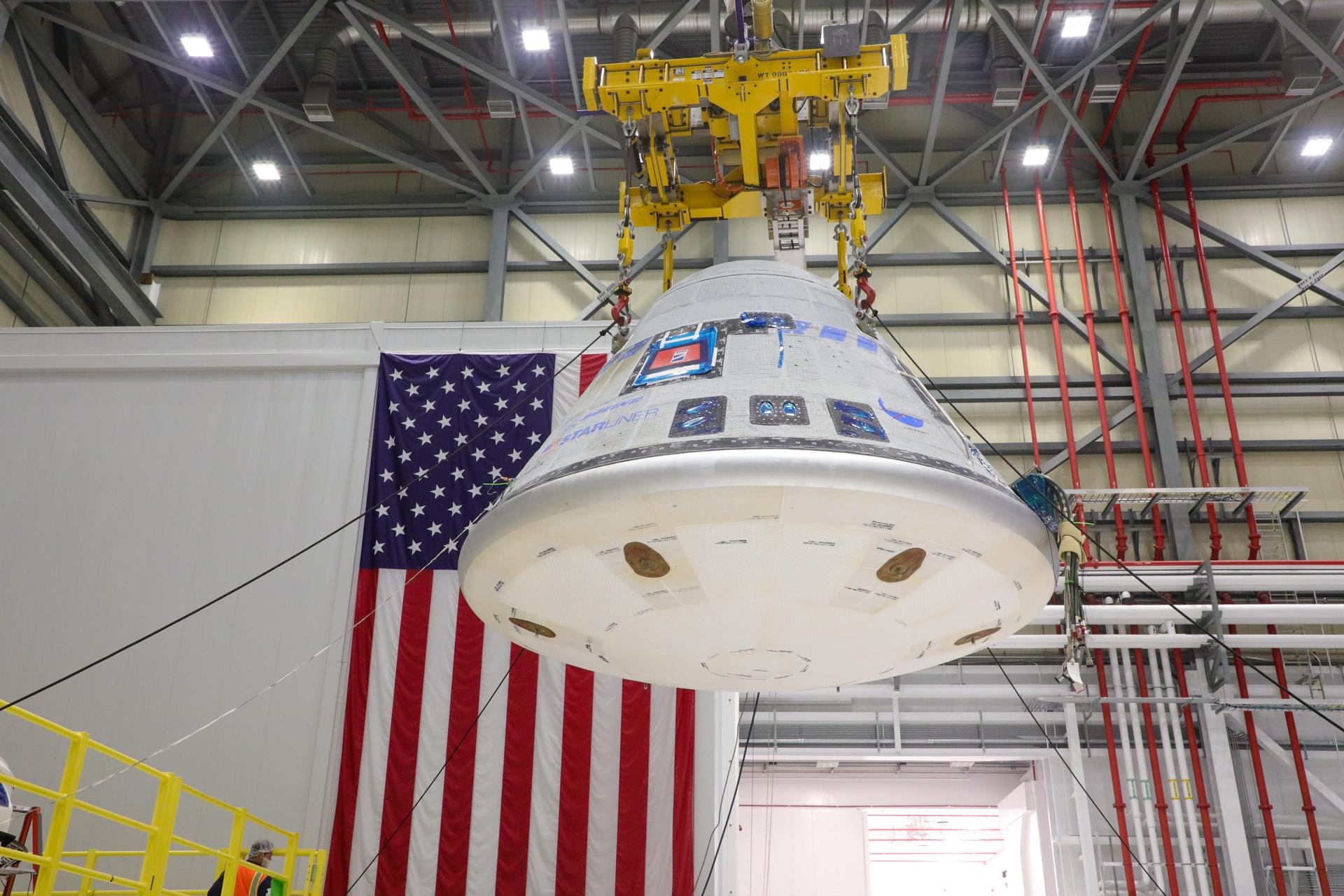
Boeing’s CST-100 Starliner, this is the craft intended to join with SpaceX’s Crew Dragon in delivering personnel to the International Space Station (ISS) and returning them to US soil, and which had originally been set to start crewed flights to the ISS in 2018. However, the programme has been beset by numerous (and at times embarrassing for Boeing) issues, coupled with COVID-2 related shutdowns, which have repeatedly pushed the flight back.
Currently, the first crewed launch – which is still technically a test flight – is scheduled for April / May 2024, and the latest report issued by NASA and Boeing indicate that the vehicle performing that mission and carry NASA astronauts Butch Wilmore and Suni Williams to the ISS for around an 8-day stay, is now 98% certified as being able to perform the mission.
The Boeing CST-100 Starliner crew capsule being prepared for the Crew Flight Test mission. Credit: Boeing/John Grant
When the flight does take place – the exact date will be confirmed in the new year – it will chalk up one or perhaps two historical milestones. It will certainly be first crewed U.S. capsule to make a land-based soft landing, rather than splashing down in the ocean. In addition, it might be the first launch of a US crewed space vehicle from Cape Canaveral rather than the Kennedy Space Centre, since Apollo 7 in 1968.
However, the second of these two honours might yet go to SpaceX and Axiom Space. The former is currently converting their Falcon 9 launch facilities at Canaveral’s SLC-40 pad to support crewed launches. If it certified for such use before April 2024, it will likely be used to launch Axiom Space’s third private mission to the ISS, Ax-3, allowing SpaceX to use the fast-fuelling facilities at Kennedy Space Centre’s Pad 39A for the launch of a robotic mission to the Moon.
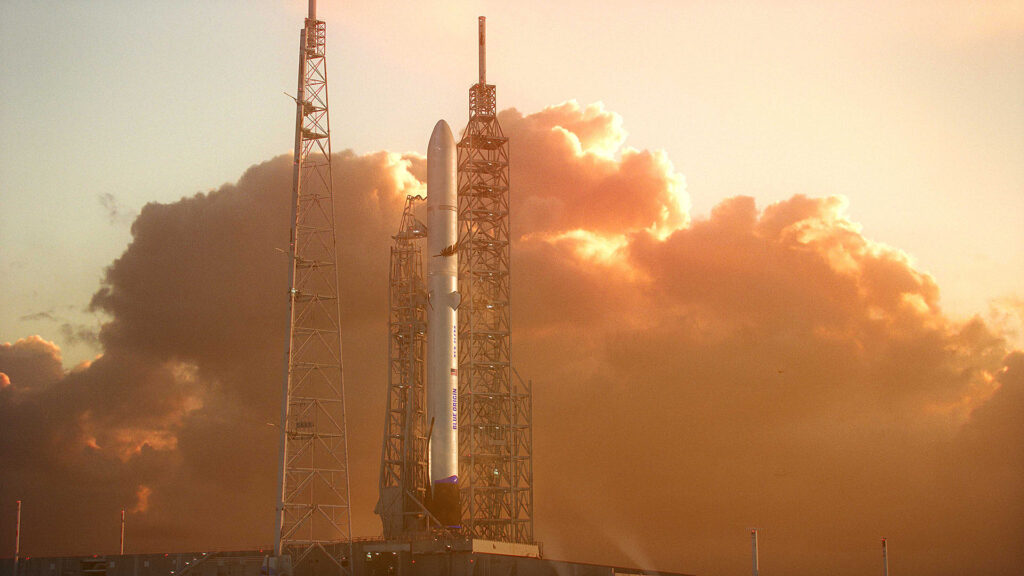
Blue Origin’s New Glenn heavy lift launch vehicle remains on target for a maiden flight in November 2024, which will see it not only lift-off for the first time, but then head to Mars carrying NASA’s Escape and Plasma Acceleration and Dynamic Explorers (ESCAPADES) mission, a pair of smallsats that will study the interaction of the solar wind with the magnetosphere of Mars.
A semi-reusable vehicle capable of hauling up to 45 tonnes to low Earth orbit (LEO) or up to 13.6 tonnes to geostationary transfer orbit (GTO), New Glenn’s first stage is designed to be flown up to 25 times, and the system has a planned cadence of 8 launches per year once operations commence – and Blue Origin have an initial batch of contracts to meet this target.
An artist’s impression of a New Glenn rocket on the pad. Credit: Blue Origin
Unlike SpaceX, which has (despite claims to the contrary) relied exclusively on a mix of private investment rounds and both NASA and US DoD contracts for the majority of its development funding, New Glenn has – barring a US $500 million US DoD contract that enables it to met the requirements for flying classified payloads – been funded entirely out of company founder Jeff Bezo’s own pocket (to the tune of US $2.5 billion by the end of 2017 alone).
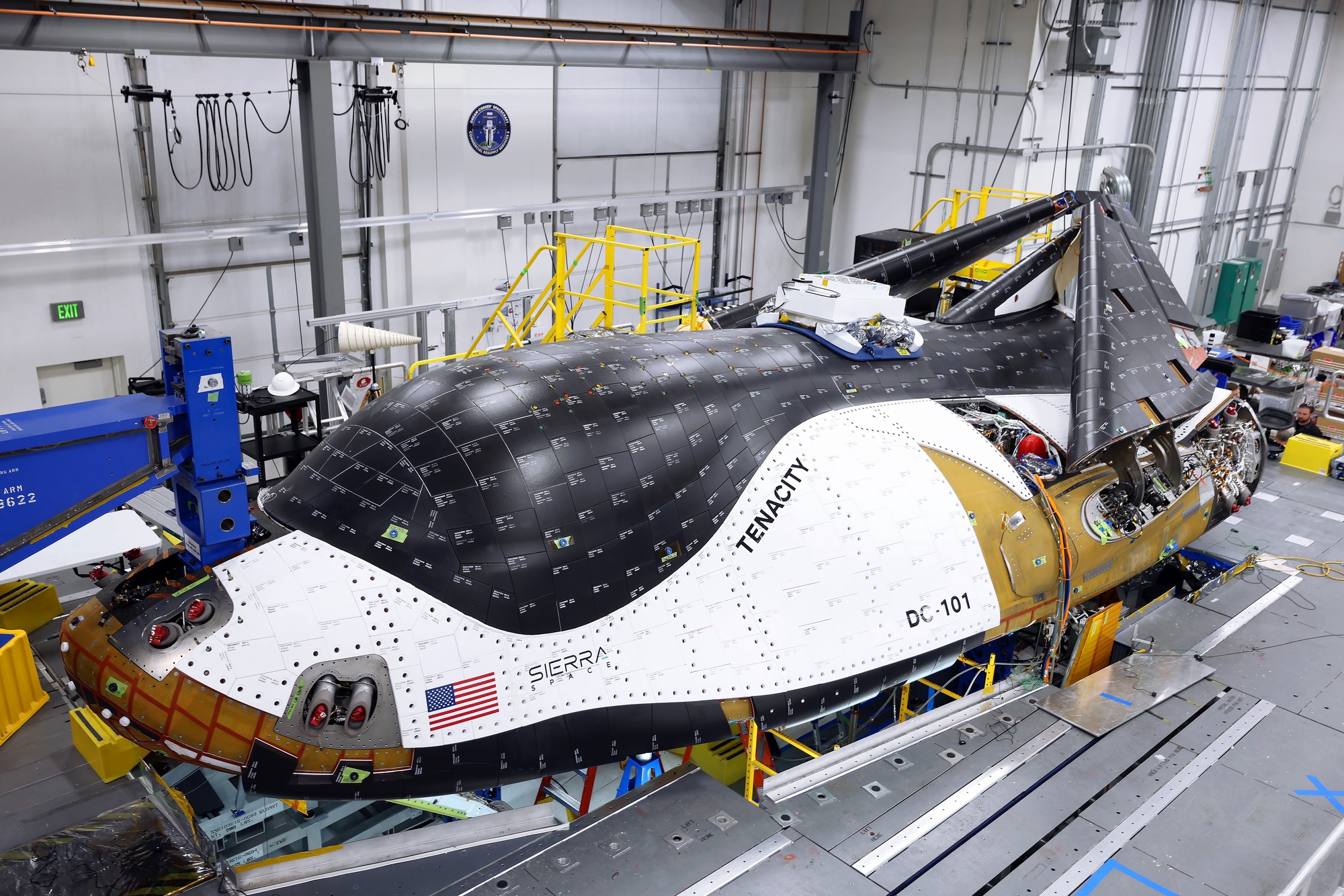
Dream Chaser Cargo, the lifting body space plane designed by Sierra Space to carry up to 5.5 tonnes of payload and supplies to the ISS has passed its latest milestone towards meeting a first planned launch in April 2024. The first operational vehicle – named Tenacity – has been completed, and construction is underway with the second “100 series” craft, built to the same specification as Tenacity. The Tenacity, meanwhile, is now to be transferred to NASA’s Armstrong Test Facility in Ohio for environmental tests, after which it will likely be transferred to Cape Canaveral Space Force Station where it will be readied for its demonstration flight to the ISS.
DC-101 Tenacity, the first orbit-capable Dream Chaser vehicle approaching completion, with its wings folded up to fit within a booster payload fairing. Credit: Sierra Space
Sierra Space has itself been in the news this week after laying-off 165 personnel from the project. However, many of the reports failed to mention that the company had “surge hired” contractors over an 8-month period specifically to see Tenacity completed in order to transition company focus to the second vehicle and a “200 series” version of the craft the company indicated in January 2023 it would be developing – although to date, no further information on this vehicle has been supplied.
Some reports on the layoffs also failed to note that the company was also absorbing 150 personnel from parent company Sierra Nevada Corporation (SNC), as projects requiring staff with requisite security clearances transferred from SNC to Sierra Space.











 Inara Pey: Living in a Modemworld