 On Monday August 14th, 2023 (SLT), the Firestorm team released version 6.6.14.69596 of their viewer. On Monday August 14th, 2023 (SLT), the Firestorm team released version 6.6.14.69596 of their viewer.
This is another release which might be described as more a maintenance update rather thana major features release, intended to keep Firestorm in step with the current official viewer code base. However, it does include some new capabilities. When reading the following, please note:
|
Table of Contents |
Finally, I have not had time to personally try this release to any great extent, so am not offering any personal feedback on it.
Update, August 17th: a JIRA has been filed that rigged meshes viewed in this version of Firestorm using the Local Mesh (BETA) capability (i.e. visible only to the person testing the mesh) introduced in Firestorm 6.6.8 may result in issues. If you are a content creator who uses the Firestorm Local Mesh (BETA) for viewing your rigged mesh creations, please see FIRE-33157.
General Notes
Installation
- Only download Firestorm from the Firestorm website. Do not utilise and other third-party site purporting to offer the Firestorm viewer, and remember Firestorm will never ask for log-in credentials in order to download a release version of their viewer.
- There is no need to perform a clean install with this release if you do not wish to.
- Do, however, make sure you back-up all your settings safely so you can restore them after installing 6.6.14.
Version Blocking
As per the Firestorm’s teams standard practice of only supporting 3 active versions of the viewer at any time, note that version 6.5.6 will be blocked from accessing Second Life three weeks from the date of version 6.6.14’s release.
Special Note: Windows 32-Bit Support
This release of Firestorm is likely the last to fully support the 32-bit version of thee Windows operating system. This is in keeping with LL’s announcement that Windows 32-bit is not longer a supported operating system (see: End of Support for Second Life 32-bit Windows Viewer and Updated Minimum System Requirements for MacOS to 10.13 or Second Life: Win 32-bit support ending; MacOS system requirements updating). A further reason for this is that as a part of the forthcoming switch to using physically based rendering (PBR) under the Kronos glTF 2.0 specification, Linden Lab will only be sub-licensing the 64-bit versions Havok physics library used within the viewer – it is further possible that in the future, other libraries needed by the viewer will only be supported in their 64-bit versions.
Those who are using the 32-bit version of Windows (estimated as around 2% of the Firestorm user base) are advised to check their systems – and if they are using hardware capable of supporting a 64-bit version, to make any necessary upgrades that may be required (generally in the area of RAM), and switch to Windows 64-bit.
An important point to note with this is that 32-bit versions of Windows will not be blocked from accessing Second Life. Rather, viewer upgrades (including the use of required build libraries) will no longer be checked for compatibility with Windows 32-bit. For Firestorm in particular, current 32-bit builds will remain available for the time being; however, no guarantee is given that this will continue to be the case with future releases.
Linden Lab Updates
Firestorm 6.6.14.69596 is fully merged up to the Linden 6.6.14 code-base, per the notes below.
Maintenance T – Maintenance Transparent Translation
- Viewer version 6.6.13.580918, July 2023.
- Primarily focused on the shift of translation services (accessed via Preferences → Chat → Typing → Translation) from Microsoft Bing to Microsoft Azure and DeepL. Also includes a range of Profile-related updates.
Maintenance S – Superlative Supports
- Viewer version 6.6.12.579987, May 2023.
- Predominantly translation updates.
Performance Floater & Auto FPS
- Viewer version 6.6.11.579629, April 2023.
- The official implementation of the Performance Floater & Auto FPS feature first implemented in Firestorm 6.5.3.65658 see my review here.
Maintenance R – Resident Inspired Improvements
- Viewer version 6.6.10.579060, March 2023.
-
Ability for recent chat to be viewed when opening Group IMs; see this official blog post.
-
Estate owners able to restrict scripted agents from entry, per this official blog post.
-
Various updates and fixes.
Maintenance Q Viewer – Quality Contributions
- Viewer version 6.6.9.577968, February 2023.
- Assorted quality of life improvements in the viewer.
Maintenance P Viewer – Preferences, Positions and Paste fixes
- Viewer version 6.6.8.576863, December 2022.
- New Preferences option to hear media & sounds from avatar or camera position – see Feature Request BUG-232338.
- Changes to the sort order of alpha blended, rigged mesh attachments – see this official blog post and a more detailed explanation by Beq Janus.
Firestorm New Features
Building: Select (and Replace) All Matching Textures
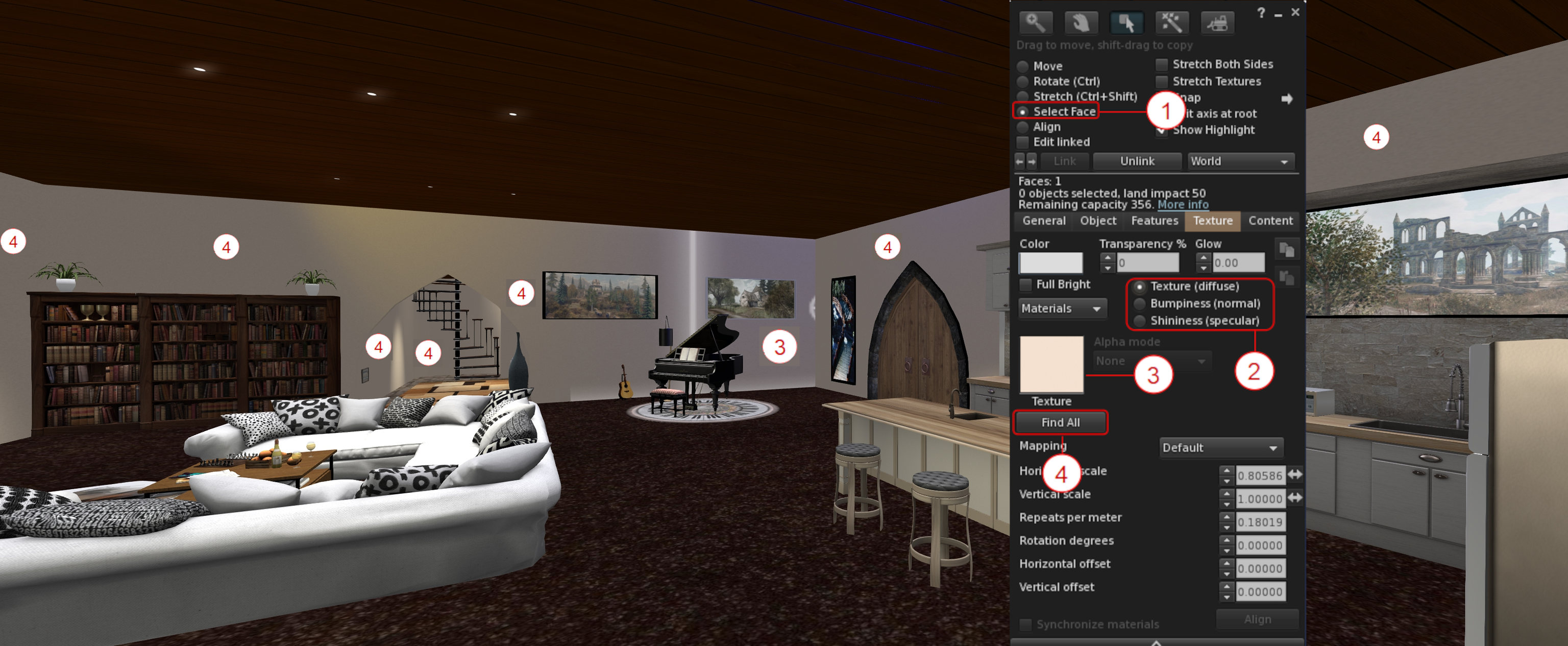
A new option – Find All – within the Build / Edit floater’s Texture tab, allows all faces in an object or linkset using the same diffuse (texture) or normal or specular map, to be updated at once.
- Right-click on the item / linkset to be updated and select Edit from the Context / Pie menu.
- In the upper part of the Edit / Build floater click the Select Face radio button – (1) in the mage below.
- Click the floater’s Texture tab to open it (shown in the image below), and:
- Use the Texture / Bumpiness (Normal) or Glossiness (Specular) radio buttons – (2) in the image below – to select the map type to be updated.
- Click on a face of the object / linkset containing the map to be updated. The face will be highlighted, and the selected map will be displayed in the Texture Swatch box on the Edit / Build floater – (3) on the image below.
- Click on the Find All button to select ALL of the object faces containing the selected map – (4) in the image below.
- When you are satisfied you have selected the correct map / surfaces, click the Texture Swatch in the Edit / Build floater to open the Texture Picker floater and pick the map you wish to use and apply it to all the selected faces in the usual manner.
Building: Strip Unwanted Alpha Channels During Image Uploads
Images uploaded to Second Life can include an empty / almost empty alpha channel which can lead to rendering issues (such as textures flipping back and forth on one another as the camera moves, impacting rendering performance) when the texture is viewed in-world. While such empty / near-empty alpha channels may be intentional, they are generally an accidental or unwanted artefact, and should be removed from the image to avoid issues such as those mentioned above.
To achieve this, Firestorm 6.6.14 introduces an automatic scan of images being uploaded to Second Life to check for alpha channels which are either empty or almost empty.
- If such channels are found in an image, the Upload Preview floater will display an additional warning and checkbox: Empty Alpha Channel Will Be Removed (see the image below, left).
- Leaving this warning checked will cause the the unwanted transparency information to be stripped from the image when it is uploaded.
- If there is a need to have the transparency information uploaded with the image, the warning should be unchecked. However, note that doing so will display an additional caution and explanation on the impact of including alpha channels in images, together with two buttons, as shown in the image below, right.
- Click the required button displayed by the caution to clear it, then click the upload button to proceed with the image upload.

Additional notes:
- The alpha state for the image, once uploaded – “no alpha” or “with alpha” – is displayed at the bottom of the upload floater, alongside the uploaded image size (as arrowed at the button of the image on the left, above).
- The Uploaded Size field has been fixed to correctly show the size of the uploaded image in all cases. see: FIRE-32944.
Inventory: Show Only Coalesced Objects

Firestorm 6.6.14 adds a new inventory option to display only coalesced objects (i.e. multiple items returned to inventory as a single group, rather than being returned individually).
- The option can be found within the Inventory gear icon menu (the gear icon being located at the bottom left of the Inventory floater), directly under those for showing only Modifiable, Copyable or Transferable items in inventory.
- Toggle the option on (check mark visible) and off (no check mark) as required.
- Note the option works in cooperation with all other options in the menu.
- This feature was added in response to FIRE-31369.
Blacklisting: Blacklist Animations via the Animation Explorer
With this release, it is possible to add any animation associated with your avatars and listed by the Animation Explorer to the Firestorm Asset Blacklist:
- Open the animation Explorer (World → Animation Explorer).
- Select the animation to be blacklisted and click the Blacklist button in the lower right section of the Explorer floater.
- Repeat for any other animations, as required and close the floater when done.
- Blocked animations can be reviewed / unblocked via the Asset Blacklist floater (World → Asset Blacklist).
Notes:
- Blocking only applies to animations played through the simulator. Those played locally (i.e. within your viewer) will still be seen by you as playing, even if blocked.
- A Blacklisted animation my still be seen by others for a brief period after blocking, as it will take a second or so for the block information to be propagated through the simulator.
Audio Streaming: Stream Title Floater and Track History
It is now possible to display information on the current song title and artist playing on the parcel audio stream (if active), and a history of the last 10 played music tracks. The information is displayed is its own floaters, accessed via the menu bar → World → Stream Title.

Additional Firestorm Improvements of Note
Inventory
- Reload Received Items: a button within the Received Items section of the Inventory floater will refresh the list of items in the section.

- Ungroup folder: A request to confirm has been added when ungrouping a folder in inventory.
- Inventory offer sound: the Inventory Offer sound (Preferences → Sound & Media → UI Sounds 3 → Inventory Offer) will now play when Automatically Accept New Inventory Items and the following Log Auto-Accepted Inventory Items to Chat are enabled (both under Preferences → Privacy → General). This is is response to FIRE-32396 .
Building and Scripting
-
-
Floater improvements: the floater can now be resized, lists will now scroll, and clipping of text on the Settings tab has been fixed. All in response to FIRE-32624.
-
Floater should now recognise and load all forms of “.DAE” (e.g. Dae DAe DAE dAE and daE). See FIRE-32180.
-
Meshes exported with Autodesk Collada should not longer fail, fixing FIRE-32599.
-
- Script Editor: A fix for the unindent after } when a previous line had a word wrap. See: FIRE-19959.
Animation Playback Floater and Preferences
The additional information displayed in the Animation Playback floater (Priority, Duration, Loop, Ease In, Ease Out and Joints) can now be toggled on/off using a drop-down button (see below).

In addition, the default state of the Playback Floater can be set via Preferences → Firestorm → Build 2 → Always Expand Animation Preview Advanced Information. By default the option is unchecked, meaning the advanced information will not be displayed when the Animation Playback floater is displayed.
General UI / Floater Updates of Note
- Profile updates:
- The View Profile option has been removed from the Context menu for your own avatar, as its already listed in the Community sub-menu. See: FIRE-32304.
- Profile description text should not longer be truncated in some cases. See: FIRE-32901.
- Unsaved text in the Notes tab of another avatar’s Profile should no longer be discarded when the Profile owner enters or leaves the region at the same time. See: FIRE-32926.
- Area Search: updates have been made to Area Search to prevent some of the aggressive culling which is impacted Area Search results.
- However, to get the best results when doing an Area Search, you will still need to turn slowly on the spot once, to fully load all the objects.
- In addition, once an item is added to the Area Search it will/should not vanish a few seconds later as had been the observed behaviour with previous releases.
- There are all partial fixes for FIRE-32688.
- Assorted floater design, typographic corrections, layout corrections and tooltip updates, per the release notes.
Other Updates of Note
Asset Cache Update
Until now, automatic purging of the Asset Cache would only commence when the “max_cache” value was exceeded. This essentially meant that a) the Asset Cache could exceed this value, and b) once started, automatic purging would be pretty much constant, impacting viewer performance.
With Firestorm 6.6.14, this has been changed:
- The “max_cache” value means just that: the largest size the Asset Cache will reach.
- Two thresholds are set via debug settings:
- A” high water” threshold set to 95% of the “max_cache” value. When this is reached, purging of the oldest caches files will commence.
- A “low water” threshold set to 70% of the “max_cache” value. When this is reached, automatic purging will stop.
- These two values will ensure:
- The “high water” threshold leaves 5% capacity available within the Asset Cache, allowing incoming data from a simulator to be properly caches during any automatic purging.
- The “low water” threshold means that automatic purging, once started, will not be constant, potentially impacting viewer performance.
- This also means that users can now set their cache to a ramdisk if they really want and it won’t (normally) overflow.
Library Updates
- FMOD Studio updated to version 2.02.15.
- Havok TPV library updated to version 1.0.577418, in line with LL.
Linux Updates
- Improvement: Firestorm now uses system-wide fontconfig and freetype directly from the user’s system, rather than using 3p libraries packaged with the viewer.
- Fixes:
- A fix for the “alpha triangles bug”(see FIRE-23370).
- WIP to get Linux crash reporting working with Bugsplat.
- The ability to toggle between internal/external browsers in preferences on Linux (Preferences → Network & Files → Connection → Web Browser).
- Updates:

 Inara Pey: Living in a Modemworld
Anyone figure out how to disable the group history? Not liking the double messages..
LikeLike
Try setting the debug setting “FetchGroupChatHistory” to false
LikeLike