OpenSimulator: Justin Clark-Casey steps back

Maria Korolov on Hypergrid Business covers the news that Justin Clark-Casey is significantly scaling-back his involvement in OpenSimulator development.

Justin Clark-Casey
Justin Clark-Casey

For those deeply entrenched in Second Life, his name may well pass unnoticed. However, since 2007, Justin has been deeply involved in OpenSimulator, as both a core developers and as a founding member and first president of the Overte Foundation, a non-profit organisation that manages contribution agreements for the OpenSimulator project.

Just how big a role he has played can in part be seen through the 11,631 code commits he has personally made to the project over eight years  – that averages out to just under four commits every single day.

Justin announced his decision to step back from what has been a central role within the OpenSimulator in a blog post, where he emphasised that he’s doing so in part because he’s shifting career, although he makes it clear he is not leaving OpenSimulator entirely; it just won’t be a primary focus in his life in the foreseeable future:

OpenSimulator (and the Metaverse in general) has been an amazing journey but, as they say, we have grown apart. For whatever reason the area doesn’t fascinate me as it did. For better or for worse, that’s crucial for me to feel happy in my work.

I’m not disappearing completely but very likely for the immediate future my involvement will be at a low ebb (mainly answering mailing list questions and the occasional bug fix). My new field is quite a bit different (data warehousing for genetics and synthetic biology) but I will always have a soft spot for virtual worlds and the idea of the Metaverse.

Justin Clark-Casey's code commits to OpenSimulator amount to 11,631 over eight years, work that has involved him in laying many of the foundations for the project and in re-factoring much of the code-base in 2011/12 (source: Black Duck’s Open Hub open source project tracker, via Hypergrid Business)
Justin Clark-Casey’s code commits to OpenSimulator amount to 11,631 over eight years, work that has involved him in laying many of the foundations for the project and in re-factoring much of the code-base in 2011/12 (source: Black Duck Open Hub open source project tracker, via Hypergrid Business)

As well as his own code contributions, Clark-Casey has been noted for carrying out a significant portion of the work required integrate patches submitted by others, and has also taken on many of the organisational duties and activities which have perhaps been seen as somewhat onerous by other developers.

His popularity and import to the OpenSimulator community can be measures by the outpouring of personal thanks and testimonials which followed his own blog post and featured in Maria’s Hypergrid Business article.

According to Maria, Justin’s announcement has led to some concerns as to the future of the project. While there has never been a single de facto leader for the platform and its very diverse and global community, Clark-Casey has very much been the public face of the platform, hence some of the concerns raised.

However, as others central to the platform’s development have been quick to point out, this is not the first time a key figure has opted to set back from the platform. As it is, the team of core developers has changed over the years and remains strong. Similarly, OpenSimulator itself enjoys broad-based support and engagement from individuals, groups, education and academia and business. As such, there is little need to doubt its foreseeable future.

“Open source development has a high churn of people, for many reasons, and many times people who have been there for a long time simply decide to leave and do something else,” Crista Lopes, creator of the Hypergrid, told is quoted as saying in Hypergrid Business. “The good thing about open source projects is that, if people find them useful or interesting, the projects survive any one particular developer’s absence. That will happen with OpenSim too.”

I only had cause to talk to Justin twice over the years, and was certainly not in any way acquainted with him. However, as a very occasional OpenSimulator visitor (notably via Kitely, OSGid and InWorldz), I offer my own thanks to him for all of his contributions to the OpenSim community, and best wishes as he enters a new stage in his career.

Related Links


The Drax Files 31: digitising ethnography in Second Life

Tom Boellstorff: digital ethnographer extraordinaire - and the focus of World Makers #31
Tom Boellstorff: digital ethnographer extraordinaire – and the focus of World Makers #31

It is directly because of Tom Boellstorff‘s influence that I have tended to cease referring to what goes on the physical world as “real life” and use the term “physical world” instead – as regular readers here may have noticed. As Tom once pointed out to me, such are the complexities of our digital activities and interactions, they are in fact no less “real” than almost everything we do in the “real” world.

I mention this because Tom is the subject of episode #31 of the Drax Files World Makers, and within it, he excellently expands upon this idea. Around half-way through the segment, he focuses down onto the issue of the artificial divide that is consciously established in the mind when one employs the term “real world” to differentiate between physical world interaction and digital interactions. As he points out, given the nature of both, is one any the more “real” than the other? Not really; both have multiple levels of activity and interaction which freely encompass both.

Really, the only thing the use of the term “real” does is perhaps instil a subconscious or active bias against anything related to immersive digital space interactions. As evidence of this, we need only look back as far as  Pamela in the 8th segment of The Drax Files Radio Hour. She is openly dismissive of Second Life for a number of reasons, not the least of which is that it is “not real”.

Tom openly challenges the the use of the world "real" to differentiate between our physical world and digital world activities and interactions
Tom openly challenges the use of the world “real” to differentiate between our physical world and digital world activities and interactions

As an ethnographer and professor at the Department of Anthropology at the University of California, Irvine, Tom has devoted a solid portion of his time to digital ethnography within Second Life. He signed-up to the platform in 2004 – when, as he notes, there were only around 2,500 total users, with an average concurrency of a couple of hundred, and you could fly over every region across the grid and witness what was going on in each of them in a the space of a week.

Since then, he has studied social interactions through Second Life at length, and has written two books on the subject as a result: Coming of Age in Second Life: An Anthropologist Explores the Virtually Human, (Princeton University Press, 2008), and Ethnography and Virtual Worlds: A Handbook of Method (Princeton University Press, 2012, co-authored with Bonnie Nardi, Celia Pearce & T. L. Taylor).  So when it comes to matter of social interaction, interpersonal relationships, the exploration of self and issues of identity, Tom has a lot to say that is directly relevant to today’s world – and not just in terms of virtual spaces like Second Life.

Digital environments like Second Life are unique in the added depth of interaction, self-identity and self-awareness and presentation they offer us

Ethnography, be it studied in either the physical or the digital, is a huge topic to try to encapsulate in just five minutes – and it is to Tom’s credit and Draxtor’s post-production skills that so much is encompassed within the time frame, given this is a very different – and potentially (with no disrespect to the content creators generally features in the series) a lot deeper subject into which to plunge.

Thus it is that as well as an intriguing exploration as to the validity of the word “real” when applied to the digital, we get a measured look at the virtual and all it can encompass to empower us in many ways. Tom encourages us to consider the social and personal interactions we have, which can be as rich and engaging as anything we might experience elsewhere; he highlights the emotional depth offered through even the most simple of digital interactions such as texting one another; and he opens the door to much broader aspects of self and identity, such as in matters of gender. This latter aspect is beautifully underlined with a fine reference to Cecilia D’Anastasio’s Motherboard piece from April 2015, Avatar IRL (which I reviewed here).

a powerful aspect of virtual spaces like Second Life is the power they give individuals to explore matters of their own identity, including issues of gender - as explored with Veronica in Avatar IRL, touched upon visually in World Makers #31
a powerful aspect of virtual spaces like Second Life is the power they give individuals to explore matters of their own identity, including issues of gender – as explored with Veronica in Avatar IRL, touched upon visually in World Makers #31

In discussion matters of identity, there’s also a reflection on the likes of Google, Facebook and other companies who wish monetise everything they can possibly learn about us. The activities of these companies do highlight the importance of identity, and of the need for us to have a freedom to choose how we represent ourselves to the digital world.

Certainly, Second Life stands to give the lie to the idea that anonymity is “about” deception and questionable activities, as some have in the recent past have tried to project. If anything, as a Tom points out, the anonymity embodied in Second Life in terms of user-to-user interactions is a major contributor to people’s willingness to be creatively expressive, and  their ability to establish their own digital business and revenue streams.

Tom participates in, and observes, a group of us engaged in a Digital Cultures Chat

This is another outstanding segment in a series which has never faltered through the 31 episodes to date deliver a relevant commentary on our digital lives and activities. It is also one that perhaps has a somewhat different audience among those outside of Second Life from past segments, highlighting as it does the extreme relevance of the platform to the likes of researchers, academics, etc. It might also, for those willing to listen, offer food for thought to businesses on the benefits of allowing us greater freedom in how we represent ourselves to one another through their platforms and services – and in allowing use to have more say in how the personal information we provide to them directly might be used.

I could prattle on, but really, Tom says everything so clearly and succinctly, that any further observations or interjections I might have are superfluous. Better to watch the segment yourself!

P.S. Tom, if you get to read this – you still owe me a round of golf! 🙂

SL project updates 33/1: server, viewer, Experiences

Eclectica; Inara Pey, August 2015, on FlickrEclectica August 2015 (Flickr) – blog post

Server Deployments

There was no deployment to the Main (SLS) channel on Tuesday, August 11th, following the lack of an RC deployment in week #32.

The three RC channels *should* get a new server maintenance package on Wednesday, August 12th. Details were still TBD at the time of writing, however, it is thought to be a series of updates aimed at reducing the rick of No Copy inventory item losses due to race conditions occurring between the viewer and server.

SL Viewer

There is not expected to be any viewer promotion this week given the Viewer-Managed Marketplace viewer was promoted in week #32, and both of the active RC viewers were updated to match its code base.

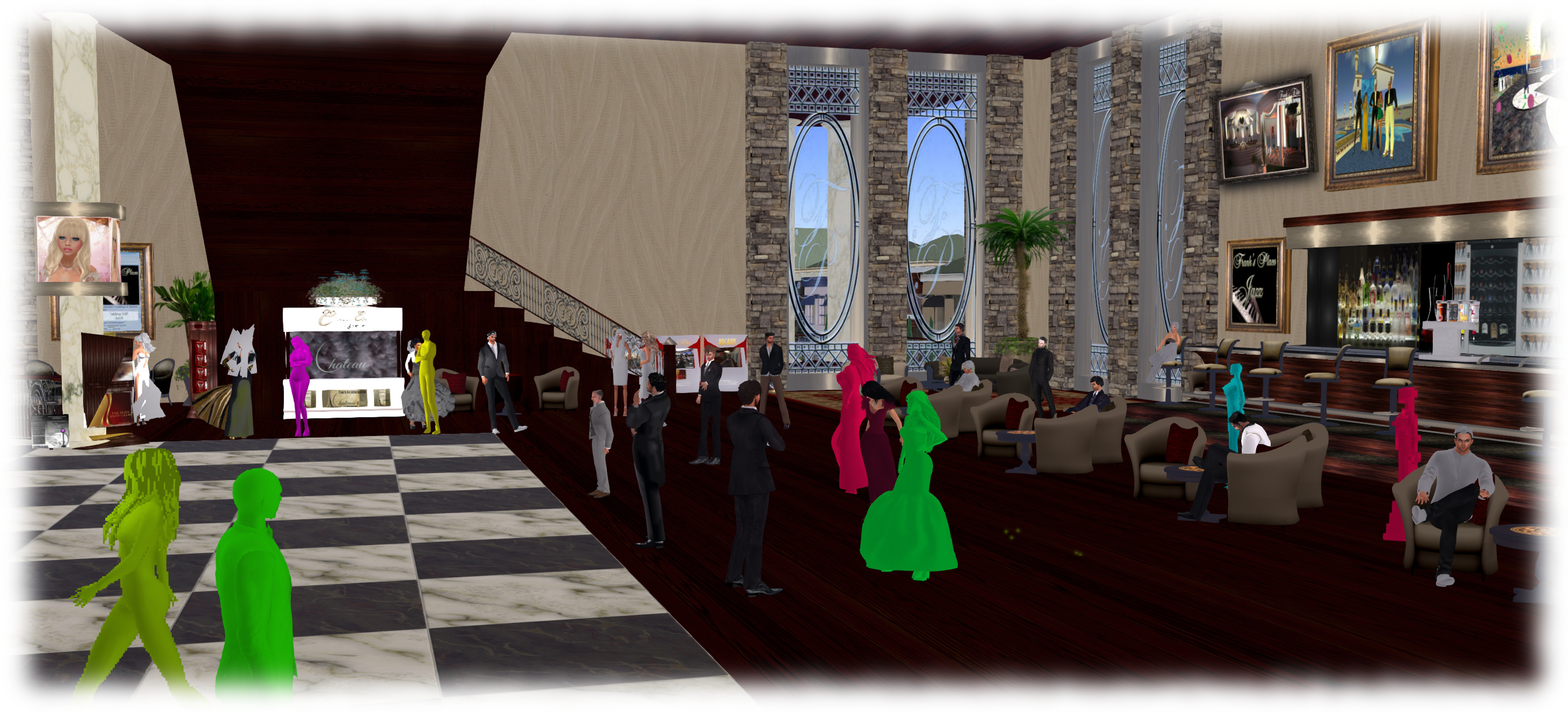
Avatar Complexity (aka Jelly Babies) will hopefully appear in week #33 as a project viewer, as per the Lab's timetable for the project
Avatar Complexity (aka Jelly Babies) will hopefully appear in week #33 as a project viewer, as per the Lab’s timetable for the project

However, it is anticipated that the Avatar Complexity / graphics preset viewer will appear in project viewer during week #33.

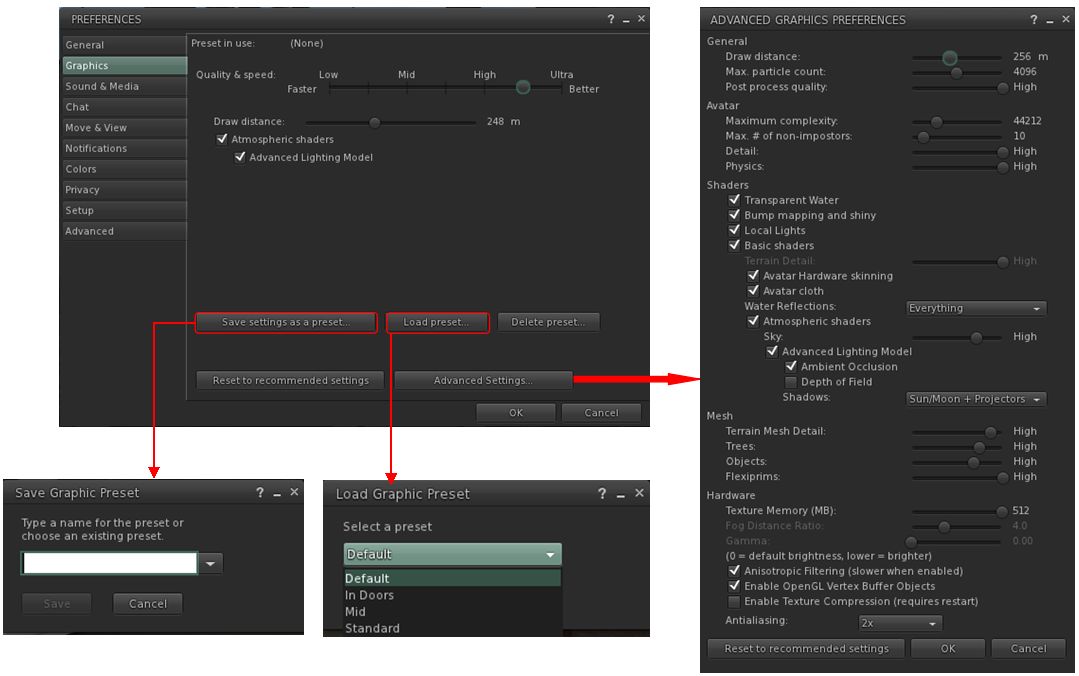
This is the viewer which enabled yo to set a rendering cost above which other avatars and their attachments will be rendered at a solid colour (aka “Jelly Babes”) in order to reduce the load on your GPU. It also provide a means by which users can save and restore different sets of graphics settings within the viewer. The idea being that users can then switch between different presets according to circumstance to help with viewer performance.

I provided a high-level overview of this viewer in June 2015, and I’ll be taking a closer look at it once the project viewer is available for people to download and try.  Currently, the main thing apparently preventing the viewer reaching a project release status is that the Lab is making some final adjustments to get the frequency of the Avatar Complexity notifications it sends to users. the viewer is designed to inform those who have avatars with a high rendering cost how many people around them are rendering them as a Jelly Baby, for example, and the balance of these messages need to be reasonable.

The viewer includes the means to create and save sets of graphics presets which can be quickly loaded according to need / circumstance to help maintain a viewer's performance
The viewer includes the means to create and save sets of graphics presets which can be quickly loaded according to need / circumstance to help maintain a viewer’s performance

Experience Keys / Tools

An issue with Experiences is that access to the KVP data store (used to store data and values for an Experience) is currently handled on the same thread in the region and object rezzing. This means that reading / writing from / to the KVP store can be impacted when a region is busy with people rezzing items, etc. Requests have been put to the Lab to move the KVP access to a separate thread, and now he has completely a number of other tasks, Simon Linden is hoping to look into this and get things separated.

In addition, the Lab is mulling options for further Experience Keys / Tools enhancements. Nothing specific has been decided, and the emphasis is that any changes made will be small, rather than anything “massive”. Without the Lab committing itself to any of them, some of the following were suggested for consideration during the Simulator user group meeting on Tuesday, August 11th:

  • Limiting draw distance within an Experience
  • Providing a means to force sit avatars on items, when required
  • Providing a means to force a user into Mouselook at certain points in an Experience and then back out of Mouselook
  • Providing a means to control set the windlight environment and prevent viewer-side overrides.

A problem with ideas like these is that the options are controlled by the viewer, and could theoretically be over-written by the user unless an RLV-like capability was implemented to prevent cheating by a user simply overriding a setting. However, the Lab are poking at ideas, and we might see further updates of some sort appearing in the future to further enhance Experiences.

Reshade: post-processing Second Life in real time

Reshade: injecting shader effects into Second Life (or any game) in real time
ReShade: overlaying your SL world view with shader effects. In this image, I’m using the ReShade split screen option to show a real-time view of Oyster Bay, with the original windlight-based view on the left, and a preview of effects overlays on the right. (which have been deliberately exaggerated for effect)

ReShade is an application which has been generating a bit of buzz around Second Life for the last couple of weeks. When installed on a Windows PC (7, 8 or 10), it allows you to overlay you Second Life world view with a wide range of shader-based effects, which can be used in screen captures for images, or when recording machinima to offer real-time visual effects.As it is an overlay system, it also works with OpenSim environments.

I first got to hear about ReShade from Whirly Fizzle at the start of August (she in turn got to learn of it through Caetlynn Resident), and having been playing with the beta since then. Just how practical it might be is a matter of personal choice / want / ability with more traditional post-processing tools, etc. However, as version 1.0 launched on August 10th, with some much-need clean-up, I thought I’d offer a write-up on it, together with a few thoughts.

Remember, ReShade is third-party application, LL and TPVs cannot provide assistance in using it – and nor can I. If you need help with it, please refer to the ReShade forums. As relatively new software, it can be a little buggy, and it doesn’t always run with the viewer when installed – again, if you have problems getting it going, neither viewer support teams nor I can really help.

A quick and dirty demo video showing how ReShade effects can be used in real-time machinima capture in Second Life

Set-up

Please ensure you’re logged-out of Second Life when setting-up ReShade.

  • Download the ReShade Framework ZIP file from the ReShade website.
  • Unzip the contents of the downloaded file to a location of your choice.
  • Navigate to the unzipped folder location and right-click on ReShade Mediator and Run As Administrator.
  • The Mediator will launch to display the configuration tab (shown below). This is the UI element used to apply and adjust effects.
  • You now need to create a profile for Framework to work with your viewer.
Your first step is to configure the Framework Mediator to recognise your viewer
  • Under the Profile section on the left of the Mediator, click Add. A file picker will open Use it to navigate to your viewer’s installation folder.
  • Locate the viewer’s .EXE file in the installation folder and click it once to highlight it, and then click the Open button in the picker
  • You will be returned to the Mediator panel, and the viewer name or “Second Life” should be displayed in the profile drop-down (below) – note that some TPVs may display their own name or may display “Second Life”, it makes no difference.
  • Make sure OpenGL has been correctly identified. Click on the Confirm button to create a profile for your viewer.
When adding a viewer to ReShade Framework, note it may display as
When adding a viewer to ReShade Framework, note it may display as “Second Life” rather than the viewer’s name – this doesn’t prevent things from working
  • When Mediator has finished creating the profile, click Apply at the top right of the panel.

The set-up process is now complete. However:

  • Note that this has created two files in your viewer’s installation folder: reshade.fx and opengl32.dll. These must be deleted if you decide to remove ReShade from your PC.
  • Also, as I’ve found ReShade to be slightly flaky, before going any further, copy the opengl32.dll and save the copy in another location – I’ll explain why later.

Continue reading “Reshade: post-processing Second Life in real time”

The Seasons of Life in Second Life

Seasons of Life - LEA 4
Seasons of Life – LEA 4

Now open at LEA 4 is Seasons of Life by John (Johannes1977 Resident), a Second Life photographer who has been rightfully gaining a respected reputation in-world for his photographic studies, which straddle the virtual and the physical worlds. As a serving member of the US Marines, for example, he shot a series of photographs showing military life whilst on deployment to Afghanistan, and these were recently featured in an exhibition at The Rose Gallery, Angel Manor.

Seasons Of Life is focused squarely on John’s work as an in-world artist, and is his first exhibition at the LEA. In his words, it represents “a person’s life cycle combined with the scientific seasons of the Earth”.

It sees the region, which is largely flooded at ground level, divided into five areas. Four of these are devoted to the four seasons – Winter, Spring Summer and Autumn, each presided over by portraits of its Guardian, as modelled by Draakje Dailey (Spring), Eleseren Brianna (Summer),  Emma Portilo (Winter) and Issy Flatley (Autumn). The fifth area is given over to the Guardian of the Night, modelled by  Seashell Dench.

Seasons of Life - LEA 4
Seasons of Life – LEA 4

The portraits are individually and collectively fascinating, presented in a variety of styles which offer strong contrasts to one another, while at the same time complimenting their individual seasonal theme,

For example, the Winter Guardian is presented in two monochrome / grey-scale images, providing a subtle emphasis of the cold grip winters holds. However, where one has a bold, charcoal-like thrust to it, the other offers a more gentle, light-handed pencil feel to it. Thus they contrast with one another while at the same time complementing the scene they present – the stark boldness of the darker image emphasising the Guardian’s power as she towers over the landscape, arms raised and outstretched as if in invocation.

Similarly, Autumn uses a more painting-like finish to each of the images (both watercolour and oil), allowing colours to be over-emphasised, echoing the rich natural hues of nature at that time of the year.

Seasons of Life - LEA 4
Seasons of Life – LEA 4

Clever use is also made of animated gifs in places which again adds depth to the images concerned. The Guardians seem to shimmer into existence as you cam onto the portraits, for example, while in an Autumn images, the waters are the Guardian’s feet ripples gently. The animations can take a number of seconds to fully work given the rain, show and lightning effects in the installation, but the end result is certainly eye-catching.

All told, an intriguing installation which will be open through until the end of October, I believe – but do take care when walking around. Step off the walkways, and you might find the water a tad bit deeper in some places than in others 🙂 .

SLurl Details

2015 viewer release summaries: week 32

Updates for the week ending: Sunday, August 9th

This summary is published every Monday, and is a list of SL viewer / client releases (official and TPV) made during the previous week. When reading it, please note:

  • It is based on my Current Viewer Releases Page, a list of all Second Life viewers and clients that are in popular use (and of which I am aware), and which are recognised as adhering to the TPV Policy. This page includes comprehensive links to download pages, blog notes, release notes, etc., as well as links to any / all reviews of specific viewers / clients made within this blog
  • By its nature, this summary presented here will always be in arrears, please refer to the Current Viewer Release Page for more up-to-date information.

Official LL Viewers

  • Current Release version: updates to version 3.8.2.303891 on August 3rd – formerly the Viewer-Managed Marketplace RC (download, release notes)
  • Release channel cohorts (See my notes on manually installing RC viewer versions if you wish to install any release candidate(s) yourself):
    • Mesh Importer RC viewer updated to version 3.8.3.304090 on August 6th – multiple improvements to the mesh uploader + optional logging (download and release notes)
    • Maintenance RC viewer updated to version 3.8.3.304115 on August 6th – comprising some 50 updates, fixes and features (download and release notes)
  • Project viewers:
    • No updates.

LL Viewer Resources

Third-party Viewers

V3-style

  • Kokua updated to version 3.8.2.36075 on August 7th – core updates: parity to release 3.8.2 of the LL viewer (Viewer-Managed Marketplace) – release notes
  • UKanDo updated to version 3.8.2.28127 on August 3rd – core updates: Viewer-Managed Marketplace release – release notes

V1-style

  • Cool VL Viewer Stable branch updated to version 1.26.14.3 and the Experimental branch updated to 1.26.15.2, both on August 8th – release notes

Mobile / Other Clients

  • No updates.

Additional TPV Resources

Related Links