Radegast updates to 2.18

Radegast is a third-party Second Life / OpenSim client which has proven to be especially popular with those on low-end systems over the years, and gained a solid level of support from the visually impaired, who found the client a lot easier to use than a full viewer – so much so that a special accessibility guide was produced, and special classes held in using the client.

Sadly, ongoing health issues impacting Latif Khalifa, Radegast’s creator, reached a point where, in November 2014, he had to signal that he was unable to continue maintaining the client, although he ensured the source code remained available for anyone who wanted to do so on behalf of the community.

Well, the good news is that on Thursday, July 9th, Radegast was updated to version 2.18. The even better news is that the person making the update was – Latif Khalifa!

The new update brings a number of improvements to the client, which the release notes list as:

  •  Support for Group Bans (RAD-471)
  • Double click on inventory item to wear/attach (RAD-472)
  • RLV support for @acceptpermission (RAD-500)
  • New Automatically Accept Dialogue Function (RAD-490)
  • A fix to allow the main window to minimize to the system tray correctly (RAD-497)
  • Add log-in support for SirinHGpole-Grid to the grid manager (RAD-503).

The Group Ban functionality in Radegast operates the same way as for any viewer:

  • Avatars can be banned from a group by either selecting them in the group members list if they are already a member and using the Ban button (below left), or by using the Group Ban Picker to ban one or more avatars pro-actively from joining the group by using the Ban … button in the Banned Residents tab (below right)
  • Group Ban capabilities can be be awarded to any role in the group by enabling the GroupBanAccess option in the  Allowed Abilities section of the Roles sub-tab.
The Radegast 2.18 update adds Group Bans to the client
The Radegast 2.18 update adds Group Bans to the client use the Ban button in the Members and Roles list to eject and ban a person in the group; use the Banned Residents tab to track those previously banned or to pro-actively ban users from joining the group.

For those unfamiliar with Radegast, it is a full feature but lightweight client able to run on Windows, Linux and Mac OS. It provides pretty much all of the capabilities found in a full viewer, including full inventory management, mesh upload capabilities, voice support, etc.. In addition, it has a few options of its own such as an API for plug-ins, speech recognition and an AI capability (ALICE).

For those who may be without their viewer for some reason, but would prefer to see what is going on in-world, the Windows and Linux versions of Radegast provide a 3D scene renderer in which you can see the world and move around in it, chat with others and – via the Objects option – interact with the things you see around you.
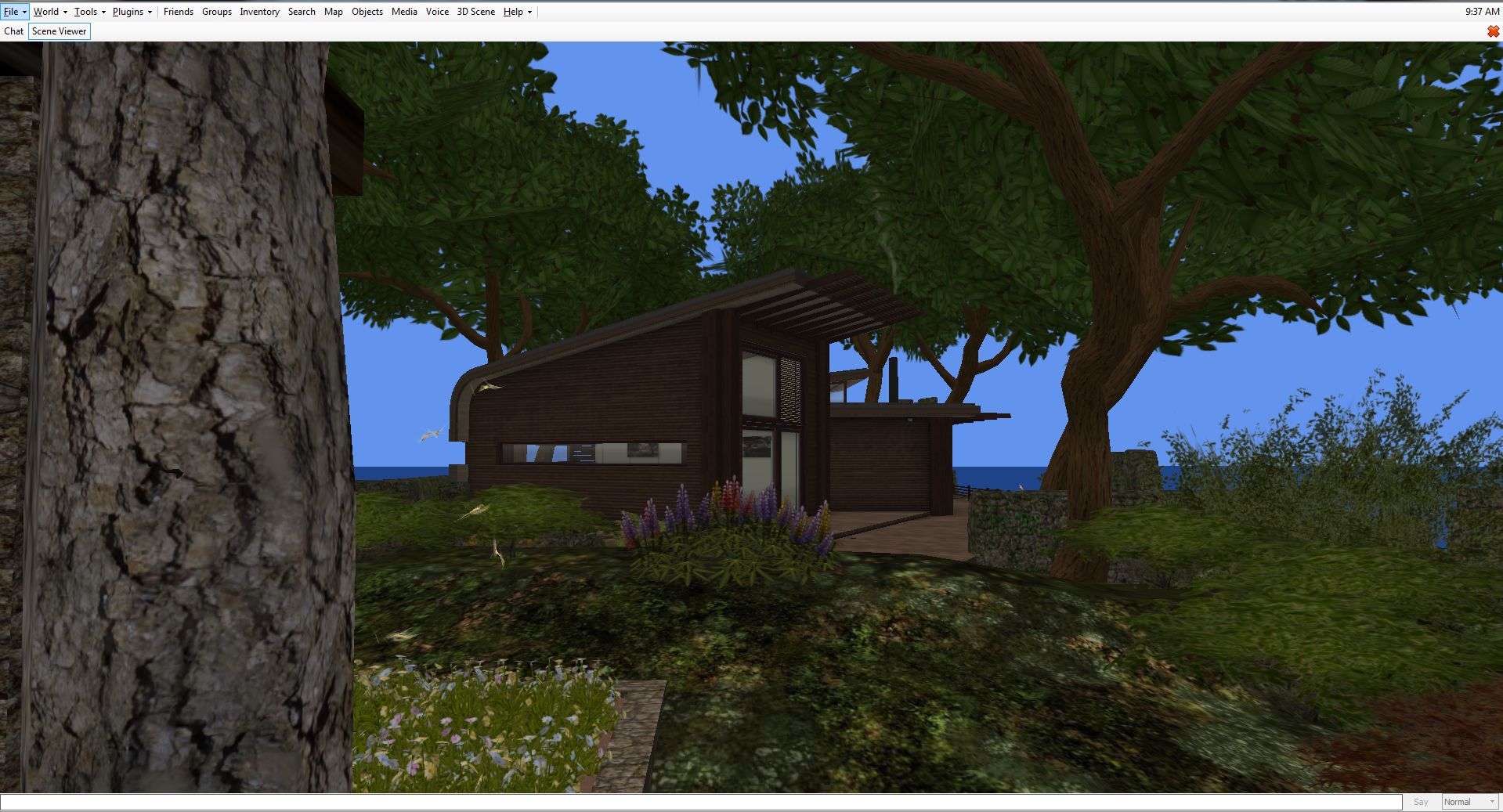
Radegast's in-world view option (the Scene Viewer)
Radegast’s in-world view option (the Scene Viewer) – note this does not support windlight, etc.

All of this has made Radegast a flexible, usable and popular client, and if you’d like to know more about it, please refer to my Radegast coverage in this blog.

Given Latif is still recovering from illness, this update may not signal his full return to supporting Radegast; when I did ask him about this update, he replied, “there were several updates, such as group bans that were done, but unreleased. So why not get them out ;-).” As to the future, we’ll have to see what comes along; but certainly, seeing Latif back in the saddle with this release is great.
Related Links

A tropical dream in Second Life

Pandora box of Dreams; Inara Pey, July 2015, on FlickrPandora box of Dreams, July 2015 (Flickr) – click any image for full size

Note: this vision of Pandora Box of Dreams has closed. 

I first visited  Lokhe Angel Verlack’s (Jackson Verlack) Pandora Box of Dreams when it was, I believe, in its second iteration, back in April 2015. Located on Lokhe’s homestead region of Diamond Bay, Paradora Box of Dreams tends to undergo a change every two or three months, each time presenting an environment where dreams and contemplation are encouraged.

I did actually manage to visit the region during its third dream iteration – the River Dream – but didn’t actually get to blog about it;  so I’ll refer you to Ziki’s post on that. Dream 004 has now arrived in the region, and the Del Mar Dream is precisely what I need right now, despite not generally being a “beachy ” person: a tropical paradise.

Pandora box of Dreams; Inara Pey, July 2015, on FlickrPandora box of Dreams, July 2015 (Flickr) – click any image for full size

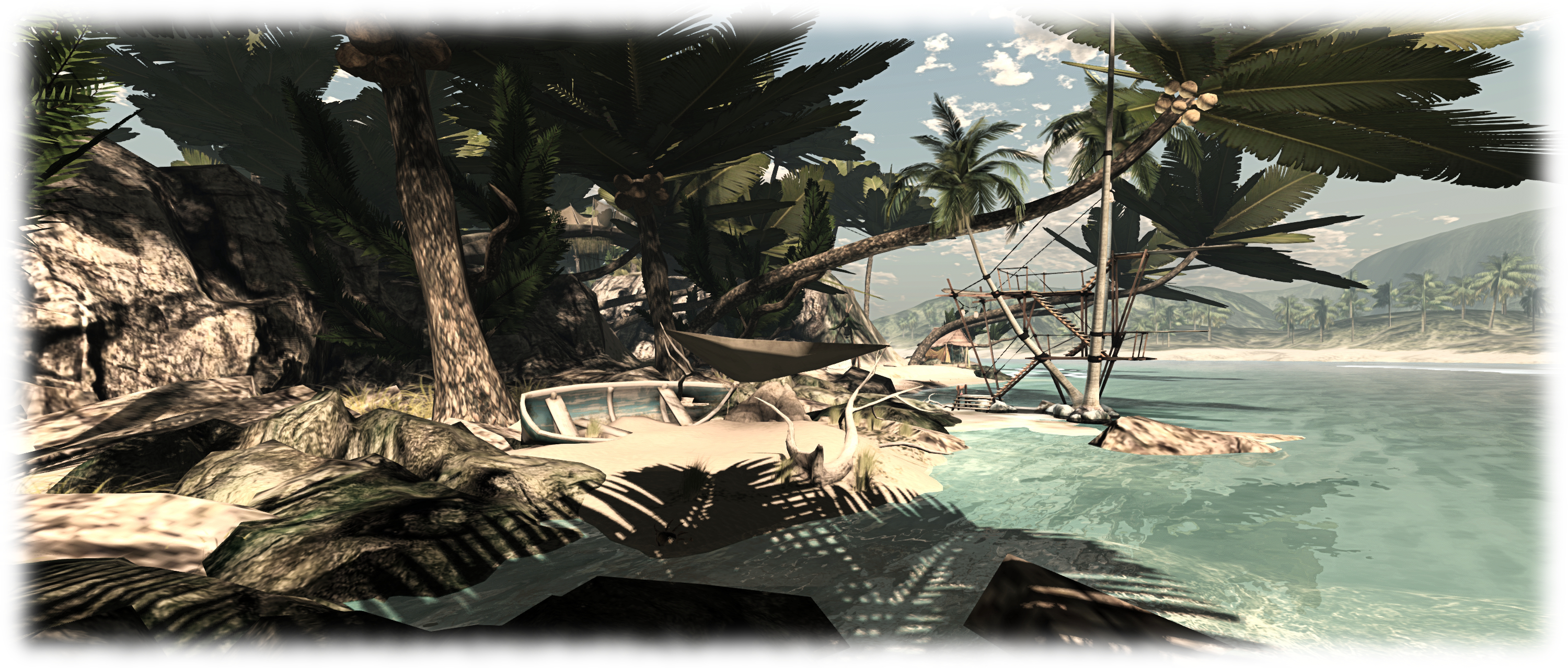
Del Mar Dream presents an idyllic Pacific island, laying far from the ocean trade routes, nestled in the arms of a larger (off sim) island which provides shelter from the rest of the world. Here can be found a place of rugged beauty and soft, coral sand beaches shaded by palm trees. Little beach shacks are scattered across the island, offering places to sit and relax, either on your own with a friend or two, and simply chat or let your thoughts escape. Hammocks also sit out in the sun or under the shade of the palms, offering the opportunity to catch a tan or drift in sleep,

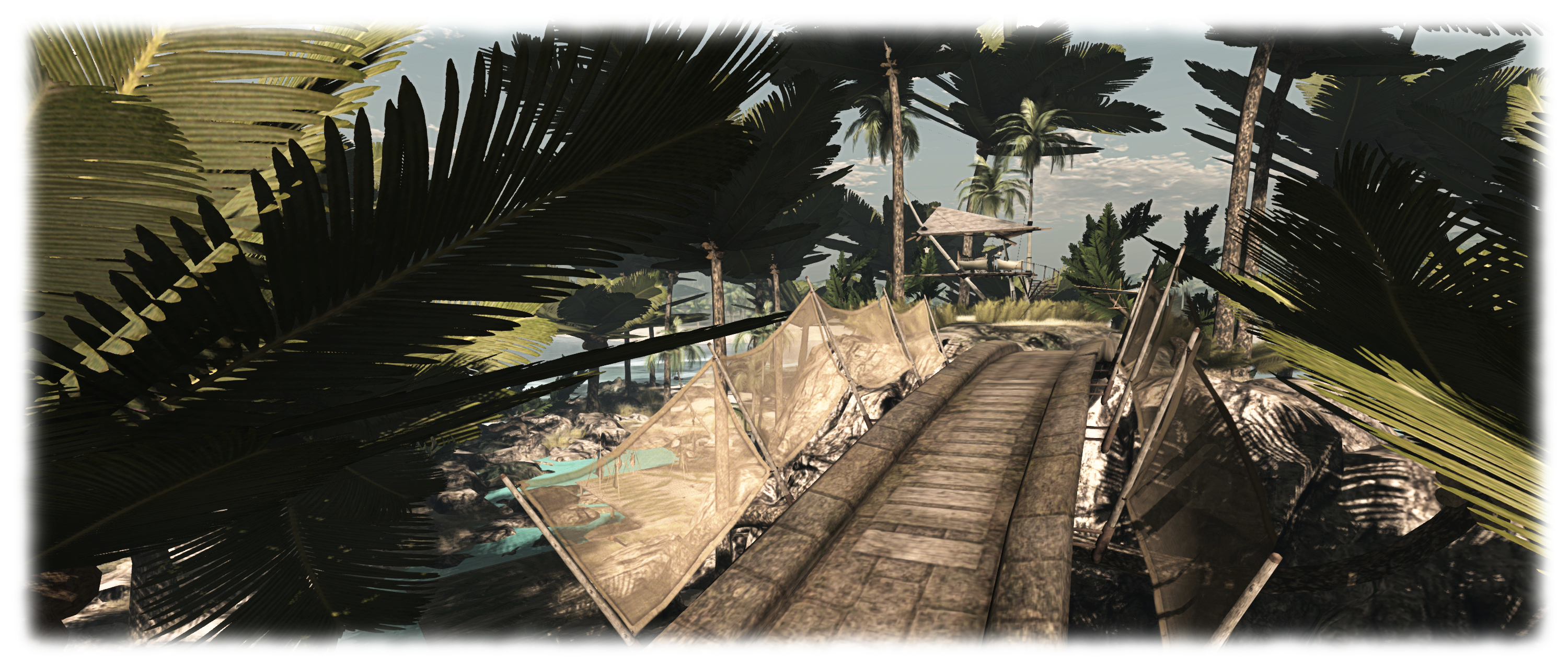
For the more energetic among us, a careful climb up the rocks forming the spine of the island will  bring you to a graceful stone bridge by Alex Bader, and access to a tiki-style platform on the highest point on the island, where it sits suspended from palm trees; an ideal place of rest / look-out. Alongside the bridge, and for the cost of joining the Pandora box of Dreams group (L$50), you can grab a hang glider and drift around the island on the wind.

Pandora box of Dreams; Inara Pey, July 2015, on FlickrPandora box of Dreams, July 2015 (Flickr) – click any image for full size

Down on the beaches on either side of the hilltop can be found diving boards (to the east) and a jetski rezzer (to the west). I’m not entirely sure the of watery engines would be appreciated by all of the island’s visitors, which might explain why, although I could get a jetski to rez, it resolutely refused my efforts to let me drive it off the rezzer and out into the bay!

The bay also offers opportunities for wading and swimming – although I do urge a degree of caution: there are puffer fish and jellyfish to be found among the rocks and shallows. Leopard sharks hug the sandy bottom further out, but present no threat to swimmers, preferring their usual diet of  clams, spoon worms, crabs, shrimp, fish, and fish eggs. Instead, they’re content to swim among the rays there.

Pandora box of Dreams; Inara Pey, July 2015, on FlickrPandora box of Dreams, July 2015 (Flickr) – click any image for full size

Local sounds can add further ambience to a visit as well, with the beach towards the west end of the island in particular presenting sounds of vacations and holidays which might stir a daydream or two. The audio stream is also suitably appropriate for the environment, and I spent a contented couple of hours relaxing on a lido out on the water, sipping a cocktail while listening to the music and steering my camera around the island remotely (flycams is such a time saver!).

As I mentioned towards the top of this piece, I’m not much of one for beach holidays – I love to explore places and wander across sandy beaches to see what might be beyond the next rise or around the headland, rather than sit and soaking up the sun. Nevertheless, the Del Mar Dream iteration of Paradora Box of dreams did – again as noted – have me simply lazing and enjoying. While it bears little resemblance to them, it did bring thoughts of some of my favourite tropical coastal areas to mind; particularly the north-east side of Sri Lanka around Batticaloa, with its white sands and wildlife.

Pandora box of Dreams; Inara Pey, July 2015, on FlickrPandora box of Dreams, July 2015 (Flickr) – click any image for full size

All told, a lovely iteration in Lokhe’s Dream sequences for the region, and one I really enjoyed visiting. As things do tend to change periodically, if you would like to visit this tropical paradise, I’d suggest you not leave it too long before doing so. And you might find that once you’ve done so, the beach and waters might well call you back again before Lokhe crafts something new to be enjoyed.

SLurl Details

Sacred Light in Second Life

Sacred Light - The Living Room
Light – The Living Room

Tuesday, July 7th saw the opening of the latest art exhibition at The Living Room, the music and arts venue operated by Owl Dragonash and Daallee. Sadly, I was unable to make the event, due to it clashing with another in-world appointment; however, I did hop over as soon as the opportunity arose to see what the latest in what has been a fascinating monthly series at the venue has brought us.

Sacred Light is a display of 2D and 3D art by Kiesta Aljon, whose work often richly expresses contrast pairings: light and dark, big and small, motion and stillness, and so on, in an effort to engage the observer in her work and encourage them to see the creative process through her eyes.

Sacred Light - The Living Room
Sacred Light – The Living Room

For this particular exhibition, several of these contrasts are on offer, both in the images and the sculptures which are presented on both the main and mezzanine floors of the Living room’s gallery space; and all of them are linked through the central theme of light and them impact it has on us.

This is a fascinating display because to the richness of contrasts that are on offer, both within individual pieces and between the various groups of pieces. For example, on one side of the gallery’s main floor are two animated digital images, both entitled “A Whirl”. Each offers a captivating contrast of fluid light against  a dark, static background which is almost mesmerising. At the same time, and on the mezzanine above them, sits a trio of mandalas, all of which again offer a rich contrast of colours within themselves, while their serene stillness offers its own contrast to the perpetual motion embodied in the two “Whirl” pieces.

Sacred Light - The Living Room
Sacred Light – The Living Room

The title of the exhibition is also fitting, as there is something “sacred” to many of the pieces – not in any religious sense, but simply because the contrast (and balance) of colours breathes a special amount of life into them.

For me, this is particularly evidenced in the three pieces entitled “Ship Storm” (seen at the top of this article), where the colour of the sky and the shadowed vignetting of the clouds seems to breathe life into the ships themselves, giving them form an existence entirely of their own. But the feeling is also true in many – if not all – of the other works exhibited here; so much so that you could find yourself contemplating various pieces individually and collectively for longer than you might have anticipated. I know I did.

Sacred Light - The Living Room
Sacred Light – The Living Room

July brings with it another Thursday of music to The Living Room. On July 16th, Jed Luckless will be taking to the stage at 17:00 SLT, and will be followed at 18:00 by Bandit Eddingham. Sacred Light itself will remain open throughout the month, and will feature a special closing party on Tuesday, July 28th, with Lazarus Doghouse presiding over the music (time TBA at the time of going to press).

SLurl Details

Lab issues notifications project viewer

secondlifeOn  Wednesday, July 8th, the Lab issued their notifications project viewer, which sees an overhaul of the way in which notifications – system, group, transaction, etc., are presented through the viewer.

The viewer has been in the works for a while, and is the direct request of a feature request put to the Lab by Aki Shichiroji back in 2012 (see BUG-8000), and which has more recently been working its way through the Lab’s work list to appear in project form on July 8th.

The release of the project viewer, version 3.8.1.303211, was accompanied by an official blog post on the subject, which reads in part:

The Notifications Project Viewer is an improvement for sorting your notifications. This new feature is based on your feedback: a notifications floater with four tabs sorting your incoming notifications into System, Transactions, Invitations, and Groups and allowing better interaction with them as well.  Those who deal with high volumes of money transactions, group notices, group invites, or inventory transfers now have a better way to review their messages and identify which notices need immediate attention.

The images below show the floater and its four tabs:

The new Notifications floater - see below for explanatory notes
The new Notifications floater – see below for explanatory notes

Multiple notifications within a tab are initially shown compressed (above left). Clicking on the down pointing arrow button for a specific notification (highlighted in red, above left) will expand that particular notification within the floater (above right), with scroll bars allowing you to scroll down through an individual notification or through the notifications within that tab.  Clicking the up point arrow button (highlighted in blue, above right) will compress an expanded notification.

As with the current notification system within the release viewer, individual notifications can be deleted from any tab by clicking the X button. There are also additional buttons within the panel for collapsing all expended notifications or deleting all notifications within the currently displayed tab (i.e. clicking Delete All with the System notifications tab will delete all notifications in that tab but not all of your notifications in general).

A further improvement to the way notifications are displayed is that a time stamp for when a notification was sent / received is now clearly visible, both in the collapsed and expanded views for all notifications. The presence of any attachment is also indicated by the use of a paper clip symbol.

Given this is a project viewer, the Lab is requesting feedback and bug reports via the Second Life JIRA.

A couple of issues have been filed already. One of these – BUG-9625 – points out that the notification floater currently fails to include any means of accepting a group invitation; the only way of accepting an invitation in the project viewer at present, is to click on the button displayed in the initial pop-up (which will still be displayed as usual).  Expect this to be created in due course as the project viewer is updated.

Also, do keep in mind this is a project viewer, and currently not intended for prime time use.

Related Links

Cica’s Dreamers in Second Life

Dreamers, LEA 24
Dreamers, LEA 24

The ninth round of the Linden Endowments for the Arts (LEA) Artist In Residence (AIR) programme kicked-off on July 1st, with the awarding of the LEA’s 20 AIR regions to their respective grantees. Under the terms of the AIR grants, those awarded a region have up to 4 months in which to prepare it for their installation, and have it formally open to the public for at least two months – although the set-up period is flexible, and can be a lot shorter if the artist(s) wish(es).

Cica Ghost opted to really maximise the time people could enjoy her work. While she only received the region on July 1st, it officially opened to the public on July 6th (an event I had to miss due to being away between the 5th and 7th inclusive).

Dreamers, LEA 24
Dreamers, LEA 24

Dreamers is a marvellous build which extends from the ground up into the sky, where eight scenes await visitors. The ground level presents a fantasy environment, perhaps lifted from a dream, full of bright colours and fantastical creatures and wheeled vehicles on a huge scale, all waiting to be explored, and bearing Cica’s colourful paintings, making careful examination of all of them a must.

Within the midst of this marvellous landscape sit sixteen long-necked heads, faces lifted towards the sky, eyes closed – the Dreamers of the installation’s title. Touch eight of them, and they will each allow you to share in their dream, transporting you to one of the eight skyborne scenes Cica has created overhead.

Dreamers, LEA 24
Dreamers, LEA 24

These will each be immediately recognisable to anyone familiar with Cica’s work, presenting as they do little extracts from past installations she’s created. So it is that through the Dreamers we once more get to see the likes of Little Town, Ghostville, Ruins, and Living in a Bowl, to name but four of the scenes on offer.

Small in size, these little scenes are enough to either pique curiosity (for the first-time visitor) or awaken memory (for those who visited the originals), setting one on a personal daydream. I could write a whole lot more about Dreamers, but really the best way to experience it is to go see it for yourself and have a little fun; it is a bright, uplifting place, full of images and daydreams, and there are more than a few poses and things to be found throughout which let you become a part of the settings, at least for a while.

Dreamers, LEA 24
Dreamers, LEA 24

Given only eight of the 16 Dreamers currently allow people to share in their dreams, I wonder if Cica might be adding to the installation as time progresses through to December, and the end of this round of AIR grants, allowing the remaining eight heads to share their slumbering imaginings with us. Or perhaps something else might appear in LEA 24 in due course.

Either way, I took the liberty of making a short film of what is there to enjoy now, if only to give a further flavour and whet appetites. So – enjoy!

SLurl Details


Second Life project updates 28/1: server, viewer

Umbral Photography, Hydra Isles; Inara Pey, July 2015, on FlickrUmbral Photography, July 2015 (Flickr) – blog post

Server Deployments

As always, please refer to the server deployment thread for the latest updates / news.

On Tuesday, July 7th, the Main (SLS) channel received the same server maintenance package deployed to the three RC channels in week #27.

As noted in my project update for week #27, BUG-197 referred to in the package release notes relates to an issue whereby a user can’t see any of their local chat on a region or parcel, and nor can anyone else, due to a scripted object which is spamming chat so badly, the chat throttle kicks in, but no warning would be provided to inform the user this was the case. with the deployed change, the user will now get a message about the chat throttle being hit, but unfortunately, the system will not identify the spammy object (so it might be removed / returned, if possible).

There will be no RC deployments to the RC channels on Wednesday, July 8th, leaving all of the main grid on the same release. A new RC deployment, described as a “minor update” is in preparation for deployment to the RC channels in week #29.

SL Viewer

On Tuesday, July 7th, The Maintenance RC viewer was updated to version 3.8.1.303166, bringing it into line with the attachments RC viewer updated in week #27, and just leaving the Viewer Managed Marketplace viewer to be updated in the release channel, which will likely happen later this week.

Chromium Embedded Framework

At the Monday Open source Developer’ meeting, Oz Linden indicated that an anticipated project viewer,  the Chromium Embedded Framework (CEF) viewer which will provide media support via HMTL 5, should be appearing “Pretty Soon”™.  While Quicktime and Flash  may work on this viewer for some users, given the age / status of both, the Lab does not plan to support either going forward, and recommends media creators migrate to HTML 5.

It had been hoped that this viewer would have been out by now; however there appear to be one or two issues still to be resolved. “I heard the developer working on it today say he was deep in the middle of keyboard issues,” Simon Linden said during the Simulator User Group meeting on Tuesday, July 7th. “Getting frameworks like that to cooperate with OS events like keyboard, mouse and screen is always tough.”

Experience Keys / Tools

Simon is continuing to work on tweaks to the Experience Keys / Tools code, and in doing so passed an interesting comment at the Simulator User Group meeting.

“I’ve been working on updating the KVP code that runs on our server,” he said, “and had the most frustrating time integrating the newest version into our code … The code we have is dated and we should have better performance and stability with their latest.”

Quite what the difference is between “our” and “their” code might be isn’t entirely clear at this point in time – although the question was asked during the meeting, and may well be asked again in the future.

Simon also hopes to put some work into getting KVP access moved onto a separate thread to ordinary asset handling. As previously mentioned in these updates, that KVP access is currently on the same thread as asset handling can, at times, cause issues, as noted in BUG-8946.

Group Chat

The recent improvements made to group chat continue to make themselves felt, with many reporting that the old issues of lag with the chat on large groups has largely dissipated. Such are the improvements that Whirly Fizzle has suggested that http://isslgroupchatstillbroken.com/ should be updated. Even so, despite all the the improvements, Simon has indicated that there are still “a few things” he’d like to tweak a little more.