Wakeboarding and parasailing in Second Life

Wakeboarding on the AD25H "Little Bee"
Wakeboarding on the AD25H “Little Bee”

In April, I wrote about Ape Piaggo’s latest waterborne project: the AD25H “Little Bee” tender speedboat. Since that time, things have progressed, and while the boat is still not quite ready for release, Ape offered me the opportunity to do some further testing on what amounts to the pre-release version – and obviously, I jumped at the chance!

This latest version features just about everything the “full” version will include, other than the car.

Yes, that’s right, the car. As this is a trailer-mountable speedboat which comes complete with its own trailer, Ape has decided to include a car capable of towing both in the release version of the boat as well. Coming on top of everything else packed into the Little Bee – an extensive range of couples and singles poses, a racing mode, the hydrofoils, ACSS, painting options, the ability to let friends drive it, coffee making (yup, really!) plus the wakeboard and parasail, this makes for a pretty comprehensive package.

Wakeboarding on the AD25H "Little Bee"
Wakeboarding on the AD25H “Little Bee”

The parasail system was actually available on the earlier model of the boat I previewed. However, this has since been improved and was one of the things Ape asked me to test. So, one bright Second Life morning, as the Sun came up over the straits, I hopped into the boat and bravely volunteered my Crash Test Alt to give the parasail another go while I tried the wakeboard. The last time my alt took to the air in the parasail, she was fully clothed; I was kinder this time, and furnished her with a swimsuit 🙂 .

Both the wakeboard and the parasail are rezzed from the boat’s Accessories menu. Note that you will have to be on water that allows object entry, and should leave a degree of space behind the boat (don’t rez them when moored with a pier right behind you, for example). Once rezzed, riders simply sit on the wakeboard / parasail (and will receive a wearable handle for the former), and away you go.

Parasailing on the AD25H "Little Bee"
Parasailing on the AD25H “Little Bee”

During testing, I found it best to keep the boat to around 40% of throttle; any higher, and things began to get decidedly iffy on region crossings.  The board is independently steerable from the boat using the LEFT / RIGHT arrow keys, and the parasail rider can adjust their height with the UP / DOWN keys. The wakeboard also includes stunts accessed via the PAGE DOWN and the UP / DOWN keys, although I could only get the latter to work, which had me dipping low to run my hand through the water.

The PAGE UP key for both the wakeboard and the parasail allows the “CineCApe” camera to work, which provides interesting views of things for the rider of either, and I’ve made use of this in the sneak peek film below. I do recommend using the camera with the wakeboard in particular, as it really adds a further dimension to riding the board.

Parasailing on the AD25H "Little Bee" - getting into the air
Parasailing on the AD25H “Little Bee” – getting into the air

Slowing the boat will have the obvious effect of dropping both the wakeboard and parasail rider back into the water, and the former will adopt a “waiting” pose, ready for the boat to start moving again, while the latter will see the parasail gently collapse as the air resistance lessens, and the rider drops down to a gentle splashdown.

Given all it has packed into it, the AD25H “Little Bee” is liable to be a “must have” buy for anyone interested in owning / driving a compact speedboat; I’ve yet to come across anything quite so enjoyable to drive and ride it in its class, and given the price is set to be under L$3000 for the boat, trailer and car, it’s going to be an absolute steal when released.

I’ll hopefully be running a full review of the boat once it is available. In the meantime, as noted above, another sneak peek video.

Small town living in Second Life

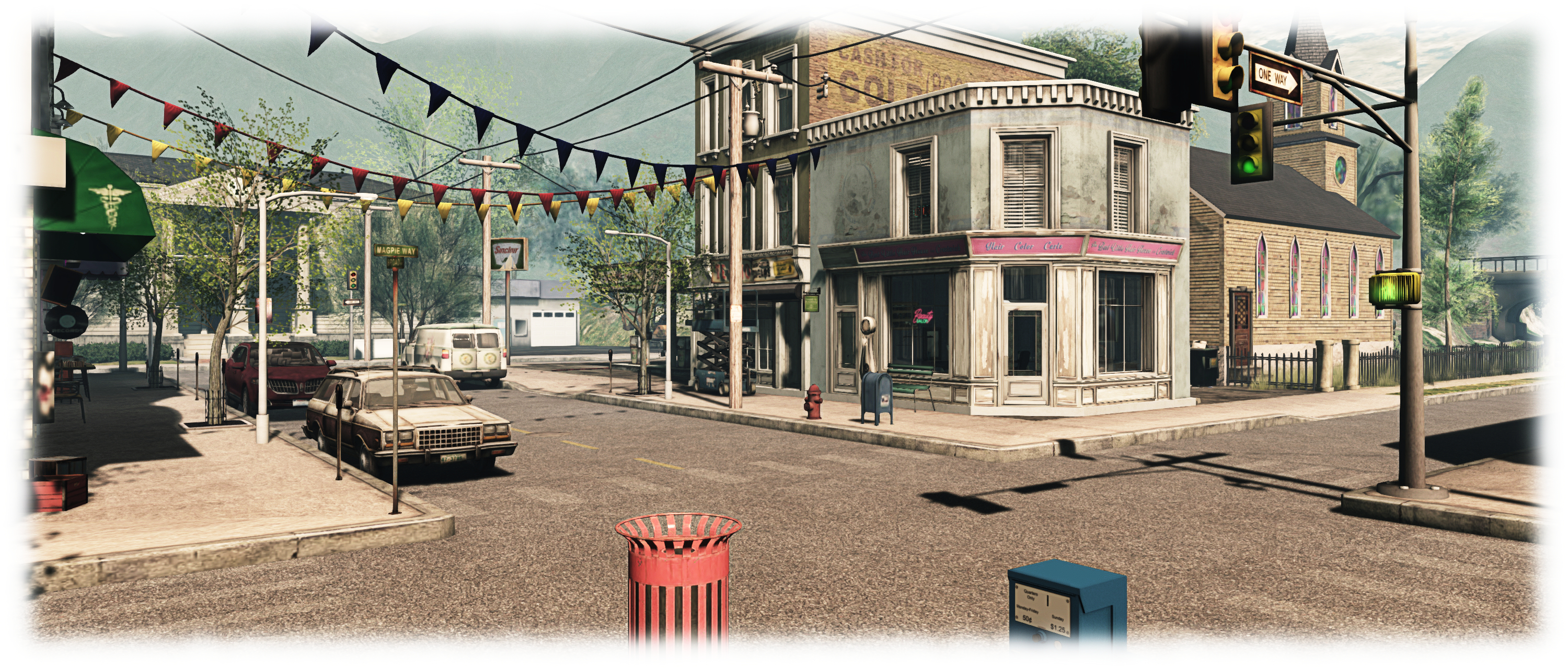
Crestwick Island; Inara Pey, June 2015, on Flickr Crestwick Island (Flickr) – click and image for full size

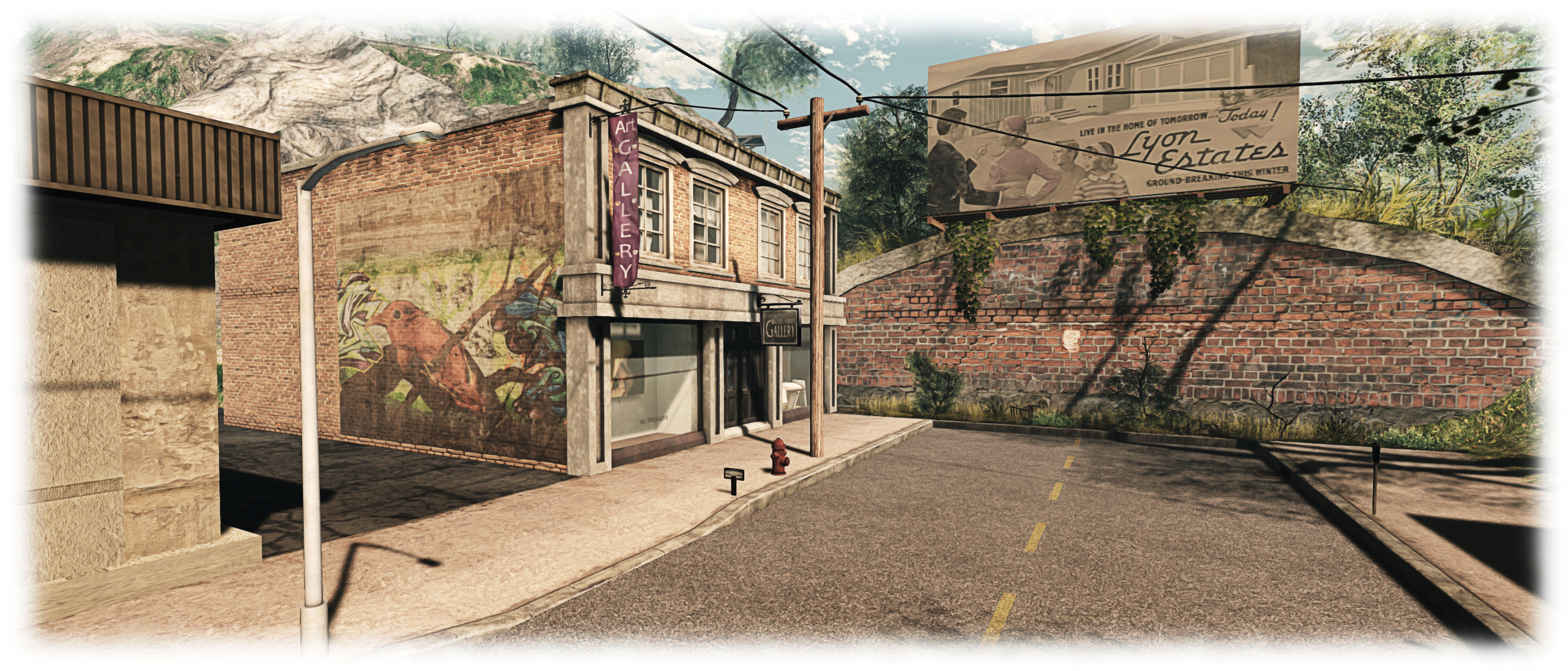
Crestwick Island is a small town sited in a picturesque bay, and it’s not unreasonable to state that it has perhaps been better days; the streets are a little careworn, some of the houses equally so. And while there are attempts at colour and gaiety in the town centre, it’s hard not to escape the feeling that you’re visiting a little corner of the world that has passed its prime while seeking to hang on to it as best it can.

Which is not to say it is in any way a place that shouldn’t be seen – entirely the opposite, in fact. Designed by Isa Messioptra and Ciphertazi Wandin, Crestwick Island is actually a joy to see and wander through, and considerable care has been taken to offer a place that has a very genuine feel to it while enfolding the kind of quirks and whimsy that will bring a smile to the face of any visitor as they perambulate through the streets and along the footpaths and tracks. There’s even a few nods towards the the realm of Hollywood – although they may escape immediate recognition except to the film buffs among us.

Crestwick Island; Inara Pey, June 2015, on Flickr Crestwick Island (Flickr)

Take, for example, the town’s beauty salon; the sign over the windows proudly proclaims it to be The Best Little Hair House in Crestwick – a play on the title of a certain musical and 1982 film about a Chicken Ranch in Texas, and starring Dolly Parton and Burt Reynolds.

The beauty salon shares the town’s main street with the local medical centre, newspaper offices, bank, books shop and dance studio, with the town hall presiding sternly over all of them. Sitting kitty-corner to the beauty salon is the still chic Rosewater Cafe, offering refreshments, a place to while away the hours and dancing for those in the mood.

At the opposite end of the street to the town hall can be found the art gallery, featuring Isa’s stunning artwork (which can also be found on Flickr, as can Cipher’s) and which sits under a fading billboard which will take movie buffs Back To …. another  film from the 1980s starring Michael J. Fox…

Crestwick Island; Inara Pey, June 2015, on Flickr Crestwick Island (Flickr)

Nor is art limited to the gallery; there is some impressive graffiti to be found on the walls of certain buildings, and it can also be found in doors as well. In this respect, do make sure you pay a visit to the local place of worship; it has something quite novel to offer visitors, and a trip to Crestwick Island would be incomplete without stopping by!

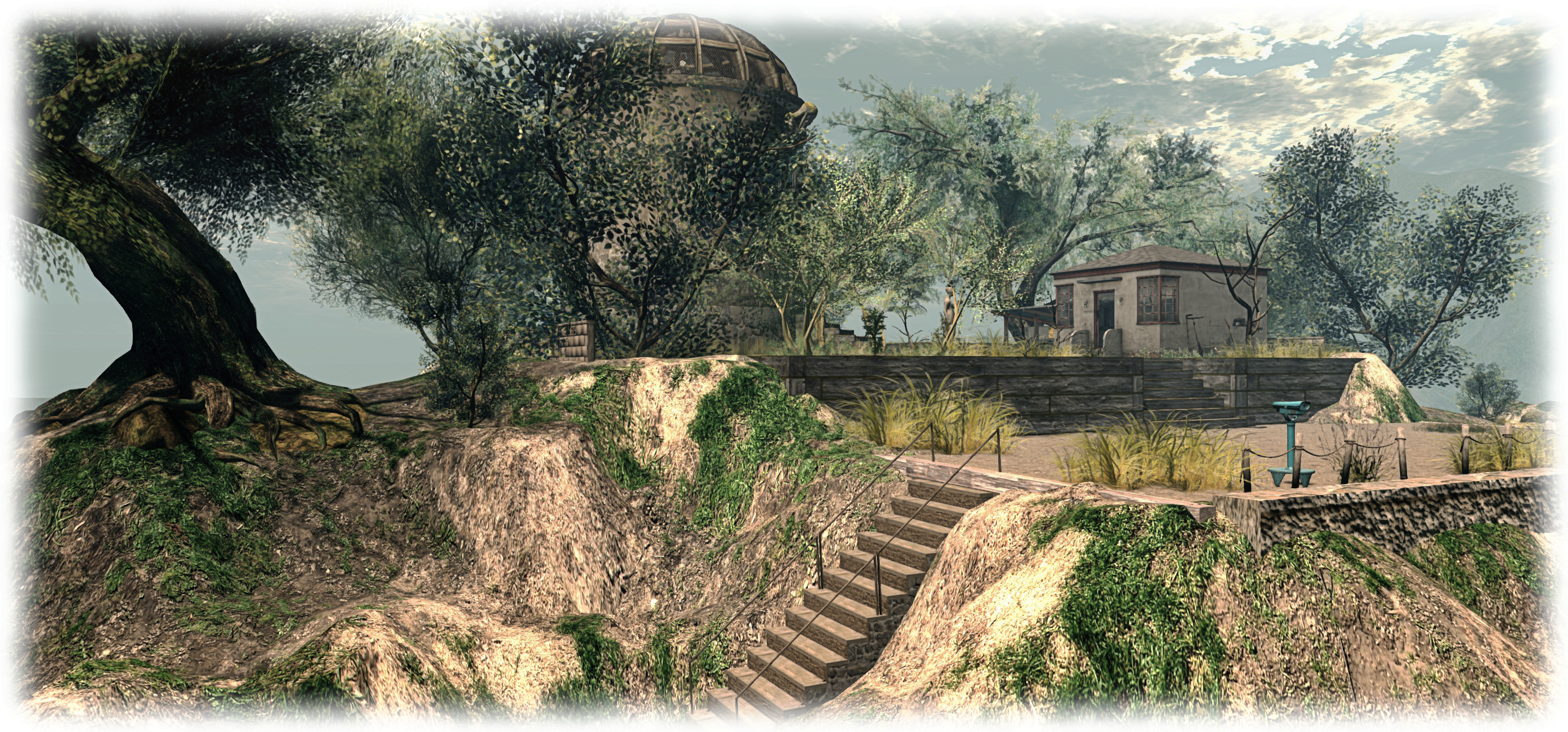
Further out from the town the landscape is a little more rugged, and a tall plateau rises to the north west, topped by what looks like an old observatory dome and a smaller building. Stone steps with rusting iron handrails offer a way up to the dome, as does a winding sandy track – and anyone who has visited Griffiths Park and Observatory in Los Angeles might has a slight sense of deja-vu walking up the track; I know I did.

Crestwick Island; Inara Pey, June 2015, on Flickr Crestwick Island (Flickr)

Do take note, however, that like the town’s church, the observatory isn’t all it seems, and I wouldn’t be at all surprised if the name “Roswell” slips into your thoughts once you’ve climbed the ageing metal stairs up to the dome…

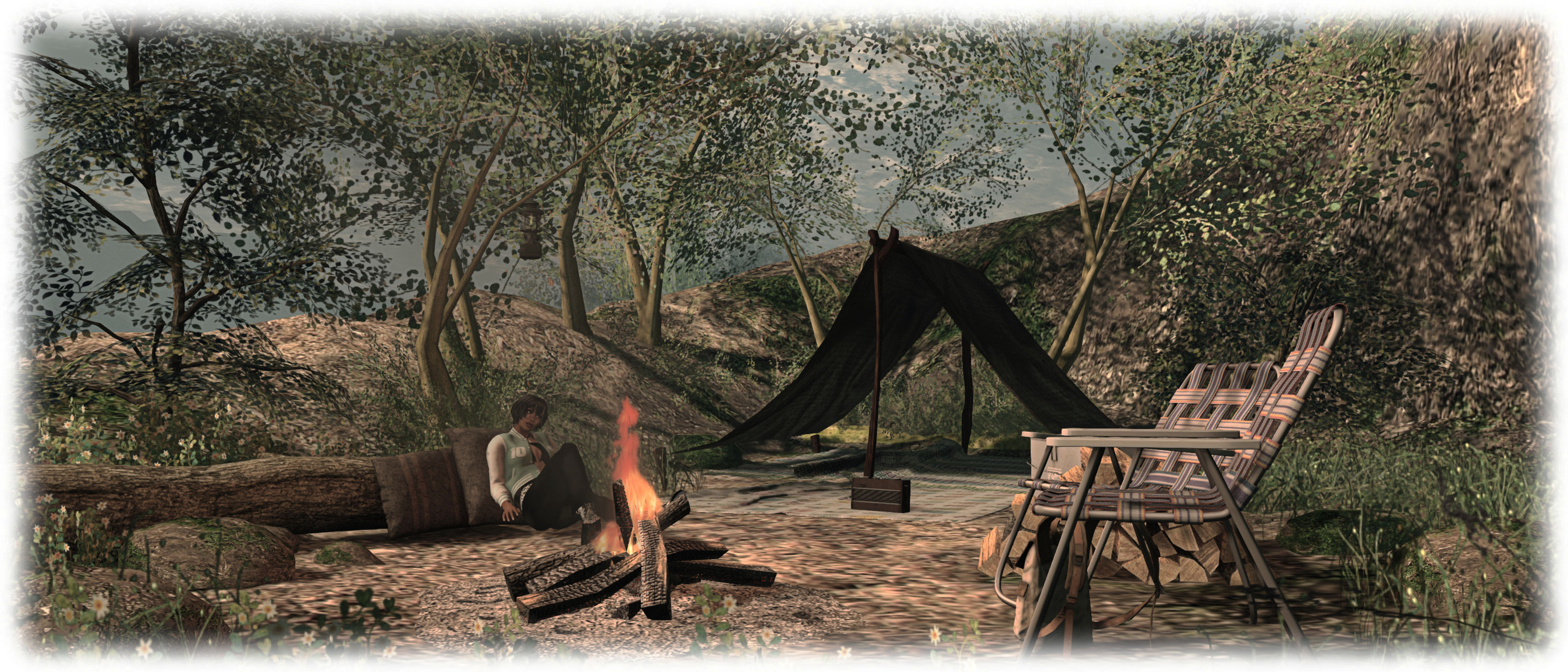
All told, Crestwick island is a visual treat, whether seen under the default windlight (to which I made only minor tweaks for most of the picture here) or under … well, probably just about any one you care to choose; it’s instantly picturesque, the slightly running-to-seed look actually adding to the look and feel of the town. If you’ve not visited already, it’s well worth the time in stopping by; you can even enjoy a little wine in the park or a snuggle at the cliff side camp…

Crestwick Island; Inara Pey, June 2015, on Flickr Crestwick Island (Flickr)

SLurl Details

Visionary Tales in Second Life

Visionary Tales
Visionary Tales

Set to open at 15:00 SLT on Wednesday, June 3rd, is the latest exhibition at Max Butoh’s marvellous Dathúil gallery. Visionary Tales features the  artistry of Pollyanna4, who describes herself as a “photographic storyteller” – and a visit to Dathúil will reveal why.

“My artworks are stories, people, places and moments in time.,” Pollyanna explains. “I am inspired by many things, music, a lyric, a verbal conversation, or the mood and atmosphere of what greets me.”

Visionary Tales
Visionary Tales

The result is a series of 21 images, which can also be found on Pollyanna’s stunning Flickr stream, and here divided into three story sets, which she describes as, “Coming Home ~ Trials and tribulations of a difficult journey”, “Dolls ~ From the Heart” and “Abstracted world (stories/people/views/outlooks)”.  Each of the pieces includes a small book in the lower right corner which, when clicked, will offer a short piece of text in personal chat to help frame the image; and these can themselves be powerfully emotive:

Lost and alone, cold and confused.

She fell to her knees and screamed to the heavens above Dear God, help me…there has to be a way!

Falling in a heap on the wooden slats of the bridge, she closed her eyes.

Visionary Tales
Visionary Tales

“Often, I create from the idea itself and build my imagery around the idea,” Polyanna continues in describing her work. “However, on other occasions it is a glancing feeling which makes me get out my camera and capture the essence. Texture and shadow within a photograph are things I enjoy exploring, giving many different variations on the normal photographic image created by the SL camera.

“My aim, is to make people think. To look at every part of the photograph and read for themselves, with the help of the title and or music/poetry, just what the story is being told. ”

The result is a series of pictures and associated texts which encourage the observer to enter into the piece that are looking at, to share in the story that is being shown to them, and thus to carry it in whatever direction they take – or it leads; .both images and words beautifully evocative.

Visionary Tales
Visionary Tales

This is another outstanding exhibition in what is fast becoming my favourite gallery in terms of its design, ambience and the range of exhibitions featured since it opened. I have no hesitation in recommending Visionary Tales as an exhibit worth seeing. In keeping with the theme, the formal opening event on June 3rd will feature singer and storyteller Russell Eponym. Thereafter, Visionary Tales will be open through until the end of June.

My thanks to Lucy and to Max for the warm invitation to drop-in and preview the exhibit.

SLurl Details

An opportunity in Australia with a little help through Second Life

Image courtesy of Carmsie Melodie

FreeWee Ling is perhaps best known for her tireless work on behalf of the University of Western Australia (UWA), and co-organiser and curator of the UWA’s art-related projects, activities and galleries within Second Life.

At the end of 2014, she rightly gained recognition from the Australian Department of Education for this work, and was awarded an Endeavour Executive Fellowship that allowed her to travel from her home in the eastern United States to spend four months at the UWA in Perth, Australia, where she was based with the UWA’s Department of Physics.

FreeWee was encouraged to apply for an Endeavour Executive Fellowship by colleague Jayjay Zifanwe (Jay Jay Jegatheva in the physical world, Manager of the School of Physics at UWA) and her application was supported by a letter of recommendation from UWA.

Now, JayJay, FreeWee and the UWA are encouraging other Second Life residents to take the opportunity to follow in FreeWee’s footsteps, and applying for a 2016 Endeavour Executive Fellowship and, if selected by the Australian Department of Education, travel to UWA.

News of this was passed to me by Carmsie Melodie, who Tweeted me to point to a write-up on her blog. The same write-up is also available on the UWAinSL blog, where FreeWee has also written about her experience as a Fellowship awardee – so if you are interested in applying, do make sure you read FreeWee’s article.

What is the Endeavour Executive Fellowship?

The Endeavour Executive Fellowship is one of a number of Endeavour Scholarships and Fellowships offered by the Australian government to international applicants from participating countries who are considered high achievers in business, industry, education or government.

The Endeavour Executive Fellowship is a 4-month study period in Australia, focusing on learning and building skills and knowledge through a host work environment in the applicant’s field or area of expertise, rather than through formal enrolment in a study programme. It offers financial support (up to  Australian $18,500) towards professional development opportunities for the successful applicant, and an opportunity to study at UWA for four months.

Image courtesy UWA
Image courtesy UWA

Commenting on her experience in applying, FreeWee said:

The Endeavour application process was fairly easy, all done online. You need to describe what you want to do, get a couple of people to write recommendations, get certified copies of transcripts, etc. But it’s all carefully laid out in the online application. I’m happy to answer any questions you might have about it. You can’t win if you don’t enter!

Once I was notified that my application was approved, the program turned me over to a caseworker who supported me from leaving for Perth to arriving back home. My caseworker was great, always responded quickly to any concerns I had and monitored my progress throughout my stay.

To find out more, please read the Endeavour Scholarship and Fellowship lead-in from the Australian Government,  which also includes a link to the applications forms.

Should you decide to apply for the Executive Fellowship, please be sure to contact Jayjay (in-world via IM or note card or via e-mail to: jay.jay-at-uwa.edu.au) and / or FreeWee (in-world via note card) for advice and support on how the UWAinSL can assist you in your application.

Do note as well that submissions for Fellowship applications close on Tuesday 30th June, 2016.

With thanks to Carmsie Melodie for the pointer via Twitter.

2015 viewer release summaries: week 22

Updates for the week ending: Sunday, May 31st, 2015

This summary is published every Monday, and is a list of SL viewer / client releases (official and TPV) made during the previous week. When reading it, please note:

  • It is based on my Current Viewer Releases Page, a list of all Second Life viewers and clients that are in popular use (and of which I am aware), and which are recognised as adhering to the TPV Policy. This page includes comprehensive links to download pages, blog notes, release notes, etc., as well as links to any / all reviews of specific viewers / clients made within this blog
  • By its nature, this summary presented here will always be in arrears, please refer to the Current Viewer Release Page for more up-to-date information.

Official LL Viewers

  • Current Release version: 3.7.29.301305, May 28 (formerly the Avatar Layer Limits RC viewer  allows users to wear up to 60 wearable layers (jackets, shirts, tattoo, alpha, etc.) in any combination ) download page, release notes
  • Release channel cohorts (See my notes on manually installing RC viewer versions if you wish to install any release candidate(s) yourself):
    • Attachment fixes RC viewer (Project Big Bird) updated to version 3.7.29.301943 on May 21 – core updates: a number of fixes for various attachment issues (download and release notes)
  • Project viewers:
    • No updates.

LL Viewer Resources

Third-party Viewers

V3-style

  • Black Dragon updated to version 2.4.2.6 on May 30th with a bug fix release 2.4.2.7 on June 1st  – core updates: revised Build tools floater layouts (release notes)
  • UKanDo updated to version 3.7.29.28115 on May 31 – core updates: keeping pace with recent LL  releases (layer limits), and RLV releases (release notes).

V1-style

  • Cool VL Viewer Stable branch updated to version 1.26.12.44, and the Experimental branch to version 1.26.13.13, both on May 30th (release notes).

Mobile / Other Clients

  • No updates.

Additional TPV Resources

Related Links

Black Dragon: Build floater updates

Blackdragon logoBlack Dragon 2.4.2.6 was released on Saturday, May 30th 2015, followed by a rapid-fire bug fix update with the release of 2.4.2.7 on Monday, June 1st.

Both updates  focus on the Build tools floater and its associated tabs, which Niran has completely overhauled and realigned in an attempt to make it a lot less cluttered-looking and easier to read, as well as adding a degree of consistency of presentation between the tabs in the floater and the types of tool options (spinners and sliders) seen in the Build floater when compared to other tool floaters in the viewer.

My personal opinion on the changes is that is that he’s largely succeeded. There is a linear tidiness to the tabs in his revised Build floater that works naturally for those used to scanning left-to-right, and top down. everything is pretty much orderly placed, and the flow through the various tabs is logical and easy to follow.

Build-1
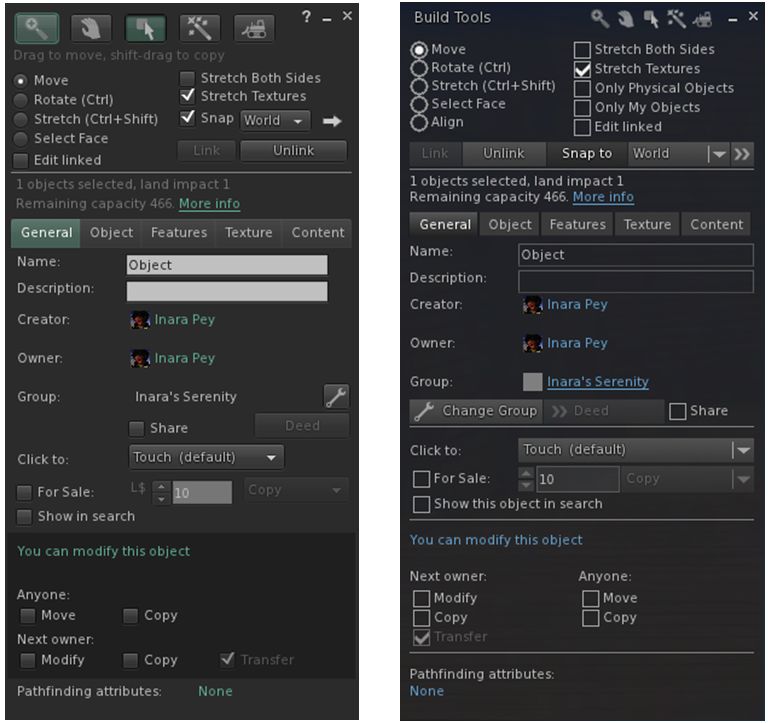
The official viewer’s Build floater Object tab (l) and Niran’s revised layout in black Dragon (r) – click any image for full size

Buttons with the Black Dragon floater are more obvious / clearer – radio buttons, for example are better defined when selected, what might be slightly confusing buttons (such as the spanner for changing the group attributes) are now clearly labelled, and buttons for pop-out options like the Grid Options are also more in keeping with the style used elsewhere in the viewer.

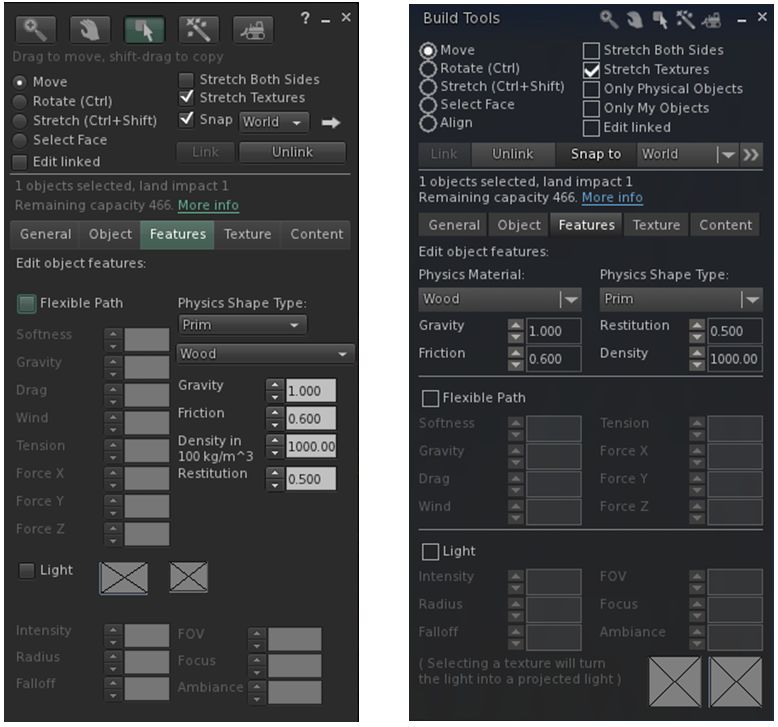
The official viewer's Build floater Features tab (l) and Niran's revised layout in black Dragon (r)
The official viewer’s Build floater Features tab (l) and Niran’s revised layout in black Dragon (r)

Some of the changes are a lot more noticeable in this regard than others – as with the General and Features tabs – both of which are compared to their official viewer equivalents in the images above – and the Texture tab. The changes to the Content and Object tabs are more subtle in nature – but given they were relatively straightforward to understand, then this is in keeping with making balanced changes.

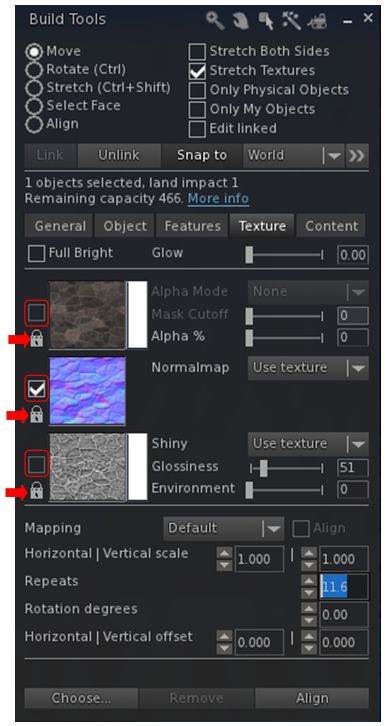
The Texture tab now has clearer map selection check boxes (outlined) and individual lock options for applying rotations, offsets, etc., via the spinners (arrowed)

In terms of the Texture tab, Niran has also revised the map selection indicator from a radio button to a check box – again adding consistency to the use of check boxes in the floater – and has also added an individual lock option to each of the three map types.

The check boxes actually do make it easier to see which of the three maps (diffuse, normal or specular) has been selected, while the three individual locks now allow greater flexibility in how changes to repeats, offsets and rotations are applied.

For example, if you want to have them applied across all three maps, regardless of which one you have selected, just click on the icons to lock them – any change make to the offsets, etc., on one map will automatically be applied to all three, regardless of which one you are working on.  If you want to change the offsets to each map independently of the others, simply unlock them (the default) – any changes made the offset, etc., spinners will only apply to the selected map. And you can also obviously have one set of rotations applied to two out of the three maps and level the third to be independently set.

The Textures tab also now makes use of sliders as well as spinners for applying  Glow, Transparency (Alpha %), Glossiness and Environment  to faces / objects, making it easy to apply quick changes before fine-tuning them with the spinners. It was actually two of these sliders that prompted the 2.4.2.7 release. While testing the 2.4.2.6 release for this review, I noted the Glow and Alpha % sliders were not working as expected. A quick IM to Niran, and he dived in and fixed the issue. The updates to these two sliders mark the only changes between 2.4.2.6 and 2.4.2.7.

Snapshot Floater Preview Update

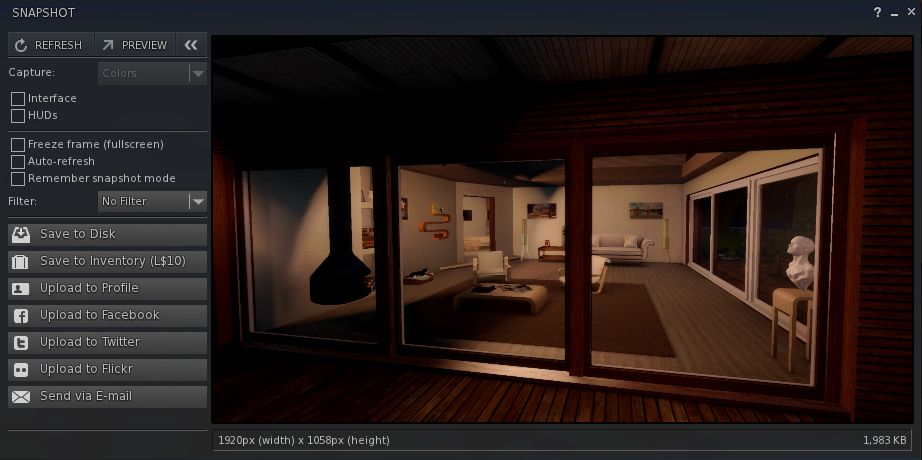
The other significant update in the 2.4.2.6/7 release lies with the Unified Snapshot floater. In the 2.4.2.5 updates (which I reviewed here), Niran introduced a separate, resizeable preview panel as an alternative to the preview pane built-in to the floater. He’s now further revised the snapshot floater so that the built-in preview pane displays a high-resolution preview image, as with the alternative preview panel.

The resizeable preview panel for the snapshot floater now displays high-resolution preview images
The preview pane for the snapshot floater now displays high-resolution preview images

The new preview panel offers a much improved image, and further enhances an option a lot of people would like to see adopted by other viewers in some way.

Feedback

Overall, the core Build tools updates in these releases  – to me – do much to enhance the Build floater. As noted, some of the changes are a little more subtle than others, but overall they all work to present a far tidier set of tabs within the floater, and offer a more-or-less consistent set of control options in terms of the use of spinners, sliders, etc. One might have a small niggle with the colour swatch panels for the diffuse and specular maps perhaps not being obvious, but it’s really hard to see how else they could be presented without losing the order and layout Niran has achieved within the Texture tab.

Towards the top of this post, I pointed to these releases marking the beginning of the end of Niran’s active development of the Black Dragon viewer He’s aiming to slow things down from release 2.4.5). Since releasing the 2.4.2.7 update he has explained some of his reasons for this.

The important point to note here are the word “active” – hence my emphasis above. He’s not given up on everything within the viewer; he’s allowing himself space to refocus on other things than need attention (like that irritating thing we call “real life”) and to refresh himself. He’ll still be poking and tweaking things in the viewer in the future; it just won’t be his primary focus. And after the amount of time and effort he has poured into his viewers, frankly, he should be respected for his decision, and offered kudos for all he has offered the community.

In the meantime, I’ll continue to look forward to seeing what future updates to Black Dragon bring.

Additional Links