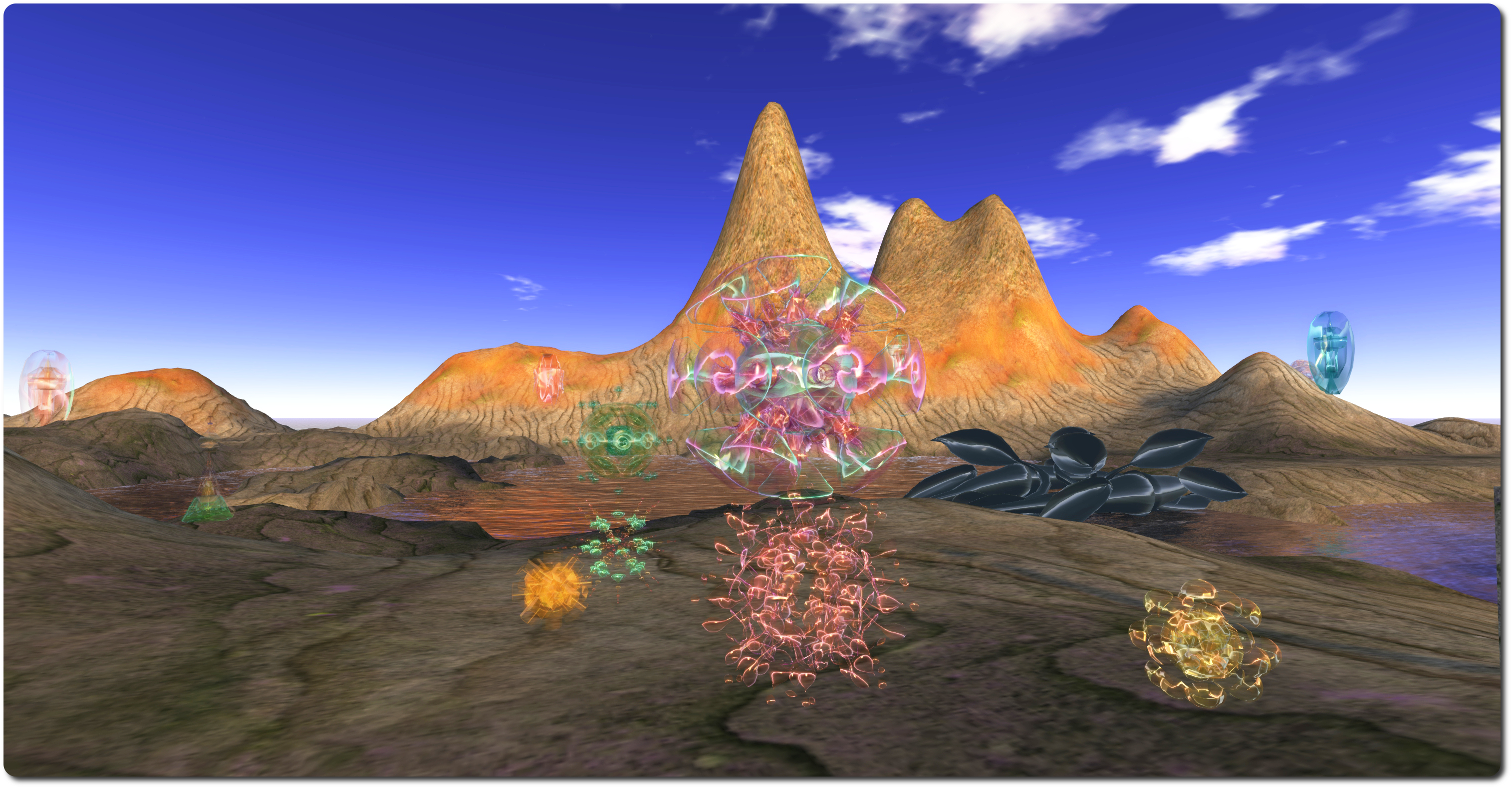
Ghosts on the grid; echoes in the metaverse

Ghosts of the Internet

There are ghosts
and
they inhabit other grids.

They are the souls of avatars lost to us,
like echos from other dimensions,
it is said,
though no one knows for sure.

What we do know is
A weakness in the structure of metaverse
has opened
and they now
wander.

So opens the description of Glyph Graves’ Ghosts of the Internet, a fascinating installation which continues the artist’s reflections in virtual space. Fascinating, because it exists both in Second Life at LEA21 and in the Inworldz region of Translation – and those in one can see the “ghosts” of those in the other moving around, and can even converse with them.
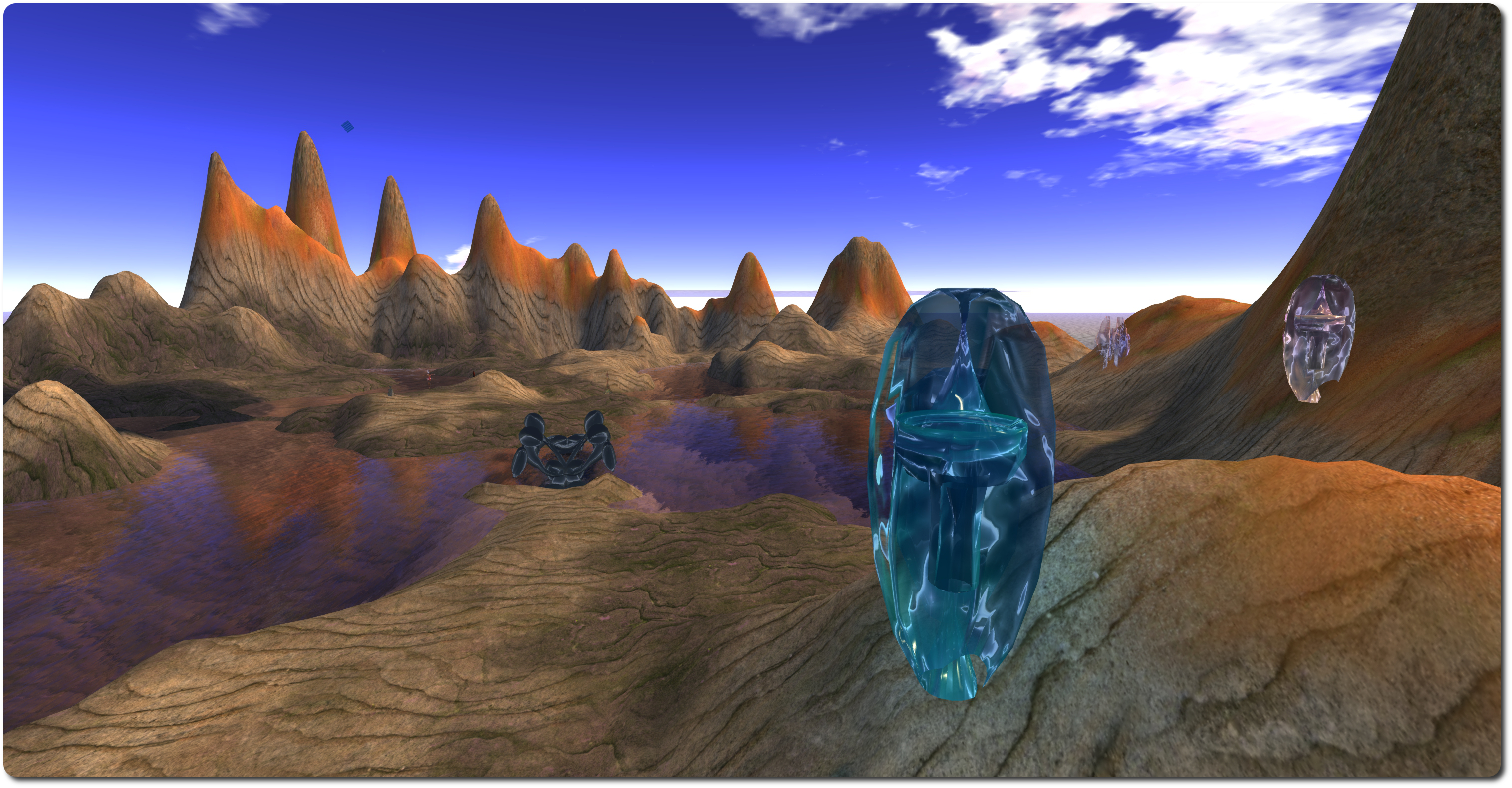
Ghosts of the Internet

The landing point at each installation provides instructions on how to get started, together with recommended graphics settings (using Firestorm as the example). There’s also a teleport to deliver you to ground level, which is more-or-less identical in both regions (Sasun Steinbeck provided a tool to help copy items between the two environments), comprising barren rock, partially flooded and surrounded by tall hills.

Within either landscape sit a series of semi-transparent otherworldly forms, with shifting colours within, which might be taken as alien crystal growths or exotic sculptures. Some of these are the “bridge” between Second Life and Inworldz, allowing communications between the two to take place. Others, spread around the borders of the landscape are the Pylons of Binding – move beyond them, and contact with “the other side” is no longer possible. Snails also roam each of these realms, and at least one is large enough to slide run over you if you’re not careful, although they are shy: touch one, and it will retreat into its shell for a few seconds.
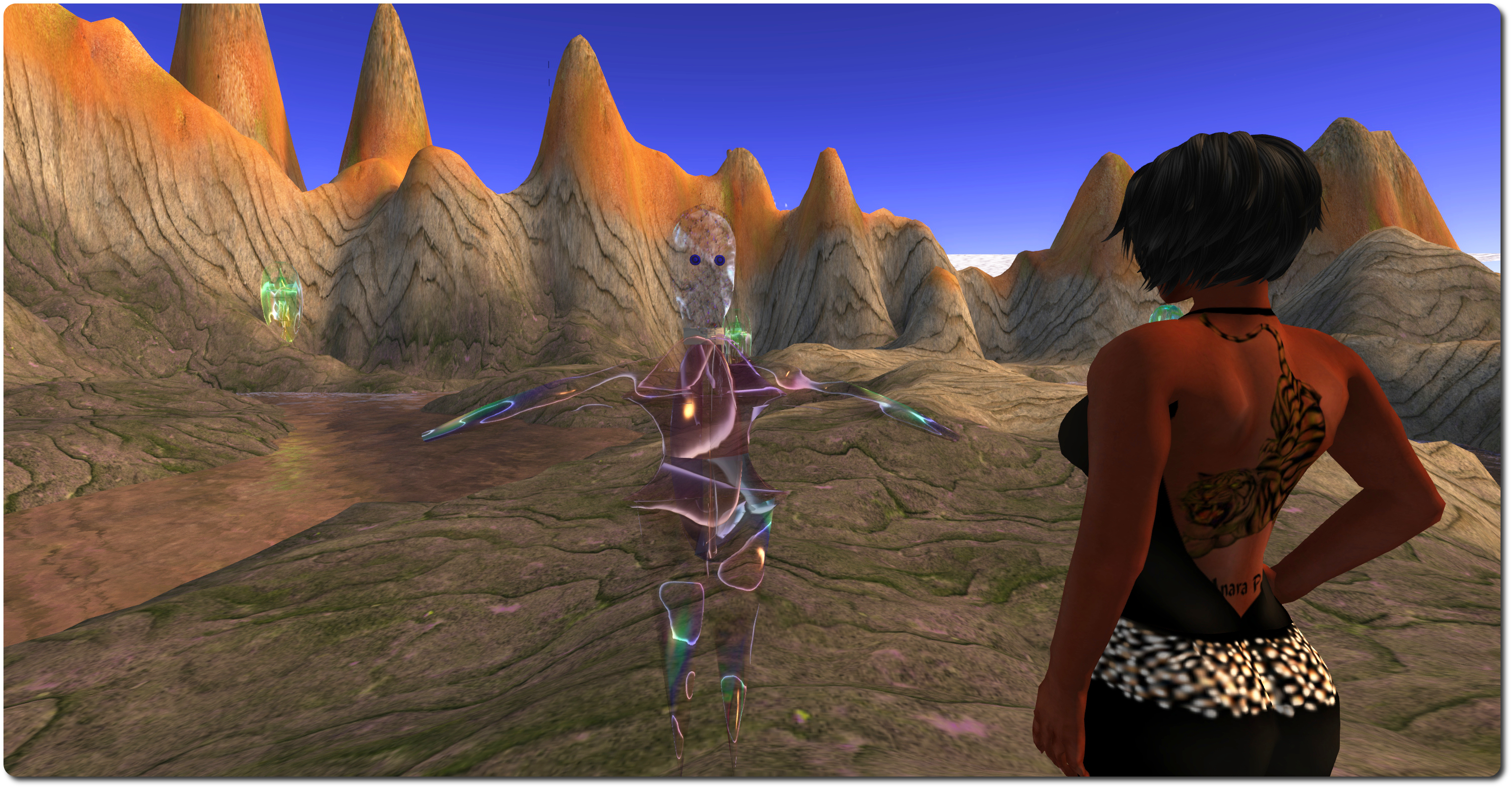
Ghosts of the Internet - conversing with myself (SL to Inworldz)
Ghosts of the Internet – my Inworldz ghost floats before me in SL

But it is the ghosts which are really the focus here. These appear whenever someone on either side is within the boundaries set by the Pylons of Binding (although if there is no-one in the region on the other grid, no ghosts will be visible). In other words, the ghosts that appear represent avatars visiting the installation on the other grid.

Communications between world is initiated by touching a ghost (which will then become somewhat multi-hued) and then typing into open chat (you may have to wait for the “ghost” to respond to your initial touch first). Only one conversation with a ghost can be established at any given time, so if you touch a ghost already in a conversation, it will not respond to you. It is also not recommended that you touch several ghosts at once to initiate multiple conversations, as “bad things will happen” as a result (and it might get very confusing).

Be aware that whatever you say to the other person is also repeated in open chat at their end of the link, not in IM, and so will be heard by anyone else who is near them. Chat from any other avatars around you, however, is not transmitted. To terminate a conversation, or if you do not which to speak to someone on the other side who touches your “ghost” there, simply touch the appropriate ghost to terminate the connection.
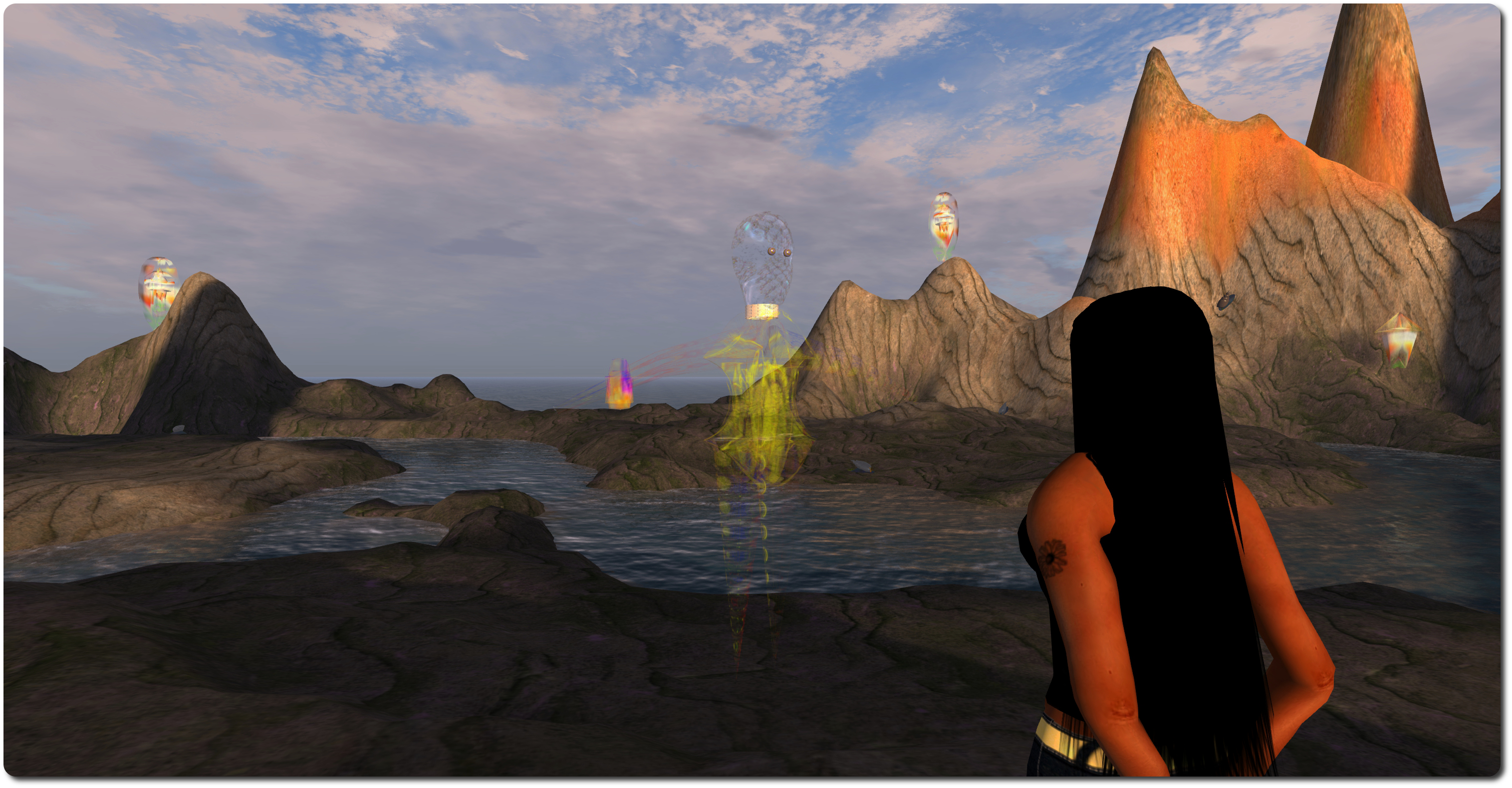
Ghosts of the Internet (Inworldz) - conversing with myself (Inworldz to SL)
Ghosts of the Internet (Inworldz) – facing and conversing with my SL ghost as it appears on Inworldz

If you have accounts on both Inworldz and Second Life, Ghosts of the Internet brings a whole new level of meaning to the expression “talking to oneself”; nevertheless, it is an easy means of experiencing the installation should there otherwise be on-one else on the other side with whom you can converse. Alternatively, if your focus is solely on Second Life, you can enjoy something of the experience by having a friend hop over to Coppelia, and converse with them from the Ghosts of the Internet installation on LEA21.

As well as being a fascinating technical / artistic piece, Ghosts of the Internet carries with it echoes of the past. Remember the heady days of 2008, when a group of brave explorers set-out to move between dimensions, travelling from Second Life to OpenSim, and the promise therein? It is also – possibly – a hint of a potential future, given Ebbe Altberg’s comments on SL and the metaverse.

Both of these give the installation an added philosophical edge in terms of what might have been and what might yet be. I also found that when talking two myself between the two worlds, prompted thoughts of how the metaverse might be used as an expression or reflection of the multiverse, and our own multiple existences therein …
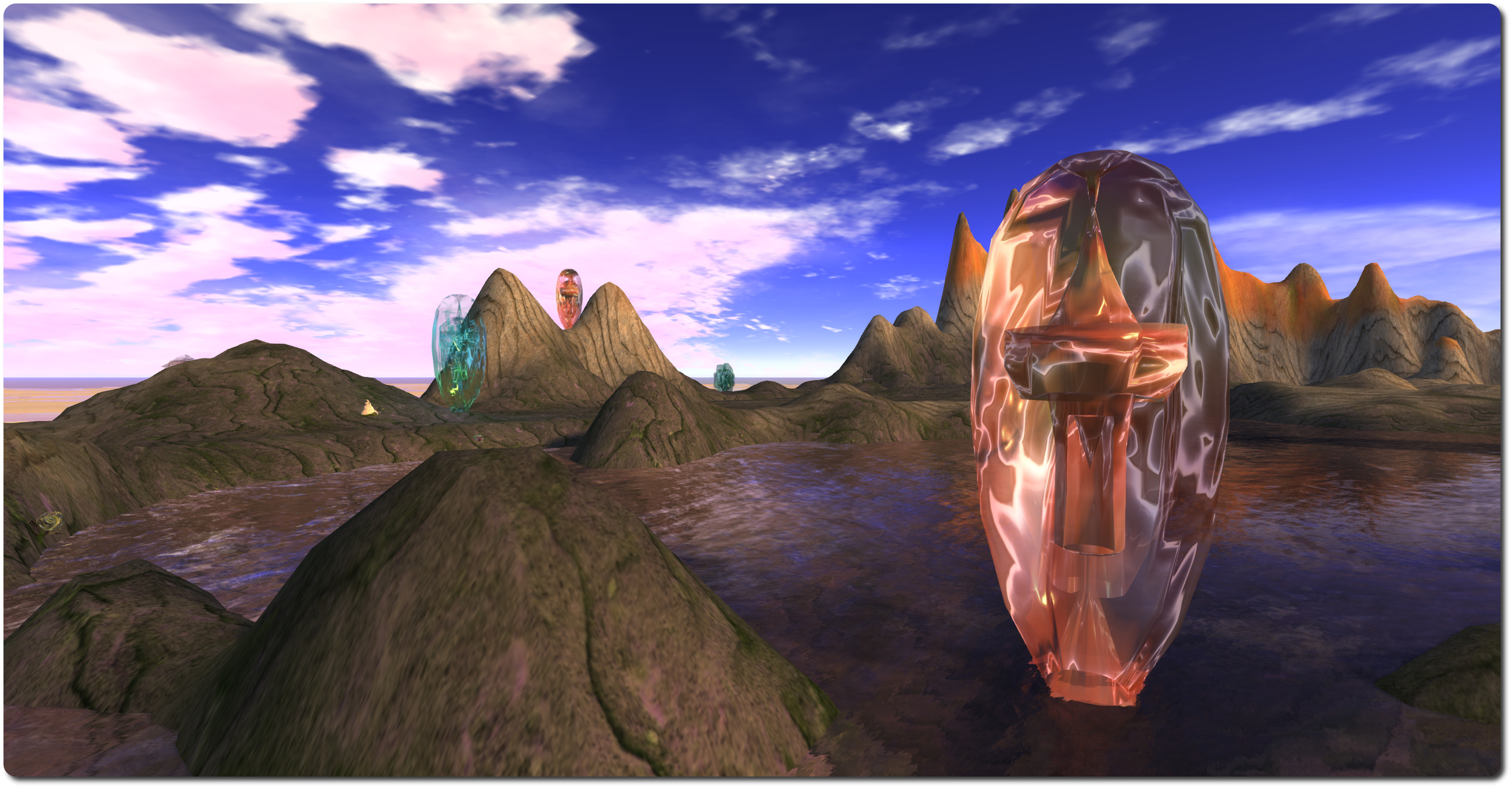
Ghosts of the Internet

So, for a while at least, there are ghosts on the grid, and echoes in the metaverse. See them and hear them while you can. Recommended.

Related Links

Got a question about the VR metaverse? Put it to the experts!

SVVR

The first Silicon Valley VR (SVVR) Conference and Expo will take place on Monday 19th May and Tuesday 20th May 2014, at the Computer History Museum, Mountain View, California.

The conference will bring together a host of experts in the VR and in virtual environments, including the likes of Palmer Luckey (Oculus VR), Philip Rosedale, Ebbe Altberg, David Holtz (Leap Motion), Ben Lang (Road to VR), Jan Goetgeluk (Virtuix) and many more – see the list of speakers and panelists on the conference website – as well as including exhibits and demos from some of the top names in the field.

Both the Drax Files Radio Hour and New World Notes have secured discounts of $100 per person on the two-day registration for those who are able to attend. Simply enter either code “drax2014″ or “nwn2014” when registering to claim your discount.

But even if you can’t attend, you can still be involved. Here’s how.

As a part of the conference events, Draxtor Despres of The Drax Files fame will be moderating a special panel, Creating the VR Metaverse. featuring Ebbe Altberg (Linden Lab), Philip Rosedale (High Fidelity), Stefano Corazza (Mixamo), Tony Parisi (Vizi).

Creating the VR metaverse
(l to r): Ebbe Altberg, Philip Rosedale, Stefano Corazza and Tony Parisi. Ready to answer questions on “Creating the VR Metaverse”.

Together, they’ll be considering topics such as:

  • One global metaverse or many?
  • Identity and privacy
  • Virtual World Governance: democracies, the greek god model, or benevolent dictators
  • Intellectual property and legal jurisdictions
  • Avatar portability and standards

If you have a question you’d like to put to this panel during the course of the proceedings, then please leave it in the comments following this article, and it may be selected by Drax to be asked during the course of the discussion.

Perhaps your question relates to one of the topics listed above, or perhaps you’re wondering if the idea of a just a “VR metaverse” is too narrow, and any future metaverse should also embrace augmented reality (AR) as well; or perhaps you’re wondering why and how any new metaverse might enjoy wider adoption in the world at large than we’ve seen with the likes of SL and OpenSim; or perhaps … Well, you get the idea.

Panel moderator: Draxtor Drepres
Panel moderator: Draxtor Despres

You can address your question to an individual member of the panel or to all of them or any combination in between. All that’s required is that your question is pertinent to the panel’s theme, creating the VR  metaverse, is polite, and is suitable for the forum in which it is to be asked.

Obviously, and depending upon the number received, not every question submitted will necessarily be asked (as questions will also be taken from the live audience) – but if your question is liable to get the panel thinking or generate some interesting / thought-provoking replies, then it may well get selected. Just make sure you have provided it in the comments below no later than 20:00 on Monday May 19th.

Related Links


Viewer release summaries 2014: week 19

Updates for the week ending: Sunday May 11th, 2014

This summary is published every Monday and is a list of SL viewer / client releases (official and TPV) made during the previous week. When reading it, please note:

  • It is based on my Current Viewer Releases Page, a list of all Second Life viewers and clients that are in popular use (and of which I am aware), and which are recognised as adhering to the TPV Policy. This page includes comprehensive links to download pages, blog notes, release notes, etc., as well as links to any / all reviews of specific viewers / clients made within this blog
  • By its nature, this summary presented here will always be in arrears, please refer to the Current Viewer Release Page for more up-to-date information

Official LL Viewers

  • Current viewer release: update to version 3.7.7.289461 (formerly the Interest list RC – improvements to how the viewer and server work together to know what scene objects to draw) on May 6th (download page, release notes)
  • Release channel cohorts (See my notes on manually installing RC viewer versions if you wish to install any release candidate(s) yourself):
  • Project viewers:
    • No Updates

LL Viewer Resources

Third-party Viewers

V3-style

  • Catznip updated to version R9 on May 9th – core updates: CHUI integration, materials processing support, initial overhaul of Preferences floater; improved camera / movement floaters; profile display updates;  bug fixes;  and more  (release notes) – review here
  • Firestorm updated to version 4.6.5.40833 on May 11th – core updates: Vivox 4.6.x; FmodEx updates & fixes; Fitted Mesh fixes; Mac Cocoa fixes; OpenSim updates; building & scripting updates; communications updates and fixes; bug fixes; and more   (release notes) – review here

V1-style

  • Cool VL viewer updated on May 10th, as follows: Stable: version 1.26.12.0; Legacy: version 1.26.8.58 – core updates: please refer to the release notes (downloads)

Mobile / Other Clients

  • Lumiya updated to version 2.6.0 on May 9th – core updates: Fitted Mesh support; Request Teleport; Support for selecting avatars in 3D by touch; significant 3D performance improvements; reduced memory footprint; improved bandwidth usage  (release notes) – review here

Additional TPV Resources

Related Links

Firestorm 4.6.5: steady as she goes

firestorm-logoOn Sunday May 11th, the Firestorm team released Firestorm 4.6.5.40833. Given this release comes just two months after the 4.6.1 release, it does not have a huge raft of new shiny. What it does offer is a nice package of new features and updates, together with a fair few bug fixes from both the Lab and the Firestorm team.

As always, the complete list of changes, together with attributions, can be found in the release notes, and I refer readers to that document for specifics on all contributors, FIRE JIRA links, etc. The following is intended as an overview of some of the more major / interesting changes, updates and  fixes to be found in the release.

The Before We Begin Notes

  • Downloading – a reminder: while the Firestorm download server performed perfectly for the 4.6.1 release, please remember it is the only server handling downloads. So in the unlikely event you encounter delays or a slow download, please be patient / consider re-trying a little later
  • Version blocking: Jessica informs me that there are no plans to block any older Firestorm versions following this release
  • Installation: as always, a completely clean install of the viewer is recommended.

Lab Updates

This release sees Firestorm reach parity with LL’s 3.7.4 code-base, and add a number of fixes and updates from the Lab, including (but not limited to):

  • Vivox 4.6.x updates
  • Advanced Lighting Model can no longer be enabled for Mac OSX 10.6.8 as Mac OSX 10.6.8 is no longer supported by Linden lab (The ability to enable ALM on 10.6.8 was removed because it caused rendering glitches when enabled)
  • Fix for huge amounts of memory being used & viewer crashing when opening large chat histories from the conversation log
  • Fix for BUG-5537, introduced as a result of changes made to the avatar_lad.xml for Fitted Mesh. These changes caused a non-rigged mesh attachment object worn on the chest attachment point shape to look fine in the wearer’s view whereas anyone else it would appear as if the wearer’s chest was showing through the clothing item
  • Fix for crash when editing certain rigged meshes at high altitude
  • Fix for crash when uploading corrupt .DAE file (BUG-4961)
  • Fix for BUG-997,terrain texture changes caused by changing texture elevation ranges or terraforming can not be seen until after relog or teleporting out and back to the region
  • Fix for a suspected thread race crasher in the FmodEx library.

A Note on Interest List Updates

The recent LL viewer-side interest list updates are not a part of the Firestorm 4.6.5 release. As noted elsewhere in this blog, the interest list code is a non-trivial merge due to the extent of changes included alongside of the core interest list updates. It’ll therefore take a little longer for this work to appear in Firestorm.

Building and Scripting Updates

Firestorm 4.6.5 see the Build options in Preferences revised, with two Build sub-tabs (Build 1 and Build 2) under Preferences > Firestorm.

The revised Build-1 sub-tab in Preferences > Firestorm

Build 1 (above) contains the options for setting defaults for all newly created prims (size, settings, texture, permissions and pivot point) and the LSL pre-processor options.

The Build 2 sub-tab contains the six check-boxes (Save Scripts Edited from Inventory to Mono, Save Textures from Inventory to Disk as PNG Instead of TGA by Default, etc, which had been in the previous Build sub-tab). It also contains four new options.

The new Build 2 sub-tab in Preferences > Firestorm

The new options are:

  • Limit select distance (meters) – disallows selection of objects beyond the specified selection distance from your avatar
  • Limit drag distance (meters) – when enabled, this limits the translation distance of objects in a single operation of the translate tool (metres from start point)
  • Constrain rotations to multiples of X degrees, when not using ‘snap to grid’ – all rotations via the rotation tool are constrained to multiples of this unit (degrees)
  • Preview animations on own avatar during upload – when enabled, you can preview animations during the upload process on your own avatar instead of on the avatar dummy in the upload window.

Firestorm 4.6.5 also includes the following build related items:

  • An option to prevent avatar from turning to selected object when editing (Preferences > Move & View > Firestorm > Turn Avatar Towards a Selected Object)
  •  A fix so that when previewing an animation for uploading it (in paused mode), moving the track of the slider will now correctly change the displayed frame of the animation.

Communications Updates

There are a number of new options for communications with this release, together with a number of fixes. The new features include:

voice-warn
The new multiple voice instances option should enable you to run voice on multiple viewer instances on the same computer & without generating warnings like this
  • An option to allow voice to connect in multiple viewer instances simultaneously (Preferences > Sound and Media > Voice Settings), allowing you to run voice on multiple viewer instances, and without seeing the connection warning pop-up message (shown right)
  • An option to hear voice equally from everyone, rather than being dependent upon either avatar position or camera placement. This is a useful addition for meetings, etc., where attendees may be located at difference distances from your avatar / camera position, thus impacting voice quality when they are speaking.
The new voice options in Preferences > Sound and Media > Voice Settings
  • A new option has been added to enable the full profile of an avatar to be opened when clicking on an inspect SLurl (Preferences > Firestorm > General > Open Avatar Profile Directly When Clicking on its Name).

Continue reading “Firestorm 4.6.5: steady as she goes”

The Drax Files Radio Hour 18: more from Santa Cruz and a CEO’s son

radio-hourEpisode 18 of The Drax Files Radio Hour features the third part of Draxtor’s chats with Linden staffers. Alongside of this is an interview with one with Aleks Altberg (son of LL CEO Ebbe) and another with Karl Krantz, organiser of the Silicon Valley Virtual Reality Conference taking place on May 19th-20th.

As well as being available on the show’s website and on Stitcher, the show is also on YouTube, and it is to that recording (embedded at the end of this article) any timestamps given in the text refer.

Brendan Iribe’s “fireside chat” with TechCrunch co-editor Matthew Panzarino at the recent TechCrunch Disrupt New York event (May 5th-7th), pops-up in the early part of the show. During the chat (which I muse upon here), Iribe outlines a potential future for VR is a (very loosely defined, in terms of purpose and use) MMO / metaverse of virtual environments. This is not a vision that he sees coming about in the next year or two – Iribe couches his frame of reference around a decade hence, at a time when he sees VR / VWs having wider acceptance and the technology itself has had time to further mature (particularly some of the associated hardware) and become more broadly accepted in daily life.

Brendan Iribe, Oculus VR CEO, talks to Matthew Panzarino at Techcrunch Disrupt NY (image via Techcrunch)

Surprise is expressed in the show that SL seems to be “unknown” or “ignored” by Iribe and others. I don’t think this is a valid assumption. Cory Ondrejka not only works at Facebook, but he was involved in the Oculus VR acquisition and he’s hardly blind to Second Life, having co-founded it.

Rather I’d suggest the reason SL isn’t mentioned comes down to something that appears to be missed in the discussion: the fact that Iribe is talking in terms of something a decade hence, and possibly something likely not built entirely by any single organisation, although FB is obviously well-placed to help build things. Perhaps more to the point, FB could position itself to provide core elements of the backbone – such as transaction services, identity services, and so on, thus becoming a gatekeeper to this new environment, much as Philip Rosedale wants to position High Fidelity in his vision of things.

As such, by the time the brave new digital world painted in Iribe’s broad brushstrokes actually arrives, it will likely be something that is so beyond comparison with SL that the latter is not seen as having relevance in discussions. In this, it’s not so much down to Iribe and others to point to SL and say, “look, this is the idea!” It is for SL to find wider relevance in the scheme of things.

The interview with Aleks Altberg commences at 16:18 into the show. A lot has been documented by Ebbe himself about Alek’s involvement in SL (perhaps first in this very blog in a comment he left just after starting at LL, then later during his VWBPE address), so it’s good to hear from him first-hand about his experiences with the platform and his thoughts about it.

Aleks Altberg, courtsey of 425 motorsport
Aleks Altberg, courtesy of 425 motorsport

Aleks reveals it was his father who indirectly go him interested in SL after he found his Dad using it. From here, his tale is probably familiar to many SL users – passing the time flying around, exploring, meeting people and only gradually unlocking the deeper secrets of SL – object creation, building, and so on, over time, which in turn led him into scripting and thus into SL commerce.

In discussing getting more people engaged in SL, Aleks offers-up an interesting “five-step” plan, which includes basic control orientation and some initial content building. It’s not a bad approach – but in some respects, it has been tried, albeit it not in quite the way he suggests, and hasn’t always worked.

He’s also less-than-convinced that trying to help people connect to things in SL which (might) interest them will work. He actually has a point – not everyone who comes to SL really knows what they’re looking for. Equally, there is no guarantee that anything which may have enticed someone into SL becomes the reason for them to remain engaged in SL.

However, I’d still suggest that many who come to SL do so because they have heard of something or seen something which has piqued their interest, and so attempting to find the means to connect them to that interest / point of curiosity (and others similarly engaged), then letting them discover everything else over time, is potentially more beneficial than appearing to say, “here’s all that SL can do – now go forth and do it!”, and shouldn’t be completely dismissed.

Karl Krantz, founder of the SVVR Meet-up (image courtesy of Road to VR)

Karl Krantz is interviewed at 26:12, where he discusses the SVVR conference and expo, which he admits to being an attempt to get the more affordable aspects of VR “away” from the gaming environment and open them out to more widespread interest / opportunities. The conference will take place at the Computer History Museum, Mountain View, California on May 19th / 20th.

Those in a position to attend can get $100 off the price of admission (reducing it to as little as $250) by using the code “drax2014″ (or indeed, “nwn2014″ if you are an NWN reader) when registering. They can then get to hear the likes of Palmer Luckey (Oculus VR), Philip Rosedale, Ebbe Altberg, David Holtz (Leap Motion), Ben Lang (Road to VR) and others.

Krantz is also no stranger to SL, and offers some interesting commentary on the platform – including the need for the Terms of Service to be redressed (which is being worked upon internally by the Lab). He’s also very positive towards LL being able to position themselves to capitalise on any VR wave which may emerge, although his comments on the ToS and on issues of performance caveat this particular view somewhat.

More particularly, he suggests Linden Lab might be better served in moving away from being solely a platform provider and focusing on providing the core services – the transaction system and Linden Dollars, the identity management service, the marketplace, etc. and then opening the rest of the platform out for development and operation by others and folding-in OpenSim. Again, this is pretty similar to the High Fidelity approach, and it could have some merit to it; the problem being how the Lab pivots away from its current operating / revenue model to this kind of approach without actually hurting itself financially in the process or causing mass disruption to SL as it is operated today.

Enkidu Linden is an Engineer Manager for Platforms at the Lab, and Drax had the opportunity of interviewing him during the Santa Cruz meet-up, as we hear starting at the 34:38 mark. Aside from his work with the transactional elements of the platform, Enkidu reveals an interesting approach to how we relate to our avatars and express ourselves through our avatars.

Where many of us seek to build our avatar as  – for want of a better term – a singular focal point of our identity in terms of looks, appearance, etc., and through while we can express ourselves, Enkidu comes from the opposite end of the spectrum, using many different avatar forms to express facets of his personality and interests. He’s certainly not alone in doing this; I have a couple of friends who routinely shift their avatar form as a means of self-expression. Even so, it’s and interesting reflection of the diverse ways in which we can define a means of identity and connection with others.

In terms of Lindens and their time in-world, Enkidu points-out that staff at the Lab, being geographically diverse in their locations (east and west coast, north and south), do spend time in-world attending various meetings in non-public regions and also spend time elsewhere (presumably using their Alts prior to Ebbe lifting the ban on staff using their “official” accounts for in-world roaming). In this, he notes, “Our job is to make sure the people in Second Life can have the experiences they want to have. If we never have those experiences ourselves, how can we understand what they are?”

This is a wide-ranging discussion which tackles, or at least touches upon, a fair few areas. Those who have ever wanted to understand more about Linden Dollar transactions, the LindeX and exchange rates (and how the latter in particular keep the SL economy stable) would do well to listen to Enkidu’s description – in totally none-technical terms – of how things flow together and the wheels turn.

As a former government employee, Enkidu offers some observations on our relationship with government and our relationship with the Lab, some of which indirectly echoed Ebbe’s own Forum-made observation of the Dunning-Kruger effect which can shape some reactions to the Lab’s stewardship of SL. it’s an observations which is, at least sometimes and in certain ways, hard to dispute.

All told, another fascinating discussion with a Lab staffer, albeit one somewhat different to those in the last two shows.

Not much to say in summary this time around, other than the interviews are once again excellent.

Catznip R9: the cat gets the cream

catznip logoCatznip released version R9 of their popular v3 viewer on Friday May 9th, and marks their biggest single update so far. As the team move towards a shorter, faster release cycle, it is likely to be the last of the really big updates we see coming out of the door from the team. In the future, things are liable to appear in smaller and more focused releases.

The complete list of changes can be found in the release notes, and I refer readers to that document for a full list of updates and changes, and any necessary specifics on code contributed to the viewer (if applicable).

The following is intended as an overview of some of what I feel are the more major / interesting / visible changes to be found in the release.

Chat  and CHUI

R9 sees Catznip get the best of CHUI and extras from the Catznip team that should help to present users with a chat  / IM conversations.

Catznip R9 chat takes the best of CHUI and adds Catznip's own tweaks, and the return of popular elements
Catznip R9 chat takes the best of CHUI and adds Catznip’s own tweaks, and the return of popular elements

One of the more noticeable elements is the ability to range tabs either vertically or horizontally. Given that many people do appreciate chiclets, considerable effort has been put into restoring the chiclets following the inclusion of the CHUI code.

Given the extent of the updates resulting from the CHUI merge and the team’s efforts to present a flexible, friend chat UI, Preferences > Chat has been extensively updated.

Preferences > Chat has been revised with expanded options for managing all aspects of chat and IMs

These changes are apparent from the moment Preferences > Chat is opened, with six new sub-tabs appearing in the panel. Three of these – Translation, Auto-Replace and Spell Checking – replace the button which access these options in earlier releases. The remaining three tabs – Chat, IM & Groups and Logging – are entirely new to this release, and all include options for configuring chat and IM notifications, behaviour, appearance, and more (some of which have been inherited from the old Preferences > Catznip > Chat sub-tab, which has been removed from R9, being surplus to requirements).

The IM & Groups sub-tab helps with configuring chat / IM behaviour, appearance, etc.

Additionally, the spelling checker has been updated to support German, French, Italian and Polish.

Building Updates

Perhaps the most obvious change to Catznip R9 is the arrival of Materials Processing. However, there are other updates as well, including:

  • Windows only:
    • Drag-and-drop textures directly onto a prim face using local textures as the backing store
    • Drag-and-drop uploading of textures
  • Added a “Selection Options” pop-out to thebuildfloater,  grouping all selection related viewer options and including:
    • Select Only Copyable Objects (also added to Build menu > Options)
    • Option to prevent turning towards a newly selected object
  • Option to prevent the avatar’s arm from pointing at a newly selected object
  • Added copy/paste of the different types of texture parameters with three possible scenarios (always on a single object):
    1. Copy all texture faces (which may or may not be identical) => pastes the texture data on matching selected faces
    2. Copy one texture face => pastes the texture data on all selected faces
    3. Copy several texture faces => pastes the texture data on matching selected faces
  • Added pipette for the different types of texture parameters.
  • The Build floater with Selections Options pop-out (l) and Materials (r)
    The Build floater with Selections Options pop-out (l) and Materials (r)

    Camera and Movement Floaters

    The updated Camera and Movement floaters
    The updated Camera and Movement floaters

    Both the Camera and Movement floaters have been refined so they are transparent, rather than opaque, and are more compact. The Camera floater also has a revised layout.

    A slider in Preferences > Colors allows you to adjust the level of transparency / opacity of both floaters.

    Inventory Updates

    This release sees a number of inventory related updates and changes, including:

    • A significant speed improvements when filtering inventory
    • Open in Inventory check box added to the Buy Contents floater + UI layout cleanup
    • Texture tooltip added for inventory items
    • Copy Outfit List to Clipboard is now available when right-clicking any outfit folders in your inventory
    • Option to clear the current inventory filter rather than create a new inventory floater when the shown item is currently filtered
    • Inventory will always show the “Received Items” folder if the inventory’s panel contents are filtered (with a non-default filter)
    • Empty system folders no longer hidden by default (Advanced > Debug setting DebugHideEmptySystemFolders set to FALSE)
    • New option to control how offered inventory is handled while marked as Do not Disturb
      • Pop up a chiclet as normal (default)
      • Auto-accept the offer
      • Auto-decline the offer.

    Notecards / Scripts / Text editors

    These see the following features added to the R9 release:

    • Recovery support for unsaved notecards (embedded items are not preserved)
    • Texture tool tips for embedded notecard items
    • Use the current selection (text, etc.) as the default search string
    • Highlighting of occurrences in the target editor when using the Search/Replace floater
    • New keyboard shortcuts to the script editor menu
      • F1 opens the LSL reference
      • Shift+F1 opens keyboard help
      • Ctrl+G opens the “Go to line” floater.

    In addition, the following behaviours have been revised:

    • When you Go To a line in a script editor, at least three lines above/below the target line will now be visible
    • Case-insensitive search is now enabled by default for notecards, scripts and text editors.

    Preferences

    As well as the updates to the Chat tab, this release sees a number of other updates in Catznip’s Preferences which form a part of ongoing work to overhaul Preferences.

    The Sound and Media tab has been completely overhauled, with new sub-tabs for volume controls and streaming, Sound Alerts, and Voice Chat.

    The Sound Alerts sub-tab panel on the revised Sound and Media tab in Preferences
    The Sound Alerts sub-tab panel on the revised Sound and Media tab in Preferences

    Continue reading “Catznip R9: the cat gets the cream”
