Endeavour – a personal memory

STS-49: Endeavour’s maiden flight

I don’t tend to write about personal stuff, but today is an exception. In my life, my Dad has been responsible for many things – most of them for the good (other than when the need to tell me off came up!). I’ve shared a lot with him over the years, but three things in particular draw us together with a shared passion: Formula 1 racing, flying, and all things related to astronomy and space exploration.

It’s the latter that prompts this blog post, as Dad has always followed the space shuttle missions. He has the official NASA videos (now all on DVD, although I can remember when he had them on VHS!) of all the major missions – the docking missions with the Russian space station Mir, the Hubble Space Telescope launch, the first “satellite rescues”; the triumphs and tragedies.

If I’m honest, I never paid much attention to these things as a child – space was a “boy” thing. That changed in 1992 when Dad dragged us to Florida to see the maiden flight of the space shuttle Endeavour. He’d seen other launches, but this was the first family trip to see one. If I’m honest, I was more interested in spending two weeks in Florida and doing everything else we’d planned (Disney, Universal Studios, driving, shopping…). As it turned out, the shuttle launch was the highlight of the trip.

Through contacts, Dad had got us a pass into the space centre on the day of the launch, and we had instructions to drive down to the Air Force base south of the space centre, where we were met (along with about 100 other cars!) by a security escort and were led up through the launch facilities to a vantage point about 4 miles from the launch pad, which was visible on the horizon, across a wide river.

We were there for hours with little to do. I remember Mum being very tolerant while Dad was like a small boy at Xmas, faced with lots of new toys. He had a 35mm camera with a huge zoom lens, another with a wide-angle lens, he charged Mum with a third and me with the video camera, and was constantly fussing and checking and re-checking them, putting batteries back on the little portable chargers, swapping the chargers in and out of the cigarette lighter socket in the car, and so on.

I remember being bored and cold a lot of the time. It was May, and the weather had been overcast, and the wind really cut across the flat land. When they mentioned a delay, and possible weather issues, I was actually ready to pack up and go back to the house we’d rented.

That changed when the countdown resumed. I really cannot describe the excitement that went through the crowd when it was announced the launch would go ahead. I do remember that distant blur on the horizon becoming the focus of everyone’s attention and the excitement running up and down the shoreline like something palpable. I also remember fighting Dad for use of his binoculars and looking at the shuttle “up close” and thinking how beautiful it looked. I think that was the point Dad’s “shuttle bug” (as Mum called it) bit me.

The launch itself was thrilling; the countdown over the speakers lining the public area reached 10, I was holding the video camera, the REC light bright in the viewfinder pressed to my eye, and seconds later I saw the faint glow of the main engines as they ignited just before the booster rockets ignited  – and the shuttle vanished in a huge, billowing cloud of smoke – then burst from it, climbing so fast I remember hurriedly zooming out and tipping the camera  – losing the shuttle in the process, but getting it in frame quickly, trying to holding the camera steady.

All around, people were whooping and cheering, the shuttle was climbing into a bronze sky and – it was absolutely silent. There wasn’t a sound from it until a crackling boom! rolled across the water, followed by the sound of about a million firecrackers going off. This was the oddest thing of all – you expect the shuttle to make a long, loud roar, but it’s nothing like that – not over a distance of 4 miles, anyway.

As the speakers gave the call, “Endeavour, go at throttle up,” I honestly remember everyone going quiet. This was the point where the Challenger had exploded. Then, with the shuttle just points of light in my viewfinder, I saw the solid rockets detach; two glowing pinpoints of light – and everyone around me started cheering and jumping, people were hugging one another; I panned the camera down as the shuttle vanished behind cloud, following this long, crooked  trail of smoke back to the empty launch pad, and then stopped filming. Dad was hugging Mum wildly, and he grabbed me, and was shouting things like “Magnificent!” and “Wonderful!” – and was wiping tears from his eyes.

Since then, the Endeavour has remained his “favourite” shuttle; he has every DVD NASA has released of her missions. And today marks the start of her final flight, 19 years to the day that she completed that maiden mission in 1992, when she landed in California.

STS-134: Endeavour’s final mission

It would have been wonderful to be in Florida to witness her final launch, but it was not to be. Instead, with her final flight – and with then entire shuttle era, something that has run the greater part of my life amazingly enough, coming to a close,  it’s time to recall some facts about this, the “baby” of the shuttle fleet.

  • Endeavour is the “youngest” shuttle of the surviving fleet, built to replace the lost Challenger
  • Endeavour was the first shuttle to be fitted with systems to enable long duration missions (up to 28 days in space) to be undertaken
  • Endeavour performed the first Hubble Servicing mission
  • Endeavour brought the Space Station “into being” with the delivery of the Unity module in 1998
  • Endeavour lifted the first African-American woman into space (Mae Jemison), the shuttle’s first Japanese astronaut (Mamoru Mohri) and the first married couple to fly on the same space mission (Mark Lee and Jan Davis)
  • Endeavour flew Barbara Morgan, originally the back-up for Teacher-in-Space Susan Christa McAuliffe who was killed in the Challenger disaster, in August 2007 on mission STS-118
  • Undertook the longest-ever space shuttle mission, STS-126, lasting 15 days, 20 hours, 30 minutes and 34 seconds
  • Only shuttle to ever land on the “temporary runway” at Edwards Air Force Base, requiring a unique braking technique to be used
  • Became the only shuttle prepped for a “triple role” launch option: as the launch vehicle for STS-127 mission, and as the rescue vehicle for either the Discovery on STS-119 (rescue mission coded STS-327) or the Atlantis on STS-125 (rescue mission coded STS-400)
  • Was the last shuttle to occupy Launch Pad 39B
  • Endeavour undertook that final night launch for the shuttle fleet on the 8th February 2010 during mission STS-130.

During STS-134, Endeavour will achieve two final “firsts”:

  • She will perform the first-ever “dual rendezvous” with the space station: one will be to dock with the station to undertake the main elements of her mission; the second will be a rendezvous that will terminate prior to docking, to test new navigation sensors that will be used in future space vehicles
  • Her crew will undertake the final spacewalks during a shuttle mission, when they install the Alpha Magnet Spectrometer-2 and the Express Logistics Carrier-3.

There is still one more mission to come, STS-135 with the Atlantis, but for me, personally, this is the mission that holds the greatest resonance as the shuttle era comes to an end.

Godspeed to Endeavour and her crew.

Viewer security exploit revealed

Nalates Urriah reports that Linden Lab have confirmed there is a security exploit involving a flaw in the Ogg Vorbis library could lead to Viewer crash issues. It’s not thought that the exploit can either perform privilege-escalation or arbitrary code-execution on users’ systems.

The flaw has been known about since 2009, but the exploit is fairly recent. Ogg files are in widespread use, so this is not an issue specific to the Viewer code. Linden lab has responded to the situation by issuing a patch and an advisory for all TPVs to recompile their binaries for all TPV viewers.

At the time from writing, updating executables for Kirstenlee’s Viewer (S21 7a) and the Firestorm Previews have been released.  Links for the Firestorm downloads (which do not appear to be available on the Phoenix website) are available as follows:

Note that all of the above three releases of Firestorm should be clean installations, not installed over any previous release (which should be removed first).

Other TPVs will doubtless follow, and users are advised to keep an eye on the various Viewer-related blogs and update as required.

Addendum May 16th

Phoenix have released an update that fixes this issue (and others). Find it here.

Listening and hearing

On Friday, Rod Humble kicked-off what he promised (via Twitter), to be a resumption of communications from the Lab regarding what is going on around SL and the Lab’s efforts relating to it. At the same time, we also got an update on what we can expect in terms of news on Mesh by the end of the month.

Many have critiqued LL – and Rodvik – for their use of Twitter; a commentator on this very blog took issue in the way communications are being handled –  claiming LL had “missed the boat” in their efforts. I’ve also been critical of the Lab, not just recently but throughout the life of this blog, for their lack of prowess when it comes to listening and engaging.

But, as Tateru today points out – things are changing. Rodvik is not only listening, he’s hearing and reacting- and kudos to him for doing so.

Just a few weeks ago, Theia Magic and others were making constructive blog posts and Tweets on the state of the new user welcome areas (notably Ahern and the lack of coordinated help for new users. The abuse is something a group of us had a round-robin on one evening (again via Twitter), when two of us pointed out the absurdity that when it comes to the official forums, LL are so paranoid about language and misunderstandings, that they actually blanked the use of the name “Dick van Dyke” for fear of upsetting the teens (or their parents) – and yet anyone arriving like Ahern risks being subjected to the most foul written and verbal (if Voice enabled) abuse which LL apparently deemed as “acceptable”.

Whether it came about as a result of Rodvik’s involvement in Twitter exchanges is 100% clear (although his intervention in issues is a matter of record), he has confirmed the return of the Resident Help Network. This cannot be anything but a good move – providing it is properly managed and coordinated. LL cannot be expected to keep their thumb on the pulse of everything in SL, so the proper used of something like SHN could be of major benefit – and it hopefully represents a first real step towards practical re-engagement with the user community – something that has again been something of a bee in my bonnet.

Also on Twitter, and while it received largely positive feedback, the new user sign-up process was critiqued because it only features human avatars. Again, Rodvik took time out to respond to these comments – and in his latest post he advises us that LL are expanding the available choice of avatars, “We know that the beauty of Second Life is the diversity and richness of how we choose to represent ourselves inworld. So, we’re adding 12 animal and 12 Robots and soon we’ll have Vehicles too. Then, we’ll also commission another set of human avatars that represent a wider, more diverse audience.

Both of these responses indicate that not only is Rodvik – the man at the top  – listening, he’s hearing what is being said and reacting to it.

A critical part in communications – again, as Tateru notes – is feedback – and this is something that, while there are still frustrations over a number of issues – Rodvik is paving the way. His blog posts are refreshing as they provide information and feedback clearly, and place him squarely alongside Frank Ambrose (FJ Linden) for providing quality communications. LL aren’t out of the woods where the entire issue of company / user interaction / engagement is concerned, but Rodviks efforts on Twitter, and he openness in blogging are certain steps in the right direction.

Mesh: timeline due end of May

It has been confirmed that Linden Lab will be publishing a timeline for the roll-out of Mesh at the end of May.

Note this is not the actual roll-out of Mesh itself; it is the timeline on what will happen when. It’s a good move on LL’s part: people have been hungering for Mesh for a long time, and all that has been happening on the Beta grid had increased overall levels of excitement / curiosity / confusion / demands to see it “now”.

Mesh is potentially one of the most revolutionary new aspects to be introduced to SL in a long time – at least in terms of content creation and technology. It will possibly completely redefine entire market sectors in terms of both the look of objects, how they are created and the skill sets required to produce them. It can be applied to almost anything – objects, building shells, vehicles, so the impact is potentially huge, although there do appear to be some limitations as to precisely what can be achieved  – and how much will be modifiable – within mesh objects.

Castle exterior by Ash Soyinka (31 prim equivalent) image copyright Pupatron

Take just one market sector, the one I’m most familiar with: buildings.

The potential here is mind-boggling: beautifully sculpted exteriors to buildings that mimic their real-life (or fantasy!) counterparts, and for the equivalence of a few dozen prims, and fitted-out inside with traditional prim-made floors, etc.

Avatars are another area where mesh could revolutionise things. While our current avatars are themselves mesh creations, they are somewhat limited; augmentation currently requires the use of prims and sculpties – both of which can be cumbersome. Mesh imports allow avatars to be massively altered / augmented – so the potential here is massive, although there are allegedly some initially limitations as to what can be done with such rigged meshes.

Given the sheer scope of impact mesh represents, then defining a timeline / roadmap leading to its roll-out is undoubtedly a good move. While there is much about Mesh that probably won’t become apparent until after it is “live” – precisely how popular mesh designs will be, what they will do to the market sectors where they are principally used, precisely what the initial limitations will be, how these will be overcome, and so on, there is still a need for people to have as much information in advance as it is possible to give. This can only be achieved through full and proper communication and avoiding the desire to give into pressure to simply “get it done”.

We’ve waited a long time for mesh – kudos goes to LL for dealing with its arrival sensibly and in a step-by-by manner that has fully engaged with the user community on the Beta grid, and which look set to continue now on the main grid. Hopefully, the new timeline will do much to clarify where everything stands with regards to mesh, and in the coming months, we’ll see even more engagement between users and Lab as we move towards it’s arrival.

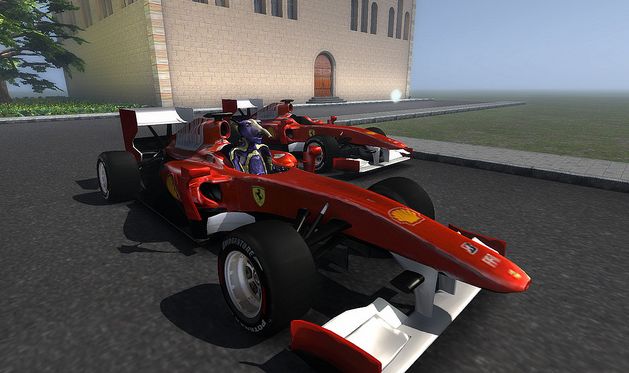
Timmi Allen’s awesome 27-prim equivalent model of the 2010 Ferrari F10

Further Information

All images in this report copyright named individuals; objects copyright named creators.

SL8B: more details

June 23rd marks SecondLife’s official 8th Birthday. To mark the event, there will once again be a week-long celebration, SL8B, commencing on Monday June 20th, 2011 and running through until Sunday 26th.

The theme this year is “The Magic of SL” – which LL describe as being “about that moment when we realized how amazing Second Life really is. It’s when we found our own personal connections to Second Life, realizing its potential in our own lives and the lives of other Residents. Whether it’s the social aspect, the content creation possibilities, or unique business and commerce opportunities, we’ve all got a tale of Second Life magic to share.”

Exhibitors are being offered 1024sq metres of space each (32×32 metres) with a maximum prim count of 234 per parcel. A total of 21 sims has been provided for the event. As well as exhibitors, the event will feature performers – singers, actors, DJs…

The key dates around the event are as follows:

  • May 5—Applications for builders, exhibitors, performers, and volunteer greeters open.
  • May 20—Exhibitor, performer, and volunteer greeter applications deadline.
  • May 31—Accepted exhibitors are notified.
  • June 1—Accepted exhibitors can begin work on their parcels at the SL8B site.
  • June 5—Last day for exhibitors to to begin building.
  • June 15—Deadline for all exhibitor builds.
  • June 16-17—Tech rehearsal.
  • June 18—Press preview.
  • June 20—10:00 a.m. SLT: Gates open to the public!
  • June 23—The Birthday! Special ceremonies included!
  • June 26—Last day of entertainment.
  • July 2—Gates close at 11:59 p.m. SLT

If there is one quibble to be had about the event it is the fact that is it rated 16 – so the Adult community in Second Life is effectively excluded. Given that a large proportion of SL users are here because of Adult related themes, and it is fair to say that Adult related items play a substantial part in the SL economy, the exclusion is something of a poke in the eye for many people.

While one obviously wouldn’t expect to see Adult activities running alongside G/PG-rated exhibits and the like, the fact remains that there is an Adult Continent. So couldn’t LL see their way clear to actually involving the Adult community in the celebrations by allocating sims in Zindra for a celebration of SL8B there? It would certainly send a more inclusive message to the community as a whole.

That aside, more effort seems to be going into SL8B in terms of raising visibility; not only is there a Wiki guide and blog posts – there is actually an official SL8B WordPress blog for events!

Further Information

Kokua Viewer: first looks

kokua-logoKokua is the name of the new Viewer from the Imprudence team. It’s been in development for several months, and a “test release” or “Work-in-Progress release” has now been made available. Based on Snowstorm 2.4, Kokua represents the forth major TPV to be based on the Viewer 2, following Kirstenlee’s S20/S21 series, Dolphin 2 and Firestorm itself.

Given the version (0.1.0) on offer isn’t even an Alpha, it would be unfair to subject it to a full review; rather, here are some impressions after having taken it for a spin over a couple of hours.

Installation and Start-up

Installation was pretty much the norm for an SL Viewer, although running it might cause some surprises, at least on the Windows version, where it opens up a couple of unexpected terminal windows; one apparently monitoring the Viewer’s system calls, etc., and the other blank. Closing the latter will remove the blog display panel from the splash screen, but otherwise not impact the Viewer. Closing the other window – identifiable from the commands displayed – will also close the Viewer – it must remain open until you actively quit the Viewer (at which point it will close). Doubtless future releases will see these additional windows removed.

Hybrid Interface

Once logged-in it becomes evident that Kokua is something of a hybrid Viewer; while the layout of the UI is broadly Viewer 2, there are subtle differences. The most obvious of these at first glance is the menu bar, which is more Viewer 1.x in appearance than Viewer 2.x. Rather than the increasingly-familiar Me, Communicate, World, Build and Help options, Kokua presents us with File, Edit, View, World, Build and Help, together (as with Viewer 2) the optional Advanced and Develop menus.

Similarly, the toolbar at the bottom of the Viewer window presents additional buttons over Viewer 2’s default set (see below). Of particular note is the Sidebar button, which brings up a floating palette from which the various Sidebar tabs can be accessed. Anyone having used Kirstenlee’s S20 Viewer, will find this instantly familiar. However, there is a slight annoyance – close the Sidebar palette before you’ve closed any open Sidebar tab…and you cannot close the tab. You must re-open the Sidebar palette and click on the relevant button to close the tab.

Toolbars (From top: viewer 2.x, Firestorm, Kokua, Kirstenlee S21

Communications

One of the major frustrations with Viewer 2.x has always been in the area of typewritten communications which has exhibited various flaws, including much in the way of wasted space through the use of avatar icons in the actual chat / IM windows. While things have improved over successive releases of Viewer 2, Kokua sadly takes a step backwards.

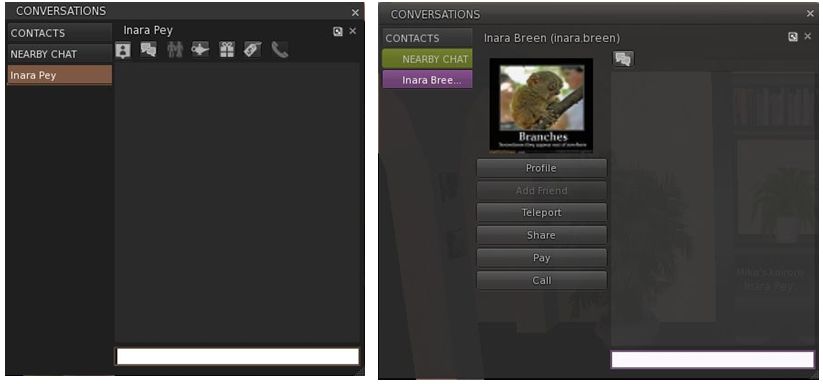
The problem is that both the chat and IM window tabs take up an excessive amount of space when compared to Viewer 2 because both include a central “column”. In the case of IM tabs, this is used to display the Profile picture of the person with whom you are conversing and a series of Action buttons (Pay, Teleport, etc), as shown below; in the case of the Chat window, it displays a list of icons representing everyone in your immediate vicinity.

IM tabs (Left: Viewer 2.x; right: Kokua)

Truth be told, while not always ideal, Viewer 2’s use of icons at the top of IM tabs is a far better solution to providing access the options to pay, teleport, etc. Where the chat window is concerned, the list of avatar icons is…wasteful.

View (Camera) Controls

On a more positive note, a nice touch within Kokua is a revised View / Camera control palette which includes buttons for camera zoom and for entering Mouselook, as well as the more familiar control options. These are a very nice touch.

Performance and General Feedback

In terms of performance and use, Kokua sits right up there for me. My frame rate was hitting 50-55 fps when on my own, and dropping to around the mid-30s when interacting with a few others. This actually puts it top of the tree for me in comparison to the likes of Firestorm and even Phoenix 908/977. However, activating dynamic shadows did give me a massive performance hit; one far greater than with Firestorm, with my frame rate collapsing to around 7-8 fps.

Rezzing was also extremely fast on Kokua when compared specifically to Phoenix and Firestorm – both of which it beat hands-down when logging on to the same location with each Viewer and with a cleared cache. While it might be my eyes, Kokua also seems to render objects with a far greater sharpness than seems to be the case with Viewer 2, Firestorm or Phoenix.

When installed, Kokua leaves one of the bigger footprints on a hard disk – 137Mb. This compares to the 102Mb used by V2, the 129 by Klee’s S21 and the whooping 154Mb required by Firestorm. Memory usage for the Viewer equated to that for both Firestorm and Klee, with similar overall core usage on a multi-core (quad core) CPU, where three cores shared the load.

Conclusion

There is of course much that is missing from this release – hence the “test” and “WIP” warnings in the Imprudence blog; so those anticipating a Viewer comparable to the pre-Alpha of Firestorm should perhaps wait until the next release of Kokua comes along. Certianly, anyone requiring the Media Filter, RLVa, radar or a choice of skins would do well to wait.

People also shouldn’t expect things like web Profiles or Avatar Physics – these became available after the version of Snowstorm Kokua is currently based on, so it is frankly unfair to expect either, or critique the Imprudence team because they are “not there”.  Indeed, those expecting more would do well to read the Imprudence blog post caveats relating to the release, namely:

  • This is a test build. It will likely have many bugs. It might break your avatar or eat your pets. Use it for testing purposes only.
  • This is not a finished product. The UI is not final. The feature set is not final. Nothing about it is final.
  • We need your feedback to improve the viewer.

However, that said, there are two elements of the current release that I would change were I involved in Kokua. These are:

  • The current chat / IM window / tab layout: this is really irritating in the amount of screen real estate required to adequately display conversations – and it is simply not necessary. The central “column” for images and the like really serves no purpose that cannot be better met through other means. If nothing else, those routinely using SL from a laptop may well find the amount of screen display lost to chat very annoying
  • The Sidebar tabs really need individual options to close them in addition to being able to do so from the Sidebar button palette; relying on the palette alone is not really convenient.

Other than that, this looks like a promising start for Kokua, and I look forward to taking future, more advanced, releases for a more thorough test drive.