Bright Canopy, the streaming service for SL, discontinued

I admit I’m getting to this somewhat late, although I don’t recall seeing it reported elsewhere among the blogs, etc., I try to read.

In January 2020, Bright Canopy, the one remaining streaming service for Second Life (and OpenSim) ceased operations. I’m actually a little embarrassed by not having noticed the change, given that I played a very small role in it getting started.

While possibly not a well-known service, Bright Canopy was officially launched at the end of August 2015, having come about (at relatively high speed) as a result of the folding of the SL Go streaming service. SL Go had, in turn, been the first functional SL streaming service, put together with LL’s help by former game streaming company OnLive. It established a small but loyal following before it came to an end after OnLive was forced to sell its IP to Sony as a result of not being able to generate the revenue through its various services (including SL Go) it needed to remain viable.

At the time of SL Go’s demise, I ruminated on the potential of the Lab running a streamed SL service through Amazon AppSstream (see: Could the Lab use Amazon AppStream to “replace” SL Go?), and that prompted Second Life user and app developer Bill Glover to comment:

Let’s just do it ourselves! You really got me thinking. I’d can launch a service right now if I get enough folks for Beta.
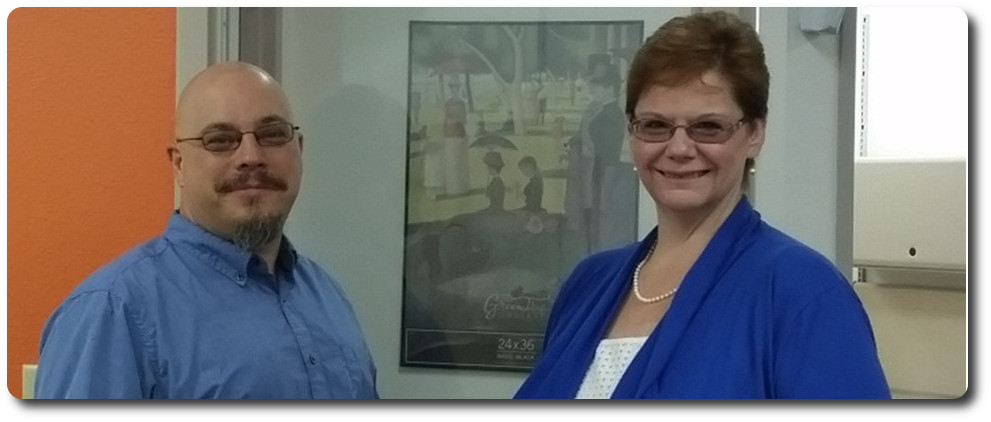
Bill and Jeri Glover: creators of the Bright Canopy service

Bill and his wife, Jeri, set about working on the idea whilst user Nebadon Izumi, also picking up on my ruminations, started his own tests using AppsStream,. I reported on his work a few days later (see: Using Amazon AppStream to stream a viewer – although sadly Nebadon’s video that originally accompanied that article was later removed from You Tube), and as a result of that article, Nikola Bozinovic, founder and CEO of Frame, a cloud-based service focused on delivering Windows applications to users, suggested his service could be used to deliver Second Life through the cloud.

Nikola Bozinovic, founder of Frame, worked with Bill and Jeri to make Bright Canopy happen, with Frame eventually acquiring Bright Canopy as a service in June 2016

Bill and Nikola quickly got their heads together, and within 24 hours, they had their own proof-of-concept running, delivering the official SL viewer over Frame via Amazon (as an aside, even while Bill and Nikola were in discussions, I tried Frame directly for myself).

As a streaming service, Bright Canopy did incur a cost for users – initially US $17.00 a month (necessary as operating costs from both AWS and Frame needed to be covered), but it continued where SL Go left off, offering both the official viewer and Firestorm to users for the same quality of graphics delivered to almost any computer / device as offered directly by the viewer. Over time the service expanded, adding Singularity to the list of viewers available, together with Blender and Gimp for those who might want CPU / GPU horsepower for their content creation work.

I actually lost track of Bright Canopy in the years post 2016, but it continued to be available, and several friends continued to use it as an away-from-home alternative to their viewer. My interest was stirred again in late 2018, when I caught the news the Frame itself had been acquired by Nutanix, as I was curious as to what it might mean for Bright Canopy. But as nothing appeared to change, I once again lost track of things.

However, as Jodi Serenity – who used the service on occasion – informed me, things did change at the start of 2020, with Nutanix discontinuing Bright Canopy and an offering. No reason (such as lack of subscribers) has been given, and Jodi informs me she has no recollection of any e-mail that may have been circulated ahead of the suspension of the service.

The ending of Bright Canopy means that currently, there is no longer a streaming service for Second Life. However, the landscape for accessing the platform without resorting to a full blown viewer has also changed in the years since SL Go and Bright Canopy first arose. Apps like Lumiya have shown what can be done in terms of client apps that can also render the world, and we currently have Speedlight the Android / browser client with its nascent world rendering capability, while LL themselves have hinted their own iOS  / Android client may eventually progress to world rendering.
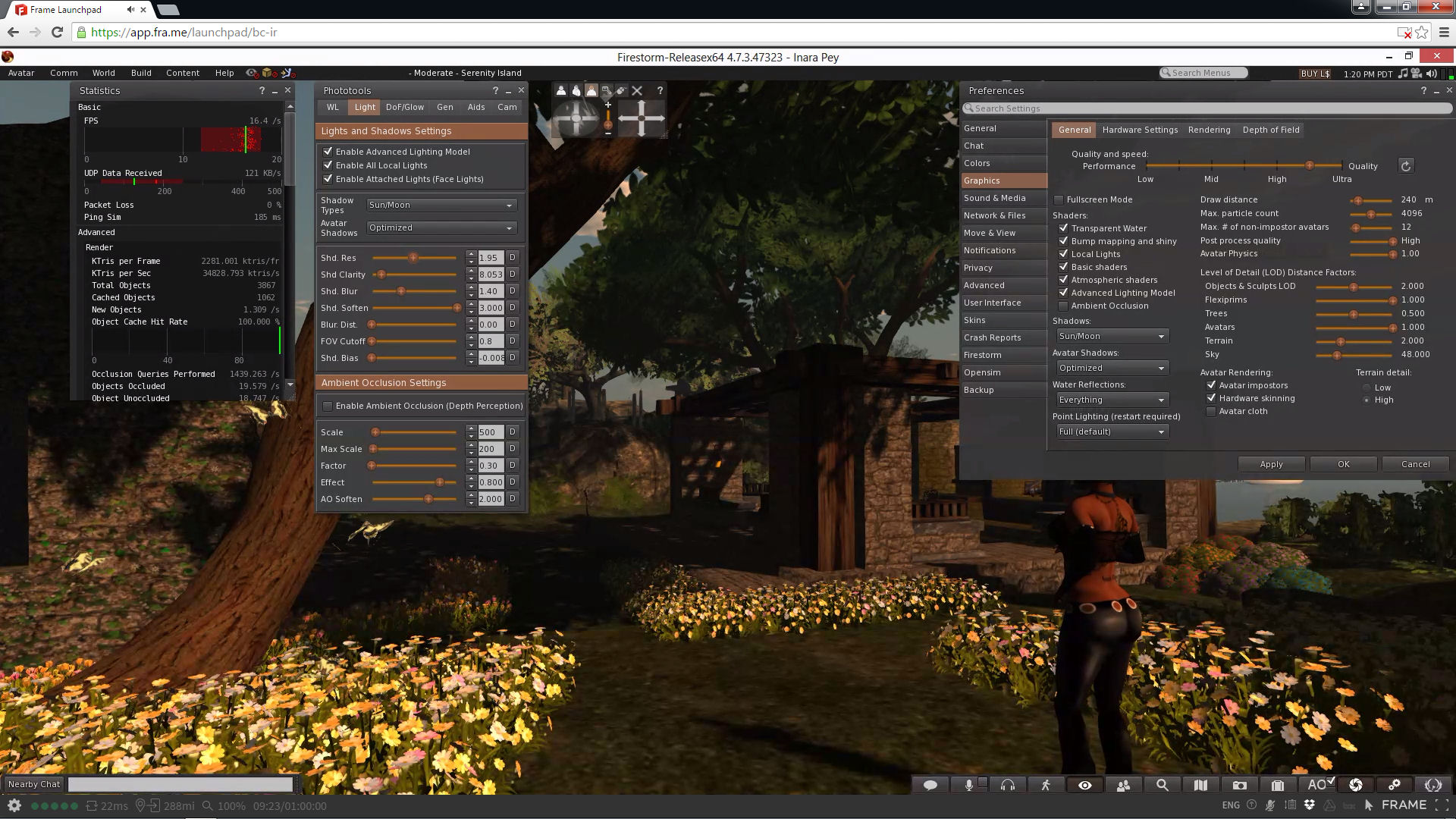
Bright Canopy running Second Life through Frame, offering those on low-specification computers to enjoy the full graphic richness of the platform with (allowing for network vagaries) low latency

Of course, none of these options render Second Life to a fidelity that can be achieved by a streaming service – but they have the advantage of being offered at a lower price. That said, the cost of streaming is also slowly changing, and even the Lab has been pondering whether they might want to offer a service at some point in the future – so it is very possible (if not probable) that Bright Canopy’s passing is not the last we’ll hear of a Second Life streaming service.
Streaming Second Life (and other grids): Frame enters the arena

My original ruminations on Amazon AppStream have led to a couple of people giving the service a go.  Nabadon’s Izumi  has tried the service with the OnLook viewer and OS Grid, and Bill Glover has given feedback through his blog on using AppStream with Firestorm connecting to Second Life.

However, as several people have said, AppStream isn’t the only way to go – there are other options. One of these is Frame, which uses Amazon’s AWS and Microsoft’s Azure cloud services. In fact, it was Frame’s founder, Nikola Bozinovic, who suggested people look at the service as s potential means of accessing SL and similar grids via the cloud through a comment he left on this blog. He also provided a link to a demonstration he his have said up using the official viewer, together with an invitation to try it out.

Nikola Bozinovic, founder of Frame, who extended an invitation to try the service as a possible means of accessing Second Life (and other grids) from the cloud

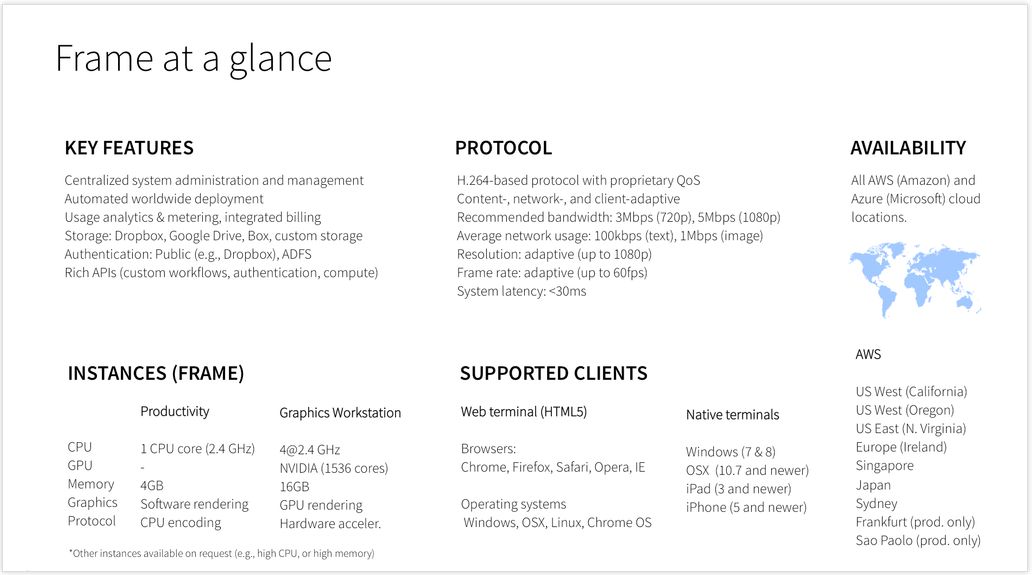
I don’t want to get blogged-down about what Frame is, but the infographic below should give the basics – suffice it to say here that it allows you to stream Windows and web apps, using a number of locations around the world, to a range of devices. It also provides a number of different use levels: Personal, Education, Business, and Platform. You can also find out more about it here.

The key point with Frame is that it potentially offers two approaches to accessing Second Life and other grids via the cloud:

  • As a do-it-yourself option, where you can sign-up for a Personal account, upload your choice of viewer and run it yourself when needed
  • As a packaged service similar to SL Go – which is how Bill Glover is approaching things through his Bright Canopy project, which has a demo up-and-running using Firestorm, and those interested can sign-up to find out about the work and try the demo version.

Nikola extended an invitation to me to try the Personal account  / “do-it-yourself” option for myself, which I was happy to do as a proof-of-concept attempt, and this article is primarily focused on doing that, and providing some short-form feedback. As Bill is working on the packaged service option, I’m not touching too much on that at this point in time.

A quick summary of the technical aspects of Frame (image courtesy of Nikola

Getting Started On your Own With Frame

Anyone wishing to try accessing Second Life through Frame can do so by requesting access to Frame Personal. An access code will be sent to you, allowing you to set-up your Frame account, and select the nearest PoP to you, and your preferred server type  (I opted for the four core system with 16Gb of memory and 20 free hours running a JavaScript client).

Once this has been done, the Launchpad is displayed. This is the normal starting point for Frame operations, and is used to manage the applications you’re running on the service (two are provided by default). This may take a short time to load the first time.

Adding a Viewer to your Frame Account

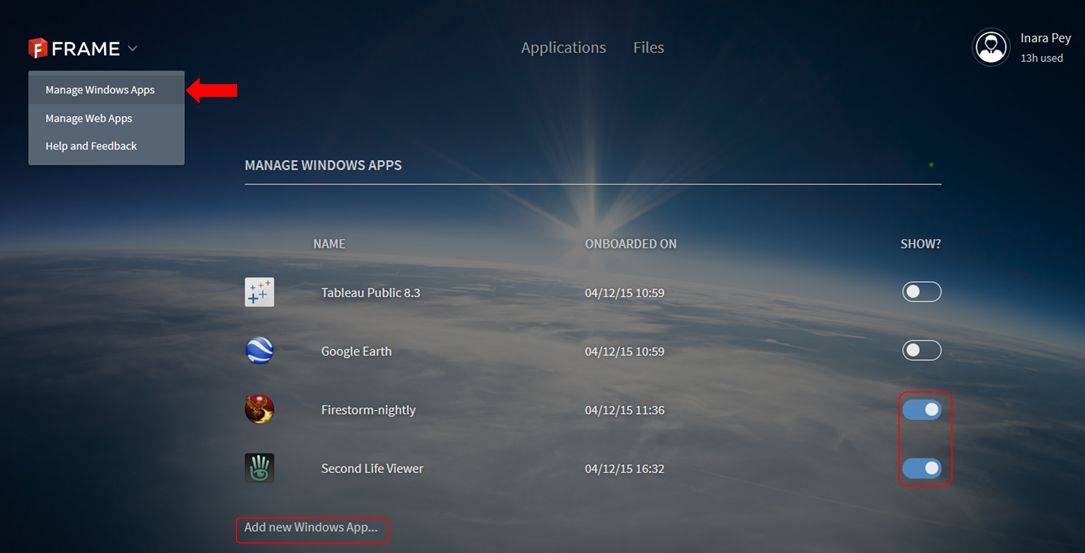
  • click on the chevron next to the Frame logo in the top left corner of the screen and select Manage Windows Apps.
  • A list of your installed applications is displayed (Tableau Public and Google Earth are provided by default).
  • Click on Add New Windows App … under the list.
  • Your virtual desktop will launch. Use the Chrome browser in the desktop to navigate to and download the Windows installer for your preferred viewer OR, if you have the EXE on your computer, use the Upload button (arrow in a circle) button in the lower right corner of the desktop screen to upload it.
Adding new applications to Frame is a matter of using the Manage Windows Apps (main menu) and the Add New Windows App function to run a virtual desktop from which you can browser for the application's installer and then download and install it. Frame will then automatically "onboard" it, and the application simply needs to be "switched on" via the toggle to the right of it
Adding new applications
  • Run the installer as if you were installing the viewer on your PC.
  • Once the viewer has installed, Frame will ask you if you wish to “on-board” it – confirm this, and accept the ToS – having read them, obviously! 😉 ).
  • When the “on-board” process has finished (it takes about 15 seconds), go to the gear icon in the lower left of your virtual desktop and DISCONNECT.This returns you to your Launchpad
  • Activate the viewer by toggling the “switch” to the right of it so it turns blue (shown above). This adds the viewer (and any other app you activate) to your Frame dashboard.
  • Click on Applications at the top of the screen to go to your dashboard. Double click the displayed viewer icon to launch the viewer.

While it may sound long-winded, the entire process of setting-up an application like this can be done in just a few minutes.

Continue reading “Streaming Second Life (and other grids): Frame enters the arena”

Using Amazon AppStream to stream a viewer

Update, Saturday April 11th: Bill Glover, who has also shown a keen interest in the possibility of using Amazon AppStream, has been carrying out his own experiments with Firestorm and Second Life. He notes of his experience:

I set-up a stream with the Firestorm and was able to use it from both a Chromebook and an Android phone. It was really very responsive over a hotel wifi network, but there are many caveats.

It works, but it’s expensive and nowhere near being useful for just casually streaming SL without some custom client development and viewer integration.

You can read his initial thoughts on things over on his blog.

On Wednesday, April 8th, and following the announcement that the SL Go service is to be discontinued, I speculated on how the Lab (or indeed, someone else) might offer up an alternative to fill the void left once SL Go ceases at the end of the month.

After looking at various alternatives (including Highwind’s GDN – Highwinds being one of LL’s CDN providers), a conversation with Dennis Harper pointed me towards Amazon AppStream, and the more I read, the more it seemed to be a viable option, and hence it became the focus of my article.

As a result, Nebadon Izumi (Michael Emory Cerquoni) sat down to see just how easy (or not) to get something up and running, albeit using OS Grid and the OnLook viewer, and reported some success.

What made me think to try was your article. “You get 20 hours of free streaming per month with Basic Amazon AWS account (required to access the AppStream service), then its 83 cents per hour. I also tried this on my Android Tablet, but while the graphics were beautiful, input is a problem, and the viewer will need overlay controls like SL Go, which will require development.

– Nebadon discussing using Appstream for Second Life with me

Once he had his account created, Nebadon was able to install the viewer and use the supplied web browser to obtain and install the VS C++ 2010 re-distributable packages he needed in order to run the Singularity-based OnLook viewer, “you can go anywhere on the web and download any software you need to make your application run,” he noted to me. “Once I had these and the viewer installed, it took about 20-30 minutes for the viewer to deploy, and I got a set of instructions on how people can connect to it.” The whole process took him, he estimates, about 2 hours.

This is obviously a long way short of providing a full-blown service, and anyone wishing to use Amazon AppStream as the basis for a streaming solution for their grid who obviously have to dig a lot deep into issues of cost and pricing, payment mechanisms, potential demand, management, scaling, and so on; it also has yet to be tried with a viewer connecting to SL. Nevertheless, as a trial exercise, Nebadon’s work at least shows that the viewer can be streamed relatively easily using AppStream, and that’s a good place to start.