 Viewer-Managed Marketplace (VMM) is a new set of capabilities designed to enable merchants to manage the creation and management of Marketplace product listings through the viewer, bypassing the need to use the Merchant Outbox an have copies of items stored on the Marketplace inventory servers), or using Magic Boxes located in-world, as VMM fully supports the sale on No Copy objects.
As most (all?) merchants are aware, it has been undergoing beta testing since the end of 2014, initially on Aditi (the Beta grid), and more recently on the Main grid, and there have been several feedback session on the work, either directly with merchants and those involved in the beta testing, and / or through the Lab’s Third-Party Viewer Developer meetings (see my VMM updates in this blog for specifics, together with the main VMM discussion thread on the Commerce forum).
The general feedback on the beta is that it has been going very well, with reported issues being dealt with by the Lab.
Automated Migration Notes
As a part of the transition to VMM, the Lab is offering merchants an automatic migration of their existing Direct Delivery items to VMM (items in Magic Boxes must be manually migrated to VMM). It is this automatic migration process that has been undergoing the most recent and extensive testing, and details on the process are now beginning to emerge, which can be summarised as:
- The automated migration process for all merchants will start no earlier than June 20th, 2015
- The automated migration process is capped at a maximum of 5,000 items per merchant, and the Lab has been notifying affected merchants of this, and what actions will be taken for those with more than 5,000, namely:
- Any unlisted items held by the merchant will be removed from the Marketplace as returned to the Merchant’s Received Items folder
- If the above fails to reduce the item count to below 5,000, any listed items held by the Merchant which have not had a sale in the past year will be unlisted and returned to the Merchant’s Received Items folder.
- Those merchants with more than 5,000 items on the Marketplace who do not wish to have their items pruned by the auto-migration process are being encouraged to carry out any pruning that may be required to get their numbers below 5,000 ahead of the start of the auto-migration process, or to carry out the migration of their Direct Delivery items manually and alongside any Magic Box items they may have.

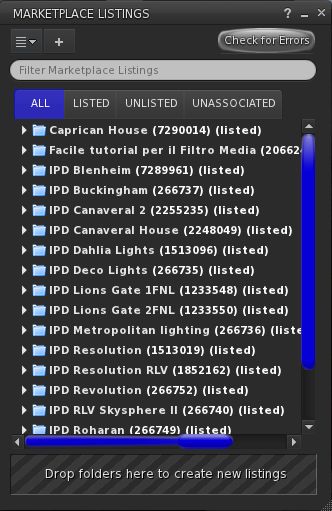
For those who wish to do so, manually migrating Direct Delivery items to VMM is relatively straightforward. All you need is the VMM project viewer (currently version 3.7.28.300920, although this may update shortly – see below), and you can use the Associate Listings capability within VMM to easily link items in your Marketplace Listings panel with you existing MP listings without having the re-create the latter, as shown above.
One point to note when moving DD items to VMM is that if you use multiple sub-folders within a current Direct Delivery folder, you may have to re-arrange things to avoid VMM treating the sub-folders as individual versions of the product.
Additional Notes
Some concerns have been raised over goods from merchants which are still popular in terms of sales, even though the Merchant may no longer be active in Second Life. It would seem that if these items meet the criteria for automatic migration, then they should continue to be available following the migration process. However, if they are only available via Magic Boxes and are not migrated manually (or fail to meet the automatic migration criteria), then will cease to be available as the switch-over to VMM runs its course.
For those who would prefer to use the viewer they are most familiar with in order to migrate their items to DD, rather than use the LL viewer, it is anticipated that the latter will undergo a further round of minor fixes, and the updates version either issued as a release candidate viewer or promoted to RC status shortly thereafter.
Once at RC status, the VMM code will legitimately be available for incorporation into TPVs as well. However, some TPVs have already adopted the code – the v3-style UKanDo viewer being one, for example.
One additional point of note here as well is that just because the viewer code may go to RC status fairly shortly, it does not mean the Lab are suddenly going to declare VMM is “live”. Lead times have been promised and adhered to throughout testing, and as noted earlier in this article, the only time scale that is confirmed for now is that the automatic migration process for all Merchants will not commence before June 20th.
While my own feedback may be of limited value, as I only have a small store and do not classify myself as a Merchant, I have used both the project viewer and UKanDo to manually migrate my items (and have removed various items out of choice, even though my store was well below the automatic migration threshold). By using the Associate Listing capability in VMM, I found the entire process to be relatively issue free – the only problems I did have were the result of silly mistakes on my part will flicking back and forth between the project viewer and UKanDo to test the functionality of the latter against the former.




 Inara Pey: Living in a Modemworld