As always, please refer to the week’s forum deployment thread for news, updates and feedback.
On Tuesday July 16th, the SLS Main channel received the server maintenance package previously deployed to Magnum in week 28.
On Wednesday July 17th, the three main Release Candidate channels received the following updates: individual updates:
Magnum became the RC with the server-side baking / appearance project enabled (SSB/A is disabled on LeTigre). This move was made to expose SSB/A to a larger number of regions and a larger number of users as a result
BlueSteel received a further package of under-the-hood changes related to the experience tools
LeTigre received a new server maintenance project, which included fixes for several issues, including a further updated for pathfinding characters using CHARACTER_STAY_WITHIN_PARCEL getting stuck if they somehow exited their home parcel. It also added “RenderMaterialsCapability” to the /simulator/features cap, which indicates the access rate allowed when accessing the “RenderMaterials” capability, and Increased the “RenderMaterials” capability access rate to 4 requests per second (up from 1).
SL Viewer Updates
Release Candidate Viewers & the Release Process
The first of the viewer Release Candidates became public on Thursday July 19th. This is a maintenance update (3.6.2.278602) with a number of individual fixes from LL’s viewer maintenance team.
While the actual order of release is not clear, it appears that the next Release Candidates which will be added to the viewer release channel will be:
Viewer Breakpad changes
The Vivox updates
A Snowstorm (code contributions) build.
Which of these RCs is promoted to be the defacto release viewer will be depend upon a number of factors, including how well each performs as a release candidate (in terms of performance, crash rate, etc.).
Because Release Candidates are “cohorts” within the viewer release channel, you cannot download them as a distinct viewer installer package via the Official Alternate Viewers wiki page. However, release candidates can be tracked (and the source code obtained by those interested in self-compiling viewers) from the Official Viewer Source Repository page.
To give some idea as to why the new process has been introduced, Simon Linden indicated there is around four months of viewer work currently backed-up and awaiting release. This may mean that initially, there might be a higher bumber of RC viewer cohorts in the release channel than will be the case once the backlog starts to clear.
I’ll be endeavouring to keep pace with official viewer updates, including cohorts, through my Viewer Round-up Page.
Settings.xml
The plan to use a single settings.xml file for all installed versions of the SL viewer is currently dependent upon a snowstorm code contribution which is currently in the pipeline. Once this has been implemented within the viewer code, it should help eliminate problems of users on the SL viewer reporting their settings have been “eaten” / overwritten should they move between different versions of the official viewer (i.e. swapping between the release viewer and a project viewer and back again).
Group Ban List
Baker Linden continues to work on the group ban list project (see JIRA VWR-29337). The last time he was available for an update at the Simulator User Group on Tuesday July 10th, he indicated that he was working on the back-end code, which required a lot of refactoring and which he was hoping to get finished by the end of week 28 prior to moving to the viewer-side code.
Speaking on his behalf at the Server Beta meeting on Thursday July 18th, Simon indicated that Baker may have achieved his goal, and is now working on the viewer side of things and the UI.
Experience Tools
Again, no major news here. The server-side updates (which presumably include the long-awaited permissions system updates) continue to reach RC channels, but there is no news on the viewer-side updates which are expected to be appearing in a project viewer at some point in the (hopefully) near future.
As always, please refer to the week’s forum deployment thread for news, updates and feedback.
Second Life Server (SLS Main) Channel
On Tuesday 16th July, the SLS Main channel received the server maintenance package previously deployed to Magnum in week 28, intended to fix a couple of pathfinding issues:
A fix for the navmesh bug whereby pathfinding rebakes are continuously triggered if a region has more than one parcel and has no parcel edges above water, then it thinks it needs to rebake (BUG-2975) – see part 2 of my week 26 report.
A slight issue at the start of the rolling restart process on Tuesday 16th July meant that some regions on the main channel experienced to restarts, with the second updating to the correct release.
Release Candidate Channels
On Wednesday July 17th, the three main Release Candidate channels should each receive individual updates, as follows:
Magnum will become the RC with the server-side baking / appearance project enabled
BlueSteel should receive a further package of under-the-hood changes related to the experience tools
LeTigre should receive a new server maintenance project, which includes the following fixes and new features:
Fixes:
BUG-969 “teleporting breaks collision detection state for volumedetect objects”
BUG-2931 “run_time_permissions no longer triggers in attachments after requesting 0 permissions”
A further fix for the issue of pathfinding characters using CHARACTER_STAY_WITHIN_PARCEL getting stuck if they somehow exited their home parcel
New Features:
Added “RenderMaterialsCapability” to /simulator/features cap, which indicates the access rate allowed when accessing the “RenderMaterials” capability
Increased the “RenderMaterials” capability access rate to 4 requests per second (up from 1)
Viewer Updates and Release Process
As I reported at the time (see New viewer release process implemented), the new viewer release process went live in week 28. I’ve provided a complete breakdown of the process and what it means in general, for those who wish to know more.
This has seen a number of beta and project viewers appear on the revised Official Alternate Viewer wiki page, with updated viewers including:
On July 15th the Second Life Beta channel saw a new release – version 3.6.2.278491 (release notes)
CHUI updates continue to appear first in the CHUI project viewer, which released version 3.6.2.278372 on July 9th
The project Cocoa viewer for the Mac also updated on July 15th, to version 3.6.1.278025.
SSB/A Update
In a late change to the deployment schedule, Magnum will the RC channel to have SSB/A enabled following the rolling restarts on Wednesday July 17th.
This will include a fix for BUG-3203, the “notecard bug” I reported on in week 28 (with thanks to Whirly Fizzle), wherein if you create a notecard in an SSB/A region (i.e. a region on the LeTigre RC at the moment) and attempt to embed anything in it (e.g. LMs, textures, other notecards), the notecard will fail to save with the message: Unable to upload (asset ID number) due to the following reason: The server is experiencing unexpected difficulties. Please try again later.
Update, September 15th, 2024: the viewer release process defined below has been replaced:
Linden Lab now maintains a single Develop branch for the viewer, into which updates all pass for internal viewer builds, and from which Release Candidate viewers are peeled and made available.
This is tied to a “featurettes” approach to new features and capabilities, whereby these may be added to the viewer and deployed within Release Candidates, but place behind debug settings / remain “turned off” until such time as all dependencies on their use (e.g. back-end support) are in place / LL are confident they are ready to be made fully available.
Update July 23rd, 2013: As release candidate viewers are now available for download on the Alternate Viewers wiki page, I’ve added some notes on manually installing and running multiple release candidates to this article.
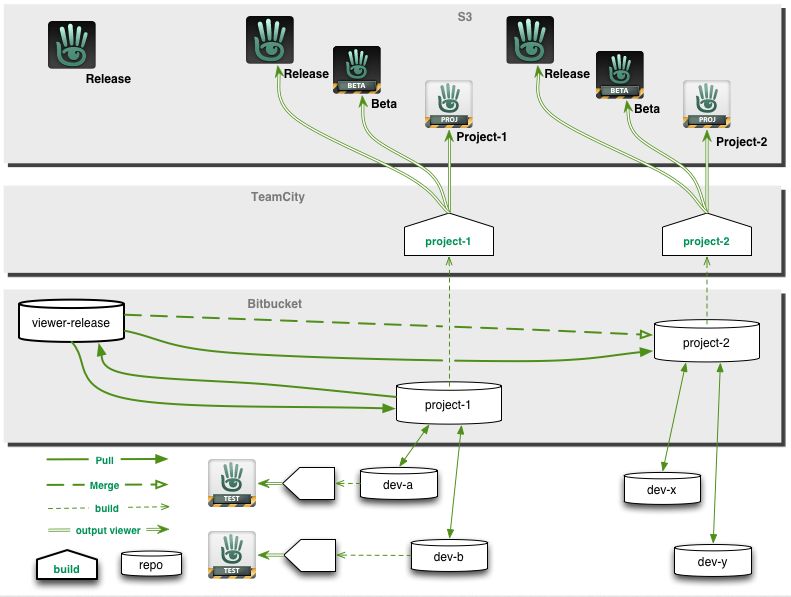
The new viewer release process announced by the Lab in May 2013 has officially been implemented.
Officially called the Viewer Integration and Release Process, It is designed to improve how the Lab can put new viewers before users and progress them through to a release status while avoiding bottlenecks such as those witnessed in late 2012, when an issue with the Viewer Beta channel effectively stopped any new viewer releases for around a two-month period.
With the new system, early versions of viewers will still be made available through “dedicated” project and beta viewers, all of which will be available for download via the Official Alternate Viewers Page. However, the major change to the process is the use of “release candidates”.
When a viewer is ready for final testing, a release candidate will be readied. Rather than residing in their own dedicated viewer channel, these release candidates will be updates in the regular release channel, residing in a named “cohort” within the channel.
This means two things. Firstly, release candidates are available for download alongside one another and the default release viewer. Who might receive a given release candidate is a random selection based on a viewer setting (see below) and a pre-determined quota of downloads for the candidate (once the quota has been reached for a given candidate, the system will no longer select it for download).
Secondly, when a specific release candidate is deemed ready for release (based on bug reports filed, issues reported and fixed, stats gathered, etc.), there is no longer any need to rebuild it as a “release” viewer, as it is already in the release channel. It is simply moved from its named cohort to become the default release version on the SL viewer download page. Any remaining release candidates are then rebuilt using the new default release code, and continue with testing until one is deemed ready to become the next release.
From a user perspective, release candidates are largely indistinguishable from one another and the default release viewer (other than their version number and the features they contain), and the chances are that some users will be unaware that they have been selected by the system to run a release candidate; they will simply see it as receiving an automatic / mandatory viewer update, and install it.
“Willing to Update” and Release Candidate Downloads
As mentioned above, users who receive a release candidate viewer are selected at random, based on a defined quota of downloads for a given release candidate. However, whether or not a user might be selected to receive a release candidate viewer depends on whether or not they have left the “willing to update” option enabled in their current viewer.
Located in Preferences > Setup, “willing to update to release candidates” (to give the option its full name) is enabled by default. But just because it is, does not automatically mean someone will be selected to test a release candidate viewer. This is because the download quota defined for any given release candidate will always be relatively small when compared to the SL user base as whole.
However, if you don’t wish to run any release candidate viewers at all, you can disable this option, and only receive viewer updates when the default release viewer is updated.
Another point to remember with release candidates is that users won’t be moved between release candidates as a result of updates. So if you leave the “willing to update” option enabled and you happen to be selected for testing “release candidate A”, you won’t suddenly start receiving updates for “release candidate B”; you’ll stay with the updates for “release candidate A” until such time as it becomes the default release viewer. Only then might you be selected to receive another release candidate download at some point in the future.
Download Page and Alternate Viewers Page updates
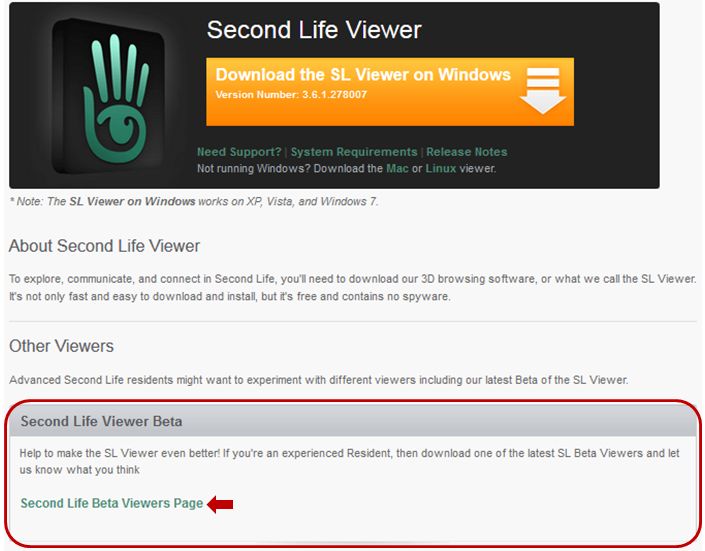
As a result of the move to the new release process, the SL viewer download page has been updated, and there is no longer any link to download the “Beta Viewer”. Instead, there is a link which takes you to the Official Alternative Viewer wiki page, which instead lists all available beta and project viewers.
An important aspect of viewer bug reporting has been to give details of the viewer you’re running, including the version number. This information is requested in the “Environment” section of the bug report form. Given that the new viewer release process means there can be a number of release candidates in use at any given time, as well as various beta and project viewers, it is even more important that this information is given when raising a bug report.
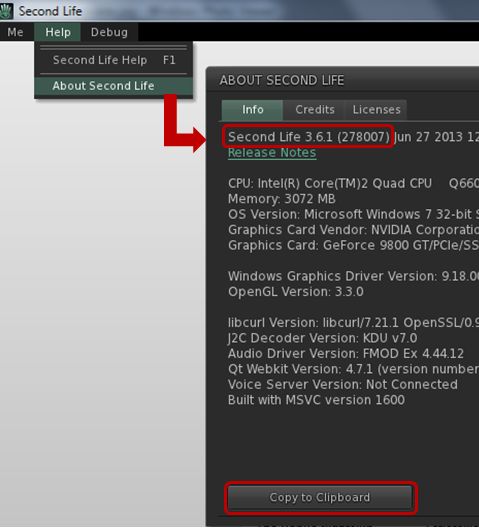
Displaying details of the viewer you are using, including its version number
Viewer information can be found in the About Second Life floater (Help > About Second Life), if you’re not already familiar with it. Further, the information on this floater can be copied directly to your clipboard ready to be pasted in a bug report to save you having to manually enter it.
Notes on Manually Installing Release Candidates
Viewer release candidates are now listed on the Alternative Viewers wiki page, and can be downloaded and installed, if so desired. If you do opt to do so, please note that release candidates are contained in “cohorts” within the viewer release channel, and are designed to overwrite any release candidate viewer you have installed. Therefore, if you wish to manually install multiple release candidate viewers side-by-side and with the de facto release viewer, you much ensure, in accordance with your operating system, that:
Any shortcuts / start menu links (e.g. Windows) you have for the viewer are renamed before you install any release candidates
Each release candidate is installed into a unique folder
Any shortcuts / start menu links (e.g. Windows) which are created as a part of the installation process are given unique names before installing the next release candidate
Notes:
If you provide unique destinations for each release candidate installation thorugh the installer package (e.g. Windows), make sure the installer is listing the correct destination folder when manually downloading and installing a subsequent release / update
The Windows auto-updater will automatically install into the last folder defined in the viewer installer (so if you have manually installed “Release Candidate A” and then “Release Candidate B” into separate folders, then get an update for “Release Candidate A” via the auto-updater, it will install into the folder for “Release Candidate B”)
Disabling the auto-updater in Preferences may not stop this from happening.
Instead, go to viewer install folder/app_settings, then edit settings.xml, and find the entry UpdaterServiceURL and change https://update.secondlife.com to https://secondlife.com/no-thanks (or similar) and save. You may need Admin privileges to do this.
Changes to this Blog
I maintain a list of viewers recognised as being used with Second Life (predominantly, but not exclusively, based on the Third-party Viewer Directory), which is updated as a when I become aware of new viewer releases being made. The section of this page which deals with the SL viewer has been updated to reflect the new viewer release process, and now includes all SL viewers currently listed in the SL viewer download page and the Official Alternate Viewer wiki page (with the exception of the Amazon channel viewer, which is the version of the viewer offered through Amazon.com).
Update Wednesday July 10th: In checking the forum deployment thread for this week’s roll-outs, I see that KarenMichelle Lane has provided a list of regions on LeTigre where SSB/A will be enabled once they have restarted. Again, you’ll need to have an SSB/A-enabled viewer to avoid issues with avatar rendering on these regions. If you find that once the restarts have completed you are encountering issues with avatar rendering (for example, you are using an SSB/A viewer and find you avatar fails to render for yourself or others), or other issues which appear to be linked to SSB/A, please consider raising a bug report detailing the problem, how to reproduce it, and including your environment information (Help > About (Viewer Name) > Copy to Clipboard), which references Project Sunshine.
Server Deployments – Week 28
As always, please refer to the week’s forum deployment thread for news, updates and feedback.
Second Life Server (SLS Main) Channel
On Tuesday 9th July, the SLS Main channel received the server maintenance package previously deployed to all three RC channels in week 26. This comprised:
A fix for ‘llApplyImpulse now works only in the root prim’ (SVC-8227)
A fix for the navmesh bug whereby pathfinding rebakes are continuously triggered if a region has more than one parcel and has no parcel edges above water, then it thinks it needs to rebake (BUG-2975) – see part 2 of my week 26 report.
Viewer Updates and Release Process
The Second Life Beta viewer updated to release 3.6.2.278133 on July 2nd – see the release notes for change details.
The Materials Project viewer was also updated on July 2nd, to release 3.6.2.278221.
Speaking at the Opensource UG meeting on Monday 8th July, Oz indicated that he hoped the new viewer release process would go live on Tuesday July 9th. If this has in fact happened, the first viewer to pass through the new process is likely to be a project (or beta viewer) with further third-party code contributions to the SL viewer.
However, as both the SSB/A deployment and the new viewer release process both require an update to the login code, it is possible the new viewer release process will not go live until Wednesday 10th July.
The login change for the viewer release change is to update the automatic check which is carried out to see if a mandatory upgrade is required (see my week 20 report). To prepare for the new release process, is check has been updated. , the login change for SSB/A is described by Oz Linden as, “a very minor change to ensure that inventory is correct” .
Group Ban List
Baker Linden and his new harido
Baker Linden continues to work on the new group ban list functionality (JIRA VWR-29337). Speaking at the Simulator User Group on Tuesday July 8th, he said:
For my update: I’m making really good progress on group bans. I’m doing a bit of a refactoring because I changed the way the backend works slightly. Hopefully by the end of the week I’ll be finishing up the backend code.
There’s currently no date as to when the viewer-side changes might see the light-of-day, but given Baker is currently working on the back-end, this is hardly surprising. He’s also indicated that while it won’t be available when the new functionality goes live, he is considering adding scripting functions to group bans. He also confirmed that group bans would have their own moderation capability, rather than being tied to estate ban moderation.
Particle System Updates
Particle Blocking
As previously reported in these updates, the new “right-click on particles to block and emitter” (MAINT-2268) code for the viewer has been released in the SL Beta Maintenance Viewer. As well as allowing people to click on particles to prevent the viewer generating any more particles in someone’s world-view, the code also has a FPS limit on particles and will stop generating new particles when frame rates drop to 4 FPS.
Those who have tested the capability report it works well and it is very easy to right-click on particles and block them. A slight bug has been reported whereby when unblocking a particle generator / person owning a particle generator, the viewer will not resume generating the particles until the user changes their group tag.
New Particle Capabilities
First reported on in these pages back in week 12, the new particle capabilities – glow, ribbon and blending optionshave had server-side support for some time. The Beta Maintenance viewer mentioned above now has the first part of the viewer code, and speaking at the Simulator User Group meeting on Tuesday July 8th, Simon Linden said, ” Once that one is out, we’ll get the next one going,” so expect these capabilities to be becoming more radily available in the near future.
Ribbon particles – one of the new particle capabilites
Other Bits
Snapshot Fixes
The SL Beta Maintenance veiwer includes further snapshot fixes (MAINT-2152) which are designed to overcome the problem of black rectangles / borders appearing in very high resolution snapshots. These fixes are in addition to the “tiling” fix issued last year.
However, Whirly Fizzle reports that if very high-res snapshots are captured with the Beta Maintenance viewer and post-processed, the tiling artefact tends to return.
Post-processing high-res images captured using the additional snapshot updates (as found in the current SL Beta Maintenance viewer) can result in tiling artefacts reappearing (image, originally in PNG format, courtesy of Whirly Fizzle.
Simon Linden reports that a further update to these fixes is about to be released, although it is not known at this time if it will fix this issue, or a reported issue of GPU crashes when using the Beta Maintenance viewer for snapshots.
Your Skin – In the Sky
The issue of avatar skins appearing in the sky at very high altitudes (see JIRA VWR-28962) came up for discussion at the Simulator User Group. First reported in 2012, there is some speculation whether SSB/A will impact the frequency with which the issued manifests; it appears to be linked to the local bake process, and so may only occur in the future when people at high altitudes are editing their appearance.
The “face-in-sky” issue (image courtesy of Eku Zhong)
In the meantime, if you are up high and encounter this phenomenon, try toggling the Advanced Lighting Model option in Preferences > Graphics off / on.
Apologies for the late-running of this update. I started drafting it earlier in the week and, um, forgot about it.
Week 27 Server Deployments
Just a reminder that due to the Independence Day code freeze for week 27, and the fact that the Lab is closed on Thursday 4th, Friday 5th July for a long weekend, there were no server deployments this week.
Server-side Baking / Appearance
Deployment / enabling should be commencing in week 28, most likely starting on the 9th July. To help spread the message, the Lab has once again blogged on the deployment of the new service, referring to it by the official title of Project Sunshine (which is a part of the Shining Project) and again included their video explaining what is going to be happening.
The majority of maintained viewers provided by both Linden Lab and third-party viewer developers are already ready for the new service, with only Dolphin, Exodus and Imprudence being without support. Hopefully, both Dolphin and Exodus will update shortly, but it will be some time before Imprudence is in a position to adopt SSB/A – the team has a fair amount of catching-up to do.
So, to borrow from the Lab. If you’re not already running an SSB/A capability viewer: “Don’t be cloudy and grey – enjoy Sunshine today” – and update your viewer!
SL Viewer News
A further SL beta viewer release was made on Tuesday July 2nd – version 3.6.2.278133 – with (among other things) further materials fixes, as listed in the release notes.
In other updates:
The Lab has made a viewer repo public which contains various bug fixes and updates made available in the beta maintenance viewer. These include items such as the additional fixes for high-resolution snapshots (to prevent things like black rectangles appearing in very high resolution images). Expect to see them filtering through into TPV soon, and for the fixes themselves to start the SL release viewer possibly sooner.
The “project interesting” viewer which contains viewer-side updates to complement various server-side interest list project updates is still undergoing work to fix all the blocker bugs which are currently preventing it from being made public.
In terms of the latter, Andrew Linden reports that he is looking to gather data which will allow for performance comparisons with things like scene loading pre- and post “project interesting”, to see help measure the improvements in the HTTP texture download changes implemented by Monty Linden.
Other Items
What is a Reasonable FPS Rate?
In the last part of my week 26 update, I reported that the Lab has statistics which show that around 50% of users are running viewers with the Advanced Lighting Model option (“ALM” – formerly the Lighting and Shadows option and also referred to as “deferred rendering”) active, and that they further had data to suggest that up to 75% of users have hardware capable of running with ALM enabled “with reasonable performance” in terms of frame rates (e.g. an average somewhat above 10 fps).
At the time I reported this, I noted that:
However, given that fps is a highly subjective measure and somewhat dependent on a range of external factors (such as how many other avatars are in the region with you, whether you are moving around a lot or not, etc), the “YMMV” rule comes into play.
That the term “reasonable performance” is so nebulous sparked a debate during the Simulator User Group meeting as to what might be regarded as “reasonable” frame rates for a viewer running with ALM enabled (although not necessarily with any lighting & shadows options set). The broad consensus of opinion was that a rate of around 20-30 fps would be considered “reasonable”.
Part of the concern here is that while ALM is required in order to be able to render materials effects, LL might be overly optimistic in determining which cards have ALM enabled by default, which may in turn have an additional impact on new user retention due to people logging-in to SL and experiencing extremely low frame rates and not having any understanding on how to improve their experience.
As always, please refer to the week’s forum deployment thread for news, updates and feedback.
Second Life Server (Main) Channel
On Tuesday 25th June, the SLS Main channel received the server maintenance package deployed to the three RC channel in week 25. This fixes a number of crash modes, addresses an issue with neighbouring region visibility, and adds the new pathfinding property CHARACTER_STAY_WITHIN_PARCEL to llCreateCharacter() and llUpdateCharacter() – see my week 19 report for details – and the object return functions I reported on in week 23.
While not intended to fix issues of diagonally adjacent regions not being visible to one another (SVC-8130), there are reports that at least some of the regions which have suffered from this issue for a considerable time can be seen from one another once more – although Maestro Linden isn’t entirely convinced the underlying cause of the problem has been corrected.
Release Candidate (RC) Channels
On Wednesday 26th June, all three RC channels (Magnum, BlueSteel and LeTigre) received a new server maintenance package, comprising:
A fix for ‘llApplyImpulse now works only in the root prim’ (SVC-8227)
added to avoid changing the behaviour of existing scripts which may rely on llXorBase64StringsCorrect()’s current output
Added max_materials_per_transaction flag to /simulator/features cap
This number returns the maximum number of materials that can be sent to the “RenderMaterials” capability in a single request.
MAX_MATERIALS_PER_TRANSACTION
Speaking at the Server Beta meeting on Thursday 27th June, Maestro Linden described the max_materials_per_transaction flag thus:
It limits how many materials the viewer can request details for or set (POST, PUT methods) in a single message. By default, the limit is 50. The reason for the limit is that we don’t want the simulator to hang if a malicious viewer requests the details of 2 billion materials at once.
So, the capability for materials is called RenderMaterials [and] it has 3 HTTP access methods:
GET: get the full list of details of all materials in the region
POST: get the materials details for a list of material_ids (the server will only parse the first max_materials_per_transaction in the post data)
PUT: set the materials properties of up to max_materials_per_transaction object faces
GET is used when you first connect to a region and want to get the materials of everything [in the region, not just within draw distance]; POST is used if, for example, a new object is rezzed with a new materials type, and the viewer needs to resolve what the normal map is, etc; and PUT is used for object editing.
[So] if the viewer needs to edit 80 faces at once, for example, it will know that the server limit is 50, and POST in 2 messages (one for the first 50, the other for the other 30). [The] ‘max_materials_per_transaction’ flag in the features cap will be a way for the viewer to know if the server limit changes from 50 per message. I’m not aware of any plans to change that limit in the near future, though.
Deployments for Week 27
There will be no server-side deployments in Week 27 (commencing Monday July 1st), as US Independence Day is on Thursday July 4th. The next scheduled deployments will be in week 28, commencing Monday July 8th.
Pathfinding Bug
Elijah Linden has discovered a bug within the pathfinding code, wherein certain regions have continuous navmesh rebaking, which causes some annoying UI effects, hurts simulator performance somewhat and causes memory spikes. Regions can be affected even if pathfinding is turned off.
Voidpointer Linden assumes human form (stock)
The bug arose as a result of the recent CHARACTER_STAY_WITHIN_PARCEL property added to the pathfinding capabilities. Commenting on the bug at the Server Beta meeting on Thursday 27th June, Voidpointer Linden, who implemented the new CHARACTER_STAY_WITHIN_PARCEL property, said:
As part of the STAY_WITHIN_PARCEL changes, I needed to change the way the navmesh is constructed. This involved making sure that every region did a rebake once. Unfortunately, the criteria that I used to test whether a region needed rebaking had a flaw – it can’t see parcel edges underwater [possibly because the navmesh doesn’t include areas below sea level]. So if a region has more than 1 parcel and has no parcel edges above water, then it thinks it needs to rebake. So it does.
And does so repeatedly, as Elijah Linden reported in BUG-2975 (Regions continue to requests rebake after rebakes have been performed).
There is a fix for the issue, but it currently requires testing, and may not appear for a while. In the meantime, there is one assured workaround: if your region is suffering from the issue and has a parcel which is completely submerged, subdivide / raise one part of a boundary for that parcel (and which is not also a region boundary) above water so it can be found by the navmesh rebake process.
This bug is unlikely to be resolved before week 28 due to there being no deployments scheduled for week 27, as mentioned above.
SL Viewer
The SL release viewer updated to version 3.6.1.278007 on June 27th, containing the fixes from the 3.6.1.277611 beta release. This contains some updates related to the viewer being available via Amazon, and fixes for occlusion culling being less effective than it should be, legacy Shiny being too strong in ALM with materials,light function sampling is incorrect in advanced lighting model and a viewer compilation error.
The beta viewer updated to 3.6.1.277824 on June 26th, with the release notes listing the same updates as 3.6.1.277611 and 3.6.1.278007 – so these appear to be work-in-progress fixes.