Second Life project updates 29/1: server, viewer, general items

Indie Teepee: July 10th through 24th, 2015 - blog post
Indie Teepee: July 10th through 24th, 2015 – blog post

Server Deployments Week #29

As always, please refer to the server deployment thread for the latest updates / news.

  • There was no Main (SLS) channel deployment on Tuesday, July 14th.
  • On Wednesday, July 15th all three RC channels should receive the same server maintenance package, comprising internal simulator fixes.

There were some issues with poor region performance following the week #28 Main channel deployment (see BUG-9647), but the majority of these appear to have been corrected with a region restart.

SL Viewer

On Tuesday, July 14th, the attachment fixes viewer (project Big Bird) was promoted to the de facto release viewer. Version 3.8.1.303130 has fixes for some attachment-related issues, particularly when multiple attachments are added or removed at the same time. Allegedly, no birds were harmed during the making of this viewer, although a parrot may have bitten an engineer’s finger…

Region Performance

Simon Linden: considering matters of region performance

While things may appear to be quiet in terms of new deployments, etc., the Lab are working on Second Life in a number of areas. One of these is in finding ways to improve region performance – such as through finding the means for a region to support more avatars, something Simon Linden was recently looking into.

During the Simulator user group meeting on July 14th, Simon indicated he was also looking at the abilities provided to region owners which might allow them to better specify what can and cannot be done within their regions in turns of things like object rezzing. in order to improve people’s experiences. “I’m looking at the balances we keep on regions between being permissive and locked down, and how that relates to the land usage,” he said during the meeting, before continuing:

So combat regions want fast and free rezzing, but that’s not appropriate for a music venue … venues don’t want free rezzing of objects, so someone can’t drop their griefer bombs. The big fuzzy goal is to make SL better.   More specifically, it’s to make different types of regions run better. For example, there’s a bug now where rezzing can get backed up and delayed.   This is really bad for combat rezzing arrows or whatever projectile. Part of the reason that happens is throttles and limits on rezzing … So maybe we should be able to set up combat region settings tweaked for that kind of performance, and an event venue might be tweaked to handle crowds best, and really lock down free rezzing and object entry. 

This sparked a discussion on a range of performance issues and cases, including issues such as BUG-8974 and BUG-8946, as well as matters such as the inefficiencies evident in the asset handling system in general (this has also come into sharper focus with the arrival of Experiences, where KVP operations are handled by the same thread as asset handling), and the issues of agent script usage (script management doesn’t balance out and prevent someone from using far more than their share of script time). Ironically, during the meeting, a demonstration of this problem was given with the arrival of a griefer loaded with  >9999 scripts – with the result that the region crashed.

Simon emphasised the discussion was just that – a discussion intended to explore ideas and options, rather than any firm commitment on his or the Lab’s part to make changes. With this in mind, some of the suggestions put forward were:

  • Land owner resource control for both rezzing and scripts for all region types (see BUG-3854)
  • An option to block rezzing an object over a certain draw weight to help stop people being able to rez graphics crashers
  • Possibly altering settings on mainland so that when purchased, it is not completely permissive and the new owner failing to understand what that can mean
  • A re-submission of BUG-2467 as a feature request, amended to “visible attachments”, so the Lab might re-evaluate the idea
  • The Lab to reconsider requests such as BUG-4153 and BUG-4182.

One of the problems here is that there are a lot of settings which might be exposed in order to help land holders better protect / optimise their land, such that it could become a complex issue in user understanding if too many controls are made available. However, it will be interesting to see what might transpire in the future as the Lab continued to consider options.

Other Items

Receipt of illegitimate L$ and Account Locking

An old issue of individual harassment has started to re-surface in Second Life of late, which can lead to people’s accounts being locked. With it, someone pays another avatar in-world using fraudulently created Linden Dollars. This results in an automatic account lock being applied, and the recipient, even though they are an innocent party, finds they are unable to use the account while investigations proceed.

The problem here is that there is currently no way to prevent the receipt of any L$ payment; not even blocking an avatar can prevent them from making a payment to you.

As a result of the recent increase in this problem occurring (there have been numerous reports to the Lab’s support team on the matter), a request has been made for the Lab to consider adding an “accept” button for all incoming payments. This would allow people to review all such unsolicited incoming payments ahead of accepting them, allowing them to judge whether the payment is valid or not.

Lab issues notifications project viewer

secondlifeOn  Wednesday, July 8th, the Lab issued their notifications project viewer, which sees an overhaul of the way in which notifications – system, group, transaction, etc., are presented through the viewer.

The viewer has been in the works for a while, and is the direct request of a feature request put to the Lab by Aki Shichiroji back in 2012 (see BUG-8000), and which has more recently been working its way through the Lab’s work list to appear in project form on July 8th.

The release of the project viewer, version 3.8.1.303211, was accompanied by an official blog post on the subject, which reads in part:

The Notifications Project Viewer is an improvement for sorting your notifications. This new feature is based on your feedback: a notifications floater with four tabs sorting your incoming notifications into System, Transactions, Invitations, and Groups and allowing better interaction with them as well.  Those who deal with high volumes of money transactions, group notices, group invites, or inventory transfers now have a better way to review their messages and identify which notices need immediate attention.

The images below show the floater and its four tabs:

The new Notifications floater - see below for explanatory notes
The new Notifications floater – see below for explanatory notes

Multiple notifications within a tab are initially shown compressed (above left). Clicking on the down pointing arrow button for a specific notification (highlighted in red, above left) will expand that particular notification within the floater (above right), with scroll bars allowing you to scroll down through an individual notification or through the notifications within that tab.  Clicking the up point arrow button (highlighted in blue, above right) will compress an expanded notification.

As with the current notification system within the release viewer, individual notifications can be deleted from any tab by clicking the X button. There are also additional buttons within the panel for collapsing all expended notifications or deleting all notifications within the currently displayed tab (i.e. clicking Delete All with the System notifications tab will delete all notifications in that tab but not all of your notifications in general).

A further improvement to the way notifications are displayed is that a time stamp for when a notification was sent / received is now clearly visible, both in the collapsed and expanded views for all notifications. The presence of any attachment is also indicated by the use of a paper clip symbol.

Given this is a project viewer, the Lab is requesting feedback and bug reports via the Second Life JIRA.

A couple of issues have been filed already. One of these – BUG-9625 – points out that the notification floater currently fails to include any means of accepting a group invitation; the only way of accepting an invitation in the project viewer at present, is to click on the button displayed in the initial pop-up (which will still be displayed as usual).  Expect this to be created in due course as the project viewer is updated.

Also, do keep in mind this is a project viewer, and currently not intended for prime time use.

Related Links

Second Life project updates 28/1: server, viewer

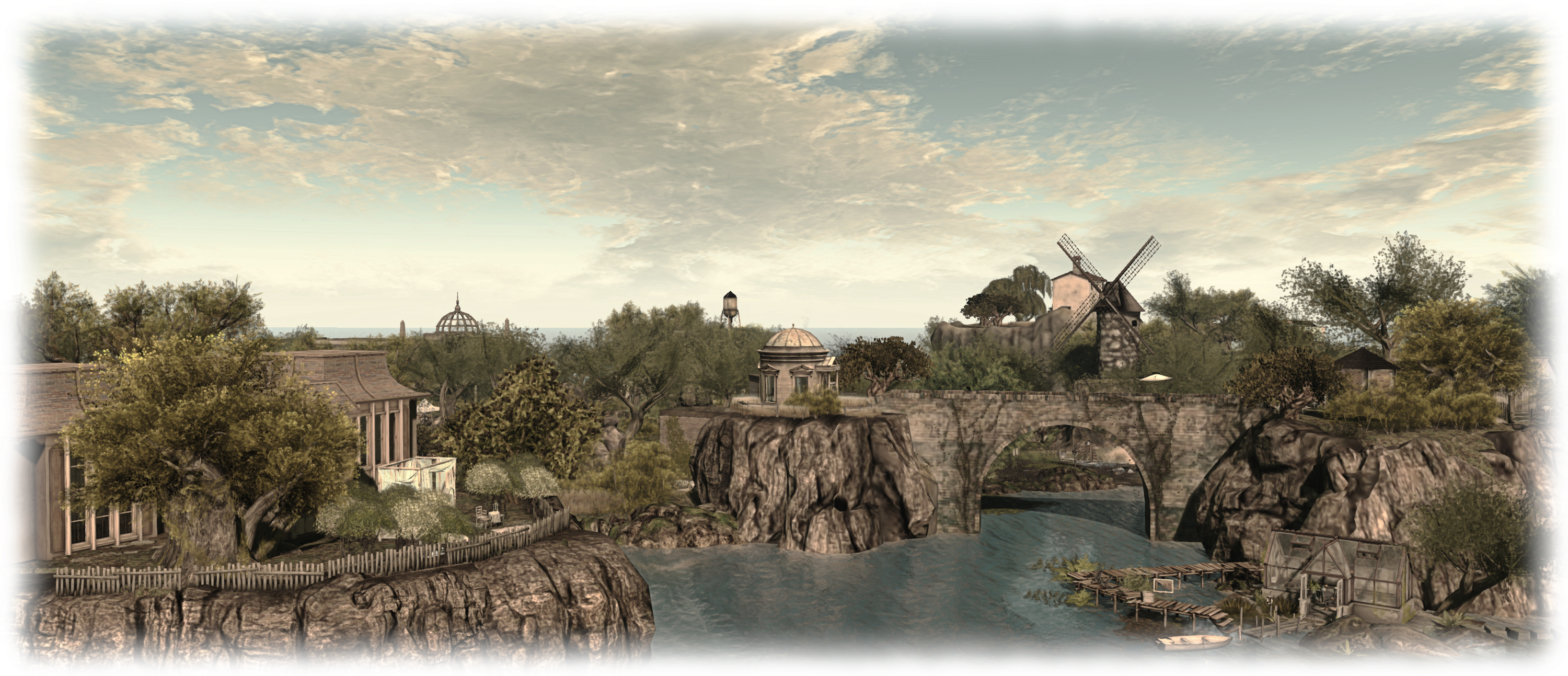
Umbral Photography, Hydra Isles; Inara Pey, July 2015, on FlickrUmbral Photography, July 2015 (Flickr) – blog post

Server Deployments

As always, please refer to the server deployment thread for the latest updates / news.

On Tuesday, July 7th, the Main (SLS) channel received the same server maintenance package deployed to the three RC channels in week #27.

As noted in my project update for week #27, BUG-197 referred to in the package release notes relates to an issue whereby a user can’t see any of their local chat on a region or parcel, and nor can anyone else, due to a scripted object which is spamming chat so badly, the chat throttle kicks in, but no warning would be provided to inform the user this was the case. with the deployed change, the user will now get a message about the chat throttle being hit, but unfortunately, the system will not identify the spammy object (so it might be removed / returned, if possible).

There will be no RC deployments to the RC channels on Wednesday, July 8th, leaving all of the main grid on the same release. A new RC deployment, described as a “minor update” is in preparation for deployment to the RC channels in week #29.

SL Viewer

On Tuesday, July 7th, The Maintenance RC viewer was updated to version 3.8.1.303166, bringing it into line with the attachments RC viewer updated in week #27, and just leaving the Viewer Managed Marketplace viewer to be updated in the release channel, which will likely happen later this week.

Chromium Embedded Framework

At the Monday Open source Developer’ meeting, Oz Linden indicated that an anticipated project viewer,  the Chromium Embedded Framework (CEF) viewer which will provide media support via HMTL 5, should be appearing “Pretty Soon”™.  While Quicktime and Flash  may work on this viewer for some users, given the age / status of both, the Lab does not plan to support either going forward, and recommends media creators migrate to HTML 5.

It had been hoped that this viewer would have been out by now; however there appear to be one or two issues still to be resolved. “I heard the developer working on it today say he was deep in the middle of keyboard issues,” Simon Linden said during the Simulator User Group meeting on Tuesday, July 7th. “Getting frameworks like that to cooperate with OS events like keyboard, mouse and screen is always tough.”

Experience Keys / Tools

Simon is continuing to work on tweaks to the Experience Keys / Tools code, and in doing so passed an interesting comment at the Simulator User Group meeting.

“I’ve been working on updating the KVP code that runs on our server,” he said, “and had the most frustrating time integrating the newest version into our code … The code we have is dated and we should have better performance and stability with their latest.”

Quite what the difference is between “our” and “their” code might be isn’t entirely clear at this point in time – although the question was asked during the meeting, and may well be asked again in the future.

Simon also hopes to put some work into getting KVP access moved onto a separate thread to ordinary asset handling. As previously mentioned in these updates, that KVP access is currently on the same thread as asset handling can, at times, cause issues, as noted in BUG-8946.

Group Chat

The recent improvements made to group chat continue to make themselves felt, with many reporting that the old issues of lag with the chat on large groups has largely dissipated. Such are the improvements that Whirly Fizzle has suggested that http://isslgroupchatstillbroken.com/ should be updated. Even so, despite all the the improvements, Simon has indicated that there are still “a few things” he’d like to tweak a little more.

Second Life project updates 27/1: server, viewer, Experience Keys

Jasmine's Hollow; Inara Pey, June 2015, on Flickr Jasmine’s Hollow (Flickr)

Server Deployments

As always, please refer to the server deployment thread for the latest updates / news.

  • There was no scheduled deployment to the Main (SLS) channel on Tuesday, June 30th
  • On Wednesday, July 1st, all three RC channel received a re-roll of the server maintenance project from week #26, minus the problem which caused that week’s roll-back.

BUG-197, “Cannot See My Chat Only In My Region/ Region Bad Performance” refers to a problem whereby a user can’t see any of their local chat on a region or parcel, and nor can anyone else, due to a scripted object which is spamming chat so badly, the chat throttle kicks in, but no warning would be provided to inform the user this was the case. with the deployed change, the user will now get a message about the chat throttle being hit, but unfortunately, the system will not identify the spammy object (so it might be removed / returned, if possible).

SL Viewer

On Tuesday, June 30th, the Experience Tools RC viewer, version 3.8.0.302622, was promoted to de facto release status by Linden Lab. An official blog post accompanied the promotion, and I blogged an updated overview of the viewer and Experiences.

On Thursday, July 2nd, the Attachment Fixes RC viewer (Project Big Bird) updated to version 3.8.1.303130, bringing it to parity with the release viewer. The Maintenance RC viewer and the Viewer-Managed Marketplace RC viewer will also be updated in due course.

Experiences and Experience Tools

As noted above, the Experience Tools viewer was promoted as the release viewer on Tuesday, June 30th. As a result of this, a number of questions were raised during the Simulator User Group meeting that day, some of which have been asked elsewhere, and so are reproduced here:

  • Will accounts other than Premium be able to create Experiences in the future?
    • No comment at this time
  • Will it be possible to purchase additionalKVP data storage (for storing information on an experience – players, their progress, etc.) in future?
    • This has not been ruled out by the Lab, but it is something they’re decided they don’t “need to figure out yet”
  • What happens to an Experience if a Premium user reverts to a Basic account?
    • The Experience is suspended; data saved to the KVP will not be immediately deleted
  • Will it be possible to transfer an Experience to, say an alt on Premium if downgrading the account associated with the Experience to Basic?
    • This is a possible idea for the future; however the Lab are not looking at it at present, due to the complexities involved
  • Can any third-party creators to sell no mod scripts for other people’s experiences?
    • Technically, no; contributors to an Experience have to be explicitly allowed by the Experience owner
  • Can an Experience run on a mainland parcel?
    • Yes
  • Can an experience run across multiple regions?
    • Yes, so long as it is Allowed by the land owner(s)
  • Will a region restart affect the information for an Experience stored in theKVP?
    • No.

Other Items

Windlight / Environment Changes

The Lab is looking to improve windlight / environment capabilities within the viewer. No work has actually started as yet, but there has been an offer from the Alchemy TPV team to contribute code that would allow the cloud textures to be changed without having to re-start the viewer when doing so.

An idea that has been suggested is that creating and saving windlight settings as local XML files could be replaced by saving them as assets. No decision has been made on this, but it is important to note that were this to go ahead, this would not prevent people from creating their own windlights. Rather, what it would mean is that such custom settings would be saved as SL assets, rather than locally, making them easier to share with others, resulting in a more easily achieved “shared experience” to be experienced.

Avatar Complexity

The release  of a project viewer for Avatar Complexity is still stalled due to the bug that’s been introduced that renders all avatars affected by the setting as invisible, rather than as the expected “Jelly Babies”.

Early looks: Avatar Complexity and Graphics Presets

secondlifeTwo new options which will be appearing in the official viewer in the near future, and which have been mentioned in this blog a number of times over the past few months are Avatar Complexity and the ability to create, save and restore graphics presets. Both are intended to provide options by which users can better tune the viewer and its settings to suit their needs and circumstances.

I’ve had the opportunity to look at both in a development viewer from the Lab, and what follows is an overview of how things may appear when both capabilities are released for general use. However, please keep in mind that things are sill very much a work-in-progress at the moment and aspects of either / both may well change between now and any functionality appearing in any public version of the viewer.

Avatar Complexity

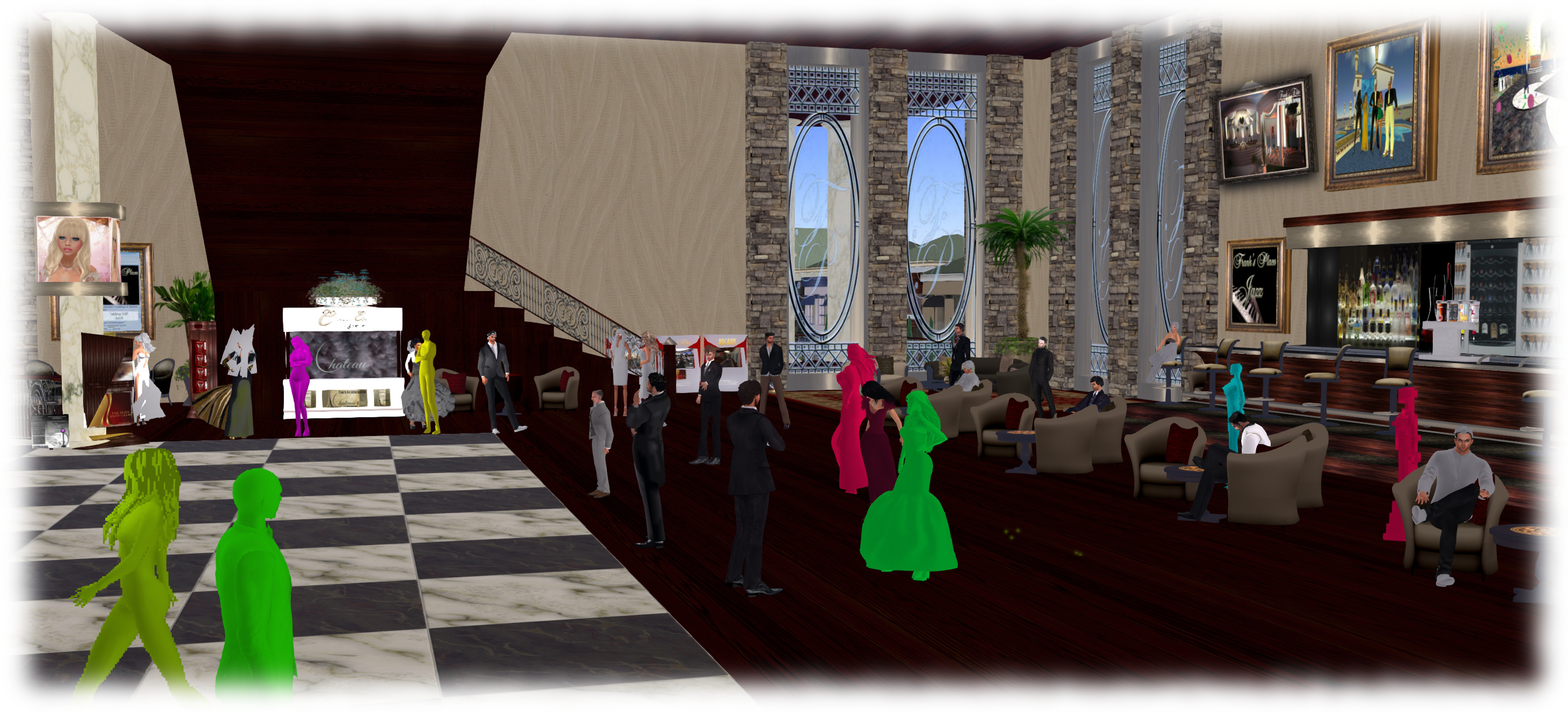
As avatars can often be the single biggest impact on the viewer in terms of rendering, particularly in crowded places, so  Avatar Complexity adds a new slider to the viewer which can be used to set a level above which avatars requiring a lot of processing will appear as a solid colour – the most popular term used to describe them being Jelly Babies after the sweet (candy) of the same name – greatly reducing the load placed on a system compared to having to render them in detail, so improving performance.

Avatar complexity is intended to help those who may hit performance issues as a result of their GPU struggling to render complex (hight render cost) avatars, by rendering such avatars as solid colours.

The intent with the capability is to allow people to adjust the setting according to circumstance, so that when in a crowded area with lots of avatars, the setting can be dialled down and more of those avatars which are harder to render become solid colours, while in quieter areas, the setting and can dialled back up, allowing more avatars to be seen in full detail.

Avatar Complexity is intended to sit alongside the avatar imposters functionality (Max # of non-impostors in the official viewer), allowing both to be used as required to produce more optimal performance in crowded or busy places.

By default, Avatar Complexity is set to No Limit, meaning all avatars in your field of view will fully render. As the slider is moved, it will list a render weight value, which is a revision of the RenderAutoMute function within the viewer previously used to help calculate the more familiar Avatar Draw /  Render Weight. The latter, viewed via Advanced > Performance Tools, has also been renamed to Show Avatar Complexity Information for consistency, with the displayed information updated.

The Avatar Complexity slider in Preferences > Graphics > Advanced Graphics Preferences (l) and the new format of information displayed when Advanced > Performance Tools > Show Avatar Complexity Information is enabled (r)
The Avatar Complexity slider in Preferences > Graphics > Advanced Graphics Preferences (l) and the new format of information displayed when Advanced > Performance Tools > Show Avatar Complexity Information is enabled (r) – click for full size

Graphics Presets

The initial work on Graphics Presets was undertaken by open source contributor Jonathan Yap (see STORM-2082) to provide a means by which users can save and restore different sets of graphics settings within the viewer. The idea being that users can then switch between different presets according to circumstance to help with viewer performance.

So, for example, one preset might have all the performance hitting items – shadows, projectors, etc., – turned on / up for times when the overall quality and depth of detail in a scene is important (such as when taking photos). Another might have these more taxing capabilities turned down / off to ease the processing load on a computer during more general activities. A third might be established for “in door” uses, with things like draw distance and the level of detail for external items (the sky, trees, terrain, reflections, etc.) all turned down, again easing the processing load.

Like Avatar Complexity, Graphics Presets is still undergoing development internally with the Lab, and so what is presented here may be subject to change.

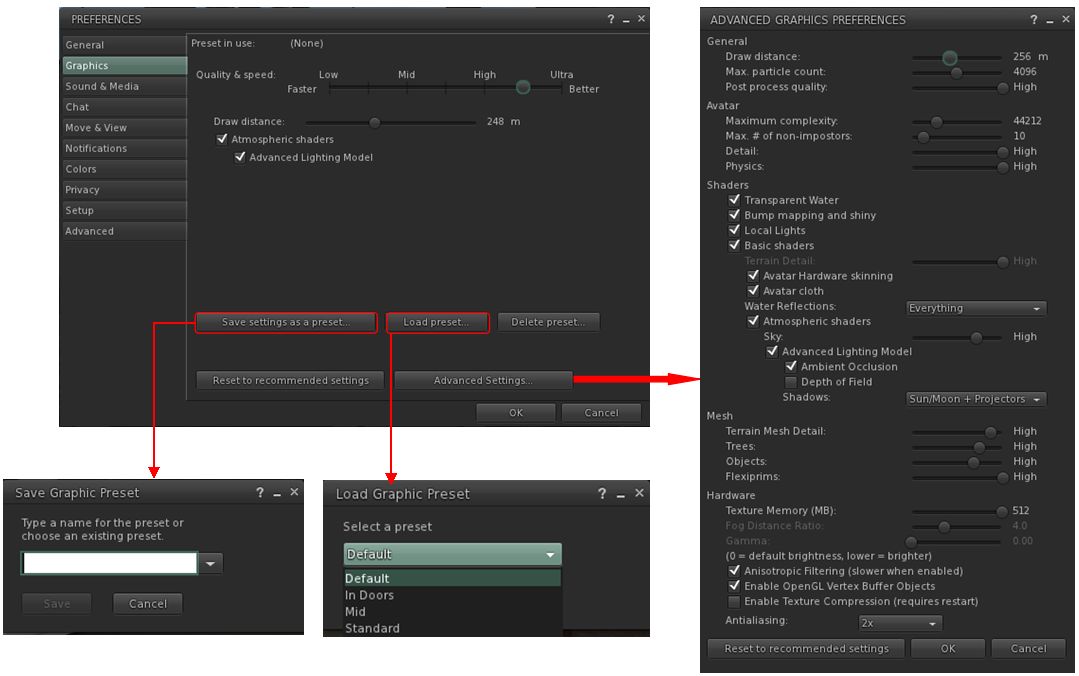
Perhaps the most significant change this brings to the viewer is the introduction of a new Advance Graphics Preferences floater (shown below right). This is designed to display all of the options than a user can set and save within a graphics preset without having to either scroll through options (an earlier iteration of the design did use a scroll bar, but they didn’t meet with favourable reactions during testing), or having to switch between different sub tabs.

The new graphics profile options - the Advanced Graphics floater (as it is at present), and the options for saving / restoring profiles from within Preferences.
The new graphics presets options – the Advanced Graphics floater (as it is at present), and the options for saving / restoring profiles from within Preferences – click for full size

Continue reading “Early looks: Avatar Complexity and Graphics Presets”

Second Life project updates week 25/1: server, viewer

Flux Sur Mer; Inara Pey, June 2015, on Flickr Flux Sur Mer (Flickr) – blog post

Server Deployments Week 25

As always, please refer to the server deployment thread for the latest updates / news.

  • On Tuesday, June 16th, the Main (SLS) channel received the server maintenance package previously deployed to the three RC channels, comprising further Internal server logging changes.
  • There will be no deployment or restart to the three RC channels on Wednesday, June 17th.

SL Viewer

On Friday, June 12th, the Lab issued a new viewer directly to release status. Version 3.7.29.302599 offers no functional changes to the the previous release viewer, but does include two DLL files – MSVCP100.DLL and MSVCR100.DLL which were missing from the Windows version of the viewer, and as a result causing problems for some users by their absence.

As a result of this release, the Attachment fixes RC viewer (Project Big Bird) RC viewer updated to version 3.7.31.302640 on Tuesday, June 16th, and the Experience Tools viewer updated to version 3.8.0.302622.

An “obsolete platform viewer” has also been issued by the Lab. Version 3.7.28.300847 of the viewer is a “static” release of the viewer which is aimed at providing users on Windows XP or versions of OS X below 10.7 to be able to continue to log-in to SL following the upgrade of the tools used to build the viewer. As I reported at the time, the key points to note about this viewer are:

  • It will not receive new features or bug fixes
  • It will not be promoted to release status
  • It does not change the Lab’s support policy on Windows XP or versions of OS X below 10.7, and is purely – as noted – an interim offering to help people
  • It will be provided for as long as is reasonable – but not indefinitely.

 Other Items

 Experience Keys  / Tools

As noted above, the Experience Tools RC viewer has been updated to match the current release version as the Lab continue to work on the back-end services. One issue that has been encountered  – albeit it in a single case so far – is that access to the KVP store used to hold information on the experience can be delayed in very permissive areas where there is a lot of natural in-world rezzing going on (e.g. public sandboxes) – see BUG-9027. This is because access to the store uses the same resources as used for rezzing objects.

The concern with the problem is that it could have an impact of grid wide experiences. However support for running experiences on a grid-wide basis is, in the Lab’s eyes, “still some time in the more distant future”, as they are focused on the region / parcel level and ensuring the capability works within these extremes first. As such, this issue is unlikely to prevent the initial deployment of the Experience Tools capability, although the Lab will look into this particular matter at a latter date.

Combat and Damage

During the Simulator User Group meeting on Tuesday, June 16th, the subject of damage, combat and protection within regions controls. Commenting on the matter Simon Linden said, “I’m beginning to think more and more we need regions set to different modes … something safe for general use, then raise the limits for combat (and the like) where you are freer to hurt yourself.  It’s just an idea at this point, but the one-setting-for-everything seems to always make someone unhappy.”

The problem here is that the existing Linden Damage system is seen as being somewhat inflexible, hence the development of various combat systems within SL. However, that there are so many systems now available, makes the Lab hesitant to change things, as Simon went on to explain:

We’ve talked before about working on the damage feature but I think that’s a case where everyone has their own usage, and so it would be better to have the features so others can make the damage systems they want. We probably can’t alter the current one. I’m sure somewhere somebody is using it and we can’t break their content. We could add to it, if it’s backwards compatible, but like I said, I think it would be better to hear what the CS and other system builders want to make their system nicer.

As Simon states, this doesn’t mean the Lab are about to make changes, or consider making changes where combat systems and damage are concerned; just that they are aware of the limitations within the current land settings.

That said, a recent change within the LL viewer has been noticed. Under it, damage cannot be set it the parcel level only; also, the viewer does not display the health meter on damage enabled parcels, but people can be “killed” and teleported home.  While Oz acknowledged this may be due to the Lab not fully following through on a set of changes to the viewer code, Simon also pointed out that the two-state on / off capabilities between regions and parcels has never really been fit for purpose:

Basically if you have any larger or high level setting, as well as a smaller scale (like regions vs parcels)  the higher one can’t just be “on” or “off”. It needs to be “on with override smaller settings” , “on without override”, “off override smaller settings” , “off without override” … It just doesn’t work with simple on/off settings.   You need more info about the intent on how it relates to the smaller areas

However, he again warned against anything being done on this in the near future, commenting, “if we want to fix this in SL, it means viewer UI changes, new data being passed back and forth to the simulator (which can be a hassle depending on the messages), new values in the database (which is another issue) and of course simulator changes.” In other words, were anything to be done, it would be a large-scale project, something which the Lab has yet to even consider taking on.