There was no deployment to the Main (SLS) channel on Tuesday, August 16th, and there will be no deployment on Wednesday, August 17th.
It is currently “doubtful” there will be an RC deployment next week – although this may change. A contributing reason for the slowdown is that the Lab is currently focused on server-side operating system upgrades.
SL Viewer
Release Viewer
BUG-37646 “Attachments get ghosted at login on 4.0.7.318301”; and BUG-37653 “Every time I delete Cache and Relog, my Saved Appearances do not load and I am left as a White Cloud in Second Life Viewer 4.0.7.318301”, noted in my last TPVD meeting update have both been accepted by the Lab and are being worked on.
VLC RC Viewer
As expected, the VLC Media Plugin RC viewer, which contains the LibVLC-based replacement for QuickTime for Windows, updated on August 15th to version 4.1.1.318504. An additional fix is included with the update, which should correct an issue with new MOAP objects losing audio.
Remaining Official Viewers
This leaves the remaining list of official viewers, at the time of writing as follows:
Current Release version: 4.0.7.318301 (dated August 8), promoted August 11 – formerly the Maintenance RC viewer
RC viewers:
Visual Outfit Browser viewer updated to version 4.0.7.318263, on August 1 – ability to preview images of outfits in the Appearance floater – due to update
Project viewers:
Project Bento (avatar skeleton extensions) updated to version 5.0.0.317597 on July 14 – incorporation of final skeleton and slider updates from the test viewer
Obsolete platform viewer version 3.7.28.300847 dated May 8, 2015 – provided for users on Windows XP and OS X versions below 10.7.
The majority of the notes in this update are taken from the TPV Developer meeting held on Friday, August 12th. The video of that meeting is embedded at the end of this update, and references to it are indicated through the use of time stamps in the paragraphs below. My thanks as always to North for recording and providing it.
Server Deployment – Recap
There was only a Main (SLS) channel deployment this week. This saw the roll of the server maintenance package previously deployed to the three RC’s in week #31, on Tuesday, August 9th. This comprised internal fixes and an update to prevent BUG-37573.
SL Viewer
Release Viewer – Texture Handling Fixes
[0:35] The Maintenance RC viewer release on Monday, August 8th gained a rapid promotion to the de facto release viewer on Thursday, August 11th. Version 4.0.7.318301 (dated August 8th).
This viewer includes a number of fixes in the image pipeline (e.g. fixes for “bad” textures – those texture files which have invalid data in them). Also included is a fix to prevent the viewer crashing when you system runs out of main (not GPU) memory while attempting to load a texture file. Instead, the viewer will substitute a plain grey texture. So, when you start to see grey everywhere instead of expected textures, it’s time to restart the viewer. This may be a pain to look at, but it is considered preferable to having the viewer crash at a potentially inconvenient moment.
[1:35] The Lab intends to move along similar lines for other issues within the viewer which can result in a hard crash, and also go through cleaning-up how exceptions are generated and caught by the viewer, and this work should be appearing in the next but one Maintenance RC update. The overall goal is to improve the image pipeline and some other points in the viewer where a relatively low-level thing results in the viewer crashing. Some of this work might also help prevent attempts to deliberately crash other viewers using textures.
In the meantime, issues have emerged affecting attachments and the Current Outfit Folder with this release – see BUG-37646 “Attachments get ghosted at login on 4.0.7.318301”; and BUG-37653 “Every time I delete Cache and Relog, my Saved Appearances do not load and I am left as a White Cloud in Second Life Viewer 4.0.7.318301”, for details.
Remaining Viewers in the Release Channel
[4:20] The VLC Media Plugin RC viewer, version 4.1.1.318152 dated July 28th at the time of writing, which contains the LibVLC-based replacement for QuickTime for Windows, is liable to be the next RC that will be promoted to release status. A new RC version of this viewer, merged-up to the 4.0.7.318301 code, should appear in the release pipeline in week #33 (commencing Monday, August 15th).
[4:32] The plan remains to update the Mac version of the viewer to use VLC as a part of the 64-bit viewer development.
[6:10] The Visual Outfits Browser RC viewer, version 4.0.7.318263 dated August 1st at the time of writing, which allows users to preview images of outfits in the Appearance floater should be updated in week #33 following a merge with the 4.0.7.318301 code. This update will also include a further round of bug fixes for this project.
Project Bento
[7:35] A new project viewer is being readied, which includes bug fixes and which has been merged with the 4.0.7.318301 code. This should hopefully appear in week #33. See my Bento update 22 for more on the project.
Upcoming Viewers
[6:43] A new Maintenance viewer should appear in week #33. This will contain further fixes and improvements, although not the exception handling improvements referred to above.
[7:00] Work is expected to resume on the 64-bit versions of the official viewer in week #33.
SL Voice
[9:45] Work is progressing on Voice, with a further SL Voice plugin update expected from Vivox soon. Oz has been debugging an upcoming project / RC viewer with more Voice fixes – although this isn’t yet ready to be issued.
Avatar Complexity
It has been noted that Avatar Complexity values can fluctuate when seen from different systems, on average by around 5%. This is because it is next to impossible to come up with a single figure that s accurate across all systems, as the calculations have a degree of hardware dependency (GPU, rendering capabilities, etc),
However, the Lab will continue to tweak the calculations to try to make them as consistent as possible, but this will be a gradual process for reasons Oz discussed in the meeting, and which I’ve extracted in the audio file below
A couple of particular issues which have been reported for avatar complexity calculations are BUG-37631 “Rigged mesh with partially transparent texture on it have 4 times higher complexity”, and BUG-37642 “ACI randomly changes (often at login or following a TP)”.
Other Items
Memory Bloat Crashers
[8:50] With the arrival of Avatar Complexity, which provides protection against worn graphics crashers (just don’t set your Maximum Complexity slider to No Limit), it appears that inconsiderates in the virtual world are swapping to use attachments which cause memory bloat in order to crash viewers. There are, for example, attachments which can raise viewer memory to 4 Gb which immediately crasher 32-bit viewers, even if the offending avataris “Jelly Dolled”.
Oz has requested the Lab be supplied with examples, so they can start looking into the matter and hopefully come up with a fix.
Abuse Report Categories
[10:31] One of the possible issues for some Abuse Reports (ARs) appearing to go unanswered is that there are still viewers using the “old” AR categories, rather than the newer categories (as found in the official viewer). This is particularly true where users are still on versions of the viewer which do not have the revised list of AR categories.
To prevent this is the future, the Lab plan to make Abuse Report categories a capability handled by the simulator and downloaded to the viewer. This removes storing the categories in the viewer & having older viewer fail to reflect more recent category updates. It will also make it easier for the Lab to update AR categories to better meet users’ needs. A project viewer will be appearing at some point in the future supporting this new capability.
Also, within the official viewer, appending a snapshot to an AR is to become mandatory, rather than optional, to further help support identify issues and deal with them. Having a picture may not be relevant for all ARs, but for those where it could help in identifying issues, it ensures the picture is provided, rather than ignored.
On Tuesday, August 9th, the Main (SLS) channel received the server maintenance package deployed to the three RC’s in week #31, and which was itself an update to the RC deployment of July 27th due to BUG-37573.
There were no RC deployment on Wednesday, August 10th.
SL Viewer
It had been anticipated that the Maintenance RC viewer might be promoted as the de facto release viewer this week. Instead, a new version of the RC arrived on Monday, August 8th – version 4.0.7.318301.
The rest of the available official viewers remain as:
Current Release version: 4.0.6.315555 (dated May 23rd), promoted July 5th – formerly the Inventory Message RC viewer
RC viewers:
VLC Media Plugin RC viewer, version 4.1.1.318152, dated July 28th – replaces the QuickTime media plugin for the Windows version of the viewer with one based on LibVLC
Visual Outfits Browser RC viewer, version 4.0.7.318263, dated August 1st – ability to preview images of outfits in the Appearance floater.
Project viewers:
Project Bento (avatar skeleton extensions), version 5.0.0.317597, dated July 14th – incorporation of final skeleton and slider updates from the test viewer
Obsolete platform viewer, version 3.7.28.300847 dated May 8th, 2015 – provided for users on Windows XP and OS X versions below 10.7.
Hitomi Tiponi’s Starlight set provides a total of 10 different skinning options for the official viewer, together with a range of additional UI tweaks and options (Starlight Silver Blue skin shown on viewer 4.0.6.315555) – Click any image for full size, if required
Reader Wolf Baginski posted a comment on the subject of alternative skins for the official LL viewer, prompting me to think about Starlight. This is a set of alternative UI skins and additional options available for the official viewer (and for some TPVs, although they are outside the scope of this article), which I last wrote about in these pages page back in 2010/11 when I was using it with viewer 2.x.
So, given I haven’t written about Starlight for a good while, and given there may be users of the official viewer who haven’t previously come across it, I thought it might be a good idea to take a look at Starlight as it is today, and offer something of an introduction for those unfamiliar with it.
Overview
Produced and maintained by Hitomi Tiponi, Starlight has been available for the English language version of the viewer for a good few years, as noted above. Today, it includes no fewer than 10 alternative UI skins and a range of other UI updates and tweaks which may appeal to users. The ten skins comprise:
Original Orange: a dark theme with a touch of orange
Nostalgia Blue: features buttons and some layout changes to remind you of Viewer 1.x
Silver Blue: a ‘dark on light’ theme using a cool blue
Silver Pink: as above, but with a hint of pink
Mono Teal: a high-definition black on grey / white & teal green buttons
Orb Red: designed to make the interface seem less one-dimensional
Orb Blue: as above, but a deep shade of blue
Original Teal: The Lab’s original viewer 2.x colour scheme with slightly improved contrast
Custom Dark: for using with a backdrop of a black, navy blue, dark red etc.
Custom Light: for a brighter, vibrant look, ideal for integrating black text with a lighter theme.
The additional UI items offered within Starlight include, but are not limited to:
Top bar Draw Distance slider (between 32 and 992 metres)
Revised Preferences panels
Additional Toolbar buttons
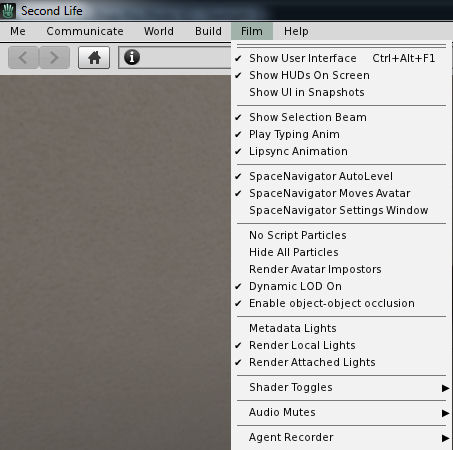
Film menu, for photography and machinima fans
Inclusion of a “lite” version of PhotoTools
Comprehensive Shadows, Rendering, Depth of Field and Local Lights settings in Preferences > Graphics
Assorted UI layout improvements / updates.
For a full list of such options and updates, please refer to the Starlight wiki page.
Starlight also offers a range of UI options, including updated floater layouts, new floaters, additional toolbar buttons, easy access Draw Distance slider and more. Click for full size, if required
Installing Starlight
Note that while available for the official viewer, Starlight is a third-party product, and isn’t supported by Linden Lab.
Read the notes on downloading the correct version.
If you download the .ZIP file (suitable for Windows, OS X and Linux) following the manual installation instructions on the wiki page.
If you download the Windows Easy Installer:
Launch the installer and follow the on-screen instructions
Make sure you install Starlight to the installation location of the viewer with which it is to be used
If you use different RC and project viewers, and wish to have Starlight available for all of them, you must install it for each one.
Note that if a new version of the viewer is subsequently installed to the same location used with Starlight, the Starlight files will be removed as a part of the installation process. You’ll therefore need to re-install the latest version of Starlight in order to keep using it. However, as the Second Life settings files are not removed during viewer updates / installations (they are only removed if you manually carry out a completely clean installation), the viewer should revert to the last active Starlight skin once you have re-installed your Starlight files.
For photographers and machinima makers, Starlight adds the Film menu to the viewer’s menu options (Starlight Mono Teal skin shown)
Running Starlight
Launch the viewer.
Select a Starlight skin from the drop-down displayed below the log-in button.
Re-start the viewer and log-in.
Repeat these steps should you wish to change skins.
Selecting a new Starlight Skin
Additional Notes
Well documented and supported, Hitomi generally has an updated version within hours of any new official viewer de facto release, offering a good cross-section of UI skins and some excellent UI additions, Starlight remains the add-on for the official viewer.
The was no Main (SLS) channel deployment on Tuesday, August 2nd as had been anticipated. Instead a further update to the existing RC server maintenance package was made to all three RC channels on Wednesday August 3rd. This update included a fix for BUG-37573 “Rez silently fails on RC Magnum, RC LeTigre and RC BlueSteel regions”.
SL Viewer
The Visual Outfits Browser viewer was promoted to release candidate status on Monday, August 1st, with the release of version 4.0.7.318263. This update includes further fixes listed as:
MAINT-6476 VOB – User can add any size image to an Outfit Gallery outfit folders
MAINT-6583 [VOB] Snapshot floater is stuck in “Posting” state.
MAINT-6601 [VOB] Texture picker generates WARNING spam in SecondLife.log.
All other viewers remain unchanged since my last projects update:
Current Release version: 4.0.6.315555 (dated May 23rd), promoted July 5th – formerly the Inventory Message RC viewer
RC viewers:
VLC Media Plugin RC viewer, version 4.1.1.318152, dated July 28th – replaces the QuickTime media plugin for the Windows version of the viewer with one based on LibVLC
Maintenance RC viewer, version 4.0.7.318189, dated July 28th – fixes and updates
Project viewers:
Project Bento (avatar skeleton extensions), version 5.0.0.317597, dated July 14th – incorporation of final skeleton and slider updates from the test viewer
Obsolete platform viewer, version 3.7.28.300847 dated May 8th, 2015 – provided for users on Windows XP and OS X versions below 10.7.
On Tuesday, July 19th the server maintenance package previously deployed to all three RC was rolled-out to the Main (SLS) channel,described as “minor internal changes”. One of these sees worn scripts capped at a count of 2500. Attempts to add attachments which take an avatar over this limit should result in the attachments failing to wear
There no deployment and no scheduled restart for the RC channels on Wednesday, July 20th, so the entire grid is running on the same simulator release
SL Viewer
The Maintenance RC viewer updated to version 4.0.7.317689 on July 21st, which includes the following additional fixes:
MAINT-6448PERMISSION_DEBIT notification should default to Deny (my emphasis)
MAINT-6534 [MAINT-RC] Resetting scripts via the build menu no longer works on many scripted objects unless making the scripts visible in the contents tab of the objects first
STORM-2133 VOICE-36 prevents proper shut-down of connector.
The old debit notification (left) gave equal emphasis to accepting / denying the request to access account balances. The update to the Maintenance RC viewer new focus attention on denying a request for account access as the default option.
Project Bento
The following notes and audio were taken from the weekly Bento User Group meeting, held on Thursday, July 21st at 13:00 SLT at the the Hippotropolis Campfire Circle. For details on the meeting agenda, please refer to the Bento User Group wiki page.
Note that this meeting was an “informal” meeting as project development lead Vir Linden is on vacation, as is Dan Linden, another of the devs who has been working on Bento. On-hand for the meeting were Troy, Coyot and Kyle Linden. These notes are not intended to offer a full transcript of the meeting, but rather covers the key topics of the discussion. Extraneous sounds in the audio are the result of someone leaving their microphone open during the meeting.
Internal Bento Presentation at the Lab
There’s an “SL summit” taking place in week #30 (commencing Monday, July 25th) within the Lab, at which Bento will again be presented. Troy Linden will be doing this, using screen shots and information on the recent work, and updating LL staff on the project’s process and on the ongoing collaboration between the Lab and Bento content creators.
Final Skeleton and Issues / Testing
With the release of the latest project viewer (version 5.0.0.317597 at the time of writing), the Lab hopes the Bento skeleton is now finalised. However, there are still a range of issues which are still being seen, some of which may be related to the most recent updates to the skeleton and sliders, others of which relate to earlier versions of the skeleton. There is also a further level of confusion due the AvaStar having to make a series of changes to their tool set, and these also being in a state of flux (version 2.0.13 (Alpha 4) was, at the time of writing the most up-to-date version, which should handle the new updates, although the .BVH animations handling may still be awaiting update). All of this means that most creators have yet to really experiment and test the latest updates.
Troy’s suggestion is that as 5.0.0.317597 does contain the must recent version of the skeleton and sliders, that creators work with models built with this skeleton, and report issues directly against it, to help ensure the Lab is correctly catching everything.
Avatar Reset / Reset Skeleton Option
In theory, removing an avatar mesh using custom joint offsets should reset the underlying avatar. However, this isn’t always the case.
For example, if the animations running on the mesh contain translations, and the last frame of those animations doesn’t move the bones back into their starting position, then an automatic reset of the avatar won’t occur. It is also possible that the update message may not be received by other viewers (e.g. due to Interest List limitations). These problems (which actually pre-date Bento) is why the Reset Skeleton option was added to the Bento viewer.
This prompted a discussion on the impact of sliders / bone rotations / translations and the order in which shapes / joint positions / animations are applied to an avatar, which in testing appear to be at odds with the order of application provided by Vir. Understanding what exactly is going on is again made a little harder, as it is believed there are still some disconnects between updates to the SL skeleton rig and updates made to Avastar.
Medue Simoni, Teager and Mel Vanbeeck discuss sliders, bone rotations / translations, and their impact on an avatar
Medhue Teager and Mel discuss the order in which joint offsets, shape offsets and sliders are applied to an avatar, in reference to Vir’s forum post on the matter
Expect further discussion on this following additional testing.
Brief Summary of Additional Observations
Avatar Height: his has been the topic of conversation for the last few meetings. In particular see my Bento update #19 for details of the current issues arising from the most recent changes in how an avatar’s position relative to the ground is calculated / re-calculated by the viewer.
Vir has suggested that, as a part of investigations, people try to avoid changing the position of any of the bones used in the position calculation via an animation, and instead change the rotation of the bone(s) to achieve the desired result. Initial feedback voice at this meeting (via chat) is that this many not be an ideal solution.
Speech Gestures: A long-standing aspect of Second Life is that speech gestures (along with gesture in general) are not automatically attached / detached with an avatar. This makes sense in that it allows people to choose the gestures they wish to run with an avatar.
However, with Bento, it is possible that dedicated gestures are required (e.g. wing folding gestures, speech gestures that are specific to an avatar form, etc.). As the gestures are not auto-attached / detached this leaves the potential for users experiencing apparent “issues” (e.g. their avatar seems to behave oddly as something like a speech gesture fail to play, or there is a conflict with gestures as the user has multiple gestures trying to do the same thing running simultaneously, etc.). It’s not clear what (if anything) might be done to address this.
Why Bento is Taking so “Long”
There have been some complaints in forum threads and non-Bento user group meetings about the length of time Bento is taking to mature. However, as Troy re-iterated in the meeting, a lot of this is both down to the fact that Bento needs to serve a very wide range of use-cases, not all of which are necessarily compatible with one another (e.g. supporting both human and non-human avatars).
Additionally, and in order to be as broadly useful as possible, the project requires an iterative development process between both the Lab and the expertise of in-world content creators in order to ensure Bento is as useful a product as possible when officially launched. This iterative process inevitably means the project will take time to fully mature.
Troy and Coyot Linden discuss the overall approach to Bento






 Inara Pey: Living in a Modemworld