Lab seeks to improve how TPV support issues are addressed

C & TM Linden Research

As mentioned in the TPV/Developer meeting of the 24th August, Oz Linden has been taking steps to try an improve how issues are addressed by the company’s support teams when dealing providing support to users who are using a TPV as their viewer of choice.

That TPVs are collectively more popular than the official SL viewer is not that surprising. However, a lot of people still turn to Linden Lab for help when they encounter issues. As a result of this, LL have come in for criticism as to how they handle users who report that they are using TPVs, and it is this that has prompted Oz to try to improve how matters can be handled and addressed.

Identifying the Problem

The first part of dealing with any problem is correctly diagnosing whether it is in fact viewer-related or server-related. This isn’t as easy as it sounds because there are many parts of SL where the problem could reside either within the viewer or on the server-side of things (inventory issues being a good example) – hence why LL often get the call when things go wrong.

Because of this complexity, and in order to help improve the initial viewer issue / server issue diagnosis, Oz is working with LL’s support teams to put together a better set of heuristics for use in support staff training and guidance in identifying where a particular problem may reside. To help with this work, he has asked the TPVs supply lists of issues they have encountered which they know are not viewer issues, and how to recognise them. These lists can then be added to the information supplied to LL support staff to both speed the initial diagnosis of a problem and reduce the chances of a problem being mis-diagnosed from the outset.

It’s a Viewer Problem – But Can it be Reproduced on the LL Viewer?

When it comes to trying to resolve what appears to be a viewer issue, LL support staff will ask a) whether the user is using the official LL viewer; and b) if they have tried to reproduce the issue using the official LL viewer. These questions are often taken to mean LL’s support staff “do not want to help” with the problem if it appears to be TPV related.

However, this is not the case; the question is a perfectly valid part of trying diagnose a problem because:

  • If the problem can be reproduced using the official viewer, there is a chance support staff may be able to provide SL-viewer based assistance to resolve the issue
  • If the problem cannot be reproduced on the official viewer, then it at least helps point to the problem potentially being related to the TPV itself.

Obviously, if the problem does appear to be viewer-related but only manifests in a TPV, LL’s support personnel are unlikely to be able to give detailed help (simply because it is unfair to expect LL’s support personnel to be intimately versed in how to resolve issues occurring with all of the TPVs used to access SL). As such, they are going to pass the matter back to the user. When this happens, it can lead to frustrations and a feeling that LL “aren’t interested” in solving the problem.

To avoid this in the future, Oz is working with TPVs to ensure LL’s support staff are better placed to provide onward guidance rather than leaving users feeling they “don’t want to help”. This is being done by each TPV listed in the TPV Directory being asked to:

  • Add the details of any in-world support group(s) they operate to their Directory listing if they haven’t already done so
  • Use a new field in the Directory to give details of any additional locations where help on a specific TPV might be obtained (e.g. a website, a support forum, etc.)

Thus, should an issue appear to be related to a specific viewer which LL staff cannot help resolve, they will at least be able to point the user concerned in one or more directions where they can receive more focused assistance in order to resolve the problem.

Asking People to Complete the Survey

During the discussion, Oz reiterated that every support issue dealt with by LL staff should trigger a follow-up e-mail to the user concerned. While this might not happen until up to four days after the event itself, the e-mail does include a customer satisfaction survey. This is important for two reasons:

  • All survey responses are reviewed by a Linden Lab staffer; they are not farmed out to a third-party survey company or ignored or handled by an automated process
  • They are seen as a primary mechanism for determining how well support is identifying and dealing with issues to the satisfaction of LL’s users.

As such, Oz emphasised the importance for feedback to be given, particularly where there is strong evidence to show that support have failed to provide the correct assistance. While completing the survey may not help in resolving the issue itself, it may help pin-point errors within the support process, particularly if a number of surveys are received highlighting the same fault.

The current process by which support issues – particularly those with TPV problems reported to LL – are handled doesn’t always run smoothly, and there are times when issues do get mis-directed. However, Oz’s response to concerns raised during recent TPV developer meetings demonstrates that steps are being taken to address them. It has been suggested that LL post a blog entry on the initiatives explained here (particularly on the need for TPV users to understand why LL do ask about reproducing issues encountered using the official viewer). In lieu of that happening, I hope this piece will serve as an informational.

Pathfinding: starting to reach TPVs

The pathfinding tools are starting to find their way into TPVs well ahead of showing any sign of moving from the SL Beta Viewer to the release version.

The delay in updating the release viewer may be down to several reasons. One of these might be that Linden Lab staff acknowledge the pathfinding documentation is currently undergoing update and rationalisation, and so the capability is still regarded as being “in beta”.

The table below is a list of current TPV versions (August 19th) of TPVs which have started to embrace pathfinding, and indicates the tools provided.

(click to enlarge if required)

Note that the Navmesh View  / Test option is tied to the new SL Havok sub-licence arrangement, as such none of the above viewers are able to include it unless / until they sign the sub-licence agreement (and are eligible to do so). However, visualising the navmesh is not essential to setting pathfinding attributes for objects in-world or optimising regions where pathfinding is being actively used. Other “missing” functionality as indicated in the table above will doubtless be addressed by the viewers in future releases.

Links for these viewers, including to their release notes, can be found on my Viewer round-up page.

Related Links

SL Viewer: getting up steam for Steam?

secondlifeFollowing-on from the announcement that Second Life will soon be available through Steam, it appears the viewer itself is going through some small changes in order for it to be better used with SL.

Yesterday, I downloaded the latest Development version of the viewer. As per usual, I performed a clean install, removing the older version & the associated user and log files. On starting the viewer, I was surprised to see the log-in screen displayed with an additional pop-up:

SL Development Viewer 3.4.1.263582, (August 16)

Clicking Create Account pops-up the familiar “Do you want to open your web browser” dialogue box, prior to taking you (on clicking OK) to the SL sign-up page. I confess I have not (as yet) run through th actual sign-up process to see if that has changed in preparation for the Steam tie-in, but I’ll be doing so around the time the tie-in is announced as being live, if only out of curiosity.

Clicking Continue from the prompt will allow you to log-in using an existing account, and the prompt to sign-up is not repeated the next time you launch the viewer.

Alongside the new pop-up message, the actual log-in area of the viewer splash screen has been tidied-up and made more presentable.

The cleaned-up log-in credentials area of the splash screen, completed with grid access option enabled (Main and Beta grids only)

Assuming these changes are a part of the preparations for the link-up with Steam, they would appear to answer how users coming to Second Life via Steam will be directed to the sign-up pages. As such, it will be interesting to see what, if anything, will be done to make at least the initial sign-up page more informative as to what Second Life is, or whether this will be handled directly through the SL page(s) on Steam itself (I personally suspect the latter).

Second Life’s Steam-powered approach to new users

Linden Lab has issued a blog post announcing that Second Life will be expanding to steam “in the next month or so”. The announcement reads in full:

As some sharp-eyed developers have speculated, we’re going to make Second Life available on Steam in the next month or so. 

Many of us have friends who are avid Steam gamers, but if you’re not familiar, Steam is a very popular online game platform that offers a wide range of titles (and will soon also offer other software as well). 

What does this news mean for Second Life? You’ll still be able to access Second Life just as you can today; there won’t be any change to that. But, the more than 40 million people who use Steam will also be able to get Second Life as easily as they can get games like Portal. 

We’ll make an announcement on the blog when Second Life is actually available on Steam, but in the meantime, if you have friends who are Steam gamers, let ‘em know it’s coming!

Steam is a digital distribution platform developed by Valve Corporation. It is used to distribute games and related media online, from small independent developers to larger software houses. The primary service allows users to download games and other software stored in Steam’s virtual software library (some 1500 titles as of August 2012) to their local computers. In addition, Steam offers a range of other services, include the ability to purchase games in your local currency, some DRM protection for titles, and a comprehensive communications platform service that allows for direct contact between users, the ability for users to join in multi-player games, etc.

It is estimated that Steam has some 54 million users world-wide as of August 2012, with an average concurrency rate of some 5 million users.

Given the volume of users enjoyed by Steam, and the fact that many SL users are also engaged in games and may well use Steam already, this move is clearly aimed towards increasing SL’s visibility and increasing the potential influx of new – and retained – users. As such, it is no coincidence that this announcement comes almost hand-in-glove with the blog post about materials processing coming to SL.

With pathfinding now “released” on the main grid, the promise of much improved materials processing on the way which should, among other things, lead to a much more “realistic” looking in-world experience, and the roll-out of advanced experience tools, the move to make SL accessible to “hard-core” gaming community using Steam could be seen to be indicative of Linden Lab’s desire to have Second Life perceived more as a “games enabling platform” than perhaps as a “virtual world”.

We’re promised a follow-up blog piece when the service is launched, possibly some time in September. It will be interesting to see how the platform is promoted and what the potential response is from the world at large.

Linden Lab announces normal and specular maps coming to SL

Today, Linden Lab has announced a major new open source initiative to improve graphics rendering performance within the viewer. The announcement reads in full:

One of the challenges that virtual world creators face is the trade-off between rich visual detail and geometric complexity. Ideally, by adding more and smaller faces to an object, a designer can model different surface textures and create realistic variations in the interplay of light and shadow. However, adding faces also quickly increases the size of the model and its rendering cost. Normal and Specular Maps are ways to address this by allowing for the appearance of a complex surface without actually modelling fine scale geometry. 

A Normal Map is an image where the color codes indicate how the renderer should reflect light from each pixel on a surface by modifying the direction that the pixel “faces” (imagine that each pixel could be turned on tiny pivots). This means that pixels on a simple surface can be rendered so that they appear to have much more detail than the actual geometry and at much lower rendering cost. Light and shadow are rendered as though the surface had depth and physical texture, simulating roughness, bumps, and even edges and additional faces.

Similarly, a Specular Map allows each pixel to have its own degree of reflectivity, so that some parts of a single face reflect sharply, while adjacent pixels can be dull.

The open source developers of the Exodus Viewer are contributing Viewer support for Normal and Specular Maps, as well as some additional controls for how light reflects from faces. Linden Lab is developing the server side support so that this powerful tool will be available in Second Life.

Design and development are under way. Watch this blog and the Snowstorm Viewers page for information on when test Viewers with these new capabilities become available.

For additional information, or to learn more about how you can participate in the open source program, please contact Oz@lindenlab.com.

A video has also been released, demonstrating the capabilities.

With thanks to Pete Linden for the heads-up

The skills divide: investigating a better build floater

As I reported a while back, the Content Creation Improvement Informal User Group has started looking into the matter of the Build floater.

Like many things in the viewer, the Build floater has to cover many tasks, some of them quite basic (moving a lounge chair across a room) through to very complex building and texturing activities required by content creators. Over the years, this has led to the Build floater becoming considerably more cramped and complex as options, capabilities and tools have been added to it.

Even redesigns of the UI – as with Viewer 2.x and Viewer 3.x have brought with them issues of their own. Some of these are code-related, some of them are very much impact the usability of the floater, e.g. localisation problems wherein languages other than English don’t readily fit the floater size and layout, etc.

Some TPVs have sought to tackle the issue over the years, but efforts have tended to revolve around working with the constraints defined by the current Build floater, rather than looking what needs to be done in order to make the use of tools traditionally grouped together as “build tools” more task-oriented.

Firestorm and Phoenix, for example, have retained the old V1 capability of being able to show a minimal toolbar (remember the MORE and LESS options on the old, old Build floater?) which can be used to perform basic object movement and rotation tasks without having a plethora of additional information thrown at the novice user.

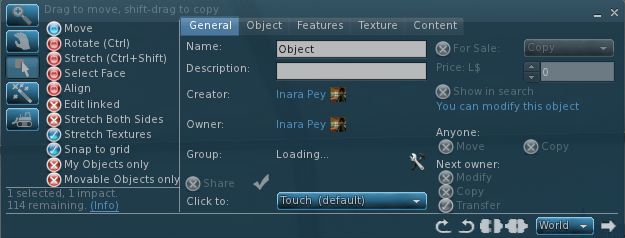
The V1-inspired “minimal Build floater” as exemplified by Firestorm

Niran’s Viewer has also sought to address how information within the Build floater is presented: offering it in a left-to-read format which is potentially more readable for many people as it is easier to visually scan.

However, such approaches suffer their own drawbacks. Niran’s Viewer may present the information in a more logical left-to-right flow, but this is really a cosmetic change rather than a fundamental shift in emphasis in how the tools are presented in terms of user needs as opposed to content creator needs. Similarly, the Firestorm / Phoenix approach retains the minimal information approach from Viewer 1.x, but again, even this potentially contains too much information for, say, someone merely wishing to pull out a sofa and position it in their lounge or who wants to adjust the location of a bracelet attachment on their wrist.

Niran’s Viewer: attempting to make the Build floater a little more logic

The CCIIUG is therefore looking not so much to redesign the Build floater itself, but what needs to be done to present options and tools more logically, such as through one or more floaters that could eventually replace the Build floater as we know it. As such, the Group has been discussing requirements in terms of use rather than function:

  • What tools does the lay user, with no interest in content creation, need to be able to see and access in order to complete the simplest of tasks such as the aforementioned positioning of an in-world object or to resize an object (in-world or attached) to suit their needs?
  • How can these be presented in a user-friendly manner that doesn’t swamp the “consumer user” with information superfluous to their needs
  • Where does the cut-off come between “basic” tools (as described above) and the more advanced tools generally the preserve of the content creator?
  • How should the more advanced tools be presented?

These are actually tough questions to answer as they cover very specialist areas, code design, UI design, etc., as well as a need to clearly understand what “consumer” or “novice” users actually require (itself a tough question for anyone who has been engaged in Second Life for any reasonable length of time, as views naturally become more subjective as time passes). However, the work is potentially pertinent for a number of reasons:

  • The Build floater is seeing more and more being pushed into it as functionality within Second Life continues to be enhanced with new tools and features – mesh saw the additional link and pop-up panel; pathfinding has seen the addition of new information panels, etc.
  • It is thought that there may well be a further change pushed into the Build floater as a result of “something new” (no specifics available) coming down the line
  • Even if any new approach coming out of the CCIIUG isn’t adopted by LL, as it amounts to UI improvements, as so long as it does not impact how the in-world experience is shared between viewers, it does not fall foul of the TPV Policy, and so TPVs will be free to adopt whatever improvements may arise from discussions if they so wish.

A working party within the CCIIUG is being formed to look more closely at the matter, and with a view to putting together mock-ups of ideas as to what a new Build tool UI might look like. As such, input is being welcomed from both TPV developers and from users in general on the matter, with the aim of eventually presenting ideas to Linden Lab at some point in the near future.

If you’d like to be a part of the working party, you can join by attending the weekly CCIIUG meetings, held every Tuesday at 15:00 SLT at the Hippotropolis Auditorium. Information on the Build tools discussions to date, please see the links below.

Related Links