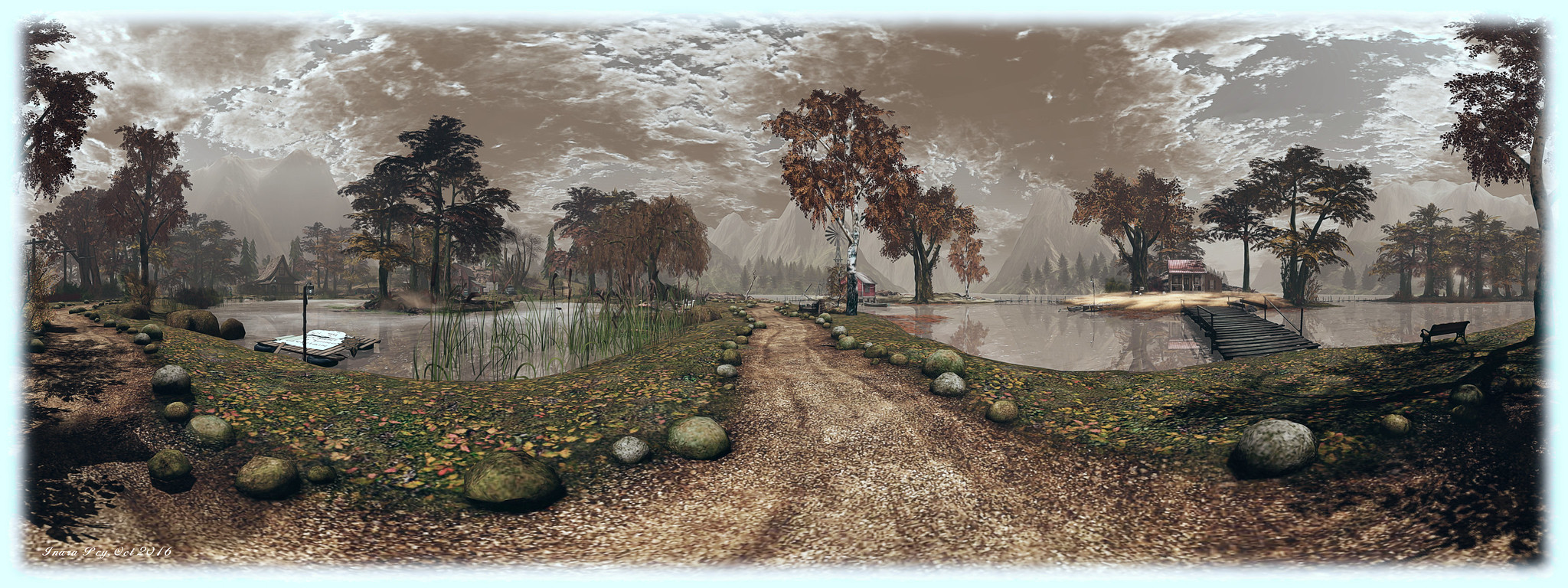
Lab: 360 panoramic image capture coming to the viewer – soon!

It All Starts With a Smile; Inara Pey, October 2016, on Flickr The ability to take 360-degree panoramic shots is to be integrated into the viewer, with access via the snapshot floater (Image location: It All Starts With A Smile  – blog post – static image produced with the Illiastra Panoramic Camera HUD) – click the image to see it in 360-degree format

Just as I was working on an article about  the Illiastra Panoramic Camera and producing static / interactive 360-degree images of Second Life, I attended the Third Party Viewer Development meeting on Friday, October 7th. During that meeting, Troy Linden announced that the Lab are working on incorporating the capability to generate 360-degree snapshots directly into the viewer.

The new capability is to be called 360 Snapshot, and will be integrated into the snapshot floater (alongside of additional snapshot improvements contributed by TPV developer NiranV Dean – although these sit outside of the 360-degree feature).

In essence, the snapshot floater will act as a 360-degree camera rig, allowing you to position your avatar almost anywhere in-world and capture a full 360-degree image, stitched together by back-end processing by the Lab. The image will then be shareable via the SL Share feature, and should be available for download to your local drive.

The work is far enough advanced such that a test viewer (not a project viewer) will be appearing sometime quite soon, with the Lab being keen to get it capability out into the hands of users to try. However, the important thing to note is that it will be a test version – it will not be a final, polished solution right out of the gate. The idea is to give users an indication of things like picture quality, approach taken, etc., and allow the Lab to examine exactly how much additional functionality they need to consider / include in the capability.

Initially, the stitching element will be absent; users will have to take care of that themselves after saving the image set to their local drive. There are also some potentially significant issues the Lab want to look at in detail through the use of the test viewer.

In particular there is the question of how the capability will interact with the simulator Interest List: will items effectively behind your avatar’s field of view update correctly in order to be properly imaged by the system? If not, the Lab will need to look in to how things might be adjusted. The idea here is that by carrying out such tests publicly, the Lab can work with interested users and photographers to identify potential limitations and problem areas in the approach, and so hopefully address them.

In commenting on the project, Oz acknowledged that there are HUD systems available which have been inspirational, and much of the driver behind this capability is the desire to give users a simple “point and shoot” interface.

There is no indication yet on limitations which might be placed on the system, such as image resolution, etc. Hence again why the capability will be appearing in a test viewer when it emerges, rather than a project viewer. The Lab also isn’t committing to any kind of time scales for this work, other than the test viewer is liable to appear reasonably soon; or how long the project will take to reach a release status once a test viewer does appear. The focus is on a step-by-step development of the capability.

Note: the audio clips here are extracts of salient points from the discussion on the 360 Snapshot capability. To hear the full discussion of the capability, please listen to the video of the Third Party Viewer Meeting video, starting at the 08:49 point.

Be a part of the Lab’s 2016 Halloween events

The latest in the Lab’s social meet-ups in-world with residents is currently in the planning stages. Given the time of year, the Lab have decided to mix the Halloween season into things and hold a “travelling meet-up”. They’re also putting together the Halloween Shop ‘Til You Drop event, as a blog post from Xiola explains.

Following the success of the 2015 Creepy Crawl, the Lab are looking to do the same in 2016: spend time in-world hopping from venue to venue, spending time with residents at each, dancing chatting and generally having a good time. The event will take place on Monday, October 31st, and the full details for those just wishing to hop along and join the fun will be announced in due course.

However, for those who wish to offer their venue / place as a possible stop along the way, there are some simple instructions to follow, as Xiola states in the blog post:

  1. Make sure your place is listed in the Destination Guidehere’s how to submit.
  2. Hop over to this form and fill it out before October 20th – we’ll start selecting the venues after that!
  3. Keep an eye out for an email and/or notecard after the 20th to let you know if your venue was selected.

So, if you fancy hosting a little Linden Halloween fun, make sure you get your venue in the DG (if it isn’t already) and fill-out the application form – do keep in mind that preferred venues should be

Shop ‘Til You Drop is a Halloween-themed shopping event taking place between Friday, October 21st and Monday, October 31st 2016.

If you’re a Merchant who specializes in costumes and other Halloween-themed items and would like to participate, the Lab invites you to fill-out and submit the Halloween Shopping Event form – keep in mind the event will be open to a General-rated audience. Selected Merchants will be offered a booth to display and sell some of their items at a special discounted price to shoppers. Given the time frame, Merchants are advised to submit the form sooner rather than later, and to keep in mind that not everyone may be successful in applying.

Again, for those wishing to attending the event, further details will be forthcoming from the Lab nearer the date.

Project Espeon: Experience enabled sits in Second Life

Experience scripted force sits - a new project from the Lab (image courtesy of Linden Lab)
Experience scripted force sits – a new project from the Lab (image courtesy of Linden Lab)

Update: thanks to the efforts of one or more juveniles defacing the orginial, the proposal – originally referred to as a Google document in this article – has been converted to PDF format, and this article has been updated to reflect that fact, and how those with a genuine interest in the proposed capabilities can forward ideas and suggestions to the Lab.

Since the introduction of Experience Keys into Second Life to allow more convenient granting of permissions for the system to act on an avatar’s behaviour when engaged on a specific activity – such as a game or a tour – a commonly requested item has been the ability to for scripted forced sits to be made a part of the Experience process.

On Thursday, September 22nd, during the Server Beta user group meeting, Rider Linden announced he is working on just this capability – and that test regions are available on Aditi for Experience creators to test the capability as it stands.

The new LSL functions for Experience-enabled scripted forced sits form Project Espeon (after the Pokémon character). Rider has produced a proposal document on the new functionality, which can be read  in PDF format, which he introduces as follows:

With the advent of Experiences Keys we would like to be able to allow scripts being run as part of an experience to force an avatar to sit in a particular location.  This feature will be useful in an adventure game scenario where an avatar is forced to sit in a trap so that it may sync its animations with the avatar, or in an amphitheatre or classroom situation where a presenter wishes for all the other participants to remain seated.

We will add at least one new LSL script function that will force an avatar to sit on a particular prim and make adjustments to the existing llUnSit() function to perform the counter action.  

Within the document, Rider outlines the current APIs and functions related to sitting (llLinkSitTarget()llSitTarget()llSetSitText()llAvatarOnLinkSitTarget()llAvatarOnSitTarget() and llUnSit() ) which by affected by the new capability, before proposing a new series of APIs and behaviour changes to make Experience scripted sitting possible. At the time of writing this article, these new capabilities comprise:

  • llSitOnLink( )  – Function: integer llSitOnLink( key agent_id, integer link ); – mimic the behaviour of the rightclick “Sit Here” menu item.  The avatar specified by agent_id is forced to sit on the sit target of the prim indicated by the link parameter. If the specified link is already occupied the simulator will search down the chain of prims in the linkset looking for an available sit target, as per the diagram at the top of this article.
  • PRIM_ALLOW_UNSIT – to be added to llSetPrimitiveParams( ) – When set on a prim that is running a script as part of an experience an avatar that is seated on the sit target and has agreed to participate in the experience will be unable to stand, select another prim to sit on or teleport to another location in the same region (inter-regional teleports will act as normal).
  • PRIM_SCRIPTED_SITS_ONLY – to be added to llSetPrimitiveParams( ) – Agents may only be seated on this prim using llSitOnLink().  Attempts to do a manual sit will fail.  This flag applies even outside of an experience enabled region.
  • PRIM_SIT_TARGET – to be added to llSetPrimitiveParams( ) – The sit target if any defined for this prim.  If the active value is 0 the sit target is deactivated, if it is nonzero the prims sit target is set to the indicated offset and rotation. As with llLinkSitTarget(), these values relative to the prim, however unlike llLinkSitTarget() an offset of <0.0, 0.0, 0.0> may be explicitly set.

Note that the above is in summary only, please refer to the Google document for the complete specifics.

Test regions have been set-up on ADITI, the beta grid, and those interested in testing the capabilities should join the Second Life Beta group on Aditi for access. The test regions are: Leafeon or Umbreon or Sylveon, with test content is available on Leafeon. If you wish to have your own Experience added to the regions for testing, contact Rider via IM. Similarly, if you have any suggestions or ideas for improving the proposal document or the functions, should raise a JIRA.

With thanks to Whirly Fizzle.

Lab issues important update on Second Life viewer evolution

Linden Lab have issued a blog post on upcoming changes / evolutions in the Second Life viewer, most of which will hopefully be familiar with readers of these pages – particularly my project updates and viewer notes.

In Important Viewer Evolution Update, the Lab outline three developments coming to the official viewer, and also indicate the ending of support for some versions of Windows and Mac OSX. The three developments are:

  • The Project Bento avatar skeleton extensions. For those needing an introduction to Bento, which adds enormous new capabilities to the SL avatar skeleton when working with mesh bodies and attachments, please refer to my Project Bento updates.
  • 64-bit viewer support. The Lab is working on 64-bit versions of the viewer for Windows and Mac. A project viewer is expected “real soon now”, and should offer much improved memory handling and reduced crash rates for 64-bit OS users. The 32-bit Windows version of the viewer will continue once the 64-bit arrive, and the Lab’s advice is that for those who can, to switch to 64-bit when available (or with a TPV, most of whom offer 64-bit versions).
  • Introduction of VLC for better media support. In April, Apple announced they were immediately ceasing support for QuickTime on Windows, leaving some potential security vulnerabilities unpatched (see my article here). As a result, the Lab has implemented media support using  LibVLC for Windows. A release candidate viewer is currently available via the Alternate Viewers wiki page. A Mac switch to VLC is anticipated when the 64-bit versions of the official viewer arrive

OS Support Changes

In the post, the Lab also announce that from this week (week #38 2016 at the time of writing) discontinuing support for the following operating system versions:

  • Windows Vista
  • Mac OS X versions less than 10.9.

The Lab note that the viewer may continue to operate on those OS versions which are no longer supported, but they won’t be testing against them or attempting to fix any compatibility issues related to them.

With this part of the announcement, the Lab note that Apple has released OSX 10.12 Sierra, which has caused some Mac users issues. They therefore offer this advice:

We do have reports that installing this upgrade will clear your Second Life inventory cache. Normally, that should only cause some performance impact as the cache is reloaded, but in some cases at least in current viewers it causes your avatar to appear as a cloud (see BUG-37653). The workaround is to open your Inventory, find an outfit folder, and drag the outfit folder onto your avatar; after this, you can modify your appearance using any of the usual methods.

Required Viewer Update

Finally, and as a result of recent and upcoming changes to the viewer, the Lab note that they will be making upgrades from any Viewer version older than 4.0.5 a required update, and in line with the ending of support for Vista and Mac OSX versions below 10.9, they have updated the SL system requirements.

Lab seeks Halloween photos for Second Life campaign

Second Life Community Manager Xiola Linden has blogged about an opportunity for residents to have their photographs featured in an upcoming Halloween e-mail and selected banner campaign.

In the post, Xiola notes:

Share your pic on our Official Flickr Page with the tag “SLHalloween2016” so that we can see all of your amazing work. You may submit as many as you like between now and October 5, 2016. Please include your avatar name in the image description so that we know who to credit!

We’ll showcase the chosen image(s) in an email to Residents, as well as in some banner campaigns. We’ll let the chosen image creators know via Flickr.

Images should be taken in-world and be Halloween themed in order to qualify. They should also be appropriate for all audiences.  Xiola also offers some submission tips:

  • Layout:
    • The main content of your image should be near the center and to the right of the image – similar to the images you’d see on the Second Life login page.
    • Horizontal images work best.
  • Show your avatar or avatars in a scene in-world – an image that tells a story is going to make an impression.
  • Keep your image free of additional text/logos.
  • Higher resolution images work best.


The official blog post includes a couple of example images to help visualise finished banners / headers.

So, if you fancy having a go – snap away, and good luck!

Ladyslipper Constantine: celebrating a life in Second Life

ladyslipperAs many of us are aware, long-time Second Life resident Ladyslipper Constantine passed away on Saturday, September 17th, 2016.

Having joined Second Life in May 2008 and deaf, Ladyslipper (or L.S., as she liked to be known, having taken her name from the flower of the US state she lived in for many year: Minnesota) quickly became involved with Virtual Ability  (you can read more about her on the VAI website), and also joined Burn 2, becoming a leading member of DRUM, as well as being a Burn2 Ranger.

In addition to these activities, Ladyslipper was very involved in Virtual Worlds Best Practices in Education events, many Second Life Birthday celebrations, and more recently, with One Billion Rising.

Ladyslipper lost her life to cancer, passing away peacefully on the 17th, surrounded by loved ones. For all those who knew her, I’ve received notice from Gentle Heron of Virtual Ability that, VAI will be hosting a Celebration of Ladyslipper’s life on Saturday, October 1st, starting at 11:00am SLT on the north-east lawn of Virtual Ability island.

“The celebration will begin with some of her friends offering memories in text and voice,” Gentle says of the event, “because LS was part of the deaf community in SL. There will be a slide show of the many events LS participated in. And there will be music and dancing. LS loved a good party.”

To help with the celebration of Ladyslipper’s life, VAI are asking that if anyone does have  images of Ladyslipper at SL events which might be included in the slide show, to please consider passing them to iSkye Silverweb.

Further details can be obtained in-world from Gentle Heron, Eme Capalini, or Treasure Ballinger.

My condolences to Ladyslipper’s loved ones, and all who knew and worked with her.