Nalates Urriah keeps her finger on the pulse of what is happening on the technical side of Second Life, reporting on a range of weekly User Group and other meetings held in-world.
This week, she reports on an interesting new scripting function Falcon Linden is working on.
llSetKeyframedAnimation() is designed to allow objects to be moved through a non-physical link set. The function should allow a range of objects to achieve smooth movement, and will allow avatars to stand / sit on objects as they move. As such, the function should be ideal for the likes of trains and elevators to run smoothly along their tracks / up and down elevator shafts.
Going up? Smoother elevators on their way (among other things!)
There are some animation issues, however – notably when walking on an object using the function, an avatar’s animation will get a little messy. The function also must use the Prim Equivalency system and come in at under a physics weight of 64.
Nalates reports that the new function should soon be working on two regions on the Beta grid and that Falcon will post to the wiki page (linked to above) when the regions are supporting it. Those testing the function are asked to include the function name in the title of any JIRA they raise.
In the wake of the arrival of mesh, and in the hope of alleviating confusion / making things a little more understandable, there are changes coming down the road for Viewer 3. Some of these will undoubtedly make their way into TPVs as well, so here’s a quick overview.
The changes described below can be seen in the latest Mesh Development Viewer from Linden Lab (3.0.5 (240741)+), which can be obtained from the alternate viewer wiki download page. note that as this is a development Viewer, some elements may change in relation to descriptions provided here.
Prim Equivalence and Land Impact
For a general user perspective, this is probably going to be the most obvious change.
Prim Equivalence, or PE has been an issue on many levels, not the least of which, for consumers, is that it tends to be bracketed with a prim count value – and is frequently greater than the associated prim count (although there are items where the reverse is true). People therefore get confused as to which is the key value: prim count (which everyone is familiar with) or PE.
In order to try to solve these issues, the terms “Prim Equivalence” and “prim count” are set to be replaced by a single value: “Land Impact”. How this will work takes a little explaining on two fronts, as it relates to a couple of changes within the Viewer and how we need to view things. So bear with me while I attempt to explain.
The first of these changes is that land will no longer be referred to in terms of prim counts and usage, but rather in terms of its “capacity”. Essentially, this means that:
Full sims have a “capacity” of 15,000
Homestead sims have a “capacity” of 3,750
OpenSpace sims have a “capacity” of 1,875.
Land parcels will also be referred to in terms of their “capacity”:
About Land today: prim counts (l); As it will be: capacity (r) (click to enlarge)
This might all sound like unnecessary semantics – but it does have a point in that it allows everything to be thought of equally, regardless of its origin – as we’ll see below.
Note as well, that nothing is physically being “lost” from your land. A 4096 sq m parcel that had a prim count of 937 prims before the arrival of the new Viewer will simply have a “capacity” of 937 after the new Viewer has entered general use, as shown by the figures highlighted in green in the above images.
To align with this, objects need no longer be through of in terms of their prim count or their PE – but simply in terms of their Land Impact – that is, how much of the available “capacity” on a sim / parcel they take up. This is reflected in changes being made to the Build menu floater:
Build floater: As it is with Prim count & PE (l); The new Land Impact values (r)
As can be seen, the prim count / PE values are being replaced with two simple figures:
The impact the rezzed object has on the land
The remaining capacity that is available for rezzing further objects.
So if an object has a Land Impact of 15, it will reduce the land capacity by 15; if it has an impact of 150, it will reduce the land capacity by 150, regardless as to whether the object itself is made of prims or is a mesh object.
For people who want more detail on individual objects, the new Build menu also includes a MORE INFO link. This opens an additional floater which provides:
Information on the object itself (including the prim count for those missing it!)
If the object is a mesh creation, the “weights” applied to it in terms of the bandwidth required to download it, the server resources it uses, its physics weight, etc.
The overall land impact: impact of the object itself, impact of all objects rezzed, remaining free capacity and total capacity for the land itself.
MORE INFO: for a prim object (l) and mesh object (r) – note the weights for th mesh object
There will also be a WHAT IS ALL THIS? link which will open a Help page that explains the various figures.
Replacing both prim count and PE with a single, easily understood value (Land Impact) makes sense, and at a stroke makes the impact of rezzing any object in-world easy to understand, removing any confusion between prim count and PE.
Of course, there are going to be voices that proclaim the change is about further “hiding” the “real” cost of mesh objects from the user, with the underlying implication that the users are somehow being hoodwinked by Linden Lab. But, c’est la vie. People are wont to make waves come what may.
It will be interesting to see how merchants react to the change – given that all vendors, etc., refer to prim counts right now, and getting wording changed to “Land Impact” (or simply dropping the word “prim” from displays) is a nontrivial issue for many. Some may even opt to retain the use of “prim count” in their vendors for this reason.
And when considering merchants – one hopes that Linden Lab will actually remember to update the Marketplace so that listings also reflect the use of “Land Impact” (i.e rename Prim Count!).
Avatar Rendering Cost and Avatar Draw Weight
Alongside the changes around PE and Land Impact, the Viewer will also be losing another measure that has always caused controversy and angst: Avatar Rendering Cost, or ARC.
Always intended to be an indicative figure for the amount of potential Viewer-side lag avatars create, ARC quickly became viewed by some as the figure for determining whether or not an avatar was “creating lag”, which in turn lead to a lot of drama in some quarters – up to and including people being banned from venues / sims on the basis of their ARC count.
DWA: 197,484 – but don’t panic!
From 3.0.5, things will be totally revamped. ARC as a term is vanishing from the Viewer to be replaced by Draw Weight for Avatars (DWA). Furthermore, how DWA is calculated is radically different to how ARC has been calculated, as Nyx Linden explains.
DWA should be far more accurate than the old ARC system; and therein, one cannot help but feel, lies the rub.
If the figure is indeed more accurate, it is likely to be pounced upon within even greater zeal by those already obsessed with ARC. As such, I can’t help but hope this is one value that Linden Lab don’t make a song-and-dance about when these changes to the Viewer are formally released for general use.
Mesh Uploader
Another source of irritation for content creators has been the mesh upload floater. At SLCC 2011, Charlar Linden himself admitted the current floater is isn’t overly user-friendly. As such, it is also being overhauled, as can again be seen in the current Mesh Development Viewer.
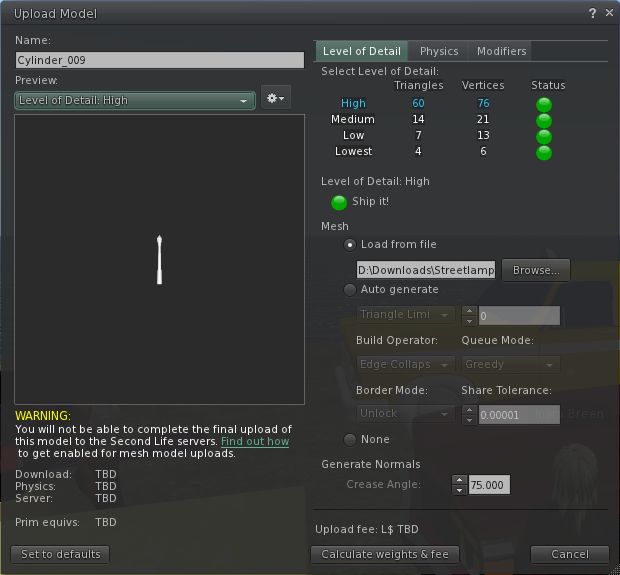
The current upload floater presents a basic set of modifiers that can be applied to a mesh object prior to uploading in order to optimise it. These tend to encourage a lot of trial and error / guesswork on the part of the creator in order to arrive at a desired result.
The current mesh object upload floater
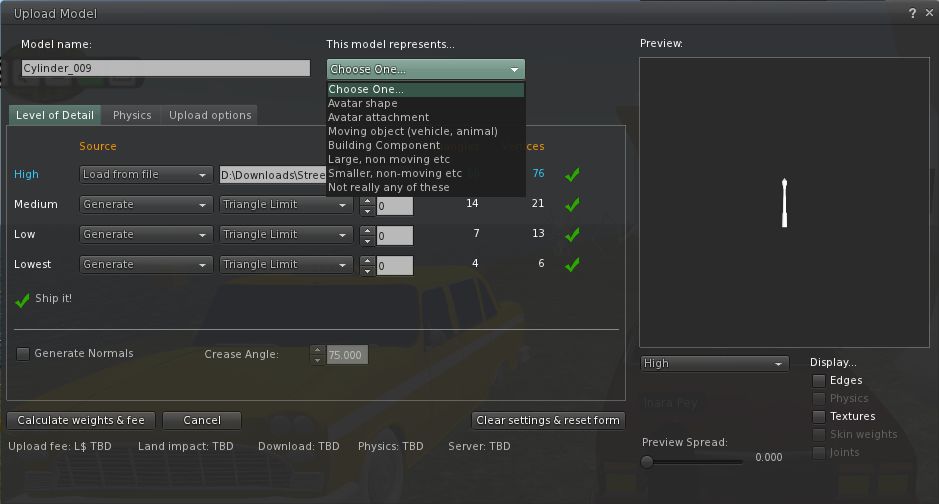
The new upload floater offers a greater range of modifiers and the ability to better define the model itself in terms of what it represents (avatar shape, avatar attachment, moving vehicle, etc – see the drop down in the image below), which presumably apply suitable algorithms that help optimise the object and calculate its overall weight.
The new mesh upload floater as it appears in the Mesh Development Viewer
I understand that several of the changes in the new upload floater are as a result of consultations with / requests from mesh content creators, so hopefully they will go some way to easing the process of importing objects into Second Life.
More to Come
These are by no means the only changes coming to Second Life and the Viewer as a result of the arrival of mesh object support. For one thing, more needs to be done in the area of mesh clothing in order to make it easier to adjust clothing to fit the avatar, rather than the other way around as is currently largely the case. Therefore we can expect to see further changes in relation to this in the future (indeed, those interested in the issue should check Maxwell Graf’s JIRA relating to a parametric deformer).
In the meantime, the above should hopefully give insight into what is waiting just around the corner.
The server roll-out of the 13th September introduced a new and unexpected bug into the grid, as defined in JIRA SVC-7283:
“Attempting to issue llRemoteLoadScriptPin() on a non-full perm script to a worn/attached object fails with “Unable to add item” error message. If there was an existing script with the same name in the destination object, that script is deleted, often resulting in the items being made completely useless.
“A similar error occurs when using llGiveInventory() on a no-transfer item to a worn/attached object. In this case, the error message is “Unable to give inventory: ‘Destination did not accept'”.”
Simply put, this means that at present, attempting to update worn objects runs the risk of breaking them completely.
The JIRA is currently assigned to WorkingOnIt Linden, which means it is being investigated – indeed, Maestro Linden has commented on the JIRA, and has confirmed the bugs. He’s even offered some well-meaning advice:
“The workaround for updaters that affect attachments such as HUDs is to first drop the attachment or detach it and rez it on the ground before using the updater.”
However, this doesn’t help in all cases – particularly those using RLV items which they may not be able to remove; there are also those update systems that rely on the object being worn.
What is more worrying, however, is the seemingly casual response from Linden Lab to the issue. There has been no official indication to content creators that there is a potentially major bug impacting their items – people are being left to hear about things via word-of mouth.
Nor does the Lab – via Oskar Linden – seem all that concerned about getting a fix for the problem out sooner rather than later. Commenting on the JIRA, Oskar Linden states:
“We have traced the cause of SVC-7283 to a security fix around permissions. Due to the urgency of the security issue, we deployed the fix to all channels of the grid at once. Unfortunately, we cannot ‘roll back’ the change at this point, since doing so would compromise permissions across the grid. We are working on a fix for SVC-7283 – we hope to deploy the fix to an RC channel next week. We apologize for the inconvenience and problems with update scripts which are caused by this bug.”
So a potentially significant bug has been introduced right across the grid – and Linden Lab hope to get a fix out to 10% of the grid next week. Does this mean that if successful, the fix will be held over a further week prior to being rolled out to the remaining RC channels and the rest of the grid?
If so, it is wholly unacceptable.
The bug was apparently introduced as a result of a fix being pushed out without sufficient regression testing. Fair enough; however, if this can be done with a security fix – and given Linden Lab have successfully recreated the bugs through Maestro Linden’s tests – then frankly the normal release cycle should be foreshortened as far as possible:
The fix should be coded
The code should be tested for potential impact
The code should be *immediately* release to an RC channel and baked for 24 hours on that channel
If no significant impacts / bugs found as a result of the RC test, the code should immediately be rolled out to the rest of the grid.
And I sincerely hope that this is what Linden Lab will be aiming for. If they are – then we need a clearer statement of intent than Oskar is giving.
In the meantime, one would hope Linden Lab would at least take the issue by the horns and for once communicate the problem with their users, rather than leaving it to people to stumble upon it through either word-of-mouth or through actually encountering an update failure.
Updates
15th September
Maestro Linden reports on SVC-7283:
“We have a fix for this bug that looks promising, which is currently on Aditi (the ‘Beta grid’). The fix version right now is thermonuclear 11.09.14.240803. You can find this version on a handful of Aditi regions; I’ve been testing in the region ‘Pixelpark’, which has a large sandbox area.
“With this fixed version, llGiveInventory() and llRemoteLoadScriptPin() should be able to deliver (no-copy or no-trans) items to worn attachments as long as the attachment’s owner permissions (in terms of copy and transfer) don’t exceed the owner permissions of the item.
“The following 2 cases are still blocked, however, for security reasons:
“Adding a no-transfer item to a worn attachment which is transferable
“Adding a no-copy item to a worn attachment which is copyable
“These cases might be fixed in a future project, but first the server will need to support dynamic updating of worn attachments’ permissions.”
17th September
The fix developed by Maestro Linden is receiving some positive feedback from those testing it on the Beta grid; as such, it is to be rolled out to an RC channel (no details on which as yet) on Wednesday 21st September.
This probably means that the fix will not be implemented across the entire Grid for a further week.
Additionally, a further issue was uncovered relating to permissions restrictions that impact content creators (but not necessarily their customers), wherein NO TRANS items cannot be moved between root and child prims in a full permissions item. Maestro Linden has opened a JIRA related specifically to this issue, SVC-7294.
19th September: The bug fix is confirmed for a roll-out on an RC channel this Wednesday (21st Sept). Those wishing to have their regions included int eh release should submit region names to JIRA SVC-7291.
21st September: The bug fix was apparently rolled out to all RC channels today (it seems the release notes for the RC channels don’t expressly refer to the JIRA), and appears to have corrected a part of the problem for some content creators impacted by the issue, but not for others. Further updates expected.
In addition, there are still issues beyond this JIRA that need addressing – hopefully through SVC-7294, although no roll-out date is available for this yet.
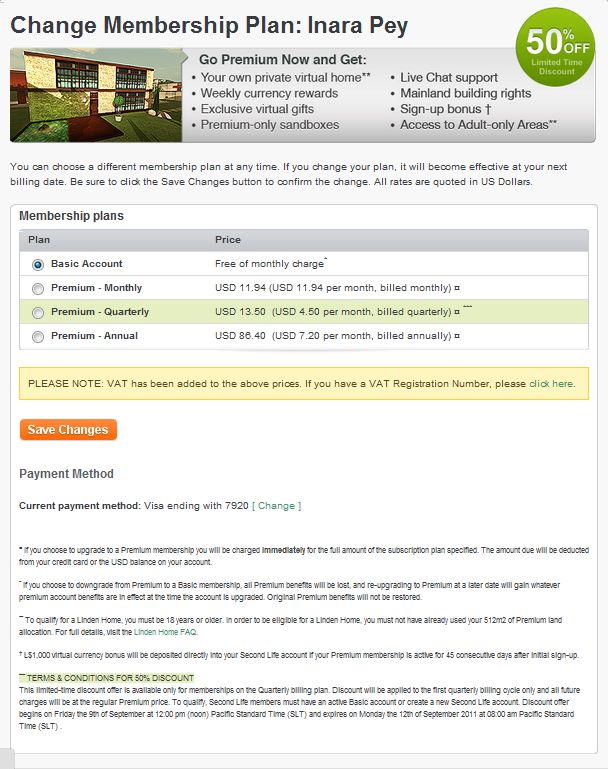
Linden Lab have slipped in a new offer to encourage the take-up of Premium memberships. For a limited time (i.e. this weekend), people can sign-up at a 50% discount – but only if they sign-up for the Quarterly payment plan and only for the first billing cycle.
While such quarterly offers are not uncommon – my ISP offers new sign-up 1/3 off their first quarter bill for phone & broadband charges, for example) – one cannot help but feel the Lab are perhaps being a tad tight-fisted here. While I can understand that Annual membership is hard to discount to the same degree – why restrict the offer to Quarterly only (and perhaps even why only the first quarter?).
The discount offer. The small print reads: “This limited-time discount offer is available only for memberships on the Quarterly billing plan. Discount will be applied to the first quarterly billing cycle only and all future charges will be at the regular Premium price.”
Why not offer a 25% discount on monthly memberships, applicable to the first 3 months alongside a 50% discount on Quarterly memberships?
Of course, there is a risk that, in offering such discounts, LL will annoy their established Premium members. But the fact is, currently, and the new additions to Premiums notwithstanding, there is little enough being offered to tempt established users with free accounts into jumping onto the Premium train; and while the various offers might appeal to incoming members, one feels that overall, people will – by their very nature – opt to go the “free” route first, rather than “risk” signing up – again, discount notwithstanding – to limit their exposure.
Both increasing the attractiveness of Premium memberships and promoting them to the user base is a good idea. One just wonders if there is a consistent and workable strategy behind it that will lead to success.
Linden Lab have issued a casting call for people wishing to participate in an upcoming web-based advertising campaign for Second Life.
The campaign will be similar to the Become Your Avatar banner ads campaign currently to be seen in relations to Second Life, but will also feature video as will as still pictures.
The Become Your Avatar banner ad campaign
As such, the Lab is looking for people who are comfortable revealing their “human side” alongside their avatars in SL with the aim of spotlighting the diverse and creative communities in Second Life.
If you’re interested in participating in the campaign please complete the official application form and get it back to Linden Lab no later than 12:00 noon PDT on Monday September 12th.
Good luck to all who apply, and maybe see you on the casting couch!



 Inara Pey: Living in a Modemworld