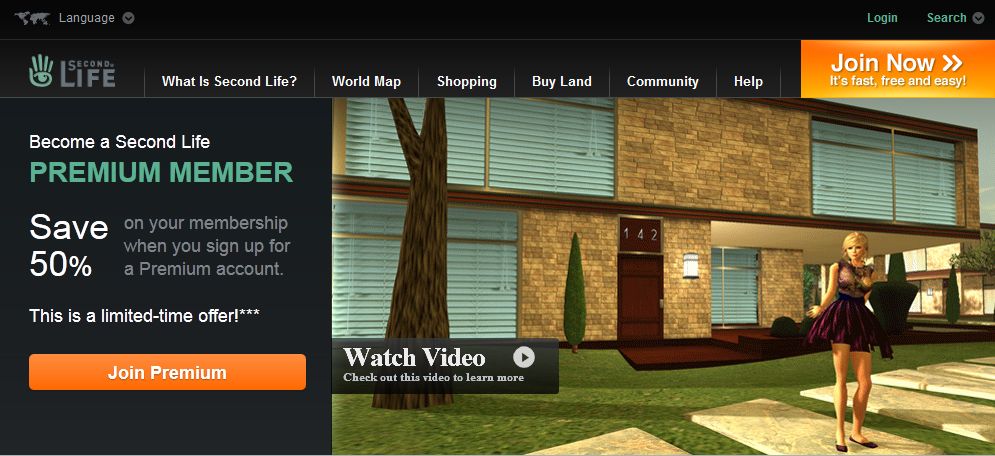
They’re now doing it again. This time the offer is for longer – an entire week, starting at 08:00 SLT/PST today, Monday 21st November, and ending at 08:00 SLT/PST on Monday 28th November.
As with the original offer
The discount only applies to Quarterly membership billing plans
Only the first quarter will be discounted the rest of the year will be charged at the full Quarterly membership rate.
There’s even a cheesy video this time – although I still dispute some of the claims made:
More space? How, exactly? 512sq m (even with a Linden Home), isn’t a huge amount of space
More privacy? Again, how, exactly?
More Access? Really? Where?
Fact is, as far as these claims are concerned, they can all be matched via Basic membership, and I still find LL’s use of them as promotional tools mildly misleading. For space – you can rent land (OK, making a payout, but the space will be way more than the free 512 from Premium); you’ll get privacy to the same degree as Premium (if you have your own land – right down to the same parcel settings). Access? simply go PIOF and age verified (no longer the big bad bogeyman it once was), and you’ll enjoy the same access.
It’s going to be interesting how well this is received – not they we really got any indication as to the success of September’s promotion.
What will be more interesting is whether or not this may lead to a repeat of the Land Sale that LL held towards the end of October to follow-up on the Premium drive, and if so, how long for – both schemes original ran just for a weekend in their first outings.Should LL opt to run with the Land Sale again, then it could come up as a little Christmas enticement (assuming they’re not seriously contemplating doing anything drastic with tier in the New Year).
So, if you feel up for going Premium, now’s the time to try – you might want to read my reports on the upgrade process and things like Linden Homes and the Premium Sandboxes. That said, I actually don’t think the Quarterly membership, even with a single discount offers that great value for money – if you want to go for Premium, best to go directly for Annual. Yes, you’re making a greater commitment, but the return on your membership is greater – and you arguably have greater protection against account suspension due to a payment error / failure.
A frend in-world pointed me towards the SL forums today, and an interesting post from Kelly Linden on upcoming functionality which will allow scripts that pay out L$ to determine whether or not the transfer is successful, fails or is refused by the recipients.
The new functions are called llTransferLindenDollars and transaction_result.
LSL event triggered from an llTransfer* call (currently only llTransferLindenDollars).
transaction_id matches the return value of the llTransfer call. If the transaction was successful the id will match the transaction id shown in the transaction history on secondlife.com.
success is TRUE if the transfer succeeded otherwise FALSE.
data will contain a CSV of destination id and amount transferred on success and an error tag on failure.
Kelly further explains:
llTransferLindenDollars has all the exact same limitations and restrictions as llGiveMoney – no more and no less. The only difference is that the result of that transaction is routed back to the script when llTransferLindenDollars is used.
Technical details:
L$ transactions in Second Life are managed by a service internally termed “L$ API”. This includes llGiveMoney and direct agent to agent transfers – and anything else that transfers L$. The new function doesn’t actually “pull the transaction data from the LL servers”, it just passes back the results from using the L$ API.
It is true that this service operates on HTTPS hence the possibility of it giving an “HTTP status code other than 200”. This is expected to be extremely rare. As for the incident today on the beta regions: in order to reproduce this error (and ensure it works as expected) QA forced a configuration change such that this particular region host believed the L$ API existed at a nonsense address. Resetting the configuration to default fixed it of course.
To be extra clear:
There are no cases where llTransferLindenDollars could succeed when llGiveMoney would fail.
There are no cases where llTransferLindenDollars could fail when llGiveMoney would succeed.
There are some rare edge cases, mostly relating to LSL limitations:
LSL scripts do not process more than one event at a time. If the script gets reset, the object taken, or the region restarted while the transaction_result is pending in a queue (because the script is busy in another event) then the result may get lost. This risk can be mitigated by using scripts that are mostly idle while waiting for the transaction_result event. This is not unique to the new features but applies to all events in LSL.
LSL scripts have a max event queue size of 64. If the event queue is full new transaction_result events will get dropped. This risk can be mitigated by ensuring the script handling the transaction_result does not build up a queue of events. This is not unique to the new features but applies to all events in LSL.
The only script in an object which will get a transaction_result event is the script that called llTransferLindenDollars. This is similar to how the http_request event works.
This functionality is currently undergoing testing on the Aditi Beta grid on channel DRTSIM-111 in the following regions (SLurls): Bethel, Fortuna and Sandbox Wanderton.
You can follow / join the discussion on these functions in the SL forums.
I confess I don’t know if this is new, or I’m just blind and a little stupid (don’t answer that!), but my.secondlife.com has gone more Twittery, introducing a TRENDING tab.
The tab is accessed via the HOME tab on your web profile, and like Twitter, pops up anything that is proving popular among those using the Feed function – presumably based on a combination of replies & number of loves received by a message.
I freely admit this may have been around a while and I’ve simply missed it, or it was recently added and I simply missed the news. I’ve been rather absent from active engagement on Twitter lately due to work and things so could have missed the news there; and I do keep forgetting to tend to my own my.secondlife.com feed). As such, I only noticed it today, and did (rather forlornly) ask:
If it *is* new…then it’s an interesting new option that allows greater interaction between SL users (LL, why aren’t you telling us about these things?). If it’s been around a while, feel free to pat me on the head sympathetically before moving on :).
More people are trying-out the new FUI (apparently “Flexible User Interface”, and not “phooey” as someone jokingly insisted!) in Viewer 3.2, and some interesting JIRA are starting to appear.
If you’ve made the hop, you might want to consider taking a look at some of these and adding your support to any you agree with (remember to WATCH rather than VOTE – or do both to be on the safe side!):
VWR-20738: add ability to organise buttons in Customise Toolbars floater
VWR-27209: a Navigation bar only option to top bar of UI
VWR-27222: add Estate & Statistics Bar buttons and include multi-use separator in Customise Toolbars
VWR-27318 / VWR-27330: provide the option to use either the toolbars or the Sidebar
VWR-27358: allow the Chat Bar and an “IM Bar” to be docked, as if a button-like element, to the bottom bar area
VWR-27388: make any menu option draggable to the button bar
VWR-27448: recover the ability to dock windows at the edge of the screen and have them behave like tabs
VWR-27455: make the button bars on Viewer 3.2 dockable to top/bottom or right/left (depending on the edge) and not only on the middle
VWR-27457: create a “Quick Preferences” button for rapid access to frequently used preferences
VWR-27463: add Picks, Places, and Destinations to menus
VWR-27599: some floater window sizes and positions are sometimes reset to default after a crash, and all are on viewer update
While the following are not strictly Viewer 3.2 related, some may feel they still apply:
VWR-26688: allow notifications to be positioned to a different area of the screen
Note that I don’t pretend that this is an exhaustive list, nor have I included any JIRA for 3.2.0 through 3.2.2 marked as “fix pending”. Finally, JIRA listed above should not in any way be taken as a personal endorsement on my part – they’re simply what came up in search & while perusing the results!
Update 17th November
Adding EXP-1449 left click drag to control avatar not working, when “single click on land” action set to “move to clicked point”.
When it was first announced, the Linden Lab RFP for an Adult Gateway caused something of a stir among the Adult community. Just over a month ago, word circulated in-world that the Freedom Continent had won the bid; something that was not officially confirmed until the Adult Content User Group meeting on Monday November 6th.
Freedom Continent is a consortium of experienced Adult activity SL users and sim owners who have come together to provide a pooled resource of adult activities and who have had their sims relocated in-world to form a “mini-continent”. For the past several weeks, they’ve been at work developing the new Adult Gateway, which is located to the south of the current core of Freedom Continent sims.
In all, five sims have been allocated to that Gateway project – a central hub called Zindra Prime, surrounded on all four side by “focus” regions called North, South, West and East. Currently, three of the sims – North, Prime and South – are nearing completion, and work is underway on the remaining two. As such, I thought I’d pay the new Gateway a visit and see what was happening and what the broader plans might be.
The central Adult Gateway hub
The use of “Zindra” in the region names may seem a trifle confusing given none of them are physically connected to the Adult continent of the same name. This is because Linden Lab have decided that the name should be used exclusively with the new Gateway, rather than in reference to a specific geographic region in-world (not that the continent itself will be changing name). As such, the new Gateway represents all Adult activities in Second Life, regardless of physical location or ownership, and will provide a means of entry to those activities for anyone wishing to explore them.
Zindra Prime is intended as an arrival hub and information centre for those who are perhaps exploring Adult activities for the first time. From here, they can explore any or all of the four “compass” sims – North, South, West and East, each of which is specifically themed in terms of Adult content – the North sim, for example is for all activities related to BDSM and the south sim to Gor / medieval.
This has been a deliberate design choice, as Serjourn Daxter, one of the project’s leaders and a Freedom Continent pioneer, explained to me during my visit. “We’ve seen that ‘Adult’ is a far from homogenous term. BDSMers seem to be less than fond of Goreans and the traditional CARP/RP groups are not big fan of others – although some people play in more than one camp. So we have made four focus sims, surrounding the Adult hub.”
Adult Gateway Gor / Medieval hub
Each of the four focus sims has a unique build which reflects the environment it represents and provides a mix of areas that can be used for informational purposes or as shop fronts for Adult communities, sims and stores. Given this, I asked if the various hubs would offer classes for newcomers?
“The central hub will focus on adult in general,” Serjourn replied. “The speciality hubs will focus on their respective specialities. For example, the GOR hub will teach game meters, and the BDSM hub RLV. We will offer small shop space and adboards to let businesses present themselves.”
She continued, “The idea is really – when you come to the adult world, you need to feel welcome, learn basic skills and find your area of interest. So the idea is, you get here and you may or may not have skills. If you lack basic skills, we supply them in the main hub. We help you get to where your interest may be. If you lack, say, BDSM specific skills, your next stop may be the BDSM hub. But we don’t want to send an unskilled newcomer with a desire for sex action to a Gor sim, and certainly not without knowledge of what Gor is.”
And moving beyond the hubs, and helping people to get to where they might want to go? “We will not differentiate where a business is located,” Serjourn stated firmly, “We will gladly share traffic.”
The BDSM hub
As it is, staff – particularly non-English speakers – are being sought, and plans are to have full 24/7 cover on the sims to provide maximum support and assistance to visitors. The hubs themselves are certainly open to exploration and discovery; I spent a pleasant hour wandering between them and getting a feel for things. The builds are clean and simple, display space is plentiful, and region crossings relatively smooth.
Given the layout of the hub sims, I asked if there were plans for expansion. “We offer sim owners the opportunity to join the appropriate sector of continent, subject to the LL fee for sim moves,” Serjourn confirmed. “We have a lot of BDSM sims joining, and we are open for other sims. There are already [on-going] talks with GOR sims. We will have open areas between the sectors, so some sims will always have a water border.”
With working progressing so well, my last question to Serjourn was whether an opening date had been set for the Gateway. “Well, the target is Sunday,” she replied. “Then a week of ramp up and adjustments,” she added, then laughed, “It may be LATE on Sunday!”
There has been a lot of angst generated by the entire Adult Gateway RFP and how it has been handled over the last few months. However, what is being developed in the new Gateway sims looks to be a worthy addition to the Adult community, and will hopefully prove to be a benefit to all parties across the grid.
Update 14th November
In order to prevent confusion over the use of the name Zindra, Freedom Continent have voted to drop the name from the new Gateway. The new hub regions will now simply be called “Adult Hub”, followed by the focus name (so “Adult Hub BDSM” for example). Serjourn did hint this may well be the case during our interview, and a unanimous vote on the part of the Freedom Continent’s management group determined the name Zindra would be voluntarily dropped in order to assist in promoting unity within the Adult community.
Quick note: A couple of other blogs have linked to this piece as a review of the new UI. If you are looking for a review, you can find mine here. This article only references the fact the new Viewer is released, and doesn’t carry any specifics.
Well, well.
After blogging yesterday that Viewer 3.2 had reached Beta – lo and behold, and with no fanfare whatsoever, it’s released!
Apparently there was a blog post about it that Tateru spotted on Monday, but it appears to have vanished into the sub-etha.
Version 3.2.0 (244443), dated Nov 3rd, doesn’t have the latest revisions that the Beta release has – there is no Destination Guide open by default, and there are no translation options on the Chat Preferences, nor does Inventory have the Direct Delivery revision (not surprising, given yesterday’s announcement). The new attach points (Neck and Centre) have yet to appear – although they are in the Beta, so expect them & translate, etc., shortly.
However, everything else I covered in my First Looks piece on the new UI is there – including the direct-to-marketplace shopping button top right of the screen which is liable to annoy many who have in-world shops.
3.2.0 UI
I’m not sure when on Monday the switch-over occurred; I’ve been checking the download page daily of late (sometimes more than twice), and when I downloaded the latest Beta, the release Viewer was still 3.1.2.
Short Random Thoughts on the UI
Given we have a button-based UI, I’m not going to suggest anything radical, but here are some thoughts:
Make the Chat bar optionally “sticky” so that if positioned over the bottombutton area, it displays a-la V1, without the floater surround (i.e. so the “nearby chat” floater title and X to close vanish). This would:
Reduce screen space used by the bar
Allow a further V1-like feel to the Viewer, helping those moving over from V1 feel more at home
Add more button options for greater flexibility, for example:
Environment settings to access the Environment Settings floater (and add sun positions as buttons on the floater)
Quick Preferences button, a-la Phoenix / Firestorm, that provides access to frequently used options such as the Draw distance, Particles count, Height offset, Physics and LOD sliders, etc, and WindLight presets
Button floaters were an idea that crossed my mind as well, but I’m not convinced they’d be a benefit.I hope the code is such that TPVs adopting the UI can add their own buttons easily enough.
I’m a little surprised that the improved camera controls / floater still hasn’t appeared and can’t help wondering what LL are doing with it.
Would also be nice at some point to see some form of client-side AO option included in the Viewer. TPVs have these as standard, they don’t impact on the sales of AOs (as people still need the walks, etc.). On that subject, LL, isn’t it about time the default waddle was reworked into something of a “unisex” walk?
Anyway, random thoughts aside, if you’ve not given the new UI a test, I recommend you do, even if you’re not a regular official Viewer user – it’s worth a look-see, and even if buttons aren’t to everyone’s liking, they at least allow a greater flexibility of approach to screen layout – and even allow a sort-of pseudo Viewer 1.x layout.
Updates: 9th November
Two excellent JIRAs on the UI have been raised, and they are certainly worth Watching (which, as we all know, is the new Voting – although putting in a vote as well won’t do any harm!)
VWR-27388 – make all menu options draggable to the button areas – thanks to Pat Perth
VWR-27455 – make button groups repositionable within the button areas (i.e. move to left/right or top/bottom edge of placement areas – thanks to Gwyneth Llewelyn
I’ve also raised a JIRA for the addition of a “Quick Preferences” button to access specific sliders: VWR-27457.
 As with the original offer


 Inara Pey: Living in a Modemworld