“A ballet in a war zone, beautiful, terrifying, and glorious” – inside LL’s Ops team

secondlifeIn May of 2014, Landon Linden, aka Landon McDowell, the Lab’s VP of Operations and Platform Engineering, wrote a blog post on the reasons why a series of issues combined to make Second Life especially uncomfortable for many.

At the time, and as many bloggers and commentators – myself included – noted, the post came as a refreshing breath of fresh air after so long without meat-and-veg communications from the Lab in terms of what is going on with the platform and why things can go wrong.

Now Landon is back explaining how the Lab’s Ops team responds to issues within their services, the communications tools they use – and why the tools are so effective.
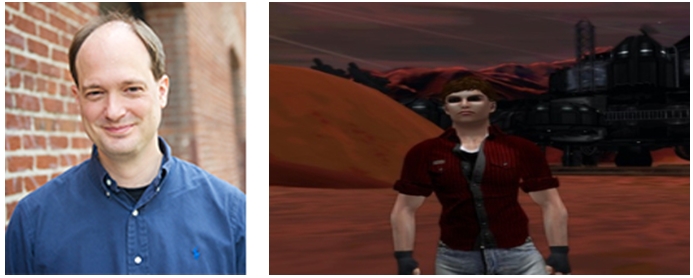
An Inside Look at How The Ops Team Collaborates is once again an interesting and informative piece, delving into not only the technical aspects of how the Lab respond to problems within their services, but which also encompasses the very human aspects of the dealing with issues – handling emotions when tensions are high, opening the window for those not directly involved in matter to keep an eye on what is happening so that they can also make better informed decisions on their own actions, and more.

Landon McDowell, the Lab's VP of Operations and Platform Engineering and his alter-ego, Landon Linden
Landon McDowell, the Lab’s VP of Operations and Platform Engineering and his alter-ego, Landon Linden

The core of the Lab’s approach to incident communications is the use of text chat (specifically IRC) rather than any reliance on crash team meetings, the telephone and so on. Those who deal with the Lab on a technical level won’t be surprised at the use of IRC – it is a fairly strong channel of communication for the Lab in a number of areas; but what makes this post particularly interesting is the manner in which the use of IRC is presented and used: as a central incident and problem management tool for active issues; as a means of ensuring people can quickly get up-to-speed with both what has happened in a situation, and what has been determined / done in trying to deal with it; as a means of providing post-mortem information;  and as a tool for helping train new hires.

These benefits start with what is seen as the sheer speed of communication chat allows, as Landon notes:

The speed of text communication is much faster. The average adult can read about twice as fast as they can listen. This effect is amplified with chat comms being multiplexed, meaning multiple speakers can talk intelligibly at the same time. With practice, a participant can even quickly understand multiple conversations interleaved in the same channel. The power of this cannot be overstated.

In a room or on a conference call, there can only be one speaker at a time. During an outage when tensions are high this kind of order can be difficult to maintain. People naturally want to blurt out what they are seeing. There are methods of dealing with this, such as leader-designating speakers or “conch shell” type protocols. In practice though, what often prevails is what one of my vendors calls the “Mountain View Protocol,” where the loudest speaker is the one who’s heard.

In text, responders are able to hop out of a conversation, focus on some investigation or action, hop back in, and quickly catch up due to the presence of scroll back. In verbal comms, responders check-out to do some work and lose track of the conversation resulting in a lot of repeating.

He also notes that not everyone is involved in a situation right from the start. Issues get escalated as they evolve, additional support may be called-in, or the net widened in the search for underlying causes, requiring additional teams to be involved, or the impact of an incident spreads. Chat and the idea of “reading scrollback” as the Lab calls it, allows people to come on-stream for a given situation and fully au fait with what has occurred and what is happening in a manner not always possible through voice communications and briefings, and without breaking the ongoing flow of communications and thinking on the issue.

The multiplexing capabilities of chat also mean that individuals can disengage from the main conversation, have private exchanges which, while pertinent to the issue, might otherwise derail the core conversation or even be silenced in something like a teleconference – and those engaged in such exchanges can still keep abreast of the central conversations.

For an environment like the Lab, where operations and personnel are distributed (data centres and offices located in different states / on different coasts, not everyone working from an office environment, etc.), chat has proven a powerful tool, although one that may take time getting to grips with, as Landon notes about his first exposure, saying:

I … just sat there staring at the screen wondering what the hell had just happened, wondering what the hell I had gotten myself into. I thought I was a seasoned pro, but I had never ever seen an incident response go that smoothly or quickly. Panic started to set in. I was out of my league.

However, the benefits in using it far outweigh any need for a degree of gear shifting required by ops staff in learning to use the approach. As Landon states in closing his comments, “when it works it is a wondrous thing to behold, a ballet in a war zone, beautiful, terrifying, and glorious.”

This is another great insight into what happens inside the Lab, and as such, the post makes very worthwhile reading, whether or not you have a background in Ops support.

SL project updates: week 39/1: server, viewer, iCloud and other issues

Matoluta Sanctuary and Bay; Inara Pey, September 2014, on FlickrSunrise, Matoluta Sanctuary and Bay (Flickr) – blog post

The following notes were taken from the Open Source Dev meeting on Monday 22nd September 22nd, and the Simulator User Group meeting on Tuesday 23rd September.

Server Deployments Week 39

As always, please refer to the forum discussion thread for the latest updates and information.

  • There will be no scheduled deployment to the Main (SLS) channel this week.
  • On Wednesday 24th September, all three RC channel should receive a further update to the Experience Tool maintenance release deployed in week 38, which includes a fix for an issue with llGetExperienceDetails().

SL Viewer

The most recent Maintenance release viewer, version 3.7.16.294015, was promoted to the de facto release viewer on Monday 22nd September. This viewer includes fixes for inventory and outfit management; appearance editing; group & group ban management; camera controls; multi-grid support for favourites; notifications management; stability, bug and crash fixes – see the release notes for further information.

On Friday September 19th, the New Log-in Screen RC viewer reached release candidate status when 3.7.16.294345 arrvied in the release channel. This viewer brings a simple and clean login screen for new users, and a corresponding update for returning users. (download and release notes, my overview).

GPU Table Retirement

An ongoing project at the Lab is to remove the need for the GPU table within the viewer. This is currently used to set the default graphics level for a user’s graphics card, and requires constant checking and update as new GPUs and cards are produced. Recent work has seen the GPU table massively updated, with the Lab working towards an alternative strategy of determining the capabilities of a graphics system.  This is primarily done by  measuring the memory bandwidth of a card and setting the default based on that (plus a couple of other parameters.

A viewer utilising this approach is currently with LL’s QA team and should be making an appearance soon. This strategy has already shown sufficient promise that new GPUs are no longer being added to the GPU table in preparation for it to be phased out.

Other Items

iCloud Conflict

A recent update to Apple’s iCloud service aimed at users of windows system using the service has had an unexpected impact on various aspects of the SL including killing mesh uploads, snapshots (saving to inventory fails with “Error encoding snapshot”) and textures (upload fail with “Couldn’t convert the image to jpeg2000”), and UI elements can turn completely black.

Full details of the issue can be found on BUG-7343,  and the problems have been particularly noted in both the official viewer and Firestorm, and Catznip. investigations are underway by both the Lab and the Firestorm team, and one line of thinking is that it might be some DLL injection poisoning issue.

The iCloud update, which was apparently deployed over the weekend of the 20th /21st September has, at the time of writing, yet to be deployed for Mac systems. There is some speculation that it may not result in similar issues for Mac users due to the way iCloud is implemented for each OS. One potential work-around is to roll-back to an earlier version of the service’s client, making sure that any auto-update option is disabled.

Group Tags

We’re probably all aware how changing group tags can often be a cure-all for a number of problems, even when logically it should be the case. One possible explanation as to why this is the case is that changing your group tag may trigger a full update of your avatar.

However, possibly as a result of interest list changes, there is now one situation where changing your group tag is not a good idea – and that is when a scene is still loading, as doing so can cause the scene load to fail, and the only means of resuming it is to relog – see BUG-6299. So, if you arrive in a location that sends you a request to join a group you’d like to join, wait a couple of minutes in order to give the scene the chance to fully load before you do so.

This issue is known to the Lab, but a fix has yet to be determined.

llSetlinkAlpha Update Issue

This is an issue that is getting a little long in the tooth – see BUG-1786 – which sees llSetLinkAlpha failing to correctly update a percentage of prims when a large(ish) number are updated simultaneously. Weapons users are liable to be familiar with this, as it can occur in “holstering”  or “slinging” a weapon which should cause the “held” version of the weapon to turn transparent and the “slung” / “holstered” version rendered, but often results in elements of the “held” version of the weapon remaining visible.

This issue appears to be related to UDP packets being lost between the server and the viewer, with Simon Linden commenting, “I remember digging into this and it seemed like lost packets.  It’s really hard to predict when they’ll get lost, but it seems it’s not slowing down updates quite right when there’s a sudden flood.” He promised to pass the issue with LL’s product team, but wasn’t optimistic it might move higher up the “fix” chain due to the current volume of work.

SL projects update 23/2: object detachment and inventory issues

I opted to put the following under a separate projects update piece, rather than “Other Items” (as I usually do), as they are quite extensive and worth noting. All of these items were discussed at the Simulator User Group meeting on Tuesday June 3rd.

Scripted Object Detachment Issue

This problem has been around for a while (see JIRA SVC-7626 for a description, although there have been more recently JIRA filed), and Simon Linden has been digging into it.

It relates to the scripted detachment of objects using a REGION_CHANGED event following a region crossing. When entering the new region, the order of the messages received by the viewer gets mixed-up such that it may get the order to “kill” (stop rendering) the object ahead of the message telling it to detach the object.

Should this happen, the viewer actually doesn’t know which object it should remove, and the result is that the object remains in visible to the wearer, but it cannot be detached or edited (because the server considers it removed). However, to other people in the region, the object will not appear to be attached, as they received the correct updates. So, if you have multiple attachments doing this, everyone may see different things.

One way to correct the problem is to re-log. This can cause the object to render properly and be detached.  Simon Linden also offered a possible solution:

If you click on it, it will likely go away. What happens then is the viewer sends up a “select” or some similar message with that local ID. The server can’t find the local ID, so it echos back a “kill” to the viewer … under the assumption that the viewer is confused and has this odd local ID.  That’s why similar problems of ghost objects [seen in-world rather than attached to an avatar] can often be fixed by clicking on them …

I’m not sure why but the click / selection thing seems to work more if you go back to the original region [where the object was still attached].

Why the order of the messages received by the viewer gets mixed-up is unclear, and there may be a number of possible causes, as Simon also explained:

Having controls [e.g. PERMISSION_TAKE_CONTROLS] may affect how scripts get run, and thus the REGION_CHANGED event gets processed faster [leading to the mix-up in the order of the messages]. I have to drop my bandwidth down to the lowest setting to make it happen … that’s another factor.

It’s an interesting bug because it combines region crossings with scripts, object deletions and the interest list updates … all pretty complicated parts of the server.

It’s not clear what is going to be done to rectify the issue, given it is a timing issue touching on several areas of interaction. In the meantime, if you encounter the issue, you may want to raise an additional JIRA, citing location, behaviour, etc., and also try one of the workarounds mentioned above.

Problems with Inventory’s Received Items Panel

received-itemsReceived Items is a system folder introduced with Direct Delivery and intended to be used for the initial receipt of SL Marketplace purchases before moving them into “normal” inventory. Because it is intended to be a “temporary” store, Received Items isn’t included in any inventory searches, so any items stored in folders created there won’t ever be listed when using search.

Within the official SL viewer, Received Items appears as a separate section at the bottom of the Inventory Folder (shown on the right). When displayed like this, it is not possible to move Received Items. However, when receiving goods from the Marketplace, Received Items does appear as a folder in the Recent tab of Inventory – and it is here that problems can occur, for example:

  • It is possible to drag the Received Items folder shown in the Recent tab into another folder, causing Received Items to vanish from the bottom of the Inventory floater following a re-log
  • It is possible to right-click on the Received Items folder in the Recent tab and delete it.

Neither of these issues are unrecoverable, however, and neither leads to a permanent loss of inventory.

Recovering After Accidentally Deleting the Received Items Folder

  • If you accidentally delete the Received Items folder in the Recent tab, you can recover it the same way as anything else – open Trash and drag it back under the My Inventory folder
  • If you purge your Trash after accidentally deleting the Received Items folder from the Recent tab, simply go to the Marketplace and make a purchase – Received Items will be re-created on receipt, although anything stored within it prior to the deletion will be lost.
When
SL viewer: following the receipt of a purchase, it is possible to accidentally move the Received Items folder in the Recent tab to another folder (l). Should this happen, then following a relog, it would appear as if the Recent Items section at the bottom of the Inventory floater has vanished (c). Also, when displaying Received Items as a folder under the Recent tab, it is possible to right-click it and accidentally delete it (r).

Continue reading “SL projects update 23/2: object detachment and inventory issues”

Why things went wrong recently with Second Life, by Landon Linden

secondlifeWe’re all aware of the recent unpleasantness which hit Second Life over the past few weeks and which culminated in the chaos of Tuesday, May 20th, when the disruption not only caused issues with log-ins, but also caused both a curtailment in server-side deployments on Tuesday and a rescheduling of both deployments for the rest of the week and the postponing of a period of planned maintenance.

As noted in my week 20/2 SL projects update, Simon and Maestro Linden gave an explanation of Tuesday’s issues at the Serve Beta meeting on Thursday May 22nd. However, in a Tools and Technology blog post, Landon Linden has given a comprehensive explanation of the broader issues that have hit second Life in recent weeks.

Landon begins the post:

When I came to Linden Lab over five years ago, Second Life had gone through a period of the coveted hockey-stick growth, and we had just not kept up with the technical demands such growth creates. One or more major outages a week were common.

In my first few months at the Lab, we removed more than a hundred major single points of failure in our service, but several major ones still loomed large, the granddaddy of them all being the core MySQL database server. By late Winter 2009 we were suffering from a core database outage a few times each week.

It is that core MySQL database server that has been partially to blame for the recent problems, having hit two different fatal hardware faults which forced the Lab to stop most SL services on both occasions. As the blog post explains, work is in-hand to remove some of the risk in this database becoming a single point of failure by moving it to new hardware. This will be followed over the coming weeks and months to try to further reduce the impact of database failures.

But the MySQL issue wasn’t the only cause of problems, as Landon further explains:

A few weeks ago there was a massive distributed denial of service attack on one of our upstream service providers that affected most of their customers, including us, and inhibited the ability of some to use our services. We have since mitigated future potential impact from such an attack by adding an additional provider. There have also been hardware failures in the Marketplace search infrastructure that have impacted that site, a problem that we are continuing to work through.

Landon Linden: why things went squiffy with SL
Landon Linden: explaining why SL  has suffered servere issues of late

He also provides further information on the issue which impacted users and services on Tuesday May 20th, expanding on that given by Simon and Maestro at the Server Beta meeting.

At that meeting, Simon briefly outlined Tuesday’s issues as being a case of the log-in server failing to give the viewer the correct token for it to connect to a region, so people actually got through the log-in phase when starting their viewer, but never connected to a region.

Landon expands on this, describing how the mechanism for handing-off of sessions from login to users’ initial regions is a decade old and relies on the generation of a unique identifier (the “token” Simon referred to). Simply put: the mechanism ran out of numbers – but did so quietly and without flagging the fact that it had. As a result, the server team took four hours to track down the problem and come up with a fix.

Referring to this particular issue, Landon goes on:

Having such a hidden fault in a core service  is unacceptable, so we are doing a thorough review of the login process to determine if there are any more problems like this lurking. Our intent at this point also is to remove the identifier assignment service altogether. It not only was the ultimate source of this outage, but is also one more single point of failure that should have been dispatched long ago.

Such open honesty and transparency about technical matters is something that hasn’t really been seen from the Lab since the departure of Frank (FJ Linden) Ambrose, the Lab’s former Senior VP of Global Technology, who departed the company at the end of 2011. As such, it is an excellent demonstration of Ebbe Altberg’s promise to re-open the lines of communication between company and users, and one which is most welcome.

Kudos to Landon for his sincere apology for the disruption in services and  for such a comprehensive explanation of the problems. Having such information will hopefully aid our understanding of the challenges the Lab faces in dealing with a complex set of services which is over a decade old, but which we expect to be ready and waiting for us 24/7. Kudos, again as well to Ebbe Altberg for re-opening the hailing frequencies. Long may it continue.

Related Links

SL projects updates 19/2: group bans, miscellaneous items

Server Deployments Week 19 – Recap

There were no server deployments!

Group Chat

As noted in part one of this report, the group chat updates were deployed to the back-end chat servers on Monday May 5th. The changes to group chat should be subtle, and may not be observable to many. Additional analytics are included in the code, which should provide further pointers on what else may need addressing going forward.

Group Ban Lists

Obligatory Baker Linden shot :)
Obligatory Baker Linden shot 🙂

Baker Linden’s work on adding the ability to ban troublemakers / spammers, etc., from groups with open enrollment is now getting relatively close to becoming available.

Baker has recently closed what is believed to be the last of the server-side issues, BUG-5929. This meant that if the name of the group owner was accidentally added to a list of people to be banned from a group, the ban process would fail, with no-one in the list either being added to the ban list or banned from the group (although other than the group owner, anyone selected for banning would be ejected from the group).

The expected behaviour would be for all those named (other than the group owner) to be added to the ban list, with those who were already members of the group also being ejected and banned. Baker’s fix is to ensure this is now the case, and it should be available shortly on Aditi for testing (channel DRTSIM-234 14.05.05.289712 – which includes the Morris region where the Server Beta meeting is held).

Viewer-wise, a project viewer with the new code is expected to appear very shortly (it was running through the build process during the Server Beta meeting on Thursday May 8th). This should be added to the Alternative Viewers wiki page when available. The repository for the code has now been made public, so TPVs can start looking at it – but again, given the status of the viewer as a project release, don’t expect the code to immediately start popping-up in TPVs.

HOWEVER, it may be a while before the new group ban functionality can be used on the main grid, as there is an initial back-end host code update required prior to anything being deployed to any simulator channel. According to Maestro Linden, the Lab will likely want to run those updates for a week to check for any unexpected regressions prior to putting any simulators on a group ban RC.

In the meantime, the group ban capabilities can be tested on Aditi either using the project viewer (when available) or the existing test viewer.

Other Items

“Welcome to the Hotel California” – BUG-5961

Trying to leave a group with a large membership list can prove problematic if the memebrship list takes time to load
Trying to leave a group with a large membership list can prove problematic if the membership list takes time to load

An old issue recently came to light once more with BUG-5961 (originally entitled “I cannot leave a group that I joined”, but with the description subsequently updated by Maestro to “Viewer attempts full fetch of member list before allowing user to leave group” in order to better reflect his findings following investigation).

It’s not actually clear if this is a one-off situation, or possibly more widespread, as the bug report is specific to the group “Akeyo”.

However, Maestro’s thinking is that the problem is linked to the download of the membership list, which even with the Group Services fixes introduced in late 2012, can still take time to complete with some larger groups.

Essentially, you cannot leave a group until the membership list has been loaded, as the viewer must check to ensure that when leaving, you’re not the last owner of the group. Should the membership list take time to download, this can lead to a temptation to click the Leave button again, causing the download to start-over, resulting in the list not loading, thus preventing you  from leaving it (hence the Hotel California quip, which I admit I stole from Maestro!).

The Lab is looking into this issue further, although it may be a while before any resolution is found. One workaround in the meantime is to run a client such as Radegast, which handles groups slightly differently to the viewer, and use that to leave the offending group.

Restore to Last Position

Restore to Last position was a popular feature which allowed anyone to take content to inventory and then re-rez it later at the same position. While there were issues with the capability (such as using it to rez an object in a different region, with a different topology to the one where it was originally taken back to inventory resutling in an object to “vanish”, as it rezzed underground or something), it was broadly seen as beneficial.

However, it was also subject to exploitation, which is why the server-side behaviour for it was changed by the Lab some time ago such that the function will only work if you have rezzing rights at 0,0,0 in a region. If you do not, any attempt to use Restore to Last Position will fail with a notification that you don’t have the required rezzing permissions. The viewer-side code for the capability was also removed from the SL viewer, although TPVs have retained it.

A further issue with the capability has been with No Copy objects. If Restore to Last Position is used on these when the user doesn’t have rezzing rights at 0.0.0 in a region, they not only fail to rez – they also vanish from inventory, requiring a relog in order to get them listed again.

However, BUG-5955 “Restore to Last Position (used only by TPVs) causes content loss” highlights a problem where at least one type of No Copy object can be permanently lost from inventory if Restore to Last Position is used even in a region where the user has rezzing permissions at 0,0,0. Not even a subsequent re-log sees the item reappear in inventory.

Given the unpredictable nature of Restore to Last Position, the Lab is considering removing or blocking all support for it viewer-side until such time as a fix for issues can be found / it can be made to work more predictably in all cases.

As an alternative, and given the function’s popularity, it has been suggested a restriction preventing its use on No Copy objects should be implemented. The Lab may be taking this under consideration. This is the option Firestorm have indicated that they intend to implement with their upcoming release (which may as a result be delayed until the code is implemented and tested).

SL projects news week 8/1: server, viewer and log-in issue PSA

My apologies for the late release of this update; things have been a little bit hectic, and I’ve been rushing to catch-up on posts and news.

Server Deployments: week 8 – recap

As always, please refer to the server deployment thread in the forums for the latest updates / changes.

  • As there was no update to the RC channels in week 7, there was no update to the Main channel on Tuesday February 18th.
  • On Wednesday February 19th, all three RCs received a new server maintenance package which comprised the following updates:
    • Fix for BUG-5034 “If an EM restarts a region and then teleports out immediately, the EM will disconnect just after teleport”
    • Fixed a rare case in which e-mails read by LSL scripts immediately after rez or region change would sometimes be missing the message body
    • Fixed some crash modes
Maestro Linden
Maestro Linden

The region restart issue (BUG-5034) was described in part 2 of my week 7 report.

Commenting on the e-mail issue during the Server Beta Meeting on Thursday February 20th, Maestro Linden said:

The other bug fix was for some obscure e-mail issue that Kelly found, where e-mails to LSL scripts would be missing their message bodies under very obscure circumstances. Nobody’s filed a bug report about that happening, so maybe nobody ever saw it regularly.

 In this case you’d see the e-mail, and see the subject but not the body. Or rather, I guess the body would be an empty string … I guess you’d only know if you had sent the e-mail yourself.

 According to Kelly, it would only happen during a very narrow time window as the sim was starting up, so I could imagine most people who saw it once just shrugging after the issue didn’t occur a second time.

SL Viewer Updates

  • The Maintenance release RC was updated on Tuesday February 18th to version 3.7.2.286708
  • The HTTP RC was updated on Wednesday, February 19th to version 3.7.2.286707
  • The Google Breakpad RC has been removed from the release channel, having completed this round of tests.

Group Ban Lists

There’s not much more to report here than last week. Commenting on the overall status of the work at the Simulator User Group meeting on Tuesday February 18th, Baker Linden said:

I’m in the last stages of code cleanup and ensuring there aren’t any major bugs (which QA will surely find) and I’m wrapping everything up for deployment to Aditi this week (server-side stuff only right now).

 It’s not clear if the server code did reach Aditi, or whether it may appear in week 9. Commenting on the status at the Server Beta meeting later in the week, Maestro Linden indicated the code was “inching closer to Aditi”, and will be available “as soon as we’re confident that the backend host and simulators are playing nicely. If there’s a bug which is definitely viewer-only, that’s not a blocker for Aditi at all.”

Materials Handling

Scripted Control

The ability to control materials (normal and specular maps) via scripts has been an oft-discussed topic in User Group meetings and the subject of MATBUG-359.  The subject was again raised at the Simulator User Group Meeting on Tuesday February 18th, to which Simon replied, “I’ve been looking into that, and hope to get to it soon, but it keeps getting pushed back with other more immediate issues cropping up.”

One of the concerns with scripted control of materials maps in that if manual changes are made to materials too quickly in the build floater, they will often revert, as if the server is unhappy in receiving  too many quick updates. Commenting on this, Simon added:

That’s an interesting point and something we’ll have to look at after doing the basic scripting change.   If it’s somehow worse than the current scripted texture changes, we’ll have to have some sort of throttle to slow it down.

The question was raised on why normal and specular maps appear to work different to diffuse (texture maps), with the server better able to handle fast changes to textures when compared to normal and specular maps. Simon indicated that both normal and specular maps are handled differently in order to minimise the impact of multiple usage.  Expanding on this is terms of scripted control, he went on:

I was just looking at the materials code, and the complication this has compared to regular textures is how materials have their own layer of special data packaging instead of a just a UUID on a face.  I’m not sure yet how script access is going to thrash that data or not.

There also may be something of a cost / benefit issue within the Lab when it comes to adding scripted control to materials – would the potential uses be broad enough to justify the time required to avoid issues of data thrashing, introducing throttles on updates, etc. Hence Simon asked for some specific examples of where scripted control of materials would be beneficial, so he could carry them back to the Lab’s product managers.

Continue reading “SL projects news week 8/1: server, viewer and log-in issue PSA”