New Grid Status service now operating for Second Life

On Monday, November 28th, Linden Lab launched their new Grid Status update service.

Now delivered by a new service provider, it is designed to provide more detailed information on the overall status of the grid and Second Lifer services, whilst making it easier for the Lab to update the information presented through the pages.

While the new Grid Status pages are hosted by a different provider, existing grid status page and RSS links should redirect automatically.

Steven Linden first announced these changes would be coming during the TPV Developer meeting held on Friday, November 19th. The new page is more informative, with the most recent update  / information displayed at the top, with drop-down sections displayed beneath it, with historical information displayed below these.

The drop-down sections can be used to display expanded information on the three main grid simulator channels; information on the various SL web-based services (secondlife.com, marketplace, wiki, community pages, JIRA, etc.); updates on major in-world services, (group chat, L$ transactions, rezzing, Voice services, teleporting, inventory, etc) as well as further information on various external services such as the log-in service and the chat / phone  / Case support services.

As well as more information being available on the page, there is also an expanded set of subscriptions options to the service. These can be accessed via the orange button in the top right corner of the page, and they include the option to have Grid Status updates SMS’d directly to a mobile ‘phone. In addition, a separate option can be used to subscribe directly to a specific incident in progress via e-mail and / or SMS.
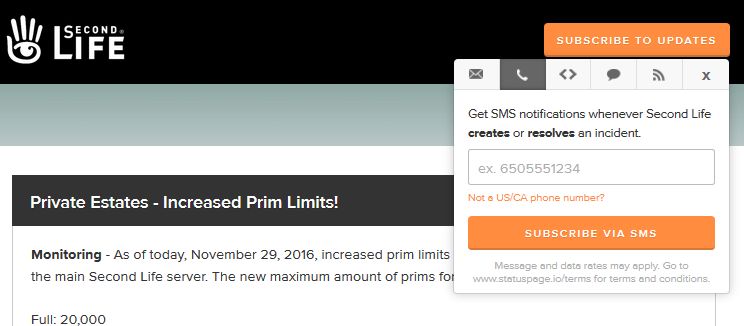
The grid status subscription options, which comprise e-mail, SMS messaging, webhooks and RSS, together with a link to the SL support portal

The new service also means the Lab’s Operations team can now update incident reports directly via a bot system, rather than relying on a manual update process involving different teams, as was the case in the past. This should help ensure the status information reflect updates and situations in a more timely manner.

With a faster means for staff to update information, more means by which users can access updates outside of visiting the Grid Status page itself (so often a bottleneck in the past), this new service should hopefully prove to be a lot more flexible, informative and accessible to SL users.

Note: at the time of writing, the Grid Status section on users’ secondlife.com dashboards was reporting “RSS Feed has no items”, suggest the RSS feed to the dashboard may have just to be updated. This has been reported to the Lab.

llTakeControl and Horizons Experience – update

Horizons Experience may have robots on the loose, but stopping them is proving a bit harder for some than was intended
A fix for the Horizons gun issue some users may have been experiencing while using TPVs with the Horizons Experience (Quest 3) should be on its way.

Update, November 28th: Dee Linden pinged me in-world to let me know the forest quest guns have now been updated with the revised script, and should work with all viewers.

Horizons Gun

On November 19th, I wrote about how recent changes in behaviour to llTakeControl meant that some users on TPVs such as Firestorm and Alchemy have found the guns used in the third of the Horizons Experience quests (Quest 3, the forest shoot-out with robots) may not work with their viewer.

At the time, the problem appeared to be due to behaviour changes made to llTakeControl as a result of SVC-7532. As these changes with this fix could “break” existing weapons in Second Life, it was not adopted by some TPVs, and so the Horizons Gun would not work with them.

However, following my article, Sue W left a comment indicating that Firestorm 4.7.9 allowed the gun to work (but not Firestorm 4.7.7 or 4.7.10). This, together with the problem as a whole, prompted further investigation on the issue by members of the Firestorm team, several of the LDPW Moles and staff from the Lab, using the Horizons staging regions.

These investigations revealed that the Horizons gun works with Firestorm 4.7.9 due to a partial fix for llTakeControl issues (quite separate to SVC-7532)  which had been implemented with that release. However, as the fix had problems of its own, it was backed out for Firestorm 4.7.10 – hence why the horizons gun would not work with either 4.7.7 or 4.7.10 (except under very specific circumstances, as detailed in my previous article).

Further and extensive tests set-up by Quartz Mole, using both the Horizons Experience gun and the gun scripts used with Winter Wonderland (soon to officially reopen) revealed changes made to llTakeControl as a result of BUG-8265 were in fact responsible for the issues being experienced by some TPV users when trying to operate the Horizons gun. As a result, Quartz has re-worked the Horizons gun script, and testing shows it should now work with all viewers, and it will be deployed to the public gaming regions in the very near future.

Once the updated script is on the public horizons Experience Qeust 3, the guns should work with all viewers

SVC-7532

This still leaves the issue of SVC-7532, which can still break the behaviour of older gun systems. To avoid this, Firestorm have indicated that with their upcoming release, they will introduce a toggle option, as Alchemy is doing. This will take the form of an option in Preferences which will allow users to switch between “old” and “new” llTakeControl behaviours in accordance with the weapons they are using.

With thanks to Whirly Fizzle for the update information, and Quartz Mole for extensively banging on things or the Horizons gun fix.


llTakeControl issue and the Horizons Experience

Horizons Experience may have robots on the loose, but stopping them is proving a bit harder for some than was intended

Update, November 24th: This issue now has a fix, please refer to my update article.

Note: this issue was discussed at the TPV Developer meeting on Friday, November 18th, together with wider issues around llTakeControl. You can follow he full conversation via the meeting video, between the 10:16 and 36:22 marks. In this report, I have attempted to focus solely on the Horizons Experience issue.

The TL;DR short form of what follows is that if you playing the Horizons Experience using a TPV, you may find the gun required for Quest 3 in the game  – the forest shoot-out with robots – doesn’t work (Firestorm and Alchemy have the issue, for example). If so, you’ll need to switch to the official viewer to complete that Quest. When you have done so, you can then switch back to using your preferred viewer.

For those interested in the background, as in as small a nutshell as possible: the function llTakeControls has a long history of not behaving well. One of the issues was that it prevented interaction (left-click touch) with objects when in Mouselook, prompting SVC-7532 to be raised.

A fix for this problem was implemented in February 2016. However, while it fixed the left-click touch issue, it broke many weapons systems (see BUG-37693) as well as causing other problems (see BUG-11602). As TPVs tend to be a used a lot by people involved in SL combat environments, some – such as Firestorm and Alchemy – didn’t implement SVC-7532.

The Horizons Experience gun used in Quest 3, however, is designed to work with the SVC-7532 behaviour change, and so may not work for everyone using a viewer which does not have SVC-7532 implemented. Note the “may not” there. If you happen to be on a TPV viewer without SVC-7532, but are wearing an attachment already using llTakeControls when you enter the Horizons Experience, then the gun might work for you (this has been my own experience).

The problem now is what to do. Rolling back the behaviour change implemented in SVC-7532 is not seen as ideal, as it breaks expected functionality elsewhere. Similarly, any “blanket” implementation of SVC-7532 is going to completely break a lot of weapons systems, which the Lab would rather avoid. There’s also the fact that this is one issue among a number caused by llTakeControl (see BUG-8265 for other issues with it), so the Lab is going to have to spend time in further investigations to determine how they’ll handle things going forward.

At the moment, two possible short-term solutions for the “Horizons gun problem” were suggested at the TPV Developer meeting on Friday November 18th (video):

  • Re-scripting the Horizons gun / shooting system
  • Implementing some kind of toggle via the Advanced or Develop(er) menu so that users can switch between the two llTakeControl behaviours depending on the weapon system they are using.

At present, the Lab might be leaning towards the second option. However, and as noted, no decision has been made as yet.

In the meantime, if you encounter the “Horizons gun problem” when using a TPV, you’ll need to switch to the official viewer to complete Quest 3.

With thanks to Whirly Fizzle.

2016 SL project updates 45/1: server, viewer, attachment issues

Dystopia // [flit ink] + aberrant; Inara Pey, November 2016, on Flickr Dystopia // [flit ink] + aberrantblog post

Server Deployments

As always, see the server deployment thread for the latest updates and information.

  • There was no Main (SLS) channel roll on Tuesday, November 8th.
  • On Wednesday, November 9th, the three RC channels should all receive the same new server maintenance package, which includes:
    •  llGetEnv() will support “region_max_prims” (feature request BUG-40825).
    • llGetObjectDetails() will have a new OBJECT_GROUP_TAG function  (feature request BUG-20064) – when pointed at avatars it returns the group tag you see floating above them; and also OBJECT_TEMP_ATTACHED – to tell you if something is a temp attachment (feature request BUG-5195).

SL Viewer

There have been no changes to the current batch of viewers in the various pipelines since the end of week #44, leaving things as follows:

  • Current Release version: 4.1.1.320331 (dated October 4th), promoted October 10th – formerly the VLC media plug-in for Windows RC
  • Release channel cohorts:
    • Project Bento  RC (avatar skeleton extensions), version 5.0.0.321250, dated November 2nd – bug fixes
    • Maintenance RC viewer version 4.1.2.321183, dated October 28th – over 70 crash fixes, improvements and other fixes
  • Project viewers:
    • 360-degree snapshot viewer, version 4.1.2.320965, dated October 26th – ability to take 360-degree panoramic images – hands-on review
  • Obsolete platform viewer version 3.7.28.300847 dated May 8, 2015 – provided for users on Windows XP and OS X versions below 10.7.

Avatar Attachments Being Unexpectedly Detached

This has been an issue for a while, but has recently seen an uptick in occurrences. IN essence, and for some reason, when undertaking at TP or physical region crossing (both amount to the same thing), a “kill object” (attachment) message can be sent by the simulator.

Essentially, there is an issue in messaging between the simulator and the viewer during region crossings (physical or teleports), which can result in attachments being detached or, harder to detect, attachments being removed server-side, but remaining visible (but effectively ghosted) in your view, and which cannot be individually removed, as the simulator doesn’t recognise them as being there.

Whirly Fizzle has posted on possible fixes for the issue, including details of an experimental fix from the Firestorm team which might be included in the next release, pending Linden Lab addressing the root cause of the problems

One of the most common occurrences for the problem is having multiple items on a single attachment point (rigged meshes can often all default to the right hand, for example). So, should this problem occur, and once you’ve corrected matters (such as be a forced rebake (CTRL-SHIFT-R) or a complete change of outfit, for example), check the items affected by the problem, and if they do share an attachment point with one another or other attachments your avatar is wearing, trying relocating them to unoccupied points (this should be particularly easy to do with rigged mesh, which can be attached pretty much anywhere and render at the correct point on your body.

AMD & Nvidia drivers resolve Win 10 OpenGL issues in Second Life, et al

win10-logoIn September I blogged about the OpenGL issue affecting many Windows 10 users, including some using Second Life. An intermittent problem, not encountered by every Windows 10 user, the issue results in exceptionally low FPS rates (on the order of 1 or 2 fps) when experienced.

The root cause appears to be the Cumulative Update for Windows 10 (KB3176938) released at the end of August 2016, intended to fix a lot of issues encountered with the Windows 10 Anniversary update, However, since its release on August 31st, 2016, KB3176938 has given rise to renewed Windows 10 / OpenGL issues  which have been impacting a number of games – and also affecting Second Life.

However, it now appears as if the problem has been resolved. As indicated by reader Lee McKay, both Nvidia and AMD have released new drivers which should address the problems Windows 10 users have been experiencing as a result of this issue.

The two drivers are:

As I’m not a win 10 user, I cannot verify if these drivers (or at least the Nvidia driver, as I’m a GTX 970 user) do fix the problems, but Lee indicates they have been tested and verified as correcting the problems.

So, if you are a Windows 10 user with an AMD or Nvidia GPU, and you’ve been experiencing fps issues of late, you might want to try downloading the relevant driver and giving it a try.

With thanks to Lee McKay for the updates on this situation.

Windows 10 OpenGL issue affecting some Second Life users

win10-logoUpdated, October 7th: AMD and Nividia have released drivers which should hopefully address this issue. See the comment from Lee McKay (below), and my article here.

In August, Microsoft issued their Windows 10 Anniversary Update, which result in some problems for users around the world, notable with the operating system locking-up or freezing (see this Reddit thread as an example).

As a result of the issues, Microsoft issued a series of hotfixes and updates, culminating in a Cumulative Update KB3176938.

However, since its release on August 31st, 2016, KB3176938 has given rise to renewed Windows 10 / OpenGL issues  which are impacting a number of games – and also impacting Second Life.

Whirly Fizzle has raised a JIRA on the problems – BUG-37795 (based on a Firestorm filing by Vicky Aura (FIRE-20034). The issue is intermittent, but when encountered, results in exceptionally low FPS rates (on the order of 1 or 2 fps). The issue tended to occur when moving focus away from Second Life to another running application, and then switching back. Whirly reports that on some systems this problem is intermittent but on other systems it will reproduce after the viewer has lost focus for the first time in a session.

The issue has also been raised on the Microsoft forums by Firestorm developer Ansariel Hiller – but do note, the issues is not related just to the use of Firestorm, other SL viewers can be affected.

Currently, if you are a Windows 10 user and being hampered by this issue, the only known workaround is to uninstall KB3176938. Again, as Whirly points out in the JIRA, How To Geek provides instructions on how to do this – and please refer to the comment from Torric below, when doing so.

Again, please note this is not a Second Life problem, it is an issue within Windows 10 affecting assorted applications and games using OpenGL.

With thanks to Whirly Fizzle.